NordVPN Threat Protection Pro – blocking websites and apps on Windows 11 (looking for solution)


yastil

Active member
Member
Local time
6:07 AM
Posts
62
OS
Windows 11 Pro 25H2 build 26200.8894
Hello,

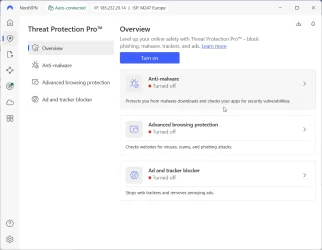
I’m having an issue with the **Threat Protection Pro** feature in **NordVPN** on **Windows 11 Pro (version 25H2)**. After enabling this feature, the system behaves abnormally and some apps or websites stop working.

🔹 **Behavior description:**
- Some websites **do not load** 🌐
- Some websites load **very slowly** 🐢
- Internet connection in certain apps **sometimes drops** ⚡
- Threat Protection Pro may **conflict with firewall or antivirus** 🔒
- The behavior is not consistent – some days it works better than others 🔄

🔹 **My setup:**
- Windows 11 Pro, version 25H2 ✅
- NordVPN 7.x with Threat Protection Pro enabled
- Bitdefender + Windows Defender (latest versions) 🛡️

🔹 **What I’ve tried:**
- System restart 🔄
- Turning Threat Protection Pro off and on ⚡
- Reinstalling NordVPN 💽
- Checking firewall and exception settings 🔒
- Testing different websites and apps to identify a pattern 🔍

🔹 **Additional info:**
- I’ve already contacted **NordVPN support**, but no solution so far ❌
- This is not limited to one website or app – it’s a broader issue 🌐
- My goal is to configure Threat Protection Pro so that it **works correctly** and **doesn’t slow down or block normal connections** ✅

🙏 **Looking for advice / tips:**
- How to properly configure Threat Protection Pro on Windows 11
- How to check for conflicts with antivirus/firewall
- How to ensure stable connections while Threat Protection is enabled

Thanks in advance to anyone who has experience or tips to solve this.
NordVPN_TH_PROT.webp
 
Windows Build/Version
25H2/26200, 7462

My Computer My Computer

At a glance

Windows 11 Pro 25H2 build 26200.8894AMD Ryzen 7 7700XRAM: 64 GB DDR5AMD Radeon RX 7800 XT (16 GB)
OS
Windows 11 Pro 25H2 build 26200.8894
Computer type
PC/Desktop
Manufacturer/Model
Custom build (Gigabyte)
CPU
AMD Ryzen 7 7700X
Motherboard
Gigabyte B650M GAMING X AX
Memory
RAM: 64 GB DDR5
Graphics Card(s)
AMD Radeon RX 7800 XT (16 GB)
Sound Card
Realtek (onboard)
Monitor(s) Displays
Samsung
Screen Resolution
1920 x 1080
Hard Drives
Samsung 990 PRO 1 TB (NVM-e),
Keyboard
Logitech MX Master
Mouse
Logitech
Internet Speed
13ms/250Mbps/25Mbps
Browser
Microsoft Edge
Antivirus
Bitdefender
Other Info
UEFI, Secure Boot ON, TPM 2.0 ON

@yastil said :​

" I’ve already contacted **NordVPN support**, but no solution so far..."
______________________________________________________________
This is a Windows 11 forum and if Nord can not help you as a paying customer, then what can one do?
I bet if you uninstall your superfluous VPN software, all will work fine.
 

My Computers My Computers

  • At a glance

    All Branches but ReleaseAMD Ryzen 7 7735HS 3200-4500 Mhz 8 cores x 232 GB DDR5Radeon Graphic / NVIDIA GeForce RTX 4060 8 GB...
    OS
    All Branches but Release
    Computer type
    Laptop
    Manufacturer/Model
    Acer Nitro ANV15-51
    CPU
    AMD Ryzen 7 7735HS 3200-4500 Mhz 8 cores x 2
    Motherboard
    Sportage_RBH
    Memory
    32 GB DDR5
    Graphics Card(s)
    Radeon Graphic / NVIDIA GeForce RTX 4060 8 GB GDDR6
    Sound Card
    AMD/Realtek(R) Audio
    Monitor(s) Displays
    Integrated Monitor (15.3"vis)
    Screen Resolution
    FHD 1920X1080 16:9 144Hz
    Hard Drives
    KINGSTON OM8SEP4512Q-AA 1TB
    Western Digital 256GB
    PSU
    19V DC 6.32 A 120 W
    Cooling
    Dual Fans
    Mouse
    MS Bluetooth
    Internet Speed
    Fiber 1GB Cox -us & 1GB Orange-fr
    Browser
    Edge Canary- Firefox Nightly-Chrome Dev-Chrome Dev
    Antivirus
    Windows Defender
  • At a glance

    Windows 11 BetaAMD A9-94208 GB of DDR4AMD Radeon R5
    Operating System
    Windows 11 Beta
    Computer type
    Laptop
    Manufacturer/Model
    Asus X751BP
    CPU
    AMD A9-9420
    Memory
    8 GB of DDR4
    Graphics card(s)
    AMD Radeon R5
    Screen Resolution
    1600x900
    Hard Drives
    Seagate 1 TB

@yastil said :​

" I’ve already contacted **NordVPN support**, but no solution so far..."
______________________________________________________________
This is a Windows 11 forum and if Nord can not help you as a paying customer, then what can one do?
I bet if you uninstall your superfluous VPN software, all will work fine.
Haha, I know, I probably look like a bit of a noob 😅
I understand this forum is mainly about Windows 11, not NordVPN.
But the issue with Threat Protection Pro affects **Windows directly** – some websites and apps stop working, and the system behaves unstably.

My goal isn’t to discuss NordVPN itself, but to figure out **how Windows settings interact with Threat Protection Pro** so that everything works reliably without blocking connections.

If anyone has experience with how Windows 11 and Threat Protection Pro work together, I’d really appreciate any tips 👍
 

My Computer My Computer

At a glance

Windows 11 Pro 25H2 build 26200.8894AMD Ryzen 7 7700XRAM: 64 GB DDR5AMD Radeon RX 7800 XT (16 GB)
OS
Windows 11 Pro 25H2 build 26200.8894
Computer type
PC/Desktop
Manufacturer/Model
Custom build (Gigabyte)
CPU
AMD Ryzen 7 7700X
Motherboard
Gigabyte B650M GAMING X AX
Memory
RAM: 64 GB DDR5
Graphics Card(s)
AMD Radeon RX 7800 XT (16 GB)
Sound Card
Realtek (onboard)
Monitor(s) Displays
Samsung
Screen Resolution
1920 x 1080
Hard Drives
Samsung 990 PRO 1 TB (NVM-e),
Keyboard
Logitech MX Master
Mouse
Logitech
Internet Speed
13ms/250Mbps/25Mbps
Browser
Microsoft Edge
Antivirus
Bitdefender
Other Info
UEFI, Secure Boot ON, TPM 2.0 ON
  • Helpful
Reactions: OAT
Haha, I know, I probably look like a bit of a noob 😅
I understand this forum is mainly about Windows 11, not NordVPN.
But the issue with Threat Protection Pro affects **Windows directly** – some websites and apps stop working, and the system behaves unstably.

My goal isn’t to discuss NordVPN itself, but to figure out **how Windows settings interact with Threat Protection Pro** so that everything works reliably without blocking connections.

If anyone has experience with how Windows 11 and Threat Protection Pro work together, I’d really appreciate any tips 👍
Thank you for filling out your specs in your profile BTW.
 

My Computers My Computers

  • At a glance

    All Branches but ReleaseAMD Ryzen 7 7735HS 3200-4500 Mhz 8 cores x 232 GB DDR5Radeon Graphic / NVIDIA GeForce RTX 4060 8 GB...
    OS
    All Branches but Release
    Computer type
    Laptop
    Manufacturer/Model
    Acer Nitro ANV15-51
    CPU
    AMD Ryzen 7 7735HS 3200-4500 Mhz 8 cores x 2
    Motherboard
    Sportage_RBH
    Memory
    32 GB DDR5
    Graphics Card(s)
    Radeon Graphic / NVIDIA GeForce RTX 4060 8 GB GDDR6
    Sound Card
    AMD/Realtek(R) Audio
    Monitor(s) Displays
    Integrated Monitor (15.3"vis)
    Screen Resolution
    FHD 1920X1080 16:9 144Hz
    Hard Drives
    KINGSTON OM8SEP4512Q-AA 1TB
    Western Digital 256GB
    PSU
    19V DC 6.32 A 120 W
    Cooling
    Dual Fans
    Mouse
    MS Bluetooth
    Internet Speed
    Fiber 1GB Cox -us & 1GB Orange-fr
    Browser
    Edge Canary- Firefox Nightly-Chrome Dev-Chrome Dev
    Antivirus
    Windows Defender
  • At a glance

    Windows 11 BetaAMD A9-94208 GB of DDR4AMD Radeon R5
    Operating System
    Windows 11 Beta
    Computer type
    Laptop
    Manufacturer/Model
    Asus X751BP
    CPU
    AMD A9-9420
    Memory
    8 GB of DDR4
    Graphics card(s)
    AMD Radeon R5
    Screen Resolution
    1600x900
    Hard Drives
    Seagate 1 TB
Haha, I know, I probably look like a bit of a noob 😅
I understand this forum is mainly about Windows 11, not NordVPN.
But the issue with Threat Protection Pro affects **Windows directly** – some websites and apps stop working, and the system behaves unstably.

My goal isn’t to discuss NordVPN itself, but to figure out **how Windows settings interact with Threat Protection Pro** so that everything works reliably without blocking connections.

If anyone has experience with how Windows 11 and Threat Protection Pro work together, I’d really appreciate any tips 👍
If you are using EDGE with a VPN that may be your issue. Try another Browser such as Firefox.
 

My Computers My Computers

  • At a glance

    Windows11 Pro 26200.8894Intel Core i9 14900F (24 -Core, 68 MB Total C...32GB DDR5RTX 4080 Super w/610.74
    OS
    Windows11 Pro 26200.8894
    Computer type
    PC/Desktop
    Manufacturer/Model
    Dell Alienware Aurora R16
    CPU
    Intel Core i9 14900F (24 -Core, 68 MB Total Cache)
    Motherboard
    Dell Alienware
    Memory
    32GB DDR5
    Graphics Card(s)
    RTX 4080 Super w/610.74
    Sound Card
    Realtec
    Monitor(s) Displays
    Corsair XENEON 32QHD165
    Screen Resolution
    2560 X 1440
    Hard Drives
    1-2TB Samsung 990 Pro PCIe NVMe M2 SSD
    1-4TB Samsung 990 Pro PCIe NVMe M2 SSD
    PSU
    1000 Watt Platinum Dell
    Case
    Alienware
    Cooling
    Liquid Closed Loop
    Keyboard
    Corsair Strafe RGB
    Mouse
    Logitech MK270 Wireless
    Internet Speed
    100Gb's Down-20 Up
    Browser
    Firefox 152.0.6
    Antivirus
    Defender
    Other Info
    Very Quiet And Fast
    CyberPower UPS CP1500PFCLCD
  • At a glance

    PClinuxOS Mate (2025.7)13th Gen Inter(R) Core(TM) i3-1315U64 GB DDR4 @3200 MHz.Internal
    Operating System
    PClinuxOS Mate (2025.7)
    Computer type
    PC/Desktop
    Manufacturer/Model
    Intel
    CPU
    13th Gen Inter(R) Core(TM) i3-1315U
    Motherboard
    Intel
    Memory
    64 GB DDR4 @3200 MHz.
    Graphics card(s)
    Internal
    Sound Card
    None
    Monitor(s) Displays
    Dell 2419HGCF
    Screen Resolution
    1920 X 1080
    Hard Drives
    SAMSUNG 980 PRO SSD 2TB, PCIe 4.0 M.2 2280
    PSU
    Chicony 30 Watt
    Case
    Small
    Keyboard
    Dell
    Mouse
    Razor
    Internet Speed
    1GB
    Browser
    Slimjet
NORD.webp


Nord does not have a great reputation, does it?
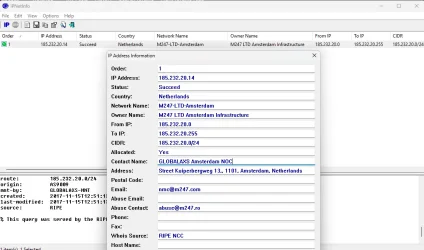
For future posts, do not paste screenshots that contain personal data such as an IP address.
This is a VPN host so it's not critical but still.
 

My Computers My Computers

  • At a glance

    All Branches but ReleaseAMD Ryzen 7 7735HS 3200-4500 Mhz 8 cores x 232 GB DDR5Radeon Graphic / NVIDIA GeForce RTX 4060 8 GB...
    OS
    All Branches but Release
    Computer type
    Laptop
    Manufacturer/Model
    Acer Nitro ANV15-51
    CPU
    AMD Ryzen 7 7735HS 3200-4500 Mhz 8 cores x 2
    Motherboard
    Sportage_RBH
    Memory
    32 GB DDR5
    Graphics Card(s)
    Radeon Graphic / NVIDIA GeForce RTX 4060 8 GB GDDR6
    Sound Card
    AMD/Realtek(R) Audio
    Monitor(s) Displays
    Integrated Monitor (15.3"vis)
    Screen Resolution
    FHD 1920X1080 16:9 144Hz
    Hard Drives
    KINGSTON OM8SEP4512Q-AA 1TB
    Western Digital 256GB
    PSU
    19V DC 6.32 A 120 W
    Cooling
    Dual Fans
    Mouse
    MS Bluetooth
    Internet Speed
    Fiber 1GB Cox -us & 1GB Orange-fr
    Browser
    Edge Canary- Firefox Nightly-Chrome Dev-Chrome Dev
    Antivirus
    Windows Defender
  • At a glance

    Windows 11 BetaAMD A9-94208 GB of DDR4AMD Radeon R5
    Operating System
    Windows 11 Beta
    Computer type
    Laptop
    Manufacturer/Model
    Asus X751BP
    CPU
    AMD A9-9420
    Memory
    8 GB of DDR4
    Graphics card(s)
    AMD Radeon R5
    Screen Resolution
    1600x900
    Hard Drives
    Seagate 1 TB
I use NordVPN (7.54.6.0) and activated Threat Protection a few days ago.
So far, no difference in browsing speed (Edge, Chromium and Firefox).
Only difference with the Yastil's specs is that I use the Win 11 builtin Defender.

For some sites not loading, try a different server. With the world conflicts going on, whole countries are blocked.
Maybe also disable BitDefender temporarily and recheck.
 

My Computer My Computer

At a glance

Windows 11 Pro for Workstations 25H2 26200.88946C+4c Intel 13th Gen Intel(R) Core(TM) i5-134...64 GBNVIDIA GeForce RTX 4060, Intel UHD Graphics 730
OS
Windows 11 Pro for Workstations 25H2 26200.8894
Computer type
PC/Desktop
Manufacturer/Model
ASRock
CPU
6C+4c Intel 13th Gen Intel(R) Core(TM) i5-13400, 4100 M
Motherboard
ASRock B660M-HDV
Memory
64 GB
Graphics Card(s)
NVIDIA GeForce RTX 4060, Intel UHD Graphics 730
Sound Card
Realtek
Monitor(s) Displays
AOC 24V2W1G5
Screen Resolution
1920x1080
Hard Drives
Samsung SSD 990 Pro with Heatsink
Keyboard
Logitech
Mouse
Logitech
Internet Speed
1GB
Antivirus
Windows Defender
I’m having an issue with the **Threat Protection Pro** feature in **NordVPN** on **Windows 11 Pro (version 25H2)**. After enabling this feature, the system behaves abnormally and some apps or websites stop working.

🔹 **Behavior description:**
- Some websites **do not load** 🌐
- Some websites load **very slowly** 🐢
- Internet connection in certain apps **sometimes drops** ⚡
- Threat Protection Pro may **conflict with firewall or antivirus** 🔒
- The behavior is not consistent – some days it works better than others 🔄

🔹 **My setup:**
- Windows 11 Pro, version 25H2 ✅
- NordVPN 7.x with Threat Protection Pro enabled
- Bitdefender + Windows Defender (latest versions) 🛡️

🔹 **What I’ve tried:**
- System restart 🔄
- Turning Threat Protection Pro off and on ⚡
- Reinstalling NordVPN 💽
- Checking firewall and exception settings 🔒
- Testing different websites and apps to identify a pattern 🔍

🔹 **Additional info:**
- I’ve already contacted **NordVPN support**, but no solution so far ❌
- This is not limited to one website or app – it’s a broader issue 🌐
- My goal is to configure Threat Protection Pro so that it **works correctly** and **doesn’t slow down or block normal connections** ✅

🙏 **Looking for advice / tips:**
- How to properly configure Threat Protection Pro on Windows 11
- How to check for conflicts with antivirus/firewall
- How to ensure stable connections while Threat Protection is enabled

Thanks in advance to anyone who has experience or tips to solve this.
I would disable or uninstall Bit Defender and use Windows Defender.
Enable Threat Protection Pro in Nord and run some tests.
If the browsing issues go away then you need to try and workout why Bitdefender and Nord do not play well together.
 

My Computer My Computer

At a glance

Windows 11AMD Ryzen 8700G64 GBOnboard
OS
Windows 11
Computer type
PC/Desktop
Manufacturer/Model
Generic
CPU
AMD Ryzen 8700G
Motherboard
Gigabyte B650 UD AC
Memory
64 GB
Graphics Card(s)
Onboard
Sound Card
Onboard
Monitor(s) Displays
Del U2723QE
Screen Resolution
3840 x 2160
Hard Drives
Corsiar MP600 1TB
PSU
Silverstone 750 GOLD
Case
Silverstone FARA 513
You must make a choice: Bitdefender or Windows Defender or NordVPN to protect you. Only one antivirus application with the good configuration to avoid interaction between them. Better to keep only BitDefender to do this protection.
 

My Computer My Computer

At a glance

Windows 11
OS
Windows 11
You must make a choice: Bitdefender or Windows Defender or NordVPN to protect you. Only one antivirus application with the good configuration to avoid interaction between them. Better to keep only BitDefender to do this protection.
Thank You Very Much
 

My Computer My Computer

At a glance

Windows 11 Pro 25H2 build 26200.8894AMD Ryzen 7 7700XRAM: 64 GB DDR5AMD Radeon RX 7800 XT (16 GB)
OS
Windows 11 Pro 25H2 build 26200.8894
Computer type
PC/Desktop
Manufacturer/Model
Custom build (Gigabyte)
CPU
AMD Ryzen 7 7700X
Motherboard
Gigabyte B650M GAMING X AX
Memory
RAM: 64 GB DDR5
Graphics Card(s)
AMD Radeon RX 7800 XT (16 GB)
Sound Card
Realtek (onboard)
Monitor(s) Displays
Samsung
Screen Resolution
1920 x 1080
Hard Drives
Samsung 990 PRO 1 TB (NVM-e),
Keyboard
Logitech MX Master
Mouse
Logitech
Internet Speed
13ms/250Mbps/25Mbps
Browser
Microsoft Edge
Antivirus
Bitdefender
Other Info
UEFI, Secure Boot ON, TPM 2.0 ON
I would disable or uninstall Bit Defender and use Windows Defender.
Enable Threat Protection Pro in Nord and run some tests.
If the browsing issues go away then you need to try and workout why Bitdefender and Nord do not play well together.
Thank You Very Much
 

My Computer My Computer

At a glance

Windows 11 Pro 25H2 build 26200.8894AMD Ryzen 7 7700XRAM: 64 GB DDR5AMD Radeon RX 7800 XT (16 GB)
OS
Windows 11 Pro 25H2 build 26200.8894
Computer type
PC/Desktop
Manufacturer/Model
Custom build (Gigabyte)
CPU
AMD Ryzen 7 7700X
Motherboard
Gigabyte B650M GAMING X AX
Memory
RAM: 64 GB DDR5
Graphics Card(s)
AMD Radeon RX 7800 XT (16 GB)
Sound Card
Realtek (onboard)
Monitor(s) Displays
Samsung
Screen Resolution
1920 x 1080
Hard Drives
Samsung 990 PRO 1 TB (NVM-e),
Keyboard
Logitech MX Master
Mouse
Logitech
Internet Speed
13ms/250Mbps/25Mbps
Browser
Microsoft Edge
Antivirus
Bitdefender
Other Info
UEFI, Secure Boot ON, TPM 2.0 ON

Re your settings did you re enable Windows Defender after Installing Bitdefender ?
My understanding is if Bitdefender is installed and running Windows Defender is Disabled.
I use Nord with Webroot Secure Anywhere with Opera Browser.
I don't have Nord Automatically Starting as I found that I had some issues previously and found that by manually starting Nord my system ran better.
 

My Computer My Computer

At a glance

Windows 11AMD Ryzen 8700G64 GBOnboard
OS
Windows 11
Computer type
PC/Desktop
Manufacturer/Model
Generic
CPU
AMD Ryzen 8700G
Motherboard
Gigabyte B650 UD AC
Memory
64 GB
Graphics Card(s)
Onboard
Sound Card
Onboard
Monitor(s) Displays
Del U2723QE
Screen Resolution
3840 x 2160
Hard Drives
Corsiar MP600 1TB
PSU
Silverstone 750 GOLD
Case
Silverstone FARA 513
Re your settings did you re enable Windows Defender after Installing Bitdefender ?
My understanding is if Bitdefender is installed and running Windows Defender is Disabled.
I use Nord with Webroot Secure Anywhere with Opera Browser.
I don't have Nord Automatically Starting as I found that I had some issues previously and found that by manually starting Nord my system ran better.
Exactly. I tried your advice right away. I had a startup issue. I turned it off and that solved part of the problem. And if Threat Protection Pro blocks a page, I'll turn it off. As for BD, I have Anti-malware in NordVPN permanently turned off. It's not compatible with BD. Thank you for your reply.
 

My Computer My Computer

At a glance

Windows 11 Pro 25H2 build 26200.8894AMD Ryzen 7 7700XRAM: 64 GB DDR5AMD Radeon RX 7800 XT (16 GB)
OS
Windows 11 Pro 25H2 build 26200.8894
Computer type
PC/Desktop
Manufacturer/Model
Custom build (Gigabyte)
CPU
AMD Ryzen 7 7700X
Motherboard
Gigabyte B650M GAMING X AX
Memory
RAM: 64 GB DDR5
Graphics Card(s)
AMD Radeon RX 7800 XT (16 GB)
Sound Card
Realtek (onboard)
Monitor(s) Displays
Samsung
Screen Resolution
1920 x 1080
Hard Drives
Samsung 990 PRO 1 TB (NVM-e),
Keyboard
Logitech MX Master
Mouse
Logitech
Internet Speed
13ms/250Mbps/25Mbps
Browser
Microsoft Edge
Antivirus
Bitdefender
Other Info
UEFI, Secure Boot ON, TPM 2.0 ON
Back
Top Bottom