Solved Norton 360 – How to remove the new AntiTrack push notification on Home page


wiganken

Well-known member
Power User
VIP
Local time
6:28 AM
Posts
1,254
Location
UK
OS
Windows 11 Pro
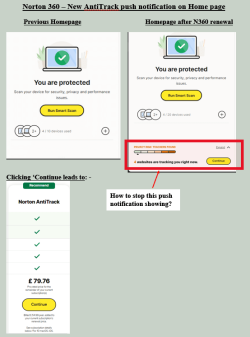
I have just renewed my Norton 360 and the new Homepage is pushing Norton's AntiTrack. I do not want this. It did not appear before I renewed N360.

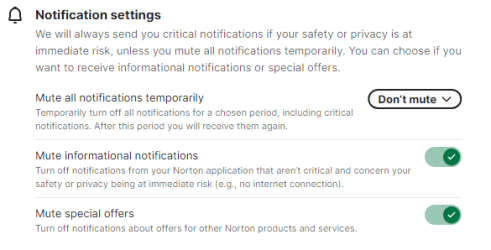
I have looked in Settings and muted Notifications but that does not stop it appearing. It seems to be embedded into the software user interface.
Does anyone know if this is a temporary 'Push' that will disappear?

I know some people don't like Norton but it has been okay in my experience. Until this annoyance.

Thanks in advance.
Muted.png

N360 AntiTrack Push.png
 

My Computers

System One System Two

  • OS
    Windows 11 Pro
    Computer type
    PC/Desktop
    Manufacturer/Model
    GMKtec K11
    CPU
    AMD Ryzen 9 8945HS
    Memory
    32GB DDR5 SO-DIMM
    Graphics Card(s)
    Integrated AMD Radeon 780M (4.00 GHz)
    Monitor(s) Displays
    Benq 2250HM
    Screen Resolution
    1920 x 1080
    Hard Drives
    1 TB PCIe 4.0 NVMe M.2 SSD
  • Operating System
    Windows 11 Home
    Computer type
    Laptop
    Manufacturer/Model
    ASUS Zenbook 14 OLED 14" Laptop - UX3405CA-QL192W
    CPU
    Intel® Core™ Ultra 7 - 255H processor
    Memory
    16 GB LPDDR5 SDRAM
    Graphics card(s)
    Intel Arc 140T onboard graphics
    Screen Resolution
    1920 x 1200 (16:10 WUXGA resolution) OLED Touchscreen
    Hard Drives
    1TB SSD
If you dont see an option to get rid of it in the settings, it most likely cannot be removed.

Try checking your browser extensions and remove it if it is there. Could also check your installed programs and remove it from there or choose change on the norton installer and see if you can customize the installation to remove that element.

Just use windows defender and get rid of norton. Norton slows down machines.
 

My Computers

System One System Two

  • OS
    Windows 11 Pro
    Computer type
    PC/Desktop
    Manufacturer/Model
    Custom Built
    CPU
    Ryzen 7 5700 X3D
    Motherboard
    MSI MPG B550 GAMING PLUS
    Memory
    64 GB DDR4 3600mhz Gskill Ripjaws V
    Graphics Card(s)
    RTX 4070 Super , 12GB VRAM Asus EVO Overclock
    Monitor(s) Displays
    Gigabyte M27Q (rev. 2.0) 2560 x 1440 @ 170hz HDR
    Hard Drives
    2TB Samsung nvme ssd
    4TB Western Digital nvme ssd
    PSU
    CORSAIR RMx SHIFT Series™ RM750x 80 PLUS Gold Fully Modular ATX Power Supply
    Case
    CORSAIR 3500X ARGB Mid-Tower ATX PC Case – Black
    Cooling
    ID-COOLING FROSTFLOW X 240 CPU Water Cooler
    Keyboard
    Logitech G213
    Mouse
    Logitech G203
    Internet Speed
    1.2gbps Fiber 😎
  • Operating System
    Chrome OS
    Computer type
    Laptop
    Manufacturer/Model
    HP Chromebook
    CPU
    Intel Pentium Quad Core
    Memory
    4GB LPDDR4
    Monitor(s) Displays
    14 Inch HD SVA anti glare micro edge display
    Hard Drives
    64 GB emmc
also check your installed programs and remove it from there
Thanks, but AntiTrack is not installed. The push offer on the user interface is prompting me to install it at a cost of £79.76.

I think it may be embedded into the app after first installation. Maybe a future app update will remove it. I hope.

This is the first annoyance I have experienced (apart from a slight bug, which I fixed) with N360, so having paid £20 for 20-devices, 2-year protection I want to keep it now.

It's just an annoyance that I will ignore if I can't stop it showing in the N360 Home UI.
 

My Computers

System One System Two

  • OS
    Windows 11 Pro
    Computer type
    PC/Desktop
    Manufacturer/Model
    GMKtec K11
    CPU
    AMD Ryzen 9 8945HS
    Memory
    32GB DDR5 SO-DIMM
    Graphics Card(s)
    Integrated AMD Radeon 780M (4.00 GHz)
    Monitor(s) Displays
    Benq 2250HM
    Screen Resolution
    1920 x 1080
    Hard Drives
    1 TB PCIe 4.0 NVMe M.2 SSD
  • Operating System
    Windows 11 Home
    Computer type
    Laptop
    Manufacturer/Model
    ASUS Zenbook 14 OLED 14" Laptop - UX3405CA-QL192W
    CPU
    Intel® Core™ Ultra 7 - 255H processor
    Memory
    16 GB LPDDR5 SDRAM
    Graphics card(s)
    Intel Arc 140T onboard graphics
    Screen Resolution
    1920 x 1200 (16:10 WUXGA resolution) OLED Touchscreen
    Hard Drives
    1TB SSD
Update -
Does anyone know if this is a temporary 'Push' that will disappear?

It has now disappeared on its own so it was a temporary push.

Solved.
 

My Computers

System One System Two

  • OS
    Windows 11 Pro
    Computer type
    PC/Desktop
    Manufacturer/Model
    GMKtec K11
    CPU
    AMD Ryzen 9 8945HS
    Memory
    32GB DDR5 SO-DIMM
    Graphics Card(s)
    Integrated AMD Radeon 780M (4.00 GHz)
    Monitor(s) Displays
    Benq 2250HM
    Screen Resolution
    1920 x 1080
    Hard Drives
    1 TB PCIe 4.0 NVMe M.2 SSD
  • Operating System
    Windows 11 Home
    Computer type
    Laptop
    Manufacturer/Model
    ASUS Zenbook 14 OLED 14" Laptop - UX3405CA-QL192W
    CPU
    Intel® Core™ Ultra 7 - 255H processor
    Memory
    16 GB LPDDR5 SDRAM
    Graphics card(s)
    Intel Arc 140T onboard graphics
    Screen Resolution
    1920 x 1200 (16:10 WUXGA resolution) OLED Touchscreen
    Hard Drives
    1TB SSD
It came back and will not go away so I have finally ditched Norton and installed Bitdefender Total Security instead. It is much less intrusive and pushy.
I am a convert to Defender after years with Norton. Norton have shot themselves in the foot with change last October.
I am not watching this thread but I thought others may like to see another who has dumped Norton.
 

My Computers

System One System Two

  • OS
    Windows 11 Pro
    Computer type
    PC/Desktop
    Manufacturer/Model
    GMKtec K11
    CPU
    AMD Ryzen 9 8945HS
    Memory
    32GB DDR5 SO-DIMM
    Graphics Card(s)
    Integrated AMD Radeon 780M (4.00 GHz)
    Monitor(s) Displays
    Benq 2250HM
    Screen Resolution
    1920 x 1080
    Hard Drives
    1 TB PCIe 4.0 NVMe M.2 SSD
  • Operating System
    Windows 11 Home
    Computer type
    Laptop
    Manufacturer/Model
    ASUS Zenbook 14 OLED 14" Laptop - UX3405CA-QL192W
    CPU
    Intel® Core™ Ultra 7 - 255H processor
    Memory
    16 GB LPDDR5 SDRAM
    Graphics card(s)
    Intel Arc 140T onboard graphics
    Screen Resolution
    1920 x 1200 (16:10 WUXGA resolution) OLED Touchscreen
    Hard Drives
    1TB SSD
It came back and will not go away so I have finally ditched Norton and installed Bitdefender Total Security instead. It is much less intrusive and pushy.
I am a convert to Defender after years with Norton. Norton have shot themselves in the foot with change last October.
I am not watching this thread but I thought others may like to see another who has dumped Norton.
I was a mostly happy Norton customer for probably 30 years now, but I got very unhappy after the merge (?) with LifeLock. I also got very tired of the pushy ads, plus the difficulty of installing Anti-Track (and yes, I'm pretty technical for a non IT professional.)So I also switched to BitDefender, which seems to have better security, BTW. And no pushy messages. Not exactly cheap, but worth it.
 

My Computer

System One

  • OS
    Windows 11 2H25
    Computer type
    PC/Desktop
    Manufacturer/Model
    DIY
    CPU
    AMD 9900X
    Motherboard
    MSI X870E Carbon
    Memory
    64 GB
    Graphics Card(s)
    AMD 9070 XT
    Sound Card
    built-in
    Monitor(s) Displays
    Dell 24"
    Hard Drives
    Sabrent 1 TB NVMe, 4 x SSD (need to check models), 4 x 3.5" HDD, 8-16 TB, all WD
    PSU
    Seasonic 850
    Case
    Fractal Design North XL (which I likw)
    Cooling
    Corsair AIO for CPU, fans for case
    Keyboard
    Das Keyboard 4
    Mouse
    Corsair M65 (white)
    Internet Speed
    1 TB download
    Browser
    Firefox
    Antivirus
    Bitdefender
    Other Info
    Also have Lenovo T14S laptop (me) and Lenovo Slim 71 (wife)
I was a mostly happy Norton customer for probably 30 years now, but I got very unhappy after the merge (?) with LifeLock. I also got very tired of the pushy ads, plus the difficulty of installing Anti-Track (and yes, I'm pretty technical for a non IT professional.)So I also switched to BitDefender, which seems to have better security, BTW. And no pushy messages. Not exactly cheap, but worth it.
If I pay for something, I better not be getting ads in it.

My opinion anyway.
 

My Computers

System One System Two

  • OS
    Windows 11 Pro
    Computer type
    PC/Desktop
    Manufacturer/Model
    Custom Built
    CPU
    Ryzen 7 5700 X3D
    Motherboard
    MSI MPG B550 GAMING PLUS
    Memory
    64 GB DDR4 3600mhz Gskill Ripjaws V
    Graphics Card(s)
    RTX 4070 Super , 12GB VRAM Asus EVO Overclock
    Monitor(s) Displays
    Gigabyte M27Q (rev. 2.0) 2560 x 1440 @ 170hz HDR
    Hard Drives
    2TB Samsung nvme ssd
    4TB Western Digital nvme ssd
    PSU
    CORSAIR RMx SHIFT Series™ RM750x 80 PLUS Gold Fully Modular ATX Power Supply
    Case
    CORSAIR 3500X ARGB Mid-Tower ATX PC Case – Black
    Cooling
    ID-COOLING FROSTFLOW X 240 CPU Water Cooler
    Keyboard
    Logitech G213
    Mouse
    Logitech G203
    Internet Speed
    1.2gbps Fiber 😎
  • Operating System
    Chrome OS
    Computer type
    Laptop
    Manufacturer/Model
    HP Chromebook
    CPU
    Intel Pentium Quad Core
    Memory
    4GB LPDDR4
    Monitor(s) Displays
    14 Inch HD SVA anti glare micro edge display
    Hard Drives
    64 GB emmc
I posted in the Norton forums about them going back to becoming bloatware... and going back to the mess they made a few years ago.... I am probably going to dump Norton360 and just use the Anti-virus next go rounds, in a few months, I still have 6 months or so left on my subscription. They have wrecked it pushing al this crap on us... btw, I do not want VPN either...
 

My Computer

System One

  • OS
    Win11
    Computer type
    PC/Desktop
    Manufacturer/Model
    Asus Home built
    CPU
    i9-13900
    Motherboard
    ASUS Strix Z790-H
    Memory
    64 GB
    Graphics Card(s)
    Nvidia RTX 5070 TI OC
    Monitor(s) Displays
    Sony 55"
    Hard Drives
    SSD
    PSU
    850 watt EVGA
    Case
    Cooler Master Haf 932
    Cooling
    CoolerMaster
    Keyboard
    RedDragon
    Mouse
    CoolerMaster
    Internet Speed
    300/300
    Antivirus
    Defender
    Other Info
    VR, Virtual Reality
I still had 20 months left on my 24 month licence but I felt so incensed at N360's behaviour that I called time on it. N360 had cost me £20 for 10 devices for 2 years but, after 4 months I paid £16.66 to install Bitdefender 12 month licence. I'm glad I did since I couldn't tolerate Norton for another 20 months and Bitdefender does the job silently except for the odd popup. There is no pushy behaviour or bloatware.
My N360 licences are sitting unused but I don't care about that.
 

My Computers

System One System Two

  • OS
    Windows 11 Pro
    Computer type
    PC/Desktop
    Manufacturer/Model
    GMKtec K11
    CPU
    AMD Ryzen 9 8945HS
    Memory
    32GB DDR5 SO-DIMM
    Graphics Card(s)
    Integrated AMD Radeon 780M (4.00 GHz)
    Monitor(s) Displays
    Benq 2250HM
    Screen Resolution
    1920 x 1080
    Hard Drives
    1 TB PCIe 4.0 NVMe M.2 SSD
  • Operating System
    Windows 11 Home
    Computer type
    Laptop
    Manufacturer/Model
    ASUS Zenbook 14 OLED 14" Laptop - UX3405CA-QL192W
    CPU
    Intel® Core™ Ultra 7 - 255H processor
    Memory
    16 GB LPDDR5 SDRAM
    Graphics card(s)
    Intel Arc 140T onboard graphics
    Screen Resolution
    1920 x 1200 (16:10 WUXGA resolution) OLED Touchscreen
    Hard Drives
    1TB SSD
I still had 20 months left on my 24 month licence but I felt so incensed at N360's behaviour that I called time on it. N360 had cost me £20 for 10 devices for 2 years but, after 4 months I paid £16.66 to install Bitdefender 12 month licence. I'm glad I did since I couldn't tolerate Norton for another 20 months and Bitdefender does the job silently except for the odd popup. There is no pushy behaviour or bloatware.
My N360 licences are sitting unused but I don't care about that.
Agree with you. Shame about Norton. I started using Norton Utilities for DOS and their Windows 3 UI enhancement utility back in the 1990s. I don't know if Peter Norton is still around, but if he is, he is probably royally, completely pissed the way the company has sullied his name.

EDIT: From 11 years ago. Where Have You Gone, Peter Norton?
 

My Computer

System One

  • OS
    Windows 11 2H25
    Computer type
    PC/Desktop
    Manufacturer/Model
    DIY
    CPU
    AMD 9900X
    Motherboard
    MSI X870E Carbon
    Memory
    64 GB
    Graphics Card(s)
    AMD 9070 XT
    Sound Card
    built-in
    Monitor(s) Displays
    Dell 24"
    Hard Drives
    Sabrent 1 TB NVMe, 4 x SSD (need to check models), 4 x 3.5" HDD, 8-16 TB, all WD
    PSU
    Seasonic 850
    Case
    Fractal Design North XL (which I likw)
    Cooling
    Corsair AIO for CPU, fans for case
    Keyboard
    Das Keyboard 4
    Mouse
    Corsair M65 (white)
    Internet Speed
    1 TB download
    Browser
    Firefox
    Antivirus
    Bitdefender
    Other Info
    Also have Lenovo T14S laptop (me) and Lenovo Slim 71 (wife)

Latest Support Threads

Back
Top Bottom