Notepad not opening; old version does from system32, not from context menu


I'm not sure what you mean, I'm referring to all three double click on the file, right click and either 'open' or 'open with' Notepad.
 

My Computer My Computer

At a glance

Windows 11 Education 64 bit11th gen. i7, 4 cores 8 logic16384MB RAMNVIDIA GeForce MX450
OS
Windows 11 Education 64 bit
Computer type
Laptop
Manufacturer/Model
Dell Inspiron 15 5510
CPU
11th gen. i7, 4 cores 8 logic
Motherboard
Dell 0Y20X4, A00
Memory
16384MB RAM
Graphics Card(s)
NVIDIA GeForce MX450
Sound Card
INTELAUDIO\FUNC_01&VEN_10EC&DEV_0236&SUBSYS_10280B24&REV_1000
Screen Resolution
1920 x 1080 (32 bit) (60Hz)
Hard Drives
PC SN530 NVMe WDC 512GB
Do you mean I can't use Notepad if I'm signed in to my account on my laptop only not to MS?
If so, I totally agree that f*k them!
 

My Computer My Computer

At a glance

Windows 11 Education 64 bit11th gen. i7, 4 cores 8 logic16384MB RAMNVIDIA GeForce MX450
OS
Windows 11 Education 64 bit
Computer type
Laptop
Manufacturer/Model
Dell Inspiron 15 5510
CPU
11th gen. i7, 4 cores 8 logic
Motherboard
Dell 0Y20X4, A00
Memory
16384MB RAM
Graphics Card(s)
NVIDIA GeForce MX450
Sound Card
INTELAUDIO\FUNC_01&VEN_10EC&DEV_0236&SUBSYS_10280B24&REV_1000
Screen Resolution
1920 x 1080 (32 bit) (60Hz)
Hard Drives
PC SN530 NVMe WDC 512GB
I'm referring to all three double click on the file, right click and either 'open' or 'open with' Notepad.
All 3 of these work for me for classic Notepad, with the exception of the circled one...

0008009.webp

Do you mean I can't use Notepad if I'm signed in to my account on my laptop only not to MS?
I don't have a clue, never mind all that..., just uninstall the modern Notepad, make sure you save and run the reg file as posted. It should work.
 

My Computers My Computers

  • At a glance

    Windows 11 Pro
    OS
    Windows 11 Pro
    Computer type
    PC/Desktop
    Manufacturer/Model
    ASUS ROG Strix
  • At a glance

    Windows 11 Pro
    Operating System
    Windows 11 Pro
    Computer type
    Laptop
    Manufacturer/Model
    ASUS VivoBook
  • ASUS VivoBook 'Lite' ~ Windows 11 Home
Thanks, whatever happens.
 

My Computer My Computer

At a glance

Windows 11 Education 64 bit11th gen. i7, 4 cores 8 logic16384MB RAMNVIDIA GeForce MX450
OS
Windows 11 Education 64 bit
Computer type
Laptop
Manufacturer/Model
Dell Inspiron 15 5510
CPU
11th gen. i7, 4 cores 8 logic
Motherboard
Dell 0Y20X4, A00
Memory
16384MB RAM
Graphics Card(s)
NVIDIA GeForce MX450
Sound Card
INTELAUDIO\FUNC_01&VEN_10EC&DEV_0236&SUBSYS_10280B24&REV_1000
Screen Resolution
1920 x 1080 (32 bit) (60Hz)
Hard Drives
PC SN530 NVMe WDC 512GB
I can't see the file type information from your screen shot of the properties because the open with dialog is in the way. However, it doesn't look quite right.

I'd like to check that .txt is connected appropriately

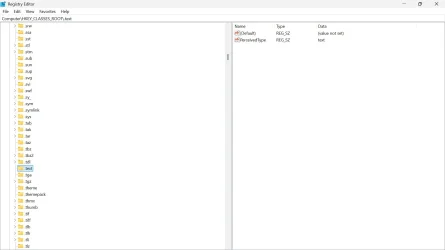
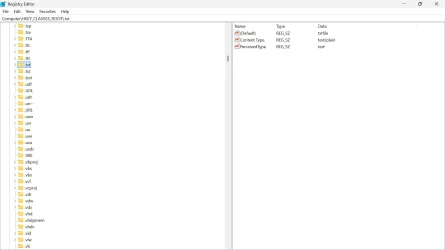
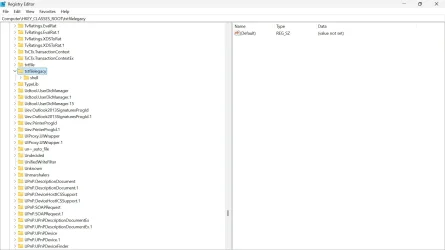
Can you look at HKCR\.txt and HKCR\txtfilelegacy

1760878110934.webp
and
1760878293026.webp
and tell us what you see?
 

My Computers My Computers

  • At a glance

    Windows 11 25H2 Pro Build 26200i3-1215U8GB
    OS
    Windows 11 25H2 Pro Build 26200
    Computer type
    PC/Desktop
    Manufacturer/Model
    MSI PRO ADL-U Cubi 5 (MS-B0A8)
    CPU
    i3-1215U
    Memory
    8GB
    Monitor(s) Displays
    Sony 43" 4k TV
    Screen Resolution
    3840x2160
    Hard Drives
    250GB NVMe M.2 PCIe Gen 3 SSD
    PSU
    External 65W
    Case
    Mini PC
    Browser
    FireFox
    Antivirus
    MS
  • At a glance

    Windows 11 Pro 25H2Intel i3-910016GB DDR4
    Operating System
    Windows 11 Pro 25H2
    Computer type
    PC/Desktop
    Manufacturer/Model
    Dell Optiplex 3070 SFF
    CPU
    Intel i3-9100
    Memory
    16GB DDR4
    Monitor(s) Displays
    Dell S2721
    Screen Resolution
    3840 x 2160
    Hard Drives
    Samsung 500GB nvMe
    Case
    Dell small form factor
    Keyboard
    Cherry mechanical (Blue)
    Mouse
    Microsoft
    Antivirus
    MS Defender
I see this only:
 

Attachments

  • 1.webp
    1.webp
    41.5 KB · Views: 1
  • 2.webp
    2.webp
    79.6 KB · Views: 1

My Computer My Computer

At a glance

Windows 11 Education 64 bit11th gen. i7, 4 cores 8 logic16384MB RAMNVIDIA GeForce MX450
OS
Windows 11 Education 64 bit
Computer type
Laptop
Manufacturer/Model
Dell Inspiron 15 5510
CPU
11th gen. i7, 4 cores 8 logic
Motherboard
Dell 0Y20X4, A00
Memory
16384MB RAM
Graphics Card(s)
NVIDIA GeForce MX450
Sound Card
INTELAUDIO\FUNC_01&VEN_10EC&DEV_0236&SUBSYS_10280B24&REV_1000
Screen Resolution
1920 x 1080 (32 bit) (60Hz)
Hard Drives
PC SN530 NVMe WDC 512GB
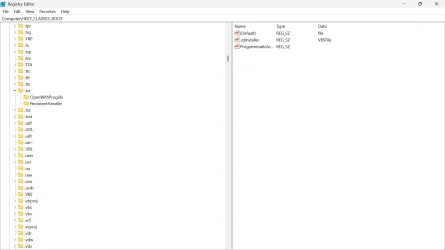
Unfortunately, you didn't select .txt in the first screenshot. So the values we see are those in HKCR. The screen shot shows this in address bar at the top. They do seem odd, as though the intention had been to show that a .qInstaller file is a vbscript file. The other value which I assume is ProgrammaticAccessOnly only makes sense in a verb key under a shell jey for a file extension or file type. Do you have any idea how they got there? This looks like hand editing. Do you think that you might have done this elsewhere?
 

My Computers My Computers

  • At a glance

    Windows 11 25H2 Pro Build 26200i3-1215U8GB
    OS
    Windows 11 25H2 Pro Build 26200
    Computer type
    PC/Desktop
    Manufacturer/Model
    MSI PRO ADL-U Cubi 5 (MS-B0A8)
    CPU
    i3-1215U
    Memory
    8GB
    Monitor(s) Displays
    Sony 43" 4k TV
    Screen Resolution
    3840x2160
    Hard Drives
    250GB NVMe M.2 PCIe Gen 3 SSD
    PSU
    External 65W
    Case
    Mini PC
    Browser
    FireFox
    Antivirus
    MS
  • At a glance

    Windows 11 Pro 25H2Intel i3-910016GB DDR4
    Operating System
    Windows 11 Pro 25H2
    Computer type
    PC/Desktop
    Manufacturer/Model
    Dell Optiplex 3070 SFF
    CPU
    Intel i3-9100
    Memory
    16GB DDR4
    Monitor(s) Displays
    Dell S2721
    Screen Resolution
    3840 x 2160
    Hard Drives
    Samsung 500GB nvMe
    Case
    Dell small form factor
    Keyboard
    Cherry mechanical (Blue)
    Mouse
    Microsoft
    Antivirus
    MS Defender
Sumpthin ain't right...
 

My Computers My Computers

  • At a glance

    Windows 11 Pro
    OS
    Windows 11 Pro
    Computer type
    PC/Desktop
    Manufacturer/Model
    ASUS ROG Strix
  • At a glance

    Windows 11 Pro
    Operating System
    Windows 11 Pro
    Computer type
    Laptop
    Manufacturer/Model
    ASUS VivoBook
  • ASUS VivoBook 'Lite' ~ Windows 11 Home
I hope this time I did what you said.
I didn't mess around this with in the registry.

Sumpthin ain't right...
That much is what I understand
:-)
 

Attachments

  • 3.webp
    3.webp
    39.1 KB · Views: 2

My Computer My Computer

At a glance

Windows 11 Education 64 bit11th gen. i7, 4 cores 8 logic16384MB RAMNVIDIA GeForce MX450
OS
Windows 11 Education 64 bit
Computer type
Laptop
Manufacturer/Model
Dell Inspiron 15 5510
CPU
11th gen. i7, 4 cores 8 logic
Motherboard
Dell 0Y20X4, A00
Memory
16384MB RAM
Graphics Card(s)
NVIDIA GeForce MX450
Sound Card
INTELAUDIO\FUNC_01&VEN_10EC&DEV_0236&SUBSYS_10280B24&REV_1000
Screen Resolution
1920 x 1080 (32 bit) (60Hz)
Hard Drives
PC SN530 NVMe WDC 512GB
Sumpthin ain't right...
Yes, but now I think I know what it is.
I hope this time I did what you said.
Unfortunately you didn't. you showed the .text rather than the .txt entry.
I didn't mess around this with in the registry.
Probably not directly in this case. But you have used xPad text editor. and that does appear in the options for 'open with'. I think you must have tried the option to associate xPad with .txt files.

I tried xPad out in the Windows Sandbox using NirSoft's RegFromApp to work out what it did. It didn't appear to have an option to undo this, but that may be because theSandbox doesn't have any version of notepad by default. The only text editor it has is edit.exe the 'new' terminal mode editor.

xPad sets .txt files as type textfile and writes the necessary information to make it the editor for textfile type. This probably works ok in Windows 10, but Windows 11 uses a different type for .txt files: txtfilelegacy.

So, our suggestions won't work unless you change the type back to txtfilelegacy. xPad hasn't had any updates for some time, and in this respect at least isn't compatible with Windows 11.
 

My Computers My Computers

  • At a glance

    Windows 11 25H2 Pro Build 26200i3-1215U8GB
    OS
    Windows 11 25H2 Pro Build 26200
    Computer type
    PC/Desktop
    Manufacturer/Model
    MSI PRO ADL-U Cubi 5 (MS-B0A8)
    CPU
    i3-1215U
    Memory
    8GB
    Monitor(s) Displays
    Sony 43" 4k TV
    Screen Resolution
    3840x2160
    Hard Drives
    250GB NVMe M.2 PCIe Gen 3 SSD
    PSU
    External 65W
    Case
    Mini PC
    Browser
    FireFox
    Antivirus
    MS
  • At a glance

    Windows 11 Pro 25H2Intel i3-910016GB DDR4
    Operating System
    Windows 11 Pro 25H2
    Computer type
    PC/Desktop
    Manufacturer/Model
    Dell Optiplex 3070 SFF
    CPU
    Intel i3-9100
    Memory
    16GB DDR4
    Monitor(s) Displays
    Dell S2721
    Screen Resolution
    3840 x 2160
    Hard Drives
    Samsung 500GB nvMe
    Case
    Dell small form factor
    Keyboard
    Cherry mechanical (Blue)
    Mouse
    Microsoft
    Antivirus
    MS Defender
stop messing with the registry, run these steps in order:
open powershell as admin and run:
Code:
Remove-WindowsCapability -Online -Name Microsoft.Windows.Notepad~~~~0.0.1.0
reboot
open powershell as admin and run:
Add-WindowsCapability -Online -Name Microsoft.Windows.Notepad~~~~0.0.1.0
reboot
Settings > Apps > Advanced App Settings > App Execution Aliases > Notepad Radio Button > OFF


Disable "A new version of Notepad is available." Banner - save and run this .reg
Code:
Windows Registry Editor Version 5.00

[HKEY_CURRENT_USER\Software\Microsoft\Notepad]
"ShowStoreBanner"=dword:00000000
 

My Computer My Computer

At a glance

Windows 11 Pro
OS
Windows 11 Pro
Probably the easiest for the OP would be to just Download Notepad and install it!
 

My Computers My Computers

  • At a glance

    Windows 11 Pro
    OS
    Windows 11 Pro
    Computer type
    PC/Desktop
    Manufacturer/Model
    ASUS ROG Strix
  • At a glance

    Windows 11 Pro
    Operating System
    Windows 11 Pro
    Computer type
    Laptop
    Manufacturer/Model
    ASUS VivoBook
  • ASUS VivoBook 'Lite' ~ Windows 11 Home
Probably the easiest for the OP would be to just Download Notepad and install it!
I agree. If the OP would have done that then there would have been no problems.

I have the "Classic" Notepad installed. The Windows 11 Notepad is the default but I can choose the "Classic" Notepad if I want.

2025-10-20 23_19_55-Greenshot - File Explorer.webp
 

My Computers My Computers

  • At a glance

    Windows 11 Pro 25H2 (26200.6901)AMD Ryzen 7 6800H with Radeon 680M GPU (486MB...Crucial DDR5-4800 (2400MHz) 32GB (2 x 16GB)NVIDIA RTX 3060 Laptop (6GB RAM)
    OS
    Windows 11 Pro 25H2 (26200.6901)
    Computer type
    Laptop
    Manufacturer/Model
    ASUS TUF Gaming A15 (2022)
    CPU
    AMD Ryzen 7 6800H with Radeon 680M GPU (486MB RAM)
    Memory
    Crucial DDR5-4800 (2400MHz) 32GB (2 x 16GB)
    Graphics Card(s)
    NVIDIA RTX 3060 Laptop (6GB RAM)
    Sound Card
    n/a
    Monitor(s) Displays
    15.6-inch
    Screen Resolution
    1920x1080 300Hz
    Hard Drives
    2 x Samsung 990 Evo Plus (2TB M.2 NVME SSD)
    PSU
    n/a
    Mouse
    Wireless Mouse M510
    Internet Speed
    2100Mbps/300Mbps
    Browser
    Firefox
    Antivirus
    Malwarebytes
  • At a glance

    Windows 11 Pro 25H2 (26200.8246)AMD Ryzen 7 5700X3DG.SKILL Flare X 32GB (2x16GB) DDR4ASUS ROG-STRIX-RTX3060TI-08G-V2-GAMING (RTX 3...
    Operating System
    Windows 11 Pro 25H2 (26200.8246)
    Computer type
    PC/Desktop
    Manufacturer/Model
    Custom build
    CPU
    AMD Ryzen 7 5700X3D
    Motherboard
    ASUS ROG Strix B550-F Gaming WiFi II
    Memory
    G.SKILL Flare X 32GB (2x16GB) DDR4
    Graphics card(s)
    ASUS ROG-STRIX-RTX3060TI-08G-V2-GAMING (RTX 3060-Ti, 8GB RAM)
    Monitor(s) Displays
    Samsung G50D IPS 27"
    Screen Resolution
    1440p/180Hz
    Hard Drives
    SAMSUNG 990 EVO Plus (2TB] M.2 NVME SSD
    SAMSUNG 990 EVO Plus (4TB) M.2 NVME SSD
    PSU
    Corsair RM750x (750 watts)
    Case
    Cooler Master MasterCase 5
    Cooling
    Scythe Mugen 6
    Keyboard
    Logitech K520 (MK540 keyboard/mouse combo)
    Mouse
    Logitech M310 (MK540 keyboard/mouse combo)
    Internet Speed
    2100 Mbps down / 300 Mbps up
    Browser
    Firefox, Edge, Chrome
    Antivirus
    Malwarebytes (Premium)
    Other Info
    ASUS Blu-ray Burner BW-16D1HT (SATA) || Western Digital Easystore 20TB USB 3.0 external hard drive used with Acronis True Image 2025 backup software || HP OfficeJet Pro 6975 Printer/Scanner
xpad seemed better than notepad++, now per your advice I uninstalled it; still no result.
My next attempt to show you what asked for.

I've run the two powershell commands, the reg word was already 0; still no result.

I've downloaded the old notepad, as I did before, still no result.

Shouldn't I just give it up and use another text editor?
 

Attachments

  • txt.webp
    txt.webp
    40.8 KB · Views: 1

My Computer My Computer

At a glance

Windows 11 Education 64 bit11th gen. i7, 4 cores 8 logic16384MB RAMNVIDIA GeForce MX450
OS
Windows 11 Education 64 bit
Computer type
Laptop
Manufacturer/Model
Dell Inspiron 15 5510
CPU
11th gen. i7, 4 cores 8 logic
Motherboard
Dell 0Y20X4, A00
Memory
16384MB RAM
Graphics Card(s)
NVIDIA GeForce MX450
Sound Card
INTELAUDIO\FUNC_01&VEN_10EC&DEV_0236&SUBSYS_10280B24&REV_1000
Screen Resolution
1920 x 1080 (32 bit) (60Hz)
Hard Drives
PC SN530 NVMe WDC 512GB
Some good news at last.
Now a new item appears in the context menu 'Edit with notebook (classic)'. With this it opens.
Is it possible to set it as default, go this by just click on the file name?
 

My Computer My Computer

At a glance

Windows 11 Education 64 bit11th gen. i7, 4 cores 8 logic16384MB RAMNVIDIA GeForce MX450
OS
Windows 11 Education 64 bit
Computer type
Laptop
Manufacturer/Model
Dell Inspiron 15 5510
CPU
11th gen. i7, 4 cores 8 logic
Motherboard
Dell 0Y20X4, A00
Memory
16384MB RAM
Graphics Card(s)
NVIDIA GeForce MX450
Sound Card
INTELAUDIO\FUNC_01&VEN_10EC&DEV_0236&SUBSYS_10280B24&REV_1000
Screen Resolution
1920 x 1080 (32 bit) (60Hz)
Hard Drives
PC SN530 NVMe WDC 512GB
Back
Top Bottom