JavaScript is disabled. For a better experience, please enable JavaScript in your browser before proceeding.
You are using an out of date browser. It may not display this or other websites correctly.
You should upgrade or use an
alternative browser .
Nothing working, automatic repair loop, access denied, windows resource protection …
I would still do a media scan/repair. Windows doesn't just get corrupted to the degree yours did, without good reason.
Windows 11 i9 12900K G.Skill Trident Z Royal Elite 2x32GB 4266Mhz ... RTX 3080 Ti Windows 11 PC/Desktop i9 12900K ASUS ROG STRIX Z690-A GAMING WIFI D4 G.Skill Trident Z Royal Elite 2x32GB 4266Mhz Gold RTX 3080 Ti Sound Blaster ZxR Alienware 38" 3840x1600 Samsung 980/860 EVO/970 Pro Dark Power 12 850W Phanteks Evolv X MSI Meg CoreLiquid S360 Roccat Vulcan 122 AIMO
Well-known member
Guru
VIP
The log file created by Startup Repair can help to find out the cause of the boot problem. In this video, i will explain how to use the Startup Repair tool to troubleshoot boot problems in Windows 10 and Windows 11.
Windows 11 AMD Ryzen 7 5700G Micron Technology DDR4-3200 16GB NVIDIA GeForce RTX 3060 Windows 11 PC/Desktop HP Pavilion AMD Ryzen 7 5700G Erica6 Micron Technology DDR4-3200 16GB NVIDIA GeForce RTX 3060 Realtek ALC671 Samsung SyncMaster U28E590 3840 x 2160 SAMSUNG MZVLQ1T0HALB-000H1
One other question/issue.
Windows 11 Pro AS Rock 16GB Radeon 3.6 ghz Windows 11 Pro PC/Desktop AMD Ryzen 3 3200G AS Rock 16GB Radeon 3.6 ghz 1 2 SSD, 2 HD Opera
System files are more restricted. For that you need to modify UAC.
All Branches but Stable AMD Ryzen 7 7735HS 3200-4500 Mhz 8 cores x 2 32 GB DDR5 Radeon Graphic / NVIDIA GeForce RTX 4060 8 GB... All Branches but Stable Laptop Acer Nitro ANV15-51 AMD Ryzen 7 7735HS 3200-4500 Mhz 8 cores x 2 Sportage_RBH 32 GB DDR5 Radeon Graphic / NVIDIA GeForce RTX 4060 8 GB GDDR6 AMD/Realtek(R) Audio Integrated Monitor (15.3"vis) FHD 1920X1080 16:9 144Hz KINGSTON OM8SEP4512Q-AA 1TB 19V DC 6.32 A 120 W Dual Fans MS Bluetooth Fiber 1GB Cox -us & 1GB Orange-fr Edge Canary- Firefox Nightly-Chrome Dev-Chrome Dev Windows Defender
Windows 11 Beta AMD A9-9420 8 GB of DDR4 AMD Radeon R5 Windows 11 Beta Laptop Asus X751BP AMD A9-9420 8 GB of DDR4 AMD Radeon R5 1600x900 Seagate 1 TB
System files are more restricted. For that you modify UAC.
All the way down? Thanks
Windows 11 Pro AS Rock 16GB Radeon 3.6 ghz Windows 11 Pro PC/Desktop AMD Ryzen 3 3200G AS Rock 16GB Radeon 3.6 ghz 1 2 SSD, 2 HD Opera
System files are more restricted. For that you need to modify UAC.
Got it. It's already set all the way down.
Windows 11 Pro AS Rock 16GB Radeon 3.6 ghz Windows 11 Pro PC/Desktop AMD Ryzen 3 3200G AS Rock 16GB Radeon 3.6 ghz 1 2 SSD, 2 HD Opera
Why don’t I have admin access on my own machine??
Windows 11 Pro AS Rock 16GB Radeon 3.6 ghz Windows 11 Pro PC/Desktop AMD Ryzen 3 3200G AS Rock 16GB Radeon 3.6 ghz 1 2 SSD, 2 HD Opera
Well-known member
Guru
VIP
Why don’t I have admin access on my own machine??
Did you try doing the repair install? If that doesn't work, you may have to do a clean install.
Windows 11 Pro 25H2 Intel Core i7-10700K 16GB (8GB PC4-19200 DDR4 SDRAM x2) NVIDIA GeForce GTX 1050 TI Windows 11 Pro 25H2 PC/Desktop PowerSpec B746 Intel Core i7-10700K ASRock Z490 Phantom Gaming 4/ax 16GB (8GB PC4-19200 DDR4 SDRAM x2) NVIDIA GeForce GTX 1050 TI Realtek Audio #1. LG ULTRAWIDE 34" #2. AOC Q32G2WG3 32" #1. 3440 X 1440 #2. 1920 x 1080 NVMe WDC WDS100T2B0C-00PXH0 1TB 750 Watts (62.5A) PowerSpec/Lian Li ATX 205 Logitech K270 Logitech M185 Microsoft Edge and Firefox Webroot SecureAnywhere CE 26.1
Windows 11 Canary Channel Intel Core i5-8400 CPU @ 2.80GHz 16 MB DDR 4-2666 Windows 11 Canary Channel PC/Desktop PowerSpec G156 Intel Core i5-8400 CPU @ 2.80GHz AsusTeK Prime B360M-A 16 MB DDR 4-2666 23" Speptre HDMI 75Hz 1920x1080 Samsung 970 EVO 500GB NVMe Logitek K270 Logitek M185 Firefox, Edge and Edge Canary Windows Defender
Well, after several days of smooth sailing, the automatic repair loop is back…. Ugh
Windows 11 Pro AS Rock 16GB Radeon 3.6 ghz Windows 11 Pro PC/Desktop AMD Ryzen 3 3200G AS Rock 16GB Radeon 3.6 ghz 1 2 SSD, 2 HD Opera
Why don’t I have admin access on my own machine??
If your disk crashed/large portions got corrupted, then the entire filesystem is in an unidentified state (including access rights). As I keep saying. kinda pointless to start a repair, in that case. Honestly, try a
media check first (check for bad sectors and such, check your SSD status, etc). Only then would I attempt a repair. Although, at that point, you're likely better off doing a full clean install (after having retrieved as much data from your disk as you could).
Windows 11 i9 12900K G.Skill Trident Z Royal Elite 2x32GB 4266Mhz ... RTX 3080 Ti Windows 11 PC/Desktop i9 12900K ASUS ROG STRIX Z690-A GAMING WIFI D4 G.Skill Trident Z Royal Elite 2x32GB 4266Mhz Gold RTX 3080 Ti Sound Blaster ZxR Alienware 38" 3840x1600 Samsung 980/860 EVO/970 Pro Dark Power 12 850W Phanteks Evolv X MSI Meg CoreLiquid S360 Roccat Vulcan 122 AIMO
It sounds like your Windows install is seriously corrupted. I would do a repair install as soon as you're able to. You can keep all your files and apps.
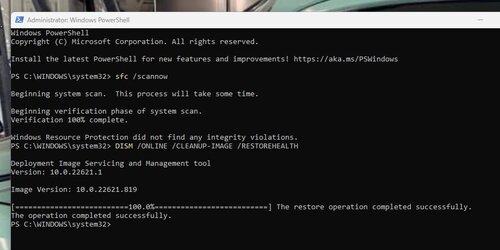
The second Powershell command I provided should have fixed any corrupt issues in the system as it effectively conducts a repair on the OS.
Windows 11 Home AMD Ryzen 9 5900HX 16 GB DDR4 Nvidia RTX 3070 Windows 11 Home Laptop Alienware M15 Ryzen Edition AMD Ryzen 9 5900HX 16 GB DDR4 Nvidia RTX 3070 1TB SSD Edge Defender
I still cannot save the edited host file.
Windows 11 Pro AS Rock 16GB Radeon 3.6 ghz Windows 11 Pro PC/Desktop AMD Ryzen 3 3200G AS Rock 16GB Radeon 3.6 ghz 1 2 SSD, 2 HD Opera
Go here using regedit
All Branches but Stable AMD Ryzen 7 7735HS 3200-4500 Mhz 8 cores x 2 32 GB DDR5 Radeon Graphic / NVIDIA GeForce RTX 4060 8 GB... All Branches but Stable Laptop Acer Nitro ANV15-51 AMD Ryzen 7 7735HS 3200-4500 Mhz 8 cores x 2 Sportage_RBH 32 GB DDR5 Radeon Graphic / NVIDIA GeForce RTX 4060 8 GB GDDR6 AMD/Realtek(R) Audio Integrated Monitor (15.3"vis) FHD 1920X1080 16:9 144Hz KINGSTON OM8SEP4512Q-AA 1TB 19V DC 6.32 A 120 W Dual Fans MS Bluetooth Fiber 1GB Cox -us & 1GB Orange-fr Edge Canary- Firefox Nightly-Chrome Dev-Chrome Dev Windows Defender
Windows 11 Beta AMD A9-9420 8 GB of DDR4 AMD Radeon R5 Windows 11 Beta Laptop Asus X751BP AMD A9-9420 8 GB of DDR4 AMD Radeon R5 1600x900 Seagate 1 TB
I still cannot save the edited host file.
You always need admin privileges (run your editor as Adminstrator) to edit the host file.
Windows 11 i9 12900K G.Skill Trident Z Royal Elite 2x32GB 4266Mhz ... RTX 3080 Ti Windows 11 PC/Desktop i9 12900K ASUS ROG STRIX Z690-A GAMING WIFI D4 G.Skill Trident Z Royal Elite 2x32GB 4266Mhz Gold RTX 3080 Ti Sound Blaster ZxR Alienware 38" 3840x1600 Samsung 980/860 EVO/970 Pro Dark Power 12 850W Phanteks Evolv X MSI Meg CoreLiquid S360 Roccat Vulcan 122 AIMO
I have an ISO USB but I don’t see any repair option. It just wants to install Windows.
Windows 11 Pro AS Rock 16GB Radeon 3.6 ghz Windows 11 Pro PC/Desktop AMD Ryzen 3 3200G AS Rock 16GB Radeon 3.6 ghz 1 2 SSD, 2 HD Opera