Notification sounds when in sleep mode?


pacificSurf

Well-known member
Member
Local time
12:40 AM
Posts
168
OS
windwos 11 pro
The Computer is not necessarily waking up from sleep, which is good I think. I can open the screen and it's not on. But when it's in sleep with the laptop closed, there's notification noises. Like for new emails or something.

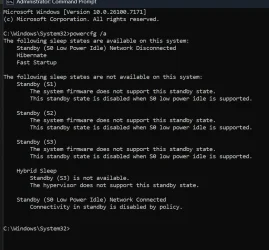
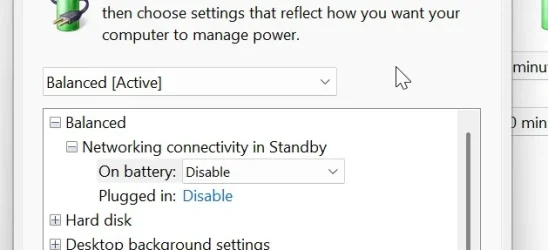
I have disabled modern standby and network connectivity.

So why is it giving notification noises and doing that when it's in sleep?

Surface laptop 7 lunar lake. Windows 11 pro 24H2.
DTOrzTRKgz.webp

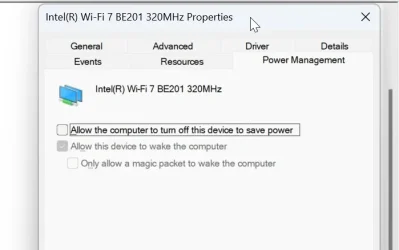
I have kept this unchecked, because otherwise when I wake up from sleep, theres no internet and I have to manually disconnect and reconnect to the network. I dont think this would be the cause of my issue though? If network connectivity is already disabled in standby, then I don't think I need to allow the PC to turn the power off of my Wi-fi adapter right? idk
oSfkKPStdh.webp

LDRxoxnWcD.webp
 

My Computer My Computer

At a glance

windwos 11 pro
OS
windwos 11 pro
I have disabled modern standby and network connectivity.

Per your powercfg report, you have not disabled modern standby as it appears S3 sleep is not supported for that device. Instead it appears you are hibernating.
The system remains in S0 while in standby, allowing all background activity to continue.

Explanation of S3 vs S0 here. Modern Standby vs S3

If you think email notifications are what is generating the sounds, if you wish you can turn off notifications for individual apps (such as your email app) from settings>system>notifications. But the sounds will also be disabled while windows is active.
 

My Computers My Computers

  • At a glance

    Windows 11 Pro 25H2 26200.8655i9-10900 10 core 20 threads32 gbnone-Intel UHD Graphics 630
    OS
    Windows 11 Pro 25H2 26200.8655
    Computer type
    PC/Desktop
    Manufacturer/Model
    Dell Optiplex 7080
    CPU
    i9-10900 10 core 20 threads
    Motherboard
    DELL 0J37VM
    Memory
    32 gb
    Graphics Card(s)
    none-Intel UHD Graphics 630
    Sound Card
    Integrated Realtek
    Monitor(s) Displays
    Benq 27
    Screen Resolution
    2560x1440
    Hard Drives
    2x1tb Solidigm m.2 nvme /External drives 512gb Samsung m.2 sata+2tb Kingston m2.nvme
    PSU
    500w
    Case
    MT
    Cooling
    Dell Premium
    Keyboard
    Logitech wired
    Mouse
    Logitech wireless
    Internet Speed
    so slow I'm too embarrassed to tell
    Browser
    #1 Edge #2 Firefox
    Antivirus
    Defender+MWB Premium
  • At a glance

    Windows 11 Pro 24H2 26200.8457AMD Ryzen 7 6800U32 gbintegrated
    Operating System
    Windows 11 Pro 24H2 26200.8457
    Computer type
    PC/Desktop
    Manufacturer/Model
    Beelink Mini PC SER5
    CPU
    AMD Ryzen 7 6800U
    Memory
    32 gb
    Graphics card(s)
    integrated
    Sound Card
    integrated
    Monitor(s) Displays
    Benq 27
    Screen Resolution
    2560x1440
    Hard Drives
    1TB Crucial nvme
    Keyboard
    Logitech wired
    Mouse
    Logitech wireless
    Internet Speed
    still too embarrassed to tell
    Browser
    Firefox
    Antivirus
    Defender
    Other Info
    System 3 is non compliant Dell 9020 i7-4770/24gb ram Win11 PRO 26200.8457
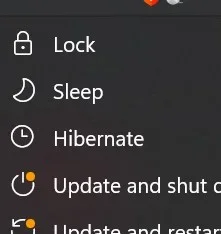
Its sleep, I have hibernate but its just sleep mode, instant wake when I hit a key. Hibernate takes a lot longer.

elbmUOSww2.webp
 

My Computer My Computer

At a glance

windwos 11 pro
OS
windwos 11 pro
I'm saying according to your screenshot you have Hibernate enabled (attestd to by it being an option in your power options.) You are still using modern standby when you select sleep from power options. Hibernate saves your session to disk and powers down completely, while Modern Standby allows for quicker wake times

That device is physiccally unable to use S3 sleep. When you click sleep in power options, it is S0 modern standby..
It's one of Microsoft's confusing misnomers why they call it sleep at all.
 

My Computers My Computers

  • At a glance

    Windows 11 Pro 25H2 26200.8655i9-10900 10 core 20 threads32 gbnone-Intel UHD Graphics 630
    OS
    Windows 11 Pro 25H2 26200.8655
    Computer type
    PC/Desktop
    Manufacturer/Model
    Dell Optiplex 7080
    CPU
    i9-10900 10 core 20 threads
    Motherboard
    DELL 0J37VM
    Memory
    32 gb
    Graphics Card(s)
    none-Intel UHD Graphics 630
    Sound Card
    Integrated Realtek
    Monitor(s) Displays
    Benq 27
    Screen Resolution
    2560x1440
    Hard Drives
    2x1tb Solidigm m.2 nvme /External drives 512gb Samsung m.2 sata+2tb Kingston m2.nvme
    PSU
    500w
    Case
    MT
    Cooling
    Dell Premium
    Keyboard
    Logitech wired
    Mouse
    Logitech wireless
    Internet Speed
    so slow I'm too embarrassed to tell
    Browser
    #1 Edge #2 Firefox
    Antivirus
    Defender+MWB Premium
  • At a glance

    Windows 11 Pro 24H2 26200.8457AMD Ryzen 7 6800U32 gbintegrated
    Operating System
    Windows 11 Pro 24H2 26200.8457
    Computer type
    PC/Desktop
    Manufacturer/Model
    Beelink Mini PC SER5
    CPU
    AMD Ryzen 7 6800U
    Memory
    32 gb
    Graphics card(s)
    integrated
    Sound Card
    integrated
    Monitor(s) Displays
    Benq 27
    Screen Resolution
    2560x1440
    Hard Drives
    1TB Crucial nvme
    Keyboard
    Logitech wired
    Mouse
    Logitech wireless
    Internet Speed
    still too embarrassed to tell
    Browser
    Firefox
    Antivirus
    Defender
    Other Info
    System 3 is non compliant Dell 9020 i7-4770/24gb ram Win11 PRO 26200.8457
I'm saying according to your screenshot you have Hibernate enabled (attestd to by it being an option in your power options.) You are still using modern standby when you select sleep from power options. Hibernate saves your session to disk and powers down completely, while Modern Standby allows for quicker wake times

That device is physiccally unable to use S3 sleep. When you click sleep in power options, it is S0 modern standby..
It's one of Microsoft's confusing misnomers why they call it sleep at all.
Oh so its still modern standby. Aside from my email client making the sounds, is there any way top stop that activity during modern standby, like all Activity while in this mock-sleep mode? I thought disabling networking would do it.
 

My Computer My Computer

At a glance

windwos 11 pro
OS
windwos 11 pro
is there any way top stop that activity during modern standby, like all Activity while in this mock-sleep mode?
Not that I'm aware of. Some folks consider hibernate as the lesser of 2 evils. Though hibernation does use a large hiberfile.sys file and is slightly slower to wake, modern standby has a lot of idiosyncracies one has to deal with.
 

My Computers My Computers

  • At a glance

    Windows 11 Pro 25H2 26200.8655i9-10900 10 core 20 threads32 gbnone-Intel UHD Graphics 630
    OS
    Windows 11 Pro 25H2 26200.8655
    Computer type
    PC/Desktop
    Manufacturer/Model
    Dell Optiplex 7080
    CPU
    i9-10900 10 core 20 threads
    Motherboard
    DELL 0J37VM
    Memory
    32 gb
    Graphics Card(s)
    none-Intel UHD Graphics 630
    Sound Card
    Integrated Realtek
    Monitor(s) Displays
    Benq 27
    Screen Resolution
    2560x1440
    Hard Drives
    2x1tb Solidigm m.2 nvme /External drives 512gb Samsung m.2 sata+2tb Kingston m2.nvme
    PSU
    500w
    Case
    MT
    Cooling
    Dell Premium
    Keyboard
    Logitech wired
    Mouse
    Logitech wireless
    Internet Speed
    so slow I'm too embarrassed to tell
    Browser
    #1 Edge #2 Firefox
    Antivirus
    Defender+MWB Premium
  • At a glance

    Windows 11 Pro 24H2 26200.8457AMD Ryzen 7 6800U32 gbintegrated
    Operating System
    Windows 11 Pro 24H2 26200.8457
    Computer type
    PC/Desktop
    Manufacturer/Model
    Beelink Mini PC SER5
    CPU
    AMD Ryzen 7 6800U
    Memory
    32 gb
    Graphics card(s)
    integrated
    Sound Card
    integrated
    Monitor(s) Displays
    Benq 27
    Screen Resolution
    2560x1440
    Hard Drives
    1TB Crucial nvme
    Keyboard
    Logitech wired
    Mouse
    Logitech wireless
    Internet Speed
    still too embarrassed to tell
    Browser
    Firefox
    Antivirus
    Defender
    Other Info
    System 3 is non compliant Dell 9020 i7-4770/24gb ram Win11 PRO 26200.8457
Not that I'm aware of. Some folks consider hibernate as the lesser of 2 evils. Though hibernation does use a large hiberfile.sys file and is slightly slower to wake, modern standby has a lot of idiosyncracies one has to deal with.
Yaah exactly, Hibernation writes everything to disk every time and is slower. I guess I can just disable the Wi-fi card in sleep mode and see what that does. thanks
 

My Computer My Computer

At a glance

windwos 11 pro
OS
windwos 11 pro
Maybe try turning on Do Not Disturb in the Notification center before putting the device to sleep?


My Computers My Computers

  • At a glance

    Windows 11AMD Ryzen 5 3500U with Radeon Vega Mobile Gfx8.00 GBAMD Radeon(TM) Vega 8 Graphics
    OS
    Windows 11
    Computer type
    Laptop
    Manufacturer/Model
    HP Pavilion Laptop 15-cw1xxx
    CPU
    AMD Ryzen 5 3500U with Radeon Vega Mobile Gfx
    Memory
    8.00 GB
    Graphics Card(s)
    AMD Radeon(TM) Vega 8 Graphics
    Sound Card
    Realtek High Definition Audio
    Monitor(s) Displays
    Generic PnP Monitor
    Screen Resolution
    1920x1080
    Hard Drives
    LITEON CV8-8E128-HP (SSD)
    WDC WD10SPZX-60Z10T0 (Hard Drive)
    PSU
    Microsoft ACPI-Compliant Control Method Battery
    Case
    Proprietary HP Pavilion Laptop 15 shell
    Cooling
    Active Fan Cooling
    Keyboard
    Standard PS/2 Keyboard
    Mouse
    ELAN Clickpad
    Internet Speed
    35.50 Mbps download 23.44 Mbps upload
    Browser
    Edge
    Antivirus
    Windows Defender
  • At a glance

    Windows 11 24h2Intel® Core™ i5-3330S Processor8.00 GB DDR3 1600 MHzNVIDIA GeForce GT 640M
    Operating System
    Windows 11 24h2
    Computer type
    PC/Desktop
    Manufacturer/Model
    Apple iMac "Core i5" 2.7 21.5" (Late 2012)
    CPU
    Intel® Core™ i5-3330S Processor
    Motherboard
    Ivy Bridge (LGA 1155)
    Memory
    8.00 GB DDR3 1600 MHz
    Graphics card(s)
    NVIDIA GeForce GT 640M
    Sound Card
    Cirrus Logic CS4206B (AB 90)
    Monitor(s) Displays
    Generic Monitor (iMac)
    Screen Resolution
    1920x1080
    Hard Drives
    APPLE HDD HTS541010A9E662 (Hard Drive 1TB)
    PSU
    Integrated
    Case
    iMac Aluminum Body
    Cooling
    Fan
    Keyboard
    HP SK-2085
    Mouse
    Lenovo
    Internet Speed
    90.8 Mbps download 23.4 Mbps upload
    Browser
    Google Chrome
    Antivirus
    Windows Defender
Maybe try turning on Do Not Disturb in the Notification center before putting the device to sleep?

Yeah, could do that. My primary concern was just the underlying running aspect, that i didn't want the laptop running while in sleep, draining battery or turning on fans at all.
 

My Computer My Computer

At a glance

windwos 11 pro
OS
windwos 11 pro
Yeah, could do that. My primary concern was just the underlying running aspect, that i didn't want the laptop running while in sleep, draining battery or turning on fans at all.
There's not much you can do if that laptop doesn't support S3 other than buy one that does unfortunately...
 

My Computers My Computers

  • At a glance

    Windows 11AMD Ryzen 5 3500U with Radeon Vega Mobile Gfx8.00 GBAMD Radeon(TM) Vega 8 Graphics
    OS
    Windows 11
    Computer type
    Laptop
    Manufacturer/Model
    HP Pavilion Laptop 15-cw1xxx
    CPU
    AMD Ryzen 5 3500U with Radeon Vega Mobile Gfx
    Memory
    8.00 GB
    Graphics Card(s)
    AMD Radeon(TM) Vega 8 Graphics
    Sound Card
    Realtek High Definition Audio
    Monitor(s) Displays
    Generic PnP Monitor
    Screen Resolution
    1920x1080
    Hard Drives
    LITEON CV8-8E128-HP (SSD)
    WDC WD10SPZX-60Z10T0 (Hard Drive)
    PSU
    Microsoft ACPI-Compliant Control Method Battery
    Case
    Proprietary HP Pavilion Laptop 15 shell
    Cooling
    Active Fan Cooling
    Keyboard
    Standard PS/2 Keyboard
    Mouse
    ELAN Clickpad
    Internet Speed
    35.50 Mbps download 23.44 Mbps upload
    Browser
    Edge
    Antivirus
    Windows Defender
  • At a glance

    Windows 11 24h2Intel® Core™ i5-3330S Processor8.00 GB DDR3 1600 MHzNVIDIA GeForce GT 640M
    Operating System
    Windows 11 24h2
    Computer type
    PC/Desktop
    Manufacturer/Model
    Apple iMac "Core i5" 2.7 21.5" (Late 2012)
    CPU
    Intel® Core™ i5-3330S Processor
    Motherboard
    Ivy Bridge (LGA 1155)
    Memory
    8.00 GB DDR3 1600 MHz
    Graphics card(s)
    NVIDIA GeForce GT 640M
    Sound Card
    Cirrus Logic CS4206B (AB 90)
    Monitor(s) Displays
    Generic Monitor (iMac)
    Screen Resolution
    1920x1080
    Hard Drives
    APPLE HDD HTS541010A9E662 (Hard Drive 1TB)
    PSU
    Integrated
    Case
    iMac Aluminum Body
    Cooling
    Fan
    Keyboard
    HP SK-2085
    Mouse
    Lenovo
    Internet Speed
    90.8 Mbps download 23.4 Mbps upload
    Browser
    Google Chrome
    Antivirus
    Windows Defender
I noticed in your original post your said:
But when it's in sleep with the laptop closed,

While modern standby has gotten better, know that one of those modern standby idiosyncracies I spoke about is that some users have reported their device overheats when in modern standby with the lid closed with even some reporting they have caught fire when carried in a bag. If it were me, I would set close lid action to hibernate.
 

My Computers My Computers

  • At a glance

    Windows 11 Pro 25H2 26200.8655i9-10900 10 core 20 threads32 gbnone-Intel UHD Graphics 630
    OS
    Windows 11 Pro 25H2 26200.8655
    Computer type
    PC/Desktop
    Manufacturer/Model
    Dell Optiplex 7080
    CPU
    i9-10900 10 core 20 threads
    Motherboard
    DELL 0J37VM
    Memory
    32 gb
    Graphics Card(s)
    none-Intel UHD Graphics 630
    Sound Card
    Integrated Realtek
    Monitor(s) Displays
    Benq 27
    Screen Resolution
    2560x1440
    Hard Drives
    2x1tb Solidigm m.2 nvme /External drives 512gb Samsung m.2 sata+2tb Kingston m2.nvme
    PSU
    500w
    Case
    MT
    Cooling
    Dell Premium
    Keyboard
    Logitech wired
    Mouse
    Logitech wireless
    Internet Speed
    so slow I'm too embarrassed to tell
    Browser
    #1 Edge #2 Firefox
    Antivirus
    Defender+MWB Premium
  • At a glance

    Windows 11 Pro 24H2 26200.8457AMD Ryzen 7 6800U32 gbintegrated
    Operating System
    Windows 11 Pro 24H2 26200.8457
    Computer type
    PC/Desktop
    Manufacturer/Model
    Beelink Mini PC SER5
    CPU
    AMD Ryzen 7 6800U
    Memory
    32 gb
    Graphics card(s)
    integrated
    Sound Card
    integrated
    Monitor(s) Displays
    Benq 27
    Screen Resolution
    2560x1440
    Hard Drives
    1TB Crucial nvme
    Keyboard
    Logitech wired
    Mouse
    Logitech wireless
    Internet Speed
    still too embarrassed to tell
    Browser
    Firefox
    Antivirus
    Defender
    Other Info
    System 3 is non compliant Dell 9020 i7-4770/24gb ram Win11 PRO 26200.8457
You have not yet identified the source of those notifications [other than that it is a Windows app generating them rather than an old 'desktop application'].
They should not be email notifications because your powercfg -a report says you are not connected to your network whilst in S0 Modern standby [aka S0 Low power idle].
I suggest you wait for one of those notification sounds then press a key / wiggle the mouse to bring the display up so you can find out what the notification is.

I do wonder how you thought S0 Modern Standby was disabled. Perhaps the action you took is causing the computer to run in some unsupported, non-standard way.
I had one that went haywire when I disabled S0 Modern standby; it could not read its Windows disk correctly.

laptop running while in sleep
And I urge you not to use the word sleep at all; it might case incorrect thinking. You do not have any sleep states.
You can set your Power options, Choose what the power buttons do dialog not to show that sleep option. All it does is send your computer into a later S0 Modern standby idle condition straightaway that it would otherwise take some time to reach.


Denis
 

My Computer My Computer

At a glance

Windows 11 Home x64 Version 25H2 Build 26200....
OS
Windows 11 Home x64 Version 25H2 Build 26200.8037
You have not yet identified the source of those notifications [other than that it is a Windows app generating them rather than an old 'desktop application'].
They should not be email notifications because your powercfg -a report says you are not connected to your network whilst in S0 Modern standby [aka S0 Low power idle].
I suggest you wait for one of those notification sounds then press a key / wiggle the mouse to bring the display up so you can find out what the notification is.

I do wonder how you thought S0 Modern Standby was disabled. Perhaps the action you took is causing the computer to run in some unsupported, non-standard way.
I had one that went haywire when I disabled S0 Modern standby; it could not read its Windows disk correctly.


And I urge you not to use the word sleep at all; it might case incorrect thinking. You do not have any sleep states.
You can set your Power options, Choose what the power buttons do dialog not to show that sleep option. All it does is send your computer into a later S0 Modern standby idle condition straightaway that it would otherwise take some time to reach.


Denis

The reason I thought it was disabled was because I followed brinks tutorial to disable modern standby where you run that CMD command. On top of that, the command says "operation completed successfully" but I guess it's misleading and is not actually doing anything because my computer doesn't support disabling it.

Because I disabled Network connectivity during modern standby I guess what mine is called is "disconnected modern standby"

Yes I need to figure out what the notification noise is it may not be emails, so I'll check next time it happens.
 

My Computer My Computer

At a glance

windwos 11 pro
OS
windwos 11 pro
The reason I thought it was disabled was because I followed brinks tutorial to disable modern standby where you run that CMD command. But clearly even though the command say it was accepted
Understood.
My 'haywire' computer also completed the disabling procedure. The absence of any errors in the procedure just means the Registry edit happened [not that the computer would take a blind bit of notice of the change].
Fortunately, I'd made a system image beforehand so I was able to undo the job completely.

Do you have a home network with other computers on it?
If so, you can check whether or not they can see the computer we're discussing whilst it's in S0 Modern standby.


Denis
 

My Computer My Computer

At a glance

Windows 11 Home x64 Version 25H2 Build 26200....
OS
Windows 11 Home x64 Version 25H2 Build 26200.8037
If so, you can check whether or not they can see the computer we're discussing whilst it's in S0 Modern standby.
Denis he has network connectivity disabled while in s0. screenshot post 1
 

My Computers My Computers

  • At a glance

    Windows 11 Pro 25H2 26200.8655i9-10900 10 core 20 threads32 gbnone-Intel UHD Graphics 630
    OS
    Windows 11 Pro 25H2 26200.8655
    Computer type
    PC/Desktop
    Manufacturer/Model
    Dell Optiplex 7080
    CPU
    i9-10900 10 core 20 threads
    Motherboard
    DELL 0J37VM
    Memory
    32 gb
    Graphics Card(s)
    none-Intel UHD Graphics 630
    Sound Card
    Integrated Realtek
    Monitor(s) Displays
    Benq 27
    Screen Resolution
    2560x1440
    Hard Drives
    2x1tb Solidigm m.2 nvme /External drives 512gb Samsung m.2 sata+2tb Kingston m2.nvme
    PSU
    500w
    Case
    MT
    Cooling
    Dell Premium
    Keyboard
    Logitech wired
    Mouse
    Logitech wireless
    Internet Speed
    so slow I'm too embarrassed to tell
    Browser
    #1 Edge #2 Firefox
    Antivirus
    Defender+MWB Premium
  • At a glance

    Windows 11 Pro 24H2 26200.8457AMD Ryzen 7 6800U32 gbintegrated
    Operating System
    Windows 11 Pro 24H2 26200.8457
    Computer type
    PC/Desktop
    Manufacturer/Model
    Beelink Mini PC SER5
    CPU
    AMD Ryzen 7 6800U
    Memory
    32 gb
    Graphics card(s)
    integrated
    Sound Card
    integrated
    Monitor(s) Displays
    Benq 27
    Screen Resolution
    2560x1440
    Hard Drives
    1TB Crucial nvme
    Keyboard
    Logitech wired
    Mouse
    Logitech wireless
    Internet Speed
    still too embarrassed to tell
    Browser
    Firefox
    Antivirus
    Defender
    Other Info
    System 3 is non compliant Dell 9020 i7-4770/24gb ram Win11 PRO 26200.8457
Denis he has network connectivity disabled while in s0. screenshot post 1
Yes, I saw that.
Since those notification sounds are of unknown origin then it would be helpful for the OP to get confirmation that it is actually using Disconnected standby as the PowerCfg -a results indicate.


All the best,
Denis
 

My Computer My Computer

At a glance

Windows 11 Home x64 Version 25H2 Build 26200....
OS
Windows 11 Home x64 Version 25H2 Build 26200.8037
I think I found out what it is now, So after I put the laptop into Modern Standby "sleep", I get home, I plug the power cord in (which is a propriety slot, its not USB based), that wakes the laptop, and I suddenly get new mail notifications.
So it seems to be the power cord being plugged in, somehow triggers a wake, which then triggers connection to wifi- and thus new mail notifications.

But what's strange is when I open the laptop, the screen is still off, as if its in modern standby still.
 

My Computer My Computer

At a glance

windwos 11 pro
OS
windwos 11 pro
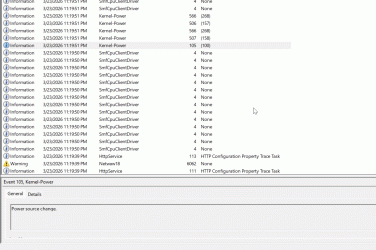
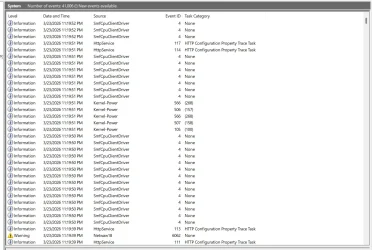
OKay I just caught it happening, laptop was closed in modern standby for past couple hours, suddenly I hear new mail notification noises.

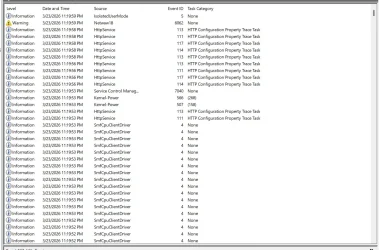
and ran and opened my laptop quick to bring up event viewer. I attached 2 screenshots of the entire time period (maybe 20 seconds where it could have occurred), but also a GIF image below, which I think is the specific event and cause, its one of these 5 kernel power messages. Any idea which is relevant of these 5? And what is means?
One says "AC/DC Display Burst Suppressed....Exiting Modern Standby" But the other one says "Reason InputMouse".

mmc_QNspL2h5mW.gif
 

Attachments

  • 5lJVt7Cvt7.webp
    5lJVt7Cvt7.webp
    149.7 KB · Views: 1
  • PGsTum5EiT.webp
    PGsTum5EiT.webp
    166.6 KB · Views: 1
Last edited:

My Computer My Computer

At a glance

windwos 11 pro
OS
windwos 11 pro
in modern standby for past couple hours, suddenly I hear new mail notification noises.
Do you have a home network with other computers on it?
If so, you can check whether or not they can see the computer we're discussing whilst it's in S0 Modern standby.


Denis
 

My Computer My Computer

At a glance

Windows 11 Home x64 Version 25H2 Build 26200....
OS
Windows 11 Home x64 Version 25H2 Build 26200.8037
While viewing this thread in Edge. Open co-pilot chat in upper right corner of page, Ask this exact question - How can I manage notification sounds in modern standby on Windows 11?

It's answer analyzes everything in this thread and basically says what you have been told, but puts it all in a clear chronilogical perspective and says what you can and can not do regarding sounds when using Modern standby(s0). Through your interaction with co-pilot's questions to you, it can also analyze each of the wake event s in your event viewer screenshot
-------------------------------------
The specific answer from Co-pilot regarding why you are hearing sounds when plugging in AC power is:

Why AC power causes notification sounds​

Your event logs show entries like:
  • AC/DC Display Burst Suppressed
  • Exiting Modern Standby
  • Reason: InputMouse
These are normal Modern Standby wake sources. Microsoft confirms that hardware interrupts (power, input, Bluetooth, network stack) can wake the SoC briefly even when the screen stays off .

So the sequence is:
  1. Laptop is in S0 Low Power Idle
  2. You plug in AC power
  3. Power controller triggers a wake event
  4. Wi‑Fi stack reinitializes
  5. Mail syncs
  6. Notification sound plays
  7. Screen stays off because the system returns to standby
This is expected behavior — confusing, but expected.


Bottom line co-pilot also says that setting lid-close action to hibernate is the only guaranteed method for zero activity and zero sound.
 

My Computers My Computers

  • At a glance

    Windows 11 Pro 25H2 26200.8655i9-10900 10 core 20 threads32 gbnone-Intel UHD Graphics 630
    OS
    Windows 11 Pro 25H2 26200.8655
    Computer type
    PC/Desktop
    Manufacturer/Model
    Dell Optiplex 7080
    CPU
    i9-10900 10 core 20 threads
    Motherboard
    DELL 0J37VM
    Memory
    32 gb
    Graphics Card(s)
    none-Intel UHD Graphics 630
    Sound Card
    Integrated Realtek
    Monitor(s) Displays
    Benq 27
    Screen Resolution
    2560x1440
    Hard Drives
    2x1tb Solidigm m.2 nvme /External drives 512gb Samsung m.2 sata+2tb Kingston m2.nvme
    PSU
    500w
    Case
    MT
    Cooling
    Dell Premium
    Keyboard
    Logitech wired
    Mouse
    Logitech wireless
    Internet Speed
    so slow I'm too embarrassed to tell
    Browser
    #1 Edge #2 Firefox
    Antivirus
    Defender+MWB Premium
  • At a glance

    Windows 11 Pro 24H2 26200.8457AMD Ryzen 7 6800U32 gbintegrated
    Operating System
    Windows 11 Pro 24H2 26200.8457
    Computer type
    PC/Desktop
    Manufacturer/Model
    Beelink Mini PC SER5
    CPU
    AMD Ryzen 7 6800U
    Memory
    32 gb
    Graphics card(s)
    integrated
    Sound Card
    integrated
    Monitor(s) Displays
    Benq 27
    Screen Resolution
    2560x1440
    Hard Drives
    1TB Crucial nvme
    Keyboard
    Logitech wired
    Mouse
    Logitech wireless
    Internet Speed
    still too embarrassed to tell
    Browser
    Firefox
    Antivirus
    Defender
    Other Info
    System 3 is non compliant Dell 9020 i7-4770/24gb ram Win11 PRO 26200.8457

Latest Support Threads

Back
Top Bottom