NTFS and FAT32 on one HDD?!


RingTailCoon 11

Crank it up... to 11!
Member
Local time
10:41 PM
Posts
246
Location
Harderwijk
OS
Windows 11
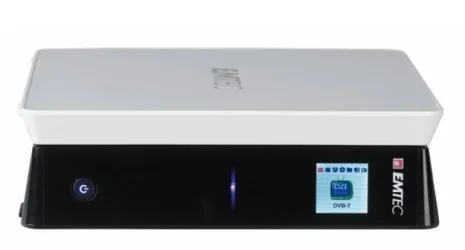
Bought myself an old EMTEC Movie Cube S800 but the config of the HDD is kinda strange to me, one part of the HDD is NTFS and the other is FAT32 formatted? Am I going crazy?!

1766135958789.webp

Uuuuuh, that's normal for a media center?
 

My Computer

System One

  • OS
    Windows 11
    Computer type
    PC/Desktop
    Manufacturer/Model
    Cooler master
    CPU
    I5
    Motherboard
    Gigabyte
    Memory
    Too much haha!
    Graphics Card(s)
    NVidia 1060
Bought myself an old EMTEC Movie Cube S800 but the config of the HDD is kinda strange to me, one part of the HDD is NTFS and the other is FAT32 formatted? Am I going crazy?!

View attachment 157389

Uuuuuh, that's normal for a media center?
Each separate partition (so long as they are physical and not logical partitions) can have any file system you can format it with. One caveat is that for non GPT and fat32 only formatted drives there's a max of 4 physical partitions.

I'd avoid under all circumstances using logical partitions though.

Another thing is some older drives might have to use "LBA" to address the full disk geometry with larger capacities. This will usually be in the drive's firmware so you shouldn't have to worry about that.

(Question - does that disk boot via "BIOS" or "UEFI" though or is it "multi-boot" - or you don't use it as a boot device at all).

Cheers
jimbo
 

My Computer

System One

  • OS
    Windows XP,11 Linux Fedora Rawhide pre-release 45
    Computer type
    PC/Desktop
    CPU
    2 X Intel i7
    Screen Resolution
    4KUHD X 2
Bought myself an old EMTEC Movie Cube S800 but the config of the HDD is kinda strange to me, one part of the HDD is NTFS and the other is FAT32 formatted? Am I going crazy?!
The HDD layout is complex because the S800 has it's own linux-based operating system. It functions not only as an external drive, but also as a PVR with analog and DVB tuners, and can be confgured as a NAS. It appears to be an MBR disk, so limited to four partitions. The 4th partition (in green) is a logical partition containing 5 partitions of its own.

The Emtec S800 HDD Movie Cube combines much of the functionality of a DTT/analogue tuner-equipped DVD/HDD recorder (minus the disc part, of course) with an HD-capable media streamer, while also throwing video capture into the mix.

It comes with a 500GB hard disc installed that can be swapped for another 3.5in drive. It will also work with USB-attached flash sticks or external drives and can function as a back-up hard disc.

....The Linux-based software is rather tacky-looking but it's generally easy to find what you want.

Manual: Manual Emtec Movie Cube S800 Media Player
 

My Computers

System One System Two

  • OS
    Windows 11 Home
    Computer type
    Laptop
    Manufacturer/Model
    Acer Aspire 3 A315-23-R9VY
    CPU
    AMD Athlon Silver 3050U
    Memory
    8GB
    Graphics Card(s)
    Radeon Graphics
    Monitor(s) Displays
    laptop screen
    Screen Resolution
    1366x768 native resolution, up to 2560x1440 with Radeon Virtual Super Resolution
    Hard Drives
    1TB Samsung EVO 870 SSD (from April 2026: 250GB EVO 850)
    Internet Speed
    150 Mbps
    Browser
    Edge, Firefox
    Antivirus
    Defender
    Other Info
    fully 'Windows 11 ready' laptop. Windows 10 C: partition migrated from my old unsupported 'main machine' then upgraded to 11. A test migration ran Insider builds for 2 months. When 11 was released on 5th October 2021 it was re-imaged back to 10 and was offered the upgrade in Windows Update on 20th October. Windows Update offered the 22H2 Feature Update on 20th September 2022. It got the 23H2 Feature Update on 4th November 2023 through Windows Update, 24H2 on 3rd October 2024 through Windows Update by setting the Target Release Version for 24H2, and 25H2 on 30th September 2025 through Windows Update by setting the Target Release Version for 25H2.

    UPDATE - 11 April 2026: due to mechanical deterioration this PC has been retired from active duty. The OS with all software and files has been migrated to my System Seven below to carry on as my general purpose 'main machine'.

    My SYSTEM THREE is a Dell Latitude 5410, i7-10610U, 32GB RAM, 512GB NVMe ssd, supported device running Windows 11 Pro.

    My SYSTEM FOUR is a 2-in-1 convertible Lenovo Yoga 11e 20DA, Celeron N2930, 8GB RAM, 256GB ssd. Unsupported device: currently running Win10 Pro, plus Win11 Pro RTM and Insider Dev, Beta, and RP 24H2 as native boot vhdx.

    My SYSTEM FIVE is a Dell Latitude 3190 2-in-1, Pentium Silver N5030, 8GB RAM, 1TB NVMe ssd, supported device running Windows 11 Pro, plus Insider Beta, Dev, and Canary builds (and a few others) as a native boot .vhdx.

    My SYSTEM SIX is a Dell Latitude 5550, Core Ultra 7 165H, 64GB RAM, 1TB NVMe SSD, supported device, Windows 11 Pro 24H2, Hyper-V host machine. Updated to 25H2 on 30th September 2025.

    My SYSTEM SEVEN is a Lenovo Thinkpad T580, Intel Core i7-8650U, 16GB RAM, 512GB NVMe SSD + 2nd 512GB NVMe SSD, a supported device for Windows 11. This is my current general purpose 'main machine'. The installed Windows 11 Home from my System One has been migrated to this machine.

  • Operating System
    Windows 11 Pro
    Computer type
    Laptop
    Manufacturer/Model
    Dell Latitude E4310
    CPU
    Intel® Core™ i5-520M
    Motherboard
    0T6M8G
    Memory
    8GB
    Graphics card(s)
    (integrated graphics) Intel HD Graphics
    Screen Resolution
    1366x768
    Hard Drives
    500GB Crucial MX500 SSD
    Browser
    Firefox, Edge
    Antivirus
    Defender
    Other Info
    unsupported machine: Legacy bios, MBR, TPM 1.2, upgraded from W10 to W11 using W10/W11 hybrid install media workaround. In-place upgrade to 22H2 using ISO and a workaround. Feature Update to 23H2 by manually installing the Enablement Package. In-place upgrade to 24H2 using hybrid 23H2/24H2 install media. Upgraded to 25H2 by Enablement Package. Also running Insider Dev, and Canary builds and Windows 10 as native boot .vhdx.

    My SYSTEM THREE is a Dell Latitude 5410, i7-10610U, 32GB RAM, 512GB NVMe ssd, supported device running Windows 11 Pro.

    My SYSTEM FOUR is a 2-in-1 convertible Lenovo Yoga 11e 20DA, Celeron N2930, 8GB RAM, 256GB ssd. Unsupported device: currently running Win10 Pro, plus Win11 Pro RTM and Insider Dev, Beta, and RP 24H2 as native boot vhdx.

    My SYSTEM FIVE is a Dell Latitude 3190 2-in-1, Pentium Silver N5030, 8GB RAM, 1TB NVMe ssd, supported device running Windows 11 Pro, plus Insider Beta, Dev, and Canary builds (and a few others) as a native boot .vhdx.

    My SYSTEM SIX is a Dell Latitude 5550, Core Ultra 7 165H, 64GB RAM, 1TB NVMe SSD, supported device, Windows 11 Pro 24H2, Hyper-V host machine. Updated to 25H2 on 30th September 2025.

    My SYSTEM SEVEN is a Lenovo Thinkpad T580, Intel Core i7-8650U, 16GB RAM, 512GB NVMe SSD + 2nd 512GB NVMe SSD, a supported device for Windows 11. This is my current general purpose 'main machine'. The installed Windows 11 Home from my System One has been migrated to this machine.
The HDD drive of those sort of boxes are usually consumer versions of PC HDDs they have different firmware to enable/optimise multiple recording and playback video streams along with less error checking.
As that particular Media centre has multiple functionality, not surprising the various partitions.
 

My Computer

System One

  • OS
    Windows 11
(Question - does that disk boot via "BIOS" or "UEFI" though or is it "multi-boot" - or you don't use it as a boot device at all).
No, it's all part of a EMTEC Movie Cube Media center settop box with intern HDD.
1766256024411.webp
 

My Computer

System One

  • OS
    Windows 11
    Computer type
    PC/Desktop
    Manufacturer/Model
    Cooler master
    CPU
    I5
    Motherboard
    Gigabyte
    Memory
    Too much haha!
    Graphics Card(s)
    NVidia 1060
Back
Top Bottom