O&O ShutUp10


My Computer

System One

  • OS
    Windows 11 Pro 25H2 26200.8457
    Computer type
    PC/Desktop
    Manufacturer/Model
    Build by vendor to my specs
    CPU
    AMD Ryzen 7 5700G
    Motherboard
    MSI PRO B550M-P Gen3
    Memory
    Kingston FURY Beast 2x16GB DIMM DDR4 2666 CL16
    Graphics Card(s)
    MSI GeForce GT 730 2GB LP V1
    Sound Card
    Creative Sound Blaster Audigy FX
    Monitor(s) Displays
    Samsung S24E450F 24"
    Screen Resolution
    1920 x 1080
    Hard Drives
    1. SSD Crucial P5 Plus 500GB PCIe M.2
    2. SSD-SATA Crucial MX500-2TB
    PSU
    Corsair CV650W
    Case
    Cooler Master Silencio S400
    Cooling
    Cooler Master Hyper H412R with Be Quiet Pure Wings 2 PWM BL038 fan
    Keyboard
    Cherry Stream (wired, scissor keys)
    Mouse
    Asus WT465 (wireless)
    Internet Speed
    70 Mbps down / 80 Mbps up
    Browser
    Firefox 130.0
    Antivirus
    F-Secure (Internetprovider version)
    Other Info
    Router: FRITZBox 7490
    Oracle VirtualBox 7 for testing software on Win 10 or 11
  • The application is now based on .NET 8 (previously .NET Framework 4.8)
  • Distributed as a single executable so that all .NET 8 libraries are available at runtime without installation and the application can be run portably.
 

My Computer

System One

  • OS
    Windows 11 Pro 25H2
    Computer type
    PC/Desktop
    Manufacturer/Model
    Intel NUC12WSHi7
    CPU
    12th Gen Core i7-1260P
    Motherboard
    NUC12WSBi7
    Memory
    64 GB Micron PC4-25600
    Graphics Card(s)
    Intel Iris Xe Graphics
    Sound Card
    on-board Realtek HD Audio
    Monitor(s) Displays
    Dell U3219Q
    Screen Resolution
    3840 x 2160
    Hard Drives
    Samsung SSD 990 PRO 1TB
    Crucial MX500 2 TB
    Antivirus
    Microsoft Defender
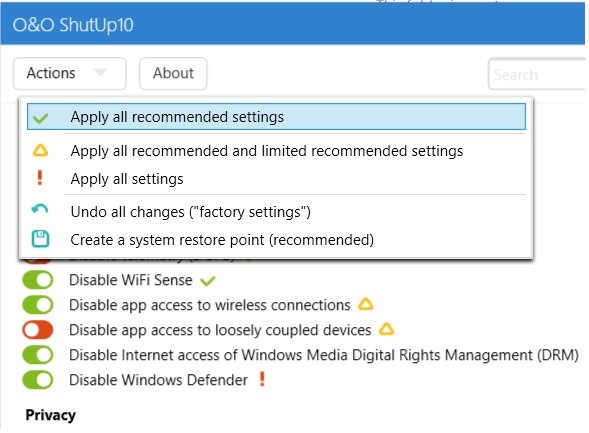
There's lots of changes that can be made with this program. The developer broke the options down to -

1) Green - Recommended
2) Orange - Limited
3) Red - No

Does anyone have a working template to share where "Limited", even "No" options were selected, to further lock down Windows 11, that did NOT break their system? I'd like to lock down my system as much as possible and not overdue it and hose my system. Btw, I'm not a gamer. I use mostly Office (Productivity) type products and VM hosts hosting various Linux distros. Thanks in advance.
 

My Computer

System One

  • OS
    Windows 11 Pro
    Computer type
    PC/Desktop
    Manufacturer/Model
    Dell 8930 & 8950

My Computer

System One

  • OS
    Windows 11 25H2 Home Single Language (26200.8037)
    Computer type
    Laptop
    Manufacturer/Model
    LENOVO IdeaPad 5 15ITL05
    CPU
    Intel Core i3-1115G4
    Motherboard
    There is no such a God, I only know mother-Earth
    Memory
    8GB
    Graphics Card(s)
    on-board
    Sound Card
    on-board
    Monitor(s) Displays
    (s) is too ambitious for me
    Screen Resolution
    1920*1080
    Hard Drives
    256GB (SSD)
    PSU
    I was very young when I last saw a PSU
    Case
    ...
    Cooling
    My coldness is enough to cool the computer
    Keyboard
    A broken and very clean keyboard
    Mouse
    Rat
    Internet Speed
    Slowest internet connection in Europe
    Browser
    ChromePortable / FirefoxPortable / TorBrowser
    Antivirus
    G-Virus
    Other Info
    I can simply say that I took the red pill and I am not happy with it.
  • Distributed as a single executable so that all .NET 8 libraries are available at runtime without installation and the application can be run portably.
Thanks, that I missed!
Did not notice I would not need to install .NET 8.

I have just used it without .NET 8 installing.
I did too. (y)
 

My Computer

System One

  • OS
    Windows 11 Pro 25H2 26200.8457
    Computer type
    PC/Desktop
    Manufacturer/Model
    Build by vendor to my specs
    CPU
    AMD Ryzen 7 5700G
    Motherboard
    MSI PRO B550M-P Gen3
    Memory
    Kingston FURY Beast 2x16GB DIMM DDR4 2666 CL16
    Graphics Card(s)
    MSI GeForce GT 730 2GB LP V1
    Sound Card
    Creative Sound Blaster Audigy FX
    Monitor(s) Displays
    Samsung S24E450F 24"
    Screen Resolution
    1920 x 1080
    Hard Drives
    1. SSD Crucial P5 Plus 500GB PCIe M.2
    2. SSD-SATA Crucial MX500-2TB
    PSU
    Corsair CV650W
    Case
    Cooler Master Silencio S400
    Cooling
    Cooler Master Hyper H412R with Be Quiet Pure Wings 2 PWM BL038 fan
    Keyboard
    Cherry Stream (wired, scissor keys)
    Mouse
    Asus WT465 (wireless)
    Internet Speed
    70 Mbps down / 80 Mbps up
    Browser
    Firefox 130.0
    Antivirus
    F-Secure (Internetprovider version)
    Other Info
    Router: FRITZBox 7490
    Oracle VirtualBox 7 for testing software on Win 10 or 11
O&O ShutUp10 2.2.1024

2.2.1024 – released on 04/02/2026​

Added:
  • Show O&O product overview when exiting the application
  • Disable Bing Chat permission in Windows Copilot (C104)
  • Hide welcome screen and startup animation (E132)
  • Disable Spotlight experiences and recommendations (E133)
  • Disable automatic sign-in from the web to the browser (E134)
  • Disable Bing Chat on the new tab page (E135)
  • Disable content on the new tab page (E136)
  • Disable AI-generated designs (E137)
  • Disable integrated AI APIs for websites (E138)
  • Disable inline compose feature (E139)
  • Disable Copilot access to page context (E140)
  • Disable prompts to set Edge as the default browser (E141)
  • Disable default browser campaigns (E142)
  • Disable diagnostic data collection (E143)
  • Disable shopping assistant (E144)
  • Hide Microsoft 365 Copilot chat icon (E145)
  • Hide Microsoft Rewards (E146)
  • Disable recommendations in Settings (E147)
  • Disable cloud-based tab services (E148)
  • Disable text prediction in forms (E149)
  • Disable visual search (E150)
  • Disable AI-powered history search (E151)
  • Allow user control over local AI features (E152)
  • Disable quick startup (E153)
  • Hide default top sites on the new tab page (E154)
  • Hide Adobe Acrobat subscription button (E155)
  • Hide welcome screen and startup animation (E232)
  • Disable Spotlight experiences and recommendations (E233)
  • Disable automatic sign-in from the web to the browser (E234)
  • Disable Bing Chat on the new tab page (E235)
  • Disable content on the new tab page (E236)
  • Disable AI-generated designs (E237)
  • Disable integrated AI APIs for websites (E238)
  • Disable inline compose feature (E239)
  • Disable Copilot access to page context (E240)
  • Disable prompts to set Edge as the default browser (E241)
  • Disable default browser campaigns (E242)
  • Disable diagnostic data collection (E243)
  • Disable shopping assistant (E244)
  • Hide Microsoft 365 Copilot chat icon (E245)
  • Hide Microsoft Rewards (E246)
  • Disable recommendations in Settings (E247)
  • Disable cloud-based tab services (E248)
  • Disable text prediction in forms (E249)
  • Disable visual search (E250)
  • Disable AI-powered history search (E251)
  • Allow user control over local AI features (E252)
  • Disable quick startup (E253)
  • Hide default top sites on the new tab page (E254)
  • Hide Adobe Acrobat subscription button (E255)
  • Set diagnostic data level to minimum (None) (F018)
  • Hide privacy settings notification on first launch (F019)
Changed:
  • Disable display of LinkedIn information (F016)
  • Disable news and interests display on the taskbar on this device (M019)
  • Disable app access to calendar for the current user (P011)
  • Disable app access to account information on this device (P107)
  • Disable app access to calendar on this device (P111)
  • Disable app access to camera on this device (P112)
  • Disable app access to microphone on this device (P113)
  • Disable app access to messages on this device (P114)
  • Disable app access to call history on this device (P118)
  • Disable app access to contacts on this device (P120)
Removed:
  • Removed note and link to the O&O newsletter from the Current User view
  • Removed note and link to O&O Syspectr from the Local Machine view
  • Removed setting F017 (Disable Microsoft feedback tracking) as duplicate of F009
Info:
  • Compatible with Windows 11 and Windows 10; x86, x64 and ARM architecture
  • Available in German, English, French, Italian, Spanish, Russian and Chinese (Simplified)
 

My Computer

System One

  • OS
    Windows 11 Pro
    Computer type
    PC/Desktop
    Manufacturer/Model
    Custom Build
    CPU
    Intel Core i9 12900KF
    Motherboard
    ASUS ROG Maximus Z690 Hero
    Memory
    Corsair 64GB DDR5 Vengeance C40 5200Mhz
    Graphics Card(s)
    ASUS GeForce RTX 3090 ROG Strix OC 24GB
    Sound Card
    OnBoard
    Monitor(s) Displays
    Acer Predator XB323UGP 32" QHD G-SYNC-C 144Hz 1MS IPS LED
    Screen Resolution
    2560 x 1440
    Hard Drives
    1x Samsung 980 Pro Series Gen4 250GB M.2 NVMe
    1x Samsung 980 Pro Series Gen4 500GB M.2 NVMe
    2x Samsung 980 Pro Series Gen4 2TB M.2 NVMe
    PSU
    Corsair AX1200i 1200W 80PLUS Titanium Modular
    Case
    Corsair 4000D Black Case w/ Tempered Glass Side Panel
    Cooling
    Noctua NH-U12A Chromax Black CPU Cooler, 4x Noctua 120mm Fans
    Keyboard
    Logitech MK545
    Mouse
    Logitech MX Master 3
    Internet Speed
    Fixed Wireless 150mbps/75mbps
    Browser
    Firefox
    Antivirus
    Kaspersky
    Other Info
    Thrustmaster TS-PC RACER
    Fanatec CSL Elite Pedals with the Load Cell Kit
    Yamaha Amp with Bose Speakers
O&O ShutUp10 3.0.1076

3.0.1076 – released on 20/05/2026​

Added
  • Secure Boot certificate status display
  • Online help integration (F1 support)
  • Settings dialog
  • Accessibility and UI automation support
  • Status bar display for filtered view
  • Edit mode for advanced users
  • Explanation dialog for edit mode
  • Disable Edge Secure Network (integrated VPN) (E156)
  • Disable Edge Secure Network (integrated VPN) (E256)
  • Disable Xbox Game Bar and Game DVR (G001)
  • Disable NFC (Near Field Communication) (S116)
  • Disable wireless display (Miracast/WiDi) (S117)
  • Disable mobile broadband (WWAN) (S118)
  • Disable WiFi Direct (S119)
  • Restrict Bluetooth pairing (S120)
  • Disable optional updates (including preview updates) (W012)
  • PREM: Premium Edition with profiles, background service, and automatic protection
  • PREM: Privacy profiles (Office, Gaming, Family, Total Privacy) with export/import (.pcfg)
  • PREM: Onboarding screen for privacy setup on first launch
  • PREM: Statistics and usage overview
  • PREM: Undo button in the profile management dialog
  • PREM: Automatic protection with settings enforcement
  • PREM: Activity log
Improved
  • Disable Cocreator in Microsoft Paint (C206)
  • Disable AI-powered image fill in Microsoft Paint (C207)
  • Disable the Microsoft Account Sign-In Button (E129)
  • Disable automatic redirection from Internet Explorer to Microsoft Edge (E131)
  • Allow user control of local AI features (E152)
  • Disable the Microsoft Account Sign-In Button (E229)
  • Allow user control of local AI features (E252)
  • Disable extension of Windows search with Bing (M003)
  • Disable search box in task bar (M016)
  • Disable news and interests in the task bar (M019)
  • Reorganized menu structure (Settings → Tools, View → Tools)
  • Search and filter moved from the main window into the title bar
  • Replaced "Quick Guide" with "Online Help" on the web
  • Revised status bar layout and font sizes
Fixed
  • Factory reset left policy registry keys behind that blocked Windows Updates
  • Unicode and symbol rendering issues in localized resources
Info
  • Compatible with Windows 11 and Windows 10; x86, x64, and ARM architecture
  • Available in German, English, French, Italian, Spanish, Russian, and Simplified Chinese
 

My Computer

System One

  • OS
    Windows 11 Pro
    Computer type
    PC/Desktop
    Manufacturer/Model
    Custom Build
    CPU
    Intel Core i9 12900KF
    Motherboard
    ASUS ROG Maximus Z690 Hero
    Memory
    Corsair 64GB DDR5 Vengeance C40 5200Mhz
    Graphics Card(s)
    ASUS GeForce RTX 3090 ROG Strix OC 24GB
    Sound Card
    OnBoard
    Monitor(s) Displays
    Acer Predator XB323UGP 32" QHD G-SYNC-C 144Hz 1MS IPS LED
    Screen Resolution
    2560 x 1440
    Hard Drives
    1x Samsung 980 Pro Series Gen4 250GB M.2 NVMe
    1x Samsung 980 Pro Series Gen4 500GB M.2 NVMe
    2x Samsung 980 Pro Series Gen4 2TB M.2 NVMe
    PSU
    Corsair AX1200i 1200W 80PLUS Titanium Modular
    Case
    Corsair 4000D Black Case w/ Tempered Glass Side Panel
    Cooling
    Noctua NH-U12A Chromax Black CPU Cooler, 4x Noctua 120mm Fans
    Keyboard
    Logitech MK545
    Mouse
    Logitech MX Master 3
    Internet Speed
    Fixed Wireless 150mbps/75mbps
    Browser
    Firefox
    Antivirus
    Kaspersky
    Other Info
    Thrustmaster TS-PC RACER
    Fanatec CSL Elite Pedals with the Load Cell Kit
    Yamaha Amp with Bose Speakers
O&O ShutUp10 3.0.1076

3.0.1076 – released on 20/05/2026​

Added
  • Secure Boot certificate status display
  • Online help integration (F1 support)
  • Settings dialog
  • Accessibility and UI automation support
  • Status bar display for filtered view
  • Edit mode for advanced users
  • Explanation dialog for edit mode
  • Disable Edge Secure Network (integrated VPN) (E156)
  • Disable Edge Secure Network (integrated VPN) (E256)
  • Disable Xbox Game Bar and Game DVR (G001)
  • Disable NFC (Near Field Communication) (S116)
  • Disable wireless display (Miracast/WiDi) (S117)
  • Disable mobile broadband (WWAN) (S118)
  • Disable WiFi Direct (S119)
  • Restrict Bluetooth pairing (S120)
  • Disable optional updates (including preview updates) (W012)
  • PREM: Premium Edition with profiles, background service, and automatic protection
  • PREM: Privacy profiles (Office, Gaming, Family, Total Privacy) with export/import (.pcfg)
  • PREM: Onboarding screen for privacy setup on first launch
  • PREM: Statistics and usage overview
  • PREM: Undo button in the profile management dialog
  • PREM: Automatic protection with settings enforcement
  • PREM: Activity log
Improved
  • Disable Cocreator in Microsoft Paint (C206)
  • Disable AI-powered image fill in Microsoft Paint (C207)
  • Disable the Microsoft Account Sign-In Button (E129)
  • Disable automatic redirection from Internet Explorer to Microsoft Edge (E131)
  • Allow user control of local AI features (E152)
  • Disable the Microsoft Account Sign-In Button (E229)
  • Allow user control of local AI features (E252)
  • Disable extension of Windows search with Bing (M003)
  • Disable search box in task bar (M016)
  • Disable news and interests in the task bar (M019)
  • Reorganized menu structure (Settings → Tools, View → Tools)
  • Search and filter moved from the main window into the title bar
  • Replaced "Quick Guide" with "Online Help" on the web
  • Revised status bar layout and font sizes
Fixed
  • Factory reset left policy registry keys behind that blocked Windows Updates
  • Unicode and symbol rendering issues in localized resources
Info
  • Compatible with Windows 11 and Windows 10; x86, x64, and ARM architecture
  • Available in German, English, French, Italian, Spanish, Russian, and Simplified Chinese
Disabling the Microsoft Sign-In Button is FANTASTIC.(y)

Whenever I hear people complaining about ADS in Windows 11, I always wonder why they don't just install THIS (O&O Shut Up 10 ++), and get RID of the ADS! EASY!

Great software, and is a must-install on ALL Windows 11 (or Windows 10) PCs.
 

My Computers

System One System Two

  • OS
    Windows 11 Pro 25H2 (OS Build 26200.8246)
    Computer type
    Laptop
    Manufacturer/Model
    Dell Precision Mobile Workstation
    CPU
    Intel(R) Xeon(R) CPU E3-1535M v5 @ 2.90 Max Turbo 3.80
    Motherboard
    00V5FJ
    Memory
    64GB DDR4 ECC (Error-Correcting Code memory)
    Graphics Card(s)
    NVIDIA Quadro M2000M 4GB GDDR5 & Intel(R) HD Graphics P530
    Sound Card
    Realtek Audio
    Monitor(s) Displays
    15.6" 4K UltraHD
    Screen Resolution
    4K UHD 3840x2160
    Hard Drives
    2TB Crucial NVMe & 2TB Seagate SATA
    PSU
    Dell 180W 19.5V-9.23A
    Keyboard
    Backlit
    Mouse
    Logitech G703 & Logitech G305
    Internet Speed
    WIFI: Intel(R) Wi-Fi 6E AX210NGW(Gig+) 160MHz Bands 2.4GHz(574Mbps), 5GHz 2.4Gbps, 6 GHz (160MHz) 2.4Gbps
    Browser
    Mozilla Firefox
    Antivirus
    Windows Defender/Microsoft Security + additional Anti Spyware, Anti Malware, etc.
    Other Info
    Thunderbolt 3
  • Operating System
    Windows 11 Pro 24H2 (OS Build 26100.6725)
    Computer type
    PC/Desktop
    Manufacturer/Model
    Dell Precision Workstation T5610
    CPU
    Dual (X2) Intel(R) Xeon(R) CPU E5-2690 0 @ 2.90GHz Max Turbo 3.80
    Motherboard
    0WN7Y6
    Memory
    64GB DDR3 ECC (Error-Correcting Code memory)
    Graphics card(s)
    NVIDIA GeForce GTX 970 4GB of GDDR5
    Sound Card
    Realtek Audio & NVIDIA High Definition Audio
    Monitor(s) Displays
    3 Acer Monitors
    Screen Resolution
    1920x1080
    Hard Drives
    2 Seagate Barracuda ST2000DM008-2UB102 (RAID)
    Mouse
    Logitech G305
Disabling the Microsoft Sign-In Button is FANTASTIC.(y)

Whenever I hear people complaining about ADS in Windows 11, I always wonder why they don't just install THIS (O&O Shut Up 10 ++), and get RID of the ADS! EASY!

Great software, and is a must-install on ALL Windows 11 (or Windows 10) PCs.
Absolutely 100 percent ☝️
Using O&O Shut Up, Brave browser and Startpage, I have a zero ad experience. I have no idea why some folks are happy to trash their browsing experience with endless pop ups and garbage ads.
 

My Computer

System One

  • OS
    Windows 11 Pro 25H2
    Computer type
    PC/Desktop
    Manufacturer/Model
    MSI
    CPU
    Intel i5 10400
    Motherboard
    B560M PRO-VDH WiFi BIOS 1.A1
    Memory
    x2 8gb Corsair Vengeance LPX 3600
    Graphics Card(s)
    Intel(R) UHD Graphics 630
    Sound Card
    Realtek onboard AL897
    Monitor(s) Displays
    MSI MAG Artymis 242C
    Screen Resolution
    1920 x 1080
    Hard Drives
    Samsung 970 Evo Plus 500gb
    PSU
    EVGA SuperNova 650w G3
    Case
    Gaming case
    Keyboard
    MSI GK20
    Mouse
    MSI Versa 300
    Internet Speed
    500mbps
    Browser
    Brave
    Antivirus
    Bitdefender
    Other Info
    MSI Herald BE9400 WiFi PCIe
    Printer - Brother MFC-L2750DW
I also use winutil.exe from Chris Titus with a fresh windows install. You can use O&O through that.
 

My Computer

System One

  • OS
    Win 11 Pro
    Computer type
    PC/Desktop
    Manufacturer/Model
    N/A
    CPU
    AMD Ryzen 7 9700X
    Motherboard
    Asrock 870E Nova WiFi
    Memory
    G.Skill Trident Z5 Neo RGB 64GB Kit (2x32GB) DDR5-6000 C30
    Graphics Card(s)
    PowerColor Radeon RX 9060 XT Reaper GDDR6 16GB
    Sound Card
    USB Out NAD M51 DAC with Adams A8 powered speakers
    Monitor(s) Displays
    Dell 3219Q
    Screen Resolution
    3840 x 2160
    Hard Drives
    5 x WD_BLACK SN850x PCIe Gen4 NVMe M.2 SSD - 4TB
    PSU
    be quiet! DARK POWER 13 1000W Titanium PCIe 5.0 ATX Modular PSU
    Case
    Fractal Design Define 7 Full Tower Case (Black)
    Cooling
    Noctua NH-D15 G2 LBC - High Performance Multi-Socket PWM CPU Cooler
    Keyboard
    Razer Huntsman V2
    Mouse
    Razer Viper Ultimate
    Internet Speed
    Starlink 94Mbps down 20Mbps up
    Browser
    Brave
    Antivirus
    ESET
Back
Top Bottom