

- Local time
- 8:19 PM
- Posts
- 169
- OS
- macOS Sequoia
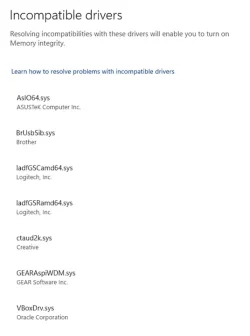
Windows Security → Device Security → Core Isolation lists several drivers that are incompatible with allowing Core Isolation to be turned on. This is after an upgrade of a really old system (> 12 years) from Windows 10 to Windows 11. @glasskuter had suggested in a separate thread that I use the DriveStore Explorer utility to remove drivers. Unfortunately, there are still incompatible drivers DriveStore Explorer cannot find. How do I find them and remove them, also?
My Computer
At a glance
macOS SequoiaM1 Max Apple Silicon32 GB
- OS
- macOS Sequoia
- Computer type
- Laptop
- Manufacturer/Model
- Apple
- CPU
- M1 Max Apple Silicon
- Memory
- 32 GB







 Apple 13" Macbook Pro 2020 (m1)






