Solved Offending drivers DriveStore Explorer can’t find


Baeolophus

Well-known member
Member
Local time
10:56 PM
Posts
162
OS
macOS Sequoia
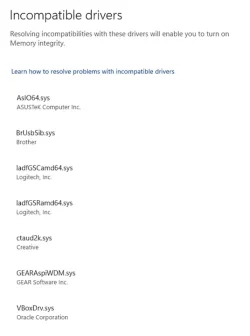
Windows Security → Device Security → Core Isolation lists several drivers that are incompatible with allowing Core Isolation to be turned on. This is after an upgrade of a really old system (> 12 years) from Windows 10 to Windows 11. @glasskuter had suggested in a separate thread that I use the DriveStore Explorer utility to remove drivers. Unfortunately, there are still incompatible drivers DriveStore Explorer cannot find. How do I find them and remove them, also?
 

My Computer My Computer

At a glance

macOS SequoiaM1 Max Apple Silicon32 GB
OS
macOS Sequoia
Computer type
Laptop
Manufacturer/Model
Apple
CPU
M1 Max Apple Silicon
Memory
32 GB
Core Isolation lists several drivers that are incompatible with allowing Core Isolation to be turned on

Does it actually give you a list of drivers? If so, could you post a screenshot of what it is showing you?
 

My Computers My Computers

  • At a glance

    Win11 Pro 25H2 (RTM+)Intel i7-14650HX32 GBNo GPU - Built-in Intel Graphics
    OS
    Win11 Pro 25H2 (RTM+)
    Computer type
    PC/Desktop
    Manufacturer/Model
    Acemagic
    CPU
    Intel i7-14650HX
    Memory
    32 GB
    Graphics Card(s)
    No GPU - Built-in Intel Graphics
    Sound Card
    Integrated
    Monitor(s) Displays
    Varies as machine will often be moved to locations with different monitors
    Screen Resolution
    Varies
    Hard Drives
    1 x 1TB Gen 4 NVMe SSD
    PSU
    120W Power Brick
    Keyboard
    Corsair K70 Max RGB Magnetic Keyboard
    Mouse
    Logitech MX Master 3
    Internet Speed
    1Gb Up / 1 Gb Down
    Browser
    Edge
    Antivirus
    Windows Defender
  • At a glance

    Win11 Pro 25H2 (RTM+)Intel i7-1255U16 GBIntel Iris Xe Graphics
    Operating System
    Win11 Pro 25H2 (RTM+)
    Computer type
    Laptop
    Manufacturer/Model
    Lenovo ThinkBook 13x Gen 2
    CPU
    Intel i7-1255U
    Memory
    16 GB
    Graphics card(s)
    Intel Iris Xe Graphics
    Sound Card
    Realtek® ALC3306-CG codec
    Monitor(s) Displays
    13.3-inch IPS Display
    Screen Resolution
    WQXGA (2560 x 1600)
    Hard Drives
    2 TB 4 x 4 NVMe SSD
    PSU
    USB-C / Thunderbolt 4 Power / Charging
    Keyboard
    Backlit, spill resistant keyboard
    Mouse
    Buttonless Glass Precision Touchpad
    Internet Speed
    1Gb Up / 1Gb Down
    Browser
    Edge
    Antivirus
    Windows Defender
    Other Info
    WiFi 6e / Bluetooth 5.1 / Facial Recognition / Fingerprint Sensor / ToF (Time of Flight) Human Presence Sensor
You could try the Memory integrity scan tool,


My Computers My Computers

  • At a glance

    Win 11 ProAMD Ryzen™ 7 7730U24GB Dual-Channel DDR4 @ 1596MHz (22-22-22-52)512MB ATI AMD Radeon Graphics (ASUStek Comput...
    OS
    Win 11 Pro
    Computer type
    Laptop
    Manufacturer/Model
    ASUS Vivobook
    CPU
    AMD Ryzen™ 7 7730U
    Motherboard
    M1605YA
    Memory
    24GB Dual-Channel DDR4 @ 1596MHz (22-22-22-52)
    Graphics Card(s)
    512MB ATI AMD Radeon Graphics (ASUStek Computer Inc)
    Monitor(s) Displays
    Generic PnP Monitor (1920x1200@60Hz) - P1 PLUS (1920x1080@59Hz)
    Screen Resolution
    1920 X 1200
    Hard Drives
    953GB Western Digital WD
    PSU
    45 Watts
    Mouse
    Lenovo Bluetooth.
    Internet Speed
    500 Mbps
    Browser
    Edge
    Antivirus
    Defender
  • At a glance

    Windows 11AMD Ryzen 7 5800H / 3.2 GHz32 GB DDR4 SDRAM 3200 MHzNVIDIA GeForce RTX 3060 6 GB GDDR6 SDRAM
    Operating System
    Windows 11
    Computer type
    Laptop
    Manufacturer/Model
    ACER NITRO
    CPU
    AMD Ryzen 7 5800H / 3.2 GHz
    Motherboard
    CZ Scala_CAS (FP6)
    Memory
    32 GB DDR4 SDRAM 3200 MHz
    Graphics card(s)
    NVIDIA GeForce RTX 3060 6 GB GDDR6 SDRAM
    Sound Card
    Realtek Audio. NVIDIA High Definition Audio
    Monitor(s) Displays
    15.6" LED backlight 1920 x 1080 (Full HD) 144 Hz
    Screen Resolution
    1920 x 1080 (Full HD)
    Hard Drives
    Samsung 970 Evo Plus 2TB NVMe M.2
    PSU
    180 Watt, 19.5 V
    Mouse
    Lenovo Bluetooth
    Internet Speed
    500 Mbps
    Browser
    Edge
    Antivirus
    Defender

My Computer My Computer

At a glance

macOS SequoiaM1 Max Apple Silicon32 GB
OS
macOS Sequoia
Computer type
Laptop
Manufacturer/Model
Apple
CPU
M1 Max Apple Silicon
Memory
32 GB
So, pretty much all of those drivers should be easy to identify. Vbox - that's obvious. Gear software - I believe that they make CD burning software that are often incorporated into other products to give those products burning capabilities (backup software is a prime example of this). Creative and Logitech, again easy. Brother should also be obvious. AsIO64.sys is part of ASUS software suite.

I would suggest starting by seeing if each of these packages has any updates available.

But be aware that this cannot be solved on every system. For some systems there simply is no getting around that some drivers may be incompatible with memory integrity.

I suppose that this is one of the many reasons that MS is pushing people toward newer hardware with Windows 11 whether we all like it or not :-)
 

My Computers My Computers

  • At a glance

    Win11 Pro 25H2 (RTM+)Intel i7-14650HX32 GBNo GPU - Built-in Intel Graphics
    OS
    Win11 Pro 25H2 (RTM+)
    Computer type
    PC/Desktop
    Manufacturer/Model
    Acemagic
    CPU
    Intel i7-14650HX
    Memory
    32 GB
    Graphics Card(s)
    No GPU - Built-in Intel Graphics
    Sound Card
    Integrated
    Monitor(s) Displays
    Varies as machine will often be moved to locations with different monitors
    Screen Resolution
    Varies
    Hard Drives
    1 x 1TB Gen 4 NVMe SSD
    PSU
    120W Power Brick
    Keyboard
    Corsair K70 Max RGB Magnetic Keyboard
    Mouse
    Logitech MX Master 3
    Internet Speed
    1Gb Up / 1 Gb Down
    Browser
    Edge
    Antivirus
    Windows Defender
  • At a glance

    Win11 Pro 25H2 (RTM+)Intel i7-1255U16 GBIntel Iris Xe Graphics
    Operating System
    Win11 Pro 25H2 (RTM+)
    Computer type
    Laptop
    Manufacturer/Model
    Lenovo ThinkBook 13x Gen 2
    CPU
    Intel i7-1255U
    Memory
    16 GB
    Graphics card(s)
    Intel Iris Xe Graphics
    Sound Card
    Realtek® ALC3306-CG codec
    Monitor(s) Displays
    13.3-inch IPS Display
    Screen Resolution
    WQXGA (2560 x 1600)
    Hard Drives
    2 TB 4 x 4 NVMe SSD
    PSU
    USB-C / Thunderbolt 4 Power / Charging
    Keyboard
    Backlit, spill resistant keyboard
    Mouse
    Buttonless Glass Precision Touchpad
    Internet Speed
    1Gb Up / 1Gb Down
    Browser
    Edge
    Antivirus
    Windows Defender
    Other Info
    WiFi 6e / Bluetooth 5.1 / Facial Recognition / Fingerprint Sensor / ToF (Time of Flight) Human Presence Sensor
I know that all of those drivers are old and no longer relevant. The hardware that this is running on does not have a disc drive. I know for a fact that the ASIO64 driver is very old. I have installed the latest driver package for the new Asus hardware, and it has not replaced or updated it. I would just like to know how to remove those drivers manually. Where would they be located?

By the way, a couple of drivers were associated with apps I was able to uninstall from Settings → Apps. This is what I am down to now:

Incompatible Drivers 2.webp

Virtualbox could not be uninstalled or updated, because it made reference to an H: drive, which is not attached to the new hardware.

Removing the file AsIO64.sys alone from the system does not take it off that list. Obviously, there are other components elsewhere, which I have not found.
 
Last edited:

My Computer My Computer

At a glance

macOS SequoiaM1 Max Apple Silicon32 GB
OS
macOS Sequoia
Computer type
Laptop
Manufacturer/Model
Apple
CPU
M1 Max Apple Silicon
Memory
32 GB
I know that all of those drivers are old and no longer relevant. The hardware that this is running on does not have a disc drive. I know for a fact that the ASIO64 driver is very old. I have installed the latest driver package for the new Asus hardware, and it has not replaced or updated it. I would just like to know how to remove those drivers manually. Where would they be located?
This is the way I handled it when switching from Asus motherboard to Asrock and it had those ASIO virtual drivers.
1755684004470.webp
 

My Computer My Computer

At a glance

W11 Pro and Insider DevAMD Ryzen 9 7900x2x16GB Kingston 6000MHz, Cl 32 @ 6200MHz Cl30Gigabyte Rx 6600XT Gaming OC 8G Pro
OS
W11 Pro and Insider Dev
Computer type
PC/Desktop
Manufacturer/Model
Home brewed
CPU
AMD Ryzen 9 7900x
Motherboard
ASROCK b650 PRO RS
Memory
2x16GB Kingston 6000MHz, Cl 32 @ 6200MHz Cl30
Graphics Card(s)
Gigabyte Rx 6600XT Gaming OC 8G Pro
Sound Card
MB, Realtek Ac1220p
Monitor(s) Displays
3 x 27"
Screen Resolution
1080p
Hard Drives
Kingston KC3000. 1TBSamsung 970 evo Plus 500GB, Crucial P1 NVMe 1TB, Lexar NVMe 2 TB, Silicon Power M.2 SATA 500GB
PSU
Seasonic 750W
Case
Custom Raidmax
Cooling
Arctic Liquid Freezer III 360mm
Internet Speed
20/19 mbps
Fairly easy to identify that lot. I'm using educated guesswork but you can nail it with a simple Google search.

Some maybe drivers for things you are using, or have used in the past, that's for you to check.

The Creative one is a sound driver, possibly in Windows\system32 folder.

The 2 Logitech ones seem to be a camera, again possibly in Windows\system32 folder.

Brother maybe a USB printer.

The Gear one some burning app driver that maybe part of an App, possibly in Windows\system32\drivers folder.

The last some virtual box driver from Oracle.

The first some ASUS utility driver.

If they are essential Apps you can update the respective App and hope for a more compatible driver.

If they are old residual sys drivers just delete them.

On my 11 year old machine I was never able to reduce that list to zero.
 

My Computer My Computer

At a glance

Windows 11
OS
Windows 11
might as well just sit in system32 and use the search feature in explorer to find them

or DIR filename.ext /s from cmd prompt

as @Helmut said most of them are likely in c:\windows\system32\drivers
 

My Computer My Computer

At a glance

PE
OS
PE
I use Microsoft SysInternals tool "AutoRuns64" to identify all drivers. You can disable starting them at boot with that tool. Be careful they are not required by Windows for it to boot and run. The tool can identify and classify all software started up on your system.


My Computers My Computers

  • At a glance

    Windows 11 Pro x64i9 14900K P/E 5.8/4.5 GHz, cache 5.0 GHz96GB (2x48) G.skill Ripjaws 6800 MT/sAsus ROG Strix 4070 Ti OC
    OS
    Windows 11 Pro x64
    Computer type
    PC/Desktop
    Manufacturer/Model
    📷🔈🎧 🪛 DIY Photoshop/Audio/Game/tinker
    CPU
    i9 14900K P/E 5.8/4.5 GHz, cache 5.0 GHz
    Motherboard
    Asus ROG Maximus Z790 Dark Hero
    Memory
    🐏 96GB (2x48) G.skill Ripjaws 6800 MT/s
    Graphics Card(s)
    Asus ROG Strix 4070 Ti OC
    Sound Card
    🔊Bowers & Wilkins 606 S3 speakers; Audiolabs 7000a integrated amp; RSL 10S Mk2 sub; Creative Pebble Pro Minimilist
    Monitor(s) Displays
    🖥️🖥️ Eizo CG2730 ColorEdge, ViewSonic VP2768
    Screen Resolution
    🖥️🖥️ 2560 x 1440p x 2
    Hard Drives
    💾 WDC SN850X 4TB nvme, SN850 1TB nvme, SK-Hynix 2 TB P41 nvme,. Sabrent USB-C DS-SC5B 5-bay docking station: 6TB WDC Black, 6TB Ironwolf Pro; 2x 2TB WDC Black HDD
    PSU
    ⚡️ 850W Seasonic Vertex PX-850 ATX 3.0/PCI-E 5.0
    Case
    Fractal Design North XL Mesh, Black Walnut
    Cooling
    ❄️ EK Nucleus black 360 AIO w/Phanteks T30-120 fans, 2 Noctua NF-A14 Chromax case fan, 1 T30-120 fan cooling memory
    Keyboard
    ⌨️ Keychron Q3 Max TKL with custom GMK Redsuns Red Samuri keycaps, TX Stabs
    Mouse
    🖱️ Logitech G305 wireless gaming
    Internet Speed
    ⬇️ 500 Mb/s ⬆️ 12 Mb/s
    Browser
    🔥🦊 Firefox
    Antivirus
    🦺 Defender, Macrium Reflect X 🏆
    Other Info
    Phangkey Amaterasu V2 Desk Mat
  • At a glance

    Apple M1
    Computer type
    Laptop
    Manufacturer/Model
    💻 Apple 13" Macbook Pro 2020 (m1)

    CPU
    Apple M1
    Screen Resolution
    2560x1600
    Browser
    Firefox
Back
Top Bottom