Office 2016 and Office 2019 have reached end of support


 Microsoft 365 Blog:

Today, October 14, 2025, support ends for all Office 2016 and 2019 suites, standalone apps, and servers. This includes:


What happens when a product reaches end of support?​

After a product's support period ends, Microsoft no longer provides:
  • Security fixes for vulnerabilities that are discovered and that may make devices, apps, or servers more directly exposed to security breaches.
  • Bug fixes for issues that are discovered that may impact the stability and usability of the product.
  • Technical support for problems that may occur.
Continuing to use products after their end of support can negatively impact organizational security, compliance, and productivity. Migrations can take time, so we recommend starting your upgrade to supported versions of these products as soon as possible.

Find specific guidance by product​

Microsoft is committed to helping you make the transition to a supported configuration. Here is an overview of our recommendations and alternative options.


 Read more:
 
I was on 2019.

My need for the Office apps is limited. I'm trying LibreOffice with the hope that I won't notice any of the Office features that may be missing from it.
 

My Computers

System One System Two

  • OS
    Windows 11 26200.8116
    Computer type
    PC/Desktop
    Manufacturer/Model
    homebuilt
    CPU
    Amd Threadripper 7970X
    Motherboard
    Gigabyte TRX50 Aero D Rev. 1.0
    Memory
    128GB (4 X 32) G.Skill DDR5 6400 (RDIMM)
    Graphics Card(s)
    Gigabyte RTX 4090 OC
    Sound Card
    none (USB to speakers), Realtek
    Monitor(s) Displays
    Innocn 32" OLED
    Screen Resolution
    3840 X 2160 @ 60Hz
    Hard Drives
    Crucial T700 2TB M.2 NVME SSD
    WD 4TB Blue SATA SSD
    Seagate 18TB IronWolf Pro
    PSU
    BeQuiet! Straight Power 12 1500W
    Case
    Lian Li 011 Dynamic Evo XL
    Cooling
    SilverStone Technology XE360-TR5, with 3 Phanteks T30 fans
    Keyboard
    Cherry KC 500 MX LP (mechanical)
    Mouse
    Logitech M500s (wired)
    Internet Speed
    2000/250 Mbps (down/up)
    Other Info
    xFinity gateway
  • Operating System
    windows 11 26200.8116
    Computer type
    PC/Desktop
    Manufacturer/Model
    homebuilt
    CPU
    Intel I9-13900K
    Motherboard
    Asus RoG Strix Z690-E
    Memory
    64GB G.Skill DDR5-6000
    Graphics card(s)
    Gigabyte RTX 3090 ti
    Sound Card
    built in Realtek
    Monitor(s) Displays
    Philips 27E1N8900 27" OLED
    Screen Resolution
    3840 X 2160 @60Hz
    Hard Drives
    WDC SN850 1TB
    8TB Seagate Ironwolf
    4TB Seagate Ironwolf
    PSU
    eVGA SuperNOVA 1300 GT
    Case
    Lian Li 011 Dynamic Evo
    Cooling
    Corsair iCUE H150i ELITE CAPELLIX Liquid CPU Cooler
    Keyboard
    Cherry Streaming (wired)
    Mouse
    Logitech M500s (wired)
I was on 2019.

My need for the Office apps is limited. I'm trying LibreOffice with the hope that I won't notice any of the Office features that may be missing from it.

Years ago, while I was on my Linux only saga, I tried this.

After numerous emails, from agents, accountants saying, Word/Excel could not open documents sent to them, created in Libre Office, or the fonts/layouts were a complete mess, I gave up on this, and just have a Windows 11 box running Office 365,, next to my Linux Workstation..

Bliss...
 

My Computers

System One System Two

  • OS
    Fedora/KDE Plasma F43
    Computer type
    PC/Desktop
    Manufacturer/Model
    HP Z640
    CPU
    Xeon 2667 v4
    Motherboard
    Xeon V4 Motherboard
    Memory
    48GB ECC DDR4
    Graphics Card(s)
    nVidia GTX 1650
    Monitor(s) Displays
    LG 27"
    Screen Resolution
    1920x1080@144hz
    Hard Drives
    NVME, SSD
    PSU
    850W
  • Operating System
    Windows 11 IOT Enterprise LTSC/RHEL 10.1 KDE Plasma
    Computer type
    PC/Desktop
    Manufacturer/Model
    HP Z440
    CPU
    Intel Xeom 2680 V4
    Motherboard
    HP Z440
    Memory
    64gb DDR4 ECC
    Graphics card(s)
    AMD RX560
    Monitor(s) Displays
    LG Gsync 27" 144hz
    Screen Resolution
    1920x1080@144hz
    Hard Drives
    SSD/nVme/HDD
    PSU
    standard 700W
    Case
    standard
    Cooling
    Standard
    Browser
    MS Edge
    Antivirus
    BitDefender

My Computer

System One

  • OS
    Windows 11 Pro
    Computer type
    PC/Desktop
    Manufacturer/Model
    Self build
    CPU
    Core i7-13700K
    Motherboard
    Asus TUF Gaming Plus WiFi Z790
    Memory
    64 GB Kingston Fury Beast DDR5
    Graphics Card(s)
    Gigabyte GeForce RTX 2060 Super Gaming OC 8G
    Sound Card
    Realtek S1200A
    Monitor(s) Displays
    Viewsonic VP2770 & Dell (secondary)
    Screen Resolution
    2560 x 1440
    Hard Drives
    Kingston KC3000 2TB NVME SSD & SATA HDDs & SSD
    PSU
    EVGA SuperNova G2 850W
    Case
    Nanoxia Deep Silence 1
    Cooling
    Noctua NH-D14
    Keyboard
    Microsoft Digital Media Pro
    Mouse
    Logitech Wireless
    Internet Speed
    80 Mb / s
    Browser
    Chrome
    Antivirus
    Defender, Malwarebytes Free & AdwCleaner
My main desktop and laptop with Windows 11 Pro are using MS Office 2021 Pro Plus.
My other computers have the following
  • Desktop with Windows 10 Pro with MS Office 2019 Pro Plus
  • Laptop with Windows 10 Pro with MS Office 2019 Pro Plus
  • Desktop with Windows 10 Home with MS Office 2010 Pro
  • Desktop with Windows 7 Home Premium with MS Office 2007 Pro
  • Desktop with Windows 7 Pro with MS Office 2003 Pro
  • Laptop with Windows 7 Pro with SoftMaker FreeOffice 2024
I will continue to use these old versions of MS Office on these old computers because they work fine so for them there is no reason to upgrade them.
 

My Computers

System One System Two

  • OS
    Windows 11 Pro 25H2 (26200.6901)
    Computer type
    Laptop
    Manufacturer/Model
    ASUS TUF Gaming A15 (2022)
    CPU
    AMD Ryzen 7 6800H with Radeon 680M GPU (486MB RAM)
    Memory
    Crucial DDR5-4800 (2400MHz) 32GB (2 x 16GB)
    Graphics Card(s)
    NVIDIA RTX 3060 Laptop (6GB RAM)
    Sound Card
    n/a
    Monitor(s) Displays
    15.6-inch
    Screen Resolution
    1920x1080 300Hz
    Hard Drives
    2 x Samsung 990 Evo Plus (2TB M.2 NVME SSD)
    PSU
    n/a
    Mouse
    Wireless Mouse M510
    Internet Speed
    2100Mbps/300Mbps
    Browser
    Firefox
    Antivirus
    Malwarebytes
  • Operating System
    Windows 11 Pro 25H2 (26200.8246)
    Computer type
    PC/Desktop
    Manufacturer/Model
    Custom build
    CPU
    AMD Ryzen 7 5700X3D
    Motherboard
    ASUS ROG Strix B550-F Gaming WiFi II
    Memory
    G.SKILL Flare X 32GB (2x16GB) DDR4
    Graphics card(s)
    ASUS ROG-STRIX-RTX3060TI-08G-V2-GAMING (RTX 3060-Ti, 8GB RAM)
    Monitor(s) Displays
    Samsung G50D IPS 27"
    Screen Resolution
    1440p/180Hz
    Hard Drives
    SAMSUNG 990 EVO Plus (2TB] M.2 NVME SSD
    SAMSUNG 990 EVO Plus (4TB) M.2 NVME SSD
    PSU
    Corsair RM750x (750 watts)
    Case
    Cooler Master MasterCase 5
    Cooling
    Scythe Mugen 6
    Keyboard
    Logitech K520 (MK540 keyboard/mouse combo)
    Mouse
    Logitech M310 (MK540 keyboard/mouse combo)
    Internet Speed
    2100 Mbps down / 300 Mbps up
    Browser
    Firefox, Edge, Chrome
    Antivirus
    Malwarebytes (Premium)
    Other Info
    ASUS Blu-ray Burner BW-16D1HT (SATA) || Western Digital Easystore 20TB USB 3.0 external hard drive used with Acronis True Image 2025 backup software || HP OfficeJet Pro 6975 Printer/Scanner
My Office 2016 just updated - I guess that was the last update.

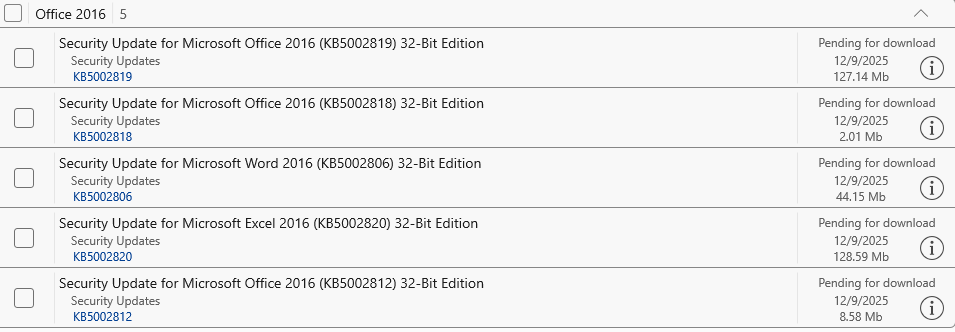
As you've no doubt since found, it was not. There were November updates and even December ones (below). So, go figure. This reminds me of Google's deprecation of Manifest v2 that was meant to happen a couple months ago but never did.

UfkaLoA.png
 

My Computer

System One

  • OS
    Windows 11
As you've no doubt since found, it was not. There were November updates and even December ones (below). So, go figure. This reminds me of Google's deprecation of Manifest v2 that was meant to happen a couple months ago but never did.

UfkaLoA.png
Where did you see those updates? Trying manually update from within Office finds no updates and there are no recent updates shown in Settings / Windows Update.
 

My Computer

System One

  • OS
    Windows 11 Pro
    Computer type
    PC/Desktop
    Manufacturer/Model
    Self build
    CPU
    Core i7-13700K
    Motherboard
    Asus TUF Gaming Plus WiFi Z790
    Memory
    64 GB Kingston Fury Beast DDR5
    Graphics Card(s)
    Gigabyte GeForce RTX 2060 Super Gaming OC 8G
    Sound Card
    Realtek S1200A
    Monitor(s) Displays
    Viewsonic VP2770 & Dell (secondary)
    Screen Resolution
    2560 x 1440
    Hard Drives
    Kingston KC3000 2TB NVME SSD & SATA HDDs & SSD
    PSU
    EVGA SuperNova G2 850W
    Case
    Nanoxia Deep Silence 1
    Cooling
    Noctua NH-D14
    Keyboard
    Microsoft Digital Media Pro
    Mouse
    Logitech Wireless
    Internet Speed
    80 Mb / s
    Browser
    Chrome
    Antivirus
    Defender, Malwarebytes Free & AdwCleaner
Where did you see those updates? Trying manually update from within Office finds no updates and there are no recent updates shown in Settings / Windows Update.

Manually update within Office 2016? How do you do that? I know modern versions let you do it from the Account page, but 2016 doesn't have an update function there, or anywhere else, that I know of.

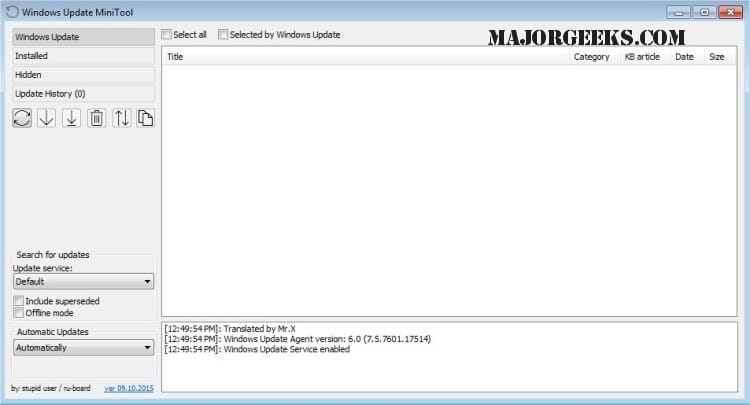
The above was from WU (well, WUMT--Windows Update MiniTool -- so I could take a good screenshot). If it's not showing up in Settings/WU for you, did the November ones? What about the October ones? My guess would be that the system you're using doesn't have the "Receive updates for other Microsoft products" option enabled, so it's pure Windows Update rather than Microsoft Update (which includes updates for things like Office). If that option is grayed out for you, rather than figuring that out it's easier just to choose Microsoft Update in WUMT.


Edit: I thought of something that explains it: we have different flavors of 2016. I have the "MSI" version, which was the end of the line for the traditional form of MS Office (I think 2019 forward MSI installs went away completely). In MSI versions, updates were fed by Microsoft Update. You must have the account-driven flavor, and updates for that, just like with modern versions, come in directly. For whatever reason, they forgot to disable the update tap for the MSI version, which makes me wonder why they're still producing such updates if no one is meant to get them.
 
Last edited:

My Computer

System One

  • OS
    Windows 11
Go to Office Account
Manually update within Office 2016? How do you do that? I know modern versions let you do it from the Account page, but 2016 doesn't have an update function there, or anywhere else, that I know of.

The above was from WU (well, WUMT--Windows Update MiniTool -- so I could take a good screenshot). If it's not showing up in Settings/WU for you, did the November ones? What about the October ones? My guess would be that the system you're using doesn't have the "Receive updates for other Microsoft products" option enabled, so it's pure Windows Update rather than Microsoft Update (which includes updates for things like Office). If that option is grayed out for you, rather than figuring that out it's easier just to choose Microsoft Update in WUMT.


Edit: I thought of something that explains it: we have different flavors of 2016. I have the "MSI" version, which was the end of the line for the traditional form of MS Office (I think 2019 forward MSI installs went away completely). In MSI versions, updates were fed by Microsoft Update. You must have the account-driven flavor, and updates for that, just like with modern versions, come in directly. For whatever reason, they forgot to disable the update tap for the MSI version, which makes me wonder why they're still producing such updates if no one is meant to get them.
Go to Office Account in any app say Word and select Update Options then Update Now.
 

My Computer

System One

  • OS
    Windows 11 Pro
    Computer type
    PC/Desktop
    Manufacturer/Model
    Self build
    CPU
    Core i7-13700K
    Motherboard
    Asus TUF Gaming Plus WiFi Z790
    Memory
    64 GB Kingston Fury Beast DDR5
    Graphics Card(s)
    Gigabyte GeForce RTX 2060 Super Gaming OC 8G
    Sound Card
    Realtek S1200A
    Monitor(s) Displays
    Viewsonic VP2770 & Dell (secondary)
    Screen Resolution
    2560 x 1440
    Hard Drives
    Kingston KC3000 2TB NVME SSD & SATA HDDs & SSD
    PSU
    EVGA SuperNova G2 850W
    Case
    Nanoxia Deep Silence 1
    Cooling
    Noctua NH-D14
    Keyboard
    Microsoft Digital Media Pro
    Mouse
    Logitech Wireless
    Internet Speed
    80 Mb / s
    Browser
    Chrome
    Antivirus
    Defender, Malwarebytes Free & AdwCleaner

Latest Support Threads

Back
Top Bottom