Okay, So What Do I Need Exactly to Use Occulink?


TomCaz

Member
Local time
11:11 PM
Posts
2
OS
Windows 11 Pro
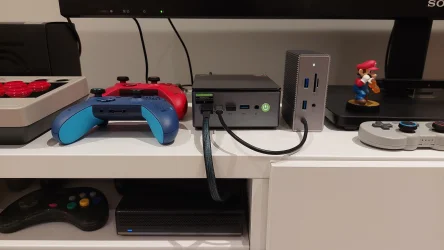
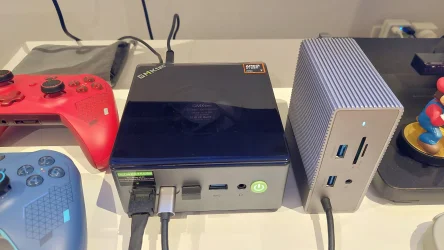
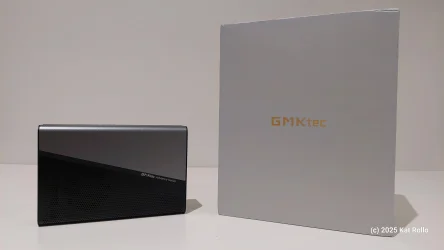
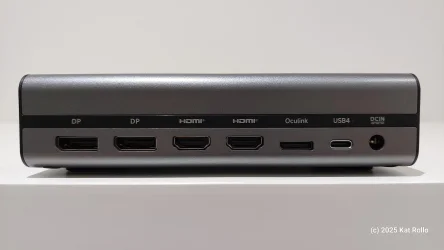
I have a minipc - it uses and AMD integrated GPU, called the 890M. Not too shabby, but I'd like to upgrade to an NVIDIA RTX card. Now, my PC has an Occulink port, so I'm assuming I can attach a card externally. BUT, what do I need, beside the card itself? I've looked all around, and I need a docking station (the lowest-priced one I found was $49), a cable, and a power supply for the card? I dunno. Honestly, there doesn't seem to be much as far as step-by-step guides go. Can you please help?
 
Windows Build/Version
Windows 11 Pro 25H2

My Computer My Computer

At a glance

Windows 11 ProRyzen 7 H25524GbRyzen 780M
OS
Windows 11 Pro
Computer type
Laptop
Manufacturer/Model
AceMagic S16
CPU
Ryzen 7 H255
Memory
24Gb
Graphics Card(s)
Ryzen 780M
I must admit that I've never heard of Oculink before. (Optical interface to PCI-E. Suitable for an eGPU.)

Looks like the basics are rather basic, as shown by one example. This one requires a little assembly, because it appears to be sold as a flatpack.

If you're looking for recommendations from someone who has actually used one, I hope that you get a response. My home-assembled PCs are of the big box type. (Takes up a lot of space, but avoids some kinds of buyer's remorse.)

Incidentally, if you don't need nVidia's proprietary features, or the best possible raytracing performance, you may wish to check AMD's discrete GPUs. They appear to have better price/performance than the current RTX cards.

(I own two GPUs. Both are RTX. I mention that to show I'm GPU agnostic.)
 
Last edited:

My Computers My Computers

  • At a glance

    Windows 11 26300.9278Amd Threadripper 7970X128GB (4 X 32) G.Skill DDR5 6400 (RDIMM)Gigabyte RTX 4090 OC
    OS
    Windows 11 26300.9278
    Computer type
    PC/Desktop
    Manufacturer/Model
    homebuilt
    CPU
    Amd Threadripper 7970X
    Motherboard
    Gigabyte TRX50 Aero D Rev. 1.0
    Memory
    128GB (4 X 32) G.Skill DDR5 6400 (RDIMM)
    Graphics Card(s)
    Gigabyte RTX 4090 OC
    Sound Card
    none (USB to speakers), Realtek
    Monitor(s) Displays
    Innocn 32" OLED
    Screen Resolution
    3840 X 2160 @ 60Hz
    Hard Drives
    Crucial T700 2TB M.2 NVME SSD
    WD 4TB Blue SATA SSD
    Seagate 18TB IronWolf Pro
    PSU
    BeQuiet! Straight Power 12 1500W
    Case
    Lian Li 011 Dynamic Evo XL
    Cooling
    SilverStone Technology XE360-TR5, with 3 Phanteks T30 fans
    Keyboard
    Cherry KC 500 MX LP (mechanical)
    Mouse
    Logitech M500s (wired)
    Internet Speed
    2000/250 Mbps (down/up)
    Other Info
    xFinity gateway
  • At a glance

    windows 11 26300.9278Intel I9-13900K64GB G.Skill DDR5-6000Gigabyte RTX 3090 ti
    Operating System
    windows 11 26300.9278
    Computer type
    PC/Desktop
    Manufacturer/Model
    homebuilt
    CPU
    Intel I9-13900K
    Motherboard
    Asus RoG Strix Z690-E
    Memory
    64GB G.Skill DDR5-6000
    Graphics card(s)
    Gigabyte RTX 3090 ti
    Sound Card
    built in Realtek
    Monitor(s) Displays
    Philips 27E1N8900 27" OLED
    Screen Resolution
    3840 X 2160 @60Hz
    Hard Drives
    WDC SN850 1TB
    8TB Seagate Ironwolf
    4TB Seagate Ironwolf
    PSU
    eVGA SuperNOVA 1300 GT
    Case
    Lian Li 011 Dynamic Evo
    Cooling
    Corsair iCUE H150i ELITE CAPELLIX Liquid CPU Cooler
    Keyboard
    Cherry Streaming (wired)
    Mouse
    Logitech M500s (wired)
Now, my PC has an Occulink port
Are you sure?

No, the AceMagic S16 laptop does not feature a native, built-in Oculink port. Its standard external connectivity relies on traditional ports like USB-C. [1, 2, 3]

However, you can still use Oculink with the device through one of two methods:

1. The Internal M.2 Mod (True Oculink Speeds)

The AceMagic S16 laptop includes an expandable, secondary M.2 2280 NVMe SSD slot. If you are comfortable leaving the bottom chassis panel off or slightly modifying it, you can install an M.2-to-Oculink adapter board into that vacant slot. This allows you to route an external Oculink cable directly out of the laptop to an eGPU dock, achieving the high-bandwidth PCIe speeds native to Oculink. [1, 2, 3, 4]

2. USB4 Adapter alternative

If your specific version of the S16 comes equipped with a fully featured USB4 Type-C port (supporting 40 Gbps data transfer), you can use a dual-interface eGPU dock (such as the AOOSTAR AG02 or similar units) that supports USB4/Thunderbolt entry. While this won't be using an Oculink connection directly, it provides a much more practical, plug-and-play alternative for an external graphics card without requiring hardware teardowns. [1, 2, 3, 4, 5]
 

My Computer My Computer

At a glance

Windows 11 Pro 25H2
OS
Windows 11 Pro 25H2
Computer type
Laptop
Manufacturer/Model
Toshiba
Are you sure?

No, the AceMagic S16 laptop does not feature a native, built-in Oculink port. Its standard external connectivity relies on traditional ports like USB-C. [1, 2, 3]

(snip)
I presume that "TomCaz" meant another PC than the laptop. It'd be odd to refer to a laptop as a mini PC. Also, "My Computer" (laptop) lists the iGPU as a 780M. Different than the one claimed for the mini PC.

Mentioning the make and model of the mini PC would have been helpful.
 

My Computers My Computers

  • At a glance

    Windows 11 26300.9278Amd Threadripper 7970X128GB (4 X 32) G.Skill DDR5 6400 (RDIMM)Gigabyte RTX 4090 OC
    OS
    Windows 11 26300.9278
    Computer type
    PC/Desktop
    Manufacturer/Model
    homebuilt
    CPU
    Amd Threadripper 7970X
    Motherboard
    Gigabyte TRX50 Aero D Rev. 1.0
    Memory
    128GB (4 X 32) G.Skill DDR5 6400 (RDIMM)
    Graphics Card(s)
    Gigabyte RTX 4090 OC
    Sound Card
    none (USB to speakers), Realtek
    Monitor(s) Displays
    Innocn 32" OLED
    Screen Resolution
    3840 X 2160 @ 60Hz
    Hard Drives
    Crucial T700 2TB M.2 NVME SSD
    WD 4TB Blue SATA SSD
    Seagate 18TB IronWolf Pro
    PSU
    BeQuiet! Straight Power 12 1500W
    Case
    Lian Li 011 Dynamic Evo XL
    Cooling
    SilverStone Technology XE360-TR5, with 3 Phanteks T30 fans
    Keyboard
    Cherry KC 500 MX LP (mechanical)
    Mouse
    Logitech M500s (wired)
    Internet Speed
    2000/250 Mbps (down/up)
    Other Info
    xFinity gateway
  • At a glance

    windows 11 26300.9278Intel I9-13900K64GB G.Skill DDR5-6000Gigabyte RTX 3090 ti
    Operating System
    windows 11 26300.9278
    Computer type
    PC/Desktop
    Manufacturer/Model
    homebuilt
    CPU
    Intel I9-13900K
    Motherboard
    Asus RoG Strix Z690-E
    Memory
    64GB G.Skill DDR5-6000
    Graphics card(s)
    Gigabyte RTX 3090 ti
    Sound Card
    built in Realtek
    Monitor(s) Displays
    Philips 27E1N8900 27" OLED
    Screen Resolution
    3840 X 2160 @60Hz
    Hard Drives
    WDC SN850 1TB
    8TB Seagate Ironwolf
    4TB Seagate Ironwolf
    PSU
    eVGA SuperNOVA 1300 GT
    Case
    Lian Li 011 Dynamic Evo
    Cooling
    Corsair iCUE H150i ELITE CAPELLIX Liquid CPU Cooler
    Keyboard
    Cherry Streaming (wired)
    Mouse
    Logitech M500s (wired)

My Computer My Computer

At a glance

Windows 11 Pro 25H2
OS
Windows 11 Pro 25H2
Computer type
Laptop
Manufacturer/Model
Toshiba
Back
Top Bottom