
Old snipping tool


ICIT2LOL

Well-known member
Member
VIP
Local time
7:19 PM
Posts
2,187
Location
Central West NSW Australia
OS
Windows 11 Pro 23H2 (OS Build 22631.4169) Desktop (OS Build 22621.4317)
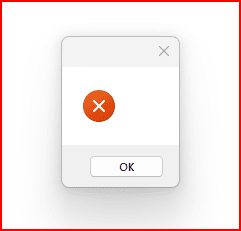
I have lost track on where I am up to getting the old snipping tool back and have the Snippingtool.exe on a USB stick but cannot find the mui command - SnippingTool.exe.mui anywhere. The Snipping Tool.exe on my stick opens but just sends a samll window - see pic.
Any ideas on how to get that Snipping Tool.mui onto my stick please?
1686016257557.png
 

My Computer

System One

  • OS
    Windows 11 Pro 23H2 (OS Build 22631.4169) Desktop (OS Build 22621.4317)
    Computer type
    Laptop
    Manufacturer/Model
    Asus Vivo notebook X712FA or Desktop Ivy Bridge build
    CPU
    i7 -10510U / Intel i5 3750K
    Motherboard
    Asus generic & Asus P8Z77-V
    Memory
    Samsung 16GB DDR4 2666 MHz & G-Skill 16GB DDR3 2134MHz
    Graphics Card(s)
    On board Intel CPU graphics & Nvidia GeForce GTX 1050Ti
    Sound Card
    Laptop onboard & Xonar DSX Card
    Monitor(s) Displays
    Generic & Samsung 27" SAM0C4C
    Hard Drives
    Samsung 970 Pro NMe & Samsung 870 EVO 500GB
    PSU
    N/A
    Case
    N/A
    Cooling
    Asus in built
    Keyboard
    Generic
    Mouse
    Logitec Wireless
    Internet Speed
    50Mbs max allowance - occasionally up to 75Mbs
    Browser
    Brave
    Antivirus
    ESET Ultimate Security on both
    Other Info
    Desktop running Windows11 Pro with unsupported hardware fix
I saved the old Snipping Tool some time ago.
I grabbed it from Windows 10 Version 1803 ISO. It's the last version without the message that Snipping Tool is moving...

Snipping Tool (Windows 10 Version 1803) Download
 

My Computers

System One System Two

  • OS
    Windows 11 Pro
    Computer type
    PC/Desktop
    Manufacturer/Model
    Stigg's Build
    CPU
    Intel Core i9-10900X
    Motherboard
    GIGABYTE X299X DESIGNARE 10G
    Memory
    Corsair 64 GB (4 x 16 GB) CMW64GX4M4C3000C15 Vengeance RGB Pro 3000Mhz DDR4
    Graphics Card(s)
    GIGABYTE GeForce GTX 1660 Super Mini ITX 6 GB OC
    Sound Card
    Realtek ALC1220
    Monitor(s) Displays
    Samsung 27" FHD LED FreeSync Gaming Monitor (LS27F350FHEXXY)
    Screen Resolution
    1920 x 1080
    Hard Drives
    Samsung 970 Pro Series 1TB M.2 2280 NVMe SSD
    Western Digital Red Pro WD8003FFBX-68B9AN0 8 TB, 7200 RPM, SATA-III
    Western Digital Red Pro WD8003FFBX-68B9AN0 8 TB, 7200 RPM, SATA-III
    PSU
    Corsair HX1200 1200W 80 Plus Platinum
    Case
    Fractal Design Define 7 Black Solid Case
    Cooling
    Noctua NH-D15 Chromax Black
    Keyboard
    Razer Ornata V2
    Mouse
    Razer DeathAdder Essential
    Internet Speed
    FTTN 100Mbps / 40Mbps
    Browser
    Mozilla Firefox
    Antivirus
    N/A
    Other Info
    Logitech BRIO 4k Ultra HD USB-C Webcam
  • Operating System
    Windows 10 Pro
    Computer type
    Laptop
    Manufacturer/Model
    ASUS ROG Zephyrus M GM501GS
    CPU
    Core i7-8750H
    Motherboard
    Zephyrus M GM501GS
    Memory
    SK Hynix 32 GB (2 x 16 GB) HMA82GS6CJR8N-VK 16 GB DDR4-2666 DDR4 SDRAM
    Graphics card(s)
    NVIDIA GeForce GTX 1070
    Sound Card
    Realtek ALC294
    Monitor(s) Displays
    AU Optronics B156HAN07.1 [15.6" LCD]
    Screen Resolution
    1920 x 1080
    Hard Drives
    Samsung MZVKW512HMJP-00000 512 GB, PCI-E 3.0 x4
    Samsung SSD 860 QVO 4TB 4 TB, SATA-III
    PSU
    N/A
    Case
    N/A
    Cooling
    N/A
    Keyboard
    PC/AT Enhanced PS2 Keyboard (101/102-Key)
    Mouse
    Razer DeathAdder Essential
    Internet Speed
    FTTN 100Mbps / 40Mbps
    Browser
    Mozilla Firefox
    Antivirus
    N/A
    Other Info
    USB2.0 HD UVC Webcam
Thanks Stigg mate forgive my ignorance but what do I do with that download after I have extracted it?? Do I have to load it into any specific location in the oS for me to be able to use it?
 

My Computer

System One

  • OS
    Windows 11 Pro 23H2 (OS Build 22631.4169) Desktop (OS Build 22621.4317)
    Computer type
    Laptop
    Manufacturer/Model
    Asus Vivo notebook X712FA or Desktop Ivy Bridge build
    CPU
    i7 -10510U / Intel i5 3750K
    Motherboard
    Asus generic & Asus P8Z77-V
    Memory
    Samsung 16GB DDR4 2666 MHz & G-Skill 16GB DDR3 2134MHz
    Graphics Card(s)
    On board Intel CPU graphics & Nvidia GeForce GTX 1050Ti
    Sound Card
    Laptop onboard & Xonar DSX Card
    Monitor(s) Displays
    Generic & Samsung 27" SAM0C4C
    Hard Drives
    Samsung 970 Pro NMe & Samsung 870 EVO 500GB
    PSU
    N/A
    Case
    N/A
    Cooling
    Asus in built
    Keyboard
    Generic
    Mouse
    Logitec Wireless
    Internet Speed
    50Mbs max allowance - occasionally up to 75Mbs
    Browser
    Brave
    Antivirus
    ESET Ultimate Security on both
    Other Info
    Desktop running Windows11 Pro with unsupported hardware fix
Thanks Stigg mate forgive my ignorance but what do I do with that download after I have extracted it?? Do I have to load it into any specific location in the oS for me to be able to use it?
Save it somewhere convenient on your hard drive, then simply run SnippingTool.exe.
I'm assuming you have file extensions displayed. If not, you won't see .exe.
 

My Computers

System One System Two

  • OS
    Windows 11 Pro
    Computer type
    PC/Desktop
    Manufacturer/Model
    Stigg's Build
    CPU
    Intel Core i9-10900X
    Motherboard
    GIGABYTE X299X DESIGNARE 10G
    Memory
    Corsair 64 GB (4 x 16 GB) CMW64GX4M4C3000C15 Vengeance RGB Pro 3000Mhz DDR4
    Graphics Card(s)
    GIGABYTE GeForce GTX 1660 Super Mini ITX 6 GB OC
    Sound Card
    Realtek ALC1220
    Monitor(s) Displays
    Samsung 27" FHD LED FreeSync Gaming Monitor (LS27F350FHEXXY)
    Screen Resolution
    1920 x 1080
    Hard Drives
    Samsung 970 Pro Series 1TB M.2 2280 NVMe SSD
    Western Digital Red Pro WD8003FFBX-68B9AN0 8 TB, 7200 RPM, SATA-III
    Western Digital Red Pro WD8003FFBX-68B9AN0 8 TB, 7200 RPM, SATA-III
    PSU
    Corsair HX1200 1200W 80 Plus Platinum
    Case
    Fractal Design Define 7 Black Solid Case
    Cooling
    Noctua NH-D15 Chromax Black
    Keyboard
    Razer Ornata V2
    Mouse
    Razer DeathAdder Essential
    Internet Speed
    FTTN 100Mbps / 40Mbps
    Browser
    Mozilla Firefox
    Antivirus
    N/A
    Other Info
    Logitech BRIO 4k Ultra HD USB-C Webcam
  • Operating System
    Windows 10 Pro
    Computer type
    Laptop
    Manufacturer/Model
    ASUS ROG Zephyrus M GM501GS
    CPU
    Core i7-8750H
    Motherboard
    Zephyrus M GM501GS
    Memory
    SK Hynix 32 GB (2 x 16 GB) HMA82GS6CJR8N-VK 16 GB DDR4-2666 DDR4 SDRAM
    Graphics card(s)
    NVIDIA GeForce GTX 1070
    Sound Card
    Realtek ALC294
    Monitor(s) Displays
    AU Optronics B156HAN07.1 [15.6" LCD]
    Screen Resolution
    1920 x 1080
    Hard Drives
    Samsung MZVKW512HMJP-00000 512 GB, PCI-E 3.0 x4
    Samsung SSD 860 QVO 4TB 4 TB, SATA-III
    PSU
    N/A
    Case
    N/A
    Cooling
    N/A
    Keyboard
    PC/AT Enhanced PS2 Keyboard (101/102-Key)
    Mouse
    Razer DeathAdder Essential
    Internet Speed
    FTTN 100Mbps / 40Mbps
    Browser
    Mozilla Firefox
    Antivirus
    N/A
    Other Info
    USB2.0 HD UVC Webcam
Thanks mate but I have literally just worked out how to get it onto my taskbar (I use it a lot) all thanks to yourself mate:thumbsup:
 

My Computer

System One

  • OS
    Windows 11 Pro 23H2 (OS Build 22631.4169) Desktop (OS Build 22621.4317)
    Computer type
    Laptop
    Manufacturer/Model
    Asus Vivo notebook X712FA or Desktop Ivy Bridge build
    CPU
    i7 -10510U / Intel i5 3750K
    Motherboard
    Asus generic & Asus P8Z77-V
    Memory
    Samsung 16GB DDR4 2666 MHz & G-Skill 16GB DDR3 2134MHz
    Graphics Card(s)
    On board Intel CPU graphics & Nvidia GeForce GTX 1050Ti
    Sound Card
    Laptop onboard & Xonar DSX Card
    Monitor(s) Displays
    Generic & Samsung 27" SAM0C4C
    Hard Drives
    Samsung 970 Pro NMe & Samsung 870 EVO 500GB
    PSU
    N/A
    Case
    N/A
    Cooling
    Asus in built
    Keyboard
    Generic
    Mouse
    Logitec Wireless
    Internet Speed
    50Mbs max allowance - occasionally up to 75Mbs
    Browser
    Brave
    Antivirus
    ESET Ultimate Security on both
    Other Info
    Desktop running Windows11 Pro with unsupported hardware fix
I saved the old Snipping Tool some time ago.
I grabbed it from Windows 10 Version 1803 ISO. It's the last version without the message that Snipping Tool is moving...

Snipping Tool (Windows 10 Version 1803) Download
Thanks very much for this post; I am new to W11 and much prefer the old snipping tool. I downloaded it per your post and now am set up with the old tool on my taskbar.
 

My Computer

System One

  • OS
    Windows 11 25H2 26200.8246
    Computer type
    PC/Desktop
    Manufacturer/Model
    HP Envy Desktop TE02-0xxx
    CPU
    2.10GHz Intel 12th Gen Core i7-12700
    Motherboard
    HP 'BlizzardU' 894B 10; Chipset Intel ADL Z690
    Memory
    16GB
    Graphics Card(s)
    NVIDIA GeForce 3050
    Sound Card
    Realtek Audio
    Monitor(s) Displays
    HP27er
    Screen Resolution
    1920x1080
    Hard Drives
    256GB NVMe SSD
    2TB HDD
    PSU
    600W
    Case
    Desktop Tower
    Cooling
    Air
    Keyboard
    Logitech K350
    Mouse
    Logitech M510
    Internet Speed
    25Mps (Max)
    Browser
    Chrome
    Antivirus
    Windows native security
    Other Info
    HP replaced SSD under warranty in November, 2023.
    No VPN.
Thanks very much for this post; I am new to W11 and much prefer the old snipping tool. I downloaded it per your post and now am set up with the old tool on my taskbar.
Well mate I think that Microsoft in all it's wisdom chose to alter the app to give some "better" features, when in my personal view it is real a retrograde step and they do this to a lot more of the settings/apps in the system when you dig into the OS..
Oh and welcome to this forum retexan599 you will find it most helpful and many of the members who have been around since Windows 7 are the most delightful group of people.
Good luck with your continuing use of the forum. :-)
 

My Computer

System One

  • OS
    Windows 11 Pro 23H2 (OS Build 22631.4169) Desktop (OS Build 22621.4317)
    Computer type
    Laptop
    Manufacturer/Model
    Asus Vivo notebook X712FA or Desktop Ivy Bridge build
    CPU
    i7 -10510U / Intel i5 3750K
    Motherboard
    Asus generic & Asus P8Z77-V
    Memory
    Samsung 16GB DDR4 2666 MHz & G-Skill 16GB DDR3 2134MHz
    Graphics Card(s)
    On board Intel CPU graphics & Nvidia GeForce GTX 1050Ti
    Sound Card
    Laptop onboard & Xonar DSX Card
    Monitor(s) Displays
    Generic & Samsung 27" SAM0C4C
    Hard Drives
    Samsung 970 Pro NMe & Samsung 870 EVO 500GB
    PSU
    N/A
    Case
    N/A
    Cooling
    Asus in built
    Keyboard
    Generic
    Mouse
    Logitec Wireless
    Internet Speed
    50Mbs max allowance - occasionally up to 75Mbs
    Browser
    Brave
    Antivirus
    ESET Ultimate Security on both
    Other Info
    Desktop running Windows11 Pro with unsupported hardware fix
Hey Stigg - I know this goes back a few years, but can you re-post the old WIN10 Snip & Sketch .exe and .mui files on a sharing site. The link above is no longer valid. Or, attach files on here. I can also provide an e-mail address, if you want to send the files to me direct. The new Snipping Tool is NOT an improvement on Snip & Sketch. I would like to be able to choose both, like we were able to for years in Win10. Thank you!!
 

My Computer

System One

  • OS
    Win11
    Computer type
    PC/Desktop
    Manufacturer/Model
    Self-Built
Hey Stigg - I know this goes back a few years, but can you re-post the old WIN10 Snip & Sketch .exe and .mui files on a sharing site. The link above is no longer valid. Or, attach files on here. I can also provide an e-mail address, if you want to send the files to me direct. The new Snipping Tool is NOT an improvement on Snip & Sketch. I would like to be able to choose both, like we were able to for years in Win10. Thank you!!
Hi, Ken.

I just checked the link in Post #2.
It's still working.
 

My Computers

System One System Two

  • OS
    Windows 11 Pro
    Computer type
    PC/Desktop
    Manufacturer/Model
    Stigg's Build
    CPU
    Intel Core i9-10900X
    Motherboard
    GIGABYTE X299X DESIGNARE 10G
    Memory
    Corsair 64 GB (4 x 16 GB) CMW64GX4M4C3000C15 Vengeance RGB Pro 3000Mhz DDR4
    Graphics Card(s)
    GIGABYTE GeForce GTX 1660 Super Mini ITX 6 GB OC
    Sound Card
    Realtek ALC1220
    Monitor(s) Displays
    Samsung 27" FHD LED FreeSync Gaming Monitor (LS27F350FHEXXY)
    Screen Resolution
    1920 x 1080
    Hard Drives
    Samsung 970 Pro Series 1TB M.2 2280 NVMe SSD
    Western Digital Red Pro WD8003FFBX-68B9AN0 8 TB, 7200 RPM, SATA-III
    Western Digital Red Pro WD8003FFBX-68B9AN0 8 TB, 7200 RPM, SATA-III
    PSU
    Corsair HX1200 1200W 80 Plus Platinum
    Case
    Fractal Design Define 7 Black Solid Case
    Cooling
    Noctua NH-D15 Chromax Black
    Keyboard
    Razer Ornata V2
    Mouse
    Razer DeathAdder Essential
    Internet Speed
    FTTN 100Mbps / 40Mbps
    Browser
    Mozilla Firefox
    Antivirus
    N/A
    Other Info
    Logitech BRIO 4k Ultra HD USB-C Webcam
  • Operating System
    Windows 10 Pro
    Computer type
    Laptop
    Manufacturer/Model
    ASUS ROG Zephyrus M GM501GS
    CPU
    Core i7-8750H
    Motherboard
    Zephyrus M GM501GS
    Memory
    SK Hynix 32 GB (2 x 16 GB) HMA82GS6CJR8N-VK 16 GB DDR4-2666 DDR4 SDRAM
    Graphics card(s)
    NVIDIA GeForce GTX 1070
    Sound Card
    Realtek ALC294
    Monitor(s) Displays
    AU Optronics B156HAN07.1 [15.6" LCD]
    Screen Resolution
    1920 x 1080
    Hard Drives
    Samsung MZVKW512HMJP-00000 512 GB, PCI-E 3.0 x4
    Samsung SSD 860 QVO 4TB 4 TB, SATA-III
    PSU
    N/A
    Case
    N/A
    Cooling
    N/A
    Keyboard
    PC/AT Enhanced PS2 Keyboard (101/102-Key)
    Mouse
    Razer DeathAdder Essential
    Internet Speed
    FTTN 100Mbps / 40Mbps
    Browser
    Mozilla Firefox
    Antivirus
    N/A
    Other Info
    USB2.0 HD UVC Webcam
@KenB

Try this if you're having problems with the UPLOAD.EE link.
 

Attachments

My Computers

System One System Two

  • OS
    Windows 11 Pro
    Computer type
    PC/Desktop
    Manufacturer/Model
    Stigg's Build
    CPU
    Intel Core i9-10900X
    Motherboard
    GIGABYTE X299X DESIGNARE 10G
    Memory
    Corsair 64 GB (4 x 16 GB) CMW64GX4M4C3000C15 Vengeance RGB Pro 3000Mhz DDR4
    Graphics Card(s)
    GIGABYTE GeForce GTX 1660 Super Mini ITX 6 GB OC
    Sound Card
    Realtek ALC1220
    Monitor(s) Displays
    Samsung 27" FHD LED FreeSync Gaming Monitor (LS27F350FHEXXY)
    Screen Resolution
    1920 x 1080
    Hard Drives
    Samsung 970 Pro Series 1TB M.2 2280 NVMe SSD
    Western Digital Red Pro WD8003FFBX-68B9AN0 8 TB, 7200 RPM, SATA-III
    Western Digital Red Pro WD8003FFBX-68B9AN0 8 TB, 7200 RPM, SATA-III
    PSU
    Corsair HX1200 1200W 80 Plus Platinum
    Case
    Fractal Design Define 7 Black Solid Case
    Cooling
    Noctua NH-D15 Chromax Black
    Keyboard
    Razer Ornata V2
    Mouse
    Razer DeathAdder Essential
    Internet Speed
    FTTN 100Mbps / 40Mbps
    Browser
    Mozilla Firefox
    Antivirus
    N/A
    Other Info
    Logitech BRIO 4k Ultra HD USB-C Webcam
  • Operating System
    Windows 10 Pro
    Computer type
    Laptop
    Manufacturer/Model
    ASUS ROG Zephyrus M GM501GS
    CPU
    Core i7-8750H
    Motherboard
    Zephyrus M GM501GS
    Memory
    SK Hynix 32 GB (2 x 16 GB) HMA82GS6CJR8N-VK 16 GB DDR4-2666 DDR4 SDRAM
    Graphics card(s)
    NVIDIA GeForce GTX 1070
    Sound Card
    Realtek ALC294
    Monitor(s) Displays
    AU Optronics B156HAN07.1 [15.6" LCD]
    Screen Resolution
    1920 x 1080
    Hard Drives
    Samsung MZVKW512HMJP-00000 512 GB, PCI-E 3.0 x4
    Samsung SSD 860 QVO 4TB 4 TB, SATA-III
    PSU
    N/A
    Case
    N/A
    Cooling
    N/A
    Keyboard
    PC/AT Enhanced PS2 Keyboard (101/102-Key)
    Mouse
    Razer DeathAdder Essential
    Internet Speed
    FTTN 100Mbps / 40Mbps
    Browser
    Mozilla Firefox
    Antivirus
    N/A
    Other Info
    USB2.0 HD UVC Webcam
Original link still works for me using Firefox/Chrome/Edge
But with Safari, it leads to phishing pages. Not sure why. Who uses safari anyway.
 

My Computers

System One System Two

  • OS
    Windows 11 Pro 25H2 Build 26200.8655
    Computer type
    PC/Desktop
    Manufacturer/Model
    Sin-built 2013
    CPU
    Intel(R) Core(TM) i7-4770K CPU @ 3.50GHz
    Motherboard
    ASUS ROG Maximus VI Formula
    Memory
    32.0 GB of I forget and the box is in storage.
    Graphics Card(s)
    Gigabyte nVidia GeForce GTX 1660 Super OC 6GB
    Sound Card
    Onboard thingy
    Monitor(s) Displays
    5 x LG 25MS500-B - 1 x 24MK430H-B - 1 x Wacom Pro 22" Touch Screen Tablet
    Screen Resolution
    All over the place
    Hard Drives
    Too many to list.
    OS on Samsung 1TB 870 QVO SATA
    PSU
    Silverstone 1500
    Case
    NZXT Phantom 820 Full-Tower Case
    Cooling
    Noctua NH-D15 Elite Class Dual Tower CPU Cooler / 6 x EziDIY 120mm / 2 x Corsair 140mm somethings / 1 x 140mm Thermaltake something / 2 x 200mm Corsair.
    Keyboard
    Corsair K95 / Logitech diNovo Edge Wireless
    Mouse
    Logitech: G402 / G502 / Mx Masters / Mx Air Cordless
    Internet Speed
    2000/500Mbps
    Browser
    All sorts
    Antivirus
    Kaspersky Premium
    Other Info
    ㅤㅤㅤㅤㅤㅤㅤㅤㅤㅤㅤㅤㅤㅤㅤㅤㅤㅤㅤㅤㅤㅤㅤㅤㅤㅤㅤㅤㅤㅤㅤㅤㅤㅤㅤㅤㅤㅤㅤㅤ⠀⠀⠀⠀⠀⠀⠀⠀⠀⠀
    TP-Link BE9300 WiFi 7 Bluetooth 5.4 (Archer TBE550E)
    TP-Link TX201 V1 2.5GB Lan

    Grandstream HT812 - VoIP
    ASUS DSL-AX82U - Mesh
    ASUS RT-AC68U - Mesh
    ASUS RT-BE88U Router

    Brother MFC-L2880DW Printer

    I’m on a horse.
  • Operating System
    Windows 11 Pro 25H2 Build 26200.8655
    Computer type
    Laptop
    Manufacturer/Model
    LENOVO Yoga 7 14IRL8 - 7i EVO OLED 14" Touchscreen i5 12 Core 16GB/512GB
    CPU
    Intel Core 12th Gen i5-1240P Processor (1.7 - 4.4GHz)
    Memory
    16GB LPDDR5 RAM
    Graphics card(s)
    Intel Iris Xe Graphics Processor
    Sound Card
    Optimized with Dolby Atmos®
    Screen Resolution
    QHD 2880 x 1800 OLED
    Hard Drives
    M.2 512GB
    Antivirus
    Defender / Malwarebytes
    Other Info
    …still on a horse.
I was able to download and extract the ols windows 10 snipping tool with the help of this thread. But Windows 11 is blocking my use of it because it says it is a risky app (but it's Their own, stupid). How can I circumvent the block and actually use the much easier old snipping tool?
 

My Computer

System One

  • OS
    Windows 11
    Computer type
    Laptop
    Manufacturer/Model
    HP Elitebook
I like the new one a lot. Not sure why people insist on the old. I find the newer one better in every way but to each their own.
 

My Computers

System One System Two

  • OS
    Windows 11 Pro
    Computer type
    PC/Desktop
    Manufacturer/Model
    Custom Built
    CPU
    Ryzen 7 5700 X3D
    Motherboard
    MSI MPG B550 GAMING PLUS
    Memory
    64 GB DDR4 3600mhz Gskill Ripjaws V
    Graphics Card(s)
    RTX 4070 Super , 12GB VRAM Asus EVO Overclock
    Monitor(s) Displays
    Gigabyte M27Q (rev. 2.0) 2560 x 1440 @ 170hz HDR
    Hard Drives
    2TB Samsung nvme ssd
    4TB Western Digital nvme ssd
    PSU
    CORSAIR RMx SHIFT Series™ RM750x 80 PLUS Gold Fully Modular ATX Power Supply
    Case
    CORSAIR 3500X ARGB Mid-Tower ATX PC Case – Black
    Cooling
    ID-COOLING FROSTFLOW X 240 CPU Water Cooler
    Keyboard
    Logitech G213
    Mouse
    Logitech G203
    Internet Speed
    1.2gbps Fiber 😎
  • Operating System
    Chrome OS
    Computer type
    Laptop
    Manufacturer/Model
    HP Chromebook
    CPU
    Intel Pentium Quad Core
    Memory
    4GB LPDDR4
    Monitor(s) Displays
    14 Inch HD SVA anti glare micro edge display
    Hard Drives
    64 GB emmc
@Stigg Post #2 (upload.ee) now links to a copy of fastfetch 2.51.1

@Maya_am:
1. Extract the Polish MUI file and copy it to "\Windows\System32\pl-pl"
2. Post #10 has the "\Windows\System32\SnippingTool.exe". It's the same executable file for all Windows languages.
 

Attachments

My Computer

System One

  • OS
    Windows 7
Back
Top Bottom




