OneDrive and other Microsoft Nightmares - hope someone might be able to help


Leo Batfish

New member
Local time
11:57 PM
Posts
3
OS
Windows 11
Let me start off by saying, I am not a very knowledgeable computer operator, and some of my statements in this regard may be wrong. The fact that Windows was installed pre-infested with at least the OneDrive and Edge is unacceptable. In this case, I ask for your forgiveness please, in advance...

Purchased my HP desktop last year. It has Windows 11. I had some issues with the OneDrive and some missing files therein. I.E. they were missing from my machine, as well as missing from the OneDrive cloud files. I somehow got a hold of someone from Microsoft Customer Service around that time to address that - OMG, that was 20 minutes of my life I can never retrieve. When it was time to actually pay for the service - I decided Not. A number of things irritated me with this program, so I disabled the OneDrive from the MS web site, and I removed some of the files from OneDrive on my machine by hand. I have also purchased a subscription to a new cloud scenario.

Now, upon performing some work, I happened to notice that one of my software programs was trying to save files into a OneDrive folder, (without my request or acceptance) - which resides inside of a Users folder. All of this resides on a drive where I only store software and the majority of the Windows files. The Documents and Pictures folders are also in there. I.E. it appears like this:
This PC > Windows (C:)> Users > rdhce > OneDrive >

Upon re-visiting the MS OneDrive site recently - it says that my account is "frozen" what ever that may mean. There are no options on that site that I can find to terminate or remove any of the OneDrive infestation from my machine. The instructions from Microsoft on the internet, to remedy this are completely useless. On top of that - I cannot locate OneDrive running in the Task Manager - which I think means it runs in the background, using system resources, without my approval or acceptance.

Getting to the bottom of it - I'm considering copying everything in those folders on the C drive, that Windows saved there - onto my D hard drive - if I can. I am mostly concerned that it will continue to try saving files in that OneDrive folder if I leave it alone.

Another development has come to light. This system has placed many of the folders that I created, and saved files inside, onto the D drive - it has placed them into the Documents folder on my C drive (which is exactly where I do NOT want them). It's funny too, in all the years of saving thousands of files on my machines - I don't believe that I have ever saved any file in a folder called Documents. How and Why would Windows make a decision as to where to move and store my information? So many of my files (not all) are doubled - now I know why my system seemed so constipated. I'm not sure how to even begin to deal with this particular problem or if it can be fixed. I don't recall having these issues with the older Windows versions ever.

For your consideration - I thank you.
 
Windows Build/Version
windows 11 24h2

My Computer

System One

  • OS
    Windows 11
    Computer type
    PC/Desktop
    Manufacturer/Model
    HP
Move your files from OneDrive back to your appropriate folders (ie) C:\Users\rdhc\ Documents, Desktop, Downloads, Pictures etc.
Then uninstall OneDrive
 

My Computer

System One

  • OS
    Windows 11 Pro Insider 64 bit 25H2 26200.5742
    Computer type
    PC/Desktop
    Manufacturer/Model
    Gigabyte Z390 UD
    CPU
    Intel Core i7 9700K 3.60
    Motherboard
    Gigabyte Z390 UD
    Memory
    16 GB
    Graphics Card(s)
    nVidia GEForce RTX 2060 Super
    Sound Card
    onboard
    Monitor(s) Displays
    Two 27" Dell 4K monitors
    Screen Resolution
    3840 x 2160
    Hard Drives
    M.2 NVME SSD, 500 GB; Two 2TB Mechanical HDD's
    PSU
    850w PSU
    Case
    Cyberpower PC
    Cooling
    Water cooled
    Keyboard
    Backlit Cyberpower gaming keyboard
    Mouse
    Backlit Cyberpower gaming mouse
    Internet Speed
    1 GB mbps
    Browser
    Brave
    Antivirus
    Windows Security
Thank you for the quick reply. I have already uninstalled the OneDrive, as well as I deleted some of the OneDrive files that were associated. Somehow, some remnants of it still reside someplace in my C drive. There are Gigs of data associated with that - but I cannot locate it as I did last night. After I send this - I will give your suggestion a try, and let you know the results.
 

My Computer

System One

  • OS
    Windows 11
    Computer type
    PC/Desktop
    Manufacturer/Model
    HP
Welcome to the forum.
When using a MS account the default location for Documents, Desktop, Pictures, and Videos is Onedrive.
If one does not want to use Onedrive, there is a certain sequence of steps that are necessary. If not followed, you can get yourself in a mess.
It has been mentioned many times on this forum so all the regulars should be aware of it.

Since you have already uninstalled Onedrive I suggest you re-install it from the MS store and make sure you are signed into it. If it is you aim to get all your files back on your system drive and not deal with onedrive at all, here is how to do it once you get Onedrive reinstalled.

Proper sequence of events to get rid of ONEDRIVE

1. You first have to turn off backup folder syncing. This tutorial tells you how and also how to get your files onto your local drive.
https://www.elevenforum.com/t/turn-on-or-off-onedrive-folder-backup-syncing-across-windows-11-devices.4321/

NOTE: ONLY IF FOLDERS DO NOT AUTOMATICALLY MOVE TO DEFAULT LOCATION IN STEP 1 ABOVE DO THIS

If this happens, then you could try option three in the tutorials below to restore the default folder location and move your files manually from Onedrive into the folders..

2. Then you have to unlink account & PC from onedrive.
Unlink Account and PC from OneDrive in Windows 11

Once you do this the files you have in onedrive will remain there until you login to Onedrive on the Web and delete them.
Microsoft OneDrive

3. You can then either uninstall Onedrive or disable it. I prefer to disable it as doing so survives any upgrades to the OS.
Open Task Manager>Startup Apps
Find Onedrive in the list and, right click on it, select disable. This prevents Onedrive from auto-starting and nagging you to sign in.

4. If you want to uninstall it instead, the best way is to use Revo Uninstaller Freeware Portable. You’ll find Onedrive under the Windows Apps section in the left pane of Revo. After uninstall is complete, be sure to scan for and delete any leftover files and registry entries Revo finds. Download Revo Uninstaller Freeware - Free and Full Download

5. You can also use option 1 in this tutorial to uninstall it. It will leave a few registry entries behind though. Uninstall and Reinstall OneDrive in Windows 11
 
Last edited:

My Computers

System One System Two

  • OS
    Windows 11 Pro 25H2
    Computer type
    PC/Desktop
    Manufacturer/Model
    Dell Optiplex 7080
    CPU
    i9-10900 10 core 20 threads
    Motherboard
    DELL 0J37VM
    Memory
    32 gb
    Graphics Card(s)
    none-Intel UHD Graphics 630
    Sound Card
    Integrated Realtek
    Monitor(s) Displays
    Benq 27
    Screen Resolution
    2560x1440
    Hard Drives
    2x1tb Solidigm m.2 nvme /External drives 512gb Samsung m.2 sata+2tb Kingston m2.nvme
    PSU
    500w
    Case
    MT
    Cooling
    Dell Premium
    Keyboard
    Logitech wired
    Mouse
    Logitech wireless
    Internet Speed
    so slow I'm too embarrassed to tell
    Browser
    #1 Edge #2 Firefox
    Antivirus
    Defender+MWB Premium
  • Operating System
    Windows 11 Pro 24H2 26200.8457
    Computer type
    PC/Desktop
    Manufacturer/Model
    Beelink Mini PC SER5
    CPU
    AMD Ryzen 7 6800U
    Memory
    32 gb
    Graphics card(s)
    integrated
    Sound Card
    integrated
    Monitor(s) Displays
    Benq 27
    Screen Resolution
    2560x1440
    Hard Drives
    1TB Crucial nvme
    Keyboard
    Logitech wired
    Mouse
    Logitech wireless
    Internet Speed
    still too embarrassed to tell
    Browser
    Firefox
    Antivirus
    Defender
    Other Info
    System 3 is non compliant Dell 9020 i7-4770/24gb ram Win11 PRO 26200.8457

My Computers

System One System Two

  • OS
    Windows 11 Pro 25H2
    Computer type
    PC/Desktop
    Manufacturer/Model
    PowerSpec B746
    CPU
    Intel Core i7-10700K
    Motherboard
    ASRock Z490 Phantom Gaming 4/ax
    Memory
    16GB (8GB PC4-19200 DDR4 SDRAM x2)
    Graphics Card(s)
    NVIDIA GeForce GTX 1050 TI
    Sound Card
    Realtek Audio
    Monitor(s) Displays
    #1. LG ULTRAWIDE 34" #2. AOC Q32G2WG3 32"
    Screen Resolution
    #1. 3440 X 1440 #2. 1920 x 1080
    Hard Drives
    NVMe WDC WDS100T2B0C-00PXH0 1TB
    Samsung SSD 860 EVO 1TB
    PSU
    750 Watts (62.5A)
    Case
    PowerSpec/Lian Li ATX 205
    Keyboard
    Logitech K270
    Mouse
    Logitech M185
    Browser
    Microsoft Edge and Firefox
    Antivirus
    Webroot SecureAnywhere CE 26.1
  • Operating System
    Windows 11 Canary Channel
    Computer type
    PC/Desktop
    Manufacturer/Model
    PowerSpec G156
    CPU
    Intel Core i5-8400 CPU @ 2.80GHz
    Motherboard
    AsusTeK Prime B360M-A
    Memory
    16 MB DDR 4-2666
    Monitor(s) Displays
    23" Speptre HDMI 75Hz
    Screen Resolution
    1920x1080
    Hard Drives
    Samsung 970 EVO 500GB NVMe
    Keyboard
    Logitek K270
    Mouse
    Logitek M185
    Browser
    Firefox, Edge and Edge Canary
    Antivirus
    Windows Defender
Are you serious?
Completely. You got yourself into this mess by not unlinking onedrive before you uninstalled it. When a user account is linked to onedrive, and the user does not want to use onedrive, one cannot just arbitrarily uninstall it like he does other apps. There is a process and you did not follow it.
I put it all together for you. Follow it...or not.
 

My Computers

System One System Two

  • OS
    Windows 11 Pro 25H2
    Computer type
    PC/Desktop
    Manufacturer/Model
    Dell Optiplex 7080
    CPU
    i9-10900 10 core 20 threads
    Motherboard
    DELL 0J37VM
    Memory
    32 gb
    Graphics Card(s)
    none-Intel UHD Graphics 630
    Sound Card
    Integrated Realtek
    Monitor(s) Displays
    Benq 27
    Screen Resolution
    2560x1440
    Hard Drives
    2x1tb Solidigm m.2 nvme /External drives 512gb Samsung m.2 sata+2tb Kingston m2.nvme
    PSU
    500w
    Case
    MT
    Cooling
    Dell Premium
    Keyboard
    Logitech wired
    Mouse
    Logitech wireless
    Internet Speed
    so slow I'm too embarrassed to tell
    Browser
    #1 Edge #2 Firefox
    Antivirus
    Defender+MWB Premium
  • Operating System
    Windows 11 Pro 24H2 26200.8457
    Computer type
    PC/Desktop
    Manufacturer/Model
    Beelink Mini PC SER5
    CPU
    AMD Ryzen 7 6800U
    Memory
    32 gb
    Graphics card(s)
    integrated
    Sound Card
    integrated
    Monitor(s) Displays
    Benq 27
    Screen Resolution
    2560x1440
    Hard Drives
    1TB Crucial nvme
    Keyboard
    Logitech wired
    Mouse
    Logitech wireless
    Internet Speed
    still too embarrassed to tell
    Browser
    Firefox
    Antivirus
    Defender
    Other Info
    System 3 is non compliant Dell 9020 i7-4770/24gb ram Win11 PRO 26200.8457
I think the point Glaskutter is making is that you can't unlink it while it's uninstalled, hence install it again, then unlink it, then you can uninstall it (after the various steps). One Drive has a habit of reappearing if it's still "linked" with your account. Whether it's via office or Windows updates.

To be fair, a lot of people don't know it needs unlinking. I didn't until recently.
 

My Computers

System One System Two

  • OS
    Windows 11 Home 25H2
    Computer type
    Laptop
    Manufacturer/Model
    HP Pavilion 14-ce3606sa
    CPU
    Core i5-1035G1
    Memory
    32gb
    Hard Drives
    Samsung 870 evo sata ssd
    Cooling
    Could be better
    Internet Speed
    50 mbps Starlink
    Browser
    Firefox
    Other Info
    Originally came installed with a 500gb H10 Optane ssd
  • Operating System
    Windows 11 Home
    Computer type
    Laptop
    Manufacturer/Model
    HP Pavilion ce3606sa
    CPU
    Intel Core i5-1035G1
    Memory
    16gb
    Hard Drives
    Hynix Gold P31 2TB
    Internet Speed
    200mbps Starlink
    Browser
    Firefox
    Antivirus
    Defender
Welcome to the forum.
When using a MS account the default location for Documents, Desktop, Pictures, and Videos is Onedrive.
If one does not want to use Onedrive, there is a certain sequence of steps that are necessary. If not followed, you can get yourself in a mess.
It has been mentioned many times on this forum so all the regulars should be aware of it.

Since you have already uninstalled Onedrive I suggest you re-install it from the MS store and make sure you are signed into it. If it is you aim to get all your files back on your system drive and not deal with onedrive at all, here is how to do it once you get Onedrive reinstalled.

Proper sequence of events to get rid of ONEDRIVE

1. You first have to turn off backup folder syncing. This tutorial tells you how and also how to get your files onto your local drive.
https://www.elevenforum.com/t/turn-on-or-off-onedrive-folder-backup-syncing-across-windows-11-devices.4321/

NOTE: ONLY IF FOLDERS DO NOT AUTOMATICALLY MOVE TO DEFAULT LOCATION IN STEP 1 ABOVE DO THIS

If this happens, then you could try option three in the tutorials below to restore the default folder location and move your files manually from Onedrive into the folders..

2. Then you have to unlink account & PC from onedrive.
Unlink Account and PC from OneDrive in Windows 11

Once you do this the files you have in onedrive will remain there until you login to Onedrive on the Web and delete them.
Microsoft OneDrive

3. You can then either uninstall Onedrive or disable it. I prefer to disable it as doing so survives any upgrades to the OS.
Open Task Manager>Startup Apps
Find Onedrive in the list and, right click on it, select disable. This prevents Onedrive from auto-starting and nagging you to sign in.

4. If you want to uninstall it instead, the best way is to use Revo Uninstaller Freeware Portable. You’ll find Onedrive under the Windows Apps section in the left pane of Revo. After uninstall is complete, be sure to scan for and delete any leftover files and registry entries Revo finds. Download Revo Uninstaller Freeware - Free and Full Download

5. You can also use option 1 in this tutorial to uninstall it. It will leave a few registry entries behind though. Uninstall and Reinstall OneDrive in Windows 11
Thank you for this information. I'm setting up a new laptop tomorrow and I know it will have Onedrive as the default location for files. Before I put any files onto that laptop, I want to disable the Onedrive. I hope this works and that Microsoft hasn't done some other crap to prevent me from removing Onedrive. -Barbara
 

My Computers

System One System Two

  • OS
    Windows 11 Home, Ver 24H2, Build 26100.4946
    Computer type
    Laptop
    Manufacturer/Model
    HP Pavilion Gaming Laptop 15-dk1082nr
    CPU
    Intel(R) Core(TM) i5-10300H CPU @ 2.50GHz (2.50 GHz)
    Memory
    16 GB
    Graphics Card(s)
    NVIDIA GeForce GTX 1660 Ti with Max-Q Design
    Sound Card
    Realtek Audio
    Monitor(s) Displays
    15.6-inch diagonal FHD, 144 Hz, IPS, anti-glare, micro-edge, WLED-backlit
    Screen Resolution
    1920x1080
    Hard Drives
    1 TB
    Keyboard
    Full-size, island-style, acid green backlit, shadow black keyboard with numeric keypad
    Internet Speed
    571.84 Mbps
    Browser
    Firefox, DuckDuckGo, Chrome
    Antivirus
    Norton 360
  • Operating System
    Windows 11 Home, Ver 24H2, Build 26100.4946
    Computer type
    Laptop
    Manufacturer/Model
    Dell Alienware 16X Aurora AC16251
    CPU
    Intel® Core™ Ultra 7 Processor 255HX (30MB cache, 20 cores, 1.8 to 5.2 GHz P-Core)
    Memory
    16GB, 2x8GB, DDR5, 5600 MT/s
    Graphics card(s)
    NVIDIA® GeForce RTX™ 5060, 8 GB GDDR7
    Sound Card
    Stereo speakers, Realtek AL3204 Audio Controller, 2 W x 2 = 4 W total
    Monitor(s) Displays
    16", WQXGA, 240Hz, 100% DCI-P3, ComfortView Plus, G-SYNC
    Hard Drives
    NVMe P0527 Phison 1024GB
    Keyboard
    1-Zone AlienFX RGB Keyboard, English US and external wireless Logitech K270
    Mouse
    Wireless Logitech M705
    Internet Speed
    571.84 Mbps
    Browser
    Firefox, DuckDuckGo, and Chrome
    Antivirus
    Norton 360
I'm setting up a new laptop tomorrow
It will work, but in your case with a new computer, why not set up with a local account from the get-go.
In setting up your new computer, when you reach the keyboard layout screen DO NOT SELECT SKIP.
Hit Shift+F10 keyboard combination to open a Windows command prompt.

At this prompt, type
start ms-cxh:localonly
and press Enter on your keyboard to open a create user account window where you can create a new local user
After filling in the information and clicking the Next button, the Windows 11 setup will continue with local account

If you want this in more detail see this tutorial steps 14 and 15
 

My Computers

System One System Two

  • OS
    Windows 11 Pro 25H2
    Computer type
    PC/Desktop
    Manufacturer/Model
    Dell Optiplex 7080
    CPU
    i9-10900 10 core 20 threads
    Motherboard
    DELL 0J37VM
    Memory
    32 gb
    Graphics Card(s)
    none-Intel UHD Graphics 630
    Sound Card
    Integrated Realtek
    Monitor(s) Displays
    Benq 27
    Screen Resolution
    2560x1440
    Hard Drives
    2x1tb Solidigm m.2 nvme /External drives 512gb Samsung m.2 sata+2tb Kingston m2.nvme
    PSU
    500w
    Case
    MT
    Cooling
    Dell Premium
    Keyboard
    Logitech wired
    Mouse
    Logitech wireless
    Internet Speed
    so slow I'm too embarrassed to tell
    Browser
    #1 Edge #2 Firefox
    Antivirus
    Defender+MWB Premium
  • Operating System
    Windows 11 Pro 24H2 26200.8457
    Computer type
    PC/Desktop
    Manufacturer/Model
    Beelink Mini PC SER5
    CPU
    AMD Ryzen 7 6800U
    Memory
    32 gb
    Graphics card(s)
    integrated
    Sound Card
    integrated
    Monitor(s) Displays
    Benq 27
    Screen Resolution
    2560x1440
    Hard Drives
    1TB Crucial nvme
    Keyboard
    Logitech wired
    Mouse
    Logitech wireless
    Internet Speed
    still too embarrassed to tell
    Browser
    Firefox
    Antivirus
    Defender
    Other Info
    System 3 is non compliant Dell 9020 i7-4770/24gb ram Win11 PRO 26200.8457
It will work, but in your case with a new computer, why not set up with a local account from the get-go.
In setting up your new computer, when you reach the keyboard layout screen DO NOT SELECT SKIP.
Hit Shift+F10 keyboard combination to open a Windows command prompt.

At this prompt, type
start ms-cxh:localonly
and press Enter on your keyboard to open a create user account window where you can create a new local user
After filling in the information and clicking the Next button, the Windows 11 setup will continue with local account

If you want this in more detail see this tutorial steps 14 and 15
Well... it's funny you mention that. I was originally going to do that but I read somewhere on another post that Microsoft has disabled this function/command. I guess I can try it and see what happens. That would be the best solution. I set up my current laptop with a local account first and have never had any problems. I'll try this on the new laptop and see what happens. I have been a HP user forever but I'm getting a Dell this time.
 

My Computers

System One System Two

  • OS
    Windows 11 Home, Ver 24H2, Build 26100.4946
    Computer type
    Laptop
    Manufacturer/Model
    HP Pavilion Gaming Laptop 15-dk1082nr
    CPU
    Intel(R) Core(TM) i5-10300H CPU @ 2.50GHz (2.50 GHz)
    Memory
    16 GB
    Graphics Card(s)
    NVIDIA GeForce GTX 1660 Ti with Max-Q Design
    Sound Card
    Realtek Audio
    Monitor(s) Displays
    15.6-inch diagonal FHD, 144 Hz, IPS, anti-glare, micro-edge, WLED-backlit
    Screen Resolution
    1920x1080
    Hard Drives
    1 TB
    Keyboard
    Full-size, island-style, acid green backlit, shadow black keyboard with numeric keypad
    Internet Speed
    571.84 Mbps
    Browser
    Firefox, DuckDuckGo, Chrome
    Antivirus
    Norton 360
  • Operating System
    Windows 11 Home, Ver 24H2, Build 26100.4946
    Computer type
    Laptop
    Manufacturer/Model
    Dell Alienware 16X Aurora AC16251
    CPU
    Intel® Core™ Ultra 7 Processor 255HX (30MB cache, 20 cores, 1.8 to 5.2 GHz P-Core)
    Memory
    16GB, 2x8GB, DDR5, 5600 MT/s
    Graphics card(s)
    NVIDIA® GeForce RTX™ 5060, 8 GB GDDR7
    Sound Card
    Stereo speakers, Realtek AL3204 Audio Controller, 2 W x 2 = 4 W total
    Monitor(s) Displays
    16", WQXGA, 240Hz, 100% DCI-P3, ComfortView Plus, G-SYNC
    Hard Drives
    NVMe P0527 Phison 1024GB
    Keyboard
    1-Zone AlienFX RGB Keyboard, English US and external wireless Logitech K270
    Mouse
    Wireless Logitech M705
    Internet Speed
    571.84 Mbps
    Browser
    Firefox, DuckDuckGo, and Chrome
    Antivirus
    Norton 360
It will work, but in your case with a new computer, why not set up with a local account from the get-go.
In setting up your new computer, when you reach the keyboard layout screen DO NOT SELECT SKIP.
Hit Shift+F10 keyboard combination to open a Windows command prompt.

At this prompt, type
start ms-cxh:localonly
and press Enter on your keyboard to open a create user account window where you can create a new local user
After filling in the information and clicking the Next button, the Windows 11 setup will continue with local account

If you want this in more detail see this tutorial steps 14 and 15
Hey, I just want to thank you for telling me about this. My new laptop came today and I was able to create a local account and uninstall the OneDrive crap before it got a chance to mess everything up. Thank you!
 

My Computers

System One System Two

  • OS
    Windows 11 Home, Ver 24H2, Build 26100.4946
    Computer type
    Laptop
    Manufacturer/Model
    HP Pavilion Gaming Laptop 15-dk1082nr
    CPU
    Intel(R) Core(TM) i5-10300H CPU @ 2.50GHz (2.50 GHz)
    Memory
    16 GB
    Graphics Card(s)
    NVIDIA GeForce GTX 1660 Ti with Max-Q Design
    Sound Card
    Realtek Audio
    Monitor(s) Displays
    15.6-inch diagonal FHD, 144 Hz, IPS, anti-glare, micro-edge, WLED-backlit
    Screen Resolution
    1920x1080
    Hard Drives
    1 TB
    Keyboard
    Full-size, island-style, acid green backlit, shadow black keyboard with numeric keypad
    Internet Speed
    571.84 Mbps
    Browser
    Firefox, DuckDuckGo, Chrome
    Antivirus
    Norton 360
  • Operating System
    Windows 11 Home, Ver 24H2, Build 26100.4946
    Computer type
    Laptop
    Manufacturer/Model
    Dell Alienware 16X Aurora AC16251
    CPU
    Intel® Core™ Ultra 7 Processor 255HX (30MB cache, 20 cores, 1.8 to 5.2 GHz P-Core)
    Memory
    16GB, 2x8GB, DDR5, 5600 MT/s
    Graphics card(s)
    NVIDIA® GeForce RTX™ 5060, 8 GB GDDR7
    Sound Card
    Stereo speakers, Realtek AL3204 Audio Controller, 2 W x 2 = 4 W total
    Monitor(s) Displays
    16", WQXGA, 240Hz, 100% DCI-P3, ComfortView Plus, G-SYNC
    Hard Drives
    NVMe P0527 Phison 1024GB
    Keyboard
    1-Zone AlienFX RGB Keyboard, English US and external wireless Logitech K270
    Mouse
    Wireless Logitech M705
    Internet Speed
    571.84 Mbps
    Browser
    Firefox, DuckDuckGo, and Chrome
    Antivirus
    Norton 360
Let me start off by saying, I am not a very knowledgeable computer operator

Are you serious? Thanks anyway.
Yes, and you are not alone, by far (solutions to your predicament could have been referenced to multiple posts in multiple forums across the 'net)

Unfortunately it's almost like Microsoft preys on the inexperienced or unsuspecting user to "trap" them into the world of OneDrive. It's all part of the marketing ploy that such users unsuspectingly continue to use OneDrive until the free space allowance runs out and they then have to consider a paying subscription for extra space (unless using a Office/365 product the includes that extra space)

An extremely all too common occurrence for many new users, that borders on sharp practice and/or attempted market monopoly

A favoured method for removing OneDrive is the 3rd party software RevoUninstaller (freeware version is adequate). This has the Advanced option, after uninstallation, to scan for leftover files, folders and registry entries. Some users have experienced (although others claim not to have), when just using the default Windows uninstall process, the return of OneDrive after an update to either Windows or Office. Just something to watch out for.
 

My Computers

System One System Two

  • OS
    Windows 11 2xH2 (latest update ... forever anal)
    Computer type
    PC/Desktop
    Manufacturer/Model
    HP Slim S01
    CPU
    Intel i5-12400
    Memory
    8GB
    Graphics Card(s)
    NVIDIA GeForce GT730
    Sound Card
    OOBE
    Monitor(s) Displays
    Acer 32"
    Screen Resolution
    1920x1080
    Hard Drives
    512GB KIOXIA NVMe
    1TB SATA SSD
    PSU
    OOBE
    Case
    OOBE
    Cooling
    OOBE
    Keyboard
    BT
    Mouse
    BT
    Browser
    Brave FFox Chrome Opera
    Antivirus
    KIS
  • Operating System
    Windows 11 Pro 2xH2 (latest update ... 4ever anal)
    Computer type
    Laptop
    Manufacturer/Model
    HP Pavillion 15
    CPU
    i7-1165G7 @ 2.80GHz
    Graphics card(s)
    Intel Iris Xe Graphics
    Hard Drives
    Samsung NVMe 512GB
    + numerous/multiple SSD Type C USB enclosures
    Internet Speed
    NBN FTTN 50
    Browser
    Brave
    Antivirus
    KIS

My Computers

System One System Two

  • OS
    Windows 11 Pro 25H2
    Computer type
    PC/Desktop
    Manufacturer/Model
    Dell Optiplex 7080
    CPU
    i9-10900 10 core 20 threads
    Motherboard
    DELL 0J37VM
    Memory
    32 gb
    Graphics Card(s)
    none-Intel UHD Graphics 630
    Sound Card
    Integrated Realtek
    Monitor(s) Displays
    Benq 27
    Screen Resolution
    2560x1440
    Hard Drives
    2x1tb Solidigm m.2 nvme /External drives 512gb Samsung m.2 sata+2tb Kingston m2.nvme
    PSU
    500w
    Case
    MT
    Cooling
    Dell Premium
    Keyboard
    Logitech wired
    Mouse
    Logitech wireless
    Internet Speed
    so slow I'm too embarrassed to tell
    Browser
    #1 Edge #2 Firefox
    Antivirus
    Defender+MWB Premium
  • Operating System
    Windows 11 Pro 24H2 26200.8457
    Computer type
    PC/Desktop
    Manufacturer/Model
    Beelink Mini PC SER5
    CPU
    AMD Ryzen 7 6800U
    Memory
    32 gb
    Graphics card(s)
    integrated
    Sound Card
    integrated
    Monitor(s) Displays
    Benq 27
    Screen Resolution
    2560x1440
    Hard Drives
    1TB Crucial nvme
    Keyboard
    Logitech wired
    Mouse
    Logitech wireless
    Internet Speed
    still too embarrassed to tell
    Browser
    Firefox
    Antivirus
    Defender
    Other Info
    System 3 is non compliant Dell 9020 i7-4770/24gb ram Win11 PRO 26200.8457
Yes, and you are not alone, by far (solutions to your predicament could have been referenced to multiple posts in multiple forums across the 'net)

Unfortunately it's almost like Microsoft preys on the inexperienced or unsuspecting user to "trap" them into the world of OneDrive. It's all part of the marketing ploy that such users unsuspectingly continue to use OneDrive until the free space allowance runs out and they then have to consider a paying subscription for extra space (unless using a Office/365 product the includes that extra space)

An extremely all too common occurrence for many new users, that borders on sharp practice and/or attempted market monopoly

A favoured method for removing OneDrive is the 3rd party software RevoUninstaller (freeware version is adequate). This has the Advanced option, after uninstallation, to scan for leftover files, folders and registry entries. Some users have experienced (although others claim not to have), when just using the default Windows uninstall process, the return of OneDrive after an update to either Windows or Office. Just something to watch out for.
I concur. I have removed onedrive and now after an update its back again --- and what is maddening to me is I have my own file server that we use to share files. So I'm going to try RevoUninstaller to permanently kill this beast.
 

My Computers

System One System Two

  • OS
    w11
    Computer type
    Laptop
    Manufacturer/Model
    lenovo
    CPU
    Yes it has one. Intel says Cor i7
    Motherboard
    I'm not taking it apart to find the name rank and serial number of the MOBO
    Memory
    > 16MB
    Graphics Card(s)
    Yes, built in
    Sound Card
    Yes
    Monitor(s) Displays
    2 external one internal
    Screen Resolution
    whatever I need
    Hard Drives
    I have a few stacks of those
    PSU
    Power Supply Unit? I have some
    Case
    Its a laptop.
    Cooling
    sits on a cooling rack for baking so it gets plenty of air [seriously]
    Keyboard
    Logitech plus built in
    Mouse
    touch pad, why I have a mouse!!
    Internet Speed
    varies from 20Mbi to 200 Mbi
    Browser
    Firefox, Chrome,
    Antivirus
    Yes
    Other Info
    Mainframe programmer. Hate, eschew, despise M/$ Have several linux machines.
  • Operating System
    Unix
    Computer type
    PC/Desktop
    Manufacturer/Model
    custom made
    CPU
    AMD
    Motherboard
    One that works
    Memory
    64GB
    Graphics card(s)
    Yes
    Sound Card
    No
    Monitor(s) Displays
    1
    Screen Resolution
    text
    Hard Drives
    ssd
    PSU
    300 watt
    Case
    tower
    Cooling
    fans
    Keyboard
    none
    Mouse
    cat ate it
    Internet Speed
    200 MBI up/down
    Browser
    NONE
    Antivirus
    NONE
    Other Info
    Firewall Gate way running pfSense community
I'm going to try RevoUninstaller to permanently kill this beast.
It'll still come back!
I'll confirm that in a few minutes!

U.webp
 

My Computers

System One System Two

  • OS
    Windows 11 Pro
    Computer type
    PC/Desktop
    Manufacturer/Model
    ASUS ROG Strix
  • Operating System
    Windows 11 Pro
    Computer type
    Laptop
    Manufacturer/Model
    ASUS VivoBook
I have removed onedrive and now after an update its back again
Removing any software with the default Windows uninstaller is fraught with perils. It's perfunctory at best, and frequently just "hides' the program. Some software, Microsoft included, is designed to leave "hooks" behind that allow for resurrection at a later stage. That's why Revo reigns.
 

My Computers

System One System Two

  • OS
    Windows 11 2xH2 (latest update ... forever anal)
    Computer type
    PC/Desktop
    Manufacturer/Model
    HP Slim S01
    CPU
    Intel i5-12400
    Memory
    8GB
    Graphics Card(s)
    NVIDIA GeForce GT730
    Sound Card
    OOBE
    Monitor(s) Displays
    Acer 32"
    Screen Resolution
    1920x1080
    Hard Drives
    512GB KIOXIA NVMe
    1TB SATA SSD
    PSU
    OOBE
    Case
    OOBE
    Cooling
    OOBE
    Keyboard
    BT
    Mouse
    BT
    Browser
    Brave FFox Chrome Opera
    Antivirus
    KIS
  • Operating System
    Windows 11 Pro 2xH2 (latest update ... 4ever anal)
    Computer type
    Laptop
    Manufacturer/Model
    HP Pavillion 15
    CPU
    i7-1165G7 @ 2.80GHz
    Graphics card(s)
    Intel Iris Xe Graphics
    Hard Drives
    Samsung NVMe 512GB
    + numerous/multiple SSD Type C USB enclosures
    Internet Speed
    NBN FTTN 50
    Browser
    Brave
    Antivirus
    KIS
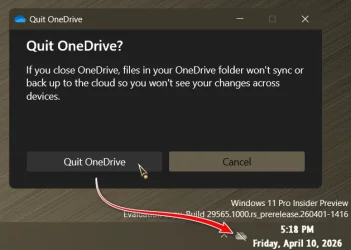
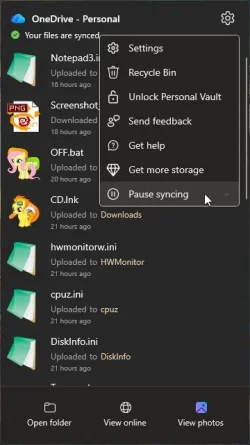
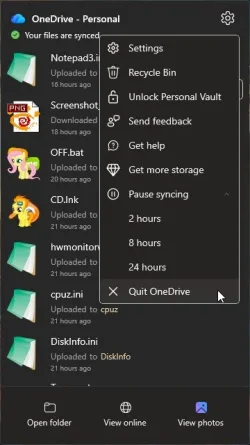
It is funny, how MS keep hiding/shifting Quit with each version.

capture_04112026_094117.webp capture_04112026_094125.webp
 

My Computer

System One

  • OS
    Home26H2Can
    Computer type
    PC/Desktop
    CPU
    AMD Ryzen 5 8600G (07/24)
    Motherboard
    ASROCK B650M-HDV/M.2 (07/24) BIOS 4.21 AGESA ComboAM5 1.3.0.1 (04/26)
    Memory
    2x32GB Kingston FURY DDR5 5600 MHz CL36 @5200 CL36 (07/24)
    Graphics Card(s)
    ASROCK Radeon RX 6600 Challenger D 8G @48FPS (08/24)
    Sound Card
    Creative Sound BlasterX AE-5 Plus (05/24)
    Monitor(s) Displays
    24" Philips 24M1N3200ZS/00 (05/24)
    Screen Resolution
    1920×1080@165Hz via DP1.4
    Hard Drives
    Kingston KC3000 NVMe 2TB (05/24)
    ADATA XPG GAMMIX S11 Pro 512GB (07/19)
    PSU
    Seasonic Core GM 550 Gold (04/24)
    Case
    Fractal Design Define 7 Mini with 3x Noctua NF-P14s/12@555rpm (04/24)
    Cooling
    Noctua NH-U12S with Noctua NF-P12 (04/24)
    Keyboard
    HP Pavilion Wired Keyboard 300 (07/24) + Rabalux 76017 Parker (01/24)
    Mouse
    Logitech M330 Silent Plus (01/26)
    Internet Speed
    500/100 Mbps via RouterOS (05/21) & TCP Optimizer
    Browser
    Edge, Brave for YouTube, LibreWolf for FB
    Antivirus
    NextDNS blocking 1/3 Traffic
    Other Info
    Phone: Motorola Moto G86 (02/26)
    Backup: Hasleo Backup Suite (PreOS)
    Headphones: Sennheiser RS170 (09/10)
    Chair: Huzaro Force 4.4 Grey Mesh (05/24)
    Notifier: Xiaomi Mi Band 9 Milanese (10/24)
    FlexCore USB-C 3.2 Gen 1 (M) to LAN (F) (08/25)
Back
Top Bottom