OneDrive weirdness!


BrianInEngland

Well-known member
Pro User
VIP
Local time
4:18 PM
Posts
3,105
OS
Windows 11 Pro 25H2 (RP channel)
My Pictures folder is stored on G:\Brian\OneDrive\Pictures, so it syncs with OneDrive, this is the default save location.

I have a folder in Pictures named Wallpaper, I use this for my lock screen slideshow
Yesterday I wanted to use a specific set of pictures from that folder so I created one named Futuristic in Wallpaper, and moved some files to it. I also downloaded a few more and put them in the new folder.
Switched the folder to Futuristic in the lockscreen settings - only the 3 new pictures would display, cycling between them. It was as if the other 30 or so didn't exist.

I tried a few things, including deleting the folder and creating it again in OneDrive online, letting it sync. Same problem. Made copies of the files, same problem. Deleted the attributes from all the files, same problem.
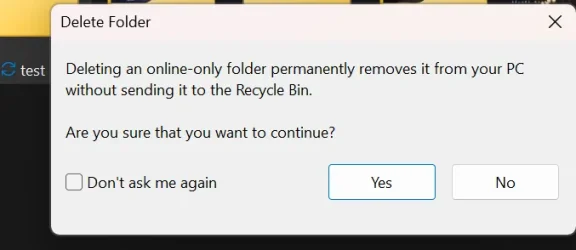
Trying to delete the folder I had a warning about deleting online-only folders - even though my OneDrive isn't set to Files on demand, all files are stored locally on the drive and are fully accessible (I have Admin access on my account)

I then used this folder in the Dynamic Theme app - this couldn't find any files at all in the folder
I then gave up, moved the pictures I didn't want for the slideshow into a folder 'Others' and put the Futuristic ones back into Wallpaper folder. They all work, cycling between the 35 files as it should.

I had a similar problem before but never really found a solution.

Stumped!
 

My Computer My Computer

At a glance

Windows 11 Pro 25H2 (RP channel)AMD Ryzen 7 9800X3D 8-core64GB Corsair Titanium 6000/CL30MSI Suprim 5080 SOC
OS
Windows 11 Pro 25H2 (RP channel)
Computer type
PC/Desktop
Manufacturer/Model
MSI
CPU
AMD Ryzen 7 9800X3D 8-core
Motherboard
MEG X870E Godlike
Memory
64GB Corsair Titanium 6000/CL30
Graphics Card(s)
MSI Suprim 5080 SOC
Sound Card
Soundblaster AE-9
Monitor(s) Displays
ASUS TUF Gaming VG289Q
Screen Resolution
3840x2160
Hard Drives
Samsung 9100 Pro 4TB (gen 5 x4, system drive/games)
Samsung 990 Pro 2TB
Samsung 980 Pro 2TB
Samsung 870 Evo 4TB
Samsung 870 Evo 2TB
Samsung T9 4TB
PSU
Seasonic PX-2200
Case
Bequiet! Dark Base Pro 901
Cooling
Noctua NH-D15S Chromax black
Keyboard
Logitech G915 X (wired)
Mouse
Logitech G903 with PowerPlay charger
Internet Speed
900Mb/sec
Browser
Microsoft Edge
Antivirus
Windows Defender
I don't use OneDrive, iDrive, YourDrive or any other cloud storage, prefer a NAS drive on my LAN. Having spouted off about that, it's my thought/experience any files needed by the Operating System for normal use such as backgrounds, screensavers, etc., work better when the actual files exist on the computer itself in the proper folders established when the OS is installed. Even my NAS drive occasionally gets disconnected from a wireless or wired computer when it is rebooted or after sleeping.
 

My Computers My Computers

  • At a glance

    Win11 Pro RTM Version 24H2 Build 26100.4202Intel Core i5 11th Gen. 2.40GHz12GB
    OS
    Win11 Pro RTM Version 24H2 Build 26100.4202
    Computer type
    Laptop
    Manufacturer/Model
    Dell Vostro 3400
    CPU
    Intel Core i5 11th Gen. 2.40GHz
    Memory
    12GB
    Hard Drives
    256GB SSD NVMe M.2
  • At a glance

    Win11 Pro RTM Version 24H2 Build 26100.4202Intel Core i5 10th Gen. 2.90GHz16GBOnboard, no VGA, using a DisplayPort-to-VGA a...
    Operating System
    Win11 Pro RTM Version 24H2 Build 26100.4202
    Computer type
    PC/Desktop
    Manufacturer/Model
    Dell Vostro 5890
    CPU
    Intel Core i5 10th Gen. 2.90GHz
    Memory
    16GB
    Graphics card(s)
    Onboard, no VGA, using a DisplayPort-to-VGA adapter
    Monitor(s) Displays
    24" Dell
    Hard Drives
    512GB SSD NVMe, 4TB Seagate HDD
    Browser
    Firefox, Edge
    Antivirus
    Windows Defender/Microsoft Security
Is there no chance it could be a sync server issue? Have you tried since, or try tomorrow?
 

My Computers My Computers

  • At a glance

    Windows 11 Pro 25H2 Build 26200.8655Intel(R) Core(TM) i7-4770K CPU @ 3.50GHz32.0 GB of I forget and the box is in storage.Gigabyte nVidia GeForce GTX 1660 Super OC 6GB
    OS
    Windows 11 Pro 25H2 Build 26200.8655
    Computer type
    PC/Desktop
    Manufacturer/Model
    Sin-built 2013
    CPU
    Intel(R) Core(TM) i7-4770K CPU @ 3.50GHz
    Motherboard
    ASUS ROG Maximus VI Formula
    Memory
    32.0 GB of I forget and the box is in storage.
    Graphics Card(s)
    Gigabyte nVidia GeForce GTX 1660 Super OC 6GB
    Sound Card
    ROG SupremeFX Formula 8-Channel High Definition Audio
    Monitor(s) Displays
    5 x LG 25MS500-B - 1 x 24MK430H-B - 1 x Wacom Pro 22" Touch Screen Tablet
    Screen Resolution
    All over the place
    Hard Drives
    Too many to list. OS on Samsung 1TB 870 QVO SATA
    PSU
    Silverstone 1500
    Case
    NZXT Phantom 820 Full-Tower Case
    Cooling
    Noctua NH-D15 Elite Class Dual Tower CPU Cooler / 6 x EziDIY 120mm / 2 x Corsair 140mm somethings / 1 x 140mm Thermaltake something / 2 x 200mm Corsair.
    Keyboard
    Corsair K95 / Logitech diNovo Edge Wireless
    Mouse
    Logitech: G402 / G502 / Mx Masters / Mx Air Cordless
    Internet Speed
    2000/500Mbps
    Browser
    All sorts
    Antivirus
    Kaspersky Premium
    Other Info
    ㅤㅤㅤㅤㅤㅤㅤㅤㅤㅤㅤㅤㅤㅤㅤㅤㅤㅤㅤㅤㅤㅤㅤㅤㅤㅤㅤㅤㅤㅤㅤㅤㅤㅤㅤㅤㅤㅤㅤㅤ⠀⠀⠀⠀⠀⠀⠀⠀⠀⠀
    TP-Link BE9300 WiFi 7 Bluetooth 5.4 (Archer TBE550E)
    TP-Link TX201 V1 2.5GB Lan

    Grandstream HT812 - VoIP
    ASUS DSL-AX82U - Mesh
    ASUS RT-AC68U - Mesh
    ASUS RT-BE88U Router

    Brother MFC-L2880DW Printer

    I’m on a horse.
  • At a glance

    Windows 11 Pro 25H2 Build 26200.8655 (Wifes)13th Generation Intel® Core™ i5-1340P Process...16GB LPDDR5-52001x Intel® Iris® Xe Graphics
    Operating System
    Windows 11 Pro 25H2 Build 26200.8655 (Wifes)
    Computer type
    Laptop
    Manufacturer/Model
    LENOVO Yoga 7 14IRL8 - Type 82YL
    CPU
    13th Generation Intel® Core™ i5-1340P Processor(Core™ i5-1340P)
    Memory
    16GB LPDDR5-5200
    Graphics card(s)
    1x Intel® Iris® Xe Graphics
    Sound Card
    Optimized with Dolby Atmos®
    Screen Resolution
    QHD 2880 x 1800 OLED
    Hard Drives
    M.2 512 GB SSD PCIe
    Mouse
    Logiteck MX Master 3S
    Internet Speed
    2000/500
    Antivirus
    Defender / Malwarebytes
    Other Info
    …still on a horse.


    Wireless Network: Wi-Fi 6E 2x2 AX; Bluetooth® 5.1 or above
    Ports: 1x 1 Novo button; 2 in 1 Audio Combo jack; Micro SD Card Reader; HDMI 1.4b; 2 x USB Type-C (TBT4)
    USB 3.2 Gen 2 DP 1.4a
    PD 3.0); 1 x USB 3.2 Gen1 Type A
    Camera
    1x 1080P FHD IR/RGB Hybrid with Privacy Shutter and Dual Array Microphone
    Graphics
    1x Intel® Iris® Xe Graphics
    Monitor
    14" WUXGA
    Form Factor
    Convertible Notebook
  • Windows 11 Pro 25H2 Build 26200.8655 (Wifes)

    Yoga 7 2-in-1 14IML9 - Type 83DJ

    Processor: Intel® Core™ Ultra 7 155H Processor(Core™ Ultra 7 155H)

    Memory: 32GB LPD5X-7467

    Hard Drive: 1 TB SSD PCIe

    Wireless Network: 1x Wi-Fi 6E 2x2 AX; Bluetooth® 5.1 or above

    Ports: 1 x HDMI 2.1 TMDS; 1 x Novo Button; 1 x Combo Audio Jack
    2 x USB-C (USB 4.0)
    1 x USB-A 3.2 Gen 1

    Camera: 1080P FHD IR Hybrid with Dual Microphone

    Graphics: Intel® Arc™ Graphics

    Monitor: 14" 2.8K

    ...Where's my horse?

My Computer My Computer

At a glance

Windows 11 Pro 25H2 (RP channel)AMD Ryzen 7 9800X3D 8-core64GB Corsair Titanium 6000/CL30MSI Suprim 5080 SOC
OS
Windows 11 Pro 25H2 (RP channel)
Computer type
PC/Desktop
Manufacturer/Model
MSI
CPU
AMD Ryzen 7 9800X3D 8-core
Motherboard
MEG X870E Godlike
Memory
64GB Corsair Titanium 6000/CL30
Graphics Card(s)
MSI Suprim 5080 SOC
Sound Card
Soundblaster AE-9
Monitor(s) Displays
ASUS TUF Gaming VG289Q
Screen Resolution
3840x2160
Hard Drives
Samsung 9100 Pro 4TB (gen 5 x4, system drive/games)
Samsung 990 Pro 2TB
Samsung 980 Pro 2TB
Samsung 870 Evo 4TB
Samsung 870 Evo 2TB
Samsung T9 4TB
PSU
Seasonic PX-2200
Case
Bequiet! Dark Base Pro 901
Cooling
Noctua NH-D15S Chromax black
Keyboard
Logitech G915 X (wired)
Mouse
Logitech G903 with PowerPlay charger
Internet Speed
900Mb/sec
Browser
Microsoft Edge
Antivirus
Windows Defender
That is definitely a sync issue. Have you tried right clicking on the folder and choosing "always keep on this device"? I know it sounds simple, but I had an issue with Steam saves because of this same exact issue. You can also check your storage sense settings. If your pictures haven't been opened in a predefined time, they will not be available on the local system and will require user interaction such as opening the file manually - by doing so it will download the file back to your device. As I mentioned earlier, you could most likely solve this by right mouse clicking on the folder, and choosing "Always keep on this device" so that it saves a copy in the cloud, and keeps it on your device. I had disabled OneDrive because of this, way to frustrating to keep track of saves, various folders, etc. I use just a regular backup method (imaging of my drive through 3rd party backup) so if I need to restore a file I can easily mount the image and pull the file I need should the situation arise.
 

Attachments

  • Screenshot 2025-01-12 0202461.webp
    Screenshot 2025-01-12 0202461.webp
    47.3 KB · Views: 2

My Computer My Computer

At a glance

Windows 11 Professional 25H2; Linux Mint12th Gen Intel(R) Core(TM) i3-1215U 1.20 GHz16 GBVideo Card: Intel Arc UHD Graphics (Alder Lak...
OS
Windows 11 Professional 25H2; Linux Mint
Computer type
PC/Desktop
Manufacturer/Model
Acer
CPU
12th Gen Intel(R) Core(TM) i3-1215U 1.20 GHz
Motherboard
Acer Aspire C24-1700
Memory
16 GB
Graphics Card(s)
Video Card: Intel Arc UHD Graphics (Alder Lake-P 282 GT2) - Integrated Graphics Controller [ACER]
Sound Card
Intel Alder Lake-P PCH - cAVS (Audio, Voice, Speech)
Monitor(s) Displays
Acer [Unknown Model: ACR40B0]
Screen Resolution
1920x1080
Hard Drives
SSD: WDC PC SN530 SDBPNPZ-512G-1114
SSD: TEAM TM8PS7512G
HDD: WDC WD20JDRW-11C7VS0
HDD: Seagate ST2000LM007-1R8174 HDD: Seagate ST1000LM035-1RK172
Case
Acer AIO
Keyboard
Razer Ornata V3 X
Mouse
Razer Basilisk V3
Browser
Brave, Chrome, Firefox, Edge
Antivirus
Microsoft Defender
That is definitely a sync issue. Have you tried right clicking on the folder and choosing "always keep on this device"? I know it sounds simple, but I had an issue with Steam saves because of this same exact issue. You can also check your storage sense settings. If your pictures haven't been opened in a predefined time, they will not be available on the local system and will require user interaction such as opening the file manually - by doing so it will download the file back to your device. As I mentioned earlier, you could most likely solve this by right mouse clicking on the folder, and choosing "Always keep on this device" so that it saves a copy in the cloud, and keeps it on your device. I had disabled OneDrive because of this, way to frustrating to keep track of saves, various folders, etc. I use just a regular backup method (imaging of my drive through 3rd party backup) so if I need to restore a file I can easily mount the image and pull the file I need should the situation arise.
All the files are stored locally, OneDrive/Pictures is my default save location.
I have found the fix. Even though OneDrive is set to Always download all files, new folders seem to be Online only, even though the tick for Always on device is showing. Disabling that then re-enabling it fixes the problem

Makes now sense how LOCAL files are flagged as Online-only, definitely a OneDrive bug
 

My Computer My Computer

At a glance

Windows 11 Pro 25H2 (RP channel)AMD Ryzen 7 9800X3D 8-core64GB Corsair Titanium 6000/CL30MSI Suprim 5080 SOC
OS
Windows 11 Pro 25H2 (RP channel)
Computer type
PC/Desktop
Manufacturer/Model
MSI
CPU
AMD Ryzen 7 9800X3D 8-core
Motherboard
MEG X870E Godlike
Memory
64GB Corsair Titanium 6000/CL30
Graphics Card(s)
MSI Suprim 5080 SOC
Sound Card
Soundblaster AE-9
Monitor(s) Displays
ASUS TUF Gaming VG289Q
Screen Resolution
3840x2160
Hard Drives
Samsung 9100 Pro 4TB (gen 5 x4, system drive/games)
Samsung 990 Pro 2TB
Samsung 980 Pro 2TB
Samsung 870 Evo 4TB
Samsung 870 Evo 2TB
Samsung T9 4TB
PSU
Seasonic PX-2200
Case
Bequiet! Dark Base Pro 901
Cooling
Noctua NH-D15S Chromax black
Keyboard
Logitech G915 X (wired)
Mouse
Logitech G903 with PowerPlay charger
Internet Speed
900Mb/sec
Browser
Microsoft Edge
Antivirus
Windows Defender
Makes now sense how LOCAL files are flagged as Online-only, definitely a OneDrive bug
Great, glad you figured it out! That is good to know as well, most definitely is a bug. I got so frustrated with OneDrive because all of my game saves from Steam would always end up in my Documents folder. Every time I went to open a game, it would say no save file present (That's because OneDrive would clear it off my system immediately and make it online only). I had to manually find where these save files were all stored at, and right click to keep on the device. Even various installs of other applications OneDrive would somehow immediately intercept - I just got tired of messing around with it (Storage sense, OneDrive all together).
 

My Computer My Computer

At a glance

Windows 11 Professional 25H2; Linux Mint12th Gen Intel(R) Core(TM) i3-1215U 1.20 GHz16 GBVideo Card: Intel Arc UHD Graphics (Alder Lak...
OS
Windows 11 Professional 25H2; Linux Mint
Computer type
PC/Desktop
Manufacturer/Model
Acer
CPU
12th Gen Intel(R) Core(TM) i3-1215U 1.20 GHz
Motherboard
Acer Aspire C24-1700
Memory
16 GB
Graphics Card(s)
Video Card: Intel Arc UHD Graphics (Alder Lake-P 282 GT2) - Integrated Graphics Controller [ACER]
Sound Card
Intel Alder Lake-P PCH - cAVS (Audio, Voice, Speech)
Monitor(s) Displays
Acer [Unknown Model: ACR40B0]
Screen Resolution
1920x1080
Hard Drives
SSD: WDC PC SN530 SDBPNPZ-512G-1114
SSD: TEAM TM8PS7512G
HDD: WDC WD20JDRW-11C7VS0
HDD: Seagate ST2000LM007-1R8174 HDD: Seagate ST1000LM035-1RK172
Case
Acer AIO
Keyboard
Razer Ornata V3 X
Mouse
Razer Basilisk V3
Browser
Brave, Chrome, Firefox, Edge
Antivirus
Microsoft Defender
In OneDrive settings, go to Advanced Settings, and you can set "Files On Demand" to OFF for all of OneDrive. That's one of the first things I do after a clean install. Problem solved with one click!

My backup strategy uses both Macrium Reflect images and OneDrive and has for many years. Obviously for imaging to be part of a data backup, all your data files must always be resident in your local OneDrive folder. Thus when using OneDrive, Files On Demand must be set to OFF.
 

My Computers My Computers

  • At a glance

    Windows 11 ProIntel Series 3 Core Ultra X9 388H64GB LPDDR5x 9600 MT/sIntel Arc graphics B390 Panther Lake
    OS
    Windows 11 Pro
    Computer type
    Laptop
    Manufacturer/Model
    Dell XPS 16 DA16260
    CPU
    Intel Series 3 Core Ultra X9 388H
    Memory
    64GB LPDDR5x 9600 MT/s
    Graphics Card(s)
    Intel Arc graphics B390 Panther Lake
    Monitor(s) Displays
    16" 3.2K Tandem OLED Infinity Edge
    Screen Resolution
    3200 x 2000 16:10 236 PPI
    Hard Drives
    1 Terabyte M.2 PCIe NVMe SSD
    Case
    Black Anodized Aluminum
    Cooling
    Vapor Chamber Cooling
    Mouse
    None
    Internet Speed
    942 Mbps Netgear Mesh + 2 Satellites
    Browser
    Microsoft Edge (Chromium)
    Antivirus
    Windows Security (Defender)
    Other Info
    NPU delivering 67 TOPS
    Microsoft 365 subscription
    Microsoft Office 365
    Microsoft OneDrive 1TB Cloud
    Microsoft Visual Studio
    Microsoft Visual Studio Code
    Microsoft Sysinternals Suite
    Microsoft BitLocker
    Microsoft Copilot
    Dell Support Assist
    Dell Command | Update
    Macrium Reflect X subscription
    1Password Password Manager
    Amazon Kindle for PC
    Lightroom/Photoshop subscription
    Interactive Brokers Trader Workstation
  • At a glance

    Windows 11 ProSnapdragon® X Elite (12 Core) with Hexagon NP...32GB LPDDR5x 8448 MT/sIntegrated Adreno GPU
    Operating System
    Windows 11 Pro
    Computer type
    Laptop
    Manufacturer/Model
    Microsoft Surface Laptop 7
    CPU
    Snapdragon® X Elite (12 Core) with Hexagon NPU delivering 45 TOPS
    Memory
    32GB LPDDR5x 8448 MT/s
    Graphics card(s)
    Integrated Adreno GPU
    Sound Card
    Omnisonic speakers with Dolby Atmos spatial sound
    Monitor(s) Displays
    13.8″ PixelSense Flow touchscreen 120 Hz 600 NIT
    Screen Resolution
    2304 × 1536 (201 PPI), 3:2 aspect ratio
    Hard Drives
    1 TB PCIe NVMe Gen 4 SSD
    Case
    Black Anodized Aluminum
    Cooling
    Vapor Chamber Cooling
    Mouse
    None
    Internet Speed
    942 Mbps Netgear Mesh + 2 Satellites
    Browser
    Microsoft Edge (Chromium)
    Antivirus
    Windows Security (Defender)
    Other Info
    Microsoft 365 subscription (Office)
    Microsoft Office 365
    Microsoft OneDrive 1TB Cloud
    Microsoft Visual Studio 2026
    Microsoft Visual Studio Code
    Interactive Brokers Trader Workstation
    Lightroom/Photoshop subscription
    1Password Password Manager
    Microsoft Sysinternals
    Amazon Kindle for PC
    Microsoft BitLocker
    Microsoft Copilot
In OneDrive settings, go to Advanced Settings, and you can set "Files On Demand" to OFF for all of OneDrive. That's one of the first things I do after a clean install. Problem solved with one click!

My backup strategy uses both Macrium Reflect images and OneDrive and has for many years. Obviously for imaging to be part of a data backup, all your data files must always be resident in your local OneDrive folder. Thus when using OneDrive, Files On Demand must be set to OFF.
Problem solved, except it isn't! I did that first thing but even then new folders are showing as Offline only, even if the tick next to 'Always keep on this device' is showing. I have to untick the new folder, then tick it again. If I try to delete the folder I get the warning about deleting offline-only files

Pic shows the folder 'test' I just created, note the tick. Until I untick then tick again I can't use pictures for the lockscreen/desktop. I can however access, copy, edit and backup the files so they are definitely stored locally
 

Attachments

  • Screenshot (22).webp
    Screenshot (22).webp
    26.9 KB · Views: 2
  • Screenshot (23).webp
    Screenshot (23).webp
    15.8 KB · Views: 2

My Computer My Computer

At a glance

Windows 11 Pro 25H2 (RP channel)AMD Ryzen 7 9800X3D 8-core64GB Corsair Titanium 6000/CL30MSI Suprim 5080 SOC
OS
Windows 11 Pro 25H2 (RP channel)
Computer type
PC/Desktop
Manufacturer/Model
MSI
CPU
AMD Ryzen 7 9800X3D 8-core
Motherboard
MEG X870E Godlike
Memory
64GB Corsair Titanium 6000/CL30
Graphics Card(s)
MSI Suprim 5080 SOC
Sound Card
Soundblaster AE-9
Monitor(s) Displays
ASUS TUF Gaming VG289Q
Screen Resolution
3840x2160
Hard Drives
Samsung 9100 Pro 4TB (gen 5 x4, system drive/games)
Samsung 990 Pro 2TB
Samsung 980 Pro 2TB
Samsung 870 Evo 4TB
Samsung 870 Evo 2TB
Samsung T9 4TB
PSU
Seasonic PX-2200
Case
Bequiet! Dark Base Pro 901
Cooling
Noctua NH-D15S Chromax black
Keyboard
Logitech G915 X (wired)
Mouse
Logitech G903 with PowerPlay charger
Internet Speed
900Mb/sec
Browser
Microsoft Edge
Antivirus
Windows Defender
That is definitely a sync issue. Have you tried right clicking on the folder and choosing "always keep on this device"? I know it sounds simple, but I had an issue with Steam saves because of this same exact issue. You can also check your storage sense settings. If your pictures haven't been opened in a predefined time, they will not be available on the local system and will require user interaction such as opening the file manually - by doing so it will download the file back to your device. As I mentioned earlier, you could most likely solve this by right mouse clicking on the folder, and choosing "Always keep on this device" so that it saves a copy in the cloud, and keeps it on your device. I had disabled OneDrive because of this, way to frustrating to keep track of saves, various folders, etc. I use just a regular backup method (imaging of my drive through 3rd party backup) so if I need to restore a file I can easily mount the image and pull the file I need should the situation arise.
All files are saved locally
 

My Computer My Computer

At a glance

Windows 11 Pro 25H2 (RP channel)AMD Ryzen 7 9800X3D 8-core64GB Corsair Titanium 6000/CL30MSI Suprim 5080 SOC
OS
Windows 11 Pro 25H2 (RP channel)
Computer type
PC/Desktop
Manufacturer/Model
MSI
CPU
AMD Ryzen 7 9800X3D 8-core
Motherboard
MEG X870E Godlike
Memory
64GB Corsair Titanium 6000/CL30
Graphics Card(s)
MSI Suprim 5080 SOC
Sound Card
Soundblaster AE-9
Monitor(s) Displays
ASUS TUF Gaming VG289Q
Screen Resolution
3840x2160
Hard Drives
Samsung 9100 Pro 4TB (gen 5 x4, system drive/games)
Samsung 990 Pro 2TB
Samsung 980 Pro 2TB
Samsung 870 Evo 4TB
Samsung 870 Evo 2TB
Samsung T9 4TB
PSU
Seasonic PX-2200
Case
Bequiet! Dark Base Pro 901
Cooling
Noctua NH-D15S Chromax black
Keyboard
Logitech G915 X (wired)
Mouse
Logitech G903 with PowerPlay charger
Internet Speed
900Mb/sec
Browser
Microsoft Edge
Antivirus
Windows Defender
Have you ever needed to copy a file from a OneDrive folder saved locally using WinPE, but the system said you didn’t have access to the file? I’m dealing with this exact issue and can’t seem to find a solution. I’ve done a lot of research, even on Reddit, and ended up here.

The only solution I’ve found so far is to use DiskGenius. On a regular Windows system, the PowerShell function I created successfully copies only the files and folders saved locally. However, on WinPE, the system can’t access these files. I’ve tried other copy methods, but none worked. Only when the OneDrive folder is converted into a generic folder can I copy the files.

Commands like xcopy, copy, robocopy, and even manual copies don’t work. The message always says that the system cannot access the file. What puzzles me is that the files are indeed saved locally.

The issue is that users put many files in the folder, and there’s not enough space to sync them all. As a result, the files end up "stuck."

I need to automate the copying of locally saved files, but I’ve run into this problem.
 

My Computer My Computer

At a glance

Windows 11
OS
Windows 11
Computer type
Laptop
Manufacturer/Model
Lenovo

Latest Support Threads

Back
Top Bottom