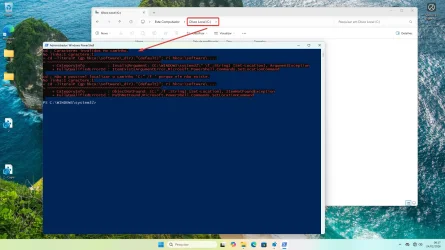
"Open powershell window here as administrator" - throws errors now?


Local time
6:04 AM
Posts
16
OS
Windows 11 Pro v. 10.0.26100 Build 26100
Hi everyone,

I've collected a bunch of "tips" to configure Windows each time I set up a new machine, or when Windows breaks everything with an update.

One of them is from the Windows 10 days - "open powershell window here as administrator" in the context menu.

It still works, but it throws an error now, so I don't want to use it. I don't understand the error and I'm not smart enough to fix it.

Does anyone know how to resolve this? Details in the tenforums thread below. Thank you.

Add Open PowerShell window here as administrator in Windows 10
 

My Computer

System One

  • OS
    Windows 11 Pro v. 10.0.26100 Build 26100
So you're using a Windows 10 tweak on Windows 11?
 

My Computers

System One System Two

  • OS
    Windows 11 Enterprise 25H2 26200 7462
    Computer type
    PC/Desktop
    Manufacturer/Model
    Custom Build
    CPU
    Intel XEON E5-2699 v3
    Motherboard
    ASUS X99-A
    Memory
    64GB Teamgroup UD4-3600
    Graphics Card(s)
    NVIDIA GeForce GTX 1080 Ti
    Sound Card
    Integrated
    Monitor(s) Displays
    ACER X34 Predator
    Screen Resolution
    3440 x 1440
    Hard Drives
    Crucial CT1000P 3P SSD8 1TB
    Crucial CT1000 BX500 SSD 1TB
    PSU
    GameMax Pro
    Case
    Fractal Design
    Cooling
    Corsair H110iGT + 6 140mm Fans
    Keyboard
    Corsair K4
    Mouse
    G-Skill G502
    Internet Speed
    300MBs
    Browser
    Chrome
    Antivirus
    OEM
    Other Info
    ASUS RT-AC87U Router
  • Operating System
    25H2 26200.5074
    Computer type
    Laptop
    Manufacturer/Model
    ASUS X555LA
    Memory
    8GB
    Browser
    Chrome
    Antivirus
    OEM

My Computers

System One System Two

  • OS
    Windows 11 Enterprise 25H2 26200 7462
    Computer type
    PC/Desktop
    Manufacturer/Model
    Custom Build
    CPU
    Intel XEON E5-2699 v3
    Motherboard
    ASUS X99-A
    Memory
    64GB Teamgroup UD4-3600
    Graphics Card(s)
    NVIDIA GeForce GTX 1080 Ti
    Sound Card
    Integrated
    Monitor(s) Displays
    ACER X34 Predator
    Screen Resolution
    3440 x 1440
    Hard Drives
    Crucial CT1000P 3P SSD8 1TB
    Crucial CT1000 BX500 SSD 1TB
    PSU
    GameMax Pro
    Case
    Fractal Design
    Cooling
    Corsair H110iGT + 6 140mm Fans
    Keyboard
    Corsair K4
    Mouse
    G-Skill G502
    Internet Speed
    300MBs
    Browser
    Chrome
    Antivirus
    OEM
    Other Info
    ASUS RT-AC87U Router
  • Operating System
    25H2 26200.5074
    Computer type
    Laptop
    Manufacturer/Model
    ASUS X555LA
    Memory
    8GB
    Browser
    Chrome
    Antivirus
    OEM
A screenshot would be useful, if you're not going to repeat the error message.

And the last post in the referenced TenForums thread is @LesFerch replying to my question.
 

My Computer

System One

  • OS
    Windows 7
If you can't be bothered to read that thread, it's unlikely you will be able to help resolve the problem.
 

My Computer

System One

  • OS
    Windows 11 Pro v. 10.0.26100 Build 26100
If you can't be bothered to read that thread, it's unlikely you will be able to help resolve the problem.
I don't have time to chase threads over the internet when you could have given a simple explanation.

Judging by your attitude so far i'm guessing this will stay unresolved.
 

My Computers

System One System Two

  • OS
    Windows 11 Enterprise 25H2 26200 7462
    Computer type
    PC/Desktop
    Manufacturer/Model
    Custom Build
    CPU
    Intel XEON E5-2699 v3
    Motherboard
    ASUS X99-A
    Memory
    64GB Teamgroup UD4-3600
    Graphics Card(s)
    NVIDIA GeForce GTX 1080 Ti
    Sound Card
    Integrated
    Monitor(s) Displays
    ACER X34 Predator
    Screen Resolution
    3440 x 1440
    Hard Drives
    Crucial CT1000P 3P SSD8 1TB
    Crucial CT1000 BX500 SSD 1TB
    PSU
    GameMax Pro
    Case
    Fractal Design
    Cooling
    Corsair H110iGT + 6 140mm Fans
    Keyboard
    Corsair K4
    Mouse
    G-Skill G502
    Internet Speed
    300MBs
    Browser
    Chrome
    Antivirus
    OEM
    Other Info
    ASUS RT-AC87U Router
  • Operating System
    25H2 26200.5074
    Computer type
    Laptop
    Manufacturer/Model
    ASUS X555LA
    Memory
    8GB
    Browser
    Chrome
    Antivirus
    OEM
@DisposableEmail I just tested the current reg file on the latest Windows 11 build and it worked just fine for me.

Perhaps you're using an older version of the reg file? If not, post the error you're seeing.

I did check the tutorial and saw that there were no new posts by you (or anyone else) so it makes no sense that we should wade through 10 pages for some error (among several) that someone else posted (and was resolved with the current reg file). As it stands, the current reg file works on a standard Windows 11 build. But other variables, such as third party AV, could make a difference. Post your error and we can help.

Another option for you: RightClickTools
 

My Computer

System One

  • OS
    Windows 10/11
    Computer type
    Laptop
    Manufacturer/Model
    Acer
One of them is from the Windows 10 days - "open powershell window here as administrator" in the context menu.

Tutorial and reg file here on Eleven Forums. Perhaps there is a difference.


My Computers

System One System Two

  • OS
    Windows 11 Pro 25H2 Build 26200.8524
    Computer type
    PC/Desktop
    Manufacturer/Model
    Sin-built 2013
    CPU
    Intel(R) Core(TM) i7-4770K CPU @ 3.50GHz
    Motherboard
    ASUS ROG Maximus VI Formula
    Memory
    32.0 GB of I forget and the box is in storage.
    Graphics Card(s)
    Gigabyte nVidia GeForce GTX 1660 Super OC 6GB
    Sound Card
    Onboard thingy
    Monitor(s) Displays
    5 x LG 25MS500-B - 1 x 24MK430H-B - 1 x Wacom Pro 22" Touch Screen Tablet
    Screen Resolution
    All over the place
    Hard Drives
    Too many to list.
    OS on Samsung 1TB 870 QVO SATA
    PSU
    Silverstone 1500
    Case
    NZXT Phantom 820 Full-Tower Case
    Cooling
    Noctua NH-D15 Elite Class Dual Tower CPU Cooler / 6 x EziDIY 120mm / 2 x Corsair 140mm somethings / 1 x 140mm Thermaltake something / 2 x 200mm Corsair.
    Keyboard
    Corsair K95 / Logitech diNovo Edge Wireless
    Mouse
    Logitech: G402 / G502 / Mx Masters / Mx Air Cordless
    Internet Speed
    2000/500Mbps
    Browser
    All sorts
    Antivirus
    Kaspersky Premium
    Other Info
    ㅤㅤㅤㅤㅤㅤㅤㅤㅤㅤㅤㅤㅤㅤㅤㅤㅤㅤㅤㅤㅤㅤㅤㅤㅤㅤㅤㅤㅤㅤㅤㅤㅤㅤㅤㅤㅤㅤㅤㅤ⠀⠀⠀⠀⠀⠀⠀⠀⠀⠀
    TP-Link BE9300 WiFi 7 Bluetooth 5.4 (Archer TBE550E)
    TP-Link TX201 V1 2.5GB Lan

    Grandstream HT812 - VoIP
    ASUS DSL-AX82U - Mesh
    ASUS RT-AC68U - Mesh
    ASUS RT-BE88U Router

    Brother MFC-L2880DW Printer

    I’m on a horse.
  • Operating System
    Windows 11 Pro 25H2 Build 26200.8524
    Computer type
    Laptop
    Manufacturer/Model
    LENOVO Yoga 7 14IRL8 - 7i EVO OLED 14" Touchscreen i5 12 Core 16GB/512GB
    CPU
    Intel Core 12th Gen i5-1240P Processor (1.7 - 4.4GHz)
    Memory
    16GB LPDDR5 RAM
    Graphics card(s)
    Intel Iris Xe Graphics Processor
    Sound Card
    Optimized with Dolby Atmos®
    Screen Resolution
    QHD 2880 x 1800 OLED
    Hard Drives
    M.2 512GB
    Antivirus
    Defender / Malwarebytes
    Other Info
    …still on a horse.
There is also this


And you can add these by using Winaero Tweaker, as I recall?


My Computers

System One System Two

  • OS
    Windows 11 Pro 25H2 Build 26200.8524
    Computer type
    PC/Desktop
    Manufacturer/Model
    Sin-built 2013
    CPU
    Intel(R) Core(TM) i7-4770K CPU @ 3.50GHz
    Motherboard
    ASUS ROG Maximus VI Formula
    Memory
    32.0 GB of I forget and the box is in storage.
    Graphics Card(s)
    Gigabyte nVidia GeForce GTX 1660 Super OC 6GB
    Sound Card
    Onboard thingy
    Monitor(s) Displays
    5 x LG 25MS500-B - 1 x 24MK430H-B - 1 x Wacom Pro 22" Touch Screen Tablet
    Screen Resolution
    All over the place
    Hard Drives
    Too many to list.
    OS on Samsung 1TB 870 QVO SATA
    PSU
    Silverstone 1500
    Case
    NZXT Phantom 820 Full-Tower Case
    Cooling
    Noctua NH-D15 Elite Class Dual Tower CPU Cooler / 6 x EziDIY 120mm / 2 x Corsair 140mm somethings / 1 x 140mm Thermaltake something / 2 x 200mm Corsair.
    Keyboard
    Corsair K95 / Logitech diNovo Edge Wireless
    Mouse
    Logitech: G402 / G502 / Mx Masters / Mx Air Cordless
    Internet Speed
    2000/500Mbps
    Browser
    All sorts
    Antivirus
    Kaspersky Premium
    Other Info
    ㅤㅤㅤㅤㅤㅤㅤㅤㅤㅤㅤㅤㅤㅤㅤㅤㅤㅤㅤㅤㅤㅤㅤㅤㅤㅤㅤㅤㅤㅤㅤㅤㅤㅤㅤㅤㅤㅤㅤㅤ⠀⠀⠀⠀⠀⠀⠀⠀⠀⠀
    TP-Link BE9300 WiFi 7 Bluetooth 5.4 (Archer TBE550E)
    TP-Link TX201 V1 2.5GB Lan

    Grandstream HT812 - VoIP
    ASUS DSL-AX82U - Mesh
    ASUS RT-AC68U - Mesh
    ASUS RT-BE88U Router

    Brother MFC-L2880DW Printer

    I’m on a horse.
  • Operating System
    Windows 11 Pro 25H2 Build 26200.8524
    Computer type
    Laptop
    Manufacturer/Model
    LENOVO Yoga 7 14IRL8 - 7i EVO OLED 14" Touchscreen i5 12 Core 16GB/512GB
    CPU
    Intel Core 12th Gen i5-1240P Processor (1.7 - 4.4GHz)
    Memory
    16GB LPDDR5 RAM
    Graphics card(s)
    Intel Iris Xe Graphics Processor
    Sound Card
    Optimized with Dolby Atmos®
    Screen Resolution
    QHD 2880 x 1800 OLED
    Hard Drives
    M.2 512GB
    Antivirus
    Defender / Malwarebytes
    Other Info
    …still on a horse.
Tutorial and reg file here on Eleven Forums. Perhaps there is a difference.


I think that tutorial is just for a non-admin PowerShell here context menu.

The Windows 10 tutorial is also applicable to Windows 11 as per the comment here from @Brink:

There's also this tutorial for Windows Terminal (Admin):
 

My Computer

System One

  • OS
    Windows 10/11
    Computer type
    Laptop
    Manufacturer/Model
    Acer
I think that tutorial is just for a non-admin PowerShell here context menu

Yes, it is. But I noticed that there were steps to Change the permissions of the Powershell key to "Allow" Administrators "Full Control. I thought it may be relevant, I really don’t know.

There's also this tutorial for Windows Terminal (Admin):

Yes, that’s in my post. You may have been composing a reply when I added it, thanks, Les
 

My Computers

System One System Two

  • OS
    Windows 11 Pro 25H2 Build 26200.8524
    Computer type
    PC/Desktop
    Manufacturer/Model
    Sin-built 2013
    CPU
    Intel(R) Core(TM) i7-4770K CPU @ 3.50GHz
    Motherboard
    ASUS ROG Maximus VI Formula
    Memory
    32.0 GB of I forget and the box is in storage.
    Graphics Card(s)
    Gigabyte nVidia GeForce GTX 1660 Super OC 6GB
    Sound Card
    Onboard thingy
    Monitor(s) Displays
    5 x LG 25MS500-B - 1 x 24MK430H-B - 1 x Wacom Pro 22" Touch Screen Tablet
    Screen Resolution
    All over the place
    Hard Drives
    Too many to list.
    OS on Samsung 1TB 870 QVO SATA
    PSU
    Silverstone 1500
    Case
    NZXT Phantom 820 Full-Tower Case
    Cooling
    Noctua NH-D15 Elite Class Dual Tower CPU Cooler / 6 x EziDIY 120mm / 2 x Corsair 140mm somethings / 1 x 140mm Thermaltake something / 2 x 200mm Corsair.
    Keyboard
    Corsair K95 / Logitech diNovo Edge Wireless
    Mouse
    Logitech: G402 / G502 / Mx Masters / Mx Air Cordless
    Internet Speed
    2000/500Mbps
    Browser
    All sorts
    Antivirus
    Kaspersky Premium
    Other Info
    ㅤㅤㅤㅤㅤㅤㅤㅤㅤㅤㅤㅤㅤㅤㅤㅤㅤㅤㅤㅤㅤㅤㅤㅤㅤㅤㅤㅤㅤㅤㅤㅤㅤㅤㅤㅤㅤㅤㅤㅤ⠀⠀⠀⠀⠀⠀⠀⠀⠀⠀
    TP-Link BE9300 WiFi 7 Bluetooth 5.4 (Archer TBE550E)
    TP-Link TX201 V1 2.5GB Lan

    Grandstream HT812 - VoIP
    ASUS DSL-AX82U - Mesh
    ASUS RT-AC68U - Mesh
    ASUS RT-BE88U Router

    Brother MFC-L2880DW Printer

    I’m on a horse.
  • Operating System
    Windows 11 Pro 25H2 Build 26200.8524
    Computer type
    Laptop
    Manufacturer/Model
    LENOVO Yoga 7 14IRL8 - 7i EVO OLED 14" Touchscreen i5 12 Core 16GB/512GB
    CPU
    Intel Core 12th Gen i5-1240P Processor (1.7 - 4.4GHz)
    Memory
    16GB LPDDR5 RAM
    Graphics card(s)
    Intel Iris Xe Graphics Processor
    Sound Card
    Optimized with Dolby Atmos®
    Screen Resolution
    QHD 2880 x 1800 OLED
    Hard Drives
    M.2 512GB
    Antivirus
    Defender / Malwarebytes
    Other Info
    …still on a horse.
Yes, it is. But I noticed that there were steps to Change the permissions of the Powershell key to "Allow" Administrators "Full Control. I thought it may be relevant, I really don’t know.
Those instructions are for changing the default permissions on the reg sub-tree, since it's protected from tampering. It doesn't grant the actual target of the context menu any special privileges.
 

My Computer

System One

  • OS
    Windows 7
@DisposableEmail I just tested the current reg file on the latest Windows 11 build and it worked just fine for me.

Perhaps you're using an older version of the reg file? If not, post the error you're seeing.

I did check the tutorial and saw that there were no new posts by you (or anyone else) so it makes no sense that we should wade through 10 pages for some error (among several) that someone else posted (and was resolved with the current reg file). As it stands, the current reg file works on a standard Windows 11 build. But other variables, such as third party AV, could make a difference. Post your error and we can help.

Another option for you: RightClickTools
I believe I found the error he is referring to.
I tested it here on Windows 10 and 11, and it works in all scenarios except on the system’s local drives, such as C:

Edit:
I did more tests, and I discovered that the original Windows command itself is broken. It seems that Microsoft changed the command.

They used the powershell.exe -noexit -command Set-Location -literalPath '%V' comand before , and now they are using powershell.exe -noexit -WorkingDirectory "%V"

The new command handles Unicode characters well, but it doesn't work on the C: drive.

local_disk.webp
 
Last edited:

My Computer

System One

  • OS
    Windows 11
    Computer type
    PC/Desktop
I believe I found the error he is referring to.
I tested it here on Windows 10 and 11, and it works in all scenarios except on the system’s local drives, such as C:
I see! Thank you! On my machine, I only ever used it on a directory or directory background. If @DisposableEmail had posted the error this would have been fixed a long time ago. Anyhow, the fix is simple. We just need to append a backslash for the the "Drive" code, like this:

@Brink here's the fixed code for Drive:

Code:
[HKEY_CLASSES_ROOT\Drive\shell\PowerShellAsAdmin\command]
@="cmd /c reg add hkcu\\software\\_dir /d \"%v\\\" /f & start powershell -WindowS H -noP -c Start-Process -v RunAs powershell.exe '-noL -noE -c cd -literalP (gp hkcu:\\software\\_dir).\\\"\\\"\\\"(default)\\\"\\\"\\\"; ri hkcu:\\software\\_dir'"
 

My Computer

System One

  • OS
    Windows 10/11
    Computer type
    Laptop
    Manufacturer/Model
    Acer
I see! Thank you! On my machine, I only ever used it on a directory or directory background. If @DisposableEmail had posted the error this would have been fixed a long time ago. Anyhow, the fix is simple. We just need to append a backslash for the the "Drive" code, like this:

@Brink here's the fixed code for Drive:

Code:
[HKEY_CLASSES_ROOT\Drive\shell\PowerShellAsAdmin\command]
@="cmd /c reg add hkcu\\software\\_dir /d \"%v\\\" /f & start powershell -WindowS H -noP -c Start-Process -v RunAs powershell.exe '-noL -noE -c cd -literalP (gp hkcu:\\software\\_dir).\\\"\\\"\\\"(default)\\\"\\\"\\\"; ri hkcu:\\software\\_dir'"
Thank you for the fix.

But I believe the 'Directory\Background' key also needs to be changed, otherwise the error persists when clicking inside the c: folder.
 

My Computer

System One

  • OS
    Windows 11
    Computer type
    PC/Desktop

Latest Support Threads

Back
Top Bottom