Opera Browser New Purple Icon on Speed Dial Page


EB2XR6

Well-known member
Member
VIP
Local time
2:24 AM
Posts
612
OS
Windows 11
I fired up Opera Version 124.0.5705.65 and noticed this Purple Icon at the Top of the Speed Dial (Start Page) please see Image 1.
I ran a full Defender Scan and it detected nothing.
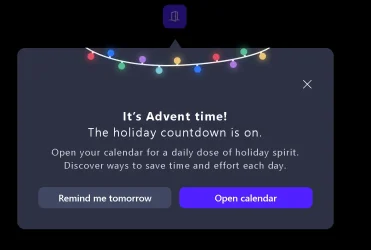
I thn clicked the icon and this Message Ad popped up as per Image 2.
I clicked on the X and it gave me the option to close the Window .
I restarted Opera and it appeared again.
I posted in the Opera Forums and the reply does not like the icon either.
I have reverted back to the previous version of Opera for the time beig.
Does anyone know the purpose of this Icon - Ad and can it be turned off, deleted etc
Thanks EB2SXR6
 

Attachments

  • Opera Icon.webp
    Opera Icon.webp
    2 KB · Views: 1
  • Opera Pop Up.webp
    Opera Pop Up.webp
    29.6 KB · Views: 1

My Computer My Computer

At a glance

Windows 11AMD Ryzen 8700G64 GBOnboard
OS
Windows 11
Computer type
PC/Desktop
Manufacturer/Model
Generic
CPU
AMD Ryzen 8700G
Motherboard
Gigabyte B650 UD AC
Memory
64 GB
Graphics Card(s)
Onboard
Sound Card
Onboard
Monitor(s) Displays
Del U2723QE
Screen Resolution
3840 x 2160
Hard Drives
Corsiar MP600 1TB
PSU
Silverstone 750 GOLD
Case
Silverstone FARA 513
That is Opera's Speed Dial, an advertisement placeholder introduced in Opera version 124.0.5705.65. It’s not malware, but part of Opera’s built-in promotional content. Clicking it opens an ad or sponsored content.
  • Manual removal: You can try right-clicking the tile and selecting Remove or Delete if available.

  • Settings workaround:
    • Go to opera://settings/startPage
    • Disable options like Show promotional content or Receive news and offers from Opera
  • Rollback option: Some users reverted to an earlier Opera version to avoid the ad from Opera
 

My Computers My Computers

  • At a glance

    Windows 11 Pro 25H2 26200.8655i9-10900 10 core 20 threads32 gbnone-Intel UHD Graphics 630
    OS
    Windows 11 Pro 25H2 26200.8655
    Computer type
    PC/Desktop
    Manufacturer/Model
    Dell Optiplex 7080
    CPU
    i9-10900 10 core 20 threads
    Motherboard
    DELL 0J37VM
    Memory
    32 gb
    Graphics Card(s)
    none-Intel UHD Graphics 630
    Sound Card
    Integrated Realtek
    Monitor(s) Displays
    Benq 27
    Screen Resolution
    2560x1440
    Hard Drives
    2x1tb Solidigm m.2 nvme /External drives 512gb Samsung m.2 sata+2tb Kingston m2.nvme
    PSU
    500w
    Case
    MT
    Cooling
    Dell Premium
    Keyboard
    Logitech wired
    Mouse
    Logitech wireless
    Internet Speed
    so slow I'm too embarrassed to tell
    Browser
    #1 Edge #2 Firefox
    Antivirus
    Defender+MWB Premium
  • At a glance

    Windows 11 Pro 24H2 26200.8457AMD Ryzen 7 6800U32 gbintegrated
    Operating System
    Windows 11 Pro 24H2 26200.8457
    Computer type
    PC/Desktop
    Manufacturer/Model
    Beelink Mini PC SER5
    CPU
    AMD Ryzen 7 6800U
    Memory
    32 gb
    Graphics card(s)
    integrated
    Sound Card
    integrated
    Monitor(s) Displays
    Benq 27
    Screen Resolution
    2560x1440
    Hard Drives
    1TB Crucial nvme
    Keyboard
    Logitech wired
    Mouse
    Logitech wireless
    Internet Speed
    still too embarrassed to tell
    Browser
    Firefox
    Antivirus
    Defender
    Other Info
    System 3 is non compliant Dell 9020 i7-4770/24gb ram Win11 PRO 26200.8457
Thanks yThat is Opera's Speed Dial, an advertisement placeholder introduced in Opera version 124.0.5705.65. It’s not malware, but part of Opera’s built-in promotional content. Clicking it opens an ad or sponsored content.
  • Manual removal: You can try right-clicking the tile and selecting Remove or Delete if available.

  • Settings workaround:
    • Go to opera://settings/startPage
    • Disable options like Show promotional content or Receive news and offers from Opera
  • Rollback option: Some users reverted to an earlier Opera version to avoid the ad from Opera
Thank you Glasskuter, I rolled back. I see Brave is now serving ads as well.
 

My Computer My Computer

At a glance

Windows 11AMD Ryzen 8700G64 GBOnboard
OS
Windows 11
Computer type
PC/Desktop
Manufacturer/Model
Generic
CPU
AMD Ryzen 8700G
Motherboard
Gigabyte B650 UD AC
Memory
64 GB
Graphics Card(s)
Onboard
Sound Card
Onboard
Monitor(s) Displays
Del U2723QE
Screen Resolution
3840 x 2160
Hard Drives
Corsiar MP600 1TB
PSU
Silverstone 750 GOLD
Case
Silverstone FARA 513
I reinstalled the lastest version and tried to disable the ad widget right click etc and could see nothing in the settings to disable it.
So rolled back again to the previous version.
 

My Computer My Computer

At a glance

Windows 11AMD Ryzen 8700G64 GBOnboard
OS
Windows 11
Computer type
PC/Desktop
Manufacturer/Model
Generic
CPU
AMD Ryzen 8700G
Motherboard
Gigabyte B650 UD AC
Memory
64 GB
Graphics Card(s)
Onboard
Sound Card
Onboard
Monitor(s) Displays
Del U2723QE
Screen Resolution
3840 x 2160
Hard Drives
Corsiar MP600 1TB
PSU
Silverstone 750 GOLD
Case
Silverstone FARA 513
I lodged a bug report with Opera.
The explanation was the Icon was to deliver a Holiday Message and once closed it should have gone away.
Opera are looking into why it did not go away.
Regards
EB2XR6
 

My Computer My Computer

At a glance

Windows 11AMD Ryzen 8700G64 GBOnboard
OS
Windows 11
Computer type
PC/Desktop
Manufacturer/Model
Generic
CPU
AMD Ryzen 8700G
Motherboard
Gigabyte B650 UD AC
Memory
64 GB
Graphics Card(s)
Onboard
Sound Card
Onboard
Monitor(s) Displays
Del U2723QE
Screen Resolution
3840 x 2160
Hard Drives
Corsiar MP600 1TB
PSU
Silverstone 750 GOLD
Case
Silverstone FARA 513
Back
Top Bottom