Options to Optimize Gaming Performance in Windows 11


Microsoft uses virtualization in Windows 11 for scenarios including Hypervisor-protected code integrity (HVCI), also called Memory Integrity, and the Virtual Machine Platform (VMP).

VMP provides core virtual machine services for Windows. Memory Integrity helps prevent attackers from injecting their own malicious code and helps ensure that all drivers loaded onto the OS are signed and trustworthy. It will be enabled by default on all new Windows 11 devices. Enabling security features on by default is based on the evolving threat landscape and the responsibility Microsoft has to protect its over a billion Windows users.

As part of continued testing and feedback from users, Microsoft has seen that in some scenarios and some configurations of gaming devices there may be a performance impact with Memory Integrity and VMP on.

Windows provides choice and control for users to configure their PCs to meet their specific needs, including the ability to turn Windows features like Memory Integrity and VMP on and off. Gamers who want to prioritize performance have the option to turn off these features while gaming and turn them back on when finished playing. However, if turned off, the device may be vulnerable to threats.

Below are instructions to turn off these features.

Turning off Memory Integrity​


  1. Select Start , enter ‘Core Isolation’ in the taskbar, and select Core Isolation from the list of results to open the Windows security app.
  2. On the Core isolation page, turn off the toggle for Memory Integrity. You might need to restart your device.
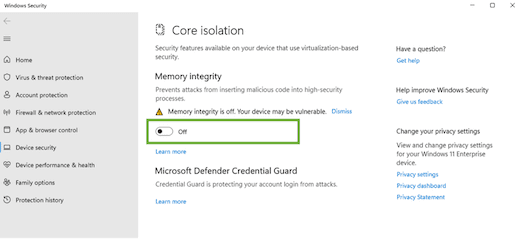
    Core isolation settings page with memory integrity toggle

Turning off Virtual Machine Platform (VMP)​

  1. Select Start , enter ‘Windows features’ in the search box, and select Turn Windows features on or off from the list of results.

  2. In the Windows Features window that just opened, find and unselect Virtual Machine Platform.
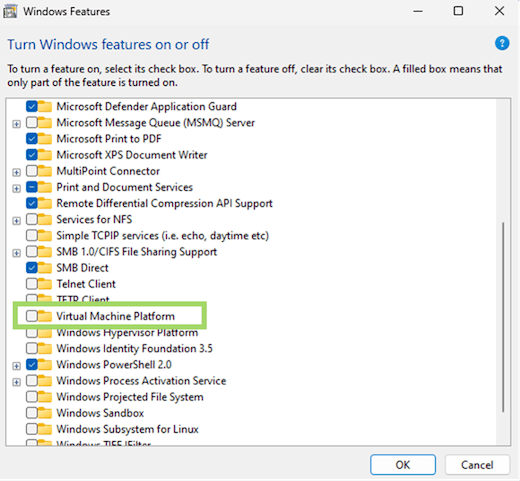
    Windows Features window with Virtual Machine Platform folder shown
  3. Select OK. You might need to restart your device.

Source:
 
Source:
Sweet, Will compare with it as is and then with these off. Like denuvo for windows.
 

My Computer My Computer

At a glance

11[email protected]Viper Steelseries 32gb@ 3600mhzGigabyte 2070 Super 8GB, +200 core + 600 memory
OS
11
Computer type
PC/Desktop
Manufacturer/Model
Custom
CPU
[email protected]
Motherboard
Gigabyte Gaming X Z490
Memory
Viper Steelseries 32gb@ 3600mhz
Graphics Card(s)
Gigabyte 2070 Super 8GB, +200 core + 600 memory
Monitor(s) Displays
ASUS 4k HDR, Two 1080p Benq and Samsung
Screen Resolution
3840x2160/2560x1440/1920x1080
Hard Drives
Adata XPG SX8200 PRO 1tb
Samsung EVO 870 500GB
PSU
Corsair RX 650
Case
NZXT h510
Cooling
CM HYPER 212 RGB
Keyboard
Razer Ornata Chroma
Mouse
Steelseries Rival 710
Core isolation.
No such page on my version of Windows 11.

1665076886116.png
 

My Computer My Computer

At a glance

Windows 11i9-9900KGigabyte RTX3080
OS
Windows 11
Computer type
PC/Desktop
CPU
i9-9900K
Motherboard
ASUS ROG MAXIMUS CODE XI
Graphics Card(s)
Gigabyte RTX3080
Source:
Windows provides choice and control for users to configure their PCs to meet their specific needs, including the ability to turn Windows features like Memory Integrity and VMP on and off. Gamers who want to prioritize performance have the option to turn off these features while gaming and turn them back on when finished playing. However, if turned off, the device may be vulnerable to threats.
What a way to do it... some of those needs to restart your whole PC in order to turn it off or on.
 

My Computer My Computer

At a glance

Win11 Insider[Always the latest Dev/Beta rele...AMD Ryzen 7 4800H with Radeon GraphicsG.SKILL [Samsung Die] DRR4 - 3200Mhz CL18 (18...nVidia GTX 1660ti GDDR6 6GB(90W) 2.02Ghz Core...
OS
Win11 Insider[Always the latest Dev/Beta releases]
Computer type
Laptop
Manufacturer/Model
Asus TUF Gaming FA506IU Laptop
CPU
AMD Ryzen 7 4800H with Radeon Graphics
Motherboard
AMD K17.6 FCH, AMD K17.6 IMC
Memory
G.SKILL [Samsung Die] DRR4 - 3200Mhz CL18 (18-19-19-36) - 32GB(16GBx2)
Graphics Card(s)
nVidia GTX 1660ti GDDR6 6GB(90W) 2.02Ghz Core & +548Mhz Mem-OC'ed [VBIOS Unlocked]
Sound Card
Realtek ALC256 @ AMD K17.6
Monitor(s) Displays
LM156LF-2F03 144HZ with Adaptive SYNC
Screen Resolution
1920x1080 - 144Hz
Hard Drives
WDC PC SN530 SDBPNPZ-256G-1002 + SHGP31-500GM-2 + ST1000LM035-1RK172 + Samsung SSD 870 QVO 1TB 1000.2 GB
PSU
ASUS Power Brick 180W
Case
Laptop Case with Dual Fan
Cooling
Dual Fans Design with Self-Cleaning Cooling
Keyboard
Asus Aura RGB with Overstroke technology
Mouse
ROG SICA Gaming Mouse
Internet Speed
100Mbps FiberOptic [100 Mbps Down - 50 Mbps Up]
Browser
Chrome/Firefox/Tor
Antivirus
Symantec Endpoint Protection with Windows Defender (Active Mode) + Custom DNS Server
Other Info
CPU with -15 Curve Optimizer all cores and -50 Cure optimizer on iGPU
BCLK OC to 101.6Mhz
Benchmark Scores:-
CineBench R23 Single core:- 1290 points
CineBench R23 Multi core:- 11111 points
Core isolation.
No such page on my version of Windows 11.

View attachment 41630
Click on "Device security" 6 down on the list. Its in there. Either that or somethings broke.
EDIT: Turns out its been off for months on my end, Never noticed it, never needed it so it can stay off
Further Edit : Virtual machine platform has also been off for atleast months, I didn't turn it off that i know of.
 

My Computer My Computer

At a glance

11[email protected]Viper Steelseries 32gb@ 3600mhzGigabyte 2070 Super 8GB, +200 core + 600 memory
OS
11
Computer type
PC/Desktop
Manufacturer/Model
Custom
CPU
[email protected]
Motherboard
Gigabyte Gaming X Z490
Memory
Viper Steelseries 32gb@ 3600mhz
Graphics Card(s)
Gigabyte 2070 Super 8GB, +200 core + 600 memory
Monitor(s) Displays
ASUS 4k HDR, Two 1080p Benq and Samsung
Screen Resolution
3840x2160/2560x1440/1920x1080
Hard Drives
Adata XPG SX8200 PRO 1tb
Samsung EVO 870 500GB
PSU
Corsair RX 650
Case
NZXT h510
Cooling
CM HYPER 212 RGB
Keyboard
Razer Ornata Chroma
Mouse
Steelseries Rival 710
It's not showing. I might have disabled something in BIOS.
I had a lot of performance issues and went through and turned off some of this ...
 

My Computer My Computer

At a glance

Windows 11i9-9900KGigabyte RTX3080
OS
Windows 11
Computer type
PC/Desktop
CPU
i9-9900K
Motherboard
ASUS ROG MAXIMUS CODE XI
Graphics Card(s)
Gigabyte RTX3080
It's not showing. I might have disabled something in BIOS.
I had a lot of performance issues and went through and turned off some of this ...
Not sure if you can turn those windows features off through the bios, Turning it off doesn't make it disappear, Somethings wrong somewhere.
 

My Computer My Computer

At a glance

11[email protected]Viper Steelseries 32gb@ 3600mhzGigabyte 2070 Super 8GB, +200 core + 600 memory
OS
11
Computer type
PC/Desktop
Manufacturer/Model
Custom
CPU
[email protected]
Motherboard
Gigabyte Gaming X Z490
Memory
Viper Steelseries 32gb@ 3600mhz
Graphics Card(s)
Gigabyte 2070 Super 8GB, +200 core + 600 memory
Monitor(s) Displays
ASUS 4k HDR, Two 1080p Benq and Samsung
Screen Resolution
3840x2160/2560x1440/1920x1080
Hard Drives
Adata XPG SX8200 PRO 1tb
Samsung EVO 870 500GB
PSU
Corsair RX 650
Case
NZXT h510
Cooling
CM HYPER 212 RGB
Keyboard
Razer Ornata Chroma
Mouse
Steelseries Rival 710
This is what it looks like:
1665094166065.png
 

My Computer My Computer

At a glance

Windows 11i9-9900KGigabyte RTX3080
OS
Windows 11
Computer type
PC/Desktop
CPU
i9-9900K
Motherboard
ASUS ROG MAXIMUS CODE XI
Graphics Card(s)
Gigabyte RTX3080
Core isolation is virtualization-based security, so when VM is disabled, it can not be enabled.
 

My Computer My Computer

At a glance

Home26H2CanAMD Ryzen 5 8600G (07/24)2x32GB Kingston FURY DDR5 5600 MHz CL36 @5200...ASROCK Radeon RX 6600 Challenger D 8G @48FPS ...
OS
Home26H2Can
Computer type
PC/Desktop
CPU
AMD Ryzen 5 8600G (07/24)
Motherboard
ASROCK B650M-HDV/M.2 (07/24) BIOS 4.21 AGESA ComboAM5 1.3.0.1 (04/26)
Memory
2x32GB Kingston FURY DDR5 5600 MHz CL36 @5200 CL36 (07/24)
Graphics Card(s)
ASROCK Radeon RX 6600 Challenger D 8G @48FPS (08/24)
Sound Card
Creative Sound BlasterX AE-5 Plus (05/24)
Monitor(s) Displays
24" Philips 24M1N3200ZS/00 (05/24)
Screen Resolution
1920×1080@165Hz via DP1.4
Hard Drives
Kingston KC3000 NVMe 2TB (05/24)
ADATA XPG GAMMIX S11 Pro 512GB (07/19)
PSU
Seasonic Core GM 550 Gold (04/24)
Case
Fractal Design Define 7 Mini with 3x Noctua NF-P14s/12@555rpm (04/24)
Cooling
Noctua NH-U12S with Noctua NF-P12 (04/24)
Keyboard
HP Pavilion Wired Keyboard 300 (07/24) + Rabalux 76017 Parker (01/24)
Mouse
Logitech M330 Silent Plus (01/26)
Internet Speed
500/100 Mbps via RouterOS (05/21) & TCP Optimizer
Browser
Edge, Brave for YouTube, LibreWolf for FB
Antivirus
NextDNS blocking 1/3 Traffic
Other Info
Phone: Motorola Moto G86 (02/26)
Backup: Hasleo Backup Suite (PreOS)
Headphones: Sennheiser RS170 (09/10)
Chair: Huzaro Force 4.4 Grey Mesh (05/24)
Notifier: Xiaomi Mi Band 9 Milanese (10/24)
FlexCore USB-C 3.2 Gen 1 (M) to LAN (F) (08/25)
Core isolation is virtualization-based security, so when VM is disabled, it can not be enabled.
Hmm thats weird, Just enabled it and restarted, VM is still disabled so...how is that? Does it mean it tells me its on and working but just fulla bs?
 

My Computer My Computer

At a glance

11[email protected]Viper Steelseries 32gb@ 3600mhzGigabyte 2070 Super 8GB, +200 core + 600 memory
OS
11
Computer type
PC/Desktop
Manufacturer/Model
Custom
CPU
[email protected]
Motherboard
Gigabyte Gaming X Z490
Memory
Viper Steelseries 32gb@ 3600mhz
Graphics Card(s)
Gigabyte 2070 Super 8GB, +200 core + 600 memory
Monitor(s) Displays
ASUS 4k HDR, Two 1080p Benq and Samsung
Screen Resolution
3840x2160/2560x1440/1920x1080
Hard Drives
Adata XPG SX8200 PRO 1tb
Samsung EVO 870 500GB
PSU
Corsair RX 650
Case
NZXT h510
Cooling
CM HYPER 212 RGB
Keyboard
Razer Ornata Chroma
Mouse
Steelseries Rival 710

Latest Support Threads

Back
Top Bottom