Overwhelmed - Macrium Reflect


You're right @Ghot

But disabling this greatly reduces the security of the computer. For those that are advanced users and know what they're doing and the possible repercussions, that's their choice but recommending it to the average home user would not be my recommendation.

I believe backing up and restoring still actually works in Macrium Reflect. However mounting a backup image as a drive looks to be broken


My guess is that users of the FREE version of Macrium 8.0 (there is no 8.1 Free version) are not having this driver blocked error as long as they did not fully update to the latest Windows update a couple days ago.


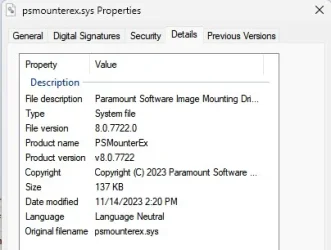
Current entry in the Microsoft security Block list file


<FileAttrib ID="ID_FILEATTRIB_PSMOUNTEREX" FriendlyName="psmounterex\02fa3060a8319f0f691547345863679d750bfea0974798ffcd379ee965bce83d FileAttribute" FileName="psmounterex.sys" MinimumFileVersion="0.0.0.0" MaximumFileVersion="8.0.7760.0"/>


Last Macrium Reflect FREE Edition 8.0.7783
The entry in the Blocl List from Microsoft: MaximumFileVersion="8.0.7760.0"

Bug fixes and Security Updates v8.0.7783 - 1st December 2023
Bug fixes and Security Updates v8.0.7690 - 11th October 2023

So my guess (not tested) is that if you have a version of Macrium Reflect 8.0 before the "8.0.7760.0" build then you will not get this error message alert and it will still work.

Windows 10 doesn't use the same aggressive security model and Microsoft no longer updates security on Windows 10 unless you signed up for the 1 year grace on updates so they should not get this error either.

For paid users on Macrium 8.1 there is no good workaround that I'm aware of. Macrium would need to provide an update


At this time I think the best Free solution would be to consider switching over to Veeam. The UI is not even close to Macrium but it is an Enterprise level product that does work very well and is free for home users.

Veeam Agent for Microsoft Windows FREE
 

My Computer My Computer

At a glance

Windows 10Intel i9-9900K64GBEVGA GeForce GTX 1070 TI
OS
Windows 10
Computer type
PC/Desktop
Manufacturer/Model
MSI Custom build
CPU
Intel i9-9900K
Motherboard
MSI MPG Z390 Gaming Edge AC
Memory
64GB
Graphics Card(s)
EVGA GeForce GTX 1070 TI
Internet Speed
1 Gbps
Browser
Firefox
Antivirus
Malwarebytes
At this time I think the best Free solution would be to consider switching over to Veeam.

That is not a solution as Macrium will fix this.

Even Macrium X has a version that would be blocked.

Screenshot 2026-04-16 193758.webp
 

My Computer My Computer

At a glance

Windows 11 Pro
OS
Windows 11 Pro

My Computers My Computers

  • At a glance

    Windows 11 HomeAMD Athlon Silver 3050U8GBRadeon Graphics
    OS
    Windows 11 Home
    Computer type
    Laptop
    Manufacturer/Model
    Acer Aspire 3 A315-23-R9VY
    CPU
    AMD Athlon Silver 3050U
    Memory
    8GB
    Graphics Card(s)
    Radeon Graphics
    Monitor(s) Displays
    laptop screen
    Screen Resolution
    1366x768 native resolution, up to 2560x1440 with Radeon Virtual Super Resolution
    Hard Drives
    1TB Samsung EVO 870 SSD (from April 2026: 250GB EVO 850)
    Internet Speed
    150 Mbps
    Browser
    Edge, Firefox
    Antivirus
    Defender
    Other Info
    fully 'Windows 11 ready' laptop. Windows 10 C: partition migrated from my old unsupported 'main machine' then upgraded to 11. A test migration ran Insider builds for 2 months. When 11 was released on 5th October 2021 it was re-imaged back to 10 and was offered the upgrade in Windows Update on 20th October. Windows Update offered the 22H2 Feature Update on 20th September 2022. It got the 23H2 Feature Update on 4th November 2023 through Windows Update, 24H2 on 3rd October 2024 through Windows Update by setting the Target Release Version for 24H2, and 25H2 on 30th September 2025 through Windows Update by setting the Target Release Version for 25H2.

    UPDATE - 11 April 2026: due to mechanical deterioration this PC has been retired from active duty. The OS with all software and files has been migrated to my System Seven in 'Other systems' to carry on as my general purpose 'main machine'.
  • At a glance

    Windows 11 ProIntel® Core™ i5-520M8GB(integrated graphics) Intel HD Graphics
    Operating System
    Windows 11 Pro
    Computer type
    Laptop
    Manufacturer/Model
    Dell Latitude E4310
    CPU
    Intel® Core™ i5-520M
    Motherboard
    0T6M8G
    Memory
    8GB
    Graphics card(s)
    (integrated graphics) Intel HD Graphics
    Screen Resolution
    1366x768
    Hard Drives
    500GB Crucial MX500 SSD
    Browser
    Firefox, Edge
    Antivirus
    Defender
    Other Info
    unsupported machine: Legacy bios, MBR, TPM 1.2, upgraded from W10 to W11 using W10/W11 hybrid install media workaround.

    In-place upgrade to 22H2 using ISO and a workaround.
    Feature Update to 23H2 by manually installing the Enablement Package.
    In-place upgrade to 24H2 using hybrid 23H2/24H2 install media.
    Upgraded to 25H2 by Enablement Package.

    Also running Insider Dev, and Canary builds and Windows 10 as native boot .vhdx.
  • My SYSTEM THREE is a Dell Latitude 5410, i7-10610U, 32GB RAM, 512GB NVMe ssd, supported device running Windows 11 Pro.

    My SYSTEM FOUR is a 2-in-1 convertible Lenovo Yoga 11e 20DA, Celeron N2930, 8GB RAM, 256GB ssd. Unsupported device: currently running Win10 Pro, plus Win11 Pro RTM and Insider Dev, Beta, and RP 24H2 as native boot vhdx.

    My SYSTEM FIVE is a Dell Latitude 3190 2-in-1, Pentium Silver N5030, 8GB RAM, 1TB NVMe ssd, supported device running Windows 11 Pro, plus Insider Beta, Dev, and Canary builds (and a few others) as a native boot .vhdx.

    My SYSTEM SIX is a Dell Latitude 5550, Core Ultra 7 165H, 64GB RAM, 1TB NVMe SSD, supported device, Windows 11 Pro 24H2, Hyper-V host machine. Updated to 25H2 on 30th September 2025.

    My SYSTEM SEVEN is a Lenovo Thinkpad T580, Intel Core i7-8650U, 16GB RAM, 512GB NVMe SSD + 2nd 512GB NVMe SSD, a supported device for Windows 11. This is my current general purpose 'main machine'. The installed Windows 11 Home from my System One has been migrated to this machine.
No doubt. If the paid version of Macrium X is having this issue I would expect Macrium to quickly come up with a solution to correct the issue.
 

My Computer My Computer

At a glance

Windows 10Intel i9-9900K64GBEVGA GeForce GTX 1070 TI
OS
Windows 10
Computer type
PC/Desktop
Manufacturer/Model
MSI Custom build
CPU
Intel i9-9900K
Motherboard
MSI MPG Z390 Gaming Edge AC
Memory
64GB
Graphics Card(s)
EVGA GeForce GTX 1070 TI
Internet Speed
1 Gbps
Browser
Firefox
Antivirus
Malwarebytes
No doubt. If the paid version of Macrium X is having this issue I would expect Macrium to quickly come up with a solution to correct the issue.
The reason Reflect X doesn't have this issue is that it doesn't use psmounterex.sys at all. You can delete it from System32\Drivers and Reflect X will still mount images. It obviously is using different code of its own.

Why it's still included in the install is a mystery, someone apparently forgot to remove it when it was no longer needed. :ROFLMAO:
 

My Computers My Computers

  • At a glance

    Windows 11 HomeAMD Athlon Silver 3050U8GBRadeon Graphics
    OS
    Windows 11 Home
    Computer type
    Laptop
    Manufacturer/Model
    Acer Aspire 3 A315-23-R9VY
    CPU
    AMD Athlon Silver 3050U
    Memory
    8GB
    Graphics Card(s)
    Radeon Graphics
    Monitor(s) Displays
    laptop screen
    Screen Resolution
    1366x768 native resolution, up to 2560x1440 with Radeon Virtual Super Resolution
    Hard Drives
    1TB Samsung EVO 870 SSD (from April 2026: 250GB EVO 850)
    Internet Speed
    150 Mbps
    Browser
    Edge, Firefox
    Antivirus
    Defender
    Other Info
    fully 'Windows 11 ready' laptop. Windows 10 C: partition migrated from my old unsupported 'main machine' then upgraded to 11. A test migration ran Insider builds for 2 months. When 11 was released on 5th October 2021 it was re-imaged back to 10 and was offered the upgrade in Windows Update on 20th October. Windows Update offered the 22H2 Feature Update on 20th September 2022. It got the 23H2 Feature Update on 4th November 2023 through Windows Update, 24H2 on 3rd October 2024 through Windows Update by setting the Target Release Version for 24H2, and 25H2 on 30th September 2025 through Windows Update by setting the Target Release Version for 25H2.

    UPDATE - 11 April 2026: due to mechanical deterioration this PC has been retired from active duty. The OS with all software and files has been migrated to my System Seven in 'Other systems' to carry on as my general purpose 'main machine'.
  • At a glance

    Windows 11 ProIntel® Core™ i5-520M8GB(integrated graphics) Intel HD Graphics
    Operating System
    Windows 11 Pro
    Computer type
    Laptop
    Manufacturer/Model
    Dell Latitude E4310
    CPU
    Intel® Core™ i5-520M
    Motherboard
    0T6M8G
    Memory
    8GB
    Graphics card(s)
    (integrated graphics) Intel HD Graphics
    Screen Resolution
    1366x768
    Hard Drives
    500GB Crucial MX500 SSD
    Browser
    Firefox, Edge
    Antivirus
    Defender
    Other Info
    unsupported machine: Legacy bios, MBR, TPM 1.2, upgraded from W10 to W11 using W10/W11 hybrid install media workaround.

    In-place upgrade to 22H2 using ISO and a workaround.
    Feature Update to 23H2 by manually installing the Enablement Package.
    In-place upgrade to 24H2 using hybrid 23H2/24H2 install media.
    Upgraded to 25H2 by Enablement Package.

    Also running Insider Dev, and Canary builds and Windows 10 as native boot .vhdx.
  • My SYSTEM THREE is a Dell Latitude 5410, i7-10610U, 32GB RAM, 512GB NVMe ssd, supported device running Windows 11 Pro.

    My SYSTEM FOUR is a 2-in-1 convertible Lenovo Yoga 11e 20DA, Celeron N2930, 8GB RAM, 256GB ssd. Unsupported device: currently running Win10 Pro, plus Win11 Pro RTM and Insider Dev, Beta, and RP 24H2 as native boot vhdx.

    My SYSTEM FIVE is a Dell Latitude 3190 2-in-1, Pentium Silver N5030, 8GB RAM, 1TB NVMe ssd, supported device running Windows 11 Pro, plus Insider Beta, Dev, and Canary builds (and a few others) as a native boot .vhdx.

    My SYSTEM SIX is a Dell Latitude 5550, Core Ultra 7 165H, 64GB RAM, 1TB NVMe SSD, supported device, Windows 11 Pro 24H2, Hyper-V host machine. Updated to 25H2 on 30th September 2025.

    My SYSTEM SEVEN is a Lenovo Thinkpad T580, Intel Core i7-8650U, 16GB RAM, 512GB NVMe SSD + 2nd 512GB NVMe SSD, a supported device for Windows 11. This is my current general purpose 'main machine'. The installed Windows 11 Home from my System One has been migrated to this machine.
So, did Macrium work with Microsoft to find a way to cut off all their old customers?

Just tested both Hasleo and Veeam. Neither one has issues mounting and loading backup images.
Both did full live backup to an image file.
I booted to USB restore disk and did a restore testing each program. Both worked perfectly

Hasleo even allows you do do full block restore or chose a Delta restore to restore only missing or different files. It was able to complete the full backup of 1.2 TB in 1 minute 49 seconds

Veeam did the full restore in about 8 minutes
 

My Computer My Computer

At a glance

Windows 10Intel i9-9900K64GBEVGA GeForce GTX 1070 TI
OS
Windows 10
Computer type
PC/Desktop
Manufacturer/Model
MSI Custom build
CPU
Intel i9-9900K
Motherboard
MSI MPG Z390 Gaming Edge AC
Memory
64GB
Graphics Card(s)
EVGA GeForce GTX 1070 TI
Internet Speed
1 Gbps
Browser
Firefox
Antivirus
Malwarebytes
So, did Macrium work with Microsoft to find a way to cut off all their old customers?

How so? The only issue here is browsing images. If you really need to browse images, turn off Memory Integrity,
restart computer then you can mount and browse images all you want.

It's primary functions, image backup and restore, work perfectly fine. That's all I use it for.
 

My Computers My Computers

  • At a glance

    Win 11 Pro 25H2 26200.8655Intel® Core™ i7-14700KG.SKILL Ripjaws S5 Series 64GB (2 x 32GB) DDR5ASUS GeForce RTX 4070 Super 12GB
    OS
    Win 11 Pro 25H2 26200.8655
    Computer type
    PC/Desktop
    Manufacturer/Model
    Self Built
    CPU
    Intel® Core™ i7-14700K
    Motherboard
    ASUS TUF Z690-PLUS WIFI BIOS 4505 11/29/25
    Memory
    G.SKILL Ripjaws S5 Series 64GB (2 x 32GB) DDR5
    Graphics Card(s)
    ASUS GeForce RTX 4070 Super 12GB
    Sound Card
    Sound Blaster AE-5 Plus
    Monitor(s) Displays
    ASUS TUF Gaming 27" 2K HDR Gaming
    Screen Resolution
    2560 x 1440
    Hard Drives
    Samsung 990 Pro 1TB NVMe (Win 11 25H2)
    SK hynix P41 500GB NVMe 25H2 DEV/Games
    SK hynix P41 2TB NVMe (x3)
    Crucial P3 Plus 4TB
    PSU
    Corsair RM850x Shift
    Case
    Antec Dark Phantom DP502 FLUX
    Cooling
    Corsair Nautilus 360 RS AIO
    Keyboard
    Logitech MK 320
    Mouse
    Razer Basilisk V3
    Internet Speed
    350Mbs
    Browser
    Firefox
    Antivirus
    Winows Security
    Other Info
    MR 8.1 Home

    System 3 Specs
    Win 11 Pro 25H2 26200.8655
    ASUS PRIME Z370-P II BIOS 3004 7/12/21
    Intel Core i7-8700 CPU @ 3.20GHz
    32GB DDR4 RAM (4x8)
    iGPU Intel UHD Graphics 630
  • At a glance

    Win 11 Pro 25H2 26200.8655Intel Core i7-11700F64 GB DDR4MSI GeForce RTX 3060 Ventus 2X 12GB
    Operating System
    Win 11 Pro 25H2 26200.8655
    Computer type
    PC/Desktop
    Manufacturer/Model
    Self Built
    CPU
    Intel Core i7-11700F
    Motherboard
    Asus TUF Gaming Z590 Plus WiFi (BIOS 2803)
    Memory
    64 GB DDR4
    Graphics card(s)
    MSI GeForce RTX 3060 Ventus 2X 12GB
    Sound Card
    SoundBlaster Audigy Fx V2
    Monitor(s) Displays
    Samsung F27T350
    Screen Resolution
    1920x1080
    Hard Drives
    Samsung 980 Pro 1TB
    Samsung 970 EVO Plus 2TB
    Samsung 870 EVO 500GB SSD
    PSU
    Corsair HX750
    Case
    Cougar MX330-G Window
    Cooling
    Thermalright Frozen Edge 240 Black AIO
    Internet Speed
    350Mbps
    Browser
    Firefox
    Antivirus
    Windows Security
How so? The only issue here is browsing images. If you really need to browse images, turn off Memory Integrity,
restart computer then you can mount and browse images all you want.

It's primary functions, image backup and restore, work perfectly fine. That's all I use it for.

It was mostly a joke, but you need to turn off more than memory integrity of Core isolation or it will still not work.

If you don't use that process of opening a backup then yes, I agree you're all set. But for those that do it does not work and does require weakening the security model of Windows which is not good advice.
 

My Computer My Computer

At a glance

Windows 10Intel i9-9900K64GBEVGA GeForce GTX 1070 TI
OS
Windows 10
Computer type
PC/Desktop
Manufacturer/Model
MSI Custom build
CPU
Intel i9-9900K
Motherboard
MSI MPG Z390 Gaming Edge AC
Memory
64GB
Graphics Card(s)
EVGA GeForce GTX 1070 TI
Internet Speed
1 Gbps
Browser
Firefox
Antivirus
Malwarebytes
If all else fails and I need to explore an image, I'll resort to using a laptop with Win 10... that's ok for now with MR 8853 ;-)
 

My Computer My Computer

At a glance

Windows 11 Proi7-8650U16GBIntel UHD 620
OS
Windows 11 Pro
Computer type
Laptop
Manufacturer/Model
Lenovo t480s
CPU
i7-8650U
Memory
16GB
Graphics Card(s)
Intel UHD 620
Screen Resolution
1920x1080
Hard Drives
C SN810 SDCPNRY-512G-1006
Browser
Edge, Firefox
Antivirus
Defender
Macrium Support has responded on the Macrium Forum......

Macrium said:
This issue will only affect Version 8.1 users who have applied the latest Windows 11 update (KB5083769)

We are continuing to investigate this further and will provide updates as more information becomes available


Kind Regards

Joe A

Macrium UK Support Team
 

My Computers My Computers

  • At a glance

    Windows 11 HomeAMD Athlon Silver 3050U8GBRadeon Graphics
    OS
    Windows 11 Home
    Computer type
    Laptop
    Manufacturer/Model
    Acer Aspire 3 A315-23-R9VY
    CPU
    AMD Athlon Silver 3050U
    Memory
    8GB
    Graphics Card(s)
    Radeon Graphics
    Monitor(s) Displays
    laptop screen
    Screen Resolution
    1366x768 native resolution, up to 2560x1440 with Radeon Virtual Super Resolution
    Hard Drives
    1TB Samsung EVO 870 SSD (from April 2026: 250GB EVO 850)
    Internet Speed
    150 Mbps
    Browser
    Edge, Firefox
    Antivirus
    Defender
    Other Info
    fully 'Windows 11 ready' laptop. Windows 10 C: partition migrated from my old unsupported 'main machine' then upgraded to 11. A test migration ran Insider builds for 2 months. When 11 was released on 5th October 2021 it was re-imaged back to 10 and was offered the upgrade in Windows Update on 20th October. Windows Update offered the 22H2 Feature Update on 20th September 2022. It got the 23H2 Feature Update on 4th November 2023 through Windows Update, 24H2 on 3rd October 2024 through Windows Update by setting the Target Release Version for 24H2, and 25H2 on 30th September 2025 through Windows Update by setting the Target Release Version for 25H2.

    UPDATE - 11 April 2026: due to mechanical deterioration this PC has been retired from active duty. The OS with all software and files has been migrated to my System Seven in 'Other systems' to carry on as my general purpose 'main machine'.
  • At a glance

    Windows 11 ProIntel® Core™ i5-520M8GB(integrated graphics) Intel HD Graphics
    Operating System
    Windows 11 Pro
    Computer type
    Laptop
    Manufacturer/Model
    Dell Latitude E4310
    CPU
    Intel® Core™ i5-520M
    Motherboard
    0T6M8G
    Memory
    8GB
    Graphics card(s)
    (integrated graphics) Intel HD Graphics
    Screen Resolution
    1366x768
    Hard Drives
    500GB Crucial MX500 SSD
    Browser
    Firefox, Edge
    Antivirus
    Defender
    Other Info
    unsupported machine: Legacy bios, MBR, TPM 1.2, upgraded from W10 to W11 using W10/W11 hybrid install media workaround.

    In-place upgrade to 22H2 using ISO and a workaround.
    Feature Update to 23H2 by manually installing the Enablement Package.
    In-place upgrade to 24H2 using hybrid 23H2/24H2 install media.
    Upgraded to 25H2 by Enablement Package.

    Also running Insider Dev, and Canary builds and Windows 10 as native boot .vhdx.
  • My SYSTEM THREE is a Dell Latitude 5410, i7-10610U, 32GB RAM, 512GB NVMe ssd, supported device running Windows 11 Pro.

    My SYSTEM FOUR is a 2-in-1 convertible Lenovo Yoga 11e 20DA, Celeron N2930, 8GB RAM, 256GB ssd. Unsupported device: currently running Win10 Pro, plus Win11 Pro RTM and Insider Dev, Beta, and RP 24H2 as native boot vhdx.

    My SYSTEM FIVE is a Dell Latitude 3190 2-in-1, Pentium Silver N5030, 8GB RAM, 1TB NVMe ssd, supported device running Windows 11 Pro, plus Insider Beta, Dev, and Canary builds (and a few others) as a native boot .vhdx.

    My SYSTEM SIX is a Dell Latitude 5550, Core Ultra 7 165H, 64GB RAM, 1TB NVMe SSD, supported device, Windows 11 Pro 24H2, Hyper-V host machine. Updated to 25H2 on 30th September 2025.

    My SYSTEM SEVEN is a Lenovo Thinkpad T580, Intel Core i7-8650U, 16GB RAM, 512GB NVMe SSD + 2nd 512GB NVMe SSD, a supported device for Windows 11. This is my current general purpose 'main machine'. The installed Windows 11 Home from my System One has been migrated to this machine.
If all else fails and I need to explore an image, I'll resort to using a laptop with Win 10... that's ok for now with MR 8853 ;-)
Or temporarily turn off Core Isolation, that works too.
 

My Computers My Computers

  • At a glance

    Windows 11 HomeAMD Athlon Silver 3050U8GBRadeon Graphics
    OS
    Windows 11 Home
    Computer type
    Laptop
    Manufacturer/Model
    Acer Aspire 3 A315-23-R9VY
    CPU
    AMD Athlon Silver 3050U
    Memory
    8GB
    Graphics Card(s)
    Radeon Graphics
    Monitor(s) Displays
    laptop screen
    Screen Resolution
    1366x768 native resolution, up to 2560x1440 with Radeon Virtual Super Resolution
    Hard Drives
    1TB Samsung EVO 870 SSD (from April 2026: 250GB EVO 850)
    Internet Speed
    150 Mbps
    Browser
    Edge, Firefox
    Antivirus
    Defender
    Other Info
    fully 'Windows 11 ready' laptop. Windows 10 C: partition migrated from my old unsupported 'main machine' then upgraded to 11. A test migration ran Insider builds for 2 months. When 11 was released on 5th October 2021 it was re-imaged back to 10 and was offered the upgrade in Windows Update on 20th October. Windows Update offered the 22H2 Feature Update on 20th September 2022. It got the 23H2 Feature Update on 4th November 2023 through Windows Update, 24H2 on 3rd October 2024 through Windows Update by setting the Target Release Version for 24H2, and 25H2 on 30th September 2025 through Windows Update by setting the Target Release Version for 25H2.

    UPDATE - 11 April 2026: due to mechanical deterioration this PC has been retired from active duty. The OS with all software and files has been migrated to my System Seven in 'Other systems' to carry on as my general purpose 'main machine'.
  • At a glance

    Windows 11 ProIntel® Core™ i5-520M8GB(integrated graphics) Intel HD Graphics
    Operating System
    Windows 11 Pro
    Computer type
    Laptop
    Manufacturer/Model
    Dell Latitude E4310
    CPU
    Intel® Core™ i5-520M
    Motherboard
    0T6M8G
    Memory
    8GB
    Graphics card(s)
    (integrated graphics) Intel HD Graphics
    Screen Resolution
    1366x768
    Hard Drives
    500GB Crucial MX500 SSD
    Browser
    Firefox, Edge
    Antivirus
    Defender
    Other Info
    unsupported machine: Legacy bios, MBR, TPM 1.2, upgraded from W10 to W11 using W10/W11 hybrid install media workaround.

    In-place upgrade to 22H2 using ISO and a workaround.
    Feature Update to 23H2 by manually installing the Enablement Package.
    In-place upgrade to 24H2 using hybrid 23H2/24H2 install media.
    Upgraded to 25H2 by Enablement Package.

    Also running Insider Dev, and Canary builds and Windows 10 as native boot .vhdx.
  • My SYSTEM THREE is a Dell Latitude 5410, i7-10610U, 32GB RAM, 512GB NVMe ssd, supported device running Windows 11 Pro.

    My SYSTEM FOUR is a 2-in-1 convertible Lenovo Yoga 11e 20DA, Celeron N2930, 8GB RAM, 256GB ssd. Unsupported device: currently running Win10 Pro, plus Win11 Pro RTM and Insider Dev, Beta, and RP 24H2 as native boot vhdx.

    My SYSTEM FIVE is a Dell Latitude 3190 2-in-1, Pentium Silver N5030, 8GB RAM, 1TB NVMe ssd, supported device running Windows 11 Pro, plus Insider Beta, Dev, and Canary builds (and a few others) as a native boot .vhdx.

    My SYSTEM SIX is a Dell Latitude 5550, Core Ultra 7 165H, 64GB RAM, 1TB NVMe SSD, supported device, Windows 11 Pro 24H2, Hyper-V host machine. Updated to 25H2 on 30th September 2025.

    My SYSTEM SEVEN is a Lenovo Thinkpad T580, Intel Core i7-8650U, 16GB RAM, 512GB NVMe SSD + 2nd 512GB NVMe SSD, a supported device for Windows 11. This is my current general purpose 'main machine'. The installed Windows 11 Home from my System One has been migrated to this machine.
Thank you for the updated information from Macrium @Bree

Again I would not recommend lowering the security model of Windows just to mount and view a backup file.

Crime directed at everyone is very active

I do malware removal for users every day and there are various ways of attacking computers


My Computer My Computer

At a glance

Windows 10Intel i9-9900K64GBEVGA GeForce GTX 1070 TI
OS
Windows 10
Computer type
PC/Desktop
Manufacturer/Model
MSI Custom build
CPU
Intel i9-9900K
Motherboard
MSI MPG Z390 Gaming Edge AC
Memory
64GB
Graphics Card(s)
EVGA GeForce GTX 1070 TI
Internet Speed
1 Gbps
Browser
Firefox
Antivirus
Malwarebytes
Thank you for the updated information from Macrium @Bree
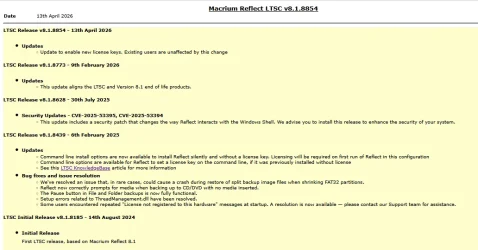
They will have to provide an update, if only for Reflect LTSC which is based on v8.1. I've downloaded the LTSC installer and confirmed that LTSC uses the same (now blocked) psmounterex.sys as v8.1 Home.

Macrium Reflect LTSC is based on a stable version of Macrium Reflect 8.1 ... we have continued to finetune Macrium Reflect 8 with bug fixes and security patches to a point where we are confident that Macrium Reflect 8 is a stable foundation for the LTSC edition.
What is Macrium LTSC?

1776464408286.webp
 

My Computers My Computers

  • At a glance

    Windows 11 HomeAMD Athlon Silver 3050U8GBRadeon Graphics
    OS
    Windows 11 Home
    Computer type
    Laptop
    Manufacturer/Model
    Acer Aspire 3 A315-23-R9VY
    CPU
    AMD Athlon Silver 3050U
    Memory
    8GB
    Graphics Card(s)
    Radeon Graphics
    Monitor(s) Displays
    laptop screen
    Screen Resolution
    1366x768 native resolution, up to 2560x1440 with Radeon Virtual Super Resolution
    Hard Drives
    1TB Samsung EVO 870 SSD (from April 2026: 250GB EVO 850)
    Internet Speed
    150 Mbps
    Browser
    Edge, Firefox
    Antivirus
    Defender
    Other Info
    fully 'Windows 11 ready' laptop. Windows 10 C: partition migrated from my old unsupported 'main machine' then upgraded to 11. A test migration ran Insider builds for 2 months. When 11 was released on 5th October 2021 it was re-imaged back to 10 and was offered the upgrade in Windows Update on 20th October. Windows Update offered the 22H2 Feature Update on 20th September 2022. It got the 23H2 Feature Update on 4th November 2023 through Windows Update, 24H2 on 3rd October 2024 through Windows Update by setting the Target Release Version for 24H2, and 25H2 on 30th September 2025 through Windows Update by setting the Target Release Version for 25H2.

    UPDATE - 11 April 2026: due to mechanical deterioration this PC has been retired from active duty. The OS with all software and files has been migrated to my System Seven in 'Other systems' to carry on as my general purpose 'main machine'.
  • At a glance

    Windows 11 ProIntel® Core™ i5-520M8GB(integrated graphics) Intel HD Graphics
    Operating System
    Windows 11 Pro
    Computer type
    Laptop
    Manufacturer/Model
    Dell Latitude E4310
    CPU
    Intel® Core™ i5-520M
    Motherboard
    0T6M8G
    Memory
    8GB
    Graphics card(s)
    (integrated graphics) Intel HD Graphics
    Screen Resolution
    1366x768
    Hard Drives
    500GB Crucial MX500 SSD
    Browser
    Firefox, Edge
    Antivirus
    Defender
    Other Info
    unsupported machine: Legacy bios, MBR, TPM 1.2, upgraded from W10 to W11 using W10/W11 hybrid install media workaround.

    In-place upgrade to 22H2 using ISO and a workaround.
    Feature Update to 23H2 by manually installing the Enablement Package.
    In-place upgrade to 24H2 using hybrid 23H2/24H2 install media.
    Upgraded to 25H2 by Enablement Package.

    Also running Insider Dev, and Canary builds and Windows 10 as native boot .vhdx.
  • My SYSTEM THREE is a Dell Latitude 5410, i7-10610U, 32GB RAM, 512GB NVMe ssd, supported device running Windows 11 Pro.

    My SYSTEM FOUR is a 2-in-1 convertible Lenovo Yoga 11e 20DA, Celeron N2930, 8GB RAM, 256GB ssd. Unsupported device: currently running Win10 Pro, plus Win11 Pro RTM and Insider Dev, Beta, and RP 24H2 as native boot vhdx.

    My SYSTEM FIVE is a Dell Latitude 3190 2-in-1, Pentium Silver N5030, 8GB RAM, 1TB NVMe ssd, supported device running Windows 11 Pro, plus Insider Beta, Dev, and Canary builds (and a few others) as a native boot .vhdx.

    My SYSTEM SIX is a Dell Latitude 5550, Core Ultra 7 165H, 64GB RAM, 1TB NVMe SSD, supported device, Windows 11 Pro 24H2, Hyper-V host machine. Updated to 25H2 on 30th September 2025.

    My SYSTEM SEVEN is a Lenovo Thinkpad T580, Intel Core i7-8650U, 16GB RAM, 512GB NVMe SSD + 2nd 512GB NVMe SSD, a supported device for Windows 11. This is my current general purpose 'main machine'. The installed Windows 11 Home from my System One has been migrated to this machine.
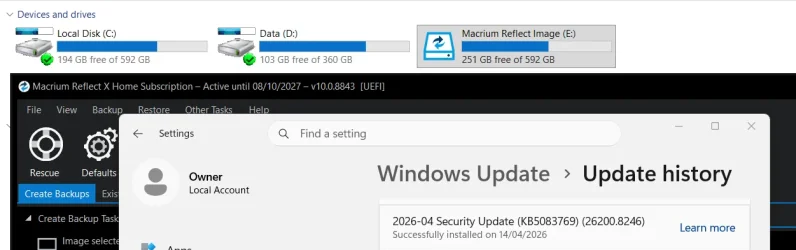
Except that Reflect X can still happily mount drives after updating to 26200.8246.

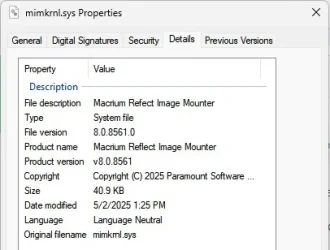
Yes X does not even have this file so the one on my system was from 8 which did not uninstall when I uninstalled 8.

I have now deleted the file and removed all references to it in the registry since I am now on X.

Looks like X uses this file for mounting images.

Screenshot 2026-04-17 193854.webp
 

My Computer My Computer

At a glance

Windows 11 Pro
OS
Windows 11 Pro
I tried renaming and replacing the file from Macrium X and it will start to load but then errors out.

I suppose we need to wait on Macirum for a valid solution
 

My Computer My Computer

At a glance

Windows 10Intel i9-9900K64GBEVGA GeForce GTX 1070 TI
OS
Windows 10
Computer type
PC/Desktop
Manufacturer/Model
MSI Custom build
CPU
Intel i9-9900K
Motherboard
MSI MPG Z390 Gaming Edge AC
Memory
64GB
Graphics Card(s)
EVGA GeForce GTX 1070 TI
Internet Speed
1 Gbps
Browser
Firefox
Antivirus
Malwarebytes
...and remember, unless Macrium decides to be overall "community friendly," they're only required to integrate any future FIX into their v8.1 LTSC edition... no other v8 editions are under current support.
 

My Computer My Computer

At a glance

Windows 10, Linux MINT (Guests 7, 11, ZorinOS)Intel Core i7-1070032gB (DDR4)Intel UHD Graphics 630
OS
Windows 10, Linux MINT (Guests 7, 11, ZorinOS)
Computer type
PC/Desktop
Manufacturer/Model
HP Z2 G5 Workstation
CPU
Intel Core i7-10700
Motherboard
HP Model# 8751
Memory
32gB (DDR4)
Graphics Card(s)
Intel UHD Graphics 630
Sound Card
Realtek basic audio
Monitor(s) Displays
32" (Viewsonic) UHD
Screen Resolution
3840 x 2160
Hard Drives
2-NvME (mainboard), 1-NvME (PCIe), 1-SATA3 SSD
Here is a convoluted method of bypassing the issue

You'll need to decide if it's worth the trouble or not.

Workaround Method (Virtual Machine)

You can use a VM (virtual machine) as a "safe compatibility layer"

  1. Install VMware or VirtualBox (both are now free) VMware | VirutalBox
  2. Create a Windows 10 virtual machine (no need to activate)
  3. Fully update Windows 10 (optional but tested working)
  4. Install Macrium Reflect 8 (disable update checks)
  5. Provide access to your backup files:
    • Map a network share from the host
    • Or attach the backup drive directly to the VM
  6. Open Macrium Reflect inside the VM
  7. Mount the image as usual
  8. Browse and extract files/folders normally


Additional finding:

Testing shows that Windows 10 (fully updated, ESU) still receives updates to the
driversipolicy.p7b file, but does not enforce the Microsoft Windows Driver Policy
in the same way as Windows 11.

As a result, the Macrium Reflect 8 driver (psmounterex.sys) continues to load
normally on Windows 10.

This allows a workaround using a Windows 10 virtual machine to mount and extract
backup images without disabling security features on the Windows 11 host.
 

My Computer My Computer

At a glance

Windows 10Intel i9-9900K64GBEVGA GeForce GTX 1070 TI
OS
Windows 10
Computer type
PC/Desktop
Manufacturer/Model
MSI Custom build
CPU
Intel i9-9900K
Motherboard
MSI MPG Z390 Gaming Edge AC
Memory
64GB
Graphics Card(s)
EVGA GeForce GTX 1070 TI
Internet Speed
1 Gbps
Browser
Firefox
Antivirus
Malwarebytes
TenForum and ElevenForum are two brilliant, GoTo websites
populated by knowledgable experienced people who share their skills for free

God bless you all!!

I give thanks for you all
- but also for my clapped out Win10 laptop with MR Free still on it,
'cos I think I can extract that file I need from Last December
 
Last edited:

My Computer My Computer

At a glance

Windows11 Homei5-12400 2.50 GHz8GBOnboard Intel(R) UHD Graphics 730
OS
Windows11 Home
Computer type
PC/Desktop
Manufacturer/Model
Lenovo IdeaCentre 3
CPU
i5-12400 2.50 GHz
Memory
8GB
Graphics Card(s)
Onboard Intel(R) UHD Graphics 730
Monitor(s) Displays
iiyama 24"
Screen Resolution
1920x1080
Hard Drives
1 x SSD 512GB
1 x HDD 1TB
Case
SFF case
I'm glad I found this thread; I thought I was the only person having this problem. I seldom have to mount a backup image but going forward, when I do, I'm going to shut off the vulnerable driver blocklist, reboot, mount my backup image and do what I have to do, turn drive blocklist back on, reboot. PITA. If Macrium doesn't fix this shame on them.
 

My Computer My Computer

At a glance

Windows 11 Professional 25H2Intel Core i9 11900K64GBNVIDIA GeForce GTX 1650
OS
Windows 11 Professional 25H2
Computer type
PC/Desktop
Manufacturer/Model
Digital Storm VELOX
CPU
Intel Core i9 11900K
Motherboard
ASUS PRIME Z590-P
Memory
64GB
Graphics Card(s)
NVIDIA GeForce GTX 1650
Sound Card
Realtek onboard
Monitor(s) Displays
Acer R221Q 21.5"
Screen Resolution
1920 x 1080
Hard Drives
2 x Samsung SSD 990 EVO Plus (1 TB)
2 x Seagate ST4000NE001 (4 TB)
PSU
None
Case
VELOX
Cooling
Cooler Master
Keyboard
Logitech
Mouse
Kensington trackball
Browser
Firefox, Chrome
Antivirus
Windows Defender, Malwarebytes
I think "Shame on them" is a bit harsh. This issue only affects users here with unsupported versions of REFLECT. Macrium has no obligation to support those versions. Having said that...

I believe they will provide a fix regardless (they have done so in the past).
 

My Computer My Computer

At a glance

Windows 10, Linux MINT (Guests 7, 11, ZorinOS)Intel Core i7-1070032gB (DDR4)Intel UHD Graphics 630
OS
Windows 10, Linux MINT (Guests 7, 11, ZorinOS)
Computer type
PC/Desktop
Manufacturer/Model
HP Z2 G5 Workstation
CPU
Intel Core i7-10700
Motherboard
HP Model# 8751
Memory
32gB (DDR4)
Graphics Card(s)
Intel UHD Graphics 630
Sound Card
Realtek basic audio
Monitor(s) Displays
32" (Viewsonic) UHD
Screen Resolution
3840 x 2160
Hard Drives
2-NvME (mainboard), 1-NvME (PCIe), 1-SATA3 SSD
Back
Top Bottom