Overwhelmed - Macrium Reflect


I think "Shame on them" is a bit harsh. This issue only affects users here with unsupported versions of REFLECT. Macrium has no obligation to support those versions. Having said that...

I believe they will provide a fix regardless (they have done so in the past).
I suppose it's in their best interest (financially) to not fix this and hope users will migrate to the new version. On the other hand, it would be good public relations.
 

My Computer My Computer

At a glance

Windows 11 Professional 25H2Intel Core i9 11900K64GBNVIDIA GeForce GTX 1650
OS
Windows 11 Professional 25H2
Computer type
PC/Desktop
Manufacturer/Model
Digital Storm VELOX
CPU
Intel Core i9 11900K
Motherboard
ASUS PRIME Z590-P
Memory
64GB
Graphics Card(s)
NVIDIA GeForce GTX 1650
Sound Card
Realtek onboard
Monitor(s) Displays
Acer R221Q 21.5"
Screen Resolution
1920 x 1080
Hard Drives
2 x Samsung SSD 990 EVO Plus (1 TB)
2 x Seagate ST4000NE001 (4 TB)
PSU
None
Case
VELOX
Cooling
Cooler Master
Keyboard
Logitech
Mouse
Kensington trackball
Browser
Firefox, Chrome
Antivirus
Windows Defender, Malwarebytes

My Computer My Computer

At a glance

Windows 10Intel i9-9900K64GBEVGA GeForce GTX 1070 TI
OS
Windows 10
Computer type
PC/Desktop
Manufacturer/Model
MSI Custom build
CPU
Intel i9-9900K
Motherboard
MSI MPG Z390 Gaming Edge AC
Memory
64GB
Graphics Card(s)
EVGA GeForce GTX 1070 TI
Internet Speed
1 Gbps
Browser
Firefox
Antivirus
Malwarebytes
Has Hasleo become or is it becoming the new 'go to' of choice for backup software?

Things do change over time and 15 to 20 years ago if it wasn't Acronis then it wasn't worth considering. We all know what happened there and Macrium took the crown and with good reason. Maybe this is another of those shifts. I certainly do not want to go down a subscription route for backup software (take note Macrium!).
 

My Computer My Computer

At a glance

W11 Pro x64 ongoing Canary 29500 latest buildsIntel i58GbIntel HD Graphics
OS
W11 Pro x64 ongoing Canary 29500 latest builds
Computer type
Laptop
Manufacturer/Model
Dell 7760 Mobile Precision 17"
CPU
Intel i5
Motherboard
Unknown
Memory
8Gb
Graphics Card(s)
Intel HD Graphics
Sound Card
Realtek
Monitor(s) Displays
Internal
Hard Drives
2 x 256Gb SSD
PSU
Dell 240 watt
Mouse
Dell Premier Bluetooth
Internet Speed
50Mbps
Browser
Edge
Antivirus
Default Microsoft Security
Has Hasleo become or is it becoming the new 'go to' of choice for backup software?
All the time it's free, the punters who think software developers should work for nothing will be all over it.
 

My Computer My Computer

At a glance

windows 11 Pro11th Gen Intel(R) Core(TM) i7-11800H @ 2.30GH...16 GBNVIDIA GeForce RTX 3050 Ti
OS
windows 11 Pro
Computer type
Laptop
Manufacturer/Model
Dell XPS 15 9510
CPU
11th Gen Intel(R) Core(TM) i7-11800H @ 2.30GHz (16 CPUs
Memory
16 GB
Graphics Card(s)
NVIDIA GeForce RTX 3050 Ti
Hard Drives
512GB Solid State Drive
Browser
Firefox
Yes, there is a FREE version... but it has limitations (not many). There are also now PAID license versions (no SUBSCRIPTIONs).

Others (like Steve :rolleyes:) will tell you it's Chinese authored with a big BEWARE. I have used their products for over 12-yrs with no indication from their user community that their products are nefarious in any way.
 

My Computer My Computer

At a glance

Windows 10, Linux MINT (Guests 7, 11, ZorinOS)Intel Core i7-1070032gB (DDR4)Intel UHD Graphics 630
OS
Windows 10, Linux MINT (Guests 7, 11, ZorinOS)
Computer type
PC/Desktop
Manufacturer/Model
HP Z2 G5 Workstation
CPU
Intel Core i7-10700
Motherboard
HP Model# 8751
Memory
32gB (DDR4)
Graphics Card(s)
Intel UHD Graphics 630
Sound Card
Realtek basic audio
Monitor(s) Displays
32" (Viewsonic) UHD
Screen Resolution
3840 x 2160
Hard Drives
2-NvME (mainboard), 1-NvME (PCIe), 1-SATA3 SSD
I rarely have to browse an image but when I have to I want to be able to. As a work around, I had an old windows 10 vm (which I never use) working on another machine. I threw Macrium Free onto the vm and can browse the images I created in all my machines in Macrium 8.1
My God, it's getting like pulling teeth to accomplish stuff I've been doing for years. It shouldn't be this difficult. It really, really shouldn't.
 

My Computers My Computers

  • At a glance

    Windows 11 Pro 25H2 26200.8655i9-10900 10 core 20 threads32 gbnone-Intel UHD Graphics 630
    OS
    Windows 11 Pro 25H2 26200.8655
    Computer type
    PC/Desktop
    Manufacturer/Model
    Dell Optiplex 7080
    CPU
    i9-10900 10 core 20 threads
    Motherboard
    DELL 0J37VM
    Memory
    32 gb
    Graphics Card(s)
    none-Intel UHD Graphics 630
    Sound Card
    Integrated Realtek
    Monitor(s) Displays
    Benq 27
    Screen Resolution
    2560x1440
    Hard Drives
    2x1tb Solidigm m.2 nvme /External drives 512gb Samsung m.2 sata+2tb Kingston m2.nvme
    PSU
    500w
    Case
    MT
    Cooling
    Dell Premium
    Keyboard
    Logitech wired
    Mouse
    Logitech wireless
    Internet Speed
    so slow I'm too embarrassed to tell
    Browser
    #1 Edge #2 Firefox
    Antivirus
    Defender+MWB Premium
  • At a glance

    Windows 11 Pro 24H2 26200.8457AMD Ryzen 7 6800U32 gbintegrated
    Operating System
    Windows 11 Pro 24H2 26200.8457
    Computer type
    PC/Desktop
    Manufacturer/Model
    Beelink Mini PC SER5
    CPU
    AMD Ryzen 7 6800U
    Memory
    32 gb
    Graphics card(s)
    integrated
    Sound Card
    integrated
    Monitor(s) Displays
    Benq 27
    Screen Resolution
    2560x1440
    Hard Drives
    1TB Crucial nvme
    Keyboard
    Logitech wired
    Mouse
    Logitech wireless
    Internet Speed
    still too embarrassed to tell
    Browser
    Firefox
    Antivirus
    Defender
    Other Info
    System 3 is non compliant Dell 9020 i7-4770/24gb ram Win11 PRO 26200.8457
I consider browsing backup images an essential feature. What if I only want to restore a certain file/ folder from a backup? There is no point in restoring the entire image only for a single file/ folder. Well let's wait whether or not Macrium fixes the driver issue. If they don't I'll look elsewhere, probably Hasleo. I generally cannot stand subscription software and I will certainly not subscribe to a backup software. I don't mind paying for software, developers need to make a living too. But a subscription? No thank you.
 

My Computer My Computer

At a glance

Windows 11AMD Ryzen 9 5950XCorsair Vengeance LPX CMK32GX4M2B3200C16 (64 GB)Asus ProArt RTX 5070 Ti OC
OS
Windows 11
Computer type
PC/Desktop
Manufacturer/Model
Custom
CPU
AMD Ryzen 9 5950X
Motherboard
Asus ROG Strix X570-F Gaming
Memory
Corsair Vengeance LPX CMK32GX4M2B3200C16 (64 GB)
Graphics Card(s)
Asus ProArt RTX 5070 Ti OC
Sound Card
Sound Blaster AE-9
Monitor(s) Displays
2 x Dell UltraSharp U2413f
Screen Resolution
1920 x 1200
Hard Drives
Samsung 990 Pro (2000 GB, M.2 2280)
Seagate Barracuda Pro (12TB, 3.5")
Seagate Exos X12 512E (12TB, 3.5")
WD Red Plus (12 TB, 3.5", CMR)
Corsair Force MP510 M.2 NVME SSD (1788 GB)
Samsung SSD 870 EVO 2TB (SATA)
PSU
Seasonic Vertex PX-1000 (1000 W)
Case
Corsair Obsidian 750D
Cooling
Deepcool GamerStorm Captain 240 Pro (12cm)
Keyboard
Logitech G910
Mouse
Logitech G502
Internet Speed
1000 Mbit/s (synchronous)
Browser
Firefox, Vivaldi
Antivirus
GDATA Internet Security
Yes, there is a FREE version... but it has limitations (not many). There are also now PAID license versions (no SUBSCRIPTIONs).
I was actually looking at Hasleo for curiosity and it seems that backup and restore of Bitlocker encrypted drives is not as straightforward as with Macrium where you essentially have nothing to think about or do. I was also surprised that there did not seem to be a single downloadable manual for Hasleo, at least not one I could easily find.
 

My Computer My Computer

At a glance

W11 Pro x64 ongoing Canary 29500 latest buildsIntel i58GbIntel HD Graphics
OS
W11 Pro x64 ongoing Canary 29500 latest builds
Computer type
Laptop
Manufacturer/Model
Dell 7760 Mobile Precision 17"
CPU
Intel i5
Motherboard
Unknown
Memory
8Gb
Graphics Card(s)
Intel HD Graphics
Sound Card
Realtek
Monitor(s) Displays
Internal
Hard Drives
2 x 256Gb SSD
PSU
Dell 240 watt
Mouse
Dell Premier Bluetooth
Internet Speed
50Mbps
Browser
Edge
Antivirus
Default Microsoft Security

perhaps? On line rather than downloadable though. No idea what help comes with the product as I've not tried it.

And there is a way of downloading the above, though I've not used it for years.
 

My Computer My Computer

At a glance

Windows 11 Proi7-8650U16GBIntel UHD 620
OS
Windows 11 Pro
Computer type
Laptop
Manufacturer/Model
Lenovo t480s
CPU
i7-8650U
Memory
16GB
Graphics Card(s)
Intel UHD 620
Screen Resolution
1920x1080
Hard Drives
C SN810 SDCPNRY-512G-1006
Browser
Edge, Firefox
Antivirus
Defender
@dalchina Thanks, I've actually seen that one. I really wanted a downloadable PDF to browse at leisure. There is a download button at the top which appears to give a url to a manual but I tried that earlier today and it just downloaded the application file to install the software when I tried it.
 

My Computer My Computer

At a glance

W11 Pro x64 ongoing Canary 29500 latest buildsIntel i58GbIntel HD Graphics
OS
W11 Pro x64 ongoing Canary 29500 latest builds
Computer type
Laptop
Manufacturer/Model
Dell 7760 Mobile Precision 17"
CPU
Intel i5
Motherboard
Unknown
Memory
8Gb
Graphics Card(s)
Intel HD Graphics
Sound Card
Realtek
Monitor(s) Displays
Internal
Hard Drives
2 x 256Gb SSD
PSU
Dell 240 watt
Mouse
Dell Premier Bluetooth
Internet Speed
50Mbps
Browser
Edge
Antivirus
Default Microsoft Security
You can download part of a web site using e.g. this:

(assuming there's no robot security block)

- you then see it as it appears normally- just that everything's on your PC.

That's the old program I used then- I guess there will be something newer if needed- or it may just still work!
 

My Computer My Computer

At a glance

Windows 11 Proi7-8650U16GBIntel UHD 620
OS
Windows 11 Pro
Computer type
Laptop
Manufacturer/Model
Lenovo t480s
CPU
i7-8650U
Memory
16GB
Graphics Card(s)
Intel UHD 620
Screen Resolution
1920x1080
Hard Drives
C SN810 SDCPNRY-512G-1006
Browser
Edge, Firefox
Antivirus
Defender

My Computer My Computer

At a glance

W11 Pro x64 ongoing Canary 29500 latest buildsIntel i58GbIntel HD Graphics
OS
W11 Pro x64 ongoing Canary 29500 latest builds
Computer type
Laptop
Manufacturer/Model
Dell 7760 Mobile Precision 17"
CPU
Intel i5
Motherboard
Unknown
Memory
8Gb
Graphics Card(s)
Intel HD Graphics
Sound Card
Realtek
Monitor(s) Displays
Internal
Hard Drives
2 x 256Gb SSD
PSU
Dell 240 watt
Mouse
Dell Premier Bluetooth
Internet Speed
50Mbps
Browser
Edge
Antivirus
Default Microsoft Security
@Mooly

There isn't single PDF Guide for the Hasleo Backup Suite. Individual tutorial guides for each process/option can be accessed via the menu here: User guide for Hasleo Backup Suite and they can be saved individually using the 'print to PDF' option from your Browser. You could then keep them as separate PDFs (easier to manage if /when any are updated), or build your own complete or selective set in a single 'document' by merging them if required.
 

My Computers My Computers

  • At a glance

    macOS 14.x (plus Windows 11, Debian, FreeBSD ...Apple M1 Max (T6001) - 8 performance 2 effici...32GB LPDDR5Apple M1 Max (32-core)
    OS
    macOS 14.x (plus Windows 11, Debian, FreeBSD for ARM64)
    Computer type
    Laptop
    Manufacturer/Model
    MacBook Pro M1 MAX
    CPU
    Apple M1 Max (T6001) - 8 performance 2 efficiency cores
    Memory
    32GB LPDDR5
    Graphics Card(s)
    Apple M1 Max (32-core)
    Hard Drives
    a) 1TB SSD + + 1TB SD Card + external SSD Drives
    Browser
    1. Safari 2. DuckDuckGo
    Antivirus
    -
  • At a glance

    Windows 11 Pro, plus VirtualBox VMs: various ...i732GB
    Operating System
    Windows 11 Pro, plus VirtualBox VMs: various Windows & Linux
    Computer type
    Laptop
    Manufacturer/Model
    Microsoft Surface Laptop Studio
    CPU
    i7
    Memory
    32GB
    Hard Drives
    1TB SSD, plus external SSDs for Virtual Machines etc.
    Browser
    1. MS Edge 2. DuckDuckGo
    Antivirus
    Defender
Here's another, also free, tho' a general search still points first to WinHTTrack


My Computer My Computer

At a glance

Windows 11 Proi7-8650U16GBIntel UHD 620
OS
Windows 11 Pro
Computer type
Laptop
Manufacturer/Model
Lenovo t480s
CPU
i7-8650U
Memory
16GB
Graphics Card(s)
Intel UHD 620
Screen Resolution
1920x1080
Hard Drives
C SN810 SDCPNRY-512G-1006
Browser
Edge, Firefox
Antivirus
Defender

My Computer My Computer

At a glance

W11 Pro x64 ongoing Canary 29500 latest buildsIntel i58GbIntel HD Graphics
OS
W11 Pro x64 ongoing Canary 29500 latest builds
Computer type
Laptop
Manufacturer/Model
Dell 7760 Mobile Precision 17"
CPU
Intel i5
Motherboard
Unknown
Memory
8Gb
Graphics Card(s)
Intel HD Graphics
Sound Card
Realtek
Monitor(s) Displays
Internal
Hard Drives
2 x 256Gb SSD
PSU
Dell 240 watt
Mouse
Dell Premier Bluetooth
Internet Speed
50Mbps
Browser
Edge
Antivirus
Default Microsoft Security
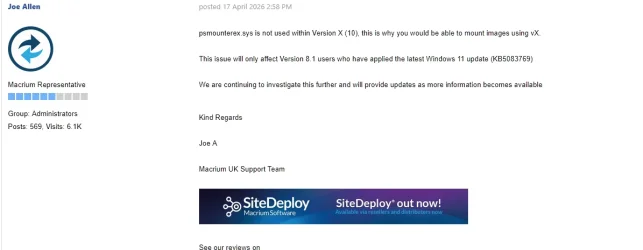
I have trust in thsi post on the Macrium support site:
Patience...


1777026526477.webp
 

My Computer My Computer

At a glance

Windows 11I7-13700K32GeForce 1660 Super
OS
Windows 11
Computer type
PC/Desktop
Manufacturer/Model
Custom made
CPU
I7-13700K
Motherboard
PRIME Z790-A WIFI
Memory
32
Graphics Card(s)
GeForce 1660 Super
Sound Card
On board
Monitor(s) Displays
Dell P2314H
Screen Resolution
HD
Hard Drives
SSD
Cooling
Yes :-)
Antivirus
ESET
I was actually looking at Hasleo for curiosity and it seems that backup and restore of Bitlocker encrypted drives is not as straightforward as with Macrium where you essentially have nothing to think about or do.
@Mooly ,

Actually, the latest Hasleo Backup Suite beta release (5.8.1.1) has greatly improved its Bitlocker capabilities. It is available for download from the Hasleo Forum, along with the release notes.

Hasleo Backup Suite is constantly evolving and being enhanced. The Hasleo Team is very dedicated. They aim to become a "first-in-class" imaging program. The number of significant enhancements since I first bought my Pro license less than six months ago is astounding.

Have a great day.

Regards,
Phil
 

My Computers My Computers

  • At a glance

    Windows 11 Pro Version 25H2 (Build 26200.8655Intel i7-9700K 4700 MHz32 GB (4 x 8GB SK Hynix DDR4 @1333 MHz) (2666...NVIDIA GeForce RTX 2060 (6 GB) GDDR6 300 MHz
    OS
    Windows 11 Pro Version 25H2 (Build 26200.8655
    Computer type
    PC/Desktop
    Manufacturer/Model
    Dell XPS8930 SE
    CPU
    Intel i7-9700K 4700 MHz
    Motherboard
    Dell XPS 8930
    Memory
    32 GB (4 x 8GB SK Hynix DDR4 @1333 MHz) (2666 MHz)
    Graphics Card(s)
    NVIDIA GeForce RTX 2060 (6 GB) GDDR6 300 MHz
    Sound Card
    None
    Monitor(s) Displays
    Dell UltraSharp U2518D 25"
    Screen Resolution
    2560 x 1440
    Hard Drives
    NVMe Intel 1024 TB
    Seagate 2 TB, SATA-III
    Western Digital Black 4TB
    PSU
    850 W Gold Standard
    Case
    Dell XPS 8930 Base (Special Edition)
    Cooling
    Air
    Keyboard
    Dell 0G4D2W
    Mouse
    Dell MOCZUL
    Internet Speed
    Download 553 Mbps, Upload 686 Mbps
    Browser
    Google Chrome
    Antivirus
    ESET Smart Security Premium, plus Malwarebytes Premium
    Other Info
    BIOS Version 1.1.31
  • At a glance

    Windows 11 Pro Version 25H2 (Build 26200.8655)i7-9750H 4.5 GHz16 GB (2 x 8GB @ 1333 MHz) DDR4-2666 MHzNVIDIA GeForce 1650 4 GB GDDR5
    Operating System
    Windows 11 Pro Version 25H2 (Build 26200.8655)
    Computer type
    Laptop
    Manufacturer/Model
    Dell XPS 15 7590
    CPU
    i7-9750H 4.5 GHz
    Motherboard
    Dell XPS 15 7590
    Memory
    16 GB (2 x 8GB @ 1333 MHz) DDR4-2666 MHz
    Graphics card(s)
    NVIDIA GeForce 1650 4 GB GDDR5
    Sound Card
    None
    Monitor(s) Displays
    Dell XPS 15 7590, 15.6" InfinityEdge Anti-Glare, Non-Touch
    Screen Resolution
    1920 x 1080
    Hard Drives
    512 GB M.2 PCle NVMe SK Hynix
    PSU
    130W Power Adapter
    Case
    Dell XPS 15 7590
    Cooling
    Air
    Keyboard
    Laptop
    Mouse
    Logitech M510
    Internet Speed
    Download: 400 Mbps, Upload: 203 Mbps
    Browser
    Google Chrome
    Antivirus
    ESET Smart Security Premium, plus Malwarebytes Premium
    Other Info
    BIOS Version 1.35.0
Thanks for the info @garioch7 Hasleo may be something I look into further as Macrium 8.1 gets overtaken by new developments.
 

My Computer My Computer

At a glance

W11 Pro x64 ongoing Canary 29500 latest buildsIntel i58GbIntel HD Graphics
OS
W11 Pro x64 ongoing Canary 29500 latest builds
Computer type
Laptop
Manufacturer/Model
Dell 7760 Mobile Precision 17"
CPU
Intel i5
Motherboard
Unknown
Memory
8Gb
Graphics Card(s)
Intel HD Graphics
Sound Card
Realtek
Monitor(s) Displays
Internal
Hard Drives
2 x 256Gb SSD
PSU
Dell 240 watt
Mouse
Dell Premier Bluetooth
Internet Speed
50Mbps
Browser
Edge
Antivirus
Default Microsoft Security
So, what do we have?
Update KB5083769 (April 14, 2026) for Windows 11 - blocks viewing backup files for Macrium 7.3 – 8.0 – 8.1

How will you view the Macrium backup if you have installed the KB5083769 update?

Method 1.
Do not install the KB5083769 update

Method 2 ( If you have installed the KB5083769 update}.
To view the backup, use the standard viBoot function of Macrium software:
2.1. Mark the viBoot function when installing Macrium versions 7.3 – 8.0 – 8.1
2.2 . Open the BIOS settings of the motherboard (when restarting the computer, hold down the "Del" button), and enable "Intel Virtualization Tecnology", save the BIOS settings.
2.3. Start –> Control Panel –> Programs and Components –> Enable or disable Windows components –> here enable (mark) all "Hyper-V" components and enable "Virtual Machine Platform".
2.4. Launch viBoot from a Desktop shortcut, open the disk copy (image) file, i.e. the XXXX.mrimg file) created by Macrium Revlect v7.x - v8.x.; now you can view or extract files from the backup (copy) of this disk.
2.5. WARNING: Before deleting the Macrium Reflect program, stop and then delete all your virtual machines! Otherwise, you will have to disable all Hyper-V components and then manually delete the remaining Macrium Revlect files and clean the Registry.

Method 3.(If you have installed the KB5083769 update),
Disable "Memory Integrity" and "List of vulnerable drivers" in the Windows 11 Security settings
In this case, you won't get the “Vulnerable driver” error.

NOTE (IMXO)
I think you are making a big mistake if you are using the Macrium to view and/or extract files from this backup.
Your disk backup is the last and most important means to recover data.
You can easily ruin your backup if you constantly read and extract data from this backup.

P.S.
I think Macrium ver. 8.0.7175 is the most reliable version of Macrium.
I never use the "disk backup view" mode, so "blocking disk backup view" does not matter to me.
 
Last edited:

My Computer My Computer

At a glance

Windows 10/11
OS
Windows 10/11
Computer type
PC/Desktop
Manufacturer/Model
Windows 10 21H2 LTSC x64 [MSDN]; Windows 11 24H2 LTSC; m/b Z77-HD3(BIOS-MBR/UEFI); HDD WD 500Gb
NOTE (IMXO)
I think you are making a big mistake if you are using the Macrium to view and/or extract files from this backup.
Your disk backup is the last and most important means to recover data.
You can easily ruin your backup if you constantly read and extract data from this backup.
This sounds like urban legend to me. From where do you get such information, and what is it about accessing a disk file (which is all a REFLECT backup really is) that causes it to be dangerous. If this was the real case, Systems would be blowing up all over the place due to DATA errors being found in disk files... database apps would be dying in their tracks.

Just curious what the basis of this warning really is...
 

My Computer My Computer

At a glance

Windows 10, Linux MINT (Guests 7, 11, ZorinOS)Intel Core i7-1070032gB (DDR4)Intel UHD Graphics 630
OS
Windows 10, Linux MINT (Guests 7, 11, ZorinOS)
Computer type
PC/Desktop
Manufacturer/Model
HP Z2 G5 Workstation
CPU
Intel Core i7-10700
Motherboard
HP Model# 8751
Memory
32gB (DDR4)
Graphics Card(s)
Intel UHD Graphics 630
Sound Card
Realtek basic audio
Monitor(s) Displays
32" (Viewsonic) UHD
Screen Resolution
3840 x 2160
Hard Drives
2-NvME (mainboard), 1-NvME (PCIe), 1-SATA3 SSD
Back
Top Bottom