Windows 11 sets a pagefile in another drive but doesn't recognize it


madeinlisboa

Member
Local time
8:54 PM
Posts
1
OS
Windows 11
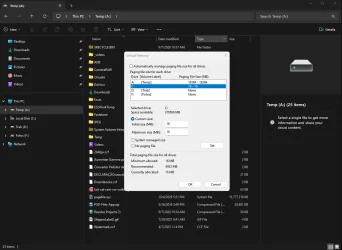
I tried to set the page file in a Crucial M4 drive (M4-CT128M4SSD2). Windows creates the page file but ignores it in the total space used by both (I had to create a small one in the boot drive). Why is this happening?
2026-10-04_172829.webp
 

My Computer My Computer

At a glance

Windows 11Intel 270k PlusCorsair DDR5 32GBNVIDIA 5070
OS
Windows 11
Computer type
PC/Desktop
Manufacturer/Model
DIY
CPU
Intel 270k Plus
Motherboard
ASRock z890 Pro RS
Memory
Corsair DDR5 32GB
Graphics Card(s)
NVIDIA 5070
Monitor(s) Displays
Benq
Is the drive an external drive? If so it may not be available soon enough during boot.

Windows will only count page files that are actually available and usable during boot. If the pagefile is on another drive and Windows is creating pagefile.sys there but not including it in the reported total paging file size, it usually means Windows has determined that drive is not suitable for hosting the primary paging file.
 

My Computers My Computers

  • At a glance

    Windows 11 Pro 26H2 26300.9457i9-10900 10 core 20 threads32 gbnone-Intel UHD Graphics 630
    OS
    Windows 11 Pro 26H2 26300.9457
    Computer type
    PC/Desktop
    Manufacturer/Model
    Dell Optiplex 7080
    CPU
    i9-10900 10 core 20 threads
    Motherboard
    DELL 0J37VM
    Memory
    32 gb
    Graphics Card(s)
    none-Intel UHD Graphics 630
    Sound Card
    Integrated Realtek
    Monitor(s) Displays
    Benq 27
    Screen Resolution
    2560x1440
    Hard Drives
    2x1tb Solidigm m.2 nvme /External drives 512gb Samsung m.2 sata+2tb Kingston m2.nvme
    PSU
    500w
    Case
    MT
    Cooling
    Dell Premium
    Keyboard
    Logitech wired
    Mouse
    Logitech wireless
    Internet Speed
    so slow I'm too embarrassed to tell
    Browser
    #1 Edge #2 Firefox
    Antivirus
    Defender+MWB Premium
  • At a glance

    Windows 11 Pro 24H2 26200.9457AMD Ryzen 7 6800U32 gbintegrated
    Operating System
    Windows 11 Pro 24H2 26200.9457
    Computer type
    PC/Desktop
    Manufacturer/Model
    Beelink Mini PC SER5
    CPU
    AMD Ryzen 7 6800U
    Memory
    32 gb
    Graphics card(s)
    integrated
    Sound Card
    integrated
    Monitor(s) Displays
    Benq 27
    Screen Resolution
    2560x1440
    Hard Drives
    1TB Crucial nvme
    Keyboard
    Logitech wired
    Mouse
    Logitech wireless
    Internet Speed
    still too embarrassed to tell
    Browser
    Firefox
    Antivirus
    Defender
  • System 3 is non compliant Dell 9020 i7-4770/24gb ram Win11 PRO 26200.9457

Latest Tutorials

Back
Top Bottom