Page numbering works for any document other than this one in Word


babylonrob

New member
Local time
9:10 AM
Posts
3
OS
Windows 11
I am guessing that the reason it does not work is that I added a blank page to the beginning of a long document (a title page), then I deleted the info on that page. Then put cursor at beginning of first page of doc and deleted it. Should be gone. I try to insert numbers the usual way. Insert > page numbers > top of page > format page numbering > then select start with page one and check continue from previous section. The first page has a 1 but all other pages have no sequence of numbers. Several tries and still does it. Any help would be great.
 

My Computer

System One

  • OS
    Windows 11
    Computer type
    Laptop
    Manufacturer/Model
    Lenovo
You have to remove all section breaks. Also the first page often has a different header and footer to subsequent pages. You may have to turn that option off as well.
 

My Computer

System One

  • OS
    Windows 11 Pro + Win11 Canary VM.
    Computer type
    Laptop
    Manufacturer/Model
    ASUS Zenbook 14
    CPU
    I9 13th gen i9-13900H 2.60 GHZ
    Motherboard
    Yep, Laptop has one.
    Memory
    16 GB soldered
    Graphics Card(s)
    Integrated Intel Iris XE
    Sound Card
    Realtek built in
    Monitor(s) Displays
    laptop OLED screen
    Screen Resolution
    2880x1800 touchscreen
    Hard Drives
    1 TB NVME SSD (only weakness is only one slot)
    PSU
    Internal + 65W thunderbolt USB4 charger
    Case
    Yep, got one
    Cooling
    Stella Artois (UK pint cans - 568 ml) - extra cost.
    Keyboard
    Built in UK keybd
    Mouse
    Bluetooth , wireless dongled, wired
    Internet Speed
    900 mbs (ethernet), wifi 6 typical 350-450 mb/s both up and down
    Browser
    Edge
    Antivirus
    Defender
    Other Info
    TPM 2.0, 2xUSB4 thunderbolt, 1xUsb3 (usb a), 1xUsb-c, hdmi out, 3.5 mm audio out/in combo, ASUS backlit trackpad (inc. switchable number pad)

    Macrium Reflect Home V8
    Office 365 Family (6 users each 1TB onedrive space)
    Hyper-V (a vm runs almost as fast as my older laptop)
Thanks, Cereberus. No section breaks. Didn't know first page header might be different. Usually, when I click page formatting, in the box I would choose to start on page 1, then all others numbers filled sequentially. This morning I just experimented by selecting the whole document, then clicked in at page 2 and all numbers filled in. Happy accident that i don't understand. I appreciate your help.
 

My Computer

System One

  • OS
    Windows 11
    Computer type
    Laptop
    Manufacturer/Model
    Lenovo
Unsure how long ago this question was posted

One must differentiate between and purpose:
  1. Page break
  2. Section break
 

My Computer

System One

  • OS
    Windows 11
    Computer type
    Laptop
    Manufacturer/Model
    Various
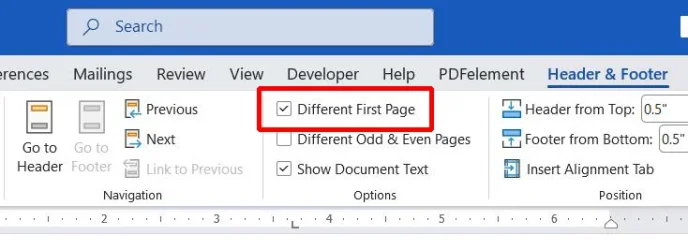
Did you check to see if you had "Different First Page" selected? If so, then page numbering on first page and subsequent pages would be independent of each other.

Suppose "Different First Page" was not selected. Then inserting page numbers would start with 1 on page one followed by 2 on page two, etc.

If you then selected "Different First Page" then there would no page number shown on first page but other pages would be numbered normally.
At this point you could manually number the first page but it would not affect the other page numbers.

PageNumbering.webp
 

My Computers

System One System Two

  • OS
    Windows 11 Pro 25H2 (26200.6901)
    Computer type
    Laptop
    Manufacturer/Model
    ASUS TUF Gaming A15 (2022)
    CPU
    AMD Ryzen 7 6800H with Radeon 680M GPU (486MB RAM)
    Memory
    Crucial DDR5-4800 (2400MHz) 32GB (2 x 16GB)
    Graphics Card(s)
    NVIDIA RTX 3060 Laptop (6GB RAM)
    Sound Card
    n/a
    Monitor(s) Displays
    15.6-inch
    Screen Resolution
    1920x1080 300Hz
    Hard Drives
    2 x Samsung 990 Evo Plus (2TB M.2 NVME SSD)
    PSU
    n/a
    Mouse
    Wireless Mouse M510
    Internet Speed
    2100Mbps/300Mbps
    Browser
    Firefox
    Antivirus
    Malwarebytes
  • Operating System
    Windows 11 Pro 25H2 (26200.8246)
    Computer type
    PC/Desktop
    Manufacturer/Model
    Custom build
    CPU
    AMD Ryzen 7 5700X3D
    Motherboard
    ASUS ROG Strix B550-F Gaming WiFi II
    Memory
    G.SKILL Flare X 32GB (2x16GB) DDR4
    Graphics card(s)
    ASUS ROG-STRIX-RTX3060TI-08G-V2-GAMING (RTX 3060-Ti, 8GB RAM)
    Monitor(s) Displays
    Samsung G50D IPS 27"
    Screen Resolution
    1440p/180Hz
    Hard Drives
    SAMSUNG 990 EVO Plus (2TB] M.2 NVME SSD
    SAMSUNG 990 EVO Plus (4TB) M.2 NVME SSD
    PSU
    Corsair RM750x (750 watts)
    Case
    Cooler Master MasterCase 5
    Cooling
    Scythe Mugen 6
    Keyboard
    Logitech K520 (MK540 keyboard/mouse combo)
    Mouse
    Logitech M310 (MK540 keyboard/mouse combo)
    Internet Speed
    2100 Mbps down / 300 Mbps up
    Browser
    Firefox, Edge, Chrome
    Antivirus
    Malwarebytes (Premium)
    Other Info
    ASUS Blu-ray Burner BW-16D1HT (SATA) || Western Digital Easystore 20TB USB 3.0 external hard drive used with Acronis True Image 2025 backup software || HP OfficeJet Pro 6975 Printer/Scanner
Thank you all for responding. Sorry I have not been replying because I have been away burying my mother and all that entails with the govt.
I learned that if you want to start on the third page with the number two, you have to insert a section (not page break as a few online articles said) at the end of the second page, then that separates the first and second page from the rest of the doc. After doing that, I mistakenly double clicked in the header, but only got a formatting page option that was not complete. I did not see the header/footer option up in the ribbon that allowed me to choose the correct option. After that I had what I needed, no numbers on title page and first page of document. The below the section break, I was able to choose on formatting page option to start on page 3 with the number 2. Voila! Thank you all for your suggestions and help.
 

My Computer

System One

  • OS
    Windows 11
    Computer type
    Laptop
    Manufacturer/Model
    Lenovo
Back
Top Bottom