Passkey Usage


Pnokio

Well-known member
Member
Local time
4:19 PM
Posts
337
Location
Scotland UK
OS
Windows 11 Home 25H2 64-Bit
Hi Folks, I sign in to Chrome, FF and Edge with the same Gmail account on two laptops. How do I use a Passkey? do I only need one or one for every browser.
 

My Computer

System One

  • OS
    Windows 11 Home 25H2 64-Bit
    Computer type
    Laptop
    Manufacturer/Model
    asus f515ja
    CPU
    Intel(R) Core(TM) i5-1035G1 CPU @ 1.00GHz 1.19 GHz
    Motherboard
    ASUSTeK COMPUTER INC. X515JA (U3E1)
    Memory
    8.00GB HDD
    Graphics Card(s)
    Standard Monitor on Intel UHD Graphics
    Sound Card
    Realtek HDA
    Screen Resolution
    1366 x 768 x 60
    Hard Drives
    1HDD 2 Partitions
    Mouse
    Logitech Cordless
    Internet Speed
    38mbps
    Browser
    Chrome+FF
    Antivirus
    Malwarebytes (Premium)
    Other Info
    When I find it.
It depends what you're using as the passkey. Passkeys are not browser specific. If you used your phone or a yubikey then it would be a single key across devices. If you use your laptop as the passkey then it's device specific and you'd have two passkeys, one per laptop
 

My Computer

System One

  • OS
    Linux Mint
    Computer type
    Laptop
    Manufacturer/Model
    System76 Lemur Pro
The passkey I'm referring to is set by accessing my Gmail account. and is only numbers.
 

My Computer

System One

  • OS
    Windows 11 Home 25H2 64-Bit
    Computer type
    Laptop
    Manufacturer/Model
    asus f515ja
    CPU
    Intel(R) Core(TM) i5-1035G1 CPU @ 1.00GHz 1.19 GHz
    Motherboard
    ASUSTeK COMPUTER INC. X515JA (U3E1)
    Memory
    8.00GB HDD
    Graphics Card(s)
    Standard Monitor on Intel UHD Graphics
    Sound Card
    Realtek HDA
    Screen Resolution
    1366 x 768 x 60
    Hard Drives
    1HDD 2 Partitions
    Mouse
    Logitech Cordless
    Internet Speed
    38mbps
    Browser
    Chrome+FF
    Antivirus
    Malwarebytes (Premium)
    Other Info
    When I find it.
That is likely just a 2nd authentication factor to access the passkey. Passkeys are generally certificate key pairs when they are stored on Windows or mobile devices
 

My Computer

System One

  • OS
    Linux Mint
    Computer type
    Laptop
    Manufacturer/Model
    System76 Lemur Pro
These are the settings I have when accessing my Gmail Account.
-
2 Step Verification
on since Dec 27 2022
-
Passkeys & Security keys
4 keys
-
Password OK
-
Skip Password when possible
ON
-
Authenticator
ON
-
Google prompt
2 devices
-
Recovery Phone & Mail
OK
-
 

My Computer

System One

  • OS
    Windows 11 Home 25H2 64-Bit
    Computer type
    Laptop
    Manufacturer/Model
    asus f515ja
    CPU
    Intel(R) Core(TM) i5-1035G1 CPU @ 1.00GHz 1.19 GHz
    Motherboard
    ASUSTeK COMPUTER INC. X515JA (U3E1)
    Memory
    8.00GB HDD
    Graphics Card(s)
    Standard Monitor on Intel UHD Graphics
    Sound Card
    Realtek HDA
    Screen Resolution
    1366 x 768 x 60
    Hard Drives
    1HDD 2 Partitions
    Mouse
    Logitech Cordless
    Internet Speed
    38mbps
    Browser
    Chrome+FF
    Antivirus
    Malwarebytes (Premium)
    Other Info
    When I find it.
Passkeys can require a strong form of authentication to access the passkey itself this is totally independent of any 2FA you have for a service such as Gmail. If Windows is the passkey device this is typically a Windows hello biometrics or a pin
 

My Computer

System One

  • OS
    Linux Mint
    Computer type
    Laptop
    Manufacturer/Model
    System76 Lemur Pro
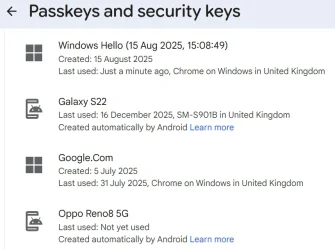
All I wanted to know is why I have 4 passkeys in my Gmail account.
 

My Computer

System One

  • OS
    Windows 11 Home 25H2 64-Bit
    Computer type
    Laptop
    Manufacturer/Model
    asus f515ja
    CPU
    Intel(R) Core(TM) i5-1035G1 CPU @ 1.00GHz 1.19 GHz
    Motherboard
    ASUSTeK COMPUTER INC. X515JA (U3E1)
    Memory
    8.00GB HDD
    Graphics Card(s)
    Standard Monitor on Intel UHD Graphics
    Sound Card
    Realtek HDA
    Screen Resolution
    1366 x 768 x 60
    Hard Drives
    1HDD 2 Partitions
    Mouse
    Logitech Cordless
    Internet Speed
    38mbps
    Browser
    Chrome+FF
    Antivirus
    Malwarebytes (Premium)
    Other Info
    When I find it.
It's a good idea to go in and name them something meaningful after creation. You created 4 passkeys (or security keys) at some point for your Gmail. If you re-imaged your device and don't sign into a MS account then that would count as 2 passkeys since they are generated key pairs. If you drill into passkeys you can see when they were created and an idea of by what (device type) and when they were last used. If they haven't been used in a long time you can simply remove them
 

My Computer

System One

  • OS
    Linux Mint
    Computer type
    Laptop
    Manufacturer/Model
    System76 Lemur Pro

This article is much more than a beginners guide. I've been using passkeys for years now and highly recommend them. Pick a good password manager. I've used 1Password for years and highly recommend it. I use passkeys for everthing and two factor identification (Google Authenticator, Microsoft Authenticator) for those sites that don't support it. I also have 2 Yubikeys one being a backup of the other that are used for access to my Google and Microsoft Accounts.

In answer to your question it's possible to use the same passkey for 2 different browsers but I wouldn't recommend it. It's more secure to use a different passkey for every site. If you have a password manager it will track everthing for you. I always have my passkeys and access to my accounts because my password manager is also on my phone.
 

My Computer

System One

  • OS
    Windows 11 & Zorin Pro
    Computer type
    Laptop
    Manufacturer/Model
    Asus Rog Strix G16
    CPU
    Intel® Core™ Ultra 9 Processor 275HX 2.7 GHz
    Motherboard
    AsusteK Computer
    Memory
    32 gb
    Graphics Card(s)
    NVIDIA® GeForce RTX™ 5060 Laptop GPU
    Sound Card
    Realtek High Definition Audio
    Monitor(s) Displays
    Laptop 16 inch
    Screen Resolution
    2560 X 1600
    Hard Drives
    Boot: Samsung 9100 NVME 2 TB Microsoft Storage Controller: Standard NVM Express Driver: Microsoft 6/21/2006. No SATA/AHCI on my motherboard or in bios
    Mouse
    Pad
    Browser
    Google Chrome
    Antivirus
    Microsoft
    Other Info
    Printer: HP Color LaserJet MFP M477dw

Latest Support Threads

Back
Top Bottom