PC restarted, tried automatic repair and then went to blue screen


Canuck8750

Member
Local time
6:23 PM
Posts
5
OS
Windows 11 Pro
So I sat down to eat the other half of my delicious turkey sub, put on an episode of Fallout, and within a few minutes, I noticed my PC restarting itself. No cause for concern I thought. Just another update. Then suddenly, it started automatic repair and then gave me a blue screen saying it encountered an error. I haven't saw a blue screen on my PC in a dog's age.
I'm running Windows 11 Pro v25H2. OS Build is 26200.7840

I first tried restarting and it did the same automatic repair loop into another blue screen. So then I powered down the PC holding the power button, then switched off the PSU switch, wait 30secs or so, plugged it back in and booted the PC up, well now I'm back into my desktop. However, I'm concerned with what the heck just happened and if I need to be worried.

I tried looking in event viewer, but I can't really make much sense of anything in there. I do see several Errors and Critical notifications.
If I share my event log here, would anyone be able to make sense of it?
Is there a better way to diagnose what just happened?
 
Windows Build/Version
26200.7840

My Computer

System One

  • OS
    Windows 11 Pro
    Computer type
    PC/Desktop
    Manufacturer/Model
    Custom Build
    CPU
    Ryzen 5 5600x
    Motherboard
    MSI B550 Gaming Plus
    Memory
    Crucial Ballistic 2x8GB 3600mhz cl16
    Graphics Card(s)
    Radeon rx6600xt
    PSU
    Fractal Design Ion+ 660p
Blue Screen of Death (also known as a blue screen or BSoD) is an error screen displayed on a Windows computer system after a fatal system error, also known as a system crash: when the operating system reaches a condition where it can no longer operate safely. BSoDs can be caused by poorly written device drivers or malfunctioning hardware, such as faulty memory, power supply issues, overheating of components, or hardware running beyond its specification limits.


My Computer

System One

  • OS
    Windows 11
    Computer type
    PC/Desktop
    Manufacturer/Model
    HP Pavilion
    CPU
    AMD Ryzen 7 5700G
    Motherboard
    Erica6
    Memory
    Micron Technology DDR4-3200 16GB
    Graphics Card(s)
    NVIDIA GeForce RTX 3060
    Sound Card
    Realtek ALC671
    Monitor(s) Displays
    Samsung SyncMaster U28E590
    Screen Resolution
    3840 x 2160
    Hard Drives
    SAMSUNG MZVLQ1T0HALB-000H1
  • Like
Reactions: OAT
I updated my system specs in profile, there are no overclocks on the system and the system age is 4yrs old. Don't recall ever having a blue screen issue with the PC before.

OneDrive Link to Logs;


My Computer

System One

  • OS
    Windows 11 Pro
    Computer type
    PC/Desktop
    Manufacturer/Model
    Custom Build
    CPU
    Ryzen 5 5600x
    Motherboard
    MSI B550 Gaming Plus
    Memory
    Crucial Ballistic 2x8GB 3600mhz cl16
    Graphics Card(s)
    Radeon rx6600xt
    PSU
    Fractal Design Ion+ 660p
I updated my system specs in profile, there are no overclocks on the system and the system age is 4yrs old. Don't recall ever having a blue screen issue with the PC before.

OneDrive Link to Logs;

If you look in Windows Update/Update history does it show anything related to system drivers, firmware or secure boot updates? Those have been known to cause blue screen issues during updates for some users.
 

My Computer

System One

  • OS
    Windows 11 25H2
    Computer type
    PC/Desktop
    Manufacturer/Model
    EVGA home brew
    CPU
    Broadwell-e 6850K 4.5ghz @1.36v
    Motherboard
    EVGA X99 FTW K
    Memory
    32GB Corsair LPM 3600 C16
    Graphics Card(s)
    EVGA RTX 3080Ti FTW
    Sound Card
    Asus Centurion true 7.1 headset. (5 speakers in each earpeice)
    Monitor(s) Displays
    LG C4 55"
    Screen Resolution
    4K 144hz
    Hard Drives
    Various models of SSDs ~10TB No HDDs installed.
    PSU
    be quiet! BN516 Straight Power 12-1000w 80 Plus Platinum
    Case
    Corsair 780T modified to dual 200mm intake fans
    Cooling
    Corsair H110i
    Keyboard
    Corsair K95 Platinum
    Mouse
    Corsair M65 RGB Elite
    Internet Speed
    50Mbs
recent playtime

"After more than 15 years of continuous service, the original Secure Boot certificates are reaching the end of their planned lifecycle and begin expiring in late June 2026," said Windows Servicing and Delivery partner director Nuno Costa on Tuesday.

"We've begun rolling out new certificates as part of the regular monthly Windows updates to in-support Windows devices for home users, businesses, and schools with Microsoft-managed updates. Organizations also have the option to manage the update process themselves using their preferred management tools."

Costa added that the certificate refresh represents "one of the largest coordinated security maintenance efforts across the Windows ecosystem," as it involves firmware updates across millions of device configurations from many hardware manufacturers and original equipment
manufacturers (OEMs).

The new Secure Boot certificates will be installed automatically via regular monthly updates for customers who allow Microsoft to manage Windows updates on their systems. Additionally, many PCs manufactured since 2024, and the vast majority shipped last year, already include updated certificates.

However, some devices may require separate firmware updates from manufacturers before applying new certificates, and Microsoft advised customers to check OEM support pages for the latest firmware versions.

Although Microsoft will automatically update high-confidence devices via Windows Update, IT admins can also deploy Secure Boot certificates using registry keys, Group Policy settings, and the Windows Configuration System (WinCS) to ensure that endpoints don't lose Windows Boot Manager and Secure Boot protections.

While devices that fail to receive updated certificates before June will continue to function normally, they will enter what Microsoft describes as a "degraded security state," with "limited" boot-level protections and no protection against attacks that exploit newly discovered vulnerabilities because they cannot install new mitigations.
 

My Computer

System One

  • OS
    Win11
If you look in Windows Update/Update history does it show anything related to system drivers, firmware or secure boot updates? Those have been known to cause blue screen issues during updates for some users.
Nothing from today when the crash occurred. A few definition updates from yesterday, Feb 12th. One of them was for the "Windows Security Platform - KB5007651"
 

My Computer

System One

  • OS
    Windows 11 Pro
    Computer type
    PC/Desktop
    Manufacturer/Model
    Custom Build
    CPU
    Ryzen 5 5600x
    Motherboard
    MSI B550 Gaming Plus
    Memory
    Crucial Ballistic 2x8GB 3600mhz cl16
    Graphics Card(s)
    Radeon rx6600xt
    PSU
    Fractal Design Ion+ 660p
Is it an HP? There's an HP "driver" update being pushed at the moment that can do that I believe.
 

My Computers

System One System Two

  • OS
    Windows 11 Home 25H2
    Computer type
    Laptop
    Manufacturer/Model
    HP Pavilion 14-ce3606sa
    CPU
    Core i5-1035G1
    Memory
    32gb
    Hard Drives
    Samsung 870 evo sata ssd
    Cooling
    Could be better
    Internet Speed
    50 mbps Starlink
    Browser
    Firefox
    Other Info
    Originally came installed with a 500gb H10 Optane ssd
  • Operating System
    Windows 11 Home
    Computer type
    Laptop
    Manufacturer/Model
    HP Pavilion ce3606sa
    CPU
    Intel Core i5-1035G1
    Memory
    16gb
    Hard Drives
    Hynix Gold P31 2TB
    Internet Speed
    200mbps Starlink
    Browser
    Firefox
    Antivirus
    Defender
my mothers HP got a new BIOS in Jan - then the new Secure Boot certificate update from Win Updates - all before Feb patch Tuesday - hers is running OK

oddly newer HP laptops I support haven't had anything yet

oh, not sure if related
her indoors keeps getting Dell Bios updates almost like clockwork for the last two years on a 2 month cycle (fixing security risks). Put the last one on in November - then see in Win Updates Optional firmware 1.491 (or whatever it said) But it appears to me both the last two BIOS updates had rolled back to 1.421 - But Microsoft still want to load 1.491 - BUT when I said go for it - it failed to install 3 times

ummm - just checked 17 nov 2025 update - This BIOS contains the new 2023 Secure Boot Certificates.
 
Last edited:

My Computer

System One

  • OS
    Win11
Was that HP bios or Dell? I had the MS KEK update for secure boot keys recently. I checked HP for my model to see if there was a new bios and there didn't seem to be - I was already running the latest F.22 (for my model). What came up in Windows updates after that was a security update and one called HP driver (can't remember the number). I googled it and it had crashed a lot of computers and people were having to remove it again, so I put updates on pause, although I do believe it gave the option to install rather than forcing it. But it wasn't a bios update, it was something to do with app access. People were complaining it also installed an app they didn't want.
 

My Computers

System One System Two

  • OS
    Windows 11 Home 25H2
    Computer type
    Laptop
    Manufacturer/Model
    HP Pavilion 14-ce3606sa
    CPU
    Core i5-1035G1
    Memory
    32gb
    Hard Drives
    Samsung 870 evo sata ssd
    Cooling
    Could be better
    Internet Speed
    50 mbps Starlink
    Browser
    Firefox
    Other Info
    Originally came installed with a 500gb H10 Optane ssd
  • Operating System
    Windows 11 Home
    Computer type
    Laptop
    Manufacturer/Model
    HP Pavilion ce3606sa
    CPU
    Intel Core i5-1035G1
    Memory
    16gb
    Hard Drives
    Hynix Gold P31 2TB
    Internet Speed
    200mbps Starlink
    Browser
    Firefox
    Antivirus
    Defender
Is it an HP? There's an HP "driver" update being pushed at the moment that can do that I believe.
My PC? No, it's a custom build. My laser printer, which just prompt me the other day for a software and firmware update, is a Brother. I ran the update successfully.
 

My Computer

System One

  • OS
    Windows 11 Pro
    Computer type
    PC/Desktop
    Manufacturer/Model
    Custom Build
    CPU
    Ryzen 5 5600x
    Motherboard
    MSI B550 Gaming Plus
    Memory
    Crucial Ballistic 2x8GB 3600mhz cl16
    Graphics Card(s)
    Radeon rx6600xt
    PSU
    Fractal Design Ion+ 660p
The hard deadline for OEM's to include CA 2023 certs in their BIOS, if they were going to support those PC's, was end of 2025.

Your mom's HP might be one of the older models that needed the last minute updates.
Your other HP's might have CA 2023 built-in. This was typical for PC's shipped in the 2022(?) and onward.
 

My Computer

System One

  • OS
    Windows 7
The hard deadline for OEM's to include CA 2023 certs in their BIOS, if they were going to support those PC's, was end of 2025.

Your mom's HP might be one of the older models that needed the last minute updates.
Your other HP's might have CA 2023 built-in. This was typical for PC's shipped in the 2022(?) and onward.
That is interesting as my HP is 10th generation and there hasn't been a bios update for a long time. Last one was May 2024. And the drivers are only for Windows 10. So as Windows 10 is officially finished, I assume there won't be any more?
 

My Computers

System One System Two

  • OS
    Windows 11 Home 25H2
    Computer type
    Laptop
    Manufacturer/Model
    HP Pavilion 14-ce3606sa
    CPU
    Core i5-1035G1
    Memory
    32gb
    Hard Drives
    Samsung 870 evo sata ssd
    Cooling
    Could be better
    Internet Speed
    50 mbps Starlink
    Browser
    Firefox
    Other Info
    Originally came installed with a 500gb H10 Optane ssd
  • Operating System
    Windows 11 Home
    Computer type
    Laptop
    Manufacturer/Model
    HP Pavilion ce3606sa
    CPU
    Intel Core i5-1035G1
    Memory
    16gb
    Hard Drives
    Hynix Gold P31 2TB
    Internet Speed
    200mbps Starlink
    Browser
    Firefox
    Antivirus
    Defender
Buried in HP's support pages for Secure Boot was a statement that listed which model years would be supported by last-minute BIOS updates. They were to be released in staggered waves, with the last batch on Dec. 2025.

If you didn't get a new BIOS in the last quarter of 2025, your legacy HP isn't getting a new BIOS.

W10 22H2 is End of Life. There is ESU, but basically you're only getting security fixes to Windows (no other changes). Drivers typically reach stability after a 2-3 years, and don't get updated unless again, there's a security hole. HP won't release newer drivers for W10. A lot of drivers are actually compatible with both W10 & 11, but W11 adds more security requirements on how the driver is packaged.
 

My Computer

System One

  • OS
    Windows 7
Thank you. So it's up to Windows to do it then.
 

My Computers

System One System Two

  • OS
    Windows 11 Home 25H2
    Computer type
    Laptop
    Manufacturer/Model
    HP Pavilion 14-ce3606sa
    CPU
    Core i5-1035G1
    Memory
    32gb
    Hard Drives
    Samsung 870 evo sata ssd
    Cooling
    Could be better
    Internet Speed
    50 mbps Starlink
    Browser
    Firefox
    Other Info
    Originally came installed with a 500gb H10 Optane ssd
  • Operating System
    Windows 11 Home
    Computer type
    Laptop
    Manufacturer/Model
    HP Pavilion ce3606sa
    CPU
    Intel Core i5-1035G1
    Memory
    16gb
    Hard Drives
    Hynix Gold P31 2TB
    Internet Speed
    200mbps Starlink
    Browser
    Firefox
    Antivirus
    Defender

My Computer

System One

  • OS
    Windows 11 Pro
    Computer type
    PC/Desktop
    Manufacturer/Model
    Custom Build
    CPU
    Ryzen 5 5600x
    Motherboard
    MSI B550 Gaming Plus
    Memory
    Crucial Ballistic 2x8GB 3600mhz cl16
    Graphics Card(s)
    Radeon rx6600xt
    PSU
    Fractal Design Ion+ 660p
  • If new device drivers or system services have been added recently, try removing or updating them. Try to determine what changed in the system that caused the new bug check code to appear.
  • Look in Device Manager to see if any devices are marked with an exclamation point (!), which indicates a problem. Review the events log displayed in the properties for any faulting device driver. Try to update the related driver.
  • Check the System Log in Event Viewer for additional error messages that might help pinpoint the device or driver that is causing the error. Look for critical errors in the system log that occurred in the same time window as the blue screen.
  • If you recently added hardware to the system, try removing or replacing it. Or check with the manufacturer to see if any patches are available.
  • Install Windows updates.
  • If you are overclocking (pushing the components beyond their design) you should revert to default at least until the crashing is solved. If you don't know what it is you probably are not overclocking.
  • Use SpeedFan to monitor temperatures in computers, overheating can cause BSOD.
  • Use Memtest86+ disc to check system memory's (RAM's) for errors.
  • Use CrystalDiskInfo to check SMART health report of the hard disk drive (HDD).


Open the Command Prompt with administrative privileges and execute bellow commands one at a time.

Code:
Dism /online /cleanup-image /restorehealth


Sfc /scannow


Chkdsk C: /f


This will show how to set Windows to create a Small memory dump when system gets a BSOD (Blue Screen of Death).

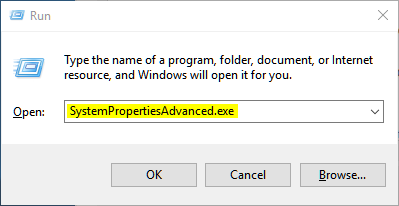
1. Open the Start Menu or Run command box, copy and paste SystemPropertiesAdvanced.exe into the search box, and press Enter key.


tGILPh0.png


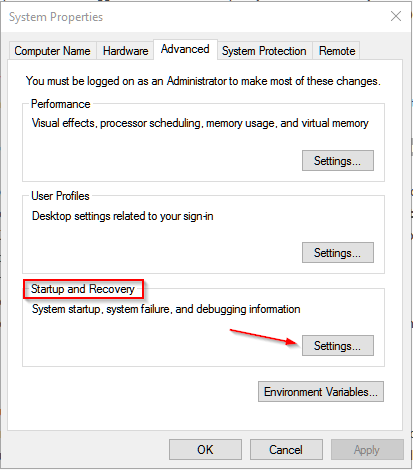
2. In the Advanced tab, click on the Settings button under "Startup and Recovery" section.


2kFr4dy.png


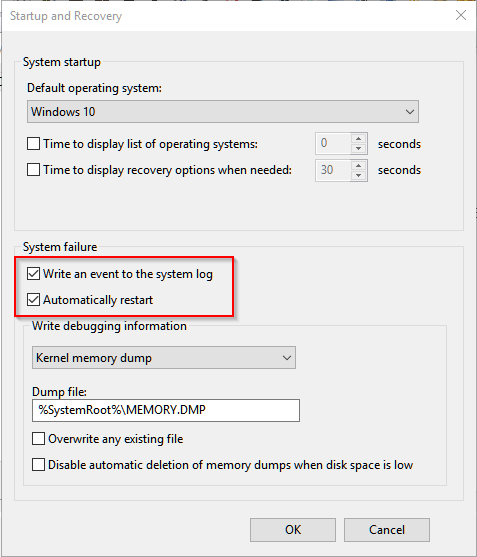
3. Check both the Write an event to the system log and Automatically restart boxes.


hZBwqPt.png


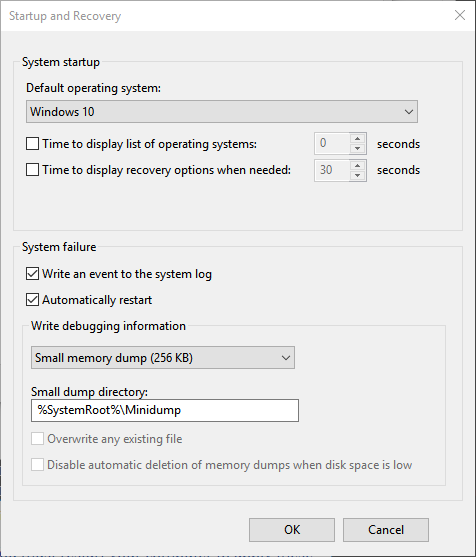
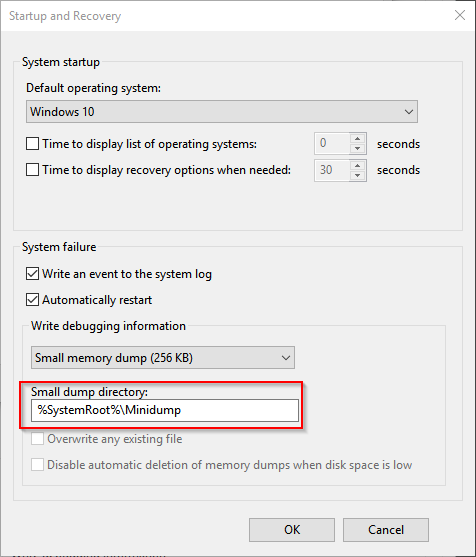
4. Select Small memory dump (256KB) from the "Write debugging information" drop down menu.


X0fMzVt.png


5. At Dump file: input box type %SystemRoot%\MiniDump


AjRCJDt.png


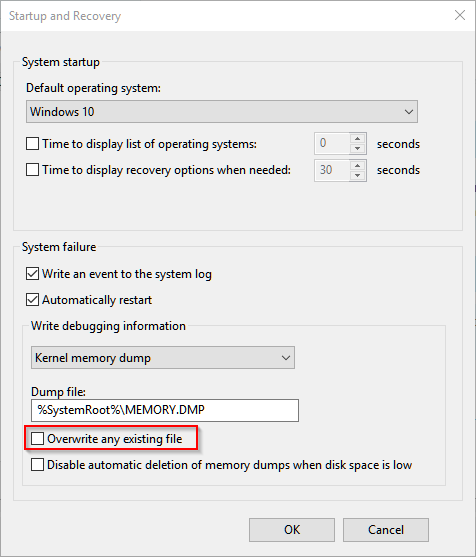
6. Check the Overwrite any existing file box, and click on OK button.


aWlRuel.png


7. If prompted, click on OK button.

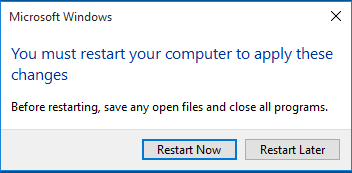
8. If prompted, click on Restart button after you save and close anything that you have open.


tM1USzC.png


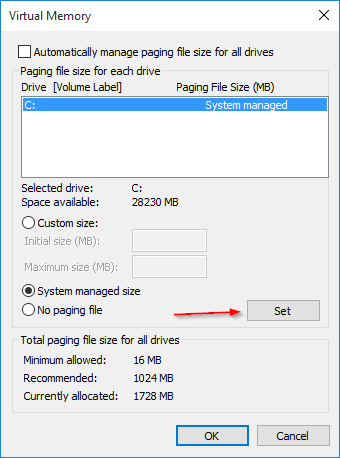
Setup Virtual Memory


Windows uses the page file to write out debug info in case your computer crashes with Blue Screen Of Death (BSOD) stop error. If your computer has a SSD drives and the operating system installed on SSD drive then you have a more complex problem. Since virtual memory writes to the hard drive very frequently, using SSD drives in this fashion can theoretically decrease the life of the drive. However, page file need to be enabled at C: partition to make Windows OS create BSOD memory dump files. If the C: partition located on SSD drive after finish running the Driver Verifier, page file can either be relocated to another storage drive or page file on C: partition can be disabled.

Follow below instructions:

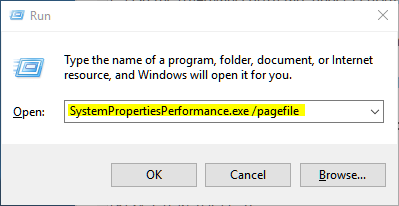
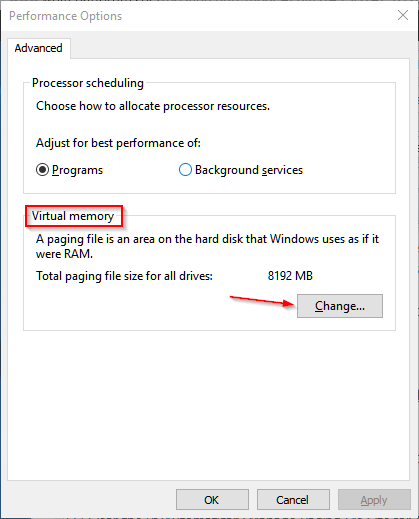
1. Type SystemPropertiesPerformance.exe /pagefile into Start Menu search box or Run command box.


nFGlqPT.png


2. Under Virtual memory section, click Change button.


0oDljqu.png


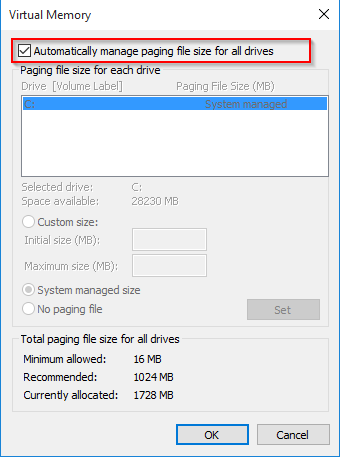
3. Clear the Automatically Manage Paging File Size for All Drives check box.


MpA6boB.png


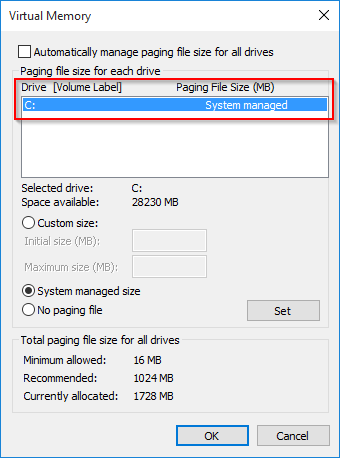
4. Under Drive [Volume Label], select the C: partition.


siiHJi4.png


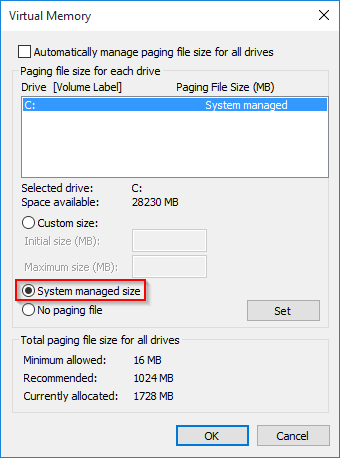
5. Select System managed size.


GowScsi.png


6. Click Set button.


xwaZ78f.png


7. Click OK button twice.
8. If prompted, click on Restart button after you save and close anything that you have open.


tM1USzC.png
 

My Computer

System One

  • OS
    Windows 11
    Computer type
    PC/Desktop
    Manufacturer/Model
    HP Pavilion
    CPU
    AMD Ryzen 7 5700G
    Motherboard
    Erica6
    Memory
    Micron Technology DDR4-3200 16GB
    Graphics Card(s)
    NVIDIA GeForce RTX 3060
    Sound Card
    Realtek ALC671
    Monitor(s) Displays
    Samsung SyncMaster U28E590
    Screen Resolution
    3840 x 2160
    Hard Drives
    SAMSUNG MZVLQ1T0HALB-000H1
Back
Top Bottom