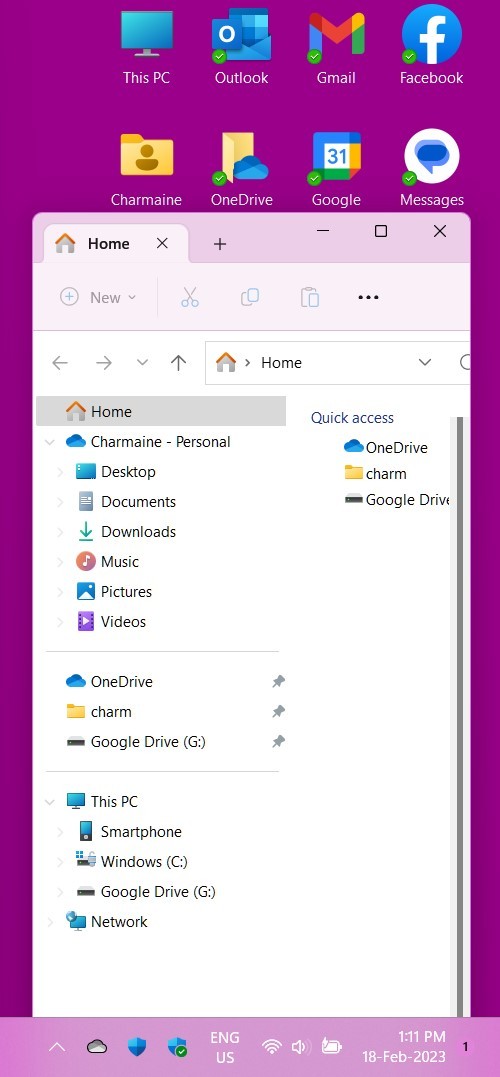
Personalization / Colours: title bars


DarkStar

Member
Local time
11:57 AM
Posts
18
Location
Surrey, UK
OS
Windows 11 Home 22H2
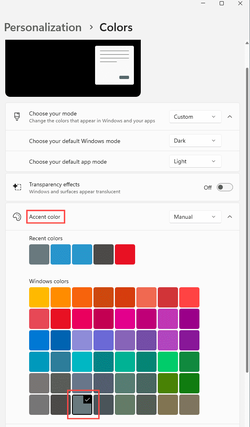
I have set "Show accent colour on title bar and windows borders" and selected a colour. That colour shows up in the window borders but not as the title bar background. What am I missing?
 

My Computer My Computer

At a glance

Windows 11 Home 22H2Intel i5-1035G1 1.00GHz, 1190 MHz, 4 cores8 GBIntel UHD Graphics
OS
Windows 11 Home 22H2
Computer type
Laptop
Manufacturer/Model
ASUS VivoBook X515JAB
CPU
Intel i5-1035G1 1.00GHz, 1190 MHz, 4 cores
Motherboard
ASUS X515JAB
Memory
8 GB
Graphics Card(s)
Intel UHD Graphics
Sound Card
Intel Smart Sound Technology
Monitor(s) Displays
1
Screen Resolution
1920 x 1080, 60Hz
Hard Drives
512GB SSD NVMe Intel
Mouse
Wired
Internet Speed
4 MBps
Browser
Firefox
Antivirus
Norton

My Computers My Computers

  • At a glance

    Win 11 Home ♦♦♦26300.9550 ♦♦♦♦♦♦♦26H2AMD Ryzen 7 3700XG.Skill (F4-3200C14D-16GTZKW)EVGA RTX 2070 (08G-P4-2171-KR)
    OS
    Win 11 Home ♦♦♦26300.9550 ♦♦♦♦♦♦♦26H2
    Computer type
    PC/Desktop
    Manufacturer/Model
    Built by Ghot® [May 2020]
    CPU
    AMD Ryzen 7 3700X
    Motherboard
    Asus Pro WS X570-ACE (BIOS 5302)
    Memory
    G.Skill (F4-3200C14D-16GTZKW)
    Graphics Card(s)
    EVGA RTX 2070 (08G-P4-2171-KR)
    Sound Card
    Realtek ALC1220P / ALC S1220A
    Monitor(s) Displays
    Dell U3011 30"
    Screen Resolution
    2560 x 1600
    Hard Drives
    2x Samsung 860 EVO 500GB,
    WD 4TB Black FZBX - SATA III,
    WD 8TB Black FZBX - SATA III,
    DRW-24B1ST CD/DVD Burner
    PSU
    PC Power & Cooling 750W Quad EPS12V
    Case
    Cooler Master ATCS 840 Tower
    Cooling
    CM Hyper 212 EVO (push/pull)
    Keyboard
    Ducky DK9008 Shine II Blue LED
    Mouse
    Logitech Optical M-100
    Internet Speed
    300/300
    Browser
    Firefox (latest)
    Antivirus
    Bitdefender Total Security
    Other Info
    Speakers: Klipsch Pro Media 2.1
  • At a glance

    Windows XP Pro 32bit w/SP3AMD Athlon 64 X2 5000+ (OC'd @ 3.2Ghz)TWIN2X2048-6400C4DHX (2 x 1GB, DDR2 800)EVGA 256-P2-N758-TR GeForce 8600GT SSC
    Operating System
    Windows XP Pro 32bit w/SP3
    Computer type
    PC/Desktop
    Manufacturer/Model
    Built by Ghot® (not in use)
    CPU
    AMD Athlon 64 X2 5000+ (OC'd @ 3.2Ghz)
    Motherboard
    ASUS M2N32-SLI Deluxe Wireless Edition
    Memory
    TWIN2X2048-6400C4DHX (2 x 1GB, DDR2 800)
    Graphics card(s)
    EVGA 256-P2-N758-TR GeForce 8600GT SSC
    Sound Card
    Onboard
    Monitor(s) Displays
    ViewSonic G90FB Black 19" Professional (CRT)
    Screen Resolution
    up to 2048 x 1536
    Hard Drives
    WD 36GB 10,000rpm Raptor SATA
    Seagate 80GB 7200rpm SATA
    Lite-On LTR-52246S CD/RW
    Lite-On LH-18A1P CD/DVD Burner
    PSU
    PC Power & Cooling Silencer 750 Quad EPS12V
    Case
    Generic Beige case, 80mm fans
    Cooling
    ZALMAN 9500A 92mm CPU Cooler
    Keyboard
    Logitech Classic Keybooard 200
    Mouse
    Logitech Optical M-BT96a
    Internet Speed
    300/300
    Browser
    Firefox 3.x ??
    Antivirus
    Symantec (Norton)
    Other Info
    Still assembled, still runs. Haven't turned it on for 15 years?

My Computer My Computer

At a glance

Windows 10 Pro 64-bit 22H2 19045.4046Intel i7-3770 @ 3.40GHz8 GBAMD 7500 Radeon HD Series
OS
Windows 10 Pro 64-bit 22H2 19045.4046
Computer type
PC/Desktop
Manufacturer/Model
Dell/Vostro 470 (Year 2012)
CPU
Intel i7-3770 @ 3.40GHz
Memory
8 GB
Graphics Card(s)
AMD 7500 Radeon HD Series
Sound Card
Realtek Hi-Def Audio
Monitor(s) Displays
Dell U2412M
Hard Drives
1 TB 7200 HDD
Keyboard
Dell/USB
Mouse
Dell/USB
Internet Speed
100/10
Browser
Edge
Antivirus
Windows Security/MalwareBytes Premium
Thank you. I understand how to select the accent colour = but it does not look as if it works correctly. And, that pointer to tinting the inactive title bars will prove useful later.

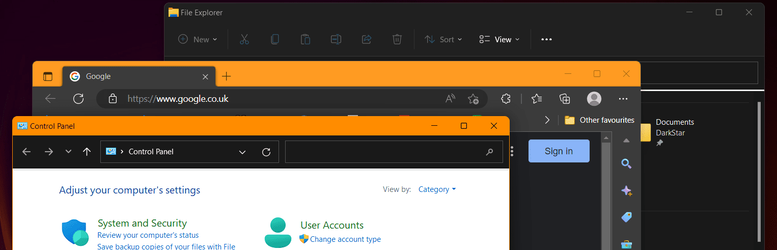
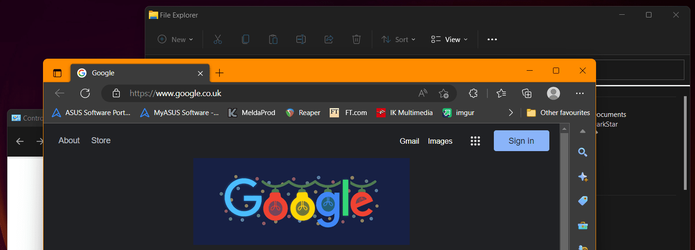
Here are 3 screenshots, showing Control Panel, Edge and File Explorer

cp1.png

edge.png

fe1.png

For Control Panel
-- when active, Title bar and border are in the accent colour
-- when inactive, neither are accented
For Edge
-- when active, Title bar and border are in the accent colour
-- when inactive, Title bar is accented but not the border
For File Explorer
-- when active, the border is accented but not the Title bar
-- when inactive, neither are accented

Firefox behaves in the same way as File Explorer
 

My Computer My Computer

At a glance

Windows 11 Home 22H2Intel i5-1035G1 1.00GHz, 1190 MHz, 4 cores8 GBIntel UHD Graphics
OS
Windows 11 Home 22H2
Computer type
Laptop
Manufacturer/Model
ASUS VivoBook X515JAB
CPU
Intel i5-1035G1 1.00GHz, 1190 MHz, 4 cores
Motherboard
ASUS X515JAB
Memory
8 GB
Graphics Card(s)
Intel UHD Graphics
Sound Card
Intel Smart Sound Technology
Monitor(s) Displays
1
Screen Resolution
1920 x 1080, 60Hz
Hard Drives
512GB SSD NVMe Intel
Mouse
Wired
Internet Speed
4 MBps
Browser
Firefox
Antivirus
Norton
... anyone-else seeing this?
 

My Computer My Computer

At a glance

Windows 11 Home 22H2Intel i5-1035G1 1.00GHz, 1190 MHz, 4 cores8 GBIntel UHD Graphics
OS
Windows 11 Home 22H2
Computer type
Laptop
Manufacturer/Model
ASUS VivoBook X515JAB
CPU
Intel i5-1035G1 1.00GHz, 1190 MHz, 4 cores
Motherboard
ASUS X515JAB
Memory
8 GB
Graphics Card(s)
Intel UHD Graphics
Sound Card
Intel Smart Sound Technology
Monitor(s) Displays
1
Screen Resolution
1920 x 1080, 60Hz
Hard Drives
512GB SSD NVMe Intel
Mouse
Wired
Internet Speed
4 MBps
Browser
Firefox
Antivirus
Norton
... anyone-else seeing this?
Yes. I have made several posts about it on this forum back early November. I can only get the File Explorer title bar showing an accent colour if I select a Win11 theme from Personalization. But then I end up with drop shadows on my desktop icons which I do not want and unable to remove even when selected to not show. I have a solid background, chose an accent colour and able to remove drop shadows on the desktop icons. However, strangely, and occasionally, if I run sfc/ scannow from CMD as admin I get the accent colour but reverts to grey at shutdown/restart. No one can explain it. Earlier today I ran it and got the accent colour, I later rebooted my machine and ran it again but no change.
 

My Computer My Computer

At a glance

Win11 22623.89111th Gen Intel R Core TM i7 - 1165G7 @ 2.80GHz16gbIntel R Iris R Xe Graphics
OS
Win11 22623.891
Computer type
Laptop
Manufacturer/Model
HP
CPU
11th Gen Intel R Core TM i7 - 1165G7 @ 2.80GHz
Memory
16gb
Graphics Card(s)
Intel R Iris R Xe Graphics
Sound Card
Realtek R Audio, Intel Smart Sound
Hard Drives
C
Browser
Google
Antivirus
Windows Security/Microsoft Defender
Other Info
Downloaded MSEdgeRedirect
I have WIN11. I tried to get the accent color on the File Explorer title bar without using a theme, but it doesn't work properly eventhough I selected to show on title bars. Strangely, on different days and times, it will randomly display the accent color when not using a theme.

I noticed the accent color works consistently on a preset theme, but I don't like the choices; therefore, I customized a one so that I could get the accent color on the File Explorer title bar. All seems fine until I reboot, then the File Explorer title bar color reverts to grey. I have resorted to selecting SLEEP instead of SHUTDOWN or RESTART when not using the laptop in order to retain my custom settings without needing to reconfigure at every reboot.

Image
 

My Computer My Computer

At a glance

Win11 22623.89111th Gen Intel R Core TM i7 - 1165G7 @ 2.80GHz16gbIntel R Iris R Xe Graphics
OS
Win11 22623.891
Computer type
Laptop
Manufacturer/Model
HP
CPU
11th Gen Intel R Core TM i7 - 1165G7 @ 2.80GHz
Memory
16gb
Graphics Card(s)
Intel R Iris R Xe Graphics
Sound Card
Realtek R Audio, Intel Smart Sound
Hard Drives
C
Browser
Google
Antivirus
Windows Security/Microsoft Defender
Other Info
Downloaded MSEdgeRedirect

Latest Support Threads

Back
Top Bottom