Photo app window size reset problem


chriszhxi

New member
Local time
3:07 AM
Posts
5
OS
Windows 11
The default Photo app window size is too wide, I can adjust it and it will remember at the moment, but later or after reboot somehow it returns to default wide window, I tried repair and reset Photo app, but the problem still exists. Is there a way to fix this?
 

My Computer

System One

  • OS
    Windows 11
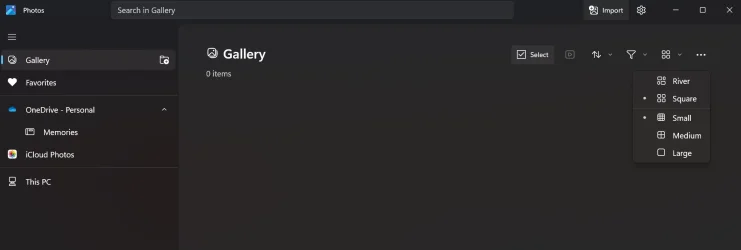
Open Photos and select GALLERY,second button on the left side.
Then in the GALLERY line,select the fifth[5] button which gives you five [5] options starting with RIVER.
See which of the options gives you the desired result.
 

My Computer

System One

  • OS
    win 10
    Computer type
    PC/Desktop
    Manufacturer/Model
    home built
    CPU
    amd ryzen 5-2600
    Motherboard
    gigabyte b450m-ds3h
    Memory
    ng skill sniper x 16gb
    Graphics Card(s)
    nvidea gtx 1050
    Monitor(s) Displays
    benq fp 92
    Hard Drives
    samsung 860 evo 500gb m2 ssd
    PSU
    antec ea550g
    Case
    nzxt noctis 450
    Browser
    edge
Open Photos and select GALLERY,second button on the left side.
Then in the GALLERY line,select the fifth[5] button which gives you five [5] options starting with RIVER.
See which of the options gives you the desired result.
Thanks for that, just adjusted mine, much better. (y)
 

My Computer

System One

  • OS
    windows 11 Pro
    Computer type
    Laptop
    Manufacturer/Model
    Dell XPS 15 9510
    CPU
    11th Gen Intel(R) Core(TM) i7-11800H @ 2.30GHz (16 CPUs
    Memory
    16 GB
    Graphics Card(s)
    NVIDIA GeForce RTX 3050 Ti
    Hard Drives
    512GB Solid State Drive
    Browser
    Firefox
Open Photos and select GALLERY,second button on the left side.
Then in the GALLERY line,select the fifth[5] button which gives you five [5] options starting with RIVER.
See which of the options gives you the desired result.
2.webp

You mean here? I tried changing it, but it didn't work for me, the photos app window still resets to default size randomly, I have not found out what triggers the resets yet sadly.
 

My Computer

System One

  • OS
    Windows 11
In Terminal [admin ],type in and run ---dism /online /cleanup-image /restorehealth ---.
When completed,type in ---sfc /scannow ---and continue to run it until a clean report is given
Also check the text size is set at 100%, Settings>Accessibility>Text size
 

My Computer

System One

  • OS
    win 10
    Computer type
    PC/Desktop
    Manufacturer/Model
    home built
    CPU
    amd ryzen 5-2600
    Motherboard
    gigabyte b450m-ds3h
    Memory
    ng skill sniper x 16gb
    Graphics Card(s)
    nvidea gtx 1050
    Monitor(s) Displays
    benq fp 92
    Hard Drives
    samsung 860 evo 500gb m2 ssd
    PSU
    antec ea550g
    Case
    nzxt noctis 450
    Browser
    edge
In Terminal [admin ],type in and run ---dism /online /cleanup-image /restorehealth ---.
When completed,type in ---sfc /scannow ---and continue to run it until a clean report is given
Also check the text size is set at 100%, Settings>Accessibility>Text size
Still the same, I also tried setting zoom preference to fit window, guess have to wait to see if future update fixed it miraculously somehow.
 

My Computer

System One

  • OS
    Windows 11
You could try resizing it manually then drag the whole app to a slightly different location on the desktop then closing it. See if that works.
 

My Computers

System One System Two

  • OS
    Win 11 Pro
    Computer type
    Laptop
    Manufacturer/Model
    ASUS Vivobook
    CPU
    AMD Ryzen™ 7 7730U
    Motherboard
    M1605YA
    Memory
    24GB Dual-Channel DDR4 @ 1596MHz (22-22-22-52)
    Graphics Card(s)
    512MB ATI AMD Radeon Graphics (ASUStek Computer Inc)
    Monitor(s) Displays
    Generic PnP Monitor (1920x1200@60Hz) - P1 PLUS (1920x1080@59Hz)
    Screen Resolution
    1920 X 1200
    Hard Drives
    953GB Western Digital WD
    PSU
    45 Watts
    Mouse
    Lenovo Bluetooth.
    Internet Speed
    500 Mbps
    Browser
    Edge
    Antivirus
    Defender
  • Operating System
    Windows 11
    Computer type
    Laptop
    Manufacturer/Model
    ACER NITRO
    CPU
    AMD Ryzen 7 5800H / 3.2 GHz
    Motherboard
    CZ Scala_CAS (FP6)
    Memory
    32 GB DDR4 SDRAM 3200 MHz
    Graphics card(s)
    NVIDIA GeForce RTX 3060 6 GB GDDR6 SDRAM
    Sound Card
    Realtek Audio. NVIDIA High Definition Audio
    Monitor(s) Displays
    15.6" LED backlight 1920 x 1080 (Full HD) 144 Hz
    Screen Resolution
    1920 x 1080 (Full HD)
    Hard Drives
    Samsung 970 Evo Plus 2TB NVMe M.2
    PSU
    180 Watt, 19.5 V
    Mouse
    Lenovo Bluetooth
    Internet Speed
    500 Mbps
    Browser
    Edge
    Antivirus
    Defender

Latest Support Threads

Back
Top Bottom