Please help me with an issue I'm having with my main hard disk.


MacroSoft_JK

Member
Local time
1:00 PM
Posts
17
OS
Windows 11 Pro. 25H2
Please help me with a problem. I'm running Windows 11. There was a brief power outage. I was using the computer. The computer shut off. I restarted the computer. "Windows informed me there was a problem with the hard disk." It wanted to correct the problem. In retrospect, maybe I should have chosen yes. Since it didn't report the problem before the power was interrupted, I figured there was a problem. I experienced a problem on my other computer. I chose to have Windows 10 repair it. It marked many sectors as bad. That's why I didn't choose yes this time. I ran chkdsk. Chkdsk found errors. I ran chkdsk /f. "Windows asked me whether I wanted to schedule it to run the next time the computer started." I typed y. I restarted the computer. It went quickly. It didn't mention any problems. Windows 10 would always give a summary. I'm 67. Hopefully, there are no problems with the hard disk. I use Ashampoo WinOptimizer 28. I had it delete some unnecessary files from temporary locations. I also had it clean the registry. I don't like Windows 11. I don't like AI. Machines, of course, can't think. "Windows informed me, and asked." I love God and everyone. Thank you very much for considering my dilemma.
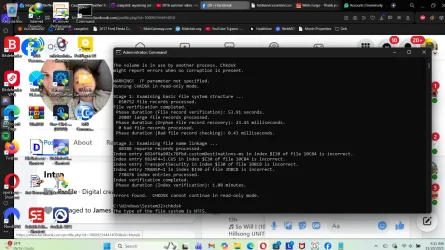
Microsoft Windows [Version 10.0.26200.7840]
(c) Microsoft Corporation. All rights reserved.

C:\Windows\System32>chkdsk
The type of the file system is NTFS.
Class not registered

The volume is in use by another process. Chkdsk
might report errors when no corruption is present. (Note from me, I understand this.)

WARNING! /F parameter not specified.
Running CHKDSK in read-only mode.

Stage 1: Examining basic file system structure ...
650752 file records processed.
File verification completed.
Phase duration (File record verification): 53.91 seconds.
29807 large file records processed.
Phase duration (Orphan file record recovery): 23.45 milliseconds.
0 bad file records processed.
Phase duration (Bad file record checking): 0.43 milliseconds.

Stage 2: Examining file name linkage ...
40388 reparse records processed.
Index entry 6824f4a902c78fbd.customDestinations-ms in index $I30 of file 10C84 is incorrect.
Index entry 6824F4~1.CUS in index $I30 of file 10C84 is incorrect.
Index entry TransportSecurity in index $I30 of file 3DBCB is incorrect.
Index entry TRANSP~1 in index $I30 of file 3DBCB is incorrect.
770476 index entries processed.
Index verification completed.
Phase duration (Index verification): 1.08 minutes.

Errors found. CHKDSK cannot continue in read-only mode.

C:\Windows\System32>chkdsk
The type of the file system is NTFS.
Class not registered

The volume is in use by another process. Chkdsk
might report errors when no corruption is present. (I ran it twice.)

WARNING! /F parameter not specified.
Running CHKDSK in read-only mode.

Stage 1: Examining basic file system structure ...
650752 file records processed.
File verification completed.
Phase duration (File record verification): 54.20 seconds.
29807 large file records processed.
Phase duration (Orphan file record recovery): 24.05 milliseconds.
0 bad file records processed.
Phase duration (Bad file record checking): 0.34 milliseconds.

Stage 2: Examining file name linkage ...
40388 reparse records processed.
770518 index entries processed.
Index verification completed.
Phase duration (Index verification): 1.06 minutes.
0 unindexed files scanned.
Phase duration (Orphan reconnection): 436.63 milliseconds.
0 unindexed files recovered to lost and found.
Phase duration (Orphan recovery to lost and found): 19.97 milliseconds.
40388 reparse records processed.
Phase duration (Reparse point and Object ID verification): 157.58 milliseconds.

Stage 3: Examining security descriptors ...
Security descriptor verification completed.
Phase duration (Security descriptor verification): 126.29 milliseconds.
59884 data files processed.
Phase duration (Data attribute verification): 1.48 milliseconds.
CHKDSK is verifying Usn Journal...
26812000 USN bytes processed.
Usn Journal verification completed.
Phase duration (USN journal verification): 373.63 milliseconds.
The master file table's (MFT) BITMAP attribute is incorrect.
The Volume Bitmap is incorrect.
Windows has checked the file system and found problems.
Please run chkdsk /scan to find the problems and queue them for repair.

3814477 MB total disk space.
750965356 KB in 291042 files.
198140 KB in 59885 indexes.
0 KB in bad sectors.
896771 KB in use by the system.
65536 KB occupied by the log file.
3080044 MB available on disk.

4096 bytes in each allocation unit.
976506367 total allocation units on disk.
788491301 allocation units available on disk.
Total duration: 1.99 minutes (119543 ms).

C:\Windows\System32>chkdsk /scan
The type of the file system is NTFS.
Class not registered

A snapshot error occured while scanning this drive. Run an offline scan and fix.

C:\Windows\System32>chkdsk /scan
The type of the file system is NTFS.
Class not registered

A snapshot error occurred while scanning this drive. Run an offline scan and fix.

C:\Windows\System32>

I have an antiquated 2013 MSI gaming tower computer. It has a Core i7 4770k. It is It has a liquid-cooled CPU heatsink. It has a radiator and a fan on the back of the tower. It can be overclocked to over 5GHz. The command center does that. I never did overclock it. I used to run Carnageddon and Road Rash 95. I don't run games anymore. I wish I knew more about computers. Thank you very much, once again. Very Sincerely, Jack Pat Keiffer.
1771526299962.webp

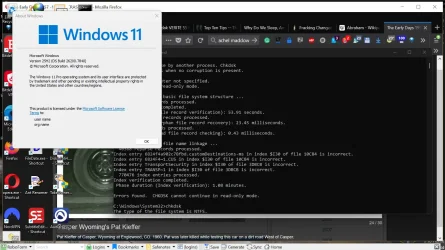
P.S. I'm running 25H2. This computer has TPM 1.2. I'm going to purchase a TPM 2 module on Amazon or eBay. I used Rufus Rufus - Create bootable USB drives the easy way and an ISO from Microsoft to install Windows 11, update the security certificate, enable a local account, etc. Rufus is an incredible site. This computer originally came with Windows 8. I upgraded it to 10. I bought the licence directly from Microsoft when they were having problems convincing people to "upgrade" to 10. I like 7 the best. I have VMWare Workstation. It is now free. I paid an enormous amount of money for software over the years. I quit buying Workstation with Workstation 15. Downloading VMware Workstation Pro I purchased the licence for 11 at Mr Key Shop | Top-Rated Software Reseller. They are a registered Microsoft Partner. They also offer many fantastic deals on a wide range of software. I have another old HP ENVY tower computer. It has an Core-17 3770. It has Windows 10. I love it! I don't have problems with it. I purchased a year of extended security updates. Sadly, October 8th is the end. I haven't used this old gaming computer in years. The oldermachinery is definitely the best. Until I started using this computer again, I had the ENVY on 24 hours a day since 2014, except for power outages and once a year to open it up and clean everything thoroughly. Thank you so very much, once again.
1771527511126.webp
 
Last edited by a moderator:

My Computers

System One System Two

  • OS
    Windows 11 Pro. 25H2
    Computer type
    PC/Desktop
    Manufacturer/Model
    2013 MSI MSI-7850 (I also have an old HP ENVY, and an old ASUS Laptop.)
    CPU
    Intel Core i7 4770k @ 3.50 Ghz. (Over 5GHz capable.)
    Motherboard
    2013 MSI-7850.
    Memory
    32 GB 1600 Mhz DDR3.
    Graphics Card(s)
    2GB NVIDIA DDR5 GTX 660 (It says MSI on the bottom. It has a large fan on the bottom.)
    Sound Card
    NVIDIA HD Audio on motherboard.
    Monitor(s) Displays
    My old 2014 Samsung 46" HDTV with (4) HDMI inputs.
    Screen Resolution
    1080p. Capable oF 2160p. My TV is 1080p.
    Hard Drives
    (2) Internal 4 TB Western Digital 6Gb/s 7200 rpm Hard Drives. (Externally (2) USB3.2 Oracle hot-swappable Enclosures. The motherboard only supports USB3.0. (So 3.0.) (Many H.D.s Over 100 TBs in total.) SSDs SUCK! They are faster but limited in terms of total reads and writes. They're similar to flash drives. They wear out quickly. H.D.s are the most durable.
    PSU
    600 watt.
    Case
    A blue 2013 XBLADE gaming tower. Blue LEDs in front and on the side panel.
    Cooling
    Liquid cooled CPU cooler with radiator and fan Fan on back of case. Fan in front to bring air in, and one on the removable side panel.
    Keyboard
    Logitech logi 2.4 Ghz wireless. (One single USB dongle for keyboard and mouse.)
    Mouse
    Logitech logi 2.4 Ghz wireless.
    Internet Speed
    400 mbps. Ethernet from modem to Netgear 8 port unmanaged 300 series switcher.
    Browser
    Firefox, Opera, and of course M.S. Edge.
    Antivirus
    Bitdefender Premium Security.
    Other Info
    You get what you pay for. Except for the keyboard and mouse, my equipment is all old, but all of it still works great. I've had my computers and TVs on 24 hours a day, except for power outages and for cleaning. They still work great.
  • Operating System
    Windows 10 Pro. 22H2
    Computer type
    PC/Desktop
    Manufacturer/Model
    HP ENVY
    CPU
    Intel Core i7 3770k @ 3.50 Ghz Intel Turboboost @3.9 Ghz
    Motherboard
    2013 HP Formosa.
    Memory
    32 GB DDR3 @1600 Mhz.
    Graphics card(s)
    4GB NVIDIA GTX DDR5
    Sound Card
    NVIDIA HD (On Motherboard.)
    Monitor(s) Displays
    My old 2014 Samsung 46" HDTV with (4) HDMI inputs.
    Screen Resolution
    1080p
    Hard Drives
    2TB Seagate 7200 RPM. 4TB 5400 PPM Western Digital.
    PSU
    480 Watt HP.
    Case
    A blue 2013 XBLADE gaming tower. Blue LEDs in front and on the side panel.
    Cooling
    CPU cooler with fan Fan Fan on back of case. Fan in front to bring air in, and one on the removable side panel.
    Keyboard
    Logitech logi 2.4 Ghz wireless. (One single USB dongle for keyboard and mouse.)
    Mouse
    Logitech logi 2.4 Ghz wireless. (One single USB dongle for keyboard and mouse.)
    Internet Speed
    400 mbps. Ethernet from modem to Netgear 8 port unmanaged 300 series switcher.
    Browser
    Firefox, Opera, and of course M.S. Edge.
    Antivirus
    Bitdefender Premium Security.

Power fluctuations are the best drive fryers around. Your drive is borked and unrecoverable. Replace
 
Last edited by a moderator:

My Computers

System One System Two

  • OS
    Windows 11 2xH2 (latest update ... forever anal)
    Computer type
    PC/Desktop
    Manufacturer/Model
    HP Slim S01
    CPU
    Intel i5-12400
    Memory
    8GB
    Graphics Card(s)
    NVIDIA GeForce GT730
    Sound Card
    OOBE
    Monitor(s) Displays
    Acer 32"
    Screen Resolution
    1920x1080
    Hard Drives
    512GB KIOXIA NVMe
    1TB SATA SSD
    PSU
    OOBE
    Case
    OOBE
    Cooling
    OOBE
    Keyboard
    BT
    Mouse
    BT
    Browser
    Brave FFox Chrome Opera
    Antivirus
    KIS
  • Operating System
    Windows 11 Pro 2xH2 (latest update ... 4ever anal)
    Computer type
    Laptop
    Manufacturer/Model
    HP Pavillion 15
    CPU
    i7-1165G7 @ 2.80GHz
    Graphics card(s)
    Intel Iris Xe Graphics
    Hard Drives
    Samsung NVMe 512GB
    + numerous/multiple SSD Type C USB enclosures
    Internet Speed
    NBN FTTN 50
    Browser
    Brave
    Antivirus
    KIS
Have you been doing any backups?

Can you still boot into Windows
 

My Computers

System One System Two

  • OS
    Windows 11 (up to date)
    Computer type
    PC/Desktop
    Manufacturer/Model
    Custom
    CPU
    Intel i5 12400
    Motherboard
    Gigabyte Z690 UA
    Memory
    Corsair Vengeance LPX 16GB
    Graphics Card(s)
    On Board the Z690
    Sound Card
    On Board
    Monitor(s) Displays
    43" Samsung tu7000
    Screen Resolution
    2560 x 1440
    Hard Drives
    SAMSUNG SSD 1TB NVMe M.2
    PSU
    Thermaltake smart 500w 80+
    Case
    LIAN LANCOOL_205M
    Cooling
    Bunch of fans . . . :o) (lights dont work)
    Keyboard
    Unicomp: Ultra Classic White Buckling Spring USB
    Mouse
    M510
    Internet Speed
    50mbps on Ethernet
    Browser
    Fire Fox
    Antivirus
    Windows
    Other Info
    Love this computer but I still prefer Win-7 like I love my old Lazy Boy Recliner . . . it just feels better.
  • Operating System
    WIN-7-64BIT and Win-11 pro for testing on unsupported hardware
    Computer type
    PC/Desktop
    Manufacturer/Model
    Home built
    CPU
    i5-3570K CPU @ 3.40GHz, 3801 Mhz, 4 Core(s), 4 Logical Processor(s)
    Motherboard
    GA-Z77-HD3
    Memory
    16 GB - Crucial Ballistick 4GB PC3-14900 DDR3-1333 MHz
    Graphics card(s)
    NVIDIA GeForce GTX 1050
    Sound Card
    On Board
    Monitor(s) Displays
    ASUS VP278
    Screen Resolution
    1920 x 1080
    Hard Drives
    4 - internal Samsung 2.5" SSD, 1 WD HDD 7200 and some external drives
    PSU
    EVGA 550w
    Case
    Old Gygabyte Tower
    Cooling
    Yes
    Keyboard
    Unicomp - UNIOP4A USB (like the old IBM Model H that I started with)
    Mouse
    M510
    Internet Speed
    50mbps
    Browser
    Firefox
    Antivirus
    Windows
    Other Info
    The only thing it lack is USB-3.2 on the front face but it has 3.0 on the back
Marking damaged sectors is not bad, it just isolates damaged sectors so they cannot be used. They are replaced by spare sectors.
They were probably damaged by a head crash during the power outage.

Subsequent checks will then be OK. Often that is the end of the problem and you will have many more years of use, though you should keep an eye on it in case damage increases.

The only thing that should concern you is the line "0 KB in bad sectors" which means good to go.
 

My Computer

System One

  • OS
    Windows 11
Since you got this

C:\Windows\System32>chkdsk
The type of the file system is NTFS.
Class not registered


Run DISM and SFC Scans
 
Last edited:

My Computers

System One System Two

  • OS
    Windows 11 (up to date)
    Computer type
    PC/Desktop
    Manufacturer/Model
    Custom
    CPU
    Intel i5 12400
    Motherboard
    Gigabyte Z690 UA
    Memory
    Corsair Vengeance LPX 16GB
    Graphics Card(s)
    On Board the Z690
    Sound Card
    On Board
    Monitor(s) Displays
    43" Samsung tu7000
    Screen Resolution
    2560 x 1440
    Hard Drives
    SAMSUNG SSD 1TB NVMe M.2
    PSU
    Thermaltake smart 500w 80+
    Case
    LIAN LANCOOL_205M
    Cooling
    Bunch of fans . . . :o) (lights dont work)
    Keyboard
    Unicomp: Ultra Classic White Buckling Spring USB
    Mouse
    M510
    Internet Speed
    50mbps on Ethernet
    Browser
    Fire Fox
    Antivirus
    Windows
    Other Info
    Love this computer but I still prefer Win-7 like I love my old Lazy Boy Recliner . . . it just feels better.
  • Operating System
    WIN-7-64BIT and Win-11 pro for testing on unsupported hardware
    Computer type
    PC/Desktop
    Manufacturer/Model
    Home built
    CPU
    i5-3570K CPU @ 3.40GHz, 3801 Mhz, 4 Core(s), 4 Logical Processor(s)
    Motherboard
    GA-Z77-HD3
    Memory
    16 GB - Crucial Ballistick 4GB PC3-14900 DDR3-1333 MHz
    Graphics card(s)
    NVIDIA GeForce GTX 1050
    Sound Card
    On Board
    Monitor(s) Displays
    ASUS VP278
    Screen Resolution
    1920 x 1080
    Hard Drives
    4 - internal Samsung 2.5" SSD, 1 WD HDD 7200 and some external drives
    PSU
    EVGA 550w
    Case
    Old Gygabyte Tower
    Cooling
    Yes
    Keyboard
    Unicomp - UNIOP4A USB (like the old IBM Model H that I started with)
    Mouse
    M510
    Internet Speed
    50mbps
    Browser
    Firefox
    Antivirus
    Windows
    Other Info
    The only thing it lack is USB-3.2 on the front face but it has 3.0 on the back
This is a good lesson on why you should invest in a UPS for computers that don't have batteries (like laptops). Power burps can be killers.
 

My Computer

System One

  • OS
    Windows 11 Professional 25H2
    Computer type
    PC/Desktop
    Manufacturer/Model
    Digital Storm VELOX
    CPU
    Intel Core i9 11900K
    Motherboard
    ASUS PRIME Z590-P
    Memory
    64GB
    Graphics Card(s)
    NVIDIA GeForce GTX 1650
    Sound Card
    Realtek onboard
    Monitor(s) Displays
    Acer R221Q 21.5"
    Screen Resolution
    1920 x 1080
    Hard Drives
    2 x Samsung SSD 990 EVO Plus (1 TB)
    2 x Seagate ST4000NE001 (4 TB)
    PSU
    None
    Case
    VELOX
    Cooling
    Cooler Master
    Keyboard
    Logitech
    Mouse
    Kensington trackball
    Browser
    Firefox, Chrome
    Antivirus
    Windows Defender, Malwarebytes
Bear in mind that if the PC loses power suddenly, then the drive can get marked as needing to be checked simply because it was not shut down clean. But most frequently, this does not cause any real corruption or problems with the data (although it certainly can). In that case, the system offers to check the disk at startup and if no errors are found it simply clears the flag saying that the system was shutdown dirty.
 

My Computers

System One System Two

  • OS
    Win11 Pro 25H2 (RTM+)
    Computer type
    PC/Desktop
    Manufacturer/Model
    Acemagic
    CPU
    Intel i7-14650HX
    Memory
    32 GB
    Graphics Card(s)
    No GPU - Built-in Intel Graphics
    Sound Card
    Integrated
    Monitor(s) Displays
    Varies as machine will often be moved to locations with different monitors
    Screen Resolution
    Varies
    Hard Drives
    1 x 1TB Gen 4 NVMe SSD
    PSU
    120W Power Brick
    Keyboard
    Corsair K70 Max RGB Magnetic Keyboard
    Mouse
    Logitech MX Master 3
    Internet Speed
    1Gb Up / 1 Gb Down
    Browser
    Edge
    Antivirus
    Windows Defender
  • Operating System
    Win11 Pro 25H2 (RTM+)
    Computer type
    Laptop
    Manufacturer/Model
    Lenovo ThinkBook 13x Gen 2
    CPU
    Intel i7-1255U
    Memory
    16 GB
    Graphics card(s)
    Intel Iris Xe Graphics
    Sound Card
    Realtek® ALC3306-CG codec
    Monitor(s) Displays
    13.3-inch IPS Display
    Screen Resolution
    WQXGA (2560 x 1600)
    Hard Drives
    2 TB 4 x 4 NVMe SSD
    PSU
    USB-C / Thunderbolt 4 Power / Charging
    Keyboard
    Backlit, spill resistant keyboard
    Mouse
    Buttonless Glass Precision Touchpad
    Internet Speed
    1Gb Up / 1Gb Down
    Browser
    Edge
    Antivirus
    Windows Defender
    Other Info
    WiFi 6e / Bluetooth 5.1 / Facial Recognition / Fingerprint Sensor / ToF (Time of Flight) Human Presence Sensor
This is a good lesson on why you should invest in a UPS for computers that don't have batteries (like laptops). Power burps can be killers.

Amen! Not only to protect against power outages but it also smooths out noise or spikes on the line as well. A UPS is a great investment and these days you can get them with LiFePo4 batteries that have 4,000+ charge / discharge cycles so no more of that replacing the stupid lead acid batteries every 2 years.
 

My Computers

System One System Two

  • OS
    Win11 Pro 25H2 (RTM+)
    Computer type
    PC/Desktop
    Manufacturer/Model
    Acemagic
    CPU
    Intel i7-14650HX
    Memory
    32 GB
    Graphics Card(s)
    No GPU - Built-in Intel Graphics
    Sound Card
    Integrated
    Monitor(s) Displays
    Varies as machine will often be moved to locations with different monitors
    Screen Resolution
    Varies
    Hard Drives
    1 x 1TB Gen 4 NVMe SSD
    PSU
    120W Power Brick
    Keyboard
    Corsair K70 Max RGB Magnetic Keyboard
    Mouse
    Logitech MX Master 3
    Internet Speed
    1Gb Up / 1 Gb Down
    Browser
    Edge
    Antivirus
    Windows Defender
  • Operating System
    Win11 Pro 25H2 (RTM+)
    Computer type
    Laptop
    Manufacturer/Model
    Lenovo ThinkBook 13x Gen 2
    CPU
    Intel i7-1255U
    Memory
    16 GB
    Graphics card(s)
    Intel Iris Xe Graphics
    Sound Card
    Realtek® ALC3306-CG codec
    Monitor(s) Displays
    13.3-inch IPS Display
    Screen Resolution
    WQXGA (2560 x 1600)
    Hard Drives
    2 TB 4 x 4 NVMe SSD
    PSU
    USB-C / Thunderbolt 4 Power / Charging
    Keyboard
    Backlit, spill resistant keyboard
    Mouse
    Buttonless Glass Precision Touchpad
    Internet Speed
    1Gb Up / 1Gb Down
    Browser
    Edge
    Antivirus
    Windows Defender
    Other Info
    WiFi 6e / Bluetooth 5.1 / Facial Recognition / Fingerprint Sensor / ToF (Time of Flight) Human Presence Sensor
For what it’s worth, run this in CMD as admin:

chkdsk C: /F /R

Not sure of the steps for running at boot.
  • /F repairs filesystem metadata
  • /R checks sectors and relocates data if needed
  • /R takes longer, but it’s the safest when the MFT bitmap is wrong

going to purchase a TPM 2 module on Amazon or eBay

Let me know how you went, I have bought 4 and not one worked on my ASUS board.
 

My Computers

System One System Two

  • OS
    Windows 11 Pro 25H2 Build 26200.8655
    Computer type
    PC/Desktop
    Manufacturer/Model
    Sin-built 2013
    CPU
    Intel(R) Core(TM) i7-4770K CPU @ 3.50GHz
    Motherboard
    ASUS ROG Maximus VI Formula
    Memory
    32.0 GB of I forget and the box is in storage.
    Graphics Card(s)
    Gigabyte nVidia GeForce GTX 1660 Super OC 6GB
    Sound Card
    Onboard thingy
    Monitor(s) Displays
    5 x LG 25MS500-B - 1 x 24MK430H-B - 1 x Wacom Pro 22" Touch Screen Tablet
    Screen Resolution
    All over the place
    Hard Drives
    Too many to list.
    OS on Samsung 1TB 870 QVO SATA
    PSU
    Silverstone 1500
    Case
    NZXT Phantom 820 Full-Tower Case
    Cooling
    Noctua NH-D15 Elite Class Dual Tower CPU Cooler / 6 x EziDIY 120mm / 2 x Corsair 140mm somethings / 1 x 140mm Thermaltake something / 2 x 200mm Corsair.
    Keyboard
    Corsair K95 / Logitech diNovo Edge Wireless
    Mouse
    Logitech: G402 / G502 / Mx Masters / Mx Air Cordless
    Internet Speed
    2000/500Mbps
    Browser
    All sorts
    Antivirus
    Kaspersky Premium
    Other Info
    ㅤㅤㅤㅤㅤㅤㅤㅤㅤㅤㅤㅤㅤㅤㅤㅤㅤㅤㅤㅤㅤㅤㅤㅤㅤㅤㅤㅤㅤㅤㅤㅤㅤㅤㅤㅤㅤㅤㅤㅤ⠀⠀⠀⠀⠀⠀⠀⠀⠀⠀
    TP-Link BE9300 WiFi 7 Bluetooth 5.4 (Archer TBE550E)
    TP-Link TX201 V1 2.5GB Lan

    Grandstream HT812 - VoIP
    ASUS DSL-AX82U - Mesh
    ASUS RT-AC68U - Mesh
    ASUS RT-BE88U Router

    Brother MFC-L2880DW Printer

    I’m on a horse.
  • Operating System
    Windows 11 Pro 25H2 Build 26200.8655
    Computer type
    Laptop
    Manufacturer/Model
    LENOVO Yoga 7 14IRL8 - 7i EVO OLED 14" Touchscreen i5 12 Core 16GB/512GB
    CPU
    Intel Core 12th Gen i5-1240P Processor (1.7 - 4.4GHz)
    Memory
    16GB LPDDR5 RAM
    Graphics card(s)
    Intel Iris Xe Graphics Processor
    Sound Card
    Optimized with Dolby Atmos®
    Screen Resolution
    QHD 2880 x 1800 OLED
    Hard Drives
    M.2 512GB
    Antivirus
    Defender / Malwarebytes
    Other Info
    …still on a horse.
Let me know how you went, I have bought 4 and not one worked on my ASUS board.

Out of curiosity, did you verify that the type of interface the TPM was doing matched what your MB requires? There are different interfaces available out there and the TPM interface needs to match the MB.
 

My Computers

System One System Two

  • OS
    Win11 Pro 25H2 (RTM+)
    Computer type
    PC/Desktop
    Manufacturer/Model
    Acemagic
    CPU
    Intel i7-14650HX
    Memory
    32 GB
    Graphics Card(s)
    No GPU - Built-in Intel Graphics
    Sound Card
    Integrated
    Monitor(s) Displays
    Varies as machine will often be moved to locations with different monitors
    Screen Resolution
    Varies
    Hard Drives
    1 x 1TB Gen 4 NVMe SSD
    PSU
    120W Power Brick
    Keyboard
    Corsair K70 Max RGB Magnetic Keyboard
    Mouse
    Logitech MX Master 3
    Internet Speed
    1Gb Up / 1 Gb Down
    Browser
    Edge
    Antivirus
    Windows Defender
  • Operating System
    Win11 Pro 25H2 (RTM+)
    Computer type
    Laptop
    Manufacturer/Model
    Lenovo ThinkBook 13x Gen 2
    CPU
    Intel i7-1255U
    Memory
    16 GB
    Graphics card(s)
    Intel Iris Xe Graphics
    Sound Card
    Realtek® ALC3306-CG codec
    Monitor(s) Displays
    13.3-inch IPS Display
    Screen Resolution
    WQXGA (2560 x 1600)
    Hard Drives
    2 TB 4 x 4 NVMe SSD
    PSU
    USB-C / Thunderbolt 4 Power / Charging
    Keyboard
    Backlit, spill resistant keyboard
    Mouse
    Buttonless Glass Precision Touchpad
    Internet Speed
    1Gb Up / 1Gb Down
    Browser
    Edge
    Antivirus
    Windows Defender
    Other Info
    WiFi 6e / Bluetooth 5.1 / Facial Recognition / Fingerprint Sensor / ToF (Time of Flight) Human Presence Sensor
I located a previous thread on the TPM topic that may help...


My Computers

System One System Two

  • OS
    Win11 Pro 25H2 (RTM+)
    Computer type
    PC/Desktop
    Manufacturer/Model
    Acemagic
    CPU
    Intel i7-14650HX
    Memory
    32 GB
    Graphics Card(s)
    No GPU - Built-in Intel Graphics
    Sound Card
    Integrated
    Monitor(s) Displays
    Varies as machine will often be moved to locations with different monitors
    Screen Resolution
    Varies
    Hard Drives
    1 x 1TB Gen 4 NVMe SSD
    PSU
    120W Power Brick
    Keyboard
    Corsair K70 Max RGB Magnetic Keyboard
    Mouse
    Logitech MX Master 3
    Internet Speed
    1Gb Up / 1 Gb Down
    Browser
    Edge
    Antivirus
    Windows Defender
  • Operating System
    Win11 Pro 25H2 (RTM+)
    Computer type
    Laptop
    Manufacturer/Model
    Lenovo ThinkBook 13x Gen 2
    CPU
    Intel i7-1255U
    Memory
    16 GB
    Graphics card(s)
    Intel Iris Xe Graphics
    Sound Card
    Realtek® ALC3306-CG codec
    Monitor(s) Displays
    13.3-inch IPS Display
    Screen Resolution
    WQXGA (2560 x 1600)
    Hard Drives
    2 TB 4 x 4 NVMe SSD
    PSU
    USB-C / Thunderbolt 4 Power / Charging
    Keyboard
    Backlit, spill resistant keyboard
    Mouse
    Buttonless Glass Precision Touchpad
    Internet Speed
    1Gb Up / 1Gb Down
    Browser
    Edge
    Antivirus
    Windows Defender
    Other Info
    WiFi 6e / Bluetooth 5.1 / Facial Recognition / Fingerprint Sensor / ToF (Time of Flight) Human Presence Sensor
Out of curiosity, did you verify that the type of interface the TPM was doing matched what your MB requires? There are different interfaces available out there and the TPM interface needs to match the MB.

Yes mate. After the first, I had to dig around for the correct info for my board (System One)

It seems to be wide spread with ASUS boards of old.
 

My Computers

System One System Two

  • OS
    Windows 11 Pro 25H2 Build 26200.8655
    Computer type
    PC/Desktop
    Manufacturer/Model
    Sin-built 2013
    CPU
    Intel(R) Core(TM) i7-4770K CPU @ 3.50GHz
    Motherboard
    ASUS ROG Maximus VI Formula
    Memory
    32.0 GB of I forget and the box is in storage.
    Graphics Card(s)
    Gigabyte nVidia GeForce GTX 1660 Super OC 6GB
    Sound Card
    Onboard thingy
    Monitor(s) Displays
    5 x LG 25MS500-B - 1 x 24MK430H-B - 1 x Wacom Pro 22" Touch Screen Tablet
    Screen Resolution
    All over the place
    Hard Drives
    Too many to list.
    OS on Samsung 1TB 870 QVO SATA
    PSU
    Silverstone 1500
    Case
    NZXT Phantom 820 Full-Tower Case
    Cooling
    Noctua NH-D15 Elite Class Dual Tower CPU Cooler / 6 x EziDIY 120mm / 2 x Corsair 140mm somethings / 1 x 140mm Thermaltake something / 2 x 200mm Corsair.
    Keyboard
    Corsair K95 / Logitech diNovo Edge Wireless
    Mouse
    Logitech: G402 / G502 / Mx Masters / Mx Air Cordless
    Internet Speed
    2000/500Mbps
    Browser
    All sorts
    Antivirus
    Kaspersky Premium
    Other Info
    ㅤㅤㅤㅤㅤㅤㅤㅤㅤㅤㅤㅤㅤㅤㅤㅤㅤㅤㅤㅤㅤㅤㅤㅤㅤㅤㅤㅤㅤㅤㅤㅤㅤㅤㅤㅤㅤㅤㅤㅤ⠀⠀⠀⠀⠀⠀⠀⠀⠀⠀
    TP-Link BE9300 WiFi 7 Bluetooth 5.4 (Archer TBE550E)
    TP-Link TX201 V1 2.5GB Lan

    Grandstream HT812 - VoIP
    ASUS DSL-AX82U - Mesh
    ASUS RT-AC68U - Mesh
    ASUS RT-BE88U Router

    Brother MFC-L2880DW Printer

    I’m on a horse.
  • Operating System
    Windows 11 Pro 25H2 Build 26200.8655
    Computer type
    Laptop
    Manufacturer/Model
    LENOVO Yoga 7 14IRL8 - 7i EVO OLED 14" Touchscreen i5 12 Core 16GB/512GB
    CPU
    Intel Core 12th Gen i5-1240P Processor (1.7 - 4.4GHz)
    Memory
    16GB LPDDR5 RAM
    Graphics card(s)
    Intel Iris Xe Graphics Processor
    Sound Card
    Optimized with Dolby Atmos®
    Screen Resolution
    QHD 2880 x 1800 OLED
    Hard Drives
    M.2 512GB
    Antivirus
    Defender / Malwarebytes
    Other Info
    …still on a horse.
Please run the bootable Sea Tools Long generic test > take pictures > post images or share links


Code:
The master file table's (MFT) BITMAP attribute is incorrect.


Code:
Index entry 6824f4a902c78fbd.customDestinations-ms in index $I30 of file 10C84 is incorrect.
Index entry 6824F4~1.CUS in index $I30 of file 10C84 is incorrect.
Index entry TransportSecurity in index $I30 of file 3DBCB is incorrect.
Index entry TRANSP~1 in index $I30 of file 3DBCB is incorrect.
 

My Computer

System One

  • OS
    Windows 10
    Computer type
    Laptop
    Manufacturer/Model
    HP
    CPU
    Intel(R) Core(TM) i7-4800MQ CPU @ 2.70GHz
    Motherboard
    Product : 190A Version : KBC Version 94.56
    Memory
    16 GB Total: Manufacturer : Samsung MemoryType : DDR3 FormFactor : SODIMM Capacity : 8GB Speed : 1600
    Graphics Card(s)
    NVIDIA Quadro K3100M; Intel(R) HD Graphics 4600
    Sound Card
    IDT High Definition Audio CODEC; PNP Device ID HDAUDIO\FUNC_01&VEN_111D&DEV_76E0
    Hard Drives
    Model Hitachi HTS727575A9E364
    Antivirus
    Microsoft Defender
    Other Info
    Mobile Workstation
Thanks for the thread link, I’ll have a read.
 

My Computers

System One System Two

  • OS
    Windows 11 Pro 25H2 Build 26200.8655
    Computer type
    PC/Desktop
    Manufacturer/Model
    Sin-built 2013
    CPU
    Intel(R) Core(TM) i7-4770K CPU @ 3.50GHz
    Motherboard
    ASUS ROG Maximus VI Formula
    Memory
    32.0 GB of I forget and the box is in storage.
    Graphics Card(s)
    Gigabyte nVidia GeForce GTX 1660 Super OC 6GB
    Sound Card
    Onboard thingy
    Monitor(s) Displays
    5 x LG 25MS500-B - 1 x 24MK430H-B - 1 x Wacom Pro 22" Touch Screen Tablet
    Screen Resolution
    All over the place
    Hard Drives
    Too many to list.
    OS on Samsung 1TB 870 QVO SATA
    PSU
    Silverstone 1500
    Case
    NZXT Phantom 820 Full-Tower Case
    Cooling
    Noctua NH-D15 Elite Class Dual Tower CPU Cooler / 6 x EziDIY 120mm / 2 x Corsair 140mm somethings / 1 x 140mm Thermaltake something / 2 x 200mm Corsair.
    Keyboard
    Corsair K95 / Logitech diNovo Edge Wireless
    Mouse
    Logitech: G402 / G502 / Mx Masters / Mx Air Cordless
    Internet Speed
    2000/500Mbps
    Browser
    All sorts
    Antivirus
    Kaspersky Premium
    Other Info
    ㅤㅤㅤㅤㅤㅤㅤㅤㅤㅤㅤㅤㅤㅤㅤㅤㅤㅤㅤㅤㅤㅤㅤㅤㅤㅤㅤㅤㅤㅤㅤㅤㅤㅤㅤㅤㅤㅤㅤㅤ⠀⠀⠀⠀⠀⠀⠀⠀⠀⠀
    TP-Link BE9300 WiFi 7 Bluetooth 5.4 (Archer TBE550E)
    TP-Link TX201 V1 2.5GB Lan

    Grandstream HT812 - VoIP
    ASUS DSL-AX82U - Mesh
    ASUS RT-AC68U - Mesh
    ASUS RT-BE88U Router

    Brother MFC-L2880DW Printer

    I’m on a horse.
  • Operating System
    Windows 11 Pro 25H2 Build 26200.8655
    Computer type
    Laptop
    Manufacturer/Model
    LENOVO Yoga 7 14IRL8 - 7i EVO OLED 14" Touchscreen i5 12 Core 16GB/512GB
    CPU
    Intel Core 12th Gen i5-1240P Processor (1.7 - 4.4GHz)
    Memory
    16GB LPDDR5 RAM
    Graphics card(s)
    Intel Iris Xe Graphics Processor
    Sound Card
    Optimized with Dolby Atmos®
    Screen Resolution
    QHD 2880 x 1800 OLED
    Hard Drives
    M.2 512GB
    Antivirus
    Defender / Malwarebytes
    Other Info
    …still on a horse.
Odd. I'd be curious to learn a little more. Does the system simply not see the TPM at all or is it just that you are having difficulty clearing or initializing it?
 

My Computers

System One System Two

  • OS
    Win11 Pro 25H2 (RTM+)
    Computer type
    PC/Desktop
    Manufacturer/Model
    Acemagic
    CPU
    Intel i7-14650HX
    Memory
    32 GB
    Graphics Card(s)
    No GPU - Built-in Intel Graphics
    Sound Card
    Integrated
    Monitor(s) Displays
    Varies as machine will often be moved to locations with different monitors
    Screen Resolution
    Varies
    Hard Drives
    1 x 1TB Gen 4 NVMe SSD
    PSU
    120W Power Brick
    Keyboard
    Corsair K70 Max RGB Magnetic Keyboard
    Mouse
    Logitech MX Master 3
    Internet Speed
    1Gb Up / 1 Gb Down
    Browser
    Edge
    Antivirus
    Windows Defender
  • Operating System
    Win11 Pro 25H2 (RTM+)
    Computer type
    Laptop
    Manufacturer/Model
    Lenovo ThinkBook 13x Gen 2
    CPU
    Intel i7-1255U
    Memory
    16 GB
    Graphics card(s)
    Intel Iris Xe Graphics
    Sound Card
    Realtek® ALC3306-CG codec
    Monitor(s) Displays
    13.3-inch IPS Display
    Screen Resolution
    WQXGA (2560 x 1600)
    Hard Drives
    2 TB 4 x 4 NVMe SSD
    PSU
    USB-C / Thunderbolt 4 Power / Charging
    Keyboard
    Backlit, spill resistant keyboard
    Mouse
    Buttonless Glass Precision Touchpad
    Internet Speed
    1Gb Up / 1Gb Down
    Browser
    Edge
    Antivirus
    Windows Defender
    Other Info
    WiFi 6e / Bluetooth 5.1 / Facial Recognition / Fingerprint Sensor / ToF (Time of Flight) Human Presence Sensor
Odd. I'd be curious to learn a little more. Does the system simply not see the TPM at all or is it just that you are having difficulty clearing or initializing it?

Never recognised.

i tried every suggestion I could find, from screwing with CMS to standing, touching the floor and coughing.
I’ll read that thread later, out of interest. It was more out of curiosity, because the only benifit I can think of is that I wouldn’t have to bypass TPM. Other than that, I can’t see a need?
 

My Computers

System One System Two

  • OS
    Windows 11 Pro 25H2 Build 26200.8655
    Computer type
    PC/Desktop
    Manufacturer/Model
    Sin-built 2013
    CPU
    Intel(R) Core(TM) i7-4770K CPU @ 3.50GHz
    Motherboard
    ASUS ROG Maximus VI Formula
    Memory
    32.0 GB of I forget and the box is in storage.
    Graphics Card(s)
    Gigabyte nVidia GeForce GTX 1660 Super OC 6GB
    Sound Card
    Onboard thingy
    Monitor(s) Displays
    5 x LG 25MS500-B - 1 x 24MK430H-B - 1 x Wacom Pro 22" Touch Screen Tablet
    Screen Resolution
    All over the place
    Hard Drives
    Too many to list.
    OS on Samsung 1TB 870 QVO SATA
    PSU
    Silverstone 1500
    Case
    NZXT Phantom 820 Full-Tower Case
    Cooling
    Noctua NH-D15 Elite Class Dual Tower CPU Cooler / 6 x EziDIY 120mm / 2 x Corsair 140mm somethings / 1 x 140mm Thermaltake something / 2 x 200mm Corsair.
    Keyboard
    Corsair K95 / Logitech diNovo Edge Wireless
    Mouse
    Logitech: G402 / G502 / Mx Masters / Mx Air Cordless
    Internet Speed
    2000/500Mbps
    Browser
    All sorts
    Antivirus
    Kaspersky Premium
    Other Info
    ㅤㅤㅤㅤㅤㅤㅤㅤㅤㅤㅤㅤㅤㅤㅤㅤㅤㅤㅤㅤㅤㅤㅤㅤㅤㅤㅤㅤㅤㅤㅤㅤㅤㅤㅤㅤㅤㅤㅤㅤ⠀⠀⠀⠀⠀⠀⠀⠀⠀⠀
    TP-Link BE9300 WiFi 7 Bluetooth 5.4 (Archer TBE550E)
    TP-Link TX201 V1 2.5GB Lan

    Grandstream HT812 - VoIP
    ASUS DSL-AX82U - Mesh
    ASUS RT-AC68U - Mesh
    ASUS RT-BE88U Router

    Brother MFC-L2880DW Printer

    I’m on a horse.
  • Operating System
    Windows 11 Pro 25H2 Build 26200.8655
    Computer type
    Laptop
    Manufacturer/Model
    LENOVO Yoga 7 14IRL8 - 7i EVO OLED 14" Touchscreen i5 12 Core 16GB/512GB
    CPU
    Intel Core 12th Gen i5-1240P Processor (1.7 - 4.4GHz)
    Memory
    16GB LPDDR5 RAM
    Graphics card(s)
    Intel Iris Xe Graphics Processor
    Sound Card
    Optimized with Dolby Atmos®
    Screen Resolution
    QHD 2880 x 1800 OLED
    Hard Drives
    M.2 512GB
    Antivirus
    Defender / Malwarebytes
    Other Info
    …still on a horse.
Out of curiosity, did you verify that the type of interface the TPM was doing matched what your MB requires? There are different interfaces available out there and the TPM interface needs to match the MB.
A few years ago I was going to buy one from Gigabyte but they did not have any left and I could not find one that matched my MB on line.
So I bought a new computer instead not knowing I could install Win-11 on it anyway. I should have came here first and asked. I never heard anyone say you could install it on unsupported hardware till a few months ago. I've been to busy to think to look but I just stumbled across it on YouTube
 
Last edited:

My Computers

System One System Two

  • OS
    Windows 11 (up to date)
    Computer type
    PC/Desktop
    Manufacturer/Model
    Custom
    CPU
    Intel i5 12400
    Motherboard
    Gigabyte Z690 UA
    Memory
    Corsair Vengeance LPX 16GB
    Graphics Card(s)
    On Board the Z690
    Sound Card
    On Board
    Monitor(s) Displays
    43" Samsung tu7000
    Screen Resolution
    2560 x 1440
    Hard Drives
    SAMSUNG SSD 1TB NVMe M.2
    PSU
    Thermaltake smart 500w 80+
    Case
    LIAN LANCOOL_205M
    Cooling
    Bunch of fans . . . :o) (lights dont work)
    Keyboard
    Unicomp: Ultra Classic White Buckling Spring USB
    Mouse
    M510
    Internet Speed
    50mbps on Ethernet
    Browser
    Fire Fox
    Antivirus
    Windows
    Other Info
    Love this computer but I still prefer Win-7 like I love my old Lazy Boy Recliner . . . it just feels better.
  • Operating System
    WIN-7-64BIT and Win-11 pro for testing on unsupported hardware
    Computer type
    PC/Desktop
    Manufacturer/Model
    Home built
    CPU
    i5-3570K CPU @ 3.40GHz, 3801 Mhz, 4 Core(s), 4 Logical Processor(s)
    Motherboard
    GA-Z77-HD3
    Memory
    16 GB - Crucial Ballistick 4GB PC3-14900 DDR3-1333 MHz
    Graphics card(s)
    NVIDIA GeForce GTX 1050
    Sound Card
    On Board
    Monitor(s) Displays
    ASUS VP278
    Screen Resolution
    1920 x 1080
    Hard Drives
    4 - internal Samsung 2.5" SSD, 1 WD HDD 7200 and some external drives
    PSU
    EVGA 550w
    Case
    Old Gygabyte Tower
    Cooling
    Yes
    Keyboard
    Unicomp - UNIOP4A USB (like the old IBM Model H that I started with)
    Mouse
    M510
    Internet Speed
    50mbps
    Browser
    Firefox
    Antivirus
    Windows
    Other Info
    The only thing it lack is USB-3.2 on the front face but it has 3.0 on the back
Thank you for your replies. I didn't expect an acceptable answer. The hard disk isn't fried. I always back everything important up to a USB Seagate 500 GB Free Agent Go hard drive. Thank you for both comments. The computer's hard disk is almost brand new. It's A Western Digital Brown gaming hard drive. I paid almost $200 for it. The old hard drive had many hours on it. I used PC Mover to transfer the files to the new one. Then I "upgraded" to Windows 11. There's probably nothing wrong with it. That's probably why Check Disk finished so quickly and didn't report any errors when I ran chkdsk/f after rebooting the computer to DOS. CrystalDiskInfo reports it is 98% healthy. It said the same thing when it was brand new, before I installed anything on it.
 

My Computers

System One System Two

  • OS
    Windows 11 Pro. 25H2
    Computer type
    PC/Desktop
    Manufacturer/Model
    2013 MSI MSI-7850 (I also have an old HP ENVY, and an old ASUS Laptop.)
    CPU
    Intel Core i7 4770k @ 3.50 Ghz. (Over 5GHz capable.)
    Motherboard
    2013 MSI-7850.
    Memory
    32 GB 1600 Mhz DDR3.
    Graphics Card(s)
    2GB NVIDIA DDR5 GTX 660 (It says MSI on the bottom. It has a large fan on the bottom.)
    Sound Card
    NVIDIA HD Audio on motherboard.
    Monitor(s) Displays
    My old 2014 Samsung 46" HDTV with (4) HDMI inputs.
    Screen Resolution
    1080p. Capable oF 2160p. My TV is 1080p.
    Hard Drives
    (2) Internal 4 TB Western Digital 6Gb/s 7200 rpm Hard Drives. (Externally (2) USB3.2 Oracle hot-swappable Enclosures. The motherboard only supports USB3.0. (So 3.0.) (Many H.D.s Over 100 TBs in total.) SSDs SUCK! They are faster but limited in terms of total reads and writes. They're similar to flash drives. They wear out quickly. H.D.s are the most durable.
    PSU
    600 watt.
    Case
    A blue 2013 XBLADE gaming tower. Blue LEDs in front and on the side panel.
    Cooling
    Liquid cooled CPU cooler with radiator and fan Fan on back of case. Fan in front to bring air in, and one on the removable side panel.
    Keyboard
    Logitech logi 2.4 Ghz wireless. (One single USB dongle for keyboard and mouse.)
    Mouse
    Logitech logi 2.4 Ghz wireless.
    Internet Speed
    400 mbps. Ethernet from modem to Netgear 8 port unmanaged 300 series switcher.
    Browser
    Firefox, Opera, and of course M.S. Edge.
    Antivirus
    Bitdefender Premium Security.

    Other Info
    You get what you pay for. Except for the keyboard and mouse, my equipment is all old, but all of it still works great. I've had my computers and TVs on 24 hours a day, except for power outages and for cleaning. They still work great.
  • Operating System
    Windows 10 Pro. 22H2
    Computer type
    PC/Desktop
    Manufacturer/Model
    HP ENVY
    CPU
    Intel Core i7 3770k @ 3.50 Ghz Intel Turboboost @3.9 Ghz
    Motherboard
    2013 HP Formosa.
    Memory
    32 GB DDR3 @1600 Mhz.
    Graphics card(s)
    4GB NVIDIA GTX DDR5
    Sound Card
    NVIDIA HD (On Motherboard.)
    Monitor(s) Displays
    My old 2014 Samsung 46" HDTV with (4) HDMI inputs.
    Screen Resolution
    1080p
    Hard Drives
    2TB Seagate 7200 RPM. 4TB 5400 PPM Western Digital.
    PSU
    480 Watt HP.
    Case
    A blue 2013 XBLADE gaming tower. Blue LEDs in front and on the side panel.
    Cooling
    CPU cooler with fan Fan Fan on back of case. Fan in front to bring air in, and one on the removable side panel.
    Keyboard
    Logitech logi 2.4 Ghz wireless. (One single USB dongle for keyboard and mouse.)
    Mouse
    Logitech logi 2.4 Ghz wireless. (One single USB dongle for keyboard and mouse.)
    Internet Speed
    400 mbps. Ethernet from modem to Netgear 8 port unmanaged 300 series switcher.
    Browser
    Firefox, Opera, and of course M.S. Edge.
    Antivirus
    Bitdefender Premium Security.

There are multiple types of drive tests.

A drive can pass some test types then fail on another.

Drive SMART tests provide instantaneous results and can be unreliable after power surges / outages.

Crystal disk can display >90% on a failed drive as the SMART tests attempt to predict drive failure.


If the computer can boot from the Western Digital Brown gaming hard drive then please run the V2 log collector > post a share link into the newest post.

 
Last edited:

My Computer

System One

  • OS
    Windows 10
    Computer type
    Laptop
    Manufacturer/Model
    HP
    CPU
    Intel(R) Core(TM) i7-4800MQ CPU @ 2.70GHz
    Motherboard
    Product : 190A Version : KBC Version 94.56
    Memory
    16 GB Total: Manufacturer : Samsung MemoryType : DDR3 FormFactor : SODIMM Capacity : 8GB Speed : 1600
    Graphics Card(s)
    NVIDIA Quadro K3100M; Intel(R) HD Graphics 4600
    Sound Card
    IDT High Definition Audio CODEC; PNP Device ID HDAUDIO\FUNC_01&VEN_111D&DEV_76E0
    Hard Drives
    Model Hitachi HTS727575A9E364
    Antivirus
    Microsoft Defender
    Other Info
    Mobile Workstation
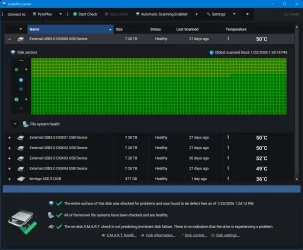
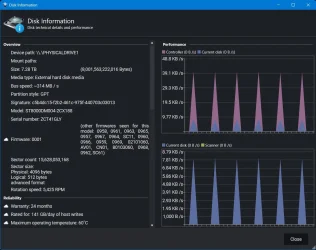
I also like to run disk monitoring software. My preference is StableBit Scanner. I have it check every sector of every drive every 30 days.

Image1.webp

Image2.webp
 

My Computers

System One System Two

  • OS
    Win11 Pro 25H2 (RTM+)
    Computer type
    PC/Desktop
    Manufacturer/Model
    Acemagic
    CPU
    Intel i7-14650HX
    Memory
    32 GB
    Graphics Card(s)
    No GPU - Built-in Intel Graphics
    Sound Card
    Integrated
    Monitor(s) Displays
    Varies as machine will often be moved to locations with different monitors
    Screen Resolution
    Varies
    Hard Drives
    1 x 1TB Gen 4 NVMe SSD
    PSU
    120W Power Brick
    Keyboard
    Corsair K70 Max RGB Magnetic Keyboard
    Mouse
    Logitech MX Master 3
    Internet Speed
    1Gb Up / 1 Gb Down
    Browser
    Edge
    Antivirus
    Windows Defender
  • Operating System
    Win11 Pro 25H2 (RTM+)
    Computer type
    Laptop
    Manufacturer/Model
    Lenovo ThinkBook 13x Gen 2
    CPU
    Intel i7-1255U
    Memory
    16 GB
    Graphics card(s)
    Intel Iris Xe Graphics
    Sound Card
    Realtek® ALC3306-CG codec
    Monitor(s) Displays
    13.3-inch IPS Display
    Screen Resolution
    WQXGA (2560 x 1600)
    Hard Drives
    2 TB 4 x 4 NVMe SSD
    PSU
    USB-C / Thunderbolt 4 Power / Charging
    Keyboard
    Backlit, spill resistant keyboard
    Mouse
    Buttonless Glass Precision Touchpad
    Internet Speed
    1Gb Up / 1Gb Down
    Browser
    Edge
    Antivirus
    Windows Defender
    Other Info
    WiFi 6e / Bluetooth 5.1 / Facial Recognition / Fingerprint Sensor / ToF (Time of Flight) Human Presence Sensor

Latest Support Threads

Back
Top Bottom