Point-in-time restore for Windows 11 is now generally available


 Windows IT Pro Blog:

When a Windows PC experiences an unexpected issue, every minute of downtime matters. Devices are constantly evolving through updates, apps, policies, drivers, and user activity, which can make recovery complex. For IT teams, getting users back to work often means time-consuming troubleshooting, or full rebuilds that take hours.

Today, we’re excited to announce the general availability of point‑in‑time restore for Windows 11 new built-in recovery capability designed to recover in minutes instead of hours, with confidence, by safely rolling a device back to a previous state. Available in Windows Enterprise, Pro and Home SKUs, point-in-time restore provides admins and employees a quick, built‑in ability to go back in time to a moment before the issue occurred.

This release marks an important step forward in Windows recovery and resilience and reflects what we’ve heard consistently from Windows users and IT admins: recovery should be reliable, simple, and easy to use when it matters most.
bS00NTA4MTAxLWVta21yNg

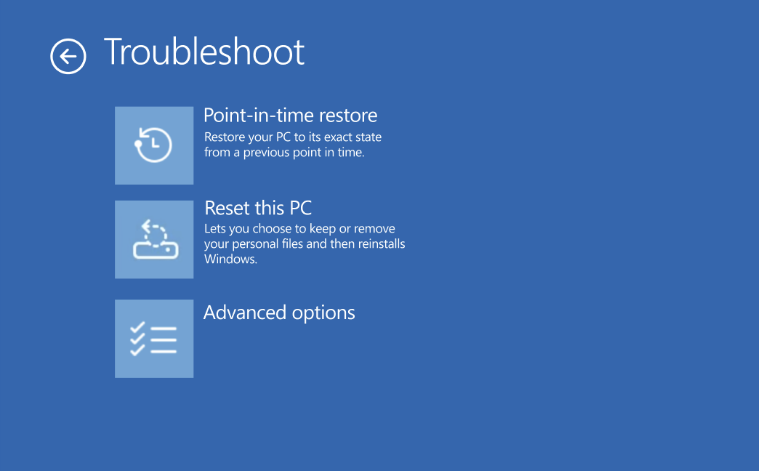
Point-in-time restore shown in the Troubleshoot menu for Windows Recovery Environment (Windows RE)

What is point‑in‑time restore for Windows 11 PCs?

Point‑in‑time restore automatically captures comprehensive restore points on a predictable cadence and stores them locally on the device.

With point‑in‑time restore, a device can be restored to the exact system state captured earlier, including:
  • Windows OS
  • Installed applications
  • System and app configurations
  • Settings
  • Local user files
Key characteristics:
  • Automatic and predictable: Restore points are captured on a recurring schedule (default: every 24 hours), so recent recovery points are already available if an issue occurs.
  • Fast, full‑system recovery: Restore the entire system to a previous state in minutes*, minimizing user and business impact.
  • Designed for real‑world disruptions: Useful for both one‑off device issues and wider incidents affecting many machines, such as a problematic updates, driver regressions, app corruption, configuration errors or other user or admin-initiated changes that result in system instability.
  • Built into Windows 11: Configuration is available within system settings, and restore operations are initiated from Windows RE, providing a trusted recovery path even when the Windows PC won’t boot.
*Note: Restore time is dependent on several factors, such as changes that have occurred on the system since restore point capture and system performance.

Point‑in‑time restore is part of Windows resiliency, focused on helping organizations prevent, manage, and recover from PC incidents more effectively. Check out the click-through demo to see the configuration and restore experience. 

How is this different from System Restore?​

You may be wondering how point‑in‑time restore compares to System Restore. While both features leverage Volume Shadow Copy Service (VSS) under the hood, point‑in‑time restore is more comprehensive and is built for modern Windows PCs management and recovery.

Point-in-time restoreSystem Restore
Restore pointsAutomatic, configurable cadence; user files are included in restore pointEvent-triggered or manual only; user files are excluded from restore point
ReliabilityStrict retention and cleanup policiesNo retention limits
User experienceIntegrated in system settingsLimited to control panel
Storage impactMinimizes storage impact by integrating with reserved storage*Higher impact to storage space
ManagementWill support robust remote management capabilitiesLimited remote management capabilities
*Note: Reserved storage is a Windows feature that sets aside a portion of disk space for successful update installation. It helps ensure that updates, temporary files, and system processes can run reliably, without requiring users to free up space.

How does this feature in Windows 11 compare to point-in-time restore for Windows 365?​

Some of you are already familiar with point‑in‑time restore for Windows 365 Enterprise, which protects Cloud PCs. While these features share the same goals of fast recovery and minimal downtime, they are optimized for different environments.

Each solution is purpose‑built for its environment, and organizations may use both depending on device types.

Windows ClientWindows 365
Feature enablementCan be enabled or disabledAlways on
Restore point retentionUp to 72 hoursUp to 1 month
Restore point typesShort-term onlyShort-term, long term, and manual
Restore point sharingNo sharing, restore points remain localSupport sharing across Windows 365 and Azure Cloud
Restore speedLikely faster due to local storage of restore pointSpeed is affected by network latency and bulk vs. single restores
Storage constraintsBound by physical disk limitsScalable, cloud storage

What’s included in general availability (GA)?​

Since its initial public preview, point-in-time restore has been enabled on over 2M devices and the feature has continued to mature based on feedback and real‑world testing. GA signals that point‑in‑time restore is ready for production use and to become part of your Windows recovery toolkit.

Highlights in the GA release include:
  • Availability for all users on consumer and commercial editions of Windows 11
  • CSPs for remote configuration
  • Integration with system reserved storage to minimize local storage impact
  • Visibility into restore points on the system and their disk usage
  • Consistency in settings across feature updates and integration with OneSettings
  • Updated documentation and guidance

Configuring point-in-time restore​

Configuration defaults for general availability are outlined below:

ConfigurationDefaultOptionsEditions eligible to configure
Feature On/OffSee belowOn, OffHome, Pro, Enterprise
Restore point frequencyEvery 24 hours4, 6, 12, 16, 24 hoursEnterprise only
Restore point retention72 hours4, 6, 12, 16, 24, 72 hoursEnterprise only
Maximum usage limit2% of diskPercent of disk (min 2 GB, max 50 GB equivalent)Home, Pro, Enterprise

Point-in-time restore is on by default on some systems not under enterprise management:
  • Windows Home edition devices
  • Windows Pro edition devices that are not domain joined and not enrolled in enterprise endpoint management
Point-in-time restore is off by default, until Windows 11, version 26H2 on some enterprise-managed systems:
  • Windows Enterprise and Education edition devices
  • Windows Pro edition devices that are domain joined or managed by an organization
*Note: Only devices with an OS volume size of 200GB or greater, will have the feature on by default. The feature will be off by default on devices with OS volume size below 200GB, but admins can turn the feature on if desired.

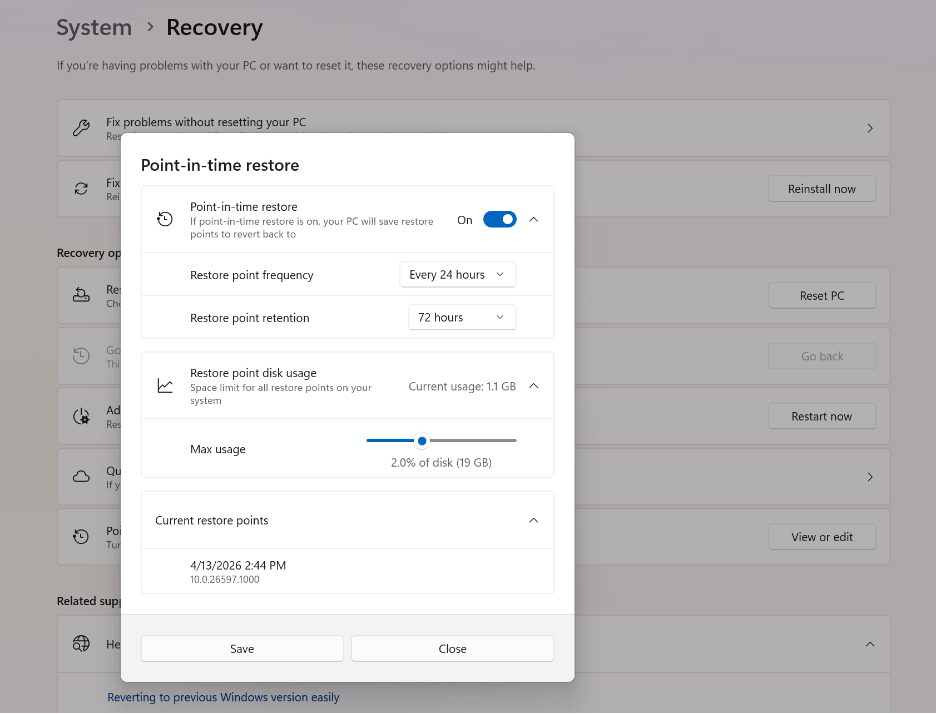
Point-in-time restore can be configured in system settings: System > Recovery > Point-in-time restore. Only local admins can view or edit point-in-time restore settings on their system.
bS00NTA4MTAxLUtVbTA0dg

Point-in-time restore settings page in System > Recovery

Important considerations before you restore​

Point‑in‑time restore is a powerful recovery tool, and it’s important to understand its behavior and impact:
  • Data loss: Any changes made after the selected restore point including files, apps, and settings will be lost. Cloud data is not affected but may require resync. Microsoft recommends storing data in the cloud.
  • Local storage: Restore points are stored locally and require sufficient disk space. Older restore points are automatically removed when limits are reached.
  • BitLocker protection: A BitLocker recovery key is required when restoring encrypted devices.
For detailed requirements, limitations, and best practices, we strongly recommend reviewing the documentation.

Restoring a device​

Currently, a restore can only be triggered locally by the user when the device is in Windows RE. The steps to perform a point-in-time restore are below:
  1. In Windows RE select Troubleshoot > Point-in-time restore
  2. Enter Bitlocker recovery key
  3. Select a restore point to restore PC to the exact state it was at the time of the restore point
  4. Acknowledge the risks and limitations associated with this feature by selecting Continue
  5. Review the restore point selection, OS version and warning of data loss and select Restore to start the restore process
*Note: Microsoft has announced plans to enable remote initiation in the future, through Intune recovery, giving organizations a more scalable way to restore devices when that capability becomes available.

Start using point‑in‑time restore today and provide feedback​

Point‑in‑time restore is now generally available on Windows 11 Client PCs on versions 24H2 and later.
Learn more and get started: point-in-time restore for Windows 11 Microsoft Learn.

We strongly encourage you to share feedback through Feedback Hub, within Recovery and Uninstall > Point-in-time restore as we continue investing in Windows recovery and resiliency.

Looking ahead​

Point‑in‑time restore is an important foundation for the future of Windows recovery. As part of Windows resiliency, we’ll continue to enhance point-in-time restore and expand recovery options, improving manageability, and reducing the time it takes to get users back to productivity across a broad range of issues.


 Source:


My Computers My Computers

  • At a glance

    Windows 11 Pro for WorkstationsIntel i7-8700K 5 GHz64 GB (4x16GB) G.SKILL TridentZ RGB DDR4 3600...ASUS ROG-STRIX-GTX1080TI-O11G-GAMING (11GB GD...
    OS
    Windows 11 Pro for Workstations
    Computer type
    PC/Desktop
    Manufacturer/Model
    Custom self build
    CPU
    Intel i7-8700K 5 GHz
    Motherboard
    ASUS ROG Maximus XI Formula Z390
    Memory
    64 GB (4x16GB) G.SKILL TridentZ RGB DDR4 3600 MHz (F4-3600C18D-32GTZR)
    Graphics Card(s)
    ASUS ROG-STRIX-GTX1080TI-O11G-GAMING (11GB GDDR5X)
    Sound Card
    Integrated Digital Audio (S/PDIF)
    Monitor(s) Displays
    2 x Samsung Odyssey G75 27"
    Screen Resolution
    2560x1440
    Hard Drives
    1TB Samsung 990 PRO M.2,
    4TB Samsung 990 PRO M.2,
    TerraMaster F8 SSD Plus NAS
    PSU
    Seasonic Prime Titanium 850W
    Case
    Thermaltake Core P3 wall mounted
    Cooling
    Corsair Hydro H115i
    Keyboard
    Amazon Basics Wired Full Keyboard MD005
    Mouse
    Logitech MX Master 4
    Internet Speed
    2 Gbps Download and 100 Mbps Upload
    Browser
    Chrome and Edge
    Antivirus
    Microsoft Defender
    Other Info
    Logitech Z625 speaker system,
    Logitech BRIO 4K Pro webcam,
    HP Color LaserJet Pro MFP M477fdn,
    CyberPower CP1500PFCLCD
    Galaxy S23 Plus phone
  • At a glance

    Windows 11 ProSnapdragon X Elite (12 core) 3.42 GHz16 GB LPDDR5x-7467 MHz
    Operating System
    Windows 11 Pro
    Computer type
    Laptop
    Manufacturer/Model
    Surface Laptop 7 Copilot+ PC
    CPU
    Snapdragon X Elite (12 core) 3.42 GHz
    Memory
    16 GB LPDDR5x-7467 MHz
    Monitor(s) Displays
    15" HDR
    Screen Resolution
    2496 x 1664
    Hard Drives
    1 TB SSD
    Internet Speed
    Wi-Fi 7 and Bluetooth 5.4
    Browser
    Chrome and Edge
    Antivirus
    Microsoft Defender
Thanks. But I'm puzzled. I have Pro- don't use Bitlocker, so I don't have a Bitlocker Recovery key.

So how is it that a Bitlocker recovery key is needed to be able to initiate a recovery?
What am I missing here?

Ah, from MS's page it's clearer:
BitLocker recovery key is required for local restore on encrypted volumes.

I read this from the tutorial:
  1. In Windows RE select Troubleshoot > Point-in-time restore
  2. Enter Bitlocker recovery key
  3. Select a restore point to restore PC to the exact state it was at the time of the restore point
  4. Acknowledge the risks and limitations associated with this feature by selecting Continue
  5. Review the restore point selection, OS version and warning of data loss and select Restore to start the restore process

Thanks.
 

My Computer My Computer

At a glance

Windows 11 Proi7-8650U16GBIntel UHD 620
OS
Windows 11 Pro
Computer type
Laptop
Manufacturer/Model
Lenovo t480s
CPU
i7-8650U
Memory
16GB
Graphics Card(s)
Intel UHD 620
Screen Resolution
1920x1080
Hard Drives
C SN810 SDCPNRY-512G-1006
Browser
Edge, Firefox
Antivirus
Defender
Thanks. But I'm puzzled. I have Pro- don't use Bitlocker, so I don't have a Bitlocker Recovery key.

So how is it that a Bitlocker recovery key is needed ot be able to initiate a recovery?
What am I missing here? Thanks.

No worries. A BitLocker recovery key is only required when restoring encrypted devices.
 

My Computers My Computers

  • At a glance

    Windows 11 Pro for WorkstationsIntel i7-8700K 5 GHz64 GB (4x16GB) G.SKILL TridentZ RGB DDR4 3600...ASUS ROG-STRIX-GTX1080TI-O11G-GAMING (11GB GD...
    OS
    Windows 11 Pro for Workstations
    Computer type
    PC/Desktop
    Manufacturer/Model
    Custom self build
    CPU
    Intel i7-8700K 5 GHz
    Motherboard
    ASUS ROG Maximus XI Formula Z390
    Memory
    64 GB (4x16GB) G.SKILL TridentZ RGB DDR4 3600 MHz (F4-3600C18D-32GTZR)
    Graphics Card(s)
    ASUS ROG-STRIX-GTX1080TI-O11G-GAMING (11GB GDDR5X)
    Sound Card
    Integrated Digital Audio (S/PDIF)
    Monitor(s) Displays
    2 x Samsung Odyssey G75 27"
    Screen Resolution
    2560x1440
    Hard Drives
    1TB Samsung 990 PRO M.2,
    4TB Samsung 990 PRO M.2,
    TerraMaster F8 SSD Plus NAS
    PSU
    Seasonic Prime Titanium 850W
    Case
    Thermaltake Core P3 wall mounted
    Cooling
    Corsair Hydro H115i
    Keyboard
    Amazon Basics Wired Full Keyboard MD005
    Mouse
    Logitech MX Master 4
    Internet Speed
    2 Gbps Download and 100 Mbps Upload
    Browser
    Chrome and Edge
    Antivirus
    Microsoft Defender
    Other Info
    Logitech Z625 speaker system,
    Logitech BRIO 4K Pro webcam,
    HP Color LaserJet Pro MFP M477fdn,
    CyberPower CP1500PFCLCD
    Galaxy S23 Plus phone
  • At a glance

    Windows 11 ProSnapdragon X Elite (12 core) 3.42 GHz16 GB LPDDR5x-7467 MHz
    Operating System
    Windows 11 Pro
    Computer type
    Laptop
    Manufacturer/Model
    Surface Laptop 7 Copilot+ PC
    CPU
    Snapdragon X Elite (12 core) 3.42 GHz
    Memory
    16 GB LPDDR5x-7467 MHz
    Monitor(s) Displays
    15" HDR
    Screen Resolution
    2496 x 1664
    Hard Drives
    1 TB SSD
    Internet Speed
    Wi-Fi 7 and Bluetooth 5.4
    Browser
    Chrome and Edge
    Antivirus
    Microsoft Defender
Thanks. But I'm puzzled. I have Pro- don't use Bitlocker, so I don't have a Bitlocker Recovery key.

So how is it that a Bitlocker recovery key is needed to be able to initiate a recovery?
What am I missing here?

Ah, from MS's page it's clearer:
BitLocker recovery key is required for local restore on encrypted volumes.

Thanks.
A BitLocker recovery key is required when restoring encrypted devices.
 

My Computers My Computers

  • At a glance

    All Branches but ReleaseAMD Ryzen 7 7735HS 3200-4500 Mhz 8 cores x 232 GB DDR5Radeon Graphic / NVIDIA GeForce RTX 4060 8 GB...
    OS
    All Branches but Release
    Computer type
    Laptop
    Manufacturer/Model
    Acer Nitro ANV15-51
    CPU
    AMD Ryzen 7 7735HS 3200-4500 Mhz 8 cores x 2
    Motherboard
    Sportage_RBH
    Memory
    32 GB DDR5
    Graphics Card(s)
    Radeon Graphic / NVIDIA GeForce RTX 4060 8 GB GDDR6
    Sound Card
    AMD/Realtek(R) Audio
    Monitor(s) Displays
    Integrated Monitor (15.3"vis)
    Screen Resolution
    FHD 1920X1080 16:9 144Hz
    Hard Drives
    KINGSTON OM8SEP4512Q-AA 1TB
    Western Digital 256GB
    PSU
    19V DC 6.32 A 120 W
    Cooling
    Dual Fans
    Mouse
    MS Bluetooth
    Internet Speed
    Fiber 1GB Cox -us & 1GB Orange-fr
    Browser
    Edge Canary- Firefox Nightly-Chrome Dev-Chrome Dev
    Antivirus
    Windows Defender
  • At a glance

    Windows 11 BetaAMD A9-94208 GB of DDR4AMD Radeon R5
    Operating System
    Windows 11 Beta
    Computer type
    Laptop
    Manufacturer/Model
    Asus X751BP
    CPU
    AMD A9-9420
    Memory
    8 GB of DDR4
    Graphics card(s)
    AMD Radeon R5
    Screen Resolution
    1600x900
    Hard Drives
    Seagate 1 TB
The documentation says "Point‑in‑time restore is now generally available on Windows 11 Client PCs on versions 24H2 and later." My WIn11 Pro is 25H2 Build 26200.8655 and Windows Update says I am up to date. But this feature is not shown in Settings/System/Recovery. Is that because this feature is not yet available for 25H2 at all? Or can I manually download and install it?
 

My Computer My Computer

At a glance

Win11 ProAMD Ryzen 5 5500U16 GBRadeon 2100
OS
Win11 Pro
Computer type
PC/Desktop
Manufacturer/Model
BeeLink SER Mini
CPU
AMD Ryzen 5 5500U
Motherboard
BeeLink SER
Memory
16 GB
Graphics Card(s)
Radeon 2100
Sound Card
none
Monitor(s) Displays
Primary: Phillips 4K; Secondary: LG 4K
Screen Resolution
Both 3860 x 2160
Hard Drives
C: NVme 500 GB Windows only
D: 128 GB NVme User data + Windows Temp via Junction Link
PSU
External
Case
Mini
Cooling
Internal fan
Keyboard
Logitech Wireless Lighted
Mouse
Kensington ExpertMouse wireless trackball
Internet Speed
500/500
Browser
Brave
Antivirus
Windows Defender
The documentation says "Point‑in‑time restore is now generally available on Windows 11 Client PCs on versions 24H2 and later." My WIn11 Pro is 25H2 Build 26200.8655 and Windows Update says I am up to date. But this feature is not shown in Settings/System/Recovery. Is that because this feature is not yet available for 25H2 at all? Or can I manually download and install it?

I imagine it will be in the next Cumulative Update Preview being released most likely soon today.


My Computers My Computers

  • At a glance

    Windows 11 Pro for WorkstationsIntel i7-8700K 5 GHz64 GB (4x16GB) G.SKILL TridentZ RGB DDR4 3600...ASUS ROG-STRIX-GTX1080TI-O11G-GAMING (11GB GD...
    OS
    Windows 11 Pro for Workstations
    Computer type
    PC/Desktop
    Manufacturer/Model
    Custom self build
    CPU
    Intel i7-8700K 5 GHz
    Motherboard
    ASUS ROG Maximus XI Formula Z390
    Memory
    64 GB (4x16GB) G.SKILL TridentZ RGB DDR4 3600 MHz (F4-3600C18D-32GTZR)
    Graphics Card(s)
    ASUS ROG-STRIX-GTX1080TI-O11G-GAMING (11GB GDDR5X)
    Sound Card
    Integrated Digital Audio (S/PDIF)
    Monitor(s) Displays
    2 x Samsung Odyssey G75 27"
    Screen Resolution
    2560x1440
    Hard Drives
    1TB Samsung 990 PRO M.2,
    4TB Samsung 990 PRO M.2,
    TerraMaster F8 SSD Plus NAS
    PSU
    Seasonic Prime Titanium 850W
    Case
    Thermaltake Core P3 wall mounted
    Cooling
    Corsair Hydro H115i
    Keyboard
    Amazon Basics Wired Full Keyboard MD005
    Mouse
    Logitech MX Master 4
    Internet Speed
    2 Gbps Download and 100 Mbps Upload
    Browser
    Chrome and Edge
    Antivirus
    Microsoft Defender
    Other Info
    Logitech Z625 speaker system,
    Logitech BRIO 4K Pro webcam,
    HP Color LaserJet Pro MFP M477fdn,
    CyberPower CP1500PFCLCD
    Galaxy S23 Plus phone
  • At a glance

    Windows 11 ProSnapdragon X Elite (12 core) 3.42 GHz16 GB LPDDR5x-7467 MHz
    Operating System
    Windows 11 Pro
    Computer type
    Laptop
    Manufacturer/Model
    Surface Laptop 7 Copilot+ PC
    CPU
    Snapdragon X Elite (12 core) 3.42 GHz
    Memory
    16 GB LPDDR5x-7467 MHz
    Monitor(s) Displays
    15" HDR
    Screen Resolution
    2496 x 1664
    Hard Drives
    1 TB SSD
    Internet Speed
    Wi-Fi 7 and Bluetooth 5.4
    Browser
    Chrome and Edge
    Antivirus
    Microsoft Defender
Suggest clarifying line 2 to read (e.g.)

1. In Windows RE select Troubleshoot > Point-in-time restore
2. If the device is encrypted enter the Bitlocker recovery key

(As I understand it it's only presently available in Insider builds)
 

My Computer My Computer

At a glance

Windows 11 Proi7-8650U16GBIntel UHD 620
OS
Windows 11 Pro
Computer type
Laptop
Manufacturer/Model
Lenovo t480s
CPU
i7-8650U
Memory
16GB
Graphics Card(s)
Intel UHD 620
Screen Resolution
1920x1080
Hard Drives
C SN810 SDCPNRY-512G-1006
Browser
Edge, Firefox
Antivirus
Defender
Seems useful. But then, I back up my system every morning.
 

My Computers My Computers

  • At a glance

    Windows 11 Pro 25H2 RP channelRyzen 9 5900XCorsair Vengeance RGB PRO 64GB (2x32GB) DDR4 ...ASUS GeForce RTX 4070 Super OC 12GB DDR6 / ZO...
    OS
    Windows 11 Pro 25H2 RP channel
    Computer type
    PC/Desktop
    Manufacturer/Model
    Home built
    CPU
    Ryzen 9 5900X
    Motherboard
    MSI MPG X570S Edge Max WiFi
    Memory
    Corsair Vengeance RGB PRO 64GB (2x32GB) DDR4 3600 (PC4-28800) C18
    Graphics Card(s)
    ASUS GeForce RTX 4070 Super OC 12GB DDR6 / ZOTAC RTX 3060 Twin Edge OC 12GB GDDR6
    Sound Card
    Proprietary on MB / FiiO K5Pro DAC
    Monitor(s) Displays
    ViewSonic XG2530 25"/Benq XL2411P 24"/ ASUS VA24DQSB) 23.8"
    Screen Resolution
    1920x1080 240Hz/144Hz/60Hz (based on monitor setup above)
    Hard Drives
    SK hynix Gold P31 1TB PCIe NVMe Gen3 M.2 2280 Internal SSD
    ADATA XPG SX8200 Pro 1TB
    Samsung SSD 860 EVO 1TB 2.5 Inch SATA III Internal SSD
    PSU
    Corsair RM1000e
    Case
    Phanteks Enthoo Pro Full Tower Chassis with Window
    Cooling
    Corsair iCUE H60i RGB PRO XT Liquid CPU Cooler
    Keyboard
    Corsair K70
    Mouse
    Logitech MX Master 3
    Internet Speed
    ~950Mb/s download / ~700Mb/s upload
    Browser
    Edge (Chromium)
    Antivirus
    Norton 360
  • At a glance

    Windows 11 ProRyzen 7 3700X32MB DDR4I forget, but it's old. I can't see the need ...
    Operating System
    Windows 11 Pro
    Computer type
    PC/Desktop
    Manufacturer/Model
    Home Built
    CPU
    Ryzen 7 3700X
    Motherboard
    MSI B550 Gaming GEN3 Gaming Motherboard
    Memory
    32MB DDR4
    Graphics card(s)
    I forget, but it's old. I can't see the need to upgrade it.
    Sound Card
    Propietary
    Monitor(s) Displays
    ACER LED 24"
    Screen Resolution
    1920X1080
    Hard Drives
    1TB Samsung SSD 3.5"
    Case
    Corsair
    Cooling
    Stock
    Keyboard
    Logitech
    Mouse
    Logitech
    Internet Speed
    ~750Mb/s download / ~750Mb/s upload
    Browser
    Edge
    Antivirus
    Defender and Malware Bytes
  • ASUS Vivobook 16X, 16" WUXGA(1920x1200) Business Laptop Computer, AMD Ryzen 7, 16GB DDR4 RAM, 1TB SSD, Windows 11 Pro, Wi-Fi 6, USB-C, Full-Sized Keyboard, Webcam, HDMI
The documentation says "Point‑in‑time restore is now generally available on Windows 11 Client PCs on versions 24H2 and later." My WIn11 Pro is 25H2 Build 26200.8655 and Windows Update says I am up to date. But this feature is not shown in Settings/System/Recovery. Is that because this feature is not yet available for 25H2 at all? Or can I manually download and install it?
I just got this enabled with this last build, .8655. So apparently still in some form of being rolled out.
 

My Computer My Computer

At a glance

Windows 11 25H2Broadwell-e 6850K 4.5ghz @1.36v32GB Corsair LPM 3600 C16EVGA RTX 3080Ti FTW
OS
Windows 11 25H2
Computer type
PC/Desktop
Manufacturer/Model
EVGA home brew
CPU
Broadwell-e 6850K 4.5ghz @1.36v
Motherboard
EVGA X99 FTW K
Memory
32GB Corsair LPM 3600 C16
Graphics Card(s)
EVGA RTX 3080Ti FTW
Sound Card
Asus Centurion true 7.1 headset. (5 speakers in each earpeice)
Monitor(s) Displays
LG C4 55"
Screen Resolution
4K 144hz
Hard Drives
Various models of SSDs ~10TB No HDDs installed.
PSU
be quiet! BN516 Straight Power 12-1000w 80 Plus Platinum
Case
Corsair 780T modified to dual 200mm intake fans
Cooling
Corsair H110i
Keyboard
Corsair K95 Platinum
Mouse
Corsair M65 RGB Elite
Internet Speed
50Mbs

Already present in 8728. The build just released, now made it GA.
 

My Computers My Computers

  • At a glance

    Windows 11 Education For 25H2Intel® Core i7 5500u8 GBIntel HD Family Graphics 5500 AMD Firepro 4150M
    OS
    Windows 11 Education For 25H2
    Computer type
    Laptop
    Manufacturer/Model
    HP ZBook G2
    CPU
    Intel® Core i7 5500u
    Motherboard
    HP
    Memory
    8 GB
    Graphics Card(s)
    Intel HD Family Graphics 5500 AMD Firepro 4150M
    Sound Card
    Realtek High Audio
    Hard Drives
    1 TB SSD
    Mouse
    HP USB Mouse
    Antivirus
    Windows Defender
  • At a glance

    Windows 11 Pro For Workstations 25H2Xeon 1535m v632 GBAMD Quadro Pro 4100
    Operating System
    Windows 11 Pro For Workstations 25H2
    Computer type
    Laptop
    Manufacturer/Model
    HP Zbook G4
    CPU
    Xeon 1535m v6
    Motherboard
    HP
    Memory
    32 GB
    Graphics card(s)
    AMD Quadro Pro 4100
    Sound Card
    Bang and Olufson Audio
    Hard Drives
    1TB SSD
    Mouse
    HP USB Mouse
    Antivirus
    Windows Defender
Do the registry based interval changes work on Pro? The frequency and retention dropdowns are grayed out so can't be changed through the settings ui. Wonder why those are not editable in Pro.
 

My Computer My Computer

At a glance

Windows 11
OS
Windows 11
Do the registry based interval changes work on Pro? The frequency and retention dropdowns are grayed out so can't be changed through the settings ui. Wonder why those are not editable in Pro.

The grayed out settings appear to be a bug for now, but you can still use the registry to change it.
 

My Computers My Computers

  • At a glance

    Windows 11 Pro for WorkstationsIntel i7-8700K 5 GHz64 GB (4x16GB) G.SKILL TridentZ RGB DDR4 3600...ASUS ROG-STRIX-GTX1080TI-O11G-GAMING (11GB GD...
    OS
    Windows 11 Pro for Workstations
    Computer type
    PC/Desktop
    Manufacturer/Model
    Custom self build
    CPU
    Intel i7-8700K 5 GHz
    Motherboard
    ASUS ROG Maximus XI Formula Z390
    Memory
    64 GB (4x16GB) G.SKILL TridentZ RGB DDR4 3600 MHz (F4-3600C18D-32GTZR)
    Graphics Card(s)
    ASUS ROG-STRIX-GTX1080TI-O11G-GAMING (11GB GDDR5X)
    Sound Card
    Integrated Digital Audio (S/PDIF)
    Monitor(s) Displays
    2 x Samsung Odyssey G75 27"
    Screen Resolution
    2560x1440
    Hard Drives
    1TB Samsung 990 PRO M.2,
    4TB Samsung 990 PRO M.2,
    TerraMaster F8 SSD Plus NAS
    PSU
    Seasonic Prime Titanium 850W
    Case
    Thermaltake Core P3 wall mounted
    Cooling
    Corsair Hydro H115i
    Keyboard
    Amazon Basics Wired Full Keyboard MD005
    Mouse
    Logitech MX Master 4
    Internet Speed
    2 Gbps Download and 100 Mbps Upload
    Browser
    Chrome and Edge
    Antivirus
    Microsoft Defender
    Other Info
    Logitech Z625 speaker system,
    Logitech BRIO 4K Pro webcam,
    HP Color LaserJet Pro MFP M477fdn,
    CyberPower CP1500PFCLCD
    Galaxy S23 Plus phone
  • At a glance

    Windows 11 ProSnapdragon X Elite (12 core) 3.42 GHz16 GB LPDDR5x-7467 MHz
    Operating System
    Windows 11 Pro
    Computer type
    Laptop
    Manufacturer/Model
    Surface Laptop 7 Copilot+ PC
    CPU
    Snapdragon X Elite (12 core) 3.42 GHz
    Memory
    16 GB LPDDR5x-7467 MHz
    Monitor(s) Displays
    15" HDR
    Screen Resolution
    2496 x 1664
    Hard Drives
    1 TB SSD
    Internet Speed
    Wi-Fi 7 and Bluetooth 5.4
    Browser
    Chrome and Edge
    Antivirus
    Microsoft Defender
Back
Top Bottom