Point-in-time restore for Windows 11 is now generally available


 Windows IT Pro Blog:

When a Windows PC experiences an unexpected issue, every minute of downtime matters. Devices are constantly evolving through updates, apps, policies, drivers, and user activity, which can make recovery complex. For IT teams, getting users back to work often means time-consuming troubleshooting, or full rebuilds that take hours.

Today, we’re excited to announce the general availability of point‑in‑time restore for Windows 11 new built-in recovery capability designed to recover in minutes instead of hours, with confidence, by safely rolling a device back to a previous state. Available in Windows Enterprise, Pro and Home SKUs, point-in-time restore provides admins and employees a quick, built‑in ability to go back in time to a moment before the issue occurred.

This release marks an important step forward in Windows recovery and resilience and reflects what we’ve heard consistently from Windows users and IT admins: recovery should be reliable, simple, and easy to use when it matters most.
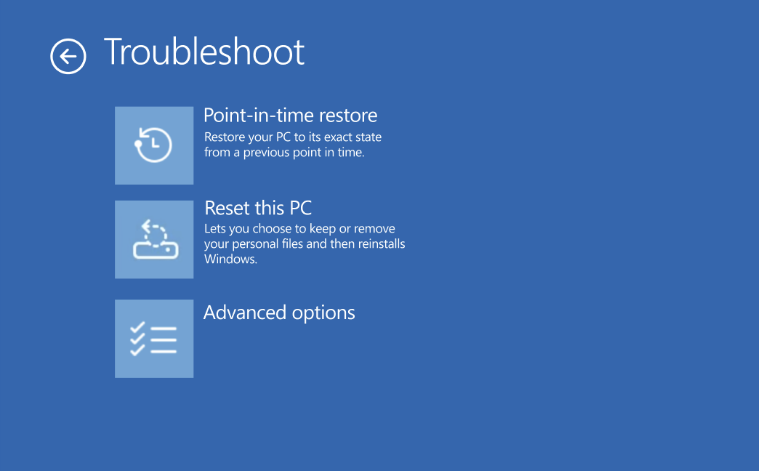
bS00NTA4MTAxLWVta21yNg

Point-in-time restore shown in the Troubleshoot menu for Windows Recovery Environment (Windows RE)

What is point‑in‑time restore for Windows 11 PCs?

Point‑in‑time restore automatically captures comprehensive restore points on a predictable cadence and stores them locally on the device.

With point‑in‑time restore, a device can be restored to the exact system state captured earlier, including:
  • Windows OS
  • Installed applications
  • System and app configurations
  • Settings
  • Local user files
Key characteristics:
  • Automatic and predictable: Restore points are captured on a recurring schedule (default: every 24 hours), so recent recovery points are already available if an issue occurs.
  • Fast, full‑system recovery: Restore the entire system to a previous state in minutes*, minimizing user and business impact.
  • Designed for real‑world disruptions: Useful for both one‑off device issues and wider incidents affecting many machines, such as a problematic updates, driver regressions, app corruption, configuration errors or other user or admin-initiated changes that result in system instability.
  • Built into Windows 11: Configuration is available within system settings, and restore operations are initiated from Windows RE, providing a trusted recovery path even when the Windows PC won’t boot.
*Note: Restore time is dependent on several factors, such as changes that have occurred on the system since restore point capture and system performance.

Point‑in‑time restore is part of Windows resiliency, focused on helping organizations prevent, manage, and recover from PC incidents more effectively. Check out the click-through demo to see the configuration and restore experience. 

How is this different from System Restore?​

You may be wondering how point‑in‑time restore compares to System Restore. While both features leverage Volume Shadow Copy Service (VSS) under the hood, point‑in‑time restore is more comprehensive and is built for modern Windows PCs management and recovery.

Point-in-time restore​
System Restore​
Restore pointsAutomatic, configurable cadence; user files are included in restore pointEvent-triggered or manual only; user files are excluded from restore point
ReliabilityStrict retention and cleanup policiesNo retention limits
User experienceIntegrated in system settingsLimited to control panel
Storage impactMinimizes storage impact by integrating with reserved storage*Higher impact to storage space
ManagementWill support robust remote management capabilitiesLimited remote management capabilities
*Note: Reserved storage is a Windows feature that sets aside a portion of disk space for successful update installation. It helps ensure that updates, temporary files, and system processes can run reliably, without requiring users to free up space.

How does this feature in Windows 11 compare to point-in-time restore for Windows 365?​

Some of you are already familiar with point‑in‑time restore for Windows 365 Enterprise, which protects Cloud PCs. While these features share the same goals of fast recovery and minimal downtime, they are optimized for different environments.

Each solution is purpose‑built for its environment, and organizations may use both depending on device types.

Windows Client​
Windows 365​
Feature enablementCan be enabled or disabledAlways on
Restore point retentionUp to 72 hoursUp to 1 month
Restore point typesShort-term onlyShort-term, long term, and manual
Restore point sharingNo sharing, restore points remain localSupport sharing across Windows 365 and Azure Cloud
Restore speedLikely faster due to local storage of restore pointSpeed is affected by network latency and bulk vs. single restores
Storage constraintsBound by physical disk limitsScalable, cloud storage

What’s included in general availability (GA)?​

Since its initial public preview, point-in-time restore has been enabled on over 2M devices and the feature has continued to mature based on feedback and real‑world testing. GA signals that point‑in‑time restore is ready for production use and to become part of your Windows recovery toolkit.

Highlights in the GA release include:
  • Availability for all users on consumer and commercial editions of Windows 11
  • CSPs for remote configuration
  • Integration with system reserved storage to minimize local storage impact
  • Visibility into restore points on the system and their disk usage
  • Consistency in settings across feature updates and integration with OneSettings
  • Updated documentation and guidance

Configuring point-in-time restore​

Configuration defaults for general availability are outlined below:

Configuration​
Default​
Options​
Editions eligible to configure​
Feature On/OffSee belowOn, OffHome, Pro, Enterprise
Restore point frequencyEvery 24 hours4, 6, 12, 16, 24 hoursEnterprise only
Restore point retention72 hours4, 6, 12, 16, 24, 72 hoursEnterprise only
Maximum usage limit2% of diskPercent of disk (min 2 GB, max 50 GB equivalent)Home, Pro, Enterprise

Point-in-time restore is on by default on some systems not under enterprise management:
  • Windows Home edition devices
  • Windows Pro edition devices that are not domain joined and not enrolled in enterprise endpoint management
Point-in-time restore is off by default, until Windows 11, version 26H2 on some enterprise-managed systems:
  • Windows Enterprise and Education edition devices
  • Windows Pro edition devices that are domain joined or managed by an organization
*Note: Only devices with an OS volume size of 200GB or greater, will have the feature on by default. The feature will be off by default on devices with OS volume size below 200GB, but admins can turn the feature on if desired.

Point-in-time restore can be configured in system settings: System > Recovery > Point-in-time restore. Only local admins can view or edit point-in-time restore settings on their system.
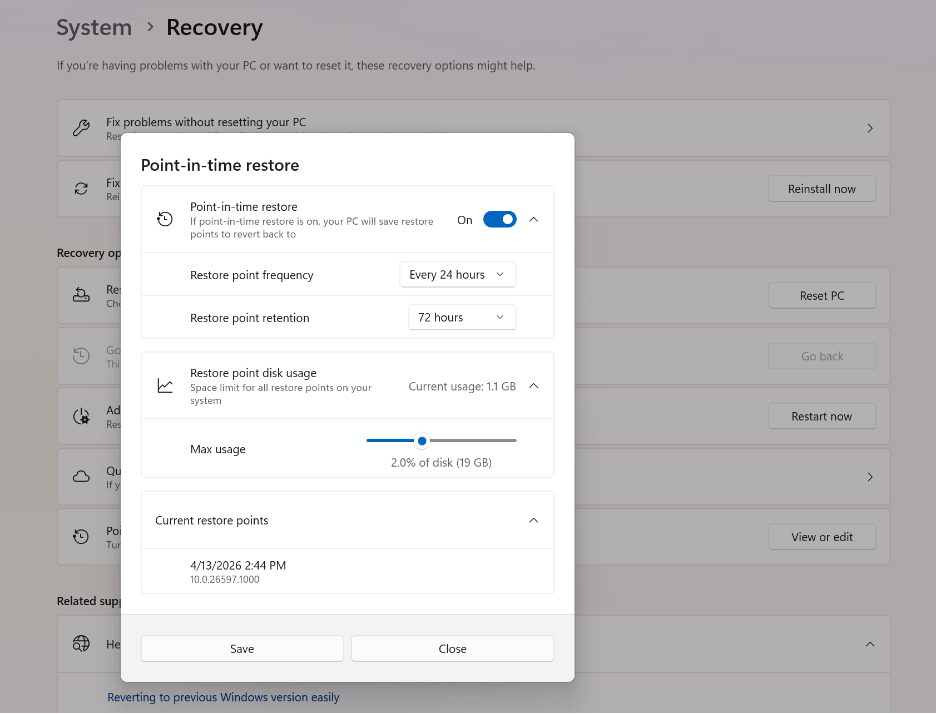
bS00NTA4MTAxLUtVbTA0dg

Point-in-time restore settings page in System > Recovery

Important considerations before you restore​

Point‑in‑time restore is a powerful recovery tool, and it’s important to understand its behavior and impact:
  • Data loss: Any changes made after the selected restore point including files, apps, and settings will be lost. Cloud data is not affected but may require resync. Microsoft recommends storing data in the cloud.
  • Local storage: Restore points are stored locally and require sufficient disk space. Older restore points are automatically removed when limits are reached.
  • BitLocker protection: A BitLocker recovery key is required when restoring encrypted devices.
For detailed requirements, limitations, and best practices, we strongly recommend reviewing the documentation.

Restoring a device​

Currently, a restore can only be triggered locally by the user when the device is in Windows RE. The steps to perform a point-in-time restore are below:
  1. In Windows RE select Troubleshoot > Point-in-time restore
  2. Enter Bitlocker recovery key
  3. Select a restore point to restore PC to the exact state it was at the time of the restore point
  4. Acknowledge the risks and limitations associated with this feature by selecting Continue
  5. Review the restore point selection, OS version and warning of data loss and select Restore to start the restore process
*Note: Microsoft has announced plans to enable remote initiation in the future, through Intune recovery, giving organizations a more scalable way to restore devices when that capability becomes available.

Start using point‑in‑time restore today and provide feedback​

Point‑in‑time restore is now generally available on Windows 11 Client PCs on versions 24H2 and later.
Learn more and get started: point-in-time restore for Windows 11 Microsoft Learn.

We strongly encourage you to share feedback through Feedback Hub, within Recovery and Uninstall > Point-in-time restore as we continue investing in Windows recovery and resiliency.

Looking ahead​

Point‑in‑time restore is an important foundation for the future of Windows recovery. As part of Windows resiliency, we’ll continue to enhance point-in-time restore and expand recovery options, improving manageability, and reducing the time it takes to get users back to productivity across a broad range of issues.


 Source:
 
Last edited:
It takes 24 hour to kick in the first time unless you reduce the interval with a registry edit.
There is no way to manually create a PITR point - only by schedule.
So you say, but my laptop did it.
 

My Computers My Computers

  • At a glance

    Windows 11 Pro 25H2 26200.8737AMD Ryzen 7 5825U with Radeon Graphics16GB
    OS
    Windows 11 Pro 25H2 26200.8737
    Computer type
    Laptop
    Manufacturer/Model
    Acemagic LX15PRO
    CPU
    AMD Ryzen 7 5825U with Radeon Graphics
    Motherboard
    BIOS CT_BI_AMI_LX15PRO_AB8139_A-004
    Memory
    16GB
    Screen Resolution
    1920 x 1080
    Hard Drives
    SSD 2TB
    Internet Speed
    30 Mbps
    Browser
    Brave
    Antivirus
    Defender/Windows Security
    Other Info
    System 3

    Acer Swift SF114-34 laptop
    OS Windows 11 Pro 26200.8737
    CPU Pentium Silver N6000
    RAM 4GB
    BIOS v1.17
    SSD Samsung 970 EVO Plus SSD 2TB (an upgrade)
  • At a glance

    Windows 11 Pro 23H2 22631.2506Atom N450 1.66GHz2GB
    Operating System
    Windows 11 Pro 23H2 22631.2506
    Computer type
    Laptop
    Manufacturer/Model
    HP Mini 210-1090NR PC (bought in late 2009!)
    CPU
    Atom N450 1.66GHz
    Memory
    2GB
    Browser
    Brave
    Antivirus
    Webroot
A thing to remember about the space consumption is it’s only file changes, not the whole file. So if you have 200 MB text file (for some reason), and delete a line, that change is what gets recorded, not the entire file.
 

My Computer My Computer

At a glance

Windows 11 Pro 25H212th Gen Core i7-1260P64 GB Micron PC4-25600Intel Iris Xe Graphics
OS
Windows 11 Pro 25H2
Computer type
PC/Desktop
Manufacturer/Model
Intel NUC12WSHi7
CPU
12th Gen Core i7-1260P
Motherboard
NUC12WSBi7
Memory
64 GB Micron PC4-25600
Graphics Card(s)
Intel Iris Xe Graphics
Sound Card
on-board Realtek HD Audio
Monitor(s) Displays
Dell U3219Q
Screen Resolution
3840 x 2160
Hard Drives
Samsung SSD 990 PRO 1TB
Crucial MX500 2 TB
Antivirus
Microsoft Defender
A thing to remember about the space consumption is it’s only file changes, not the whole file. So if you have 200 MB text file (for some reason), and delete a line, that change is what gets recorded, not the entire file.
Sort of but it is changed sectors that get recorded rather than actual file changes.

This is similar how to incremental backups are recorded on modern image backups.
 

My Computer My Computer

At a glance

Windows 11 Pro + Win11 Canary VM.I9 13th gen i9-13900H 2.60 GHZ16 GB solderedIntegrated Intel Iris XE
OS
Windows 11 Pro + Win11 Canary VM.
Computer type
Laptop
Manufacturer/Model
ASUS Zenbook 14
CPU
I9 13th gen i9-13900H 2.60 GHZ
Motherboard
Yep, Laptop has one.
Memory
16 GB soldered
Graphics Card(s)
Integrated Intel Iris XE
Sound Card
Realtek built in
Monitor(s) Displays
laptop OLED screen
Screen Resolution
2880x1800 touchscreen
Hard Drives
1 TB NVME SSD (only weakness is only one slot)
PSU
Internal + 65W thunderbolt USB4 charger
Case
Yep, got one
Cooling
Stella Artois (UK pint cans - 568 ml) - extra cost.
Keyboard
Built in UK keybd
Mouse
Bluetooth , wireless dongled, wired
Internet Speed
900 mbs (ethernet), wifi 6 typical 350-450 mb/s both up and down
Browser
Edge
Antivirus
Defender
Other Info
TPM 2.0, 2xUSB4 thunderbolt, 1xUsb3 (usb a), 1xUsb-c, hdmi out, 3.5 mm audio out/in combo, ASUS backlit trackpad (inc. switchable number pad)

Macrium Reflect Home V8
Office 365 Family (6 users each 1TB onedrive space)
Hyper-V (a vm runs almost as fast as my older laptop)
Okay but I didn’t mention how it was recorded. But you do pedantic you boo.
 

My Computer My Computer

At a glance

Windows 11 Pro 25H212th Gen Core i7-1260P64 GB Micron PC4-25600Intel Iris Xe Graphics
OS
Windows 11 Pro 25H2
Computer type
PC/Desktop
Manufacturer/Model
Intel NUC12WSHi7
CPU
12th Gen Core i7-1260P
Motherboard
NUC12WSBi7
Memory
64 GB Micron PC4-25600
Graphics Card(s)
Intel Iris Xe Graphics
Sound Card
on-board Realtek HD Audio
Monitor(s) Displays
Dell U3219Q
Screen Resolution
3840 x 2160
Hard Drives
Samsung SSD 990 PRO 1TB
Crucial MX500 2 TB
Antivirus
Microsoft Defender
And only changes in the OS C: partition are saved. The changes done in a data partition, if present, are not saved. Or are they?
 

My Computer My Computer

At a glance

Windows 10
OS
Windows 10
The way it works like with the HorizonData Restore, is Windows takes a snapshot of your entire system and will restore it to what in the snapshot. Anything installed after it, is discarded. What lives in the cloud is unaffected.
 

My Computers My Computers

  • At a glance

    Windows 11 Education For 25H2Intel® Core i7 5500u8 GBIntel HD Family Graphics 5500 AMD Firepro 4150M
    OS
    Windows 11 Education For 25H2
    Computer type
    Laptop
    Manufacturer/Model
    HP ZBook G2
    CPU
    Intel® Core i7 5500u
    Motherboard
    HP
    Memory
    8 GB
    Graphics Card(s)
    Intel HD Family Graphics 5500 AMD Firepro 4150M
    Sound Card
    Realtek High Audio
    Hard Drives
    1 TB SSD
    Mouse
    HP USB Mouse
    Antivirus
    Windows Defender
  • At a glance

    Windows 11 Pro For Workstations 25H2Xeon 1535m v632 GBAMD Quadro Pro 4100
    Operating System
    Windows 11 Pro For Workstations 25H2
    Computer type
    Laptop
    Manufacturer/Model
    HP Zbook G4
    CPU
    Xeon 1535m v6
    Motherboard
    HP
    Memory
    32 GB
    Graphics card(s)
    AMD Quadro Pro 4100
    Sound Card
    Bang and Olufson Audio
    Hard Drives
    1TB SSD
    Mouse
    HP USB Mouse
    Antivirus
    Windows Defender
Before I installed this update my Win11 Pro with 16 GB RAM C:\ drive had a page file of about 2.5 GB. That size worked fine for me.

After installing this update and setting Restore point disk usage to 0.8% = 4GB (according to MS math) my page file is now 8.9 GB. So this leads me to the following questions/observations:

1. The dynamic restore points are being saved in the page file.
2. Will my C:\ drive Macrium backups now be much larger than before due to the increased page file size?
3. I keep my Macrium backup files on a removable SSD that is normally not connected to my PC. With this new dynamic backup should I give up making Macrium backups?
4. Or should I disable this new feature and just continue my usual routine of making Macrium backups?
5. Has anyone tried to restore their C:\ drive by using one of these dynamic backups? If so, did it work ok?
According to what I can find the Point-in-Time data is saved in the hidden Protected System Volume Information folder.
I do not run a page file and a search confirmed Point-in-Time will work without a page file.
 

My Computer My Computer

At a glance

Windows 11AMD Ryzen 8700G64 GBOnboard
OS
Windows 11
Computer type
PC/Desktop
Manufacturer/Model
Generic
CPU
AMD Ryzen 8700G
Motherboard
Gigabyte B650 UD AC
Memory
64 GB
Graphics Card(s)
Onboard
Sound Card
Onboard
Monitor(s) Displays
Del U2723QE
Screen Resolution
3840 x 2160
Hard Drives
Corsiar MP600 1TB
PSU
Silverstone 750 GOLD
Case
Silverstone FARA 513
Brink Thank you the Reg Hacks, changed the Restore point frequency to 4 Hrs.
 

My Computer My Computer

At a glance

Windows 11AMD Ryzen 8700G64 GBOnboard
OS
Windows 11
Computer type
PC/Desktop
Manufacturer/Model
Generic
CPU
AMD Ryzen 8700G
Motherboard
Gigabyte B650 UD AC
Memory
64 GB
Graphics Card(s)
Onboard
Sound Card
Onboard
Monitor(s) Displays
Del U2723QE
Screen Resolution
3840 x 2160
Hard Drives
Corsiar MP600 1TB
PSU
Silverstone 750 GOLD
Case
Silverstone FARA 513
Apparently,

It does not create independent rollback histories for:

EFI System Partition (ESP)
Microsoft Reserved Partition (MSR)
Recovery Partition (WinRE)
OEM partitions
Other data partitions (D:, E:, etc.)

So I see no use for it.
 

My Computers My Computers

  • At a glance

    Windows 11 Pro 25H2 26200.8737AMD Ryzen 7 5825U with Radeon Graphics16GB
    OS
    Windows 11 Pro 25H2 26200.8737
    Computer type
    Laptop
    Manufacturer/Model
    Acemagic LX15PRO
    CPU
    AMD Ryzen 7 5825U with Radeon Graphics
    Motherboard
    BIOS CT_BI_AMI_LX15PRO_AB8139_A-004
    Memory
    16GB
    Screen Resolution
    1920 x 1080
    Hard Drives
    SSD 2TB
    Internet Speed
    30 Mbps
    Browser
    Brave
    Antivirus
    Defender/Windows Security
    Other Info
    System 3

    Acer Swift SF114-34 laptop
    OS Windows 11 Pro 26200.8737
    CPU Pentium Silver N6000
    RAM 4GB
    BIOS v1.17
    SSD Samsung 970 EVO Plus SSD 2TB (an upgrade)
  • At a glance

    Windows 11 Pro 23H2 22631.2506Atom N450 1.66GHz2GB
    Operating System
    Windows 11 Pro 23H2 22631.2506
    Computer type
    Laptop
    Manufacturer/Model
    HP Mini 210-1090NR PC (bought in late 2009!)
    CPU
    Atom N450 1.66GHz
    Memory
    2GB
    Browser
    Brave
    Antivirus
    Webroot
According to what I can find the Point-in-Time data is saved in the hidden Protected System Volume Information folder.
I do not run a page file and a search confirmed Point-in-Time will work without a page file.
Yes Brink confirmed that. Macrium does include the SVI folder in it's backups unless there's a way to exclude them
 

My Computer My Computer

At a glance

Windows 11 Pro 25H2 (RP channel)AMD Ryzen 7 9800X3D 8-core64GB Corsair Titanium 6000/CL30MSI Suprim 5080 SOC
OS
Windows 11 Pro 25H2 (RP channel)
Computer type
PC/Desktop
Manufacturer/Model
MSI
CPU
AMD Ryzen 7 9800X3D 8-core
Motherboard
MEG X870E Godlike
Memory
64GB Corsair Titanium 6000/CL30
Graphics Card(s)
MSI Suprim 5080 SOC
Sound Card
Soundblaster AE-9
Monitor(s) Displays
ASUS TUF Gaming VG289Q
Screen Resolution
3840x2160
Hard Drives
Samsung 9100 Pro 4TB (gen 5 x4, system drive/games)
Samsung 990 Pro 2TB
Samsung 980 Pro 2TB
Samsung 870 Evo 4TB
Samsung 870 Evo 2TB
Samsung T9 4TB
PSU
Seasonic PX-2200
Case
Bequiet! Dark Base Pro 901
Cooling
Noctua NH-D15S Chromax black
Keyboard
Logitech G915 X (wired)
Mouse
Logitech G903 with PowerPlay charger
Internet Speed
900Mb/sec
Browser
Microsoft Edge
Antivirus
Windows Defender
Apparently,

It does not create independent rollback histories for:

EFI System Partition (ESP)
Microsoft Reserved Partition (MSR)
Recovery Partition (WinRE)
OEM partitions
Other data partitions (D:, E:, etc.)

So I see no use for it.
Don't understand the remark...? System restore points cover all of those things automatically--it's inherent in what is always covered by system restore points, otherwise SysRestore points wouldn't be worth very much...;) OEM partitions on the drives for which you have turned on system restore are automatically covered, which is why you always want to leave on sys restore for drive C:/, if for nothing else! As far as other partitions in the system are concerned, you get the same benefit when you turn on sys restore for those partitions--but you don't, of course, derive benefit if you neglect to turn on sys restore for the partitions you want covered.
I use a lot of partitions (I'm almost out of drive letters, actually), but C:\ is the big baby that I always keep on. The more disk space you allocate for restore-point storage, the more points in time will be covered. This is a super-important setting to use with the new backup PIT features! Many times in the past I would discover that the points I needed just weren't there, or were too old to be of immediate use for the particular situation that came up. This feature eliminates that possibility.

Independent settings for these things separately would amount to a disaster upon restore, imo. Think about it. Partition backup programs like Macrium Reflect, etc., always back up all of these things when used--but Sys Restore is much faster and far more flexible, which is the whole point. I use both and have saved an enormous number of hours of tedious work because of it.

I see this feature as a major and significant advance over the former Sys Restore, which was always useful itself, but the new functionality makes it far more useful, imo.
 
Last edited:

My Computer My Computer

At a glance

Win11 Experimental Channel for 26H2 buildsAMD R7 7800X3DGSkill 2x16GB @ 6400MT/sXFX 9070 XT SWIFT tri-fan (PCIe5.0)
OS
Win11 Experimental Channel for 26H2 builds
Computer type
PC/Desktop
Manufacturer/Model
a cherry-picked assembly
CPU
AMD R7 7800X3D
Motherboard
MSI x870 Tomahawk Wi-Fi, 8-layer, 2 oz copper, server PCB
Memory
GSkill 2x16GB @ 6400MT/s
Graphics Card(s)
XFX 9070 XT SWIFT tri-fan (PCIe5.0)
Sound Card
Creative Labs G8 USB External Sound device, Gaming DAC, Sound Card & Earphone AMP.. HIGHLY RECOMMENDED, btw. Totally changed my opinion of external USB sound. I like!...;)
Monitor(s) Displays
Philips 42" OLED @ 4k
Screen Resolution
3840x2160
Hard Drives
*Boot: Samsung 980 Pro 2 TB NVMe (PCIe4x4)
*Samsung 980 EVO NVMe 500GB (PCIe 4x4)
*Kingston SNV3S2000G 2TB NVMe (PCIe4x4)
*Samsung 960 EVO 250GB NVMe(PCIe3x2)
*8TB Toshiba x300 HDD
*ST4000DM004 S3 4TB HDD
PSU
Gigabyte 850W Gold, Rev 2
Case
Lian Li Lancool 217, white, with wood trim, very nice looking--tired of black, 5-fans standard
Cooling
Air coutesy Lian Li
Keyboard
Cherry MX 2.0S RGB
Mouse
Razer Basilisk V3 24k DPI
Internet Speed
~950Mbps down and up!
Browser
Firefox x64 DE
Antivirus
Defender
Other Info
Great New system. Exceeds my expectations by quite a bit, btw. I love the USB G8 SoundBlaster, it's quite an improvement over the G6!
My first restore point was created yesterday; however, I'm not seeing the Restore menu option when I boot into WinRE.
 

My Computer My Computer

At a glance

Windows 11 Pro32GB
OS
Windows 11 Pro
Computer type
Laptop
Manufacturer/Model
Microsoft Surface Laptop Studio
Memory
32GB
Hard Drives
1TB
Don't understand the remark...?
I'm taking about the 'point-in-time' restore, not 'system restore'. Neither will back-up the EFI partition or third-party apps.
 

My Computers My Computers

  • At a glance

    Windows 11 Pro 25H2 26200.8737AMD Ryzen 7 5825U with Radeon Graphics16GB
    OS
    Windows 11 Pro 25H2 26200.8737
    Computer type
    Laptop
    Manufacturer/Model
    Acemagic LX15PRO
    CPU
    AMD Ryzen 7 5825U with Radeon Graphics
    Motherboard
    BIOS CT_BI_AMI_LX15PRO_AB8139_A-004
    Memory
    16GB
    Screen Resolution
    1920 x 1080
    Hard Drives
    SSD 2TB
    Internet Speed
    30 Mbps
    Browser
    Brave
    Antivirus
    Defender/Windows Security
    Other Info
    System 3

    Acer Swift SF114-34 laptop
    OS Windows 11 Pro 26200.8737
    CPU Pentium Silver N6000
    RAM 4GB
    BIOS v1.17
    SSD Samsung 970 EVO Plus SSD 2TB (an upgrade)
  • At a glance

    Windows 11 Pro 23H2 22631.2506Atom N450 1.66GHz2GB
    Operating System
    Windows 11 Pro 23H2 22631.2506
    Computer type
    Laptop
    Manufacturer/Model
    HP Mini 210-1090NR PC (bought in late 2009!)
    CPU
    Atom N450 1.66GHz
    Memory
    2GB
    Browser
    Brave
    Antivirus
    Webroot
My first restore point was created yesterday; however, I'm not seeing the Restore menu option when I boot into WinRE.

Yeah, I have two devices running 28000 builds and the option is nowhere to be seen when rebooting into the WinRE. I don't really care, so it's not a big deal. Garbage in, garbage out.
 

My Computer My Computer

At a glance

Windows 11
OS
Windows 11
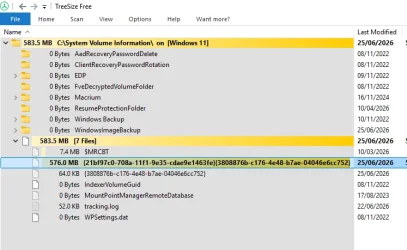
Is there any way to know the location of this volumeshadow copy backup?
It's in the same place as used for System Protection restore points, that's: C:\System Volume Information.

1782407595803.webp1782407520305.webp
 

My Computers My Computers

  • At a glance

    Windows 11 HomeAMD Athlon Silver 3050U8GBRadeon Graphics
    OS
    Windows 11 Home
    Computer type
    Laptop
    Manufacturer/Model
    Acer Aspire 3 A315-23-R9VY
    CPU
    AMD Athlon Silver 3050U
    Memory
    8GB
    Graphics Card(s)
    Radeon Graphics
    Monitor(s) Displays
    laptop screen
    Screen Resolution
    1366x768 native resolution, up to 2560x1440 with Radeon Virtual Super Resolution
    Hard Drives
    1TB Samsung EVO 870 SSD (from April 2026: 250GB EVO 850)
    Internet Speed
    150 Mbps
    Browser
    Edge, Firefox
    Antivirus
    Defender
    Other Info
    fully 'Windows 11 ready' laptop. Windows 10 C: partition migrated from my old unsupported 'main machine' then upgraded to 11. A test migration ran Insider builds for 2 months. When 11 was released on 5th October 2021 it was re-imaged back to 10 and was offered the upgrade in Windows Update on 20th October. Windows Update offered the 22H2 Feature Update on 20th September 2022. It got the 23H2 Feature Update on 4th November 2023 through Windows Update, 24H2 on 3rd October 2024 through Windows Update by setting the Target Release Version for 24H2, and 25H2 on 30th September 2025 through Windows Update by setting the Target Release Version for 25H2.

    UPDATE - 11 April 2026: due to mechanical deterioration this PC has been retired from active duty. The OS with all software and files has been migrated to my System Seven in 'Other systems' to carry on as my general purpose 'main machine'.
  • At a glance

    Windows 11 ProIntel® Core™ i5-520M8GB(integrated graphics) Intel HD Graphics
    Operating System
    Windows 11 Pro
    Computer type
    Laptop
    Manufacturer/Model
    Dell Latitude E4310
    CPU
    Intel® Core™ i5-520M
    Motherboard
    0T6M8G
    Memory
    8GB
    Graphics card(s)
    (integrated graphics) Intel HD Graphics
    Screen Resolution
    1366x768
    Hard Drives
    500GB Crucial MX500 SSD
    Browser
    Firefox, Edge
    Antivirus
    Defender
    Other Info
    unsupported machine: Legacy bios, MBR, TPM 1.2, upgraded from W10 to W11 using W10/W11 hybrid install media workaround.

    In-place upgrade to 22H2 using ISO and a workaround.
    Feature Update to 23H2 by manually installing the Enablement Package.
    In-place upgrade to 24H2 using hybrid 23H2/24H2 install media.
    Upgraded to 25H2 by Enablement Package.

    Also running Insider Dev, and Canary builds and Windows 10 as native boot .vhdx.
  • My SYSTEM THREE is a Dell Latitude 5410, i7-10610U, 32GB RAM, 512GB NVMe ssd, supported device running Windows 11 Pro.

    My SYSTEM FOUR is a 2-in-1 convertible Lenovo Yoga 11e 20DA, Celeron N2930, 8GB RAM, 256GB ssd. Unsupported device: currently running Win10 Pro, plus Win11 Pro RTM and Insider Dev, Beta, and RP 24H2 as native boot vhdx.

    My SYSTEM FIVE is a Dell Latitude 3190 2-in-1, Pentium Silver N5030, 8GB RAM, 1TB NVMe ssd, supported device running Windows 11 Pro, plus Insider Beta, Dev, and Canary builds (and a few others) as a native boot .vhdx.

    My SYSTEM SIX is a Dell Latitude 5550, Core Ultra 7 165H, 64GB RAM, 1TB NVMe SSD, supported device, Windows 11 Pro 24H2, Hyper-V host machine. Updated to 25H2 on 30th September 2025.

    My SYSTEM SEVEN is a Lenovo Thinkpad T580, Intel Core i7-8650U, 16GB RAM, 512GB NVMe SSD + 2nd 512GB NVMe SSD, a supported device for Windows 11. This is my current general purpose 'main machine'. The installed Windows 11 Home from my System One has been migrated to this machine.
It's in the same place as used for System Protection restore points, that's: C:\System Volume Information.

Thanks; DiskGenius can see it too.
 

My Computers My Computers

  • At a glance

    Windows 11 Pro 25H2 26200.8737AMD Ryzen 7 5825U with Radeon Graphics16GB
    OS
    Windows 11 Pro 25H2 26200.8737
    Computer type
    Laptop
    Manufacturer/Model
    Acemagic LX15PRO
    CPU
    AMD Ryzen 7 5825U with Radeon Graphics
    Motherboard
    BIOS CT_BI_AMI_LX15PRO_AB8139_A-004
    Memory
    16GB
    Screen Resolution
    1920 x 1080
    Hard Drives
    SSD 2TB
    Internet Speed
    30 Mbps
    Browser
    Brave
    Antivirus
    Defender/Windows Security
    Other Info
    System 3

    Acer Swift SF114-34 laptop
    OS Windows 11 Pro 26200.8737
    CPU Pentium Silver N6000
    RAM 4GB
    BIOS v1.17
    SSD Samsung 970 EVO Plus SSD 2TB (an upgrade)
  • At a glance

    Windows 11 Pro 23H2 22631.2506Atom N450 1.66GHz2GB
    Operating System
    Windows 11 Pro 23H2 22631.2506
    Computer type
    Laptop
    Manufacturer/Model
    HP Mini 210-1090NR PC (bought in late 2009!)
    CPU
    Atom N450 1.66GHz
    Memory
    2GB
    Browser
    Brave
    Antivirus
    Webroot
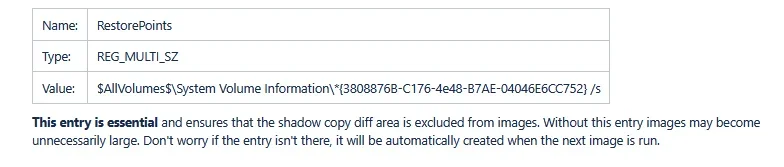
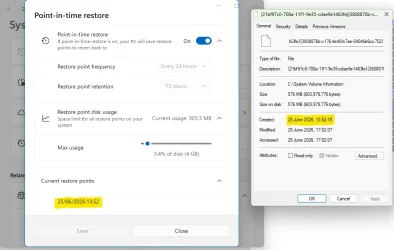
A point to note is that a Macrium Reflect backup has always specifically excluded all restore points from the system image (along with the pagefile and hiberfil.sys). This is true for Reflect X and was also true for Reflect v8.

All files matching $AllVolumes$\System Volume Information\*{3808876B-C176-4e48-B7AE-04046E6CC752} are excluded by default. My point-in-time restore point (post #56) is named {21bf97c0-708a-11f1-9e35-cdae9e1463fe}{3808876b-c176-4e48-b7ae-04046e6cc752}. It matches, and will therefore be excluded.

1782409384775.webp


My Computers My Computers

  • At a glance

    Windows 11 HomeAMD Athlon Silver 3050U8GBRadeon Graphics
    OS
    Windows 11 Home
    Computer type
    Laptop
    Manufacturer/Model
    Acer Aspire 3 A315-23-R9VY
    CPU
    AMD Athlon Silver 3050U
    Memory
    8GB
    Graphics Card(s)
    Radeon Graphics
    Monitor(s) Displays
    laptop screen
    Screen Resolution
    1366x768 native resolution, up to 2560x1440 with Radeon Virtual Super Resolution
    Hard Drives
    1TB Samsung EVO 870 SSD (from April 2026: 250GB EVO 850)
    Internet Speed
    150 Mbps
    Browser
    Edge, Firefox
    Antivirus
    Defender
    Other Info
    fully 'Windows 11 ready' laptop. Windows 10 C: partition migrated from my old unsupported 'main machine' then upgraded to 11. A test migration ran Insider builds for 2 months. When 11 was released on 5th October 2021 it was re-imaged back to 10 and was offered the upgrade in Windows Update on 20th October. Windows Update offered the 22H2 Feature Update on 20th September 2022. It got the 23H2 Feature Update on 4th November 2023 through Windows Update, 24H2 on 3rd October 2024 through Windows Update by setting the Target Release Version for 24H2, and 25H2 on 30th September 2025 through Windows Update by setting the Target Release Version for 25H2.

    UPDATE - 11 April 2026: due to mechanical deterioration this PC has been retired from active duty. The OS with all software and files has been migrated to my System Seven in 'Other systems' to carry on as my general purpose 'main machine'.
  • At a glance

    Windows 11 ProIntel® Core™ i5-520M8GB(integrated graphics) Intel HD Graphics
    Operating System
    Windows 11 Pro
    Computer type
    Laptop
    Manufacturer/Model
    Dell Latitude E4310
    CPU
    Intel® Core™ i5-520M
    Motherboard
    0T6M8G
    Memory
    8GB
    Graphics card(s)
    (integrated graphics) Intel HD Graphics
    Screen Resolution
    1366x768
    Hard Drives
    500GB Crucial MX500 SSD
    Browser
    Firefox, Edge
    Antivirus
    Defender
    Other Info
    unsupported machine: Legacy bios, MBR, TPM 1.2, upgraded from W10 to W11 using W10/W11 hybrid install media workaround.

    In-place upgrade to 22H2 using ISO and a workaround.
    Feature Update to 23H2 by manually installing the Enablement Package.
    In-place upgrade to 24H2 using hybrid 23H2/24H2 install media.
    Upgraded to 25H2 by Enablement Package.

    Also running Insider Dev, and Canary builds and Windows 10 as native boot .vhdx.
  • My SYSTEM THREE is a Dell Latitude 5410, i7-10610U, 32GB RAM, 512GB NVMe ssd, supported device running Windows 11 Pro.

    My SYSTEM FOUR is a 2-in-1 convertible Lenovo Yoga 11e 20DA, Celeron N2930, 8GB RAM, 256GB ssd. Unsupported device: currently running Win10 Pro, plus Win11 Pro RTM and Insider Dev, Beta, and RP 24H2 as native boot vhdx.

    My SYSTEM FIVE is a Dell Latitude 3190 2-in-1, Pentium Silver N5030, 8GB RAM, 1TB NVMe ssd, supported device running Windows 11 Pro, plus Insider Beta, Dev, and Canary builds (and a few others) as a native boot .vhdx.

    My SYSTEM SIX is a Dell Latitude 5550, Core Ultra 7 165H, 64GB RAM, 1TB NVMe SSD, supported device, Windows 11 Pro 24H2, Hyper-V host machine. Updated to 25H2 on 30th September 2025.

    My SYSTEM SEVEN is a Lenovo Thinkpad T580, Intel Core i7-8650U, 16GB RAM, 512GB NVMe SSD + 2nd 512GB NVMe SSD, a supported device for Windows 11. This is my current general purpose 'main machine'. The installed Windows 11 Home from my System One has been migrated to this machine.
Yeah, I have two devices running 28000 builds and the option is nowhere to be seen when rebooting into the WinRE. I don't really care, so it's not a big deal. Garbage in, garbage out.
Yeah, I rely on Macrium for my backups and was only interested in testing this as something I could enable for use during the week, when I am typically not making any backups.
 

My Computer My Computer

At a glance

Windows 11 Pro32GB
OS
Windows 11 Pro
Computer type
Laptop
Manufacturer/Model
Microsoft Surface Laptop Studio
Memory
32GB
Hard Drives
1TB
Just remember: This feature is not intended as a backup, it's an "undo" to roll back recent file changes assuming you have a working Windows system. Trying to compare it against Macrium doesn't make sense.
 

My Computer My Computer

At a glance

Windows 7
OS
Windows 7

Latest Support Threads

Back
Top Bottom