xenscrober
Member
- Local time
- 2:37 PM
- Posts
- 6
- OS
- Window 11
Hello Everyone,
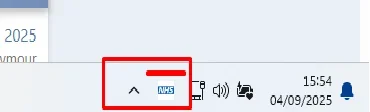
I'm very new to PowerShell Script. I've been tasked to show some icons not all icons via the system Tray, next to the clock and thought using PowerShell deployed via SCCM would be appropriate. I've included an image of what we can enable manually by hand however as we have over 5000 desktops, manual approach is out of the window. Have anyone PowerShell script I could modify for the Appid needed to showup on the system tray please ?
I'm very new to PowerShell Script. I've been tasked to show some icons not all icons via the system Tray, next to the clock and thought using PowerShell deployed via SCCM would be appropriate. I've included an image of what we can enable manually by hand however as we have over 5000 desktops, manual approach is out of the window. Have anyone PowerShell script I could modify for the Appid needed to showup on the system tray please ?
Attachments

My Computer
At a glance
Window 11OCTA Core 864GB
- OS
- Window 11
- Computer type
- PC/Desktop
- Manufacturer/Model
- IBM, Lenovo, HP
- CPU
- OCTA Core 8
- Motherboard
- HP
- Memory
- 64GB
- Monitor(s) Displays
- 2
- Screen Resolution
- 1980 by 1200
- Hard Drives
- SSD
- Keyboard
- 1
- Mouse
- 1
- Internet Speed
- 1 GB/s
- Browser
- Chrome and Edge
- Antivirus
- Sophos
- Other Info
- Support Engineer