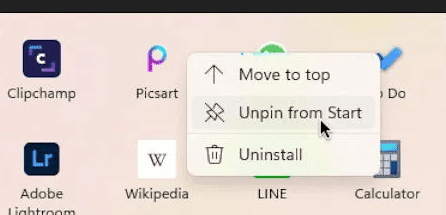
Prevent “Unpin from Start“


joserf

Member
Local time
8:34 AM
Posts
8
OS
Windows 11
Hi, does anyone have a tip on how to disable this option?
 
Windows Build/Version
Windows 11

Attachments

  • Captura de tela de 2021-12-26 22-39-51.png
    Captura de tela de 2021-12-26 22-39-51.png
    33.3 KB · Views: 1

My Computer My Computer

At a glance

Windows 11
OS
Windows 11
Computer type
Laptop
Have you tried this >>Press Win + R , type or paste gpedit. msc in the text box, and press Enter . Navigate to User Configuration > Administrative Templates > Start Menu and Taskbar. Double-click the Do not allow pinning programs to the Taskbar policy, and set it to Enabled.
Chuck
 

My Computer My Computer

At a glance

Windows11 23H2 (OS Build 22631.2428)2.90 gigahertz Intel Core i7-1070016214 Megabytes Usable Installed Memor
OS
Windows11 23H2 (OS Build 22631.2428)
Computer type
PC/Desktop
Manufacturer/Model
HP HP ENVY TE01
CPU
2.90 gigahertz Intel Core i7-10700
Motherboard
Board: HP 8767 A (SMVB)
Memory
16214 Megabytes Usable Installed Memor
Hard Drives
1511.52 Gigabytes Usable Hard Drive Capacity
1418.15 Gigabytes Hard Drive Free Space
Keyboard
Logitech wireless
Mouse
M 185 wireless
Internet Speed
12 ms Jitter 8 ms Download 10.5 Mbps Upload 1.7
Browser
Edge & FF
Antivirus
Windows Defender
Have you tried this >>Press Win + R , type or paste gpedit. msc in the text box, and press Enter . Navigate to User Configuration > Administrative Templates > Start Menu and Taskbar. Double-click the Do not allow pinning programs to the Taskbar policy, and set it to Enabled.
Chuck
It's not the taskbar, it's the start menu.
 

My Computer My Computer

At a glance

Windows 11
OS
Windows 11
Computer type
Laptop

My Computer My Computer

At a glance

Windows 10i5-10600K16 GBGeForce GTX 1650
OS
Windows 10
Computer type
PC/Desktop
CPU
i5-10600K
Motherboard
Asus Rog Strix Z490-A Gaming
Memory
16 GB
Graphics Card(s)
GeForce GTX 1650
Monitor(s) Displays
Samsung U32J59x 32" 4K
Screen Resolution
3840x2160

My Computer My Computer

At a glance

Windows 11
OS
Windows 11
Computer type
Laptop
If you want to change anything, head to Settings > Personalization > Start, where you can tell Windows to stop showing recently installed apps, frequently used apps, and recently opened items in the Start menu, App List, and elsewhere. Experiment with each of these three options to determine which ones to turn on and off. If you turn all three options off, the Recommended section of the Start menu will be empty.
Not sure if this is what you are wanting but thought i'd post it !
Chuck
 

My Computer My Computer

At a glance

Windows11 23H2 (OS Build 22631.2428)2.90 gigahertz Intel Core i7-1070016214 Megabytes Usable Installed Memor
OS
Windows11 23H2 (OS Build 22631.2428)
Computer type
PC/Desktop
Manufacturer/Model
HP HP ENVY TE01
CPU
2.90 gigahertz Intel Core i7-10700
Motherboard
Board: HP 8767 A (SMVB)
Memory
16214 Megabytes Usable Installed Memor
Hard Drives
1511.52 Gigabytes Usable Hard Drive Capacity
1418.15 Gigabytes Hard Drive Free Space
Keyboard
Logitech wireless
Mouse
M 185 wireless
Internet Speed
12 ms Jitter 8 ms Download 10.5 Mbps Upload 1.7
Browser
Edge & FF
Antivirus
Windows Defender
If you want to change anything, head to Settings > Personalization > Start, where you can tell Windows to stop showing recently installed apps, frequently used apps, and recently opened items in the Start menu, App List, and elsewhere. Experiment with each of these three options to determine which ones to turn on and off. If you turn all three options off, the Recommended section of the Start menu will be empty.
Not sure if this is what you are wanting but thought i'd post it !
Chuck
Thanks, but that's not what I need.
 

My Computer My Computer

At a glance

Windows 11
OS
Windows 11
Computer type
Laptop

Latest Support Threads

Back
Top Bottom