Problem with desktop spotlight on the new build


verlianh

Well-known member
Local time
2:49 AM
Posts
7
OS
Windows 11 Pro
Hello, I just updated to the latest beta build 22621.160, and I noticed that the desktop spotlight won't change to another image, just stuck to W11 bloom.
Is this intended at the moment?
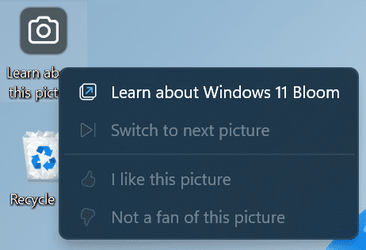
Screenshot (20).png
 
Windows Build/Version
22621.160

My Computer

System One

  • OS
    Windows 11 Pro
    Computer type
    PC/Desktop
    Manufacturer/Model
    Micro-Star International Co., Ltd.
    CPU
    AMD Ryzen 5 5600X 6-Core Processor (3.70 GHz)
    Motherboard
    MSI B450M PRO-VDH MAX (MS-7A38)
    Memory
    Dahua DHI-DDR-C300S16G26 32 GB (16 x 2)
    Graphics Card(s)
    NVIDIA GeForce RTX 4060 8 GB
    Sound Card
    Realtek High Definition Audio
    Monitor(s) Displays
    AOC 24B36H 23.8" 100 Hz IPS
    Screen Resolution
    1920x1080
    Hard Drives
    M.2 NVMe SSD - EX1000 1024G PCIE 2280 - 1 TB
    SATA SSD - Fanxiang S101 - 2 TB
    PSU
    Cougar STC 750 W
    Case
    1STPLAYER Trilobite T3 (Black)
    Cooling
    AMD Wraith Stealth
    Keyboard
    1STPLAYER LANG MK8 Titan
    Mouse
    Logitech G102
    Internet Speed
    70 mbps
    Browser
    Google Chrome
    Antivirus
    Microsoft Defender
Stupid question but have you set it to spotlight in settings, mine was not activated, it was still on picture ( how I want it )
 

My Computers

System One System Two

  • OS
    Windows 11 Pro
    Computer type
    Laptop
    Manufacturer/Model
    Alienware M18 R1
    CPU
    13th Gen Core i9 13900HX
    Memory
    32GB DDR5 @4800MHz 2x16GB
    Graphics Card(s)
    Geforce RTX 4090HX 16GB
    Sound Card
    Nvidia HD / Realtek ALC3254
    Monitor(s) Displays
    18" QHD+
    Screen Resolution
    25660 X 1600
    Hard Drives
    C: KIOXIA (Toshiba) 2TB KXG80ZNV2T04 NVMe PCIe M.2 SSD
    D: KIOXIA (Toshiba) 2TB KXG80ZNV2T04 NVMe PCIe M.2 SSD
    Case
    Dark Metallic Moon
    Keyboard
    Alienware M Series per-key AlienFX RGB
    Mouse
    Alienware AW610M
    Browser
    Chrome and Firefox
    Antivirus
    Norton
    Other Info
    Killer E3000 Ethernet Controller
    Killer Killer AX1690 Wi-Fi Network Adaptor Wi-Fi 6E
    Bluetooth 5.2
    Alienware Z01G Graphic Amplifier
  • Operating System
    Windows 11 Pro
    Computer type
    Laptop
    Manufacturer/Model
    Alienware Area 51m R2
    CPU
    10th Gen i-9 10900 K
    Memory
    32Gb Dual Channel DDR4 @ 8843MHz
    Graphics card(s)
    Nvidia RTX 2080 Super
    Sound Card
    Nvidia
    Screen Resolution
    1920 x 1080
    Hard Drives
    Hard Drive C: Samsung 2TB SSD PM981a NVMe
    Hard Drive D:Samsung 2TB SSD 970 EVO Plus
    Mouse
    Alienware 610M
    Browser
    Chrome
    Antivirus
    Norton
It was on spotlight. I tried to switched it back and forth, picture>spotlight... slideshow>spotlight, etc.
 

My Computer

System One

  • OS
    Windows 11 Pro
    Computer type
    PC/Desktop
    Manufacturer/Model
    Micro-Star International Co., Ltd.
    CPU
    AMD Ryzen 5 5600X 6-Core Processor (3.70 GHz)
    Motherboard
    MSI B450M PRO-VDH MAX (MS-7A38)
    Memory
    Dahua DHI-DDR-C300S16G26 32 GB (16 x 2)
    Graphics Card(s)
    NVIDIA GeForce RTX 4060 8 GB
    Sound Card
    Realtek High Definition Audio
    Monitor(s) Displays
    AOC 24B36H 23.8" 100 Hz IPS
    Screen Resolution
    1920x1080
    Hard Drives
    M.2 NVMe SSD - EX1000 1024G PCIE 2280 - 1 TB
    SATA SSD - Fanxiang S101 - 2 TB
    PSU
    Cougar STC 750 W
    Case
    1STPLAYER Trilobite T3 (Black)
    Cooling
    AMD Wraith Stealth
    Keyboard
    1STPLAYER LANG MK8 Titan
    Mouse
    Logitech G102
    Internet Speed
    70 mbps
    Browser
    Google Chrome
    Antivirus
    Microsoft Defender
It was on spotlight. I tried to switched it back and forth, picture>spotlight... slideshow>spotlight, etc.
Just a thought as mine stayed on picture after the update
 

My Computers

System One System Two

  • OS
    Windows 11 Pro
    Computer type
    Laptop
    Manufacturer/Model
    Alienware M18 R1
    CPU
    13th Gen Core i9 13900HX
    Memory
    32GB DDR5 @4800MHz 2x16GB
    Graphics Card(s)
    Geforce RTX 4090HX 16GB
    Sound Card
    Nvidia HD / Realtek ALC3254
    Monitor(s) Displays
    18" QHD+
    Screen Resolution
    25660 X 1600
    Hard Drives
    C: KIOXIA (Toshiba) 2TB KXG80ZNV2T04 NVMe PCIe M.2 SSD
    D: KIOXIA (Toshiba) 2TB KXG80ZNV2T04 NVMe PCIe M.2 SSD
    Case
    Dark Metallic Moon
    Keyboard
    Alienware M Series per-key AlienFX RGB
    Mouse
    Alienware AW610M
    Browser
    Chrome and Firefox
    Antivirus
    Norton
    Other Info
    Killer E3000 Ethernet Controller
    Killer Killer AX1690 Wi-Fi Network Adaptor Wi-Fi 6E
    Bluetooth 5.2
    Alienware Z01G Graphic Amplifier
  • Operating System
    Windows 11 Pro
    Computer type
    Laptop
    Manufacturer/Model
    Alienware Area 51m R2
    CPU
    10th Gen i-9 10900 K
    Memory
    32Gb Dual Channel DDR4 @ 8843MHz
    Graphics card(s)
    Nvidia RTX 2080 Super
    Sound Card
    Nvidia
    Screen Resolution
    1920 x 1080
    Hard Drives
    Hard Drive C: Samsung 2TB SSD PM981a NVMe
    Hard Drive D:Samsung 2TB SSD 970 EVO Plus
    Mouse
    Alienware 610M
    Browser
    Chrome
    Antivirus
    Norton
I noticed that the desktop spotlight won't change to another image, just stuck to W11 bloom.
Yes, I had that on one machine. First, turn off Spotlight wherever you are using it, desktop or lock screen, then reset it, then turn it back on. That fixed it for me.


My Computers

System One System Two

  • OS
    Windows 11 Home
    Computer type
    Laptop
    Manufacturer/Model
    Acer Aspire 3 A315-23-R9VY
    CPU
    AMD Athlon Silver 3050U
    Memory
    8GB
    Graphics Card(s)
    Radeon Graphics
    Monitor(s) Displays
    laptop screen
    Screen Resolution
    1366x768 native resolution, up to 2560x1440 with Radeon Virtual Super Resolution
    Hard Drives
    1TB Samsung EVO 870 SSD (from April 2026: 250GB EVO 850)
    Internet Speed
    150 Mbps
    Browser
    Edge, Firefox
    Antivirus
    Defender
    Other Info
    fully 'Windows 11 ready' laptop. Windows 10 C: partition migrated from my old unsupported 'main machine' then upgraded to 11. A test migration ran Insider builds for 2 months. When 11 was released on 5th October 2021 it was re-imaged back to 10 and was offered the upgrade in Windows Update on 20th October. Windows Update offered the 22H2 Feature Update on 20th September 2022. It got the 23H2 Feature Update on 4th November 2023 through Windows Update, 24H2 on 3rd October 2024 through Windows Update by setting the Target Release Version for 24H2, and 25H2 on 30th September 2025 through Windows Update by setting the Target Release Version for 25H2.

    UPDATE - 11 April 2026: due to mechanical deterioration this PC has been retired from active duty. The OS with all software and files has been migrated to my System Seven below to carry on as my general purpose 'main machine'.

    My SYSTEM THREE is a Dell Latitude 5410, i7-10610U, 32GB RAM, 512GB NVMe ssd, supported device running Windows 11 Pro.

    My SYSTEM FOUR is a 2-in-1 convertible Lenovo Yoga 11e 20DA, Celeron N2930, 8GB RAM, 256GB ssd. Unsupported device: currently running Win10 Pro, plus Win11 Pro RTM and Insider Dev, Beta, and RP 24H2 as native boot vhdx.

    My SYSTEM FIVE is a Dell Latitude 3190 2-in-1, Pentium Silver N5030, 8GB RAM, 1TB NVMe ssd, supported device running Windows 11 Pro, plus Insider Beta, Dev, and Canary builds (and a few others) as a native boot .vhdx.

    My SYSTEM SIX is a Dell Latitude 5550, Core Ultra 7 165H, 64GB RAM, 1TB NVMe SSD, supported device, Windows 11 Pro 24H2, Hyper-V host machine. Updated to 25H2 on 30th September 2025.

    My SYSTEM SEVEN is a Lenovo Thinkpad T580, Intel Core i7-8650U, 16GB RAM, 512GB NVMe SSD + 2nd 512GB NVMe SSD, a supported device for Windows 11. This is my current general purpose 'main machine'. The installed Windows 11 Home from my System One has been migrated to this machine.
  • Operating System
    Windows 11 Pro
    Computer type
    Laptop
    Manufacturer/Model
    Dell Latitude E4310
    CPU
    Intel® Core™ i5-520M
    Motherboard
    0T6M8G
    Memory
    8GB
    Graphics card(s)
    (integrated graphics) Intel HD Graphics
    Screen Resolution
    1366x768
    Hard Drives
    500GB Crucial MX500 SSD
    Browser
    Firefox, Edge
    Antivirus
    Defender
    Other Info
    unsupported machine: Legacy bios, MBR, TPM 1.2, upgraded from W10 to W11 using W10/W11 hybrid install media workaround. In-place upgrade to 22H2 using ISO and a workaround. Feature Update to 23H2 by manually installing the Enablement Package. In-place upgrade to 24H2 using hybrid 23H2/24H2 install media. Upgraded to 25H2 by Enablement Package. Also running Insider Dev, and Canary builds and Windows 10 as native boot .vhdx.

    My SYSTEM THREE is a Dell Latitude 5410, i7-10610U, 32GB RAM, 512GB NVMe ssd, supported device running Windows 11 Pro.

    My SYSTEM FOUR is a 2-in-1 convertible Lenovo Yoga 11e 20DA, Celeron N2930, 8GB RAM, 256GB ssd. Unsupported device: currently running Win10 Pro, plus Win11 Pro RTM and Insider Dev, Beta, and RP 24H2 as native boot vhdx.

    My SYSTEM FIVE is a Dell Latitude 3190 2-in-1, Pentium Silver N5030, 8GB RAM, 1TB NVMe ssd, supported device running Windows 11 Pro, plus Insider Beta, Dev, and Canary builds (and a few others) as a native boot .vhdx.

    My SYSTEM SIX is a Dell Latitude 5550, Core Ultra 7 165H, 64GB RAM, 1TB NVMe SSD, supported device, Windows 11 Pro 24H2, Hyper-V host machine. Updated to 25H2 on 30th September 2025.

    My SYSTEM SEVEN is a Lenovo Thinkpad T580, Intel Core i7-8650U, 16GB RAM, 512GB NVMe SSD + 2nd 512GB NVMe SSD, a supported device for Windows 11. This is my current general purpose 'main machine'. The installed Windows 11 Home from my System One has been migrated to this machine.
Yes, I had that on one machine. First, turn off Spotlight wherever you are using it, desktop or lock screen, then reset it, then turn it back on. That fixed it for me.

Thanks for the suggestion. Sadly, that method didn't fix my spotlight. After scouring the internet, I end up using Dynamic Theme app.

And one more thing, I'm currently connected to a phone hotspot because my modem is under repair. Might be the cause.
 

My Computer

System One

  • OS
    Windows 11 Pro
    Computer type
    PC/Desktop
    Manufacturer/Model
    Micro-Star International Co., Ltd.
    CPU
    AMD Ryzen 5 5600X 6-Core Processor (3.70 GHz)
    Motherboard
    MSI B450M PRO-VDH MAX (MS-7A38)
    Memory
    Dahua DHI-DDR-C300S16G26 32 GB (16 x 2)
    Graphics Card(s)
    NVIDIA GeForce RTX 4060 8 GB
    Sound Card
    Realtek High Definition Audio
    Monitor(s) Displays
    AOC 24B36H 23.8" 100 Hz IPS
    Screen Resolution
    1920x1080
    Hard Drives
    M.2 NVMe SSD - EX1000 1024G PCIE 2280 - 1 TB
    SATA SSD - Fanxiang S101 - 2 TB
    PSU
    Cougar STC 750 W
    Case
    1STPLAYER Trilobite T3 (Black)
    Cooling
    AMD Wraith Stealth
    Keyboard
    1STPLAYER LANG MK8 Titan
    Mouse
    Logitech G102
    Internet Speed
    70 mbps
    Browser
    Google Chrome
    Antivirus
    Microsoft Defender
Thanks for the suggestion. Sadly, that method didn't fix my spotlight. After scouring the internet, I end up using Dynamic Theme app.

And one more thing, I'm currently connected to a phone hotspot because my modem is under repair. Might be the cause.
Hi there
I installed an another theme rather than the standard Issue ones after an initial Windows install. Get loads more from the store.
Spotlight working OK. I didn't notice it wasn't working but in any case it's working now on this build.

Incidentally if you installed any Custom themes from W10 they all seem to work these days on W11 if you want to keep them.

Cheers
jimbo
 

My Computer

System One

  • OS
    Windows XP,11 Linux Fedora Rawhide pre-release 45
    Computer type
    PC/Desktop
    CPU
    2 X Intel i7
    Screen Resolution
    4KUHD X 2

Latest Support Threads

Back
Top Bottom