
Solved Problem with themes


hispanico

Well-known member
Local time
11:41 AM
Posts
52
OS
Windows 11 Pro - 25H2
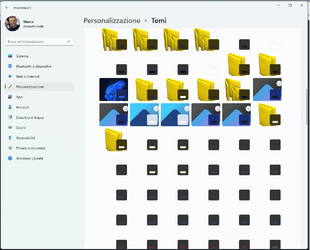
Today i want change my tjeme on windows 11 but when i selected themes appears this and i impossible see the theme and options.
How reset this or solve ?

Thank
Hispa

ps.
sOLVED I DELETE ALL THEME NOT WINDOWS AND SOLVE
 

Attachments
  • Senza titolo.png
    Senza titolo.png
    80.4 KB · Views: 3
Last edited:

My Computer My Computer

At a glance

Windows 11 Pro - 25H2AMD Ryzen 9 9950X3D48gbNvidia
OS
Windows 11 Pro - 25H2
Computer type
PC/Desktop
Manufacturer/Model
Asus
CPU
AMD Ryzen 9 9950X3D
Motherboard
Asus X870E Hero
Memory
48gb
Graphics Card(s)
Nvidia
Sound Card
Integrated
Monitor(s) Displays
ViewSonis 32"
Sorry but your sentences are hard to decipher. My theme section looks the same as yours. Just hover over each one and it says what it is. I'm not sure if Microsoft chose it to look like this or if its a coding error on their side.
 

My Computer My Computer

At a glance

Windows 11 Pro Version 23H2(OS Build 22631.4890)12-Core AMD Ryzen 9 5900X, 4950 MHz (49.5 x 100)4 - G Skill Trident Z Neo F4-3600C16-16GTZNCPCI Express 4.0 x16: PowerColor RX 6800
OS
Windows 11 Pro Version 23H2(OS Build 22631.4890)
Computer type
PC/Desktop
Manufacturer/Model
AMD
CPU
12-Core AMD Ryzen 9 5900X, 4950 MHz (49.5 x 100)
Motherboard
Gigabyte X570 Aorus Master
Memory
4 - G Skill Trident Z Neo F4-3600C16-16GTZNC
Graphics Card(s)
PCI Express 4.0 x16: PowerColor RX 6800
Sound Card
Realtek ALC1220 @ AMD K19.2 - High Definition Audio Controller
Monitor(s) Displays
2 - 27 inch Westinghouse
Screen Resolution
1920 x 1080
Hard Drives
2 SSD - 2 TB each
1 SSD - 4TB
1 HDD - 2TB
Keyboard
logitech
Mouse
logitech
Internet Speed
1 GB
Browser
Firefox
Antivirus
Eset Endpoint Security

Latest Support Threads

Back
Top Bottom




