Problems with antimalware defender update 4.18.2202.4


My Computers My Computers

  • At a glance

    Windows 11 Pro latestAMD Ryzen 5 5700x32 gb 3200 mhz xmp (4x8)msi rtx3060 8gb
    OS
    Windows 11 Pro latest
    Computer type
    PC/Desktop
    CPU
    AMD Ryzen 5 5700x
    Motherboard
    Msi b550 gaming gen3
    Memory
    32 gb 3200 mhz xmp (4x8)
    Graphics Card(s)
    msi rtx3060 8gb
    Sound Card
    Audigy RX
    Monitor(s) Displays
    Philips 222V8LA/00
    Screen Resolution
    1980x1080
    Hard Drives
    MX500 Crucial
    PSU
    corsair cv 750
    Case
    q-tech
    Cooling
    amd wraith stealth
    Keyboard
    k81 gigabyte force
    Mouse
    zeroground daito
    Internet Speed
    100-10
    Browser
    Mozilla
    Antivirus
    Windows defender
  • At a glance

    windows 11 pro latesti5-2520M8Gb ddr3 1333 mhzhd3000
    Operating System
    windows 11 pro latest
    Computer type
    Laptop
    Manufacturer/Model
    Lenovo T420
    CPU
    i5-2520M
    Memory
    8Gb ddr3 1333 mhz
    Graphics card(s)
    hd3000
    Sound Card
    on board
    Screen Resolution
    1366x768
    Hard Drives
    Team group lite 3d 240gb
    Internet Speed
    100-10
    Antivirus
    defender
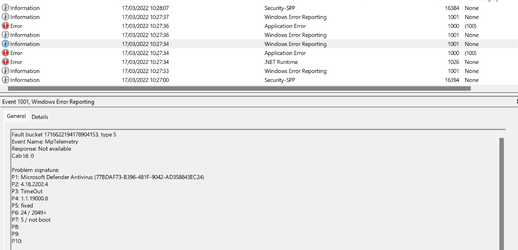
This is the error from Event viewer when it finally loads. Time Out on Defender Antivirus 4.18.2202.4
 

Attachments

  • Screenshot 2022-03-17 103141.png
    Screenshot 2022-03-17 103141.png
    54.4 KB · Views: 2

My Computer My Computer

At a glance

Windows 11 Pro 25H2 (RP channel)AMD Ryzen 7 9800X3D 8-core64GB Corsair Titanium 6000/CL30MSI Suprim 5080 SOC
OS
Windows 11 Pro 25H2 (RP channel)
Computer type
PC/Desktop
Manufacturer/Model
MSI
CPU
AMD Ryzen 7 9800X3D 8-core
Motherboard
MEG X870E Godlike
Memory
64GB Corsair Titanium 6000/CL30
Graphics Card(s)
MSI Suprim 5080 SOC
Sound Card
Soundblaster AE-9
Monitor(s) Displays
ASUS TUF Gaming VG289Q
Screen Resolution
3840x2160
Hard Drives
Samsung 9100 Pro 4TB (gen 5 x4, system drive/games)
Samsung 990 Pro 2TB
Samsung 980 Pro 2TB
Samsung 870 Evo 4TB
Samsung 870 Evo 2TB
Samsung T9 4TB
PSU
Seasonic PX-2200
Case
Bequiet! Dark Base Pro 901
Cooling
Noctua NH-D15S Chromax black
Keyboard
Logitech G915 X (wired)
Mouse
Logitech G903 with PowerPlay charger
Internet Speed
900Mb/sec
Browser
Microsoft Edge
Antivirus
Windows Defender
I found this but i didn't try it.

To roll back this update to the Inbox CAMP version, run the following command:

"%programfiles%\Windows Defender\MpCmdRun.exe" -resetplatform
 

My Computers My Computers

  • At a glance

    Windows 11 Pro latestAMD Ryzen 5 5700x32 gb 3200 mhz xmp (4x8)msi rtx3060 8gb
    OS
    Windows 11 Pro latest
    Computer type
    PC/Desktop
    CPU
    AMD Ryzen 5 5700x
    Motherboard
    Msi b550 gaming gen3
    Memory
    32 gb 3200 mhz xmp (4x8)
    Graphics Card(s)
    msi rtx3060 8gb
    Sound Card
    Audigy RX
    Monitor(s) Displays
    Philips 222V8LA/00
    Screen Resolution
    1980x1080
    Hard Drives
    MX500 Crucial
    PSU
    corsair cv 750
    Case
    q-tech
    Cooling
    amd wraith stealth
    Keyboard
    k81 gigabyte force
    Mouse
    zeroground daito
    Internet Speed
    100-10
    Browser
    Mozilla
    Antivirus
    Windows defender
  • At a glance

    windows 11 pro latesti5-2520M8Gb ddr3 1333 mhzhd3000
    Operating System
    windows 11 pro latest
    Computer type
    Laptop
    Manufacturer/Model
    Lenovo T420
    CPU
    i5-2520M
    Memory
    8Gb ddr3 1333 mhz
    Graphics card(s)
    hd3000
    Sound Card
    on board
    Screen Resolution
    1366x768
    Hard Drives
    Team group lite 3d 240gb
    Internet Speed
    100-10
    Antivirus
    defender
I reset the platform with the above command and it went in the previous version but i have the same problem.
So it seems to be the definitions that have a new form after the new update.??


p.s to reset the platform you need to open cmd.
write cd C:\Program Files\Windows Defender and "enter"
and then MpCmdRun.exe -resetplatform and "enter"
 

My Computers My Computers

  • At a glance

    Windows 11 Pro latestAMD Ryzen 5 5700x32 gb 3200 mhz xmp (4x8)msi rtx3060 8gb
    OS
    Windows 11 Pro latest
    Computer type
    PC/Desktop
    CPU
    AMD Ryzen 5 5700x
    Motherboard
    Msi b550 gaming gen3
    Memory
    32 gb 3200 mhz xmp (4x8)
    Graphics Card(s)
    msi rtx3060 8gb
    Sound Card
    Audigy RX
    Monitor(s) Displays
    Philips 222V8LA/00
    Screen Resolution
    1980x1080
    Hard Drives
    MX500 Crucial
    PSU
    corsair cv 750
    Case
    q-tech
    Cooling
    amd wraith stealth
    Keyboard
    k81 gigabyte force
    Mouse
    zeroground daito
    Internet Speed
    100-10
    Browser
    Mozilla
    Antivirus
    Windows defender
  • At a glance

    windows 11 pro latesti5-2520M8Gb ddr3 1333 mhzhd3000
    Operating System
    windows 11 pro latest
    Computer type
    Laptop
    Manufacturer/Model
    Lenovo T420
    CPU
    i5-2520M
    Memory
    8Gb ddr3 1333 mhz
    Graphics card(s)
    hd3000
    Sound Card
    on board
    Screen Resolution
    1366x768
    Hard Drives
    Team group lite 3d 240gb
    Internet Speed
    100-10
    Antivirus
    defender
@BrianInEngland @Bree Ok it fixed!!!
1)reset the platform windows defender to the default that iso have.
*open cmd with admin rights
*write cd C:\Program Files\Windows Defender and "enter"
*and then MpCmdRun.exe -resetplatform and "enter"

2)restart your machine
3)disable the real time protection only
4) go to windows update to update the defender platform (search for updates)
5)it will update and automatically it will restart the protection
6) restart and now the cmd not hang anymore


Edit: My second laptop t420 is fixed also with this workaround.
 
Last edited:

My Computers My Computers

  • At a glance

    Windows 11 Pro latestAMD Ryzen 5 5700x32 gb 3200 mhz xmp (4x8)msi rtx3060 8gb
    OS
    Windows 11 Pro latest
    Computer type
    PC/Desktop
    CPU
    AMD Ryzen 5 5700x
    Motherboard
    Msi b550 gaming gen3
    Memory
    32 gb 3200 mhz xmp (4x8)
    Graphics Card(s)
    msi rtx3060 8gb
    Sound Card
    Audigy RX
    Monitor(s) Displays
    Philips 222V8LA/00
    Screen Resolution
    1980x1080
    Hard Drives
    MX500 Crucial
    PSU
    corsair cv 750
    Case
    q-tech
    Cooling
    amd wraith stealth
    Keyboard
    k81 gigabyte force
    Mouse
    zeroground daito
    Internet Speed
    100-10
    Browser
    Mozilla
    Antivirus
    Windows defender
  • At a glance

    windows 11 pro latesti5-2520M8Gb ddr3 1333 mhzhd3000
    Operating System
    windows 11 pro latest
    Computer type
    Laptop
    Manufacturer/Model
    Lenovo T420
    CPU
    i5-2520M
    Memory
    8Gb ddr3 1333 mhz
    Graphics card(s)
    hd3000
    Sound Card
    on board
    Screen Resolution
    1366x768
    Hard Drives
    Team group lite 3d 240gb
    Internet Speed
    100-10
    Antivirus
    defender

My Computers My Computers

  • At a glance

    Windows 11 HomeAMD Athlon Silver 3050U8GBRadeon Graphics
    OS
    Windows 11 Home
    Computer type
    Laptop
    Manufacturer/Model
    Acer Aspire 3 A315-23-R9VY
    CPU
    AMD Athlon Silver 3050U
    Memory
    8GB
    Graphics Card(s)
    Radeon Graphics
    Monitor(s) Displays
    laptop screen
    Screen Resolution
    1366x768 native resolution, up to 2560x1440 with Radeon Virtual Super Resolution
    Hard Drives
    1TB Samsung EVO 870 SSD (from April 2026: 250GB EVO 850)
    Internet Speed
    150 Mbps
    Browser
    Edge, Firefox
    Antivirus
    Defender
    Other Info
    UPDATE - 11 April 2026: due to lid hinges starting to break up this laptop has been retired from active duty. The OS with all software and files has been migrated to my System Seven in 'Other systems' to carry on as my general purpose 'main machine'.

    I've now clean installed 25H2 and used Garlin's scripts to update Secure Boot to CA 2023 and revoke the PCA 2011 certificates. It's new role is to test secure boot issues.

    Info for 2021-2026:
    fully 'Windows 11 ready' laptop. Windows 10 C: partition migrated from my old unsupported 'main machine' then upgraded to 11. A test migration ran Insider builds for 2 months. When 11 was released on 5th October 2021 it was re-imaged back to 10 and was offered the upgrade in Windows Update on 20th October. Windows Update offered the 22H2 Feature Update on 20th September 2022. It got the 23H2 Feature Update on 4th November 2023 through Windows Update, 24H2 on 3rd October 2024 through Windows Update by setting the Target Release Version for 24H2, and 25H2 on 30th September 2025 through Windows Update by setting the Target Release Version for 25H2.
  • At a glance

    Windows 11 ProIntel® Core™ i5-520M8GB(integrated graphics) Intel HD Graphics
    Operating System
    Windows 11 Pro
    Computer type
    Laptop
    Manufacturer/Model
    Dell Latitude E4310
    CPU
    Intel® Core™ i5-520M
    Motherboard
    0T6M8G
    Memory
    8GB
    Graphics card(s)
    (integrated graphics) Intel HD Graphics
    Screen Resolution
    1366x768
    Hard Drives
    500GB Crucial MX500 SSD
    Browser
    Firefox, Edge
    Antivirus
    Defender
    Other Info
    unsupported machine: Legacy bios, MBR, TPM 1.2, upgraded from W10 to W11 using W10/W11 hybrid install media workaround.

    In-place upgrade to 22H2 using ISO and a workaround.
    Feature Update to 23H2 by manually installing the Enablement Package.
    In-place upgrade to 24H2 using hybrid 23H2/24H2 install media.
    Upgraded to 25H2 by Enablement Package.

    Also running Insider Dev, and Canary builds and Windows 10 as native boot .vhdx.
  • My SYSTEM THREE is a Dell Latitude 5410, i7-10610U, 32GB RAM, 512GB NVMe ssd, supported device running Windows 11 Pro.

    My SYSTEM FOUR was a 2-in-1 convertible Lenovo Yoga 11e (1st gen) type 20DA, Celeron N2930, 8GB RAM, 256GB ssd. Unsupported device. This has now been sold. It has been replaced by my System Eight.

    My SYSTEM FIVE is a Dell Latitude 3190 2-in-1, Pentium Silver N5030, 8GB RAM, 1TB NVMe ssd, supported device running Windows 11 Pro, plus Insider Beta, Dev, and Canary builds (and a few others) as a native boot .vhdx.

    My SYSTEM SIX is a Dell Latitude 5550, Core Ultra 7 165H, 64GB RAM, 1TB NVMe SSD, supported device, Windows 11 Pro, Hyper-V host machine. Updated to 25H2 on 30th September 2025.

    My SYSTEM SEVEN is a Lenovo Thinkpad T580, 1920x1080 touchscreen, Intel Core i7-8650U, 16GB RAM, 512GB NVMe SSD + 2nd 512GB NVMe SSD, a supported device for Windows 11. This is my current general purpose 'main machine'. The installed Windows 11 Home from my System One has been migrated to this machine. As its new home has an existing digital licence for Pro I've been able to upgrade the migrated OS from Home to Pro.

    My SYSTEM EIGHT is a 2-in-1 convertible Lenovo Yoga 11e (5th gen) type 20LN, Celeron N4120, 8GB RAM, 512GB NVMe ssd, a supported device for Windows 11. Currently running Windows 11 Pro, plus Insider Dev, Beta, and Canary builds as native boot vhdx.
If you do all the steps you can install the latest platform update without problem!
 

My Computers My Computers

  • At a glance

    Windows 11 Pro latestAMD Ryzen 5 5700x32 gb 3200 mhz xmp (4x8)msi rtx3060 8gb
    OS
    Windows 11 Pro latest
    Computer type
    PC/Desktop
    CPU
    AMD Ryzen 5 5700x
    Motherboard
    Msi b550 gaming gen3
    Memory
    32 gb 3200 mhz xmp (4x8)
    Graphics Card(s)
    msi rtx3060 8gb
    Sound Card
    Audigy RX
    Monitor(s) Displays
    Philips 222V8LA/00
    Screen Resolution
    1980x1080
    Hard Drives
    MX500 Crucial
    PSU
    corsair cv 750
    Case
    q-tech
    Cooling
    amd wraith stealth
    Keyboard
    k81 gigabyte force
    Mouse
    zeroground daito
    Internet Speed
    100-10
    Browser
    Mozilla
    Antivirus
    Windows defender
  • At a glance

    windows 11 pro latesti5-2520M8Gb ddr3 1333 mhzhd3000
    Operating System
    windows 11 pro latest
    Computer type
    Laptop
    Manufacturer/Model
    Lenovo T420
    CPU
    i5-2520M
    Memory
    8Gb ddr3 1333 mhz
    Graphics card(s)
    hd3000
    Sound Card
    on board
    Screen Resolution
    1366x768
    Hard Drives
    Team group lite 3d 240gb
    Internet Speed
    100-10
    Antivirus
    defender
I note that while your System One's cpu is Intel, your graphics is AMD Radeon-based. This may be relevant, all my unaffected Intel systems are using Intel HD graphics.
Not quite, I have one affected Intel only machine, a NUC11TNKi7 with latest BIOS and latest everything .... Goes as far as install issues with Samsung Magician, and Event Viewer (MMC Snapin ) not opening, freezing on Remote desktop access etc. Pretty nasty this.
 

My Computer My Computer

At a glance

Windows 11 PRO / Windows Server 2016 Essentials
OS
Windows 11 PRO / Windows Server 2016 Essentials
Ok, just performed the steps above and it fixed the issue here as well.
I did note when checking the updates that the defender platform is now: 4.18.2104.10
and that the bad update: 4.18.2202.4 failed the update
Does that mean MS pulled the bad update perhaps ?

EDIT: just noticed that 'realtime protection was stopped, look and the system successfully updated this time 4.18.2202.4

And the Event Viewer is still working.
 

My Computer My Computer

At a glance

Windows 11 Intel i5 10400 HD630 graphics chipi5-1040012 gbHD630 chipset
OS
Windows 11 Intel i5 10400 HD630 graphics chip
Computer type
PC/Desktop
Manufacturer/Model
HP
CPU
i5-10400
Memory
12 gb
Graphics Card(s)
HD630 chipset
Monitor(s) Displays
LG 24inch
Hard Drives
SSD, external usb drive 1tb for files/backups
Keyboard
wireless Logi
Mouse
ms 4000 wireless mouse
Internet Speed
10meg
Browser
Firefox
Antivirus
Defender
Other Info
Win11 Home 25h2 26200.9168 08/11/2026
I did note when checking the updates that the defender platform is now: 4.18.2104.10
and that the bad update: 4.18.2202.4 failed the update
Does that mean MS pulled the bad update perhaps ?
No, I performed the steps to fix the issue and got 4.18.2202.4 re-installed.

1647521909922.png
 

My Computers My Computers

  • At a glance

    Windows 11 HomeAMD Athlon Silver 3050U8GBRadeon Graphics
    OS
    Windows 11 Home
    Computer type
    Laptop
    Manufacturer/Model
    Acer Aspire 3 A315-23-R9VY
    CPU
    AMD Athlon Silver 3050U
    Memory
    8GB
    Graphics Card(s)
    Radeon Graphics
    Monitor(s) Displays
    laptop screen
    Screen Resolution
    1366x768 native resolution, up to 2560x1440 with Radeon Virtual Super Resolution
    Hard Drives
    1TB Samsung EVO 870 SSD (from April 2026: 250GB EVO 850)
    Internet Speed
    150 Mbps
    Browser
    Edge, Firefox
    Antivirus
    Defender
    Other Info
    UPDATE - 11 April 2026: due to lid hinges starting to break up this laptop has been retired from active duty. The OS with all software and files has been migrated to my System Seven in 'Other systems' to carry on as my general purpose 'main machine'.

    I've now clean installed 25H2 and used Garlin's scripts to update Secure Boot to CA 2023 and revoke the PCA 2011 certificates. It's new role is to test secure boot issues.

    Info for 2021-2026:
    fully 'Windows 11 ready' laptop. Windows 10 C: partition migrated from my old unsupported 'main machine' then upgraded to 11. A test migration ran Insider builds for 2 months. When 11 was released on 5th October 2021 it was re-imaged back to 10 and was offered the upgrade in Windows Update on 20th October. Windows Update offered the 22H2 Feature Update on 20th September 2022. It got the 23H2 Feature Update on 4th November 2023 through Windows Update, 24H2 on 3rd October 2024 through Windows Update by setting the Target Release Version for 24H2, and 25H2 on 30th September 2025 through Windows Update by setting the Target Release Version for 25H2.
  • At a glance

    Windows 11 ProIntel® Core™ i5-520M8GB(integrated graphics) Intel HD Graphics
    Operating System
    Windows 11 Pro
    Computer type
    Laptop
    Manufacturer/Model
    Dell Latitude E4310
    CPU
    Intel® Core™ i5-520M
    Motherboard
    0T6M8G
    Memory
    8GB
    Graphics card(s)
    (integrated graphics) Intel HD Graphics
    Screen Resolution
    1366x768
    Hard Drives
    500GB Crucial MX500 SSD
    Browser
    Firefox, Edge
    Antivirus
    Defender
    Other Info
    unsupported machine: Legacy bios, MBR, TPM 1.2, upgraded from W10 to W11 using W10/W11 hybrid install media workaround.

    In-place upgrade to 22H2 using ISO and a workaround.
    Feature Update to 23H2 by manually installing the Enablement Package.
    In-place upgrade to 24H2 using hybrid 23H2/24H2 install media.
    Upgraded to 25H2 by Enablement Package.

    Also running Insider Dev, and Canary builds and Windows 10 as native boot .vhdx.
  • My SYSTEM THREE is a Dell Latitude 5410, i7-10610U, 32GB RAM, 512GB NVMe ssd, supported device running Windows 11 Pro.

    My SYSTEM FOUR was a 2-in-1 convertible Lenovo Yoga 11e (1st gen) type 20DA, Celeron N2930, 8GB RAM, 256GB ssd. Unsupported device. This has now been sold. It has been replaced by my System Eight.

    My SYSTEM FIVE is a Dell Latitude 3190 2-in-1, Pentium Silver N5030, 8GB RAM, 1TB NVMe ssd, supported device running Windows 11 Pro, plus Insider Beta, Dev, and Canary builds (and a few others) as a native boot .vhdx.

    My SYSTEM SIX is a Dell Latitude 5550, Core Ultra 7 165H, 64GB RAM, 1TB NVMe SSD, supported device, Windows 11 Pro, Hyper-V host machine. Updated to 25H2 on 30th September 2025.

    My SYSTEM SEVEN is a Lenovo Thinkpad T580, 1920x1080 touchscreen, Intel Core i7-8650U, 16GB RAM, 512GB NVMe SSD + 2nd 512GB NVMe SSD, a supported device for Windows 11. This is my current general purpose 'main machine'. The installed Windows 11 Home from my System One has been migrated to this machine. As its new home has an existing digital licence for Pro I've been able to upgrade the migrated OS from Home to Pro.

    My SYSTEM EIGHT is a 2-in-1 convertible Lenovo Yoga 11e (5th gen) type 20LN, Celeron N4120, 8GB RAM, 512GB NVMe ssd, a supported device for Windows 11. Currently running Windows 11 Pro, plus Insider Dev, Beta, and Canary builds as native boot vhdx.

My Computer My Computer

At a glance

Windows 11 Intel i5 10400 HD630 graphics chipi5-1040012 gbHD630 chipset
OS
Windows 11 Intel i5 10400 HD630 graphics chip
Computer type
PC/Desktop
Manufacturer/Model
HP
CPU
i5-10400
Memory
12 gb
Graphics Card(s)
HD630 chipset
Monitor(s) Displays
LG 24inch
Hard Drives
SSD, external usb drive 1tb for files/backups
Keyboard
wireless Logi
Mouse
ms 4000 wireless mouse
Internet Speed
10meg
Browser
Firefox
Antivirus
Defender
Other Info
Win11 Home 25h2 26200.9168 08/11/2026

My Computers My Computers

  • At a glance

    Windows 11 HomeAMD Athlon Silver 3050U8GBRadeon Graphics
    OS
    Windows 11 Home
    Computer type
    Laptop
    Manufacturer/Model
    Acer Aspire 3 A315-23-R9VY
    CPU
    AMD Athlon Silver 3050U
    Memory
    8GB
    Graphics Card(s)
    Radeon Graphics
    Monitor(s) Displays
    laptop screen
    Screen Resolution
    1366x768 native resolution, up to 2560x1440 with Radeon Virtual Super Resolution
    Hard Drives
    1TB Samsung EVO 870 SSD (from April 2026: 250GB EVO 850)
    Internet Speed
    150 Mbps
    Browser
    Edge, Firefox
    Antivirus
    Defender
    Other Info
    UPDATE - 11 April 2026: due to lid hinges starting to break up this laptop has been retired from active duty. The OS with all software and files has been migrated to my System Seven in 'Other systems' to carry on as my general purpose 'main machine'.

    I've now clean installed 25H2 and used Garlin's scripts to update Secure Boot to CA 2023 and revoke the PCA 2011 certificates. It's new role is to test secure boot issues.

    Info for 2021-2026:
    fully 'Windows 11 ready' laptop. Windows 10 C: partition migrated from my old unsupported 'main machine' then upgraded to 11. A test migration ran Insider builds for 2 months. When 11 was released on 5th October 2021 it was re-imaged back to 10 and was offered the upgrade in Windows Update on 20th October. Windows Update offered the 22H2 Feature Update on 20th September 2022. It got the 23H2 Feature Update on 4th November 2023 through Windows Update, 24H2 on 3rd October 2024 through Windows Update by setting the Target Release Version for 24H2, and 25H2 on 30th September 2025 through Windows Update by setting the Target Release Version for 25H2.
  • At a glance

    Windows 11 ProIntel® Core™ i5-520M8GB(integrated graphics) Intel HD Graphics
    Operating System
    Windows 11 Pro
    Computer type
    Laptop
    Manufacturer/Model
    Dell Latitude E4310
    CPU
    Intel® Core™ i5-520M
    Motherboard
    0T6M8G
    Memory
    8GB
    Graphics card(s)
    (integrated graphics) Intel HD Graphics
    Screen Resolution
    1366x768
    Hard Drives
    500GB Crucial MX500 SSD
    Browser
    Firefox, Edge
    Antivirus
    Defender
    Other Info
    unsupported machine: Legacy bios, MBR, TPM 1.2, upgraded from W10 to W11 using W10/W11 hybrid install media workaround.

    In-place upgrade to 22H2 using ISO and a workaround.
    Feature Update to 23H2 by manually installing the Enablement Package.
    In-place upgrade to 24H2 using hybrid 23H2/24H2 install media.
    Upgraded to 25H2 by Enablement Package.

    Also running Insider Dev, and Canary builds and Windows 10 as native boot .vhdx.
  • My SYSTEM THREE is a Dell Latitude 5410, i7-10610U, 32GB RAM, 512GB NVMe ssd, supported device running Windows 11 Pro.

    My SYSTEM FOUR was a 2-in-1 convertible Lenovo Yoga 11e (1st gen) type 20DA, Celeron N2930, 8GB RAM, 256GB ssd. Unsupported device. This has now been sold. It has been replaced by my System Eight.

    My SYSTEM FIVE is a Dell Latitude 3190 2-in-1, Pentium Silver N5030, 8GB RAM, 1TB NVMe ssd, supported device running Windows 11 Pro, plus Insider Beta, Dev, and Canary builds (and a few others) as a native boot .vhdx.

    My SYSTEM SIX is a Dell Latitude 5550, Core Ultra 7 165H, 64GB RAM, 1TB NVMe SSD, supported device, Windows 11 Pro, Hyper-V host machine. Updated to 25H2 on 30th September 2025.

    My SYSTEM SEVEN is a Lenovo Thinkpad T580, 1920x1080 touchscreen, Intel Core i7-8650U, 16GB RAM, 512GB NVMe SSD + 2nd 512GB NVMe SSD, a supported device for Windows 11. This is my current general purpose 'main machine'. The installed Windows 11 Home from my System One has been migrated to this machine. As its new home has an existing digital licence for Pro I've been able to upgrade the migrated OS from Home to Pro.

    My SYSTEM EIGHT is a 2-in-1 convertible Lenovo Yoga 11e (5th gen) type 20LN, Celeron N4120, 8GB RAM, 512GB NVMe ssd, a supported device for Windows 11. Currently running Windows 11 Pro, plus Insider Dev, Beta, and Canary builds as native boot vhdx.
Not quite, I have one affected Intel only machine, a NUC11TNKi7 with latest BIOS and latest everything .... Goes as far as install issues with Samsung Magician, and Event Viewer (MMC Snapin ) not opening, freezing on Remote desktop access etc. Pretty nasty this.
It looks like it interferes with Windows Module Installer Worker, all installers that use that hang on my PC, for now i have disabled everything in defender and pc is working normally, please report to windows feedback
 

My Computer My Computer

At a glance

Windows 11AMD Ryzen 5 3600XCorsair Vengeance 4x8GB 3200Mhz (OCed to 3600...Nvidia RTX 3080
OS
Windows 11
Computer type
PC/Desktop
Manufacturer/Model
Custom
CPU
AMD Ryzen 5 3600X
Motherboard
Gigabyte AORUS 550 PRO
Memory
Corsair Vengeance 4x8GB 3200Mhz (OCed to 3600Mhz)
Graphics Card(s)
Nvidia RTX 3080
Sound Card
FiiO K5 Pro
Monitor(s) Displays
Gigabyte AROUS CV27Q, Dell P2219H(Vertical)
Screen Resolution
2560x1440, 1080x1920
Hard Drives
nVME Gen 3 (500GB) in RAID0, 500GB SSD, 1TB 2,5" HDD
PSU
750w
Case
Corsair iCUE 220t
Cooling
6 Fans, 1 rad
Keyboard
AnnePro 2(modded)
Mouse
Logitech G502 X PLUS
Internet Speed
1Gbit

My Computers My Computers

  • At a glance

    Windows 11 Pro latestAMD Ryzen 5 5700x32 gb 3200 mhz xmp (4x8)msi rtx3060 8gb
    OS
    Windows 11 Pro latest
    Computer type
    PC/Desktop
    CPU
    AMD Ryzen 5 5700x
    Motherboard
    Msi b550 gaming gen3
    Memory
    32 gb 3200 mhz xmp (4x8)
    Graphics Card(s)
    msi rtx3060 8gb
    Sound Card
    Audigy RX
    Monitor(s) Displays
    Philips 222V8LA/00
    Screen Resolution
    1980x1080
    Hard Drives
    MX500 Crucial
    PSU
    corsair cv 750
    Case
    q-tech
    Cooling
    amd wraith stealth
    Keyboard
    k81 gigabyte force
    Mouse
    zeroground daito
    Internet Speed
    100-10
    Browser
    Mozilla
    Antivirus
    Windows defender
  • At a glance

    windows 11 pro latesti5-2520M8Gb ddr3 1333 mhzhd3000
    Operating System
    windows 11 pro latest
    Computer type
    Laptop
    Manufacturer/Model
    Lenovo T420
    CPU
    i5-2520M
    Memory
    8Gb ddr3 1333 mhz
    Graphics card(s)
    hd3000
    Sound Card
    on board
    Screen Resolution
    1366x768
    Hard Drives
    Team group lite 3d 240gb
    Internet Speed
    100-10
    Antivirus
    defender
@BrianInEngland @Bree Ok it fixed!!!
1)reset the platform windows defender to the default that iso have.
*open cmd with admin rights
*write cd C:\Program Files\Windows Defender and "enter"
*and then MpCmdRun.exe -resetplatform and "enter"

2)restart your machine
3)disable the real time protection only
4) go to windows update to update the defender platform (search for updates)
5)it will update and automatically it will restart the protection
6) restart and now the cmd not hang anymore


Edit: My second laptop t420 is fixed also with this workaround.
Thanks will do this later
 

My Computer My Computer

At a glance

Windows 11 Pro 25H2 (RP channel)AMD Ryzen 7 9800X3D 8-core64GB Corsair Titanium 6000/CL30MSI Suprim 5080 SOC
OS
Windows 11 Pro 25H2 (RP channel)
Computer type
PC/Desktop
Manufacturer/Model
MSI
CPU
AMD Ryzen 7 9800X3D 8-core
Motherboard
MEG X870E Godlike
Memory
64GB Corsair Titanium 6000/CL30
Graphics Card(s)
MSI Suprim 5080 SOC
Sound Card
Soundblaster AE-9
Monitor(s) Displays
ASUS TUF Gaming VG289Q
Screen Resolution
3840x2160
Hard Drives
Samsung 9100 Pro 4TB (gen 5 x4, system drive/games)
Samsung 990 Pro 2TB
Samsung 980 Pro 2TB
Samsung 870 Evo 4TB
Samsung 870 Evo 2TB
Samsung T9 4TB
PSU
Seasonic PX-2200
Case
Bequiet! Dark Base Pro 901
Cooling
Noctua NH-D15S Chromax black
Keyboard
Logitech G915 X (wired)
Mouse
Logitech G903 with PowerPlay charger
Internet Speed
900Mb/sec
Browser
Microsoft Edge
Antivirus
Windows Defender
A couple of years ago, there was a problem with Event viewer for those who had set Display scaling to other than 100%.

Have the sufferers from this new condition set Display scaling to non-100%?

All the best,
Denis
 

My Computer My Computer

At a glance

Windows 11 Home x64 Version 25H2 Build 26200....
OS
Windows 11 Home x64 Version 25H2 Build 26200.8037
Well I followed the instructions for the fix, it hasn't worked. Event viewer still not loading after a restart
 

My Computer My Computer

At a glance

Windows 11 Pro 25H2 (RP channel)AMD Ryzen 7 9800X3D 8-core64GB Corsair Titanium 6000/CL30MSI Suprim 5080 SOC
OS
Windows 11 Pro 25H2 (RP channel)
Computer type
PC/Desktop
Manufacturer/Model
MSI
CPU
AMD Ryzen 7 9800X3D 8-core
Motherboard
MEG X870E Godlike
Memory
64GB Corsair Titanium 6000/CL30
Graphics Card(s)
MSI Suprim 5080 SOC
Sound Card
Soundblaster AE-9
Monitor(s) Displays
ASUS TUF Gaming VG289Q
Screen Resolution
3840x2160
Hard Drives
Samsung 9100 Pro 4TB (gen 5 x4, system drive/games)
Samsung 990 Pro 2TB
Samsung 980 Pro 2TB
Samsung 870 Evo 4TB
Samsung 870 Evo 2TB
Samsung T9 4TB
PSU
Seasonic PX-2200
Case
Bequiet! Dark Base Pro 901
Cooling
Noctua NH-D15S Chromax black
Keyboard
Logitech G915 X (wired)
Mouse
Logitech G903 with PowerPlay charger
Internet Speed
900Mb/sec
Browser
Microsoft Edge
Antivirus
Windows Defender
@BrianInEngland
Did you do all the steps? Because my machines work as intended after the steps and my clients are all ok.
If you restart the machine and cmd open as intended you have another problem.
If cmd dont open retry all steps.

If you reset the platform do you see the version 4.18.2104.10? because you are in beta channell and i dont know if there it reverts it.
As you can see thevisitor and bree fix the problem with the same steps.
 

My Computers My Computers

  • At a glance

    Windows 11 Pro latestAMD Ryzen 5 5700x32 gb 3200 mhz xmp (4x8)msi rtx3060 8gb
    OS
    Windows 11 Pro latest
    Computer type
    PC/Desktop
    CPU
    AMD Ryzen 5 5700x
    Motherboard
    Msi b550 gaming gen3
    Memory
    32 gb 3200 mhz xmp (4x8)
    Graphics Card(s)
    msi rtx3060 8gb
    Sound Card
    Audigy RX
    Monitor(s) Displays
    Philips 222V8LA/00
    Screen Resolution
    1980x1080
    Hard Drives
    MX500 Crucial
    PSU
    corsair cv 750
    Case
    q-tech
    Cooling
    amd wraith stealth
    Keyboard
    k81 gigabyte force
    Mouse
    zeroground daito
    Internet Speed
    100-10
    Browser
    Mozilla
    Antivirus
    Windows defender
  • At a glance

    windows 11 pro latesti5-2520M8Gb ddr3 1333 mhzhd3000
    Operating System
    windows 11 pro latest
    Computer type
    Laptop
    Manufacturer/Model
    Lenovo T420
    CPU
    i5-2520M
    Memory
    8Gb ddr3 1333 mhz
    Graphics card(s)
    hd3000
    Sound Card
    on board
    Screen Resolution
    1366x768
    Hard Drives
    Team group lite 3d 240gb
    Internet Speed
    100-10
    Antivirus
    defender
@BrianInEngland
Did you do all the steps? Because my machines work as intended after the steps and my clients are all ok.
If you restart the machine and cmd open as intended you have another problem.
If cmd dont open retry all steps.

If you reset the platform do you see the version 4.18.2104.10? because you are in beta channell and i dont know if there it reverts it.
As you can see thevisitor and bree fix the problem with the same steps.
Yes I did everything exactly. After resetting I had 4.18.2104.10. After updating it to 4.18.2204.4 and restarting, Event viewer doesn't load. It sometimes takes 30-40 minutes after booting to become useable.

cmd works, it never seemed to be a problem anyway. The Event viewer problem hasn't gone away.
 

My Computer My Computer

At a glance

Windows 11 Pro 25H2 (RP channel)AMD Ryzen 7 9800X3D 8-core64GB Corsair Titanium 6000/CL30MSI Suprim 5080 SOC
OS
Windows 11 Pro 25H2 (RP channel)
Computer type
PC/Desktop
Manufacturer/Model
MSI
CPU
AMD Ryzen 7 9800X3D 8-core
Motherboard
MEG X870E Godlike
Memory
64GB Corsair Titanium 6000/CL30
Graphics Card(s)
MSI Suprim 5080 SOC
Sound Card
Soundblaster AE-9
Monitor(s) Displays
ASUS TUF Gaming VG289Q
Screen Resolution
3840x2160
Hard Drives
Samsung 9100 Pro 4TB (gen 5 x4, system drive/games)
Samsung 990 Pro 2TB
Samsung 980 Pro 2TB
Samsung 870 Evo 4TB
Samsung 870 Evo 2TB
Samsung T9 4TB
PSU
Seasonic PX-2200
Case
Bequiet! Dark Base Pro 901
Cooling
Noctua NH-D15S Chromax black
Keyboard
Logitech G915 X (wired)
Mouse
Logitech G903 with PowerPlay charger
Internet Speed
900Mb/sec
Browser
Microsoft Edge
Antivirus
Windows Defender
You had a second pc with same problem did you tried it?
After resetting you need to restart also and then disable the real-time protection to re-update it. Maybe you update it after resetting without restart?
 

My Computers My Computers

  • At a glance

    Windows 11 Pro latestAMD Ryzen 5 5700x32 gb 3200 mhz xmp (4x8)msi rtx3060 8gb
    OS
    Windows 11 Pro latest
    Computer type
    PC/Desktop
    CPU
    AMD Ryzen 5 5700x
    Motherboard
    Msi b550 gaming gen3
    Memory
    32 gb 3200 mhz xmp (4x8)
    Graphics Card(s)
    msi rtx3060 8gb
    Sound Card
    Audigy RX
    Monitor(s) Displays
    Philips 222V8LA/00
    Screen Resolution
    1980x1080
    Hard Drives
    MX500 Crucial
    PSU
    corsair cv 750
    Case
    q-tech
    Cooling
    amd wraith stealth
    Keyboard
    k81 gigabyte force
    Mouse
    zeroground daito
    Internet Speed
    100-10
    Browser
    Mozilla
    Antivirus
    Windows defender
  • At a glance

    windows 11 pro latesti5-2520M8Gb ddr3 1333 mhzhd3000
    Operating System
    windows 11 pro latest
    Computer type
    Laptop
    Manufacturer/Model
    Lenovo T420
    CPU
    i5-2520M
    Memory
    8Gb ddr3 1333 mhz
    Graphics card(s)
    hd3000
    Sound Card
    on board
    Screen Resolution
    1366x768
    Hard Drives
    Team group lite 3d 240gb
    Internet Speed
    100-10
    Antivirus
    defender

Latest Support Threads

Back
Top Bottom