Solved Problems with downloading 24H2


Steadyone

Well-known member
Local time
4:40 AM
Posts
39
OS
Windows 11 Home
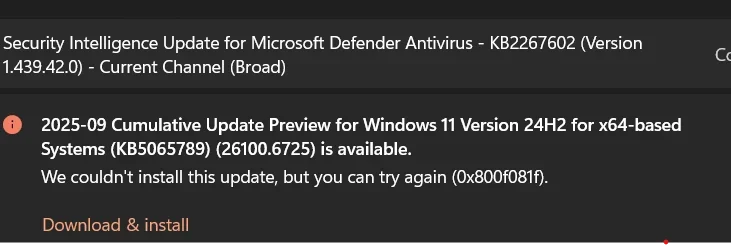
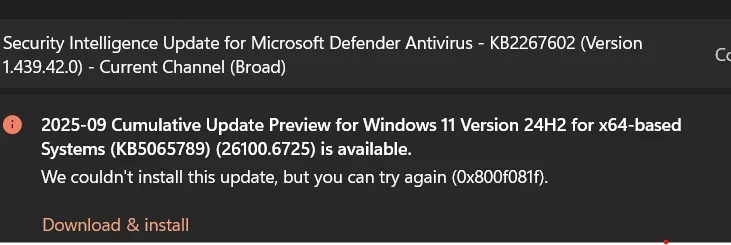
Hi I have a Dell Latitude 3510 windows 11 Home Version 24H2 OS Build 26100.6725. I have 16 gigs of memory. I am so frustrated it wont download the latest version of windows 11 which is 25-09 Cumulative Update for windows 11 Version 24H2 for X64-based systems (KB5065426) (26100.6725 is available,) it says. Does anyone know what do do about this?
 

My Computer

System One

  • OS
    Windows 11 Home
    Computer type
    Laptop
    Manufacturer/Model
    Dell Latitud 3510
    Memory
    16
    Screen Resolution
    1920 X 1200 X 60 hertz
    Keyboard
    Standard PS/2 Keyboard
    Internet Speed
    5G
    Browser
    Firefox
    Antivirus
    Windows defender
Disable your antivirus if you use a 3rd party one. Microsoft Defender should be ok.
People have found this to be an option to fix Windows Updates.
 

My Computers

System One System Two

  • OS
    Windows 11 Pro 25H2 Build 26200.8655
    Computer type
    PC/Desktop
    Manufacturer/Model
    Sin-built 2013
    CPU
    Intel(R) Core(TM) i7-4770K CPU @ 3.50GHz
    Motherboard
    ASUS ROG Maximus VI Formula
    Memory
    32.0 GB of I forget and the box is in storage.
    Graphics Card(s)
    Gigabyte nVidia GeForce GTX 1660 Super OC 6GB
    Sound Card
    Onboard thingy
    Monitor(s) Displays
    5 x LG 25MS500-B - 1 x 24MK430H-B - 1 x Wacom Pro 22" Touch Screen Tablet
    Screen Resolution
    All over the place
    Hard Drives
    Too many to list.
    OS on Samsung 1TB 870 QVO SATA
    PSU
    Silverstone 1500
    Case
    NZXT Phantom 820 Full-Tower Case
    Cooling
    Noctua NH-D15 Elite Class Dual Tower CPU Cooler / 6 x EziDIY 120mm / 2 x Corsair 140mm somethings / 1 x 140mm Thermaltake something / 2 x 200mm Corsair.
    Keyboard
    Corsair K95 / Logitech diNovo Edge Wireless
    Mouse
    Logitech: G402 / G502 / Mx Masters / Mx Air Cordless
    Internet Speed
    2000/500Mbps
    Browser
    All sorts
    Antivirus
    Kaspersky Premium
    Other Info
    ㅤㅤㅤㅤㅤㅤㅤㅤㅤㅤㅤㅤㅤㅤㅤㅤㅤㅤㅤㅤㅤㅤㅤㅤㅤㅤㅤㅤㅤㅤㅤㅤㅤㅤㅤㅤㅤㅤㅤㅤ⠀⠀⠀⠀⠀⠀⠀⠀⠀⠀
    TP-Link BE9300 WiFi 7 Bluetooth 5.4 (Archer TBE550E)
    TP-Link TX201 V1 2.5GB Lan

    Grandstream HT812 - VoIP
    ASUS DSL-AX82U - Mesh
    ASUS RT-AC68U - Mesh
    ASUS RT-BE88U Router

    Brother MFC-L2880DW Printer

    I’m on a horse.
  • Operating System
    Windows 11 Pro 25H2 Build 26200.8655
    Computer type
    Laptop
    Manufacturer/Model
    LENOVO Yoga 7 14IRL8 - 7i EVO OLED 14" Touchscreen i5 12 Core 16GB/512GB
    CPU
    Intel Core 12th Gen i5-1240P Processor (1.7 - 4.4GHz)
    Memory
    16GB LPDDR5 RAM
    Graphics card(s)
    Intel Iris Xe Graphics Processor
    Sound Card
    Optimized with Dolby Atmos®
    Screen Resolution
    QHD 2880 x 1800 OLED
    Hard Drives
    M.2 512GB
    Antivirus
    Defender / Malwarebytes
    Other Info
    …still on a horse.
What issues are you having? Is it throwing any sort of error?
 

My Computer

System One

  • OS
    Windows 11 Pro For Workstations 25H2
    Computer type
    Laptop
    Manufacturer/Model
    Dell Precision 7550
    CPU
    Intel Xeon W-10855M @ 4.9Ghz
    Memory
    32GB OWC ECC DDR4-2666 RAM
    Graphics Card(s)
    iGPU: Intel UHD Graphics P630 | Discrete GPU: NVIDIA Quadro RTX 3000 6GB
    Sound Card
    Realtek Audio
    Monitor(s) Displays
    Integrated Ultrasharp
    Screen Resolution
    1920*1080
    Hard Drives
    OS: Samsung 980 PRO 500GB NVMe
    Data: Western Digital Black SN750 1TB
    PSU
    Dell 180W
    Internet Speed
    1Gbps
    Browser
    Edge Chromium
    Antivirus
    Microsoft Defender
    Other Info
    OpenSUSE Leap 16 VM
    Zorin OS 18 VM
You could also try resetting Windows Update to see if it helps.


My Computers

System One System Two

  • OS
    Windows 11 Pro 25H2 Build 26200.8655
    Computer type
    PC/Desktop
    Manufacturer/Model
    Sin-built 2013
    CPU
    Intel(R) Core(TM) i7-4770K CPU @ 3.50GHz
    Motherboard
    ASUS ROG Maximus VI Formula
    Memory
    32.0 GB of I forget and the box is in storage.
    Graphics Card(s)
    Gigabyte nVidia GeForce GTX 1660 Super OC 6GB
    Sound Card
    Onboard thingy
    Monitor(s) Displays
    5 x LG 25MS500-B - 1 x 24MK430H-B - 1 x Wacom Pro 22" Touch Screen Tablet
    Screen Resolution
    All over the place
    Hard Drives
    Too many to list.
    OS on Samsung 1TB 870 QVO SATA
    PSU
    Silverstone 1500
    Case
    NZXT Phantom 820 Full-Tower Case
    Cooling
    Noctua NH-D15 Elite Class Dual Tower CPU Cooler / 6 x EziDIY 120mm / 2 x Corsair 140mm somethings / 1 x 140mm Thermaltake something / 2 x 200mm Corsair.
    Keyboard
    Corsair K95 / Logitech diNovo Edge Wireless
    Mouse
    Logitech: G402 / G502 / Mx Masters / Mx Air Cordless
    Internet Speed
    2000/500Mbps
    Browser
    All sorts
    Antivirus
    Kaspersky Premium
    Other Info
    ㅤㅤㅤㅤㅤㅤㅤㅤㅤㅤㅤㅤㅤㅤㅤㅤㅤㅤㅤㅤㅤㅤㅤㅤㅤㅤㅤㅤㅤㅤㅤㅤㅤㅤㅤㅤㅤㅤㅤㅤ⠀⠀⠀⠀⠀⠀⠀⠀⠀⠀
    TP-Link BE9300 WiFi 7 Bluetooth 5.4 (Archer TBE550E)
    TP-Link TX201 V1 2.5GB Lan

    Grandstream HT812 - VoIP
    ASUS DSL-AX82U - Mesh
    ASUS RT-AC68U - Mesh
    ASUS RT-BE88U Router

    Brother MFC-L2880DW Printer

    I’m on a horse.
  • Operating System
    Windows 11 Pro 25H2 Build 26200.8655
    Computer type
    Laptop
    Manufacturer/Model
    LENOVO Yoga 7 14IRL8 - 7i EVO OLED 14" Touchscreen i5 12 Core 16GB/512GB
    CPU
    Intel Core 12th Gen i5-1240P Processor (1.7 - 4.4GHz)
    Memory
    16GB LPDDR5 RAM
    Graphics card(s)
    Intel Iris Xe Graphics Processor
    Sound Card
    Optimized with Dolby Atmos®
    Screen Resolution
    QHD 2880 x 1800 OLED
    Hard Drives
    M.2 512GB
    Antivirus
    Defender / Malwarebytes
    Other Info
    …still on a horse.
You could also scroll down to “How to get this update” on the kb5065426 page itself, for other options.


My Computers

System One System Two

  • OS
    Windows 11 Pro 25H2 Build 26200.8655
    Computer type
    PC/Desktop
    Manufacturer/Model
    Sin-built 2013
    CPU
    Intel(R) Core(TM) i7-4770K CPU @ 3.50GHz
    Motherboard
    ASUS ROG Maximus VI Formula
    Memory
    32.0 GB of I forget and the box is in storage.
    Graphics Card(s)
    Gigabyte nVidia GeForce GTX 1660 Super OC 6GB
    Sound Card
    Onboard thingy
    Monitor(s) Displays
    5 x LG 25MS500-B - 1 x 24MK430H-B - 1 x Wacom Pro 22" Touch Screen Tablet
    Screen Resolution
    All over the place
    Hard Drives
    Too many to list.
    OS on Samsung 1TB 870 QVO SATA
    PSU
    Silverstone 1500
    Case
    NZXT Phantom 820 Full-Tower Case
    Cooling
    Noctua NH-D15 Elite Class Dual Tower CPU Cooler / 6 x EziDIY 120mm / 2 x Corsair 140mm somethings / 1 x 140mm Thermaltake something / 2 x 200mm Corsair.
    Keyboard
    Corsair K95 / Logitech diNovo Edge Wireless
    Mouse
    Logitech: G402 / G502 / Mx Masters / Mx Air Cordless
    Internet Speed
    2000/500Mbps
    Browser
    All sorts
    Antivirus
    Kaspersky Premium
    Other Info
    ㅤㅤㅤㅤㅤㅤㅤㅤㅤㅤㅤㅤㅤㅤㅤㅤㅤㅤㅤㅤㅤㅤㅤㅤㅤㅤㅤㅤㅤㅤㅤㅤㅤㅤㅤㅤㅤㅤㅤㅤ⠀⠀⠀⠀⠀⠀⠀⠀⠀⠀
    TP-Link BE9300 WiFi 7 Bluetooth 5.4 (Archer TBE550E)
    TP-Link TX201 V1 2.5GB Lan

    Grandstream HT812 - VoIP
    ASUS DSL-AX82U - Mesh
    ASUS RT-AC68U - Mesh
    ASUS RT-BE88U Router

    Brother MFC-L2880DW Printer

    I’m on a horse.
  • Operating System
    Windows 11 Pro 25H2 Build 26200.8655
    Computer type
    Laptop
    Manufacturer/Model
    LENOVO Yoga 7 14IRL8 - 7i EVO OLED 14" Touchscreen i5 12 Core 16GB/512GB
    CPU
    Intel Core 12th Gen i5-1240P Processor (1.7 - 4.4GHz)
    Memory
    16GB LPDDR5 RAM
    Graphics card(s)
    Intel Iris Xe Graphics Processor
    Sound Card
    Optimized with Dolby Atmos®
    Screen Resolution
    QHD 2880 x 1800 OLED
    Hard Drives
    M.2 512GB
    Antivirus
    Defender / Malwarebytes
    Other Info
    …still on a horse.
Are you using Media Creation Tool for the download ?
Have you run Settings > System >Troubleshoot >Other Troubleshooters to see if it has any entries ?
 

My Computer

System One

  • OS
    win 10
    Computer type
    PC/Desktop
    Manufacturer/Model
    home built
    CPU
    amd ryzen 5-2600
    Motherboard
    gigabyte b450m-ds3h
    Memory
    ng skill sniper x 16gb
    Graphics Card(s)
    nvidea gtx 1050
    Monitor(s) Displays
    benq fp 92
    Hard Drives
    samsung 860 evo 500gb m2 ssd
    PSU
    antec ea550g
    Case
    nzxt noctis 450
    Browser
    edge
General steps for failing windows updates.

1. Run troubleshooter-settings-system-troubleshoot-other troubleshooters-windows update-RUN.

2. Reset Windows update using Brink's tutorial Reset Windows Update in Windows 11 Tutorial

3. Open command prompt as administrator. Enter this command.
dism /online /cleanup-image /restorehealth

Restart computer

4. CLEAN UP COMPONENT STORE - dism /online /cleanup-image /startcomponentcleanup
Analyze and Clean Up Component Store (WinSxS folder) in Windows 11 Tutorial

5. Make sure you have no corrupt system files that is causing this problem. Open a command prompt as administrator and type
dism /online /cleanup-image /restorehealth

When complete restart. Then open command prompt as admin again and run sfc /scannow
Pay attention to the scan results to see if SFC found anything it could not repair

6. Do a repair install. This usually works when nothing else will. Repair Install Windows 11 with an In-place Upgrade Tutorial


My Computers

System One System Two

  • OS
    Windows 11 Pro 25H2 26200.8655
    Computer type
    PC/Desktop
    Manufacturer/Model
    Dell Optiplex 7080
    CPU
    i9-10900 10 core 20 threads
    Motherboard
    DELL 0J37VM
    Memory
    32 gb
    Graphics Card(s)
    none-Intel UHD Graphics 630
    Sound Card
    Integrated Realtek
    Monitor(s) Displays
    Benq 27
    Screen Resolution
    2560x1440
    Hard Drives
    2x1tb Solidigm m.2 nvme /External drives 512gb Samsung m.2 sata+2tb Kingston m2.nvme
    PSU
    500w
    Case
    MT
    Cooling
    Dell Premium
    Keyboard
    Logitech wired
    Mouse
    Logitech wireless
    Internet Speed
    so slow I'm too embarrassed to tell
    Browser
    #1 Edge #2 Firefox
    Antivirus
    Defender+MWB Premium
  • Operating System
    Windows 11 Pro 24H2 26200.8457
    Computer type
    PC/Desktop
    Manufacturer/Model
    Beelink Mini PC SER5
    CPU
    AMD Ryzen 7 6800U
    Memory
    32 gb
    Graphics card(s)
    integrated
    Sound Card
    integrated
    Monitor(s) Displays
    Benq 27
    Screen Resolution
    2560x1440
    Hard Drives
    1TB Crucial nvme
    Keyboard
    Logitech wired
    Mouse
    Logitech wireless
    Internet Speed
    still too embarrassed to tell
    Browser
    Firefox
    Antivirus
    Defender
    Other Info
    System 3 is non compliant Dell 9020 i7-4770/24gb ram Win11 PRO 26200.8457
You can try deleting the Windows Update cache and restart.

1) Open Task Manager and go to Services tab.
2) Find wuserv (Windows Update Service) and click to stop it.
3) Open the C:\Windows\SoftwareDistribution folder.
4) Select all contents (CTRL+A) and press DEL to delete them (move to Recycle Bin) or SHIFT+DEL (delete permanently).
5) Go back to Task Manager, Services and click to start wuserv again.
6) Restart and check Windows Update for new updates.
 

My Computers

System One System Two

  • OS
    Windows 11 Pro 23H2 (5699), 25H2 (8655)
    Computer type
    Laptop
    Manufacturer/Model
    Acer Extensa 5630EZ
    CPU
    Mobile DualCore Intel Core 2 Duo T7250, 2000 MHz
    Motherboard
    Acer Extensa 5630
    Memory
    4GB
    Graphics Card(s)
    Mobile Intel(R) GMA 4500M (Mobile 4 series)
    Sound Card
    Realtek ALC268 @ Intel 82801IB ICH9 - High Definition Audio Controller
    Monitor(s) Displays
    1
    Screen Resolution
    1280x800
    Hard Drives
    Samsung SSD 850 EVO 250GB SATA Device (250 GB, SATA-III)
    Internet Speed
    VDSL 50 Mbps
    Browser
    MICROSOFT EDGE
    Antivirus
    WINDOWS DEFENDER
    Other Info
    Legacy MBR installation, no TPM, no Secure Boot, no WDDM 2.0 graphics drivers, no SSE4.2, cannot get more unsupported ;) This is only my test laptop. I had installed Windows 11 here before upgrading my main PC. For my main PC I use everyday see my 2nd system specs.
  • Operating System
    Windows 11 Pro v25H2 (build 26200.8655)
    Computer type
    PC/Desktop
    Manufacturer/Model
    Custom-built PC
    CPU
    Intel Core-i7 3770 3.40GHz s1155 (3rd generation)
    Motherboard
    Asus P8H61 s1155 ATX
    Memory
    2x Kingston Hyper-X Blu 8GB DDR3-1600
    Graphics card(s)
    GIGABYTE GeForce RTX 3050 WINDFORCE OC V2 6GB (GV-N3050WF2OCV2-6GD)
    Sound Card
    Realtek HD audio (ALC887)
    Monitor(s) Displays
    Sony Bravia KDL-19L4000 19" LCD TV via VGA
    Screen Resolution
    1440x900 32-bit 60Hz
    Hard Drives
    WD Blue SA510 2.5 1000GB SSD as system disk, Western Digital Caviar Purple 4TB SATA III (WD40PURZ) as second
    PSU
    Thermaltake Litepower RGB 550W Full Wired
    Case
    SUPERCASE MIDI-TOWER
    Cooling
    Deepcool Gamma Archer CPU cooler, 1x 8cm fan at the back
    Keyboard
    Mitsumi 101-key PS/2
    Mouse
    Sunnyline OptiEye PS/2
    Internet Speed
    100Mbps
    Browser
    Microsoft Edge, Mozilla Firefox
    Antivirus
    Microsoft Windows Defender
    Other Info
    Legacy BIOS (MBR) installation, no TPM, no Secure Boot, WDDM 3.0 graphics drivers, WEI score 7.4
Disable your antivirus if you use a 3rd party one. Microsoft Defender should be ok.
People have found this to be an option to fix Windows Updates.
I do not have a third party virus.
 

My Computer

System One

  • OS
    Windows 11 Home
    Computer type
    Laptop
    Manufacturer/Model
    Dell Latitud 3510
    Memory
    16
    Screen Resolution
    1920 X 1200 X 60 hertz
    Keyboard
    Standard PS/2 Keyboard
    Internet Speed
    5G
    Browser
    Firefox
    Antivirus
    Windows defender
You can try deleting the Windows Update cache and restart.

1) Open Task Manager and go to Services tab.
2) Find wuserv (Windows Update Service) and click to stop it.
3) Open the C:\Windows\SoftwareDistribution folder.
4) Select all contents (CTRL+A) and press DEL to delete them (move to Recycle Bin) or SHIFT+DEL (delete permanently).
5) Go back to Task Manager, Services and click to start wuserv again.
6) Restart and check Windows Update for new updates.
I found it wuaserv is already stopped.
 

My Computer

System One

  • OS
    Windows 11 Home
    Computer type
    Laptop
    Manufacturer/Model
    Dell Latitud 3510
    Memory
    16
    Screen Resolution
    1920 X 1200 X 60 hertz
    Keyboard
    Standard PS/2 Keyboard
    Internet Speed
    5G
    Browser
    Firefox
    Antivirus
    Windows defender
Hi I have a Dell Latitude 3510 windows 11 Home Version 24H2 OS Build 26100.6725. I have 16 gigs of memory. I am so frustrated it wont download the latest version of windows 11 which is 25-09 Cumulative Update for windows 11 Version 24H2 for X64-based systems (KB5065426) (26100.6725 is available,) it says. Does anyone know what do do about this?
You could always download it manually then instal it


My Computers

System One System Two

  • OS
    Windows 11 Enterprise 25H2 26200 7462
    Computer type
    PC/Desktop
    Manufacturer/Model
    Custom Build
    CPU
    Intel XEON E5-2699 v3
    Motherboard
    ASUS X99-A
    Memory
    64GB Teamgroup UD4-3600
    Graphics Card(s)
    NVIDIA GeForce GTX 1080 Ti
    Sound Card
    Integrated
    Monitor(s) Displays
    ACER X34 Predator
    Screen Resolution
    3440 x 1440
    Hard Drives
    Crucial CT1000P 3P SSD8 1TB
    Crucial CT1000 BX500 SSD 1TB
    PSU
    GameMax Pro
    Case
    Fractal Design
    Cooling
    Corsair H110iGT + 6 140mm Fans
    Keyboard
    Corsair K4
    Mouse
    G-Skill G502
    Internet Speed
    300MBs
    Browser
    Chrome
    Antivirus
    OEM
    Other Info
    ASUS RT-AC87U Router
  • Operating System
    25H2 26200.5074
    Computer type
    Laptop
    Manufacturer/Model
    ASUS X555LA
    Memory
    8GB
    Browser
    Chrome
    Antivirus
    OEM
You can try deleting the Windows Update cache and restart.

1) Open Task Manager and go to Services tab.
2) Find wuserv (Windows Update Service) and click to stop it.
3) Open the C:\Windows\SoftwareDistribution folder.
4) Select all contents (CTRL+A) and press DEL to delete them (move to Recycle Bin) or SHIFT+DEL (delete permanently).
5) Go back to Task Manager, Services and click to start wuserv again.
6) Restart and check Windows Update for new updates.
Ok I did this and it failed.
 

Attachments

  • Screenshot 2025-10-09 083629.webp
    Screenshot 2025-10-09 083629.webp
    19.5 KB · Views: 3

My Computer

System One

  • OS
    Windows 11 Home
    Computer type
    Laptop
    Manufacturer/Model
    Dell Latitud 3510
    Memory
    16
    Screen Resolution
    1920 X 1200 X 60 hertz
    Keyboard
    Standard PS/2 Keyboard
    Internet Speed
    5G
    Browser
    Firefox
    Antivirus
    Windows defender
Ok how do U down load this manually? This is the error I get get when I did

spapakons method which did not work.​


Attachments

  • Screenshot 2025-10-09 083629.webp
    Screenshot 2025-10-09 083629.webp
    19.5 KB · Views: 0

My Computer

System One

  • OS
    Windows 11 Home
    Computer type
    Laptop
    Manufacturer/Model
    Dell Latitud 3510
    Memory
    16
    Screen Resolution
    1920 X 1200 X 60 hertz
    Keyboard
    Standard PS/2 Keyboard
    Internet Speed
    5G
    Browser
    Firefox
    Antivirus
    Windows defender
General steps for failing windows updates.

1. Run troubleshooter-settings-system-troubleshoot-other troubleshooters-windows update-RUN.

2. Reset Windows update using Brink's tutorial Reset Windows Update in Windows 11 Tutorial

3. Open command prompt as administrator. Enter this command.
dism /online /cleanup-image /restorehealth

Restart computer

4. CLEAN UP COMPONENT STORE - dism /online /cleanup-image /startcomponentcleanup
Analyze and Clean Up Component Store (WinSxS folder) in Windows 11 Tutorial

5. Make sure you have no corrupt system files that is causing this problem. Open a command prompt as administrator and type
dism /online /cleanup-image /restorehealth

When complete restart. Then open command prompt as admin again and run sfc /scannow
Pay attention to the scan results to see if SFC found anything it could not repair

6. Do a repair install. This usually works when nothing else will. Repair Install Windows 11 with an In-place Upgrade Tutorial
I have done all the above previously except a repair install. I will try that. Thanks!
 

My Computer

System One

  • OS
    Windows 11 Home
    Computer type
    Laptop
    Manufacturer/Model
    Dell Latitud 3510
    Memory
    16
    Screen Resolution
    1920 X 1200 X 60 hertz
    Keyboard
    Standard PS/2 Keyboard
    Internet Speed
    5G
    Browser
    Firefox
    Antivirus
    Windows defender
OK, I had to do a total Dell OS Recovery Tool recovery.. So it will take some time for all that I will let you know what happens. Thanks
 

My Computer

System One

  • OS
    Windows 11 Home
    Computer type
    Laptop
    Manufacturer/Model
    Dell Latitud 3510
    Memory
    16
    Screen Resolution
    1920 X 1200 X 60 hertz
    Keyboard
    Standard PS/2 Keyboard
    Internet Speed
    5G
    Browser
    Firefox
    Antivirus
    Windows defender
I used the Dell OS Recovery and it worked. It took hours to download it was unbelievable! I just now got finished with the download and it is 7pm I started at 11:00am. So yeah that was crazy! Thanks all for the input.
 

My Computer

System One

  • OS
    Windows 11 Home
    Computer type
    Laptop
    Manufacturer/Model
    Dell Latitud 3510
    Memory
    16
    Screen Resolution
    1920 X 1200 X 60 hertz
    Keyboard
    Standard PS/2 Keyboard
    Internet Speed
    5G
    Browser
    Firefox
    Antivirus
    Windows defender

Latest Support Threads

Back
Top Bottom