Problems with Two laptops connecting on the same network


JoeB52

New member
Local time
11:47 PM
Posts
1
OS
windows 11
I have two windows 11 laptops, laptop A can see laptop B, but laptop B cannot see laptop A. I have tried to compare both to see what is different between the two but have not found anything.
 

My Computer My Computer

At a glance

windows 11
OS
windows 11
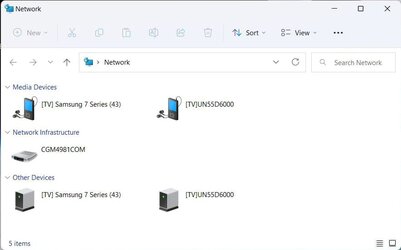
I know what you mean I have fighting this problem for years. I have two computer currently turned on. Sometimes they show up but as you can see below they are not showing up.

Network1.jpgNetwork2.jpg

On tenforums.com I found this batch file called "FDResPub.bat"
net stop FDResPub
net start FDResPub

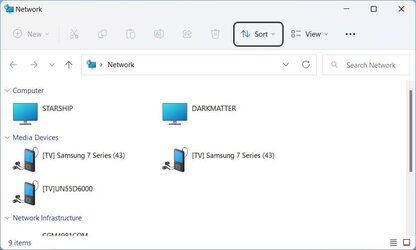
If I run this batch file on each computer then they both show up in Network. If I set this batch file to automatically start then that may also help.

Network3.jpg

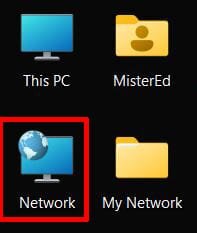
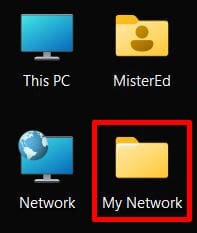
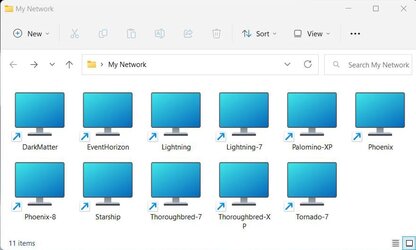
As an alternate workaround I have created a folder on my desktop called "My Network". In this folder I have shortcuts to all the computers I have.

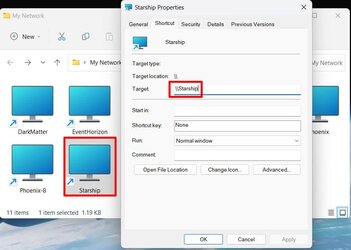
Network4.jpgNetwork5.jpg

Here is how I created a shortcut to the computer "Starship". The shortcut consists of "\\" + the computer name. Note you can only create a shortcut to a computer if the computer is turned on and on the network.

Network6.jpg
 

My Computers My Computers

  • At a glance

    Windows 11 Pro 25H2 (26200.6901)AMD Ryzen 7 6800H with Radeon 680M GPU (486MB...Crucial DDR5-4800 (2400MHz) 32GB (2 x 16GB)NVIDIA RTX 3060 Laptop (6GB RAM)
    OS
    Windows 11 Pro 25H2 (26200.6901)
    Computer type
    Laptop
    Manufacturer/Model
    ASUS TUF Gaming A15 (2022)
    CPU
    AMD Ryzen 7 6800H with Radeon 680M GPU (486MB RAM)
    Memory
    Crucial DDR5-4800 (2400MHz) 32GB (2 x 16GB)
    Graphics Card(s)
    NVIDIA RTX 3060 Laptop (6GB RAM)
    Sound Card
    n/a
    Monitor(s) Displays
    15.6-inch
    Screen Resolution
    1920x1080 300Hz
    Hard Drives
    2 x Samsung 990 Evo Plus (2TB M.2 NVME SSD)
    PSU
    n/a
    Mouse
    Wireless Mouse M510
    Internet Speed
    2100Mbps/300Mbps
    Browser
    Firefox
    Antivirus
    Malwarebytes
  • At a glance

    Windows 11 Pro 25H2 (26200.8246)AMD Ryzen 7 5700X3DG.SKILL Flare X 32GB (2x16GB) DDR4ASUS ROG-STRIX-RTX3060TI-08G-V2-GAMING (RTX 3...
    Operating System
    Windows 11 Pro 25H2 (26200.8246)
    Computer type
    PC/Desktop
    Manufacturer/Model
    Custom build
    CPU
    AMD Ryzen 7 5700X3D
    Motherboard
    ASUS ROG Strix B550-F Gaming WiFi II
    Memory
    G.SKILL Flare X 32GB (2x16GB) DDR4
    Graphics card(s)
    ASUS ROG-STRIX-RTX3060TI-08G-V2-GAMING (RTX 3060-Ti, 8GB RAM)
    Monitor(s) Displays
    Samsung G50D IPS 27"
    Screen Resolution
    1440p/180Hz
    Hard Drives
    SAMSUNG 990 EVO Plus (2TB] M.2 NVME SSD
    SAMSUNG 990 EVO Plus (4TB) M.2 NVME SSD
    PSU
    Corsair RM750x (750 watts)
    Case
    Cooler Master MasterCase 5
    Cooling
    Scythe Mugen 6
    Keyboard
    Logitech K520 (MK540 keyboard/mouse combo)
    Mouse
    Logitech M310 (MK540 keyboard/mouse combo)
    Internet Speed
    2100 Mbps down / 300 Mbps up
    Browser
    Firefox, Edge, Chrome
    Antivirus
    Malwarebytes (Premium)
    Other Info
    ASUS Blu-ray Burner BW-16D1HT (SATA) || Western Digital Easystore 20TB USB 3.0 external hard drive used with Acronis True Image 2025 backup software || HP OfficeJet Pro 6975 Printer/Scanner
Windows 10 and 11 have a FDResPub service problem and I agree with Mistered. I handle the issue differently. I created a task which resets the service after a delay and runs a script.

Use Task Scheduler to create a new task:

Name: FDResPub

Description: Restart the FDResPub service

Run whether user is logged on or not.
Do not store password

Run with highest privileges.

Configure for: Windows 10

Triggers: At log on of any user plus delay 3 minute, enabled

Actions: Start a program C:\Scripts\FDResPub.cmd

Optional start at: C:\Scripts

put scripts folder in c- drive

 

Attachments

My Computer My Computer

At a glance

Windows 11 Pro 64-bitIntel Core i9-14900KF64 GB4083MB NVIDIA GeForce RTX 4090
OS
Windows 11 Pro 64-bit
Computer type
PC/Desktop
Manufacturer/Model
Alienware Aurora R16
CPU
Intel Core i9-14900KF
Motherboard
Alienware 0RF96M (U3E1)
Memory
64 GB
Graphics Card(s)
4083MB NVIDIA GeForce RTX 4090
Monitor(s) Displays
ROG XG43UQ 43 inch monitor
Screen Resolution
(3840x2160@120Hz)
Hard Drives
Samsung SSD 870 EVO 2TB
NVMe Samsung 2048GB
Back
Top Bottom