Programs in startup folder very slow to be started


NickJP

Well-known member
Member
Local time
7:21 PM
Posts
33
OS
Windows 11 Pro
I have three programs in my startup folder - two from Xrite to set the colour profile of my monitors, and Protonmail Bridge for interfacing Protonmail to Thunderbird. For the past few months, these programs are taking two or three minutes after I login before they start. Any program that I start manually from the start menu starts in the second or two I would expect.

The PC is definitely not underpowered - Inter i5-12600K processor, 128Gb RAM, all discs are M.2 NVMe SSDs. The installation of Win11 on it is about three years old, and I never noticed this delay until the past few months. A web search turns up several suggestions that the delay appeared after the installation of KB5064080, which was the release of Build 22631.5840 in August last year. Any suggestions on how to fix the problem?
 
Windows Build/Version
Build 26200.7623

My Computer

System One

  • OS
    Windows 11 Pro
    Computer type
    PC/Desktop
    Manufacturer/Model
    Gigabyte
    CPU
    Intel i5-12600K
    Motherboard
    Z690 Aorus Pro
    Memory
    128Gb
    Graphics Card(s)
    nVidia Quadro P1000
    Sound Card
    N/A
    Monitor(s) Displays
    BenQ PD3205U, Eizo EV3237
    Screen Resolution
    3840x2160, 3840x2160
    Hard Drives
    Samsung SSD 980 Pro
    Samsung SSD 970 EVO Plus
    Sabrent Rocket Q
    Case
    Be Quiet
there are 2 start up folders
one in the user folder ..
C:\Users\XxXxX\AppData\Roaming\Microsoft\Windows\Start Menu\Programs\Startup

and one in the system ..
C:\ProgramData\Microsoft\Windows\Start Menu\Programs\Startup

i copy all my required start up shortcuts to the system start up folder
just cut and paste from the 'user startup folder'
into the 'system startup folder'

see if that improves program start up times.
best of luck Steve ..
 

My Computers

System One System Two

  • OS
    Debian Trixie KDE Windows 11 Home
    Computer type
    PC/Desktop
    Manufacturer/Model
    HP 24" AiO
    CPU
    Ryzen 7 5825u
    Motherboard
    HP
    Memory
    64GB DDR4 3200
    Graphics Card(s)
    Ryzen 7 5825u
    Sound Card
    RealTek
    Monitor(s) Displays
    24" HP AiO
    Screen Resolution
    1920 x 1080 @60 Hz
    Hard Drives
    1TB WD Blue SN580 M2 SSD Partitioned.
    2x 1TB USB HDD External Backup/Storage.
    PSU
    90W external power brick
    Case
    24" All in One
    Cooling
    Default Air Cooling
    Keyboard
    HP WiFi UK extended
    Mouse
    HP WiFi 3 Button
    Internet Speed
    1GB full fibre
    Browser
    Edge & Firefox
    Antivirus
    AVG Internet Security/Windows Defender
    Other Info
    Mainly Open Source Software
  • Operating System
    Ubuntu 22.04.5 LTS
    Computer type
    Laptop
    Manufacturer/Model
    Dell 13" Latitude 2017
    CPU
    i5 7200u
    Motherboard
    Dell
    Memory
    16GB DDR4
    Graphics card(s)
    Intel
    Sound Card
    Intel
    Monitor(s) Displays
    13" Dell Laptop
    Hard Drives
    250GB Crucial 2.5" SSD
    Mouse
    Generic WiFi 3 button
    Internet Speed
    WiFi only
    Browser
    Firefox
    Antivirus
    ClamAV TK
    Other Info
    Mainly Open Source Software
Two of the three startup shortcuts are already in the system startup folder, with the other being in the user startup folder. All three of them are very slow to start, so I don't think that being in the user or system startup folder comes into the equation.
 

My Computer

System One

  • OS
    Windows 11 Pro
    Computer type
    PC/Desktop
    Manufacturer/Model
    Gigabyte
    CPU
    Intel i5-12600K
    Motherboard
    Z690 Aorus Pro
    Memory
    128Gb
    Graphics Card(s)
    nVidia Quadro P1000
    Sound Card
    N/A
    Monitor(s) Displays
    BenQ PD3205U, Eizo EV3237
    Screen Resolution
    3840x2160, 3840x2160
    Hard Drives
    Samsung SSD 980 Pro
    Samsung SSD 970 EVO Plus
    Sabrent Rocket Q
    Case
    Be Quiet
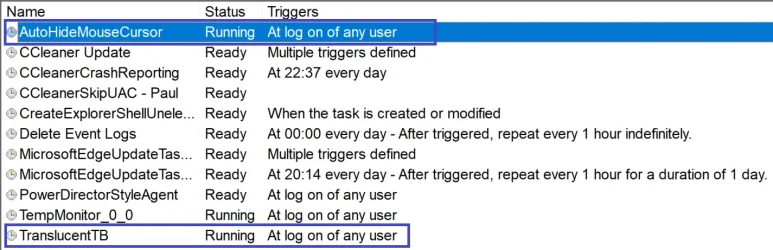
I notice the same issue. The way I got around it is by adding the 2 apps I had (AutoHideMouseCursor_x64 and TranslucentTB) to task scheduler after setting the apps to not start at startup which removes the items in the start up folder. Actually with TranslucentTB I switched to the portable version.

I think it may be due to my AV (Eset Nod32) causing start up apps to be delayed until it is fully running.

Have a play...

Screenshot 2026-01-27 084259.webp

EDIT: Think I need to remove some of those entries...
 

My Computer

System One

  • OS
    Windows 11 Pro 25H2 26200.7922
    Computer type
    PC/Desktop
    Manufacturer/Model
    Local shop built (KC Computers Ltd)
    CPU
    Intel Core i9 13900F
    Motherboard
    Gigabyte Z690 Gaming X (rev. 1.0/1.1) - (BIOS: F32 09 18 2025)
    Memory
    2 x Kingston Fury 32gb DDR5 5600 Beast
    Graphics Card(s)
    Gigabyte Eagle (Nvidia) RTX 3060
    Sound Card
    Chord Async USB 44.1kHz - 384kHz 2Qute DAC
    Monitor(s) Displays
    Gigabyte AORUS FO32U2 32” OLED Flat Gaming Monitor, 0.03ms, KVM, 250 cd/m2, FreeSync Premium Pro, HDR True Black 400
    Screen Resolution
    3840 x 2160 (UHD), 240Hz
    Hard Drives
    1 x KINGSTON NVMe M.2 SSDSKC3000D2048G 2TB
    1 x Samsung SSD 870 EVO 250GB
    2 x Crucial CT4000MX500SSD1 4TB
    2 x Crucial CT2000MX500SSD1 2TB
    1 x Crucial CT250MX500SSD1 250.0 GB
    PSU
    Gigabyte 750w
    Case
    Fractal Torrent
    Cooling
    Stock Intel CPU, 2 x Fractal 180mm PWM (front), 3 x Fractal 140mm PWM (bottom)
    Keyboard
    Logitech MX Mechanical Wireless Illuminated Performance Keyboard
    Mouse
    Logitech MX Master 3S Wireless Performance Mouse
    Internet Speed
    900 Mbps/900 Mbps Trooli FTTP
    Browser
    Firefox
    Antivirus
    Eset Nod32
Did you try the disable delay of running startup apps shown here? Made a huge difference for me as they now start immediately. If you have a newer high power CPU and a lot of RAM you definitely want to turn off the built in delay.


My Computers

System One System Two

  • OS
    Windows 11 25H2
    Computer type
    Laptop
    Manufacturer/Model
    Alienware 18 Area-51
    CPU
    Intel Core Ultra 9 275HX (24-Core)
    Motherboard
    Alienware
    Memory
    64GB DDR5 6400MT/s
    Graphics Card(s)
    NVIDIA GeForce RTX 5080 and Intel UHD Graphics
    Sound Card
    Onboard, Realtek high-performance Audio chips (ALC3329 & ALC1708))
    Monitor(s) Displays
    300HZ 18-inch QHD 500 nit Comfort View+
    Screen Resolution
    2560 x 1600
    Hard Drives
    2TB NVMe M.2 PCIe Gen 5 SSD
    Case
    Magnesium Alloy
    Cooling
    Advanced Cryo-Tech Quad-Fan Cooling system & large vapor chamber
    Keyboard
    Cherry MX ultra low profile mechanical keyboard with per key AlienFX RGB lighting
    Mouse
    Logitech MX Master 4
    Browser
    Vivaldi (main), Firefox, Chrome, Edge
    Antivirus
    MS Defender and Malwarebytes Free
  • Operating System
    Windows 11 25H2
    Computer type
    Laptop
    Manufacturer/Model
    Microsoft Surface Laptop 7
    CPU
    Qualcomm Snapdragon X Elite (12 Core) ARM based CPU
    Motherboard
    Microsoft Corp.
    Memory
    16GB LPDDR5
    Graphics card(s)
    Qualcomm Adreno X1-85
    Sound Card
    Omnisonic speakers with Dolby Atmos spatial sound
    Monitor(s) Displays
    120 Hz 13.8-inch 600 nit PixelSense Flow touchscreen
    Screen Resolution
    2304x1536
    Hard Drives
    1TB NVMe Gen 4 SSD
    Case
    Anodized Aluminum
    Cooling
    Traditional active cooling fan system
    Keyboard
    Mechanical QWERTY, backlit when in use
    Mouse
    Logitech MX Master 4 and Surface Arc Mouse
    Browser
    Vivaldi (main), Firefox, Chrome, Edge
    Antivirus
    MS Defender and Malwarebytes Free
I already had the dword value StartupDelayInMSec in HKEY_CURRENT_USER\Software\Microsoft\Windows\CurrentVersion\Explorer\Serialize set to 0. I'll try adding WaitForIdleState dword as well and see if that fixes things.
 

My Computer

System One

  • OS
    Windows 11 Pro
    Computer type
    PC/Desktop
    Manufacturer/Model
    Gigabyte
    CPU
    Intel i5-12600K
    Motherboard
    Z690 Aorus Pro
    Memory
    128Gb
    Graphics Card(s)
    nVidia Quadro P1000
    Sound Card
    N/A
    Monitor(s) Displays
    BenQ PD3205U, Eizo EV3237
    Screen Resolution
    3840x2160, 3840x2160
    Hard Drives
    Samsung SSD 980 Pro
    Samsung SSD 970 EVO Plus
    Sabrent Rocket Q
    Case
    Be Quiet
Yes, adding the WaitForIdleState dword value set to zero has got rid of the startup delay...
 

My Computer

System One

  • OS
    Windows 11 Pro
    Computer type
    PC/Desktop
    Manufacturer/Model
    Gigabyte
    CPU
    Intel i5-12600K
    Motherboard
    Z690 Aorus Pro
    Memory
    128Gb
    Graphics Card(s)
    nVidia Quadro P1000
    Sound Card
    N/A
    Monitor(s) Displays
    BenQ PD3205U, Eizo EV3237
    Screen Resolution
    3840x2160, 3840x2160
    Hard Drives
    Samsung SSD 980 Pro
    Samsung SSD 970 EVO Plus
    Sabrent Rocket Q
    Case
    Be Quiet
adding the WaitForIdleState dword value set to zero has got rid of the startup delay
Confirmed here as well. I was wondering why the apps in there were taking a while to start (only a minute, but still).
 

My Computer

System One

  • OS
    Windows 11 Pro
Back
Top Bottom