Question about network security when adding a Win 7 laptop occasionally


PBzeer

Active member
Local time
4:01 PM
Posts
45
OS
Windows 11 Home
My current network (wired) consists of 2 Win 11 pc's and a NAS. My security concern, is about when I use either of my Win 7 laptops (for running old programs that won't install above 7, and barely on it). For Internet, would it be better to connect via wifi (I have a wired/wifi modem), or connect via ethernet to the network, or does it really matter, security-wise? Obviously, I'd prefer to connect to the network to have all the resources available (NAS, DAS, external drives). I'm probably being paranoid, but figured I might as well get some opinions on it.
 

My Computers

System One System Two

  • OS
    Windows 11 Home
    Computer type
    PC/Desktop
    Manufacturer/Model
    IBuyPower/SMI7N5701
    CPU
    Intel Core i7 14700F
    Motherboard
    ASUS PRIME B760M-A AX6 II
    Memory
    32gb DDR5 5200MHz
    Graphics Card(s)
    Nvidia RTX 5070 12gb
    Sound Card
    Toshiba Dynadock Audio
    Monitor(s) Displays
    Dell P2214h
    Screen Resolution
    1920 x 1080
    Hard Drives
    AGI AI818 M.2 PCIe Gen4 SSD
    PSU
    750W 80 PLUS Gold PSU
    Case
    iBUYPOWER Slate 8 Mesh Pro
    Cooling
    Air Cooled
  • Operating System
    Windows 11 Pro upgraded from 10
    Computer type
    PC/Desktop
    Manufacturer/Model
    Intel/NUC 10i7FNH
    CPU
    i7 10710U
    Memory
    16GB
    Graphics card(s)
    Integrated Intel UHD Graphics 620
    Sound Card
    On board
    Monitor(s) Displays
    Dell P2214h
    Screen Resolution
    1920 x 1080
My current network (wired) consists of 2 Win 11 pc's and a NAS. My security concern, is about when I use either of my Win 7 laptops (for running old programs that won't install above 7, and barely on it). For Internet, would it be better to connect via wifi (I have a wired/wifi modem), or connect via ethernet to the network, or does it really matter, security-wise? Obviously, I'd prefer to connect to the network to have all the resources available (NAS, DAS, external drives). I'm probably being paranoid, but figured I might as well get some opinions on it.
wont matter. as long as the firewall and av (you can install windows defender (security essentials) on win 7) are up to date and have at least the default firewall settings enabled...
 

My Computer

System One

  • OS
    Windows 11 Pro
I'm not so sure about the wired vs wireless but my gut reaction says that wired would be a better choice because there have been a number of WiFi related security vulnerabilities patched over time that Windows 7 will not have fixes for. Of course, that might be way less of a problem on a corporate network, but caution is still a good idea.

But I would be more concerned with the bazillion other unpatched vulnerabilities in Win 7. To my mind, running Win 7 is like sticking your finger in a light bulb socket and then being surprised when you get a shock
:-)

Just look at how many issues get addressed EVERY month in Windows 10 and 11. It is literally dozens. So, we can assume that with Windows 7 there are literally HUNDREDS of unpatched vulnerabilities since there are years of unpatched issues.

All I can say is that I hope you have good backups "just in case"!
 

My Computers

System One System Two

  • OS
    Win11 Pro 25H2 (RTM+)
    Computer type
    PC/Desktop
    Manufacturer/Model
    Acemagic
    CPU
    Intel i7-14650HX
    Memory
    32 GB
    Graphics Card(s)
    No GPU - Built-in Intel Graphics
    Sound Card
    Integrated
    Monitor(s) Displays
    Varies as machine will often be moved to locations with different monitors
    Screen Resolution
    Varies
    Hard Drives
    1 x 1TB Gen 4 NVMe SSD
    PSU
    120W Power Brick
    Keyboard
    Corsair K70 Max RGB Magnetic Keyboard
    Mouse
    Logitech MX Master 3
    Internet Speed
    1Gb Up / 1 Gb Down
    Browser
    Edge
    Antivirus
    Windows Defender
  • Operating System
    Win11 Pro 25H2 (RTM+)
    Computer type
    Laptop
    Manufacturer/Model
    Lenovo ThinkBook 13x Gen 2
    CPU
    Intel i7-1255U
    Memory
    16 GB
    Graphics card(s)
    Intel Iris Xe Graphics
    Sound Card
    Realtek® ALC3306-CG codec
    Monitor(s) Displays
    13.3-inch IPS Display
    Screen Resolution
    WQXGA (2560 x 1600)
    Hard Drives
    2 TB 4 x 4 NVMe SSD
    PSU
    USB-C / Thunderbolt 4 Power / Charging
    Keyboard
    Backlit, spill resistant keyboard
    Mouse
    Buttonless Glass Precision Touchpad
    Internet Speed
    1Gb Up / 1Gb Down
    Browser
    Edge
    Antivirus
    Windows Defender
    Other Info
    WiFi 6e / Bluetooth 5.1 / Facial Recognition / Fingerprint Sensor / ToF (Time of Flight) Human Presence Sensor
I'm not so sure about the wired vs wireless but my gut reaction says that wired would be a better choice because there have been a number of WiFi related security vulnerabilities patched over time that Windows 7 will not have fixes for. Of course, that might be way less of a problem on a corporate network, but caution is still a good idea.

But I would be more concerned with the bazillion other unpatched vulnerabilities in Win 7. To my mind, running Win 7 is like sticking your finger in a light bulb socket and then being surprised when you get a shock
:-)

Just look at how many issues get addressed EVERY month in Windows 10 and 11. It is literally dozens. So, we can assume that with Windows 7 there are literally HUNDREDS of unpatched vulnerabilities since there are years of unpatched issues.

All I can say is that I hope you have good backups "just in case"!
It's being aware of those vulnerabilities that prompted my question. I don't HAVE to connect to the Internet for what I use them for, it just makes things easier if I do. So I was curious about which method of connecting would be more secure.
 

My Computers

System One System Two

  • OS
    Windows 11 Home
    Computer type
    PC/Desktop
    Manufacturer/Model
    IBuyPower/SMI7N5701
    CPU
    Intel Core i7 14700F
    Motherboard
    ASUS PRIME B760M-A AX6 II
    Memory
    32gb DDR5 5200MHz
    Graphics Card(s)
    Nvidia RTX 5070 12gb
    Sound Card
    Toshiba Dynadock Audio
    Monitor(s) Displays
    Dell P2214h
    Screen Resolution
    1920 x 1080
    Hard Drives
    AGI AI818 M.2 PCIe Gen4 SSD
    PSU
    750W 80 PLUS Gold PSU
    Case
    iBUYPOWER Slate 8 Mesh Pro
    Cooling
    Air Cooled
  • Operating System
    Windows 11 Pro upgraded from 10
    Computer type
    PC/Desktop
    Manufacturer/Model
    Intel/NUC 10i7FNH
    CPU
    i7 10710U
    Memory
    16GB
    Graphics card(s)
    Integrated Intel UHD Graphics 620
    Sound Card
    On board
    Monitor(s) Displays
    Dell P2214h
    Screen Resolution
    1920 x 1080
I believe in getting a device's full life, but I do have enough sense to realize at some point one has to be retired. Yours has to be at least 13 years old; probably older since Windows 8 came out in 2012. Even if that old Windows 7 still runs OK, no way would I connect it to the internet. I've noticed a few newbies here still do, but I've dealt with too many nasties that managed to get into patched systems to trust one completely full of holes.
 

My Computers

System One System Two

  • OS
    Windows 11 Pro 25H2
    Computer type
    PC/Desktop
    Manufacturer/Model
    Dell Optiplex 7080
    CPU
    i9-10900 10 core 20 threads
    Motherboard
    DELL 0J37VM
    Memory
    32 gb
    Graphics Card(s)
    none-Intel UHD Graphics 630
    Sound Card
    Integrated Realtek
    Monitor(s) Displays
    Benq 27
    Screen Resolution
    2560x1440
    Hard Drives
    2x1tb Solidigm m.2 nvme /External drives 512gb Samsung m.2 sata+2tb Kingston m2.nvme
    PSU
    500w
    Case
    MT
    Cooling
    Dell Premium
    Keyboard
    Logitech wired
    Mouse
    Logitech wireless
    Internet Speed
    so slow I'm too embarrassed to tell
    Browser
    #1 Edge #2 Firefox
    Antivirus
    Defender+MWB Premium
  • Operating System
    Windows 11 Pro 24H2 26200.8457
    Computer type
    PC/Desktop
    Manufacturer/Model
    Beelink Mini PC SER5
    CPU
    AMD Ryzen 7 6800U
    Memory
    32 gb
    Graphics card(s)
    integrated
    Sound Card
    integrated
    Monitor(s) Displays
    Benq 27
    Screen Resolution
    2560x1440
    Hard Drives
    1TB Crucial nvme
    Keyboard
    Logitech wired
    Mouse
    Logitech wireless
    Internet Speed
    still too embarrassed to tell
    Browser
    Firefox
    Antivirus
    Defender
    Other Info
    System 3 is non compliant Dell 9020 i7-4770/24gb ram Win11 PRO 26200.8457
if used, one should also download and run the latest Simplix patch. will bring win 7 as up-to-date as possible.
 

My Computer

System One

  • OS
    Windows 11 Pro
I believe in getting a device's full life, but I do have enough sense to realize at some point one has to be retired. Yours has to be at least 13 years old; probably older since Windows 8 came out in 2012. Even if that old Windows 7 still runs OK, no way would I connect it to the internet. I've noticed a few newbies here still do, but I've dealt with too many nasties that managed to get into patched systems to trust one completely full of holes.
It's not so much getting it's "full life" as it is having something to run some older programs that I can't find any better "modern" programs to replace them.

A follow up question to all. Doesn't someone have to get past your router firewall, before they can get to whatever pc you're using?
 

My Computers

System One System Two

  • OS
    Windows 11 Home
    Computer type
    PC/Desktop
    Manufacturer/Model
    IBuyPower/SMI7N5701
    CPU
    Intel Core i7 14700F
    Motherboard
    ASUS PRIME B760M-A AX6 II
    Memory
    32gb DDR5 5200MHz
    Graphics Card(s)
    Nvidia RTX 5070 12gb
    Sound Card
    Toshiba Dynadock Audio
    Monitor(s) Displays
    Dell P2214h
    Screen Resolution
    1920 x 1080
    Hard Drives
    AGI AI818 M.2 PCIe Gen4 SSD
    PSU
    750W 80 PLUS Gold PSU
    Case
    iBUYPOWER Slate 8 Mesh Pro
    Cooling
    Air Cooled
  • Operating System
    Windows 11 Pro upgraded from 10
    Computer type
    PC/Desktop
    Manufacturer/Model
    Intel/NUC 10i7FNH
    CPU
    i7 10710U
    Memory
    16GB
    Graphics card(s)
    Integrated Intel UHD Graphics 620
    Sound Card
    On board
    Monitor(s) Displays
    Dell P2214h
    Screen Resolution
    1920 x 1080
Not in the case of WiFi. They only need to be nearby. But those types of attacks are pretty difficult to pull off, and unless you're someone important, you're probably not a target.

Windows 7 supports WPA2. Make sure your wireless network is set to use that, and you should be golden. Technically, wired is the safest option, but wireless is good enough if done properly.
 

My Computer

System One

  • OS
    Windows 11 Pro 25H2
    Computer type
    PC/Desktop
    Manufacturer/Model
    Intel NUC12WSHi7
    CPU
    12th Gen Core i7-1260P
    Motherboard
    NUC12WSBi7
    Memory
    64 GB Micron PC4-25600
    Graphics Card(s)
    Intel Iris Xe Graphics
    Sound Card
    on-board Realtek HD Audio
    Monitor(s) Displays
    Dell U3219Q
    Screen Resolution
    3840 x 2160
    Hard Drives
    Samsung SSD 990 PRO 1TB
    Crucial MX500 2 TB
    Antivirus
    Microsoft Defender
I'll add some clarification of why there isn't much a difference.

When we talk about a wired or wireless connection the only difference is the medium by which data is transmitted, therefore the the only difference is layer 1 of the OSI networking model. As this is the layer 1 (aka physical layer) they are both susceptible to the same risk although it's presented a bit differently. The risk is snooping.

On a wired connection that risk can be exploited by physically tapping the wired connection. This can be easy to detect because someone needs to come into your home and install a physical tap. Snooping is achieved; however, it's not that useful since most modern protocols implement encryption at layer 6 the presentation layer (https, ssh etc) so snooping isn't effective.

On a wireless connection, for someone to snoop, they need to break WPA2 (available for Win7). This can be achieved by someone monitoring your network (they don't need to be connected) they can then issue a deauth packet which will cause all connected devices to re-authenticate to the access point. While monitoring they can capture the authentication handshake. With that they can then attempt to brute force for the PSK ( the wireless password). Again even if they crack the PSK you still have the same protocols in place as you do wireless so snooping isn't that useful. It is less obvious with wireless snooping since they don't need to be in your home.

There are other risks for the different networking layers but they are same no matter the medium used to network devices.
 

My Computer

System One

  • OS
    Linux Mint
    Computer type
    Laptop
    Manufacturer/Model
    System76 Lemur Pro
If someone breaks into your house because you locked the door knob instead of the deadbolt, the danger is not mitigated because you speak a different language. It’s that they can do other things while in your house, like use up all the toilet paper.
 

My Computer

System One

  • OS
    Windows 11 Pro 25H2
    Computer type
    PC/Desktop
    Manufacturer/Model
    Intel NUC12WSHi7
    CPU
    12th Gen Core i7-1260P
    Motherboard
    NUC12WSBi7
    Memory
    64 GB Micron PC4-25600
    Graphics Card(s)
    Intel Iris Xe Graphics
    Sound Card
    on-board Realtek HD Audio
    Monitor(s) Displays
    Dell U3219Q
    Screen Resolution
    3840 x 2160
    Hard Drives
    Samsung SSD 990 PRO 1TB
    Crucial MX500 2 TB
    Antivirus
    Microsoft Defender
I appreciate all the info. It's hard to search for these kinds of inputs and get any useful answers.

My limited knowledge of how the internet works says to me, my wired router is like the front door of my network house. If they can't get through the door, does it matter what's inside? Or, can what's inside make it easier to get through the door?
 

My Computers

System One System Two

  • OS
    Windows 11 Home
    Computer type
    PC/Desktop
    Manufacturer/Model
    IBuyPower/SMI7N5701
    CPU
    Intel Core i7 14700F
    Motherboard
    ASUS PRIME B760M-A AX6 II
    Memory
    32gb DDR5 5200MHz
    Graphics Card(s)
    Nvidia RTX 5070 12gb
    Sound Card
    Toshiba Dynadock Audio
    Monitor(s) Displays
    Dell P2214h
    Screen Resolution
    1920 x 1080
    Hard Drives
    AGI AI818 M.2 PCIe Gen4 SSD
    PSU
    750W 80 PLUS Gold PSU
    Case
    iBUYPOWER Slate 8 Mesh Pro
    Cooling
    Air Cooled
  • Operating System
    Windows 11 Pro upgraded from 10
    Computer type
    PC/Desktop
    Manufacturer/Model
    Intel/NUC 10i7FNH
    CPU
    i7 10710U
    Memory
    16GB
    Graphics card(s)
    Integrated Intel UHD Graphics 620
    Sound Card
    On board
    Monitor(s) Displays
    Dell P2214h
    Screen Resolution
    1920 x 1080
It's not so much getting it's "full life" as it is having something to run some older programs that I can't find any better "modern" programs to replace them.

A possible solution for this might be setting it up on a VM. That way you can take a snapshot at regular intervals and if something does happen you can simply roll back to the most recent snapshot.
 

My Computers

System One System Two

  • OS
    Win11 Pro 25H2 (RTM+)
    Computer type
    PC/Desktop
    Manufacturer/Model
    Acemagic
    CPU
    Intel i7-14650HX
    Memory
    32 GB
    Graphics Card(s)
    No GPU - Built-in Intel Graphics
    Sound Card
    Integrated
    Monitor(s) Displays
    Varies as machine will often be moved to locations with different monitors
    Screen Resolution
    Varies
    Hard Drives
    1 x 1TB Gen 4 NVMe SSD
    PSU
    120W Power Brick
    Keyboard
    Corsair K70 Max RGB Magnetic Keyboard
    Mouse
    Logitech MX Master 3
    Internet Speed
    1Gb Up / 1 Gb Down
    Browser
    Edge
    Antivirus
    Windows Defender
  • Operating System
    Win11 Pro 25H2 (RTM+)
    Computer type
    Laptop
    Manufacturer/Model
    Lenovo ThinkBook 13x Gen 2
    CPU
    Intel i7-1255U
    Memory
    16 GB
    Graphics card(s)
    Intel Iris Xe Graphics
    Sound Card
    Realtek® ALC3306-CG codec
    Monitor(s) Displays
    13.3-inch IPS Display
    Screen Resolution
    WQXGA (2560 x 1600)
    Hard Drives
    2 TB 4 x 4 NVMe SSD
    PSU
    USB-C / Thunderbolt 4 Power / Charging
    Keyboard
    Backlit, spill resistant keyboard
    Mouse
    Buttonless Glass Precision Touchpad
    Internet Speed
    1Gb Up / 1Gb Down
    Browser
    Edge
    Antivirus
    Windows Defender
    Other Info
    WiFi 6e / Bluetooth 5.1 / Facial Recognition / Fingerprint Sensor / ToF (Time of Flight) Human Presence Sensor
Or, can what's inside make it easier to get through the door?
The danger with something like Windows 7 is connecting it to the Internet. If you download something malicious, it infects that machine, and tries to infect other machines. And since that machine is inside your network, you've locked the door and left a window open.
 

My Computer

System One

  • OS
    Windows 11 Pro 25H2
    Computer type
    PC/Desktop
    Manufacturer/Model
    Intel NUC12WSHi7
    CPU
    12th Gen Core i7-1260P
    Motherboard
    NUC12WSBi7
    Memory
    64 GB Micron PC4-25600
    Graphics Card(s)
    Intel Iris Xe Graphics
    Sound Card
    on-board Realtek HD Audio
    Monitor(s) Displays
    Dell U3219Q
    Screen Resolution
    3840 x 2160
    Hard Drives
    Samsung SSD 990 PRO 1TB
    Crucial MX500 2 TB
    Antivirus
    Microsoft Defender
The danger with something like Windows 7 is connecting it to the Internet. If you download something malicious, it infects that machine, and tries to infect other machines. And since that machine is inside your network, you've locked the door and left a window open.

Could you run the Win 7 devices via a separate VLAN or guest Wi-Fi for the Win 7 laptops? Use firewall rules to limit access to only necessary resources? (NAS shares, specific IPs)
 

My Computers

System One System Two

  • OS
    Windows 11 Pro 25H2 Build 26200.8524
    Computer type
    PC/Desktop
    Manufacturer/Model
    Sin-built 2013
    CPU
    Intel(R) Core(TM) i7-4770K CPU @ 3.50GHz
    Motherboard
    ASUS ROG Maximus VI Formula
    Memory
    32.0 GB of I forget and the box is in storage.
    Graphics Card(s)
    Gigabyte nVidia GeForce GTX 1660 Super OC 6GB
    Sound Card
    Onboard thingy
    Monitor(s) Displays
    5 x LG 25MS500-B - 1 x 24MK430H-B - 1 x Wacom Pro 22" Touch Screen Tablet
    Screen Resolution
    All over the place
    Hard Drives
    Too many to list.
    OS on Samsung 1TB 870 QVO SATA
    PSU
    Silverstone 1500
    Case
    NZXT Phantom 820 Full-Tower Case
    Cooling
    Noctua NH-D15 Elite Class Dual Tower CPU Cooler / 6 x EziDIY 120mm / 2 x Corsair 140mm somethings / 1 x 140mm Thermaltake something / 2 x 200mm Corsair.
    Keyboard
    Corsair K95 / Logitech diNovo Edge Wireless
    Mouse
    Logitech: G402 / G502 / Mx Masters / Mx Air Cordless
    Internet Speed
    2000/500Mbps
    Browser
    All sorts
    Antivirus
    Kaspersky Premium
    Other Info
    ㅤㅤㅤㅤㅤㅤㅤㅤㅤㅤㅤㅤㅤㅤㅤㅤㅤㅤㅤㅤㅤㅤㅤㅤㅤㅤㅤㅤㅤㅤㅤㅤㅤㅤㅤㅤㅤㅤㅤㅤ⠀⠀⠀⠀⠀⠀⠀⠀⠀⠀
    TP-Link BE9300 WiFi 7 Bluetooth 5.4 (Archer TBE550E)
    TP-Link TX201 V1 2.5GB Lan

    Grandstream HT812 - VoIP
    ASUS DSL-AX82U - Mesh
    ASUS RT-AC68U - Mesh
    ASUS RT-BE88U Router

    Brother MFC-L2880DW Printer

    I’m on a horse.
  • Operating System
    Windows 11 Pro 25H2 Build 26200.8524
    Computer type
    Laptop
    Manufacturer/Model
    LENOVO Yoga 7 14IRL8 - 7i EVO OLED 14" Touchscreen i5 12 Core 16GB/512GB
    CPU
    Intel Core 12th Gen i5-1240P Processor (1.7 - 4.4GHz)
    Memory
    16GB LPDDR5 RAM
    Graphics card(s)
    Intel Iris Xe Graphics Processor
    Sound Card
    Optimized with Dolby Atmos®
    Screen Resolution
    QHD 2880 x 1800 OLED
    Hard Drives
    M.2 512GB
    Antivirus
    Defender / Malwarebytes
    Other Info
    …still on a horse.
For sure you can, but once you open up, say, access to the NAS, now you’ve opened SMB access from the isolated network to the main network. Might as well be on the same network now.
 

My Computer

System One

  • OS
    Windows 11 Pro 25H2
    Computer type
    PC/Desktop
    Manufacturer/Model
    Intel NUC12WSHi7
    CPU
    12th Gen Core i7-1260P
    Motherboard
    NUC12WSBi7
    Memory
    64 GB Micron PC4-25600
    Graphics Card(s)
    Intel Iris Xe Graphics
    Sound Card
    on-board Realtek HD Audio
    Monitor(s) Displays
    Dell U3219Q
    Screen Resolution
    3840 x 2160
    Hard Drives
    Samsung SSD 990 PRO 1TB
    Crucial MX500 2 TB
    Antivirus
    Microsoft Defender
For sure you can, but once you open up, say, access to the NAS, now you’ve opened SMB access from the isolated network to the main network. Might as well be on the same network now.

DOH!… true.
 

My Computers

System One System Two

  • OS
    Windows 11 Pro 25H2 Build 26200.8524
    Computer type
    PC/Desktop
    Manufacturer/Model
    Sin-built 2013
    CPU
    Intel(R) Core(TM) i7-4770K CPU @ 3.50GHz
    Motherboard
    ASUS ROG Maximus VI Formula
    Memory
    32.0 GB of I forget and the box is in storage.
    Graphics Card(s)
    Gigabyte nVidia GeForce GTX 1660 Super OC 6GB
    Sound Card
    Onboard thingy
    Monitor(s) Displays
    5 x LG 25MS500-B - 1 x 24MK430H-B - 1 x Wacom Pro 22" Touch Screen Tablet
    Screen Resolution
    All over the place
    Hard Drives
    Too many to list.
    OS on Samsung 1TB 870 QVO SATA
    PSU
    Silverstone 1500
    Case
    NZXT Phantom 820 Full-Tower Case
    Cooling
    Noctua NH-D15 Elite Class Dual Tower CPU Cooler / 6 x EziDIY 120mm / 2 x Corsair 140mm somethings / 1 x 140mm Thermaltake something / 2 x 200mm Corsair.
    Keyboard
    Corsair K95 / Logitech diNovo Edge Wireless
    Mouse
    Logitech: G402 / G502 / Mx Masters / Mx Air Cordless
    Internet Speed
    2000/500Mbps
    Browser
    All sorts
    Antivirus
    Kaspersky Premium
    Other Info
    ㅤㅤㅤㅤㅤㅤㅤㅤㅤㅤㅤㅤㅤㅤㅤㅤㅤㅤㅤㅤㅤㅤㅤㅤㅤㅤㅤㅤㅤㅤㅤㅤㅤㅤㅤㅤㅤㅤㅤㅤ⠀⠀⠀⠀⠀⠀⠀⠀⠀⠀
    TP-Link BE9300 WiFi 7 Bluetooth 5.4 (Archer TBE550E)
    TP-Link TX201 V1 2.5GB Lan

    Grandstream HT812 - VoIP
    ASUS DSL-AX82U - Mesh
    ASUS RT-AC68U - Mesh
    ASUS RT-BE88U Router

    Brother MFC-L2880DW Printer

    I’m on a horse.
  • Operating System
    Windows 11 Pro 25H2 Build 26200.8524
    Computer type
    Laptop
    Manufacturer/Model
    LENOVO Yoga 7 14IRL8 - 7i EVO OLED 14" Touchscreen i5 12 Core 16GB/512GB
    CPU
    Intel Core 12th Gen i5-1240P Processor (1.7 - 4.4GHz)
    Memory
    16GB LPDDR5 RAM
    Graphics card(s)
    Intel Iris Xe Graphics Processor
    Sound Card
    Optimized with Dolby Atmos®
    Screen Resolution
    QHD 2880 x 1800 OLED
    Hard Drives
    M.2 512GB
    Antivirus
    Defender / Malwarebytes
    Other Info
    …still on a horse.
I basically have 3 options for using either of my Win 7 laptops (one 64 bit w/nvidia gpu and one 32 bit). Also, I don't use them often and rarely for more than an hour at a time.

I can use them without Internet.

I can connect via wifi, no LAN.

I can connect via ethernet to my LAN.

I have no remote access (to my knowledge) to my LAN, even by my own devices. My modem connects to my ISP via cable and to my (wired only) router via ethernet cable. The wifi on my modem has WPA2 enabled, as do my laptops. I have no active cloud connections, as I store everything locally (30tb of storage, with 3 copies of important data).

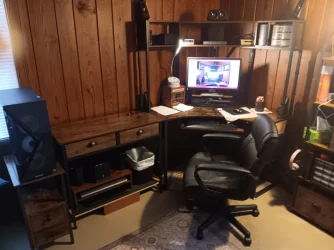
I have two methods of using my laptops. One, just by itself, or two, as a desktop through my monitor and keyboard/mouse using a Toshiba Dynadock. No internet needed for either method. I have a somewhat unorthodox setup in that my CD/DVD drive, speakers, keyboard/mouse and 2 external ssd's (and monitor for laptops) are accessed via a Toshiba Dynadock (USB hub). So if I run my laptop through the monitor, I have no other active internet connected machine available. And that's why I wondered about the advisability of connecting the laptop to the Internet, as I often need to check on how to's or ask a question on a forum or seek a solution, basically, research, not web surfing. (As an aside, while I was still living on my boat running 3 NUC's, I had 2 Win 7 machines running 24/7 from end of support to mid 2023 without a problem on the same network setup, minus wifi)

Perhaps this photo will better illustrate my purpose. The empty space to the left of the main desk is where I hook up the laptop. Obviously not a comfortable place to use the laptop on it's own for more than a few minutes. But when I hook it up to the monitor, I have no internet option other than the laptop. (Yes, I have a smartphone, but I'm smartphone stupid, and prefer not to connect to the internet with it)
setup.webp
 

My Computers

System One System Two

  • OS
    Windows 11 Home
    Computer type
    PC/Desktop
    Manufacturer/Model
    IBuyPower/SMI7N5701
    CPU
    Intel Core i7 14700F
    Motherboard
    ASUS PRIME B760M-A AX6 II
    Memory
    32gb DDR5 5200MHz
    Graphics Card(s)
    Nvidia RTX 5070 12gb
    Sound Card
    Toshiba Dynadock Audio
    Monitor(s) Displays
    Dell P2214h
    Screen Resolution
    1920 x 1080
    Hard Drives
    AGI AI818 M.2 PCIe Gen4 SSD
    PSU
    750W 80 PLUS Gold PSU
    Case
    iBUYPOWER Slate 8 Mesh Pro
    Cooling
    Air Cooled
  • Operating System
    Windows 11 Pro upgraded from 10
    Computer type
    PC/Desktop
    Manufacturer/Model
    Intel/NUC 10i7FNH
    CPU
    i7 10710U
    Memory
    16GB
    Graphics card(s)
    Integrated Intel UHD Graphics 620
    Sound Card
    On board
    Monitor(s) Displays
    Dell P2214h
    Screen Resolution
    1920 x 1080
Back
Top Bottom