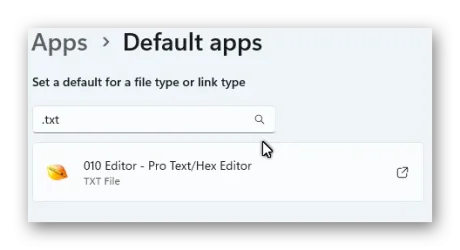
Hey All,
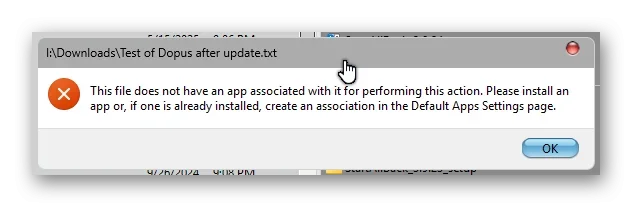
I have some custom entries in the context menu and after upgrading from 26200.8521 to 26200.8875 and now 26200.8973 the sub menus return the error in DOpus "This file does not have an app associated with it for performing this action".
The menus worked fine in 26200.8521 and right when it updated to 26200.8875 it came back with that error, I figured I am in this deep let me try 26200.8973 and same error.
I should mention that File Explorer has no issues running the menus regardless of the winver that I am using. Contacted GP Software and they said my menu worked fine on their system using my file. So anyone have any idea on what to check as the upgrade caused the issue as I can back out and it works fine again?
Reg Code that failed after the update,
So rewrote the registry code and got it working on both File Explorer and DOpus,
So why would it fail on the first example but not on the second when they have the same commands?
I have some custom entries in the context menu and after upgrading from 26200.8521 to 26200.8875 and now 26200.8973 the sub menus return the error in DOpus "This file does not have an app associated with it for performing this action".
The menus worked fine in 26200.8521 and right when it updated to 26200.8875 it came back with that error, I figured I am in this deep let me try 26200.8973 and same error.
I should mention that File Explorer has no issues running the menus regardless of the winver that I am using. Contacted GP Software and they said my menu worked fine on their system using my file. So anyone have any idea on what to check as the upgrade caused the issue as I can back out and it works fine again?
Reg Code that failed after the update,
Code:
Windows Registry Editor Version 5.00

[HKEY_CLASSES_ROOT\*\shell\Edit_Files]
"MUIVerb"="Edit with"
"HasLUAShield"=""
"SubCommands"=""
"Icon"="C:\\Program Files\\010 Editor\\010Editor.exe,0"

[HKEY_CLASSES_ROOT\*\shell\Edit_Files\shell]

[HKEY_CLASSES_ROOT\*\shell\Edit_Files\shell\01010Editor]
@="010 Editor"
"Icon"="C:\\Program Files\\010 Editor\\010Editor.exe,0"

[HKEY_CLASSES_ROOT\*\shell\Edit_Files\shell\01010Editor\command]
@="\"C:\\Program Files\\010 Editor\\010Editor.exe\" \"%1\""

[HKEY_CLASSES_ROOT\*\shell\Edit_Files\shell\02UEStudio]
@="UEStudio"
"Icon"="C:\\Program Files\\IDM Computer Solutions\\UEStudio\\UEStudio.exe,0"

[HKEY_CLASSES_ROOT\*\shell\Edit_Files\shell\02UEStudio\command]
@="\"C:\\Program Files\\IDM Computer Solutions\\UEStudio\\UEStudio.exe\" \"%1\""

[HKEY_CLASSES_ROOT\*\shell\Edit_Files\shell\03Notepad]
@="Notepad"
"Icon"="C:\\Windows\\System32\\notepad.exe,0"
"LegacyDisable"=""

[HKEY_CLASSES_ROOT\*\shell\Edit_Files\shell\03Notepad\command]
@="\"C:\\Windows\\System32\\notepad.exe\" \"%1\""

[HKEY_CLASSES_ROOT\*\shell\Edit_Files\shell\04ANotepad++64]
@="Notepad++"
"Icon"="C:\\Program Files\\Notepad++\\notepad++.exe,0"

[HKEY_CLASSES_ROOT\*\shell\Edit_Files\shell\04ANotepad++64\command]
@="\"C:\\Program Files\\Notepad++\\notepad++.exe\" \"%1\""

[HKEY_CLASSES_ROOT\*\shell\Edit_Files\shell\05hhdhexedit]
@="Hex Editor Neo"
"Icon"="C:\\Program Files\\HHD Software\\Hex Editor Neo\\HexFrame.exe,0"

[HKEY_CLASSES_ROOT\*\shell\Edit_Files\shell\05hhdhexedit\command]
@="\"C:\\Program Files\\HHD Software\\Hex Editor Neo\\HexFrame.exe\" \"%1\""

[HKEY_CLASSES_ROOT\*\shell\Edit_Files\shell\06hhdhexeditcompare]
@="Hex Editor Compare"
"Icon"="C:\\Program Files\\HHD Software\\Hex Editor Neo\\HexFrame.exe,0"

[HKEY_CLASSES_ROOT\*\shell\Edit_Files\shell\06hhdhexeditcompare\command]
@="\"C:\\Program Files\\HHD Software\\Hex Editor Neo\\hhdhexneo.dll\" \"%1\""
So rewrote the registry code and got it working on both File Explorer and DOpus,
Code:
Windows Registry Editor Version 5.00

[HKEY_CLASSES_ROOT\\*\\shell\\Edit_Files]
"Icon"="C:\\Program Files\\010 Editor\\010Editor.exe,0"
"SubCommands"="010Editor; UEStudio; Notepad; Notepad++64; hhdhexedit; hhdhexeditcompare"
"MultiSelectModel"="player"

[HKEY_CLASSES_ROOT\\*\\shell\\Edit_Files\\command]

[HKEY_LOCAL_MACHINE\\SOFTWARE\\Microsoft\Windows\\CurrentVersion\\Explorer\\CommandStore\\shell\\010Editor]
@="010 Editor"
"Icon"="C:\\Program Files\\010 Editor\\010Editor.exe,0"

[HKEY_LOCAL_MACHINE\SOFTWARE\\Microsoft\\Windows\\CurrentVersion\\Explorer\\CommandStore\\shell\\010Editor\\command]
@="\"C:\\Program Files\\010 Editor\\010Editor.exe\" \"%1\""

[HKEY_LOCAL_MACHINE\\SOFTWARE\\Microsoft\\Windows\\CurrentVersion\\Explorer\\CommandStore\\shell\\UEStudio]
@="UEStudio"
"Icon"="C:\\Program Files\\IDM Computer Solutions\\UEStudio\\UEStudio.exe,0"

[HKEY_LOCAL_MACHINE\\SOFTWARE\\Microsoft\\Windows\\CurrentVersion\\Explorer\\CommandStore\\shell\\UEStudio\\command]
@="\"C:\\Program Files\\IDM Computer Solutions\\UEStudio\\UEStudio.exe\" \"%1\""

[HKEY_LOCAL_MACHINE\\SOFTWARE\\Microsoft\\Windows\\CurrentVersion\\Explorer\\CommandStore\\shell\\Notepad]
@="Notepad"
"Icon"="C:\\Windows\\System32\\notepad.exe,0"

[HKEY_LOCAL_MACHINE\\SOFTWARE\\Microsoft\\Windows\\CurrentVersion\\Explorer\\CommandStore\\shell\\Notepad\\command]
@="\"C:\\Windows\\System32\\notepad.exe\" \"%1\""

[HKEY_LOCAL_MACHINE\\SOFTWARE\\Microsoft\Windows\\CurrentVersion\\Explorer\\CommandStore\\shell\\Notepad++64]
@="Notepad++"
"Icon"="C:\\Program Files\\Notepad++\\notepad++.exe,0"

[HKEY_LOCAL_MACHINE\\SOFTWARE\\Microsoft\\Windows\\CurrentVersion\\Explorer\\CommandStore\\shell\\Notepad++64\\command]
@="\"C:\\Program Files\\Notepad++\\notepad++.exe\" \"%1\""

[HKEY_LOCAL_MACHINE\\SOFTWARE\\Microsoft\\Windows\\CurrentVersion\\Explorer\\CommandStore\\shell\\hhdhexedit]
@="Hex Editor Neo"
"Icon"="C:\\Program Files\\HHD Software\\Hex Editor Neo\\HexFrame.exe,0"

[HKEY_LOCAL_MACHINE\\SOFTWARE\\Microsoft\\Windows\\CurrentVersion\\Explorer\\CommandStore\\shell\\hhdhexedit\\command]
@="\"C:\\Program Files\\HHD Software\\Hex Editor Neo\\HexFrame.exe\" \"%1\""

[HKEY_LOCAL_MACHINE\\SOFTWARE\\Microsoft\\Windows\\CurrentVersion\\Explorer\\CommandStore\\shell\\hhdhexeditcompare]
@="Hex Editor Compare"
"Icon"="C:\\Program Files\\HHD Software\\Hex Editor Neo\\HexFrame.exe,0"

[HKEY_LOCAL_MACHINE\\SOFTWARE\\Microsoft\Windows\\CurrentVersion\\Explorer\\CommandStore\\shell\\hhdhexeditcompare\\command]
@="\"C:\\Program Files\\HHD Software\\Hex Editor Neo\\hhdhexneo.dll\" \"%1\""
So why would it fail on the first example but not on the second when they have the same commands?
- Windows Build/Version
- 26200.8973
Attachments
My Computer
At a glance
Win11 25H24.0g32gbRX580
- OS
- Win11 25H2
- Computer type
- PC/Desktop
- Manufacturer/Model
- Asus
- CPU
- 4.0g
- Motherboard
- Asus
- Memory
- 32gb
- Graphics Card(s)
- RX580
- Monitor(s) Displays
- LG
- Hard Drives
- SSD x2 1tb
- PSU
- 800w
- Case
- Corsair
- Cooling
- BAF's
- Keyboard
- ProtoArc
- Mouse
- Logi wireless
- Browser
- Brave, Firefox
- Antivirus
- Eset Premium