Windows IT Pro Blog:
Windows 11, version 24H2 (KB5062660), introduces two major advancements that strengthen system resilience and minimize downtime: a redesigned user experience for unexpected restarts and the general availability of quick machine recovery. Together, these updates reflect our commitment to helping users and IT admins recover from disruptions faster, with less friction and greater control. These innovations are part of the broader Windows Resiliency Initiative, designed to keep users productive and organizations running smoothly.
A new user experience for unexpected restarts
With Windows 11, version 24H2, we’re introducing a more streamlined user interface for unexpected restarts that’s more than just a color change. It’s part of a broader effort to make Windows more resilient, less disruptive, and faster to recover.Why change the screen?
For nearly four decades, the blue screen shown during an unexpected restart has been a visual shorthand for something going wrong. But it’s also been a source of anxiety and frustration. We heard from users that the blue screen was visually disruptive, often unhelpful, and frustrating to stall on – until recently, users could sit on this screen for up to 40 seconds.That’s why we’ve redesigned the experience from the ground up. The new UI is simpler, and more aligned with Windows 11’s design language. It removes the frowny face and QR code, and instead presents a short, readable message with the stop code and faulty driver information. We’ve also added a hex version of the stop code to make it easier to search for help – a common user request.

The new Windows 11 unexpected restart screen.
This isn’t just about aesthetics
The latest UI update is just one part of an ongoing effort to improve the entire unexpected restart experience. We’re working on reducing downtime and improving recovery. In Windows 11 24H2, we made significant improvements to crash dump collection that reduced the time users spend on the screen from 40 seconds to just 2 seconds for most consumer devices.Supporting diagnostics for organizations
In the event of an unexpected restart, we understand error information and diagnostics can be critical, especially for IT Pros. The new screen will continue to show stop code and faulty driver information, with the added inclusion of the hex version of the stop code for easier search. Enterprises also continue to collect kernel dumps by default to support rich diagnostics, but can opt-in to the reduced downtime by configuring devices for a small memory dump. Diagnosability is preserved, while offering flexibility around dump collection and user experience.The most reliable Windows yet
We’re also proud to share that Windows 11 24H2 is our most reliable version of Windows yet. Compared to Windows 10 22H2, failure rates for unexpected restarts have dropped by 24%. These improvements reflect deep collaboration across engineering, design, and user research teams and a commitment to making Windows more resilient for everyone.What’s next?
The new UI for unexpected restarts is now generally available for all devices on Windows 11, 24H2.Announcing General Availability: quick machine recovery
Quick machine recovery, a key part of the Windows Resiliency Initiative, is now generally available in Windows 11, version 24H2(KB5062660). First introduced at Microsoft Ignite 2024, this built-in capability automatically detects, diagnoses, and resolves widespread critical boot issues using a secure, always-available Windows Recovery Environment. With targeted, automated fixes delivered through the trusted Windows Update pipeline, quick machine recovery reduces downtime, eases IT burden, and helps users return to productivity, quickly, reliably, and at scale.Quick machine recovery: built for resilience
Quick machine recovery is more than just a feature, it’s a system, purpose-built to respond to the unexpected with speed, precision, and security. It combines a connected recovery environment, Microsoft’s remediation response, and granular IT controls to ensure devices recover from critical widespread boot issues with minimal disruption.
Enable or Disable Quick Machine Recovery in Windows 11
This tutorial will show you how to enable or disable Quick Machine Recovery in Windows 11. Quick machine recovery (QMR) is a feature that enables the recovery of Windows devices when they encounter critical errors that prevent them from booting. QMR automatically detects, diagnoses, and...
 www.elevenforum.com
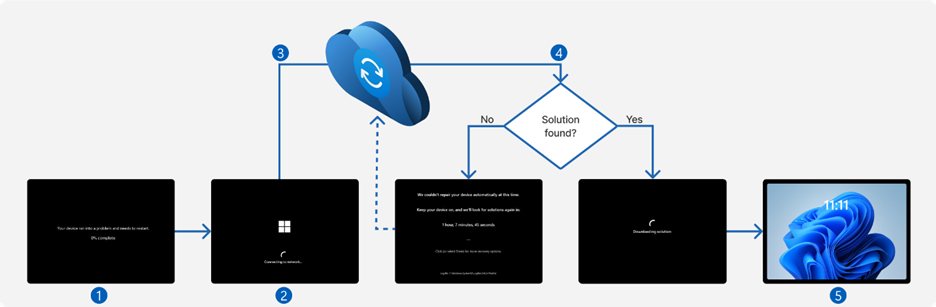
System flow from encountering a boot-critical issue to remediation via quick machine recovery.
Key Components of the quick machine recovery System
- Secure and connected Windows Recovery Environment: When enabled, quick machine recovery uses a secure, always-available Windows Recovery Environment to automatically scan Windows Update for applicable fixes, enabling recovery without requiring manual input.
- Remediation response: Remediations for widespread boot issues published by Microsoft are well documented, lightweight and can be delivered globally via secure update channel. Established Windows Update policies for organization will be honored during roll-out.
- Policy Controls for organizations: IT Admins maintain full control over how quick machine recovery behaves in their environments. Configuration options include:
o Enabling or disabling the feature
o Managing auto-remediation behavior
o Setting scan and reboot intervals
How it works
We've introduced a dedicated quick machine recovery page within the Recovery section of the Windows Settings app (System > Recovery > Quick machine recovery.) On Windows 11 Home devices, the feature is enabled by default. Today, for Windows 11 Pro, Education, and Enterprise editions, quick machine recovery is disabled by default. IT administrators are empowered to configure or enable the feature using management tools such as the Intune Settings Catalog or leverage the RemoteRemediation CSP.Once enabled, the feature activates during critical boot failures. It uses the secure and connected Windows recovery environment to scan Windows Update for applicable fixes published by Microsoft. If a matching remediation for a widespread issue is available, it is applied automatically, restoring the device without requiring manual intervention.
What's next?
Currently, quick machine recovery is supported on Windows 11 Home, Pro, Education and Enterprise SKUs, with connectivity over Ethernet and Wi-Fi (WPA/WPA2). Support for additional editions, including Windows Server, as well as expanded connectivity options for enterprise environments is coming soon. Future enhancements will also include advanced IT admin tools for remediation management, monitoring, additional policy and rollout controls.Get Started Today
- Learn more about quick machine recovery by reading our technical documentation.
- Ensure you’re on the latest Win11 24H2 build (26100.4770; see KB5062660)
- Review the various options available to enable the feature on Windows Settings app (System > Recovery > Quick machine recovery.)
- Simulate the quick machine recovery process through test mode to ensure readiness before deployment.

Use Quick Machine Recovery Test Mode in Windows 11
This tutorial will show you how to use Quick Machine Recovery test mode in Windows 11. Quick machine recovery is a feature that enables the recovery of Windows devices when they encounter critical errors that prevent them from booting. QMR automatically detects, diagnoses, and remediates boot...
www.elevenforum.com
Stay tuned for future enhancements as we continue to strengthen Windows resilience and support IT admins in maintaining seamless business operations. To learn more about the Windows Resiliency Initiative, see The Windows Resiliency Initiative: Building resilience for a future-ready enterprise.
Source:

Resilience in action for Windows devices - Windows IT Pro Blog
Discover how Windows 11 modernizes the user experience for unexpected restarts and introduces quick machine recovery to accelerate device remediation.
 techcommunity.microsoft.com
Last edited: