CntrlAltDel
Well-known member
- Local time
- 10:51 PM
- Posts
- 16
- OS
- Windows 11
Sup guys,
For the past 3 weeks I’ve been chasing a random “application hang” issue that’s happening across multiple Windows 11 versions.
It affects explorer.exe most often, but I’ve also seen it with cursor.exe, firefox.exe, and other apps. I suspect these are all symptoms of the same underlying problem (rather than unrelated per-app hangs) because the behavior is different from a normal “Not Responding” freeze.
Just today alone I spent 12 hours troubleshooting this issue. I've tried just about everything I can think of. It's just so random.
What happens
The app UI becomes unresponsive: I can’t click or interact with it.
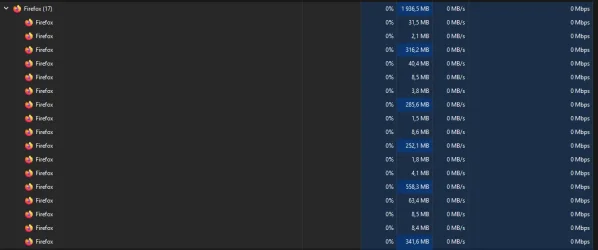
The process still shows as running in Task Manager and usually does not show “Not Responding”.
Example: in Firefox, the caret may keep blinking in a textbox, but the window won’t accept input or respond to clicks.
App-specific logs don’t show anything useful and I don’t get crash logs.
To resolve I have to kill the process and start the it again.
What I’m seeing in Event Viewer
Event Viewer only gives generic entries like:
I’m looking for tools or logging that provide more detail than Event Viewer (for example ETW/WPR, ProcMon, hang dumps, etc).
Not sure what the best starting point is.
What I’ve tried (different OS versions):
For the past 3 weeks I’ve been chasing a random “application hang” issue that’s happening across multiple Windows 11 versions.
It affects explorer.exe most often, but I’ve also seen it with cursor.exe, firefox.exe, and other apps. I suspect these are all symptoms of the same underlying problem (rather than unrelated per-app hangs) because the behavior is different from a normal “Not Responding” freeze.
Just today alone I spent 12 hours troubleshooting this issue. I've tried just about everything I can think of. It's just so random.
What happens
The app UI becomes unresponsive: I can’t click or interact with it.
The process still shows as running in Task Manager and usually does not show “Not Responding”.
Example: in Firefox, the caret may keep blinking in a textbox, but the window won’t accept input or respond to clicks.
App-specific logs don’t show anything useful and I don’t get crash logs.
To resolve I have to kill the process and start the it again.
What I’m seeing in Event Viewer
Event Viewer only gives generic entries like:
I’d love it if this rings a bell for anyone (possible cause), but even if not: what’s the best way to dig deeper?“The program explorer.exe version 10.0.26100.7462 stopped interacting with Windows and was closed.”
I’m looking for tools or logging that provide more detail than Event Viewer (for example ETW/WPR, ProcMon, hang dumps, etc).
Not sure what the best starting point is.
XML:
<Event xmlns="http://schemas.microsoft.com/win/2004/08/events/event">
  <System>
    <Provider Name="Application Hang" />
    <EventID>1002</EventID>
    <Level>2</Level>
    <Task>101</Task>
    <TimeCreated SystemTime="2025-12-27T20:24:12.7648545Z" />
    <Channel>Application</Channel>
  </System>
  <EventData>
    <Data Name="AppName">explorer.exe</Data>
    <Data Name="AppVersion">10.0.26100.7462</Data>
    <Data Name="ExeFileName">C:\Windows\explorer.exe</Data>
    <Data Name="HangType">Cross-thread;Cross-process</Data>
  </EventData>
</Event>
XML:
<Event xmlns="http://schemas.microsoft.com/win/2004/08/events/event">
  <System>
    <Provider Name="Application Hang" />
    <EventID>1002</EventID>
    <Version>0</Version>
    <Level>2</Level>
    <Task>101</Task>
    <Opcode>0</Opcode>
    <Keywords>0x8000000000000000</Keywords>
    <TimeCreated SystemTime="2025-12-27T20:24:12.7648545Z" />
    <Channel>Application</Channel>
  </System>

  <EventData>
    <Data Name="AppName">explorer.exe</Data>
    <Data Name="AppVersion">10.0.26100.7462</Data>
    <Data Name="ExeFileName">C:\Windows\explorer.exe</Data>
    <Data Name="HangType">Cross-thread;Cross-process</Data>
  </EventData>
</Event>What I’ve tried (different OS versions):
- Windows 11 Pro 24H2 (26100.7462)
- Windows 11 Enterprise 25H2 (26200.7462)
- Windows 11 Enterprise IoT LTSC 2024 (26100.7462)
- Windows Build/Version
- 24H2 (26100.7426)
My Computer
At a glance
Windows 11Ryzen 7 9800X3DCorsair Vengeance RGB DDR5-6000 CL36Sapphire Radeon RX 9070 XT NITRO+
- OS
- Windows 11
- Computer type
- PC/Desktop
- CPU
- Ryzen 7 9800X3D
- Motherboard
- ASUS ROG STRIX X670E-F Gaming WIFI
- Memory
- Corsair Vengeance RGB DDR5-6000 CL36
- Graphics Card(s)
- Sapphire Radeon RX 9070 XT NITRO+
- Monitor(s) Displays
- ASUS XG27WQ
- Screen Resolution
- 2560x1440
- Hard Drives
- Crucial T500 1TB PCIe Gen4 NVMe M.2 SSD
- PSU
- Super Flower Leadex Titanium 1000w
- Case
- Montech King Pro 95
- Cooling
- Arctic Liquid Freezer III 360mm AIO