Random BSOD while idle- windows 11


sarathasok

Member
Local time
12:33 PM
Posts
1
OS
windows
I've been facing a frustrating issue where my PC restarts randomly while I'm working. There’s no specific trigger—it happens whether I’m rendering 3DSMax, watching videos or even when idle. There’s no warning or error message, just an abrupt restart. One time a bluescreen appeared.

Log file: SARATHASOK-(2024-09-20_20-55-32).zip

Any help is very much appreciated. I was working on a deadline.
Thank you in advance.
 
Windows Build/Version
Windows 11 Pro 23H2 OS Build 22631.4169

My Computer My Computer

At a glance

windowsRyzen 5 3600ADATA XPG 8GB x 4MSI Ventus 3060Ti
OS
windows
Computer type
PC/Desktop
Manufacturer/Model
Assembled
CPU
Ryzen 5 3600
Motherboard
MSI B450 Tomahawk
Memory
ADATA XPG 8GB x 4
Graphics Card(s)
MSI Ventus 3060Ti
Monitor(s) Displays
Acer XV272U
Screen Resolution
2560 x 1440
Hard Drives
Samsung Evo 980 250 GB SSD, Western Digital WD10EZEX 1 TB 7200 rpm HDD
PSU
Antec CSK 550 Watts
Case
Antec DF 600
Make sure to install the newest version of graphic card drive, as the nvlddmkm.sys GPU driver caused the BSOD error.
 

My Computer My Computer

At a glance

Windows 11AMD Ryzen 7 5700GMicron Technology DDR4-3200 16GBNVIDIA GeForce RTX 3060
OS
Windows 11
Computer type
PC/Desktop
Manufacturer/Model
HP Pavilion
CPU
AMD Ryzen 7 5700G
Motherboard
Erica6
Memory
Micron Technology DDR4-3200 16GB
Graphics Card(s)
NVIDIA GeForce RTX 3060
Sound Card
Realtek ALC671
Monitor(s) Displays
Samsung SyncMaster U28E590
Screen Resolution
3840 x 2160
Hard Drives
SAMSUNG MZVLQ1T0HALB-000H1
Please perform the following steps during the troubleshooting: (in sequence)


1) Move the page file from D: > C: then reboot


2) Free up space on C: so that there is > 30 GB free space


3) Make sure that Windows error reporting, event viewer, and dump files are not cleaned


4) The BIOS Version/Date American Megatrends International, LLC. H.40, 03-02-2021

Upgrade the BIOS to the most up to date non-beta BIOS


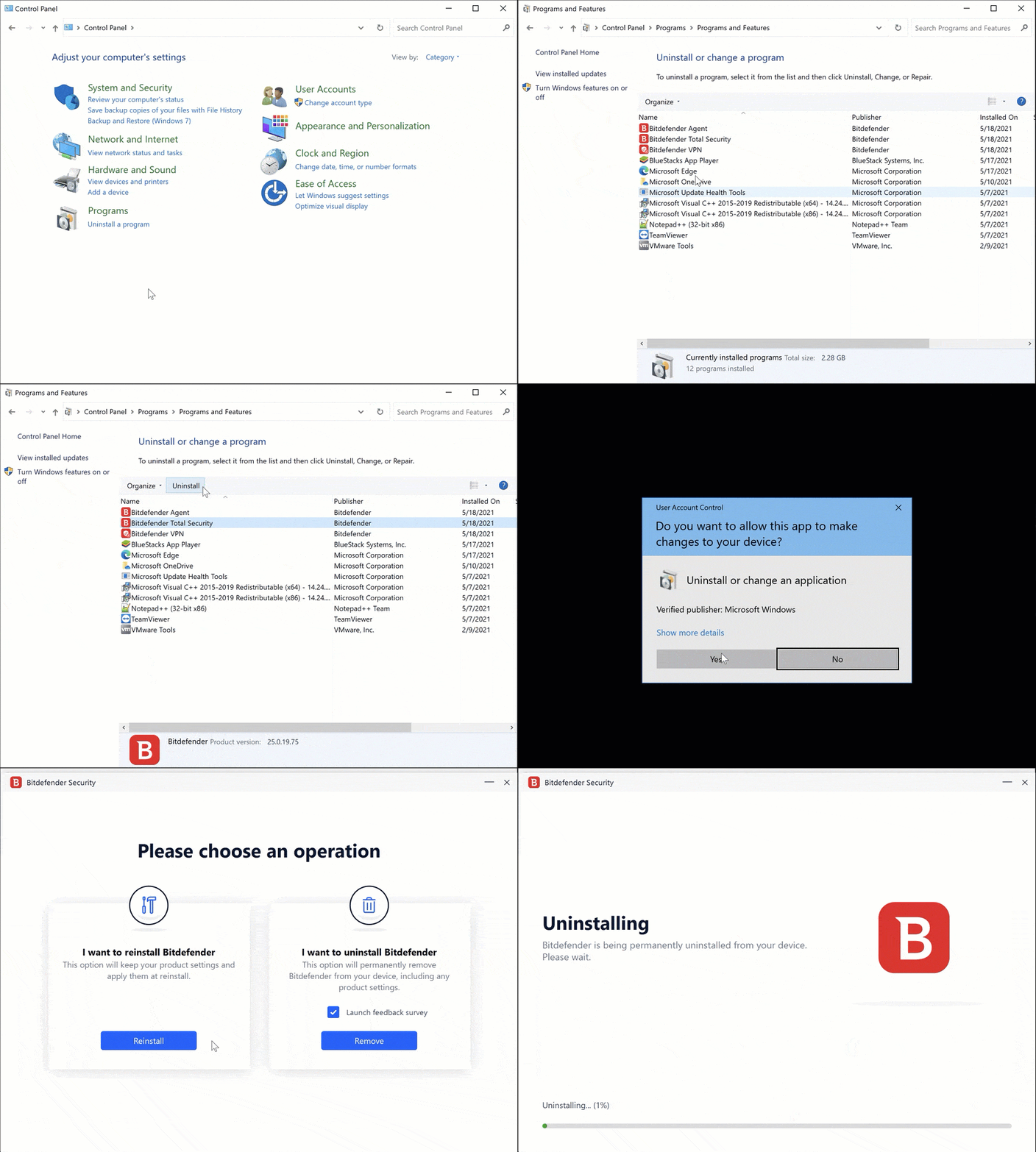
5) Uninstall Bitdefender using the applicable uninstall tool > make sure Microsoft defender is on


6) Run Tuneup plus > post a share link


7) Reinstall a Nvidia GPU driver different from 32.0.15.6094


8) If VIDEO_TDR_FAILURE (116) continues then plan to swap test the GPU hardware (Nvidia or AMD)


Code:
Name    NVIDIA GeForce RTX 3060 Ti
PNP Device ID    PCI\VEN_10DE&DEV_2489&SUBSYS_C9721462&REV_A1\4&1FC990D7&0&0019
Adapter Type    NVIDIA GeForce RTX 3060 Ti, NVIDIA compatible
Adapter Description    NVIDIA GeForce RTX 3060 Ti
Adapter RAM    (1,048,576) bytes
Installed Drivers    C:\WINDOWS\System32\DriverStore\FileRepository\nvmdi.inf_amd64_33559cc6c2fd215a\nvldumdx.dll,C:\WINDOWS\System32\DriverStore\FileRepository\nvmdi.inf_amd64_33559cc6c2fd215a\nvldumdx.dll,C:\WINDOWS\System32\DriverStore\FileRepository\nvmdi.inf_amd64_33559cc6c2fd215a\nvldumdx.dll,C:\WINDOWS\System32\DriverStore\FileRepository\nvmdi.inf_amd64_33559cc6c2fd215a\nvldumdx.dll
Driver Version    32.0.15.6094
INF File    oem1.inf (Section028 section)
Driver    C:\WINDOWS\SYSTEM32\DRIVERSTORE\FILEREPOSITORY\NVMDI.INF_AMD64_33559CC6C2FD215A\NVLDDMKM.SYS (32.0.15.6094, 68.52 MB (71,847,448 bytes), 29-08-2024 15:00)


Code:
nvlddmkm.sys Wed Aug 14 00:14:57 2024 (66BC3D51)
 

My Computer My Computer

At a glance

Windows 10Intel(R) Core(TM) i7-4800MQ CPU @ 2.70GHz16 GB Total: Manufacturer : Samsung MemoryTyp...NVIDIA Quadro K3100M; Intel(R) HD Graphics 4600
OS
Windows 10
Computer type
Laptop
Manufacturer/Model
HP
CPU
Intel(R) Core(TM) i7-4800MQ CPU @ 2.70GHz
Motherboard
Product : 190A Version : KBC Version 94.56
Memory
16 GB Total: Manufacturer : Samsung MemoryType : DDR3 FormFactor : SODIMM Capacity : 8GB Speed : 1600
Graphics Card(s)
NVIDIA Quadro K3100M; Intel(R) HD Graphics 4600
Sound Card
IDT High Definition Audio CODEC; PNP Device ID HDAUDIO\FUNC_01&VEN_111D&DEV_76E0
Hard Drives
Model Hitachi HTS727575A9E364
Antivirus
Microsoft Defender
Other Info
Mobile Workstation

Latest Support Threads

Back
Top Bottom