Solved Random crashes, apparently a GPU driver issue


Janox5214

Member
Local time
3:09 PM
Posts
5
OS
Windows 10 22H2
Hi. My computer has been randomly crashing (no BSOD shows, but it creates a DumpStack.log and Minidump folder so I guess it's technically one) for over a week now. At any times, even while browsing, or on idle. I tried everything, at first I thought it was the NVIDIA drivers, I heard the latest versions had issues, so I uninstalled with DDU and installed 566.36, which worked fine for me at the time. It worked for a day, but today it crashed again. I thought maybe it's Windows 11 24H2, but I've been using it since February and the crashes only started a week ago, so it's unlikely. I checked with WinDbg and it's a VIDEO_TDR_FAILURE, with nvlddmkm.sys as the failing module.

I attach the log generated by the V2 Log collector, as the instructions said.
CPU: Intel Core i7-7700
GPU: NVIDIA GeForce GTX 1060 6GB, driver 566.36 (also tested latest 576.52, same problem)
 
Windows Build/Version
Windows 11 24H2, build 26100.4351

Attachments

My Computer My Computer

At a glance

Windows 10 22H2Intel Core i7-770016 GB 2400MHz DDR4NVIDIA GeForce GTX 1060 6GB
OS
Windows 10 22H2
Computer type
PC/Desktop
CPU
Intel Core i7-7700
Motherboard
ASUS PRIME B250M-A
Memory
16 GB 2400MHz DDR4
Graphics Card(s)
NVIDIA GeForce GTX 1060 6GB
Screen Resolution
1920x1080
1) Please open administrative command prompt and copy and paste:

DISM /Online /Add-Capability /CapabilityName:WMIC~~~~


2) Run Tuneup plus > post a share link


2) Uninstall the Nvidia GPU drivers nvlddmkm.sys using DDU > install an older version

(make sure that 32.0.15.6636 is not reinstalled.)


4) If Video TDR continues then swap another GPU card (Nvidia or AMD)


Code:
Name    NVIDIA GeForce GTX 1060 6GB
PNP Device ID    PCI\VEN_10DE&DEV_1C03&SUBSYS_85A41043&REV_A1\4&38AB2860&0&0008
Adapter Type    NVIDIA GeForce GTX 1060 6GB, NVIDIA compatible
Adapter Description    NVIDIA GeForce GTX 1060 6GB
Adapter RAM    (1,048,576) bytes
Installed Drivers    C:\WINDOWS\System32\DriverStore\FileRepository\nv_dispi.inf_amd64_9425e4c3b1ac1c47\nvldumdx.dll,C:\WINDOWS\System32\DriverStore\FileRepository\nv_dispi.inf_amd64_9425e4c3b1ac1c47\nvldumdx.dll,C:\WINDOWS\System32\DriverStore\FileRepository\nv_dispi.inf_amd64_9425e4c3b1ac1c47\nvldumdx.dll,C:\WINDOWS\System32\DriverStore\FileRepository\nv_dispi.inf_amd64_9425e4c3b1ac1c47\nvldumdx.dll
Driver Version    32.0.15.6636
INF File    oem2.inf (Section024 section)
Driver    C:\WINDOWS\SYSTEM32\DRIVERSTORE\FILEREPOSITORY\NV_DISPI.INF_AMD64_9425E4C3B1AC1C47\NVLDDMKM.SYS (32.0.15.6636, 72.76 MB (76,292,784 bytes), 10/06/2025 16:08)

Code:
 nvlddmkm.sys Tue Dec  3 14:17:19 2024 (674F674F)
 

My Computer My Computer

At a glance

Windows 10Intel(R) Core(TM) i7-4800MQ CPU @ 2.70GHz16 GB Total: Manufacturer : Samsung MemoryTyp...NVIDIA Quadro K3100M; Intel(R) HD Graphics 4600
OS
Windows 10
Computer type
Laptop
Manufacturer/Model
HP
CPU
Intel(R) Core(TM) i7-4800MQ CPU @ 2.70GHz
Motherboard
Product : 190A Version : KBC Version 94.56
Memory
16 GB Total: Manufacturer : Samsung MemoryType : DDR3 FormFactor : SODIMM Capacity : 8GB Speed : 1600
Graphics Card(s)
NVIDIA Quadro K3100M; Intel(R) HD Graphics 4600
Sound Card
IDT High Definition Audio CODEC; PNP Device ID HDAUDIO\FUNC_01&VEN_111D&DEV_76E0
Hard Drives
Model Hitachi HTS727575A9E364
Antivirus
Microsoft Defender
Other Info
Mobile Workstation
Did 1) and 2), here's the Tuneup.log.
As for installing an even older driver, which one do you recommend? I'm on 24H2 so I don't think I can go much lower than 566.36, right?
 

Attachments

My Computer My Computer

At a glance

Windows 10 22H2Intel Core i7-770016 GB 2400MHz DDR4NVIDIA GeForce GTX 1060 6GB
OS
Windows 10 22H2
Computer type
PC/Desktop
CPU
Intel Core i7-7700
Motherboard
ASUS PRIME B250M-A
Memory
16 GB 2400MHz DDR4
Graphics Card(s)
NVIDIA GeForce GTX 1060 6GB
Screen Resolution
1920x1080
Tuneup plus results were all good.

Any GPU driver from the Nvidia website can be used for testing purposes.

If installing multiple Nvidia driver versions fails to fix hangs, freezes, or BSODs then swap test the GPU card.
 

My Computer My Computer

At a glance

Windows 10Intel(R) Core(TM) i7-4800MQ CPU @ 2.70GHz16 GB Total: Manufacturer : Samsung MemoryTyp...NVIDIA Quadro K3100M; Intel(R) HD Graphics 4600
OS
Windows 10
Computer type
Laptop
Manufacturer/Model
HP
CPU
Intel(R) Core(TM) i7-4800MQ CPU @ 2.70GHz
Motherboard
Product : 190A Version : KBC Version 94.56
Memory
16 GB Total: Manufacturer : Samsung MemoryType : DDR3 FormFactor : SODIMM Capacity : 8GB Speed : 1600
Graphics Card(s)
NVIDIA Quadro K3100M; Intel(R) HD Graphics 4600
Sound Card
IDT High Definition Audio CODEC; PNP Device ID HDAUDIO\FUNC_01&VEN_111D&DEV_76E0
Hard Drives
Model Hitachi HTS727575A9E364
Antivirus
Microsoft Defender
Other Info
Mobile Workstation
I guess there could be a problem with the equipment.
Maybe change the thermal paste on the video card, etc.
Is Intel HD Graphics working ?
 

My Computer My Computer

At a glance

Microsoft Windows 11 HomeIntel Core i5-13490F2 x 16 Patriot Memory (PDP Systems) PSD516G56...GIGABYTE GeForce RTX 4070 WINDFORCE OC 12G (G...
OS
Microsoft Windows 11 Home
Computer type
PC/Desktop
Manufacturer/Model
MSI MS-7D98
CPU
Intel Core i5-13490F
Motherboard
MSI B760 GAMING PLUS WIFI
Memory
2 x 16 Patriot Memory (PDP Systems) PSD516G560081 6400MT (32-37-37-74); 1.35V)
Graphics Card(s)
GIGABYTE GeForce RTX 4070 WINDFORCE OC 12G (GV-N4070WF3OC-12GD)
Sound Card
Bluetooth Аудио
Monitor(s) Displays
INNOCN 15K1F
Screen Resolution
1920 x 1080
Hard Drives
WD_BLACK SN770 250GB
KINGSTON SNV2S1000G (ELFK0S.6)
PSU
Thermaltake Toughpower GF3 1000W
Case
CG560 - DeepCool
Cooling
ID-COOLING SE-224-XTS / 2 x 140Mm Fan - rear and top; 3 x 120Mm - front
Keyboard
Corsair K70 RGB TKL
Mouse
Corsair KATAR PRO XT
Internet Speed
100 Mbps
Browser
Firefox
Antivirus
Microsoft Defender Antivirus
Other Info
https://www.userbenchmark.com/UserRun/66553205
Hey,
Since your GPU is not the most "modern" GPU and NVIDIA stopped their active support for GTX GPUs you might need to enable MSI (Message Signaled Interrupt). This is because NVLDDMKM.sys could fail because your CPU is not receiving status updates from the GPU.
This is a quick video explaining MSI:

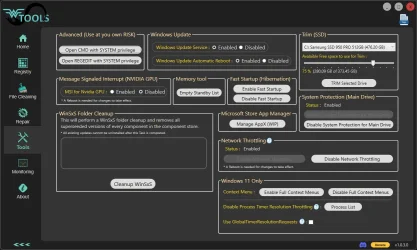
I would suggest downloading WTools and check if MSI is enabled. WTools is a really good tool for fixing your Windows/driver issues.
Here is a link for the latest version: Download Wagnardsoft Tools (WTools) 1.0.5.0

If MSI is disabled, I would enable it and see if the problem is still there. If the problem is it's still there I would install the 566.36 driver again and after installing it check again if MSI is still enabled.

I had the same error as you, and I found out that the latest NVIDIA drivers are poorly written and could cause crashes.

MSI
 

My Computer My Computer

At a glance

Windows 11
OS
Windows 11
Computer type
PC/Desktop
Is Intel HD Graphics working ?
I tried plugging the monitor's HDMI to the mobo to see, and Windows didn't boot (it freezes at the ASUS logo with the spinning circle). I guess it's a driver issue, since I haven't used the Intel HD Graphics since 2017, and I reinstalled Windows many times since then, I never installed the Intel display drivers.

If MSI is disabled, I would enable it and see if the problem is still there. If the problem is it's still there I would install the 566.36 driver again and after installing it check again if MSI is still enabled.
Well I just downloaded WTools and enabled MSI, I hope it works. Luckily the crashes aren't very frequent (1-2 per day), but still annoying.
 

My Computer My Computer

At a glance

Windows 10 22H2Intel Core i7-770016 GB 2400MHz DDR4NVIDIA GeForce GTX 1060 6GB
OS
Windows 10 22H2
Computer type
PC/Desktop
CPU
Intel Core i7-7700
Motherboard
ASUS PRIME B250M-A
Memory
16 GB 2400MHz DDR4
Graphics Card(s)
NVIDIA GeForce GTX 1060 6GB
Screen Resolution
1920x1080
I'd install the CPU graphics and try running with that for a couple days and see if the crashes still happen. You might consider even removing the GPU for this test.
 

My Computers My Computers

  • At a glance

    Win 11 Pro 25H2, Build 26200.8737Intel Core i5 1450064GB DDR4GeForce RTX 4060
    OS
    Win 11 Pro 25H2, Build 26200.8737
    Computer type
    PC/Desktop
    Manufacturer/Model
    Home Brew
    CPU
    Intel Core i5 14500
    Motherboard
    Gigabyte B760M G P WIFI
    Memory
    64GB DDR4
    Graphics Card(s)
    GeForce RTX 4060
    Sound Card
    Chipset Realtek
    Monitor(s) Displays
    LG 45" Ultragear, Acer 24" 1080p
    Screen Resolution
    5120x1440, 1920x1080
    Hard Drives
    Crucial P310 2TB 2280 PCIe Gen4 3D NAND NVMe M.2 SSD (O/S)
    Silicon Power 2TB US75 NVMe PCIe Gen4 M.2 2280 SSD (backup)
    Crucial BX500 2TB 3D NAND (2nd backup)
    Seagate 4TB Ironwolf, rotating HDD archive files
    External off-line backup Drives: 2 NVMe 4TB drives in external enclosures
    PSU
    Thermaltake Toughpower GF3 750W
    Case
    LIAN LI LANCOOL 216 E-ATX PC Case
    Cooling
    Lots of fans!
    Keyboard
    Microsoft Comfort Curve 2000
    Mouse
    Logitech G305
    Internet Speed
    Verizon FiOS 1GB
    Browser
    Firefox
    Antivirus
    Malware Bytes & Windows Defender Security
  • At a glance

    Win 11 Pro 25H2, Build 26200.8655Intel Core i5 1440032GB DDR5Intel 700 Embedded GPU
    Operating System
    Win 11 Pro 25H2, Build 26200.8655
    Computer type
    PC/Desktop
    Manufacturer/Model
    Home Brew
    CPU
    Intel Core i5 14400
    Motherboard
    Gigabyte B760M DS3H AX
    Memory
    32GB DDR5
    Graphics card(s)
    Intel 700 Embedded GPU
    Sound Card
    Realtek Embedded
    Monitor(s) Displays
    27" HP 1080p
    Screen Resolution
    1920x1080
    Hard Drives
    Crucial P310 2TB 2280 PCIe Gen4 eD NAND PCIe SSD
    Samsung EVO 990 2TB NVMe Gen4 SSD
    Samsung 2TB SATA SSD
    PSU
    Thermaltake Smart BM3 650W
    Case
    Okinos Micro ATX Case
    Cooling
    Fans
    Keyboard
    Microsoft Comfort Curve 2000
    Mouse
    Logitech G305
    Internet Speed
    Verizon FiOS 1GB
    Browser
    Firefox
    Antivirus
    Malware Bytes & Windows Defender Security
  • Nimo N171 17" Laptop, (Intel i3-1215U, 16GB RAM, 2TB NVMe, Win11 Pro)
    Acemagic Vista Mini PC V1 (Intel N150, 16GB RAM, 1TB NVMe, Win11 Pro)
    HP ENVY h8-1540t, (24GB RAM, 2TB SSD, 2TB HDD, Win11 Pro)
Well I just downloaded WTools and enabled MSI, I hope it works. Luckily the crashes aren't very frequent (1-2 per day), but still annoying.
Nice, hope this fixes your issue. Let me know if it did :-)
 

My Computer My Computer

At a glance

Windows 11
OS
Windows 11
Computer type
PC/Desktop
I think crashes every day or more would annoy the crap out of me! :confused:
 

My Computers My Computers

  • At a glance

    Win 11 Pro 25H2, Build 26200.8737Intel Core i5 1450064GB DDR4GeForce RTX 4060
    OS
    Win 11 Pro 25H2, Build 26200.8737
    Computer type
    PC/Desktop
    Manufacturer/Model
    Home Brew
    CPU
    Intel Core i5 14500
    Motherboard
    Gigabyte B760M G P WIFI
    Memory
    64GB DDR4
    Graphics Card(s)
    GeForce RTX 4060
    Sound Card
    Chipset Realtek
    Monitor(s) Displays
    LG 45" Ultragear, Acer 24" 1080p
    Screen Resolution
    5120x1440, 1920x1080
    Hard Drives
    Crucial P310 2TB 2280 PCIe Gen4 3D NAND NVMe M.2 SSD (O/S)
    Silicon Power 2TB US75 NVMe PCIe Gen4 M.2 2280 SSD (backup)
    Crucial BX500 2TB 3D NAND (2nd backup)
    Seagate 4TB Ironwolf, rotating HDD archive files
    External off-line backup Drives: 2 NVMe 4TB drives in external enclosures
    PSU
    Thermaltake Toughpower GF3 750W
    Case
    LIAN LI LANCOOL 216 E-ATX PC Case
    Cooling
    Lots of fans!
    Keyboard
    Microsoft Comfort Curve 2000
    Mouse
    Logitech G305
    Internet Speed
    Verizon FiOS 1GB
    Browser
    Firefox
    Antivirus
    Malware Bytes & Windows Defender Security
  • At a glance

    Win 11 Pro 25H2, Build 26200.8655Intel Core i5 1440032GB DDR5Intel 700 Embedded GPU
    Operating System
    Win 11 Pro 25H2, Build 26200.8655
    Computer type
    PC/Desktop
    Manufacturer/Model
    Home Brew
    CPU
    Intel Core i5 14400
    Motherboard
    Gigabyte B760M DS3H AX
    Memory
    32GB DDR5
    Graphics card(s)
    Intel 700 Embedded GPU
    Sound Card
    Realtek Embedded
    Monitor(s) Displays
    27" HP 1080p
    Screen Resolution
    1920x1080
    Hard Drives
    Crucial P310 2TB 2280 PCIe Gen4 eD NAND PCIe SSD
    Samsung EVO 990 2TB NVMe Gen4 SSD
    Samsung 2TB SATA SSD
    PSU
    Thermaltake Smart BM3 650W
    Case
    Okinos Micro ATX Case
    Cooling
    Fans
    Keyboard
    Microsoft Comfort Curve 2000
    Mouse
    Logitech G305
    Internet Speed
    Verizon FiOS 1GB
    Browser
    Firefox
    Antivirus
    Malware Bytes & Windows Defender Security
  • Nimo N171 17" Laptop, (Intel i3-1215U, 16GB RAM, 2TB NVMe, Win11 Pro)
    Acemagic Vista Mini PC V1 (Intel N150, 16GB RAM, 1TB NVMe, Win11 Pro)
    HP ENVY h8-1540t, (24GB RAM, 2TB SSD, 2TB HDD, Win11 Pro)
Well, I enabled MSI and didn't have any crashes for a week, but today it crashed again. Looked at the minidump, exact same thing: nvlddmkm.sys, VIDEO_TDR_ERROR.

After searching a bit more, I found a Reddit post from 12 years ago claiming to have fixed it by adding a DWORD TdrDelay registry key with value 8 at HKEY_LOCAL_MACHINE\SYSTEM\CurrentControlSet\Control\GraphicsDrivers. If I understood correctly, it increases the TDR timeout from 2 seconds to 8, giving it some time to respond before crashing. I'll see if it does anything.

Other posts suggest the CPU can't keep up with the GPU (which would be strange since they're the same age and there's never been a problem for 7 years), or the PCI settings in BIOS being incorrect (haven't checked, but I never touched anything there), or having the wrong XMP settings (which I never changed). Others point to the PSU or the RAM. It could be literally anything.
I still haven't tested the integrated GPU, so I'll try it when I get the time, although it's not a viable solution (I'd have to quit gaming completely).
I'll also set up a Linux dual boot and see if it happens there too.

Anyway, thanks everyone!
 

My Computer My Computer

At a glance

Windows 10 22H2Intel Core i7-770016 GB 2400MHz DDR4NVIDIA GeForce GTX 1060 6GB
OS
Windows 10 22H2
Computer type
PC/Desktop
CPU
Intel Core i7-7700
Motherboard
ASUS PRIME B250M-A
Memory
16 GB 2400MHz DDR4
Graphics Card(s)
NVIDIA GeForce GTX 1060 6GB
Screen Resolution
1920x1080
I think I found the solution: I removed the GPU, cleaned it (it had a lot of cat hair and dust), also cleaned the PSU and motherboard, and when putting back the GPU, I made sure to screw it as tight as possible (it was a bit loose before) to the PCI cover. Then I clean installed Windows 10 with 566.36 drivers. So far, so good, it's been over a week and everything's working perfectly fine.
 

My Computer My Computer

At a glance

Windows 10 22H2Intel Core i7-770016 GB 2400MHz DDR4NVIDIA GeForce GTX 1060 6GB
OS
Windows 10 22H2
Computer type
PC/Desktop
CPU
Intel Core i7-7700
Motherboard
ASUS PRIME B250M-A
Memory
16 GB 2400MHz DDR4
Graphics Card(s)
NVIDIA GeForce GTX 1060 6GB
Screen Resolution
1920x1080

Latest Support Threads

Back
Top Bottom