Random restarts on my Windows 11 PC when I playing EAC game


dantesiu

New member
Local time
9:51 AM
Posts
4
OS
windows 11
Hi all,

I need some help diagnosing an issue with my Windows 11 system. The computer randomly restarts without warning. It happens most often when I am playing games that use Easy Anti-Cheat (EAC), but I have also noticed that it sometimes restarts even when the system is idle.

I have already run the V2 log collector and uploaded the resulting ZIP file for analysis. I would really appreciate it if someone could review the logs and point me in the right direction. I am not sure if this is related to drivers, hardware, or EAC itself.

先感謝您的支持!

LESSERAFIM-(2025-10-08_10-54-23).zip
 
Windows Build/Version
24H2 OS 26100.6584

My Computer

System One

  • OS
    windows 11
    Computer type
    PC/Desktop
    CPU
    AMD Ryzen 9 5900X 12-Core Processor 3701 Mhz
    Motherboard
    TUF GAMING B550-PLUS
    Graphics Card(s)
    NVIDIA GeForce RTX 5070 Ti
    Monitor(s) Displays
    XG27UCS & ASUS VP228
    Screen Resolution
    3840 x 2160 60Hz & 1920 x 1080 60Hz
    PSU
    SeaSonic Focus GX 850 Gold 850w 80Plus Gold (Full Modular)

Not sure if this will help but I had some issues with eac and hardware enforced stack protection and this updated version cleaned it up
 

My Computer

System One

  • OS
    11-25h2
    CPU
    amd 9850x3d
    Motherboard
    asus x870e apex
    Memory
    64gb g.skill @6000cl26
    Graphics Card(s)
    pny 5090 argb oc
    Sound Card
    creative x5
    Monitor(s) Displays
    dell aw3225qf
    Screen Resolution
    4k@240
    Hard Drives
    4tb samsung 9100 pro
    4tb samsung 990 pro
    4tb wd black sn850x
    2tb samsung 980 pro (usb)
    PSU
    phanteks 1600w
    Case
    antec flux pro
    Cooling
    phanteks 420x2
    Keyboard
    logitech gpx tkl
    Mouse
    logitech gpx2 ss
Please perform the following steps:


1) Add WMIC

Code:
DISM /Online /Add-Capability /CapabilityName:WMIC~~~~


2) Run Tuneup plus > post a share link


3) Uninstall:

easyanticheat_eossys EasyAntiCheat_EOSSys \??\c:\program files (x86)\easyanticheat_eos\easyanticheat_eos.sys


4) Uninstall and reinstall:

nvlddmkm nvlddmkm c:\windows\system32\driverstore\filerepository\nvmd.inf_amd64_949b704772ff9f4b\nvlddmkm.sys


5) The BIOS 版本/日期 American Megatrends Inc. 3611, 30/9/2024

Upgrade the BIOS: 3611 > 3621

Version 3621
16.16 MB
2025/04/07
SHA-256 :F8C257903671C5F23F4FB3B5B433D03078810448BFE050D4D3A00C83E17538B8
1. Updated AGESA version to ComboV2 PI 1.2.0.E.
2. Implemented security updates.
Before running the USB BIOS Flashback tool, please rename the BIOS file (TGB550PS.CAP) using BIOSRenamer.


6) Monitor the computer for three days using:


7) For any BSOD post a new V2 share link into the newest post


Code:
EasyAntiCheat_EOS.sys Fri Oct  3 07:24:50 2025 (68DFC092)

Code:
nvlddmkm.sys Tue Jun 24 15:31:25 2025 (685B0B1D)


Code:
名稱    NVIDIA GeForce RTX 5070 Ti
PNP 裝置識別碼    PCI\VEN_10DE&DEV_2C05&SUBSYS_53101462&REV_A1\4&1D81E16&0&0019
介面卡類型    NVIDIA GeForce RTX 5070 Ti, NVIDIA 相容
介面卡描述    NVIDIA GeForce RTX 5070 Ti
介面卡 RAM    (1,048,576) 個位元組
已安裝的驅動程式    C:\WINDOWS\System32\DriverStore\FileRepository\nvmd.inf_amd64_949b704772ff9f4b\nvldumdx.dll,C:\WINDOWS\System32\DriverStore\FileRepository\nvmd.inf_amd64_949b704772ff9f4b\nvldumdx.dll,C:\WINDOWS\System32\DriverStore\FileRepository\nvmd.inf_amd64_949b704772ff9f4b\nvldumdx.dll,C:\WINDOWS\System32\DriverStore\FileRepository\nvmd.inf_amd64_949b704772ff9f4b\nvldumdx.dll
驅動程式版本    32.0.15.7688
INF 檔案    oem6.inf  (Section038 區段)
驅動程式    C:\WINDOWS\SYSTEM32\DRIVERSTORE\FILEREPOSITORY\NVMD.INF_AMD64_949B704772FF9F4B\NVLDDMKM.SYS (32.0.15.7688, 106.50 MB (111,668,872 個位元組), 5/10/2025 17:31)
 

My Computer

System One

  • OS
    Windows 10
    Computer type
    Laptop
    Manufacturer/Model
    HP
    CPU
    Intel(R) Core(TM) i7-4800MQ CPU @ 2.70GHz
    Motherboard
    Product : 190A Version : KBC Version 94.56
    Memory
    16 GB Total: Manufacturer : Samsung MemoryType : DDR3 FormFactor : SODIMM Capacity : 8GB Speed : 1600
    Graphics Card(s)
    NVIDIA Quadro K3100M; Intel(R) HD Graphics 4600
    Sound Card
    IDT High Definition Audio CODEC; PNP Device ID HDAUDIO\FUNC_01&VEN_111D&DEV_76E0
    Hard Drives
    Model Hitachi HTS727575A9E364
    Antivirus
    Microsoft Defender
    Other Info
    Mobile Workstation
Okay,
1) I have already added WMIC for the code,
2) Tuneup plus link - Tuneup_log 2025-10-09 at 00-07-40.zip
3) The EAC executable game was in my D drive, but I manually removed EAC from both the C and D drives. I no longer have any EAC on my PC.
4) I have already used DDU to remove the display driver and reinstalled it before. Which version should I reinstall—the newest one?
5) I will upgrade the BIOS to version 3621 if time permits.
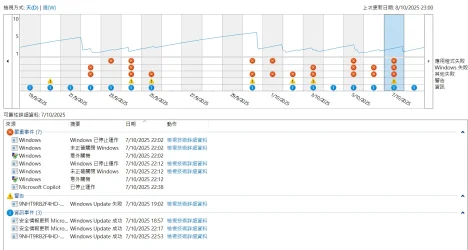
6) The following is my history from the past days (Sorry, it is in Chinese)
1759941147736.webp
7) I will share the BSOD if I have already followed all the steps and the problem still exists.

Thank you in advance for your help.
 

My Computer

System One

  • OS
    windows 11
    Computer type
    PC/Desktop
    CPU
    AMD Ryzen 9 5900X 12-Core Processor 3701 Mhz
    Motherboard
    TUF GAMING B550-PLUS
    Graphics Card(s)
    NVIDIA GeForce RTX 5070 Ti
    Monitor(s) Displays
    XG27UCS & ASUS VP228
    Screen Resolution
    3840 x 2160 60Hz & 1920 x 1080 60Hz
    PSU
    SeaSonic Focus GX 850 Gold 850w 80Plus Gold (Full Modular)
The Tuneup plus results appeared as gibberish:

Code:
    Started on 09/10/2025 ¶g¥| at  0:04:23.02

        [DISM /online /cleanup-image /RestoreHealth]

³¡¸p¬M¹³ªA°È»PºÞ²z¤u¨ã
ª©¥»: 10.0.26100.5074
¬M¹³ª©¥»: 10.0.26100.6584
ÁÙì¾Þ§@¤w¶¶§Q§¹¦¨¡C
¾Þ§@¶¶§Q§¹¦¨¡C


Please install a GPU driver different from 32.0.15.7688
 

My Computer

System One

  • OS
    Windows 10
    Computer type
    Laptop
    Manufacturer/Model
    HP
    CPU
    Intel(R) Core(TM) i7-4800MQ CPU @ 2.70GHz
    Motherboard
    Product : 190A Version : KBC Version 94.56
    Memory
    16 GB Total: Manufacturer : Samsung MemoryType : DDR3 FormFactor : SODIMM Capacity : 8GB Speed : 1600
    Graphics Card(s)
    NVIDIA Quadro K3100M; Intel(R) HD Graphics 4600
    Sound Card
    IDT High Definition Audio CODEC; PNP Device ID HDAUDIO\FUNC_01&VEN_111D&DEV_76E0
    Hard Drives
    Model Hitachi HTS727575A9E364
    Antivirus
    Microsoft Defender
    Other Info
    Mobile Workstation

My Computer

System One

  • OS
    windows 11
    Computer type
    PC/Desktop
    CPU
    AMD Ryzen 9 5900X 12-Core Processor 3701 Mhz
    Motherboard
    TUF GAMING B550-PLUS
    Graphics Card(s)
    NVIDIA GeForce RTX 5070 Ti
    Monitor(s) Displays
    XG27UCS & ASUS VP228
    Screen Resolution
    3840 x 2160 60Hz & 1920 x 1080 60Hz
    PSU
    SeaSonic Focus GX 850 Gold 850w 80Plus Gold (Full Modular)
If the computer remains stable for three or more days then as needed reinstall EAC games.

If in the future the language used during the initial installation is reused then rerun Tuneup plus and report any problems.
 

My Computer

System One

  • OS
    Windows 10
    Computer type
    Laptop
    Manufacturer/Model
    HP
    CPU
    Intel(R) Core(TM) i7-4800MQ CPU @ 2.70GHz
    Motherboard
    Product : 190A Version : KBC Version 94.56
    Memory
    16 GB Total: Manufacturer : Samsung MemoryType : DDR3 FormFactor : SODIMM Capacity : 8GB Speed : 1600
    Graphics Card(s)
    NVIDIA Quadro K3100M; Intel(R) HD Graphics 4600
    Sound Card
    IDT High Definition Audio CODEC; PNP Device ID HDAUDIO\FUNC_01&VEN_111D&DEV_76E0
    Hard Drives
    Model Hitachi HTS727575A9E364
    Antivirus
    Microsoft Defender
    Other Info
    Mobile Workstation
If the computer remains stable for three or more days then as needed reinstall EAC games.

If in the future the language used during the initial installation is reused then rerun Tuneup plus and report any problems.
Thank you for your help!
I will monitor the computer over the next few days to see if it still experiences BSODs or automatic restarts.
 

My Computer

System One

  • OS
    windows 11
    Computer type
    PC/Desktop
    CPU
    AMD Ryzen 9 5900X 12-Core Processor 3701 Mhz
    Motherboard
    TUF GAMING B550-PLUS
    Graphics Card(s)
    NVIDIA GeForce RTX 5070 Ti
    Monitor(s) Displays
    XG27UCS & ASUS VP228
    Screen Resolution
    3840 x 2160 60Hz & 1920 x 1080 60Hz
    PSU
    SeaSonic Focus GX 850 Gold 850w 80Plus Gold (Full Modular)
You're welcome.
 

My Computer

System One

  • OS
    Windows 10
    Computer type
    Laptop
    Manufacturer/Model
    HP
    CPU
    Intel(R) Core(TM) i7-4800MQ CPU @ 2.70GHz
    Motherboard
    Product : 190A Version : KBC Version 94.56
    Memory
    16 GB Total: Manufacturer : Samsung MemoryType : DDR3 FormFactor : SODIMM Capacity : 8GB Speed : 1600
    Graphics Card(s)
    NVIDIA Quadro K3100M; Intel(R) HD Graphics 4600
    Sound Card
    IDT High Definition Audio CODEC; PNP Device ID HDAUDIO\FUNC_01&VEN_111D&DEV_76E0
    Hard Drives
    Model Hitachi HTS727575A9E364
    Antivirus
    Microsoft Defender
    Other Info
    Mobile Workstation

Latest Support Threads

Back
Top Bottom