Solved Re all the weeping over local user accounts...


One reason for me not to use a Microsoft account on Windows 10 was it kept cutting my wifi. It was fine on a local account. I tried all sorts, turned off syncing on every computer in the house, cleared MS cloud settings - no difference. It only happened on the machines that were HP and were capable of running Windows 11. The two Asus machines that weren't capable of running Windows 11 were fine on a Microsoft account.
 

My Computers

System One System Two

  • OS
    Windows 11 Home 25H2
    Computer type
    Laptop
    Manufacturer/Model
    HP Pavilion 14-ce3606sa
    CPU
    Core i5-1035G1
    Memory
    32gb
    Hard Drives
    Samsung 870 evo sata ssd
    Cooling
    Could be better
    Internet Speed
    50 mbps Starlink
    Browser
    Firefox
    Other Info
    Originally came installed with a 500gb H10 Optane ssd
  • Operating System
    Windows 11 Home
    Computer type
    Laptop
    Manufacturer/Model
    HP Pavilion ce3606sa
    CPU
    Intel Core i5-1035G1
    Memory
    16gb
    Hard Drives
    Hynix Gold P31 2TB
    Internet Speed
    200mbps Starlink
    Browser
    Firefox
    Antivirus
    Defender
I recommend turning off the background telemetry with

O+O shutup 10 +

and Spybot Anti-Beacon
 

My Computers

System One System Two

  • OS
    Windows 11 Pro 25H2 (OS Build 26200.8246)
    Computer type
    Laptop
    Manufacturer/Model
    Dell Precision Mobile Workstation
    CPU
    Intel(R) Xeon(R) CPU E3-1535M v5 @ 2.90 Max Turbo 3.80
    Motherboard
    00V5FJ
    Memory
    64GB DDR4 ECC (Error-Correcting Code memory)
    Graphics Card(s)
    NVIDIA Quadro M2000M 4GB GDDR5 & Intel(R) HD Graphics P530
    Sound Card
    Realtek Audio
    Monitor(s) Displays
    15.6" 4K UltraHD
    Screen Resolution
    4K UHD 3840x2160
    Hard Drives
    2TB Crucial NVMe & 2TB Seagate SATA
    PSU
    Dell 180W 19.5V-9.23A
    Keyboard
    Backlit
    Mouse
    Logitech G703 & Logitech G305
    Internet Speed
    WIFI: Intel(R) Wi-Fi 6E AX210NGW(Gig+) 160MHz Bands 2.4GHz(574Mbps), 5GHz 2.4Gbps, 6 GHz (160MHz) 2.4Gbps
    Browser
    Mozilla Firefox
    Antivirus
    Windows Defender/Microsoft Security + additional Anti Spyware, Anti Malware, etc.
    Other Info
    Thunderbolt 3
  • Operating System
    Windows 11 Pro 24H2 (OS Build 26100.6725)
    Computer type
    PC/Desktop
    Manufacturer/Model
    Dell Precision Workstation T5610
    CPU
    Dual (X2) Intel(R) Xeon(R) CPU E5-2690 0 @ 2.90GHz Max Turbo 3.80
    Motherboard
    0WN7Y6
    Memory
    64GB DDR3 ECC (Error-Correcting Code memory)
    Graphics card(s)
    NVIDIA GeForce GTX 970 4GB of GDDR5
    Sound Card
    Realtek Audio & NVIDIA High Definition Audio
    Monitor(s) Displays
    3 Acer Monitors
    Screen Resolution
    1920x1080
    Hard Drives
    2 Seagate Barracuda ST2000DM008-2UB102 (RAID)
    Mouse
    Logitech G305
It's so funny that they are a Microsoft Partner :LOL:
 

My Computers

System One System Two

  • OS
    Windows 11 Home 25H2
    Computer type
    Laptop
    Manufacturer/Model
    HP Pavilion 14-ce3606sa
    CPU
    Core i5-1035G1
    Memory
    32gb
    Hard Drives
    Samsung 870 evo sata ssd
    Cooling
    Could be better
    Internet Speed
    50 mbps Starlink
    Browser
    Firefox
    Other Info
    Originally came installed with a 500gb H10 Optane ssd
  • Operating System
    Windows 11 Home
    Computer type
    Laptop
    Manufacturer/Model
    HP Pavilion ce3606sa
    CPU
    Intel Core i5-1035G1
    Memory
    16gb
    Hard Drives
    Hynix Gold P31 2TB
    Internet Speed
    200mbps Starlink
    Browser
    Firefox
    Antivirus
    Defender
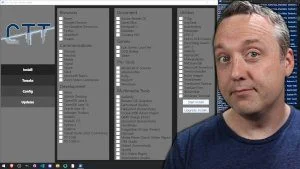
Best utility out there for reigning in Windows is Chris Titus Ultimate Windows Utility. I know many here poo poo it, but man does it work a treat for me!


Pull it up one command in Powershell, go to the tweaks page and start checking off what you want, then run it. I've never had Windows 11 Pro run so snappy and fast!
 

My Computer

System One

  • OS
    Windows 11 Pro 25H2 (26200.8457)
    Computer type
    PC/Desktop
    Manufacturer/Model
    CLX Intel Battlebox Ultimate (RA)
    CPU
    Intel® Core™ i9-13900KS 3.20GHz
    Motherboard
    ASUS ROG Maximus Z790 Hero WIFI - ATX
    Memory
    128GB DDR5-5200 Kingston Fury Beast RGB
    Graphics Card(s)
    Zotac Trinity NVIDIA® GeForce® RTX 4090 24GB GDDR6X
    Sound Card
    Realtek USB Audio
    Monitor(s) Displays
    Dell G3223Q 32" 4K Ultra HD
    Screen Resolution
    3840x2160 @144hz
    Hard Drives
    2TB x 2 Samsung 990 Pro 2280 NVMe M.2 SSD's
    2TB x 1 Samsung 980 Pro 2280 NVMe M.2 SSD
    4 TB x 1 My Passport Ultra External USB
    PSU
    1200W Corsair HX Ser HX1200 80+ Platinum
    Case
    Lian Li / Der Bauer 011DXL ROG
    Cooling
    Phanteks Glacier One 360 RGB AIO LC
    Keyboard
    Logitech K330 Wireless
    Mouse
    Logitech M310 Wireless
    Internet Speed
    1GB Fiber : 945/57
    Browser
    Firefox - Brave
    Antivirus
    Bitdefender Premium Personal
    Other Info
    Macrium Reflect X
Regarding OneDrive . . .
FWIW . . .

Several security flaws discovered in 2025 related to OneDrive's File Picker and integrations could lead to data overreach and leaks
. This is distinct from an organization-wide data breach caused by external hackers.

Key vulnerabilities and risks

  • File Picker over-permissioning: In late May 2025, researchers from Oasis Security reported a major security flaw in the OneDrive File Picker feature. When a user attempts to upload a single file to a third-party app, the File Picker uses broad OAuth permissions that grant the app access to the user's entire OneDrive storage, not just the selected file.
  • Misleading user consent: The consent dialogs used by the File Picker were found to be vague and misleading, failing to clearly communicate the extent of access being granted. This makes it difficult for users to realize they are giving permission to read or write to all their files, a condition known as "over-permissioned OAuth scopes".
  • Affects multiple apps: Many popular apps that integrate with Microsoft's cloud services, such as ChatGPT, Slack, Trello, and ClickUp, were potentially affected by the File Picker vulnerability.
  • Persistent access and insecure token storage: Older versions of the File Picker were also susceptible to insecure handling of authentication tokens, which could lead to unauthorized, long-term access to a user's account.
  • Forgotten sharing links: In September 2025, a separate vulnerability was highlighted regarding "forgotten external sharing links" in Microsoft 365, which includes OneDrive. These links can remain active indefinitely, creating a permanent, unmonitored opening to sensitive company data long after a project has ended.
  • Encouraging personal and work account crossover: A new feature rolled out in June 2025 encourages users to sign in to both their personal and corporate OneDrive accounts on the same Windows device. This creates a risk of sensitive corporate data being inadvertently copied into a less-secure personal account, leading to data leakage.
Microsoft's response

After the File Picker vulnerability was disclosed, Microsoft acknowledged the security report. However, the company stated that since user consent is required before access is granted, it did not meet the criteria for immediate servicing. Microsoft has said that it will "consider improvements to the experience in a future release".

Mitigation steps for users and organizations

To protect yourself from these security risks, security experts recommend the following actions:

  • Review app permissions: Regularly check and review the permissions granted to third-party apps connected to your OneDrive account. Revoke access for any apps with overly broad or unnecessary permissions.
  • Update admin policies: For organizations, security teams should enforce policies that restrict app access and block requests for permissions beyond what is absolutely necessary.
  • Audit sharing links: Admins should run a report in the SharePoint Admin Center to find and remove forgotten "Anyone with the link" public sharing links.
  • Limit app consent: Restrict OAuth app consent settings in your organization's Azure Active Directory and enable admin approval workflows for app requests.
  • Practice caution: Be cautious when authorizing apps that request OneDrive access. Assume that the consent flow may grant more access than the app explicitly advertises.
 

My Computers

System One System Two

  • OS
    Windows 11 Pro 25H2 (OS Build 26200.8246)
    Computer type
    Laptop
    Manufacturer/Model
    Dell Precision Mobile Workstation
    CPU
    Intel(R) Xeon(R) CPU E3-1535M v5 @ 2.90 Max Turbo 3.80
    Motherboard
    00V5FJ
    Memory
    64GB DDR4 ECC (Error-Correcting Code memory)
    Graphics Card(s)
    NVIDIA Quadro M2000M 4GB GDDR5 & Intel(R) HD Graphics P530
    Sound Card
    Realtek Audio
    Monitor(s) Displays
    15.6" 4K UltraHD
    Screen Resolution
    4K UHD 3840x2160
    Hard Drives
    2TB Crucial NVMe & 2TB Seagate SATA
    PSU
    Dell 180W 19.5V-9.23A
    Keyboard
    Backlit
    Mouse
    Logitech G703 & Logitech G305
    Internet Speed
    WIFI: Intel(R) Wi-Fi 6E AX210NGW(Gig+) 160MHz Bands 2.4GHz(574Mbps), 5GHz 2.4Gbps, 6 GHz (160MHz) 2.4Gbps
    Browser
    Mozilla Firefox
    Antivirus
    Windows Defender/Microsoft Security + additional Anti Spyware, Anti Malware, etc.
    Other Info
    Thunderbolt 3
  • Operating System
    Windows 11 Pro 24H2 (OS Build 26100.6725)
    Computer type
    PC/Desktop
    Manufacturer/Model
    Dell Precision Workstation T5610
    CPU
    Dual (X2) Intel(R) Xeon(R) CPU E5-2690 0 @ 2.90GHz Max Turbo 3.80
    Motherboard
    0WN7Y6
    Memory
    64GB DDR3 ECC (Error-Correcting Code memory)
    Graphics card(s)
    NVIDIA GeForce GTX 970 4GB of GDDR5
    Sound Card
    Realtek Audio & NVIDIA High Definition Audio
    Monitor(s) Displays
    3 Acer Monitors
    Screen Resolution
    1920x1080
    Hard Drives
    2 Seagate Barracuda ST2000DM008-2UB102 (RAID)
    Mouse
    Logitech G305

Microsoft OneDrive Auto-Sync Flaw Leaks Enterprise Secrets from SharePoint Online​

September 17, 2025

gbhackers.com/microsoft-onedrive-auto-sync-flaw/


Microsoft OneDrive Auto-Sync Flaw Leaks Enterprise Secrets from SharePoint Online​

September 17, 2025

A new report from Entro Labs reveals that one in five exposed secrets in large organizations can be traced back to SharePoint.

Rather than a flaw in SharePoint itself, the real culprit is a simple convenience feature: OneDrive’s default auto-sync.

When OneDrive silently backs up key folders like Desktop and Documents to SharePoint Online, it can turn personal files into a corporate treasure trove of secrets.

How OneDrive Auto-Sync Exposes Secrets

OneDrive for Business includes a Known Folder Move (KFM) option that automatically redirects important folders into OneDrive and, by extension, SharePoint document libraries.

This feature is enabled by default in many enterprise setups. Anything saved in those folders even temporary files like configuration JSONs, .env files, or spreadsheet “scratch pads” is copied to the cloud without alerting users.

Once in SharePoint, the files follow the platform’s sharing rules: they remain visible to their owner, may be shared with a team, and are always accessible to administrators. A misplaced password file or API key suddenly becomes available tenant-wide.

Entro Labs analyzed leaked secrets across dozens of enterprise environments and found that certain file types dominate.

Over half of the exposed secrets came from Excel workbooks, where users often paste confidential tokens and passwords for convenience.

Plain-text files such as .txt, .json, and .pem made up another 18 percent. Even scripts (.ps1), SQL dumps (.sql), and Word documents (.docx) contained credentials.

These user-generated files travel effortlessly from local drives into SharePoint, where a single admin or a compromised service account can retrieve them in minutes.

OneDrive’s sync feature may improve productivity, but it also greatly expands the blast radius of any compromised account. Security teams can take several steps today to reduce risk:

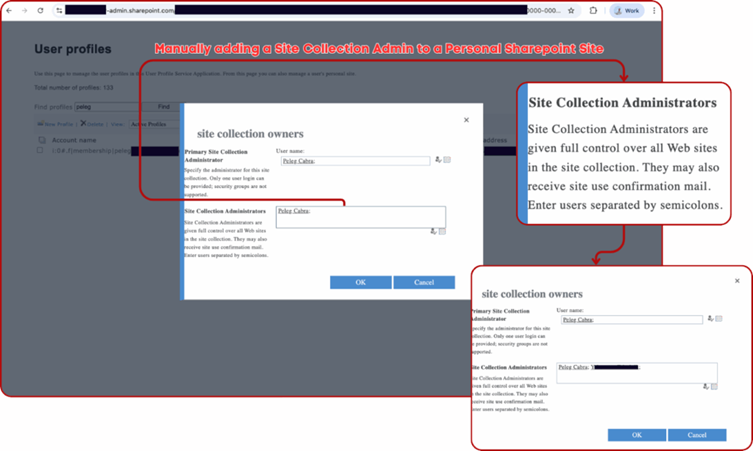
Manually adding a site collection Admin
First, raise awareness among employees, contractors, and third-party developers. Many assume their secrets stored on their Desktop or Documents folder never leave their machines.

 

My Computers

System One System Two

  • OS
    Windows 11 Pro 25H2 (OS Build 26200.8246)
    Computer type
    Laptop
    Manufacturer/Model
    Dell Precision Mobile Workstation
    CPU
    Intel(R) Xeon(R) CPU E3-1535M v5 @ 2.90 Max Turbo 3.80
    Motherboard
    00V5FJ
    Memory
    64GB DDR4 ECC (Error-Correcting Code memory)
    Graphics Card(s)
    NVIDIA Quadro M2000M 4GB GDDR5 & Intel(R) HD Graphics P530
    Sound Card
    Realtek Audio
    Monitor(s) Displays
    15.6" 4K UltraHD
    Screen Resolution
    4K UHD 3840x2160
    Hard Drives
    2TB Crucial NVMe & 2TB Seagate SATA
    PSU
    Dell 180W 19.5V-9.23A
    Keyboard
    Backlit
    Mouse
    Logitech G703 & Logitech G305
    Internet Speed
    WIFI: Intel(R) Wi-Fi 6E AX210NGW(Gig+) 160MHz Bands 2.4GHz(574Mbps), 5GHz 2.4Gbps, 6 GHz (160MHz) 2.4Gbps
    Browser
    Mozilla Firefox
    Antivirus
    Windows Defender/Microsoft Security + additional Anti Spyware, Anti Malware, etc.
    Other Info
    Thunderbolt 3
  • Operating System
    Windows 11 Pro 24H2 (OS Build 26100.6725)
    Computer type
    PC/Desktop
    Manufacturer/Model
    Dell Precision Workstation T5610
    CPU
    Dual (X2) Intel(R) Xeon(R) CPU E5-2690 0 @ 2.90GHz Max Turbo 3.80
    Motherboard
    0WN7Y6
    Memory
    64GB DDR3 ECC (Error-Correcting Code memory)
    Graphics card(s)
    NVIDIA GeForce GTX 970 4GB of GDDR5
    Sound Card
    Realtek Audio & NVIDIA High Definition Audio
    Monitor(s) Displays
    3 Acer Monitors
    Screen Resolution
    1920x1080
    Hard Drives
    2 Seagate Barracuda ST2000DM008-2UB102 (RAID)
    Mouse
    Logitech G305
Just a few things to be aware of . . . (y)

www.techradar.com/computing/windows/will-microsoft-never-learn-leaked-onedrive-app-sparks-fears-of-more-pointless-bloat-in-windows-11

Will Microsoft never learn? Leaked OneDrive app sparks fears of more pointless bloat in Windows 11​


News
ByDarren Allan publishedOctober 3, 2025
The new OneDrive app looks slick, sure, but there are questions about the purpose of this potential addition to the OS
 

My Computers

System One System Two

  • OS
    Windows 11 Pro 25H2 (OS Build 26200.8246)
    Computer type
    Laptop
    Manufacturer/Model
    Dell Precision Mobile Workstation
    CPU
    Intel(R) Xeon(R) CPU E3-1535M v5 @ 2.90 Max Turbo 3.80
    Motherboard
    00V5FJ
    Memory
    64GB DDR4 ECC (Error-Correcting Code memory)
    Graphics Card(s)
    NVIDIA Quadro M2000M 4GB GDDR5 & Intel(R) HD Graphics P530
    Sound Card
    Realtek Audio
    Monitor(s) Displays
    15.6" 4K UltraHD
    Screen Resolution
    4K UHD 3840x2160
    Hard Drives
    2TB Crucial NVMe & 2TB Seagate SATA
    PSU
    Dell 180W 19.5V-9.23A
    Keyboard
    Backlit
    Mouse
    Logitech G703 & Logitech G305
    Internet Speed
    WIFI: Intel(R) Wi-Fi 6E AX210NGW(Gig+) 160MHz Bands 2.4GHz(574Mbps), 5GHz 2.4Gbps, 6 GHz (160MHz) 2.4Gbps
    Browser
    Mozilla Firefox
    Antivirus
    Windows Defender/Microsoft Security + additional Anti Spyware, Anti Malware, etc.
    Other Info
    Thunderbolt 3
  • Operating System
    Windows 11 Pro 24H2 (OS Build 26100.6725)
    Computer type
    PC/Desktop
    Manufacturer/Model
    Dell Precision Workstation T5610
    CPU
    Dual (X2) Intel(R) Xeon(R) CPU E5-2690 0 @ 2.90GHz Max Turbo 3.80
    Motherboard
    0WN7Y6
    Memory
    64GB DDR3 ECC (Error-Correcting Code memory)
    Graphics card(s)
    NVIDIA GeForce GTX 970 4GB of GDDR5
    Sound Card
    Realtek Audio & NVIDIA High Definition Audio
    Monitor(s) Displays
    3 Acer Monitors
    Screen Resolution
    1920x1080
    Hard Drives
    2 Seagate Barracuda ST2000DM008-2UB102 (RAID)
    Mouse
    Logitech G305
I recommend turning off the background telemetry with

O+O shutup 10 +

and Spybot Anti-Beacon
I honestly don't believe that Microsoft is spying on me or that I have anything that Microsoft wants to steal.
 

My Computers

System One System Two

  • OS
    Windows 11 Pro
    Computer type
    Laptop
    Manufacturer/Model
    Dell XPS 16 DA16260
    CPU
    Intel Series 3 Core Ultra X9 388H
    Memory
    64GB LPDDR5x 9600 MT/s
    Graphics Card(s)
    Intel Arc graphics B390 Panther Lake
    Monitor(s) Displays
    16" 3.2K Tandem OLED Infinity Edge
    Screen Resolution
    3200 x 2000 16:10 236 PPI
    Hard Drives
    1 Terabyte M.2 PCIe NVMe SSD
    Case
    Black Anodized Aluminum
    Cooling
    Vapor Chamber Cooling
    Mouse
    None
    Internet Speed
    942 Mbps Netgear Mesh + 2 Satellites
    Browser
    Microsoft Edge (Chromium)
    Antivirus
    Windows Security (Defender)
    Other Info
    NPU delivering 67 TOPS
    Microsoft 365 subscription
    Microsoft OneDrive 1TB Cloud
    Microsoft Visual Studio
    Microsoft Visual Studio Code
    Microsoft Sysinternals Suite
    Microsoft BitLocker
    Microsoft Copilot
    Dell Support Assist
    Dell Command | Update
    Macrium Reflect X subscription
    1Password Password Manager
    Amazon Kindle for PC
    Lightroom/Photoshop subscription
    Interactive Brokers Trader Workstation
  • Operating System
    Windows 11 Pro
    Computer type
    Laptop
    Manufacturer/Model
    Microsoft Surface Laptop 7
    CPU
    Snapdragon® X Elite (12 Core) with Hexagon NPU delivering 45 TOPS
    Memory
    32GB LPDDR5x 8448 MT/s
    Graphics card(s)
    Integrated Adreno GPU
    Sound Card
    Omnisonic speakers with Dolby Atmos spatial sound
    Monitor(s) Displays
    13.8″ PixelSense Flow touchscreen 120 Hz 600 NIT
    Screen Resolution
    2304 × 1536 (201 PPI), 3:2 aspect ratio
    Hard Drives
    1 TB PCIe NVMe Gen 4 SSD
    Case
    Black Anodized Aluminum
    Cooling
    Vapor Chamber Cooling
    Mouse
    None
    Internet Speed
    942 Mbps Netgear Mesh + 2 Satellites
    Browser
    Microsoft Edge (Chromium)
    Antivirus
    Windows Security (Defender)
    Other Info
    Microsoft 365 subscription (Office)
    Microsoft OneDrive 1TB Cloud
    Microsoft Visual Studio 2026
    Microsoft Visual Studio Code
    Interactive Brokers Trader Workstation
    Lightroom/Photoshop subscription
    1Password Password Manager
    Microsoft Sysinternals
    Amazon Kindle for PC
    Microsoft BitLocker
    Microsoft Copilot

Microsoft OneDrive Auto-Sync Flaw Leaks Enterprise Secrets from SharePoint Online​

September 17, 2025

gbhackers.com/microsoft-onedrive-auto-sync-flaw/


Microsoft OneDrive Auto-Sync Flaw Leaks Enterprise Secrets from SharePoint Online​

September 17, 2025

A new report from Entro Labs reveals that one in five exposed secrets in large organizations can be traced back to SharePoint.

Rather than a flaw in SharePoint itself, the real culprit is a simple convenience feature: OneDrive’s default auto-sync.

When OneDrive silently backs up key folders like Desktop and Documents to SharePoint Online, it can turn personal files into a corporate treasure trove of secrets.

How OneDrive Auto-Sync Exposes Secrets

OneDrive for Business includes a Known Folder Move (KFM) option that automatically redirects important folders into OneDrive and, by extension, SharePoint document libraries.

This feature is enabled by default in many enterprise setups. Anything saved in those folders even temporary files like configuration JSONs, .env files, or spreadsheet “scratch pads” is copied to the cloud without alerting users.

Once in SharePoint, the files follow the platform’s sharing rules: they remain visible to their owner, may be shared with a team, and are always accessible to administrators. A misplaced password file or API key suddenly becomes available tenant-wide.

Entro Labs analyzed leaked secrets across dozens of enterprise environments and found that certain file types dominate.

Over half of the exposed secrets came from Excel workbooks, where users often paste confidential tokens and passwords for convenience.

Plain-text files such as .txt, .json, and .pem made up another 18 percent. Even scripts (.ps1), SQL dumps (.sql), and Word documents (.docx) contained credentials.

These user-generated files travel effortlessly from local drives into SharePoint, where a single admin or a compromised service account can retrieve them in minutes.

OneDrive’s sync feature may improve productivity, but it also greatly expands the blast radius of any compromised account. Security teams can take several steps today to reduce risk:

Manually adding a site collection Admin
First, raise awareness among employees, contractors, and third-party developers. Many assume their secrets stored on their Desktop or Documents folder never leave their machines.
I don't use OneDrive for business.
 

My Computers

System One System Two

  • OS
    Windows 11 Pro
    Computer type
    Laptop
    Manufacturer/Model
    Dell XPS 16 DA16260
    CPU
    Intel Series 3 Core Ultra X9 388H
    Memory
    64GB LPDDR5x 9600 MT/s
    Graphics Card(s)
    Intel Arc graphics B390 Panther Lake
    Monitor(s) Displays
    16" 3.2K Tandem OLED Infinity Edge
    Screen Resolution
    3200 x 2000 16:10 236 PPI
    Hard Drives
    1 Terabyte M.2 PCIe NVMe SSD
    Case
    Black Anodized Aluminum
    Cooling
    Vapor Chamber Cooling
    Mouse
    None
    Internet Speed
    942 Mbps Netgear Mesh + 2 Satellites
    Browser
    Microsoft Edge (Chromium)
    Antivirus
    Windows Security (Defender)
    Other Info
    NPU delivering 67 TOPS
    Microsoft 365 subscription
    Microsoft OneDrive 1TB Cloud
    Microsoft Visual Studio
    Microsoft Visual Studio Code
    Microsoft Sysinternals Suite
    Microsoft BitLocker
    Microsoft Copilot
    Dell Support Assist
    Dell Command | Update
    Macrium Reflect X subscription
    1Password Password Manager
    Amazon Kindle for PC
    Lightroom/Photoshop subscription
    Interactive Brokers Trader Workstation
  • Operating System
    Windows 11 Pro
    Computer type
    Laptop
    Manufacturer/Model
    Microsoft Surface Laptop 7
    CPU
    Snapdragon® X Elite (12 Core) with Hexagon NPU delivering 45 TOPS
    Memory
    32GB LPDDR5x 8448 MT/s
    Graphics card(s)
    Integrated Adreno GPU
    Sound Card
    Omnisonic speakers with Dolby Atmos spatial sound
    Monitor(s) Displays
    13.8″ PixelSense Flow touchscreen 120 Hz 600 NIT
    Screen Resolution
    2304 × 1536 (201 PPI), 3:2 aspect ratio
    Hard Drives
    1 TB PCIe NVMe Gen 4 SSD
    Case
    Black Anodized Aluminum
    Cooling
    Vapor Chamber Cooling
    Mouse
    None
    Internet Speed
    942 Mbps Netgear Mesh + 2 Satellites
    Browser
    Microsoft Edge (Chromium)
    Antivirus
    Windows Security (Defender)
    Other Info
    Microsoft 365 subscription (Office)
    Microsoft OneDrive 1TB Cloud
    Microsoft Visual Studio 2026
    Microsoft Visual Studio Code
    Interactive Brokers Trader Workstation
    Lightroom/Photoshop subscription
    1Password Password Manager
    Microsoft Sysinternals
    Amazon Kindle for PC
    Microsoft BitLocker
    Microsoft Copilot
Regarding OneDrive . . .
FWIW . . .

Several security flaws discovered in 2025 related to OneDrive's File Picker and integrations could lead to data overreach and leaks
. This is distinct from an organization-wide data breach caused by external hackers.

Key vulnerabilities and risks

  • File Picker over-permissioning: In late May 2025, researchers from Oasis Security reported a major security flaw in the OneDrive File Picker feature. When a user attempts to upload a single file to a third-party app, the File Picker uses broad OAuth permissions that grant the app access to the user's entire OneDrive storage, not just the selected file.
  • Misleading user consent: The consent dialogs used by the File Picker were found to be vague and misleading, failing to clearly communicate the extent of access being granted. This makes it difficult for users to realize they are giving permission to read or write to all their files, a condition known as "over-permissioned OAuth scopes".
  • Affects multiple apps: Many popular apps that integrate with Microsoft's cloud services, such as ChatGPT, Slack, Trello, and ClickUp, were potentially affected by the File Picker vulnerability.
  • Persistent access and insecure token storage: Older versions of the File Picker were also susceptible to insecure handling of authentication tokens, which could lead to unauthorized, long-term access to a user's account.
  • Forgotten sharing links: In September 2025, a separate vulnerability was highlighted regarding "forgotten external sharing links" in Microsoft 365, which includes OneDrive. These links can remain active indefinitely, creating a permanent, unmonitored opening to sensitive company data long after a project has ended.
  • Encouraging personal and work account crossover: A new feature rolled out in June 2025 encourages users to sign in to both their personal and corporate OneDrive accounts on the same Windows device. This creates a risk of sensitive corporate data being inadvertently copied into a less-secure personal account, leading to data leakage.
Microsoft's response

After the File Picker vulnerability was disclosed, Microsoft acknowledged the security report. However, the company stated that since user consent is required before access is granted, it did not meet the criteria for immediate servicing. Microsoft has said that it will "consider improvements to the experience in a future release".

Mitigation steps for users and organizations

To protect yourself from these security risks, security experts recommend the following actions:

  • Review app permissions: Regularly check and review the permissions granted to third-party apps connected to your OneDrive account. Revoke access for any apps with overly broad or unnecessary permissions.
  • Update admin policies: For organizations, security teams should enforce policies that restrict app access and block requests for permissions beyond what is absolutely necessary.
  • Audit sharing links: Admins should run a report in the SharePoint Admin Center to find and remove forgotten "Anyone with the link" public sharing links.
  • Limit app consent: Restrict OAuth app consent settings in your organization's Azure Active Directory and enable admin approval workflows for app requests.
  • Practice caution: Be cautious when authorizing apps that request OneDrive access. Assume that the consent flow may grant more access than the app explicitly advertises.
None of this is of any concern to me for how I use OneDrive. I don't use OneDrive in a business organization.
 

My Computers

System One System Two

  • OS
    Windows 11 Pro
    Computer type
    Laptop
    Manufacturer/Model
    Dell XPS 16 DA16260
    CPU
    Intel Series 3 Core Ultra X9 388H
    Memory
    64GB LPDDR5x 9600 MT/s
    Graphics Card(s)
    Intel Arc graphics B390 Panther Lake
    Monitor(s) Displays
    16" 3.2K Tandem OLED Infinity Edge
    Screen Resolution
    3200 x 2000 16:10 236 PPI
    Hard Drives
    1 Terabyte M.2 PCIe NVMe SSD
    Case
    Black Anodized Aluminum
    Cooling
    Vapor Chamber Cooling
    Mouse
    None
    Internet Speed
    942 Mbps Netgear Mesh + 2 Satellites
    Browser
    Microsoft Edge (Chromium)
    Antivirus
    Windows Security (Defender)
    Other Info
    NPU delivering 67 TOPS
    Microsoft 365 subscription
    Microsoft OneDrive 1TB Cloud
    Microsoft Visual Studio
    Microsoft Visual Studio Code
    Microsoft Sysinternals Suite
    Microsoft BitLocker
    Microsoft Copilot
    Dell Support Assist
    Dell Command | Update
    Macrium Reflect X subscription
    1Password Password Manager
    Amazon Kindle for PC
    Lightroom/Photoshop subscription
    Interactive Brokers Trader Workstation
  • Operating System
    Windows 11 Pro
    Computer type
    Laptop
    Manufacturer/Model
    Microsoft Surface Laptop 7
    CPU
    Snapdragon® X Elite (12 Core) with Hexagon NPU delivering 45 TOPS
    Memory
    32GB LPDDR5x 8448 MT/s
    Graphics card(s)
    Integrated Adreno GPU
    Sound Card
    Omnisonic speakers with Dolby Atmos spatial sound
    Monitor(s) Displays
    13.8″ PixelSense Flow touchscreen 120 Hz 600 NIT
    Screen Resolution
    2304 × 1536 (201 PPI), 3:2 aspect ratio
    Hard Drives
    1 TB PCIe NVMe Gen 4 SSD
    Case
    Black Anodized Aluminum
    Cooling
    Vapor Chamber Cooling
    Mouse
    None
    Internet Speed
    942 Mbps Netgear Mesh + 2 Satellites
    Browser
    Microsoft Edge (Chromium)
    Antivirus
    Windows Security (Defender)
    Other Info
    Microsoft 365 subscription (Office)
    Microsoft OneDrive 1TB Cloud
    Microsoft Visual Studio 2026
    Microsoft Visual Studio Code
    Interactive Brokers Trader Workstation
    Lightroom/Photoshop subscription
    1Password Password Manager
    Microsoft Sysinternals
    Amazon Kindle for PC
    Microsoft BitLocker
    Microsoft Copilot
My own personal preference is to use unattended setup. Even if I don't want to do a full unattended, I use a stripped-down answer file that does nothing but create a local account, prevent automatic device encryption, and stop quality updates from being installed during setup. But I also fully realize that this might be a bit much for your casual Windows user.
Unattended was the way I went after recently doing a bog-standard install I couldn't believe the poop you have to wade through
The unattended worked a charm, I got on with something else came back in the room and was good to go ..
 

My Computer

System One

  • OS
    Windows 11 IoT Enterprise LTSC 64-bit
    Computer type
    PC/Desktop
    Manufacturer/Model
    HP Z640
    CPU
    Intel Xeon E5 2699 v3 @ 2.30GHz x2
    Motherboard
    Hewlett-Packard 212A (CPU0)
    Memory
    128GB Single-Channel DDR4 @ 1064MHz (10-10-10-28)
    Graphics Card(s)
    4095MB NVIDIA GeForce RTX 2080 SUPER
    Keyboard
    HP wired
    Mouse
    HP wired
    Browser
    FF
    Antivirus
    windows defender
None of this is of any concern to me for how I use OneDrive. I don't use OneDrive in a business organization.
@TraderGary
I understand. That being said, there are many security conscious PC users here. Whether business or personal, privacy and security should always be a concern. It's just a good practice to be careful and limit liability and exposure to risk.


Ways OneDrive passwords can be exposed

  • Third-party data breaches: In late 2024 and early 2025, security researchers found billions of login credentials on the dark web, gathered from various third-party breaches. If a user has reused a password on multiple sites, their OneDrive account could be vulnerable even if Microsoft is not directly breached.
  • Credential-stealing malware: Malware on a user's computer or phone can be designed to steal login information, including saved passwords and session cookies, that allow hackers to access accounts.
  • Phishing attacks: Cybercriminals can trick users into giving away their login credentials by creating fake websites that mimic the official OneDrive or Microsoft sign-in pages.
  • Compromised Microsoft accounts: Because OneDrive is part of the Microsoft ecosystem, if a user's broader Microsoft account is compromised (e.g., through a weak password or another vulnerability), attackers could gain access to their OneDrive files.


July 21, 2025

A Timeline of Microsoft Data Breaches and Vulnerabilities: 2025 Update​


Microsoft 365 Accounts Get Sprayed by Mega-Botnet​

The threat actors are exploiting noninteractive sign-ins, an authentication feature that security teams don't typically monitor.
Picture of Kristina Beek
Kristina Beek, Associate Editor, Dark Reading
February 25, 2025
 

My Computers

System One System Two

  • OS
    Windows 11 Pro 25H2 (OS Build 26200.8246)
    Computer type
    Laptop
    Manufacturer/Model
    Dell Precision Mobile Workstation
    CPU
    Intel(R) Xeon(R) CPU E3-1535M v5 @ 2.90 Max Turbo 3.80
    Motherboard
    00V5FJ
    Memory
    64GB DDR4 ECC (Error-Correcting Code memory)
    Graphics Card(s)
    NVIDIA Quadro M2000M 4GB GDDR5 & Intel(R) HD Graphics P530
    Sound Card
    Realtek Audio
    Monitor(s) Displays
    15.6" 4K UltraHD
    Screen Resolution
    4K UHD 3840x2160
    Hard Drives
    2TB Crucial NVMe & 2TB Seagate SATA
    PSU
    Dell 180W 19.5V-9.23A
    Keyboard
    Backlit
    Mouse
    Logitech G703 & Logitech G305
    Internet Speed
    WIFI: Intel(R) Wi-Fi 6E AX210NGW(Gig+) 160MHz Bands 2.4GHz(574Mbps), 5GHz 2.4Gbps, 6 GHz (160MHz) 2.4Gbps
    Browser
    Mozilla Firefox
    Antivirus
    Windows Defender/Microsoft Security + additional Anti Spyware, Anti Malware, etc.
    Other Info
    Thunderbolt 3
  • Operating System
    Windows 11 Pro 24H2 (OS Build 26100.6725)
    Computer type
    PC/Desktop
    Manufacturer/Model
    Dell Precision Workstation T5610
    CPU
    Dual (X2) Intel(R) Xeon(R) CPU E5-2690 0 @ 2.90GHz Max Turbo 3.80
    Motherboard
    0WN7Y6
    Memory
    64GB DDR3 ECC (Error-Correcting Code memory)
    Graphics card(s)
    NVIDIA GeForce GTX 970 4GB of GDDR5
    Sound Card
    Realtek Audio & NVIDIA High Definition Audio
    Monitor(s) Displays
    3 Acer Monitors
    Screen Resolution
    1920x1080
    Hard Drives
    2 Seagate Barracuda ST2000DM008-2UB102 (RAID)
    Mouse
    Logitech G305
Best utility out there for reigning in Windows is Chris Titus Ultimate Windows Utility. I know many here poo poo it, but man does it work a treat for me!


Pull it up one command in Powershell, go to the tweaks page and start checking off what you want, then run it. I've never had Windows 11 Pro run so snappy and fast!
CTT is a great tool and the micro win is also very good . i find the installations from the CTT don't always work for me, so I use uniget i keep a bundle file of my installed apps so if I reinstall I can open the bundle and let it do its thing ... lol
 

My Computer

System One

  • OS
    Windows 11 IoT Enterprise LTSC 64-bit
    Computer type
    PC/Desktop
    Manufacturer/Model
    HP Z640
    CPU
    Intel Xeon E5 2699 v3 @ 2.30GHz x2
    Motherboard
    Hewlett-Packard 212A (CPU0)
    Memory
    128GB Single-Channel DDR4 @ 1064MHz (10-10-10-28)
    Graphics Card(s)
    4095MB NVIDIA GeForce RTX 2080 SUPER
    Keyboard
    HP wired
    Mouse
    HP wired
    Browser
    FF
    Antivirus
    windows defender
@TraderGary
I understand. That being said, there are many security conscious PC users here. Whether business or personal, privacy and security should always be a concern.


Ways OneDrive passwords can be exposed

  • Third-party data breaches: In late 2024 and early 2025, security researchers found billions of login credentials on the dark web, gathered from various third-party breaches. If a user has reused a password on multiple sites, their OneDrive account could be vulnerable even if Microsoft is not directly breached.
  • Credential-stealing malware: Malware on a user's computer or phone can be designed to steal login information, including saved passwords and session cookies, that allow hackers to access accounts.
  • Phishing attacks: Cybercriminals can trick users into giving away their login credentials by creating fake websites that mimic the official OneDrive or Microsoft sign-in pages.
  • Compromised Microsoft accounts: Because OneDrive is part of the Microsoft ecosystem, if a user's broader Microsoft account is compromised (e.g., through a weak password or another vulnerability), attackers could gain access to their OneDrive files.
C'mon now, that's the way any of your passwords can be exposed. ;-)
 

My Computers

System One System Two

  • OS
    Windows 11 Pro
    Computer type
    Laptop
    Manufacturer/Model
    Dell XPS 16 DA16260
    CPU
    Intel Series 3 Core Ultra X9 388H
    Memory
    64GB LPDDR5x 9600 MT/s
    Graphics Card(s)
    Intel Arc graphics B390 Panther Lake
    Monitor(s) Displays
    16" 3.2K Tandem OLED Infinity Edge
    Screen Resolution
    3200 x 2000 16:10 236 PPI
    Hard Drives
    1 Terabyte M.2 PCIe NVMe SSD
    Case
    Black Anodized Aluminum
    Cooling
    Vapor Chamber Cooling
    Mouse
    None
    Internet Speed
    942 Mbps Netgear Mesh + 2 Satellites
    Browser
    Microsoft Edge (Chromium)
    Antivirus
    Windows Security (Defender)
    Other Info
    NPU delivering 67 TOPS
    Microsoft 365 subscription
    Microsoft OneDrive 1TB Cloud
    Microsoft Visual Studio
    Microsoft Visual Studio Code
    Microsoft Sysinternals Suite
    Microsoft BitLocker
    Microsoft Copilot
    Dell Support Assist
    Dell Command | Update
    Macrium Reflect X subscription
    1Password Password Manager
    Amazon Kindle for PC
    Lightroom/Photoshop subscription
    Interactive Brokers Trader Workstation
  • Operating System
    Windows 11 Pro
    Computer type
    Laptop
    Manufacturer/Model
    Microsoft Surface Laptop 7
    CPU
    Snapdragon® X Elite (12 Core) with Hexagon NPU delivering 45 TOPS
    Memory
    32GB LPDDR5x 8448 MT/s
    Graphics card(s)
    Integrated Adreno GPU
    Sound Card
    Omnisonic speakers with Dolby Atmos spatial sound
    Monitor(s) Displays
    13.8″ PixelSense Flow touchscreen 120 Hz 600 NIT
    Screen Resolution
    2304 × 1536 (201 PPI), 3:2 aspect ratio
    Hard Drives
    1 TB PCIe NVMe Gen 4 SSD
    Case
    Black Anodized Aluminum
    Cooling
    Vapor Chamber Cooling
    Mouse
    None
    Internet Speed
    942 Mbps Netgear Mesh + 2 Satellites
    Browser
    Microsoft Edge (Chromium)
    Antivirus
    Windows Security (Defender)
    Other Info
    Microsoft 365 subscription (Office)
    Microsoft OneDrive 1TB Cloud
    Microsoft Visual Studio 2026
    Microsoft Visual Studio Code
    Interactive Brokers Trader Workstation
    Lightroom/Photoshop subscription
    1Password Password Manager
    Microsoft Sysinternals
    Amazon Kindle for PC
    Microsoft BitLocker
    Microsoft Copilot

My Computers

System One System Two

  • OS
    Windows 11 Workstation
    Computer type
    PC/Desktop
    Manufacturer/Model
    doofenshmirtz evil incorporated
    CPU
    Ryzen 9 5950X
    Motherboard
    Asus ROG Crosshair VIII Formula
    Memory
    Corsair Vengeance RGB PRO Black 64GB (4x16GB) 3600MHz AMD Ryzen Tuned DDR4
    Graphics Card(s)
    ASUS AMD Radeon RX 6900 XT 16GB ROG Strix LC OC
    Sound Card
    Sound BlasterX Katana
    Monitor(s) Displays
    3 x27" Dell U2724D & 1 x 34" Dell U3415W
    Hard Drives
    Samsung 980 Pro 1TB M.2 2280 PCI-e 4.0 x4 NVMe Solid State
    Drive
    PSU
    ASUS ROG THOR 850W 80 Plus Platinum
    Case
    ASUS ROG Strix Helios Midi-Tower ARGB Gaming Case
    Cooling
    ASUS ROG Strix LC Performance RGB AIO CPU Liquid Cooler - 360mm
    Keyboard
    Logi Ergo
    Mouse
    Logitech MX Vertical
    Internet Speed
    900/100 Mbps
    Browser
    Chrome
    Antivirus
    Windows Defender, Malwarebytes Pro
    Other Info
    HP M281 Printer
    Logitech Brio Stream webcam
    Yeti X mic
  • Operating System
    Windows 10
    Computer type
    Laptop
    Manufacturer/Model
    Surface Laptop
    CPU
    i7
So, you have never had the experience of the ease of accessing files seamlessly across your devices?
@z3r010
Of course I have the ease of accessing files seamlessly across devices! PC, laptop, other computers, multiple cell phones running Android OS, tablets, etc.

I have network drives on a NAS using RAID 10. I own the NAS, the drives, all is networked, secured, and with redundancy.

Judging by posts others have made in this forum, I'm not alone in this kind of thinking or setup. (y) ;-)

Lots of savvy power users here.
 

My Computers

System One System Two

  • OS
    Windows 11 Pro 25H2 (OS Build 26200.8246)
    Computer type
    Laptop
    Manufacturer/Model
    Dell Precision Mobile Workstation
    CPU
    Intel(R) Xeon(R) CPU E3-1535M v5 @ 2.90 Max Turbo 3.80
    Motherboard
    00V5FJ
    Memory
    64GB DDR4 ECC (Error-Correcting Code memory)
    Graphics Card(s)
    NVIDIA Quadro M2000M 4GB GDDR5 & Intel(R) HD Graphics P530
    Sound Card
    Realtek Audio
    Monitor(s) Displays
    15.6" 4K UltraHD
    Screen Resolution
    4K UHD 3840x2160
    Hard Drives
    2TB Crucial NVMe & 2TB Seagate SATA
    PSU
    Dell 180W 19.5V-9.23A
    Keyboard
    Backlit
    Mouse
    Logitech G703 & Logitech G305
    Internet Speed
    WIFI: Intel(R) Wi-Fi 6E AX210NGW(Gig+) 160MHz Bands 2.4GHz(574Mbps), 5GHz 2.4Gbps, 6 GHz (160MHz) 2.4Gbps
    Browser
    Mozilla Firefox
    Antivirus
    Windows Defender/Microsoft Security + additional Anti Spyware, Anti Malware, etc.
    Other Info
    Thunderbolt 3
  • Operating System
    Windows 11 Pro 24H2 (OS Build 26100.6725)
    Computer type
    PC/Desktop
    Manufacturer/Model
    Dell Precision Workstation T5610
    CPU
    Dual (X2) Intel(R) Xeon(R) CPU E5-2690 0 @ 2.90GHz Max Turbo 3.80
    Motherboard
    0WN7Y6
    Memory
    64GB DDR3 ECC (Error-Correcting Code memory)
    Graphics card(s)
    NVIDIA GeForce GTX 970 4GB of GDDR5
    Sound Card
    Realtek Audio & NVIDIA High Definition Audio
    Monitor(s) Displays
    3 Acer Monitors
    Screen Resolution
    1920x1080
    Hard Drives
    2 Seagate Barracuda ST2000DM008-2UB102 (RAID)
    Mouse
    Logitech G305
Unattended was the way I went after recently doing a bog-standard install I couldn't believe the poop you have to wade through
The unattended worked a charm, I got on with something else came back in the room and was good to go ..
I keep seeing people talking about "unattended" installs. Can someone explain that to me please because it seems a bit more than just going out while the install takes place! If it removes the need to do all the settings.
 

My Computers

System One System Two

  • OS
    Windows 11 Home 25H2
    Computer type
    Laptop
    Manufacturer/Model
    HP Pavilion 14-ce3606sa
    CPU
    Core i5-1035G1
    Memory
    32gb
    Hard Drives
    Samsung 870 evo sata ssd
    Cooling
    Could be better
    Internet Speed
    50 mbps Starlink
    Browser
    Firefox
    Other Info
    Originally came installed with a 500gb H10 Optane ssd
  • Operating System
    Windows 11 Home
    Computer type
    Laptop
    Manufacturer/Model
    HP Pavilion ce3606sa
    CPU
    Intel Core i5-1035G1
    Memory
    16gb
    Hard Drives
    Hynix Gold P31 2TB
    Internet Speed
    200mbps Starlink
    Browser
    Firefox
    Antivirus
    Defender
I keep seeing people talking about "unattended" installs. Can someone explain that to me please because it seems a bit more than just going out while the install takes place! If it removes the need to do all the settings.
Once you have created your bootable USB you add the attended file ...boot as normal, you can add as much or as little as you like,
you can add installs I have not done this
I'm sure there are others here can explain better than me ... but I did find it pretty straight forward
There are tuts but not sure on adding links and if they are allowed or not

(I literally ran a bath, came back and the installation was done )
 

My Computer

System One

  • OS
    Windows 11 IoT Enterprise LTSC 64-bit
    Computer type
    PC/Desktop
    Manufacturer/Model
    HP Z640
    CPU
    Intel Xeon E5 2699 v3 @ 2.30GHz x2
    Motherboard
    Hewlett-Packard 212A (CPU0)
    Memory
    128GB Single-Channel DDR4 @ 1064MHz (10-10-10-28)
    Graphics Card(s)
    4095MB NVIDIA GeForce RTX 2080 SUPER
    Keyboard
    HP wired
    Mouse
    HP wired
    Browser
    FF
    Antivirus
    windows defender

My Computers

System One System Two

  • OS
    Windows 11 Home
    Computer type
    PC/Desktop
    Manufacturer/Model
    IBuyPower/SMI7N5701
    CPU
    Intel Core i7 14700F
    Motherboard
    ASUS PRIME B760M-A AX6 II
    Memory
    32gb DDR5 5200MHz
    Graphics Card(s)
    Nvidia RTX 5070 12gb
    Sound Card
    Toshiba Dynadock Audio
    Monitor(s) Displays
    Dell P2214h
    Screen Resolution
    1920 x 1080
    Hard Drives
    AGI AI818 M.2 PCIe Gen4 SSD
    PSU
    750W 80 PLUS Gold PSU
    Case
    iBUYPOWER Slate 8 Mesh Pro
    Cooling
    Air Cooled
  • Operating System
    Windows 11 Pro upgraded from 10
    Computer type
    PC/Desktop
    Manufacturer/Model
    Intel/NUC 10i7FNH
    CPU
    i7 10710U
    Memory
    16GB
    Graphics card(s)
    Integrated Intel UHD Graphics 620
    Sound Card
    On board
    Monitor(s) Displays
    Dell P2214h
    Screen Resolution
    1920 x 1080
Freedom of choice should remain for what they choose to do with their own PC/laptop.
And MS agrees with you. If you're so disillusioned with Windows you're free to install a Linux distro, or an earlier, unsupported Windows version.

It's simply the sad fact of the current state of affairs: Everything is about branding, subscriptions, invasive ads, etc. MS is far from the only offender.
 

My Computer

System One

  • OS
    Windows 11 Pro 25H2 26200.7840
    Computer type
    Laptop
    Manufacturer/Model
    Lenovo IdeaPad L340
    CPU
    Intel Core i3-8145U
    Memory
    16GB
    Hard Drives
    500 GB M2 1 TB HDD
    Internet Speed
    400 MB
    Browser
    Chrome | Edge
    Antivirus
    Microsoft Defender | Block unknown executables | Various ASR rules enabled | Smart App Control

Latest Support Threads

Back
Top Bottom