Realteck Ethernet Driver Error Code 43


I’m going to try running the installer and selection uninstall to remove all drivers, restart then run again
 

My Computer My Computer

At a glance

Windows 11 ProAMD Ryzen 5-550016GB DDR4MSI RTX 2060
OS
Windows 11 Pro
Computer type
PC/Desktop
Manufacturer/Model
Custom
CPU
AMD Ryzen 5-5500
Motherboard
MSI x570 PRO-A
Memory
16GB DDR4
Graphics Card(s)
MSI RTX 2060
1738910225395.webp

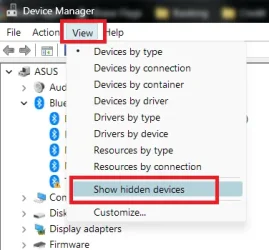
show hidden devices, uninstall your NIC and any hidden NICs and rescan for new devices, let it find and install your NIC then update the driver by manually browsing to the one you downloaded (if you havent, extract it to a folder so you can install via browsing to the .ini inside the extraction)
 

My Computer My Computer

At a glance

Windows 11 Pro
OS
Windows 11 Pro
View attachment 124570

show hidden devices, uninstall your NIC and any hidden NICs and rescan for new devices, let it find and install your NIC then update the driver by manually browsing to the one you downloaded (if you havent, extract it to a folder so you can install via browsing to the .ini inside the extraction)
same problem, i removed 3 NIC drivers and reinstalled with latest driver like instructed, its installed but just says not connected unfortuntly
 

My Computer My Computer

At a glance

Windows 11 ProAMD Ryzen 5-550016GB DDR4MSI RTX 2060
OS
Windows 11 Pro
Computer type
PC/Desktop
Manufacturer/Model
Custom
CPU
AMD Ryzen 5-5500
Motherboard
MSI x570 PRO-A
Memory
16GB DDR4
Graphics Card(s)
MSI RTX 2060

Latest Support Threads

Back
Top Bottom