Solved Realtek PCIe 2.5GbE network adapter - not reaching its nominal speed


bob2026

Member
Local time
5:34 AM
Posts
30
OS
Win 11
Hi, when I found out my modem allowed speed up to 4 Gbs I purchased a Realtek 2.5Gbs adapter. When I plugged it into the motherboard it appeared to be actually running full speed, at least according to W11/Settings/Network&Internet. The light on the Ethernet switch was orange, all the others green. I found that this was proof of a higher speed. Several months later I noticed it was on 1Gbs again, like the previous adapter. I changed the speed manually in the Device Manager, but it does not register. I think I have the latest driver (from 02.02.2026). Any idea how to push it to its nominal speed, please ...? (it had already slowed down before yesterdays automatic update to a newer insider preview version.)
 
Windows Build/Version
Dev build 29634.1000

My Computer My Computer

At a glance

Win 11
OS
Win 11
Computer type
PC/Desktop
Manufacturer/Model
don't remember
EDIT: For clarification, when I say that I have not heard of a device rated for 40Gbps, I mean specifically Ethernet devices and cables.

First, I have never heard of any device rated for a 4Gb per second speed. I have heard of 1 Gb, 2.5 Gb, 5 Gb, and 10 Gb, but never 4. I am not saying that you are wrong just that I have never heard of it so it might be worth something to double check what the interface speed really is of your router.

Secondly you may just want to make sure that you are plugged into the proper port on your router. Some routers have only certain ports that are high speed and other ports that are slower. Your system should be automatically negotiating the highest possible speed with the router so if that port is truly capable of at least 2.5 Gb, then the only other thing that I could think of might be that the cable you are using is not handling that speed properly.
 
Last edited:

My Computers My Computers

  • At a glance

    Win11 Pro 25H2 (RTM+)Intel i7-14650HX32 GBNo GPU - Built-in Intel Graphics
    OS
    Win11 Pro 25H2 (RTM+)
    Computer type
    PC/Desktop
    Manufacturer/Model
    Acemagic
    CPU
    Intel i7-14650HX
    Memory
    32 GB
    Graphics Card(s)
    No GPU - Built-in Intel Graphics
    Sound Card
    Integrated
    Monitor(s) Displays
    Varies as machine will often be moved to locations with different monitors
    Screen Resolution
    Varies
    Hard Drives
    1 x 1TB Gen 4 NVMe SSD
    PSU
    120W Power Brick
    Keyboard
    Corsair K70 Max RGB Magnetic Keyboard
    Mouse
    Logitech MX Master 3
    Internet Speed
    1Gb Up / 1 Gb Down
    Browser
    Edge
    Antivirus
    Windows Defender
  • At a glance

    Win11 Pro 25H2 (RTM+)Intel i7-1255U16 GBIntel Iris Xe Graphics
    Operating System
    Win11 Pro 25H2 (RTM+)
    Computer type
    Laptop
    Manufacturer/Model
    Lenovo ThinkBook 13x Gen 2
    CPU
    Intel i7-1255U
    Memory
    16 GB
    Graphics card(s)
    Intel Iris Xe Graphics
    Sound Card
    Realtek® ALC3306-CG codec
    Monitor(s) Displays
    13.3-inch IPS Display
    Screen Resolution
    WQXGA (2560 x 1600)
    Hard Drives
    2 TB 4 x 4 NVMe SSD
    PSU
    USB-C / Thunderbolt 4 Power / Charging
    Keyboard
    Backlit, spill resistant keyboard
    Mouse
    Buttonless Glass Precision Touchpad
    Internet Speed
    1Gb Up / 1Gb Down
    Browser
    Edge
    Antivirus
    Windows Defender
    Other Info
    WiFi 6e / Bluetooth 5.1 / Facial Recognition / Fingerprint Sensor / ToF (Time of Flight) Human Presence Sensor
Hi, when I found out my modem allowed speed up to 4 Gbs I purchased a Realtek 2.5Gbs adapter. When I plugged it into the motherboard it appeared to be actually running full speed, at least according to W11/Settings/Network&Internet. The light on the Ethernet switch was orange, all the others green. I found that this was proof of a higher speed. Several months later I noticed it was on 1Gbs again, like the previous adapter. I changed the speed manually in the Device Manager, but it does not register. I think I have the latest driver (from 02.02.2026). Any idea how to push it to its nominal speed, please ...? (it had already slowed down before yesterdays automatic update to a newer insider preview version.)
I had a similar issue when I bought a TP-Link UE302C USB C to Ethernet adapter for my PC. It wasn't reaching its full download speed potential and I couldn't work out why. Eventually I discovered that by going into the Network Ethernet change settings for the Realtek 2.5 Gb E Family Controller, selecting properties, Configure, Advanced and scrolling down to Speed and Duplex, there's a full drop down list of different speed settings. I chose 2.5 Gbps Full Duplex and it solved the issue.
 

My Computers My Computers

  • At a glance

    Windows 11 Pro 25H2 26200.9168Intel i5 10400x2 8gb Corsair Vengeance LPX 3600Intel(R) UHD Graphics 630
    OS
    Windows 11 Pro 25H2 26200.9168
    Computer type
    PC/Desktop
    Manufacturer/Model
    MSI
    CPU
    Intel i5 10400
    Motherboard
    B560M PRO-VDH WiFi BIOS 1.A1
    Memory
    x2 8gb Corsair Vengeance LPX 3600
    Graphics Card(s)
    Intel(R) UHD Graphics 630
    Sound Card
    Realtek onboard AL897
    Monitor(s) Displays
    MSI MAG Artymis 242C
    Screen Resolution
    1920 x 1080
    Hard Drives
    Samsung 970 Evo Plus 500gb
    PSU
    EVGA SuperNova 650w G3
    Case
    Gaming case
    Keyboard
    MSI GK20
    Mouse
    MSI Versa 300
    Internet Speed
    500mbps
    Browser
    Brave
    Antivirus
    Bitdefender
    Other Info
    MSI Herald BE9400 WiFi PCIe
    Printer - Brother MFC-L2750DW
  • At a glance

    Windows 11 Home 25H2 26200.897312th Gen Intel(R) Core(TM) i3-1215U8GBIntel(R) UHD Graphics (128 MB)
    Operating System
    Windows 11 Home 25H2 26200.8973
    Computer type
    Laptop
    Manufacturer/Model
    MSI Modern 14 C12M 637UK
    CPU
    12th Gen Intel(R) Core(TM) i3-1215U
    Motherboard
    Micro-Star International Co., Ltd. MS-14J1 (U3E1)
    Memory
    8GB
    Graphics card(s)
    Intel(R) UHD Graphics (128 MB)
    Sound Card
    Intel Smart Sound Technology for Bluetooth Audio
    Internet Speed
    500mbps
    Browser
    Brave
    Antivirus
    BitDefender
scrolling down to Speed and Duplex, there's a full drop down list of different speed settings. I chose 2.5 Gbps Full Duplex.
See above : "I changed the speed manually in the Device Manager."
 

My Computer My Computer

At a glance

Win 11
OS
Win 11
Computer type
PC/Desktop
Manufacturer/Model
don't remember
First, I have never heard of any device rated for a 4Gb per second speed. I have heard of 1 Gb, 2.5 Gb, 5 Gb, and 10 Gb, but never 4. I am not saying that you are wrong just that I have never heard of it so it might be worth something to double check what the interface speed really is of your router.

Secondly you may just want to make sure that you are plugged into the proper port on your router. Some routers have only certain ports that are high speed and other ports that are slower. Your system should be automatically negotiating the highest possible speed with the router so if that port is truly capable of at least 2.5 Gb, then the only other thing that I could think of might be that the cable you are using is not handling that speed properly.
Thanks. Isn't it strange that it delivered immediately 2.5Gb on plug in? My router can deliver up to 8Gb (checked my contract). All its ports deliver 8Gb, my Ethernet switch delivers 2.5Gb and the cable I bought can handle up to 40Gb.
 

My Computer My Computer

At a glance

Win 11
OS
Win 11
Computer type
PC/Desktop
Manufacturer/Model
don't remember
the cable I bought can handle up to 40Gb

Are you sure that you are looking at the specs for the right thing? This sounds like a fictitious number. As far as I am aware, there is no such thing as 40Gbps over Ethernet, only fiber. However, there are USB standards that support 40Gbps. USB 4 can support 40Gbps (often only implemented as 20Gbps), but Thunderbolt 3, 4, and USB 4 version 2 all support 40Gbps. But nothing over Ethernet does, at least not that I have ever heard.
 

My Computers My Computers

  • At a glance

    Win11 Pro 25H2 (RTM+)Intel i7-14650HX32 GBNo GPU - Built-in Intel Graphics
    OS
    Win11 Pro 25H2 (RTM+)
    Computer type
    PC/Desktop
    Manufacturer/Model
    Acemagic
    CPU
    Intel i7-14650HX
    Memory
    32 GB
    Graphics Card(s)
    No GPU - Built-in Intel Graphics
    Sound Card
    Integrated
    Monitor(s) Displays
    Varies as machine will often be moved to locations with different monitors
    Screen Resolution
    Varies
    Hard Drives
    1 x 1TB Gen 4 NVMe SSD
    PSU
    120W Power Brick
    Keyboard
    Corsair K70 Max RGB Magnetic Keyboard
    Mouse
    Logitech MX Master 3
    Internet Speed
    1Gb Up / 1 Gb Down
    Browser
    Edge
    Antivirus
    Windows Defender
  • At a glance

    Win11 Pro 25H2 (RTM+)Intel i7-1255U16 GBIntel Iris Xe Graphics
    Operating System
    Win11 Pro 25H2 (RTM+)
    Computer type
    Laptop
    Manufacturer/Model
    Lenovo ThinkBook 13x Gen 2
    CPU
    Intel i7-1255U
    Memory
    16 GB
    Graphics card(s)
    Intel Iris Xe Graphics
    Sound Card
    Realtek® ALC3306-CG codec
    Monitor(s) Displays
    13.3-inch IPS Display
    Screen Resolution
    WQXGA (2560 x 1600)
    Hard Drives
    2 TB 4 x 4 NVMe SSD
    PSU
    USB-C / Thunderbolt 4 Power / Charging
    Keyboard
    Backlit, spill resistant keyboard
    Mouse
    Buttonless Glass Precision Touchpad
    Internet Speed
    1Gb Up / 1Gb Down
    Browser
    Edge
    Antivirus
    Windows Defender
    Other Info
    WiFi 6e / Bluetooth 5.1 / Facial Recognition / Fingerprint Sensor / ToF (Time of Flight) Human Presence Sensor
But nothing over Ethernet does, at least not that I have ever heard.
I am talking about the cable ONLY. You wrote: "... the cable you are using is not handling that speed properly." The cable is not the problem. Here are its specs: Goobay's slim-format Category 8.1 network cable is ultra-flexible, features U/FTP shielding and provides fast, reliable network connections. Its ultra-slim and flexible design makes it easy to install in confined spaces, making it ideal for use in a server or network environment. With a bandwidth of 2000 MHz, it supports speeds of up to 40 Gbit/s for viable deployment over time.
 

My Computer My Computer

At a glance

Win 11
OS
Win 11
Computer type
PC/Desktop
Manufacturer/Model
don't remember
I am talking about the cable ONLY. You wrote: "... the cable you are using is not handling that speed properly." The cable is not the problem. Here are its specs: Goobay's slim-format Category 8.1 network cable is ultra-flexible, features U/FTP shielding and provides fast, reliable network connections. Its ultra-slim and flexible design makes it easy to install in confined spaces, making it ideal for use in a server or network environment. With a bandwidth of 2000 MHz, it supports speeds of up to 40 Gbit/s for viable deployment over time.
Ok, then I stand corrected. Maybe the cable is capable of that kind of speed. But what I was trying to say when I said that the cable may not be handling the speed properly is that the cable may be defective. I have come across several cables that didn't work reliably on a 2.5Gb Ethernet network even though they were Cat 7 cables. So, it still might be worth just trying another cable.

In fact, I recall on instance that I posted about here in the forum where I was getting silent corruption of data on my 2.5Gb network and it all came down to one flaky cable.
 

My Computers My Computers

  • At a glance

    Win11 Pro 25H2 (RTM+)Intel i7-14650HX32 GBNo GPU - Built-in Intel Graphics
    OS
    Win11 Pro 25H2 (RTM+)
    Computer type
    PC/Desktop
    Manufacturer/Model
    Acemagic
    CPU
    Intel i7-14650HX
    Memory
    32 GB
    Graphics Card(s)
    No GPU - Built-in Intel Graphics
    Sound Card
    Integrated
    Monitor(s) Displays
    Varies as machine will often be moved to locations with different monitors
    Screen Resolution
    Varies
    Hard Drives
    1 x 1TB Gen 4 NVMe SSD
    PSU
    120W Power Brick
    Keyboard
    Corsair K70 Max RGB Magnetic Keyboard
    Mouse
    Logitech MX Master 3
    Internet Speed
    1Gb Up / 1 Gb Down
    Browser
    Edge
    Antivirus
    Windows Defender
  • At a glance

    Win11 Pro 25H2 (RTM+)Intel i7-1255U16 GBIntel Iris Xe Graphics
    Operating System
    Win11 Pro 25H2 (RTM+)
    Computer type
    Laptop
    Manufacturer/Model
    Lenovo ThinkBook 13x Gen 2
    CPU
    Intel i7-1255U
    Memory
    16 GB
    Graphics card(s)
    Intel Iris Xe Graphics
    Sound Card
    Realtek® ALC3306-CG codec
    Monitor(s) Displays
    13.3-inch IPS Display
    Screen Resolution
    WQXGA (2560 x 1600)
    Hard Drives
    2 TB 4 x 4 NVMe SSD
    PSU
    USB-C / Thunderbolt 4 Power / Charging
    Keyboard
    Backlit, spill resistant keyboard
    Mouse
    Buttonless Glass Precision Touchpad
    Internet Speed
    1Gb Up / 1Gb Down
    Browser
    Edge
    Antivirus
    Windows Defender
    Other Info
    WiFi 6e / Bluetooth 5.1 / Facial Recognition / Fingerprint Sensor / ToF (Time of Flight) Human Presence Sensor
I was getting silent corruption of data on my 2.5Gb network and it all came down to one flaky cable.
Well, the cable is brand new. I was not aware that a cable can work with reduced speed, I would assume it either works or doesn't, But you're right: the only way to work towards the source of the issue is to eliminate all material possibilities - even unlikely ones. I'll let you know the outcome with a different (new) cable (that could also be defective ...)
 

My Computer My Computer

At a glance

Win 11
OS
Win 11
Computer type
PC/Desktop
Manufacturer/Model
don't remember
Well, the cable is brand new. I was not aware that a cable can work with reduced speed, I would assume it either works or doesn't, But you're right: the only way to work towards the source of the issue is to eliminate all material possibilities - even unlikely ones. I'll let you know the outcome with a different (new) cable (that could also be defective ...)
Every time I have ever had a bad cable (and this happens with fair regularity for me) it has always been a new cable. I have yet to have a reliable cable go bad other than one or two that got violently manhandled
:-)
 

My Computers My Computers

  • At a glance

    Win11 Pro 25H2 (RTM+)Intel i7-14650HX32 GBNo GPU - Built-in Intel Graphics
    OS
    Win11 Pro 25H2 (RTM+)
    Computer type
    PC/Desktop
    Manufacturer/Model
    Acemagic
    CPU
    Intel i7-14650HX
    Memory
    32 GB
    Graphics Card(s)
    No GPU - Built-in Intel Graphics
    Sound Card
    Integrated
    Monitor(s) Displays
    Varies as machine will often be moved to locations with different monitors
    Screen Resolution
    Varies
    Hard Drives
    1 x 1TB Gen 4 NVMe SSD
    PSU
    120W Power Brick
    Keyboard
    Corsair K70 Max RGB Magnetic Keyboard
    Mouse
    Logitech MX Master 3
    Internet Speed
    1Gb Up / 1 Gb Down
    Browser
    Edge
    Antivirus
    Windows Defender
  • At a glance

    Win11 Pro 25H2 (RTM+)Intel i7-1255U16 GBIntel Iris Xe Graphics
    Operating System
    Win11 Pro 25H2 (RTM+)
    Computer type
    Laptop
    Manufacturer/Model
    Lenovo ThinkBook 13x Gen 2
    CPU
    Intel i7-1255U
    Memory
    16 GB
    Graphics card(s)
    Intel Iris Xe Graphics
    Sound Card
    Realtek® ALC3306-CG codec
    Monitor(s) Displays
    13.3-inch IPS Display
    Screen Resolution
    WQXGA (2560 x 1600)
    Hard Drives
    2 TB 4 x 4 NVMe SSD
    PSU
    USB-C / Thunderbolt 4 Power / Charging
    Keyboard
    Backlit, spill resistant keyboard
    Mouse
    Buttonless Glass Precision Touchpad
    Internet Speed
    1Gb Up / 1Gb Down
    Browser
    Edge
    Antivirus
    Windows Defender
    Other Info
    WiFi 6e / Bluetooth 5.1 / Facial Recognition / Fingerprint Sensor / ToF (Time of Flight) Human Presence Sensor
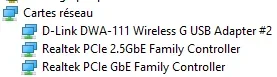
I changed the cable, first from the router to the switch, then from the switch to the desktop. Same value: 1Mbs. But I found 2 Realtek network devices in the Device Manager, only 1 being for 2.5Gbs. When deactivating the one without 2.5 I lose my internet connection.
1785425796377.webp

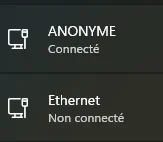
Also, there are 2 wired networks, one is connected, the other isn't
1785427278419.webp

That seems to be the issue. I don't know what to do. Unmount the Realtek adapter from the motherboard and reinstall it?
 
Last edited:

My Computer My Computer

At a glance

Win 11
OS
Win 11
Computer type
PC/Desktop
Manufacturer/Model
don't remember
That seems to be the issue. I don't know what to do. Unmount the Realtek adapter from the motherboard and reinstall it?
Have you checked the BIOS settings? Usually, you can disable MB ports there.
 

My Computers My Computers

  • At a glance

    Win 11 Pro 25H2, Build 26200.9278Intel Core i5 14500, 14th Generation64GB DDR4GeForce RTX 4060
    OS
    Win 11 Pro 25H2, Build 26200.9278
    Computer type
    PC/Desktop
    Manufacturer/Model
    Home Brew
    CPU
    Intel Core i5 14500, 14th Generation
    Motherboard
    Gigabyte B760M G P WIFI
    Memory
    64GB DDR4
    Graphics Card(s)
    GeForce RTX 4060
    Sound Card
    Chipset Realtek
    Monitor(s) Displays
    LG 45" Ultragear & Acer 24" 1080p
    Screen Resolution
    5120x1440 & 1920x1080
    Hard Drives
    Crucial P310 2TB 2280 PCIe Gen4 3D NAND NVMe M.2 SSD (O/S)
    Silicon Power 2TB US75 NVMe PCIe Gen4 M.2 2280 SSD (backup)
    Crucial BX500 2TB 3D NAND (2nd backup)
    Seagate 4TB Ironwolf, rotating HDD secondary backup
    External off-line backup Drives: 2 NVMe 4TB drives in external enclosures
    PSU
    Thermaltake Toughpower GF3 750W
    Case
    LIAN LI LANCOOL 216 E-ATX PC Case
    Cooling
    Lots of fans!
    Keyboard
    Microsoft Comfort Curve 2000
    Mouse
    Logitech G305
    Internet Speed
    Verizon FiOS 1GB
    Browser
    Firefox
    Antivirus
    Malware Bytes & Windows Defender Security
  • At a glance

    Win 11 Pro 25H2, Build 26200.9168Intel Core i5 1440032GB DDR5Intel 700 Embedded GPU
    Operating System
    Win 11 Pro 25H2, Build 26200.9168
    Computer type
    PC/Desktop
    Manufacturer/Model
    Home Brew
    CPU
    Intel Core i5 14400
    Motherboard
    Gigabyte B760M DS3H AX
    Memory
    32GB DDR5
    Graphics card(s)
    Intel 700 Embedded GPU
    Sound Card
    Realtek Embedded
    Monitor(s) Displays
    27" HP 1080p
    Screen Resolution
    1920x1080
    Hard Drives
    Crucial P310 2TB NVMe Gen4 SSD
    Samsung EVO 990 2TB NVMe Gen4 SSD
    Samsung 2TB SATA SSD
    Seagate 4TB Ironwolf, rotating HDD secondary backup
    PSU
    Thermaltake Smart BM3 650W
    Case
    Okinos Micro ATX Case
    Cooling
    Fans
    Keyboard
    Microsoft Comfort Curve 2000
    Mouse
    Logitech G305
    Internet Speed
    Verizon FiOS 1GB
    Browser
    Firefox
    Antivirus
    Malware Bytes & Windows Defender Security
  • Nimo N171 17" Laptop, (Intel i3-1215U, 16GB RAM, 2TB NVMe, Win11 Pro)
    Acemagic Vista Mini PC V1 (Intel N150, 16GB RAM, 1TB NVMe, Win11 Pro)
    HP ENVY h8-1540t, (24GB RAM, 2TB SSD, 2TB HDD, Win11 Pro)

My Computer My Computer

At a glance

Win 11
OS
Win 11
Computer type
PC/Desktop
Manufacturer/Model
don't remember
Thanks, not sure what to look for ... What are "MB ports"?
MB → motherboard

Since no one mentioned this being an OS issue, try a live boot with a Linux distro. If you cannot achieve the ~2.5Gbps speed there then the issue lies with the adapter itself.
 

My Computers My Computers

  • At a glance

    Windows 11 ProIntel Core Ultra 7 270K PlusOLOy Blade RGB 32GB (2 x 16GB) DDR5 6000 @ 7200Dell RTX 4090
    OS
    Windows 11 Pro
    Computer type
    PC/Desktop
    Manufacturer/Model
    Custom
    CPU
    Intel Core Ultra 7 270K Plus
    Motherboard
    GIGABYTE Z890 AORUS MASTER AI TOP
    Memory
    OLOy Blade RGB 32GB (2 x 16GB) DDR5 6000 @ 7200
    Graphics Card(s)
    Dell RTX 4090
    Sound Card
    onboard, PHILIPS Fidelio X2HR
    Monitor(s) Displays
    MSI MAG 321UPX
    Screen Resolution
    3840x2160
    Hard Drives
    Sabrent 1TB Rocket 4 Plus, Fanxiang S790 2TB
    PSU
    SAMA XP1000W
    Case
    Lian Li V3000 Plus (White)
    Cooling
    Custom water
    Keyboard
    ZUOYA GMK104 Wireless (white with blue switches)
    Mouse
    AJAZZ AJ159 APEX (White)
    Internet Speed
    4Gbps down / 4Gbps up
    Browser
    FireFox / Microsoft Edge
    Antivirus
    Windows Security
    Other Info
    Both CPU and GPU are under custom watercooling with an Alphacool NexXxoS Monsta 480mm radiator handling the nearly 600W+ while gaming.
  • At a glance

    Windows 11 ProAMD Ryzen 7 7800X3D32GB DDR5-6000 @ 6200PNY RTX 5080 OC (removed stock fans and put o...
    Operating System
    Windows 11 Pro
    Computer type
    PC/Desktop
    Manufacturer/Model
    Custom
    CPU
    AMD Ryzen 7 7800X3D
    Motherboard
    GIGABYTE X870 AORUS ELITE WIFI7
    Memory
    32GB DDR5-6000 @ 6200
    Graphics card(s)
    PNY RTX 5080 OC (removed stock fans and put on 140mm case fans)
    Sound Card
    HDMI (Nvidia) → Integra DRX 3.4
    Monitor(s) Displays
    LG C5 65"
    Screen Resolution
    3840x2160
    Hard Drives
    WD PC SN810 2TB
    PSU
    PCCOOLER CPS YS1000
    Case
    Fractal Design Meshify 2 XL (dark tint)
    Cooling
    Custom water
    Keyboard
    NPET K63 2.4G Wireless/Bluetooth 60% Mechanical Keyboard (brown switches)
    Mouse
    FFJ Wireless Gaming Mouse
    Browser
    Microsoft Edge
    Antivirus
    Windows Security
Pb solved. Opening my PC I found the network card's connection shaky. Plugged it in correctly and taped it. Now all good, back to 2.5 Gbs. Sorry for the hassle and a thousand thanks to all the helpful souls who showed mercy.
 

My Computer My Computer

At a glance

Win 11
OS
Win 11
Computer type
PC/Desktop
Manufacturer/Model
don't remember

Latest Support Threads

Back
Top Bottom