- Local time
- 5:04 AM
- Posts
- 750
- OS
- Windows 11 Pro build 26200.8524
After updating to Build 26200.8655, I ran check script by revolutionist @garlin, I had some anomalies in Windows installation. I had posted them here in the following thread.
 www.elevenforum.com
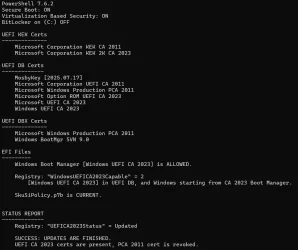
I tried to correct the anomalies using options from check script output but I couldn't correct Winload.efi's version problem. The following is the situation I am in now.
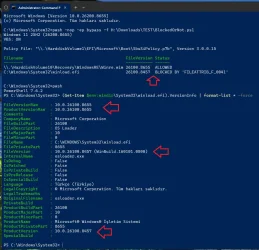
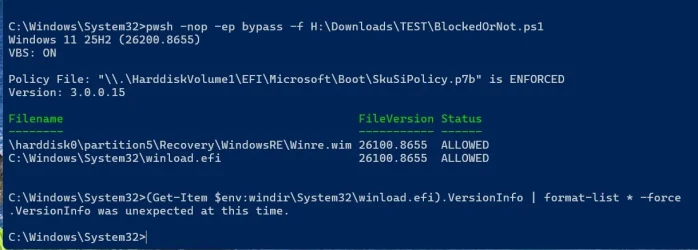
As can be seen from the screenshot above, Winload.efi file is reported as blocked.
Fortunately, Windows was still booting properly. I love Microsoft...
I used Powerrun, which was advised by @garlin when I had a similar problem in an earlier Tuesday patch, to correct version problem of Winload.efi.
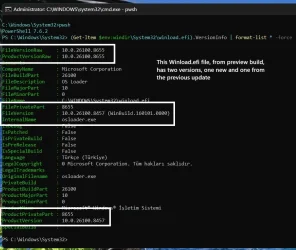
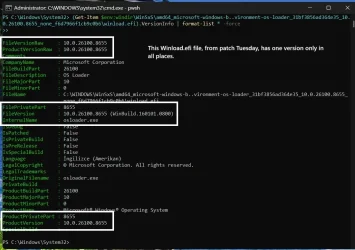
Unfortunately, Powerrun was not able to replace the Winload.efi file in System32 folder with the one with correct properties in WinSxS folder. The following screenshot shows file version of Winload.efi in WinSxS folder. It is correctly correct.
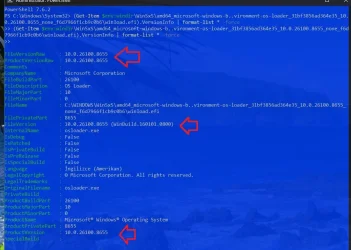
Therefore, I wanted to take chances to make a Repair install from Windows Settings in order to see if things would go the proper way.
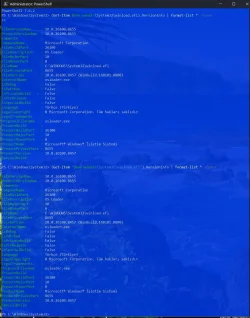
This below output is from after the Repair install was over.
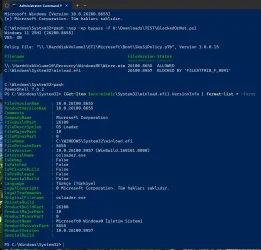
I was unlucky. Windows has not been repaired after hard work and no play.
I do hope that this will be the last time I spend hours in vain to try to repair what Microsoft seems to have broken.
Or am I cursed ???
garlin's PowerShell scripts for updating Secure Boot CA 2023
Windows 11 25H2 (26200.8457) VBS: ON Policy File: "\\.\HarddiskVolume1\EFI\Microsoft\Boot\SkuSiPolicy.p7b" is ENFORCED Version: 3.0.0.14 Filename FileVersion Status -------- ----------- ------...
www.elevenforum.com
I tried to correct the anomalies using options from check script output but I couldn't correct Winload.efi's version problem. The following is the situation I am in now.
As can be seen from the screenshot above, Winload.efi file is reported as blocked.
Fortunately, Windows was still booting properly. I love Microsoft...
I used Powerrun, which was advised by @garlin when I had a similar problem in an earlier Tuesday patch, to correct version problem of Winload.efi.
Unfortunately, Powerrun was not able to replace the Winload.efi file in System32 folder with the one with correct properties in WinSxS folder. The following screenshot shows file version of Winload.efi in WinSxS folder. It is correctly correct.
Therefore, I wanted to take chances to make a Repair install from Windows Settings in order to see if things would go the proper way.
This below output is from after the Repair install was over.
I was unlucky. Windows has not been repaired after hard work and no play.
I do hope that this will be the last time I spend hours in vain to try to repair what Microsoft seems to have broken.
Or am I cursed ???
My Computers
-
At a glance
Windows 11 Pro build 26200.8524Intel i7-4790Teams DDR3-1600 4x4 GBMSI Nvidia GeForce GTX 1050Ti- OS
- Windows 11 Pro build 26200.8524
- Computer type
- PC/Desktop
- Manufacturer/Model
- Home Built
- CPU
- Intel i7-4790
- Motherboard
- Asus H97 Pro Gamer with add-on TPM1.2 module
- Memory
- Teams DDR3-1600 4x4 GB
- Graphics Card(s)
- MSI Nvidia GeForce GTX 1050Ti
- Sound Card
- Realtek ALC1150
- Monitor(s) Displays
- Dell P2425D
- Screen Resolution
- 2560 by 1440 pixels
- Hard Drives
- Corsair NVMe M.2 Core XT 1000 GB (Windows 11 v.25H2); Samsung SATA Evo 870 500 GB (Windows 11 v.25H2);
- PSU
- Corsair HX850
- Case
- Gigabyte Solo 210
- Cooling
- Zalman CNPS7X Tower
- Keyboard
- Microsoft AIO Wireless (includes touchpad)
- Mouse
- HP S1000 Plus Wireless
- Internet Speed
- 500 Mb fiber optic
- Browser
- Chrome; MS Edge
- Antivirus
- Windows Defender
-
At a glance
MacOS 12 MontereyIntel Core i58 GBIntel integrated- Operating System
- MacOS 12 Monterey
- Computer type
- Laptop
- Manufacturer/Model
- Apple Macbook Air
- CPU
- Intel Core i5
- Memory
- 8 GB
- Graphics card(s)
- Intel integrated
- Screen Resolution
- 1440 by 900 pixels
- Hard Drives
- 128 GB
- Keyboard
- Built-in
- Mouse
- Microsoft Wireless
- Internet Speed
- 802.11 ac
- Browser
- Chrome; Safari
- Antivirus
- N/A