Removal/Uninstall of "Homework' address bar?


remover

Well-known member
Power User
VIP
Local time
1:08 AM
Posts
572
Location
Tucson, AZ.
OS
Windows 11 25H2 (OS Build 26200.8524)
This poped up with the new version of windows (see pic) Can I remove or uninstall it? Why is it there? Edit: sitting on the right side of my address bar..Cheers. & thanks 24H2 (OS Build 26100.5074)
 

Attachments

  • Screenshot 2025-08-30 134416.webp
    Screenshot 2025-08-30 134416.webp
    2.6 KB · Views: 1

My Computer

System One

  • OS
    Windows 11 25H2 (OS Build 26200.8524)
    Computer type
    Laptop
    Manufacturer/Model
    Dell
    CPU
    Processor: 11th Gen Intel(R) Core(TM) i5-1135G7 @ 2.40G
    Motherboard
    64-bit operating system Dell 0XMF7W
    Memory
    12GB
    Graphics Card(s)
    Intel R Iris R XE Graphics family
    Sound Card
    Cirrus Speakers High Definition Audio
    Monitor(s) Displays
    Generic PnP monitor
    Screen Resolution
    1920 x 1080
    Hard Drives
    NVMe 670p SSDPEKNU512GZ NVMe I NTEL 512GB
    Case
    cheap
    Mouse
    Logitech wireless mouse
    Internet Speed
    16 Mps download
    Browser
    Google Chrome
    Antivirus
    Security: Microsoft Defender & Malwarebytes Premium (with browser guard)
    Other Info
    Dell model: Inspiron 15 3511
I did not recognize it so I uploaded a photo of it and here's co-pilot's answer.

That icon—a blue button with a camera symbol followed by the words "Homework help"—is likely part of an educational app or website feature designed to assist users with schoolwork. The camera suggests that users can upload a photo of their homework, such as a math problem or worksheet, and get help solving or understanding it.

I think it could probably also be a browser add-on.
 

My Computers

System One System Two

  • OS
    Windows 11 Pro 25H2
    Computer type
    PC/Desktop
    Manufacturer/Model
    Dell Optiplex 7080
    CPU
    i9-10900 10 core 20 threads
    Motherboard
    DELL 0J37VM
    Memory
    32 gb
    Graphics Card(s)
    none-Intel UHD Graphics 630
    Sound Card
    Integrated Realtek
    Monitor(s) Displays
    Benq 27
    Screen Resolution
    2560x1440
    Hard Drives
    2x1tb Solidigm m.2 nvme /External drives 512gb Samsung m.2 sata+2tb Kingston m2.nvme
    PSU
    500w
    Case
    MT
    Cooling
    Dell Premium
    Keyboard
    Logitech wired
    Mouse
    Logitech wireless
    Internet Speed
    so slow I'm too embarrassed to tell
    Browser
    #1 Edge #2 Firefox
    Antivirus
    Defender+MWB Premium
  • Operating System
    Windows 11 Pro 24H2 26200.8457
    Computer type
    PC/Desktop
    Manufacturer/Model
    Beelink Mini PC SER5
    CPU
    AMD Ryzen 7 6800U
    Memory
    32 gb
    Graphics card(s)
    integrated
    Sound Card
    integrated
    Monitor(s) Displays
    Benq 27
    Screen Resolution
    2560x1440
    Hard Drives
    1TB Crucial nvme
    Keyboard
    Logitech wired
    Mouse
    Logitech wireless
    Internet Speed
    still too embarrassed to tell
    Browser
    Firefox
    Antivirus
    Defender
    Other Info
    System 3 is non compliant Dell 9020 i7-4770/24gb ram Win11 PRO 26200.8457
As stated, What is your Browser? (ie) Edge, Chrome, Firefox etc?
You can click the 3 dots or lines in the upper right of your browser
Choose Extensions, see if there is any added extensions that you do not use and you can disable them.

You can also run your Browser in "Safe Mode" (ie) "Private Browsing", without extensions and see if that does not show


My Computer

System One

  • OS
    Windows 11 Pro Insider 64 bit 25H2 26200.5742
    Computer type
    PC/Desktop
    Manufacturer/Model
    Gigabyte Z390 UD
    CPU
    Intel Core i7 9700K 3.60
    Motherboard
    Gigabyte Z390 UD
    Memory
    16 GB
    Graphics Card(s)
    nVidia GEForce RTX 2060 Super
    Sound Card
    onboard
    Monitor(s) Displays
    Two 27" Dell 4K monitors
    Screen Resolution
    3840 x 2160
    Hard Drives
    M.2 NVME SSD, 500 GB; Two 2TB Mechanical HDD's
    PSU
    850w PSU
    Case
    Cyberpower PC
    Cooling
    Water cooled
    Keyboard
    Backlit Cyberpower gaming keyboard
    Mouse
    Backlit Cyberpower gaming mouse
    Internet Speed
    1 GB mbps
    Browser
    Brave
    Antivirus
    Windows Security
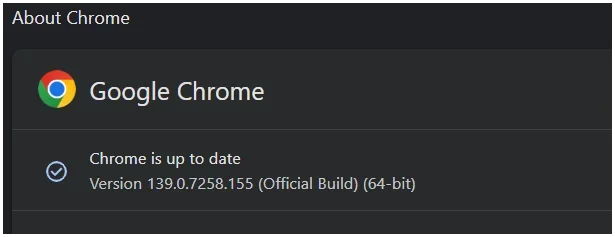
Thank you for the replies. I'm running Chrome. I've been up on the 3 dots, & just about checked everywhere. Extensions has not changed or has nothing new? I turned Off all the Extensions. Still there. Ran malware + security checks, all clean..I uploaded a photo of it to google search. (it's related to School work) Some of google's replies were n/a - started with the last version of Chrome. EDIT: Uploaded the pic to google 3 hours later. The majority comes back about: Visual Studio Code Maybe something in chrome://flags ??
 

Attachments

  • Screenshot 2025-08-30 170213.webp
    Screenshot 2025-08-30 170213.webp
    8.3 KB · Views: 1

My Computer

System One

  • OS
    Windows 11 25H2 (OS Build 26200.8524)
    Computer type
    Laptop
    Manufacturer/Model
    Dell
    CPU
    Processor: 11th Gen Intel(R) Core(TM) i5-1135G7 @ 2.40G
    Motherboard
    64-bit operating system Dell 0XMF7W
    Memory
    12GB
    Graphics Card(s)
    Intel R Iris R XE Graphics family
    Sound Card
    Cirrus Speakers High Definition Audio
    Monitor(s) Displays
    Generic PnP monitor
    Screen Resolution
    1920 x 1080
    Hard Drives
    NVMe 670p SSDPEKNU512GZ NVMe I NTEL 512GB
    Case
    cheap
    Mouse
    Logitech wireless mouse
    Internet Speed
    16 Mps download
    Browser
    Google Chrome
    Antivirus
    Security: Microsoft Defender & Malwarebytes Premium (with browser guard)
    Other Info
    Dell model: Inspiron 15 3511

The Google community says I have to shut off the Lens. I'm going to run some programs. will be back - cheers
 

My Computer

System One

  • OS
    Windows 11 25H2 (OS Build 26200.8524)
    Computer type
    Laptop
    Manufacturer/Model
    Dell
    CPU
    Processor: 11th Gen Intel(R) Core(TM) i5-1135G7 @ 2.40G
    Motherboard
    64-bit operating system Dell 0XMF7W
    Memory
    12GB
    Graphics Card(s)
    Intel R Iris R XE Graphics family
    Sound Card
    Cirrus Speakers High Definition Audio
    Monitor(s) Displays
    Generic PnP monitor
    Screen Resolution
    1920 x 1080
    Hard Drives
    NVMe 670p SSDPEKNU512GZ NVMe I NTEL 512GB
    Case
    cheap
    Mouse
    Logitech wireless mouse
    Internet Speed
    16 Mps download
    Browser
    Google Chrome
    Antivirus
    Security: Microsoft Defender & Malwarebytes Premium (with browser guard)
    Other Info
    Dell model: Inspiron 15 3511
Find this video which may help,
homework help.webp
 

My Computer

System One

  • OS
    Windows 11 Pro.(25H2)
    Computer type
    PC/Desktop
    Manufacturer/Model
    Self build
    CPU
    Ryzen 5 9600X
    Motherboard
    Aorus elite wifi7 B850
    Memory
    T-Create expert 2 x 16GB 6000 CL30-36-36.
    Graphics Card(s)
    RX9070XT Hellhound
    Sound Card
    Onboard/Logitech Z313 speakers
    Monitor(s) Displays
    Samsung G5 Odyssey 27in.
    Screen Resolution
    2560 x 1440, 144Hz
    Hard Drives
    Lexar NM790 2TB
    PSU
    Corsair RM850 (2019 model)
    Case
    Kendomen Titanium, 5 x 120mm fans
    Cooling
    Phantom Spirit 120 SE Black CPU cooler
    Keyboard
    Logitech MK120
    Mouse
    Logitech M90
    Browser
    Edge, Chrome
    Antivirus
    Defender
I spent some time looking at this. It's apparently a new feature being rolled out in Chrome.
The following flag enables the "Help me write" feature, which is a handy AI assistant for improving your written content.

chrome://flags/#help-me-with-this-page refers to a specific, experimental flag within the Google Chrome browser that controls the "Help me write" feature, which provides AI-powered writing assistance directly in the browser. To use it, type the full URL into your Chrome address bar, press Enter, and then adjust the settings for the "Help me write" flag, such as choosing between "Polish," "Elaborate," or "Formalize" options to refine your text in various contexts.

I couldn't tell you if it can be disabled via this flag because the issue/feature isn't showing for me.

Another flag chrome://flags/#search-side-panel A broader flag that may be available and relevant (removes other AI side‑panel prompts too)
 
Last edited:

My Computers

System One System Two

  • OS
    Windows 11 Pro 25H2 Build 26200.8524
    Computer type
    PC/Desktop
    Manufacturer/Model
    Sin-built 2013
    CPU
    Intel(R) Core(TM) i7-4770K CPU @ 3.50GHz
    Motherboard
    ASUS ROG Maximus VI Formula
    Memory
    32.0 GB of I forget and the box is in storage.
    Graphics Card(s)
    Gigabyte nVidia GeForce GTX 1660 Super OC 6GB
    Sound Card
    Onboard thingy
    Monitor(s) Displays
    5 x LG 25MS500-B - 1 x 24MK430H-B - 1 x Wacom Pro 22" Touch Screen Tablet
    Screen Resolution
    All over the place
    Hard Drives
    Too many to list.
    OS on Samsung 1TB 870 QVO SATA
    PSU
    Silverstone 1500
    Case
    NZXT Phantom 820 Full-Tower Case
    Cooling
    Noctua NH-D15 Elite Class Dual Tower CPU Cooler / 6 x EziDIY 120mm / 2 x Corsair 140mm somethings / 1 x 140mm Thermaltake something / 2 x 200mm Corsair.
    Keyboard
    Corsair K95 / Logitech diNovo Edge Wireless
    Mouse
    Logitech: G402 / G502 / Mx Masters / Mx Air Cordless
    Internet Speed
    2000/500Mbps
    Browser
    All sorts
    Antivirus
    Kaspersky Premium
    Other Info
    ㅤㅤㅤㅤㅤㅤㅤㅤㅤㅤㅤㅤㅤㅤㅤㅤㅤㅤㅤㅤㅤㅤㅤㅤㅤㅤㅤㅤㅤㅤㅤㅤㅤㅤㅤㅤㅤㅤㅤㅤ⠀⠀⠀⠀⠀⠀⠀⠀⠀⠀
    TP-Link BE9300 WiFi 7 Bluetooth 5.4 (Archer TBE550E)
    TP-Link TX201 V1 2.5GB Lan

    Grandstream HT812 - VoIP
    ASUS DSL-AX82U - Mesh
    ASUS RT-AC68U - Mesh
    ASUS RT-BE88U Router

    Brother MFC-L2880DW Printer

    I’m on a horse.
  • Operating System
    Windows 11 Pro 25H2 Build 26200.8524
    Computer type
    Laptop
    Manufacturer/Model
    LENOVO Yoga 7 14IRL8 - 7i EVO OLED 14" Touchscreen i5 12 Core 16GB/512GB
    CPU
    Intel Core 12th Gen i5-1240P Processor (1.7 - 4.4GHz)
    Memory
    16GB LPDDR5 RAM
    Graphics card(s)
    Intel Iris Xe Graphics Processor
    Sound Card
    Optimized with Dolby Atmos®
    Screen Resolution
    QHD 2880 x 1800 OLED
    Hard Drives
    M.2 512GB
    Antivirus
    Defender / Malwarebytes
    Other Info
    …still on a horse.
The Google community says I have to shut off the Lens. I'm going to run some programs. will be back - cheers

From what I have read, this has nothing to do with Google Lens. I could be wrong
 

My Computers

System One System Two

  • OS
    Windows 11 Pro 25H2 Build 26200.8524
    Computer type
    PC/Desktop
    Manufacturer/Model
    Sin-built 2013
    CPU
    Intel(R) Core(TM) i7-4770K CPU @ 3.50GHz
    Motherboard
    ASUS ROG Maximus VI Formula
    Memory
    32.0 GB of I forget and the box is in storage.
    Graphics Card(s)
    Gigabyte nVidia GeForce GTX 1660 Super OC 6GB
    Sound Card
    Onboard thingy
    Monitor(s) Displays
    5 x LG 25MS500-B - 1 x 24MK430H-B - 1 x Wacom Pro 22" Touch Screen Tablet
    Screen Resolution
    All over the place
    Hard Drives
    Too many to list.
    OS on Samsung 1TB 870 QVO SATA
    PSU
    Silverstone 1500
    Case
    NZXT Phantom 820 Full-Tower Case
    Cooling
    Noctua NH-D15 Elite Class Dual Tower CPU Cooler / 6 x EziDIY 120mm / 2 x Corsair 140mm somethings / 1 x 140mm Thermaltake something / 2 x 200mm Corsair.
    Keyboard
    Corsair K95 / Logitech diNovo Edge Wireless
    Mouse
    Logitech: G402 / G502 / Mx Masters / Mx Air Cordless
    Internet Speed
    2000/500Mbps
    Browser
    All sorts
    Antivirus
    Kaspersky Premium
    Other Info
    ㅤㅤㅤㅤㅤㅤㅤㅤㅤㅤㅤㅤㅤㅤㅤㅤㅤㅤㅤㅤㅤㅤㅤㅤㅤㅤㅤㅤㅤㅤㅤㅤㅤㅤㅤㅤㅤㅤㅤㅤ⠀⠀⠀⠀⠀⠀⠀⠀⠀⠀
    TP-Link BE9300 WiFi 7 Bluetooth 5.4 (Archer TBE550E)
    TP-Link TX201 V1 2.5GB Lan

    Grandstream HT812 - VoIP
    ASUS DSL-AX82U - Mesh
    ASUS RT-AC68U - Mesh
    ASUS RT-BE88U Router

    Brother MFC-L2880DW Printer

    I’m on a horse.
  • Operating System
    Windows 11 Pro 25H2 Build 26200.8524
    Computer type
    Laptop
    Manufacturer/Model
    LENOVO Yoga 7 14IRL8 - 7i EVO OLED 14" Touchscreen i5 12 Core 16GB/512GB
    CPU
    Intel Core 12th Gen i5-1240P Processor (1.7 - 4.4GHz)
    Memory
    16GB LPDDR5 RAM
    Graphics card(s)
    Intel Iris Xe Graphics Processor
    Sound Card
    Optimized with Dolby Atmos®
    Screen Resolution
    QHD 2880 x 1800 OLED
    Hard Drives
    M.2 512GB
    Antivirus
    Defender / Malwarebytes
    Other Info
    …still on a horse.

My Computers

System One System Two

  • OS
    Windows 11 Pro 25H2 Build 26200.8524
    Computer type
    PC/Desktop
    Manufacturer/Model
    Sin-built 2013
    CPU
    Intel(R) Core(TM) i7-4770K CPU @ 3.50GHz
    Motherboard
    ASUS ROG Maximus VI Formula
    Memory
    32.0 GB of I forget and the box is in storage.
    Graphics Card(s)
    Gigabyte nVidia GeForce GTX 1660 Super OC 6GB
    Sound Card
    Onboard thingy
    Monitor(s) Displays
    5 x LG 25MS500-B - 1 x 24MK430H-B - 1 x Wacom Pro 22" Touch Screen Tablet
    Screen Resolution
    All over the place
    Hard Drives
    Too many to list.
    OS on Samsung 1TB 870 QVO SATA
    PSU
    Silverstone 1500
    Case
    NZXT Phantom 820 Full-Tower Case
    Cooling
    Noctua NH-D15 Elite Class Dual Tower CPU Cooler / 6 x EziDIY 120mm / 2 x Corsair 140mm somethings / 1 x 140mm Thermaltake something / 2 x 200mm Corsair.
    Keyboard
    Corsair K95 / Logitech diNovo Edge Wireless
    Mouse
    Logitech: G402 / G502 / Mx Masters / Mx Air Cordless
    Internet Speed
    2000/500Mbps
    Browser
    All sorts
    Antivirus
    Kaspersky Premium
    Other Info
    ㅤㅤㅤㅤㅤㅤㅤㅤㅤㅤㅤㅤㅤㅤㅤㅤㅤㅤㅤㅤㅤㅤㅤㅤㅤㅤㅤㅤㅤㅤㅤㅤㅤㅤㅤㅤㅤㅤㅤㅤ⠀⠀⠀⠀⠀⠀⠀⠀⠀⠀
    TP-Link BE9300 WiFi 7 Bluetooth 5.4 (Archer TBE550E)
    TP-Link TX201 V1 2.5GB Lan

    Grandstream HT812 - VoIP
    ASUS DSL-AX82U - Mesh
    ASUS RT-AC68U - Mesh
    ASUS RT-BE88U Router

    Brother MFC-L2880DW Printer

    I’m on a horse.
  • Operating System
    Windows 11 Pro 25H2 Build 26200.8524
    Computer type
    Laptop
    Manufacturer/Model
    LENOVO Yoga 7 14IRL8 - 7i EVO OLED 14" Touchscreen i5 12 Core 16GB/512GB
    CPU
    Intel Core 12th Gen i5-1240P Processor (1.7 - 4.4GHz)
    Memory
    16GB LPDDR5 RAM
    Graphics card(s)
    Intel Iris Xe Graphics Processor
    Sound Card
    Optimized with Dolby Atmos®
    Screen Resolution
    QHD 2880 x 1800 OLED
    Hard Drives
    M.2 512GB
    Antivirus
    Defender / Malwarebytes
    Other Info
    …still on a horse.
Do/did you have that showing in your address bar also?
No, but I found the Flag anyway, but only in Chrome Canary, and it works to disable it.
 

My Computers

System One System Two

  • OS
    Windows 11 Pro
    Computer type
    PC/Desktop
    Manufacturer/Model
    ASUS ROG Strix
  • Operating System
    Windows 11 Pro
    Computer type
    Laptop
    Manufacturer/Model
    ASUS VivoBook
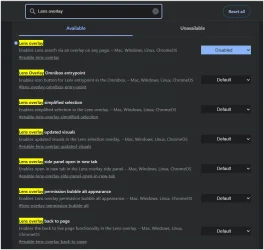
That's It @Edwin but I have the "Stable" browser or chrome. So what worked for me was (see pic) Lens Overlay (only) got rid of it... I haven't tried the others. Also the youtube helped:
(around 57 sec) nice find @paulco Thanks for all the help.... [I disabled the one on top Lens Overlay] EDIT: No Action Chip Lens in my version
 

Attachments

  • Screenshot 2025-08-30 203231.webp
    Screenshot 2025-08-30 203231.webp
    65.4 KB · Views: 3

My Computer

System One

  • OS
    Windows 11 25H2 (OS Build 26200.8524)
    Computer type
    Laptop
    Manufacturer/Model
    Dell
    CPU
    Processor: 11th Gen Intel(R) Core(TM) i5-1135G7 @ 2.40G
    Motherboard
    64-bit operating system Dell 0XMF7W
    Memory
    12GB
    Graphics Card(s)
    Intel R Iris R XE Graphics family
    Sound Card
    Cirrus Speakers High Definition Audio
    Monitor(s) Displays
    Generic PnP monitor
    Screen Resolution
    1920 x 1080
    Hard Drives
    NVMe 670p SSDPEKNU512GZ NVMe I NTEL 512GB
    Case
    cheap
    Mouse
    Logitech wireless mouse
    Internet Speed
    16 Mps download
    Browser
    Google Chrome
    Antivirus
    Security: Microsoft Defender & Malwarebytes Premium (with browser guard)
    Other Info
    Dell model: Inspiron 15 3511

Latest Support Threads

Back
Top Bottom