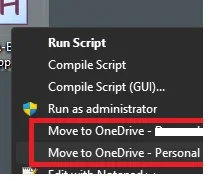
Solved Remove/disable "Move to OneDrive" context menu entry when right-clicking


My Computer My Computer

At a glance

Windows 11AMD Ryzen 7 5700GMicron Technology DDR4-3200 16GBNVIDIA GeForce RTX 3060
OS
Windows 11
Computer type
PC/Desktop
Manufacturer/Model
HP Pavilion
CPU
AMD Ryzen 7 5700G
Motherboard
Erica6
Memory
Micron Technology DDR4-3200 16GB
Graphics Card(s)
NVIDIA GeForce RTX 3060
Sound Card
Realtek ALC671
Monitor(s) Displays
Samsung SyncMaster U28E590
Screen Resolution
3840 x 2160
Hard Drives
SAMSUNG MZVLQ1T0HALB-000H1
Isn't it ironic. Had both ShellMenuView and ShellExView next to each other and chose to run the wrong one.
Yes, Indeed ShellExView has OneDrive entries.
1739967432623.webp

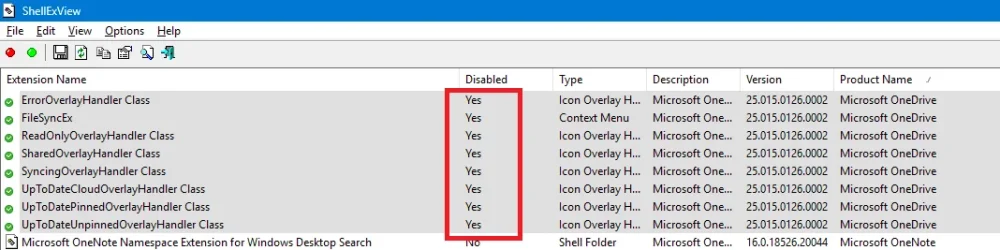
I tried disabling the marked entry in ShellExView but the annoyance is still there. Now I will disable them all to test if that solves it and then work my way backwards to pinpoint.
 

My Computer My Computer

At a glance

Windows 11
OS
Windows 11
Just uninstall OneDrive if you don't need/want it?
 

My Computer My Computer

At a glance

Windows 11 Pro 25H2 (RP channel)AMD Ryzen 7 9800X3D 8-core64GB Corsair Titanium 6000/CL30MSI Suprim 5080 SOC
OS
Windows 11 Pro 25H2 (RP channel)
Computer type
PC/Desktop
Manufacturer/Model
MSI
CPU
AMD Ryzen 7 9800X3D 8-core
Motherboard
MEG X870E Godlike
Memory
64GB Corsair Titanium 6000/CL30
Graphics Card(s)
MSI Suprim 5080 SOC
Sound Card
Soundblaster AE-9
Monitor(s) Displays
ASUS TUF Gaming VG289Q
Screen Resolution
3840x2160
Hard Drives
Samsung 9100 Pro 4TB (gen 5 x4, system drive/games)
Samsung 990 Pro 2TB
Samsung 980 Pro 2TB
Samsung 870 Evo 4TB
Samsung 870 Evo 2TB
Samsung T9 4TB
PSU
Seasonic PX-2200
Case
Bequiet! Dark Base Pro 901
Cooling
Noctua NH-D15S Chromax black
Keyboard
Logitech G915 X (wired)
Mouse
Logitech G903 with PowerPlay charger
Internet Speed
900Mb/sec
Browser
Microsoft Edge
Antivirus
Windows Defender
Just uninstall OneDrive if you don't need/want it?
I don't mean this to sound disrespectful but ... isn't it implied from what I wrote so far that YES OneDrive is being used ... Uninstalling it is the captain obvious solution for which I wasn't gonna make a forum thread discussion ....
 

My Computer My Computer

At a glance

Windows 11
OS
Windows 11
1739971250675.webp

Disabled all of them, rebooted, sadly the horror entries in Context menu are still there ... Rly, MS hardcoded it and can't be removed ...???
 

My Computer My Computer

At a glance

Windows 11
OS
Windows 11
It's solved here - How to remove "OneDrive" from the Windows 11 Explorer menu - Chipp.in Tech News and Reviews. Full credit to the author. I'll just copy the solution in case it disappears from that site:

Remove OneDrive from Windows 11’s context menu​

  1. Open the Start menu.
  2. Type regedit.exe and press the Enter-key
  3. Select Yes to continue.
  4. Paste HKEY_CURRENT_USER\Software\Microsoft\Windows\CurrentVersion\Shell Extensions\Blocked into the Path at the top and press the Enter-key.
  5. Right-click on Blocked.
  6. Select New > String value.
  7. Name it {1FA0E654-C9F2-4A1F-9800-B9A75D744B00}.
  8. Double-click on the value.
  9. Set its name to OneDrive.
The change takes effect on the next restart. You may also log off and then on again, or restart the explorer.exe process.

The OneDrive listing should no longer be visible in the context menu afterwards. Note that this does not impact any other OneDrive functionality on the device. Also note that this applies only to the user account under which the change was made.
 

My Computer My Computer

At a glance

Windows 11
OS
Windows 11
Back
Top Bottom