Solved Remove "Extract All" tweak doesn't work on Windows 11


Spartan

Well-known member
Member
VIP
Local time
6:36 PM
Posts
271
Location
Dubai
OS
Windows 11 Pro
I used this reg file but it's still there when I right click a .ZIP file. I don't want it since I have 7-ZIP installed. Any ideas?

Windows Registry Editor Version 5.00

[-HKEY_CLASSES_ROOT\CompressedFolder\ShellEx\ContextMenuHandlers\{b8cdcb65-b1bf-4b42-9428-1dfdb7ee92af}]
 

My Computers

System One System Two

  • OS
    Windows 11 Pro
    Computer type
    Laptop
    Manufacturer/Model
    ASUS ROG Strix SCAR 16 G635LX
    CPU
    Intel Core Ultra 9 275HX
    Motherboard
    ASUS
    Memory
    SK Hynix 64GB DDR5-5600MHz RAM
    Graphics Card(s)
    GeForce RTX 5090 24 GB GDDR7 VRAM
    Sound Card
    Dolby Atmos-powered speakers - 2 tweeters and 3 downward firing woofers
    Monitor(s) Displays
    ASUS ROG Strix OLED XG27AQWMG QHD 280 Hz 27" Monitor
    Screen Resolution
    QHD (2560x1440)
    Hard Drives
    2x WD_BLACK SN850X 8TB SSDs (RAID 0)
    PSU
    380W AC Power Adapter
    Cooling
    Thermal Grizzly Conductonaut + IETS GT600 Cooling Pad
    Keyboard
    ROG Strix Scope II 96 RX Wireless
    Mouse
    ROG Chakram X Origin
    Internet Speed
    1 GBPS Down / 882 MBPS Up
    Browser
    Google Chrome
    Antivirus
    Microsoft Defender
  • Operating System
    Windows 11 Pro
    Computer type
    Laptop
    Manufacturer/Model
    Dell XPS 15 9500
    CPU
    Intel i7-10875H
    Memory
    Kingston FURY Impact 64 GB 3200 MHz DDR4 RAM
    Graphics card(s)
    nVIDIA GeForce GTX 1650 Ti Max-Q w/ 4 GB GDDR6
    Sound Card
    Realtek
    Monitor(s) Displays
    15.6 UHD+ Touch, InfinityEdge, 500-nits, Anti-Reflecitve
    Screen Resolution
    3840 x 2400
    Hard Drives
    Samsung 990 PRO 2TB + 4TB SSDs
    PSU
    Dell 130W Laptop Charger USB C Type C AC Adapter
    Cooling
    Noctua NT-H2 Thermal Paste on CPU + GPU
    Mouse
    Logitech MX Anywhere 3
    Internet Speed
    1 GBPS Down / 875 MBPS Up
    Browser
    Google Chrome
    Antivirus
    AVG Free Antivirus
I used this reg file but it's still there when I right click a .ZIP file. I don't want it since I have 7-ZIP installed. Any ideas?


What happens if you "associate" ALL compressed files (except .cab and ISO), with 7zip, in 7zip file manager?
Or maybe in Win 11 default programs?

I did that with 7zip on Win 10, and I don't see any... "extract all..." when I right click a .zip file.
I never tweaked anything to remove... "Extract All" from the right click menu.
 

My Computers

System One System Two

  • OS
    Win 11 Home ♦♦♦26200.8457 ♦♦♦♦♦♦♦25H2
    Computer type
    PC/Desktop
    Manufacturer/Model
    Built by Ghot® [May 2020]
    CPU
    AMD Ryzen 7 3700X
    Motherboard
    Asus Pro WS X570-ACE (BIOS 5302)
    Memory
    G.Skill (F4-3200C14D-16GTZKW)
    Graphics Card(s)
    EVGA RTX 2070 (08G-P4-2171-KR)
    Sound Card
    Realtek ALC1220P / ALC S1220A
    Monitor(s) Displays
    Dell U3011 30"
    Screen Resolution
    2560 x 1600
    Hard Drives
    2x Samsung 860 EVO 500GB,
    WD 4TB Black FZBX - SATA III,
    WD 8TB Black FZBX - SATA III,
    DRW-24B1ST CD/DVD Burner
    PSU
    PC Power & Cooling 750W Quad EPS12V
    Case
    Cooler Master ATCS 840 Tower
    Cooling
    CM Hyper 212 EVO (push/pull)
    Keyboard
    Ducky DK9008 Shine II Blue LED
    Mouse
    Logitech Optical M-100
    Internet Speed
    300/300
    Browser
    Firefox (latest)
    Antivirus
    Bitdefender Total Security
    Other Info
    Speakers: Klipsch Pro Media 2.1
  • Operating System
    Windows XP Pro 32bit w/SP3
    Computer type
    PC/Desktop
    Manufacturer/Model
    Built by Ghot® (not in use)
    CPU
    AMD Athlon 64 X2 5000+ (OC'd @ 3.2Ghz)
    Motherboard
    ASUS M2N32-SLI Deluxe Wireless Edition
    Memory
    TWIN2X2048-6400C4DHX (2 x 1GB, DDR2 800)
    Graphics card(s)
    EVGA 256-P2-N758-TR GeForce 8600GT SSC
    Sound Card
    Onboard
    Monitor(s) Displays
    ViewSonic G90FB Black 19" Professional (CRT)
    Screen Resolution
    up to 2048 x 1536
    Hard Drives
    WD 36GB 10,000rpm Raptor SATA
    Seagate 80GB 7200rpm SATA
    Lite-On LTR-52246S CD/RW
    Lite-On LH-18A1P CD/DVD Burner
    PSU
    PC Power & Cooling Silencer 750 Quad EPS12V
    Case
    Generic Beige case, 80mm fans
    Cooling
    ZALMAN 9500A 92mm CPU Cooler
    Keyboard
    Logitech Classic Keybooard 200
    Mouse
    Logitech Optical M-BT96a
    Internet Speed
    300/300
    Browser
    Firefox 3.x ??
    Antivirus
    Symantec (Norton)
    Other Info
    Still assembled, still runs. Haven't turned it on for 15 years?
What happens if you "associate" ALL compressed files with 7zip, in 7zip file manager?
Make sure you DON'T associate .cab and ISO files with 7zip.
Or in Win 11 default programs?

I did that with 7zip on Win 10, and I don't see any... "extract all..." when I right click a .zip file.
That's exactly what I did actually minus the .cab and .iso but it still shows up
 

My Computers

System One System Two

  • OS
    Windows 11 Pro
    Computer type
    Laptop
    Manufacturer/Model
    ASUS ROG Strix SCAR 16 G635LX
    CPU
    Intel Core Ultra 9 275HX
    Motherboard
    ASUS
    Memory
    SK Hynix 64GB DDR5-5600MHz RAM
    Graphics Card(s)
    GeForce RTX 5090 24 GB GDDR7 VRAM
    Sound Card
    Dolby Atmos-powered speakers - 2 tweeters and 3 downward firing woofers
    Monitor(s) Displays
    ASUS ROG Strix OLED XG27AQWMG QHD 280 Hz 27" Monitor
    Screen Resolution
    QHD (2560x1440)
    Hard Drives
    2x WD_BLACK SN850X 8TB SSDs (RAID 0)
    PSU
    380W AC Power Adapter
    Cooling
    Thermal Grizzly Conductonaut + IETS GT600 Cooling Pad
    Keyboard
    ROG Strix Scope II 96 RX Wireless
    Mouse
    ROG Chakram X Origin
    Internet Speed
    1 GBPS Down / 882 MBPS Up
    Browser
    Google Chrome
    Antivirus
    Microsoft Defender
  • Operating System
    Windows 11 Pro
    Computer type
    Laptop
    Manufacturer/Model
    Dell XPS 15 9500
    CPU
    Intel i7-10875H
    Memory
    Kingston FURY Impact 64 GB 3200 MHz DDR4 RAM
    Graphics card(s)
    nVIDIA GeForce GTX 1650 Ti Max-Q w/ 4 GB GDDR6
    Sound Card
    Realtek
    Monitor(s) Displays
    15.6 UHD+ Touch, InfinityEdge, 500-nits, Anti-Reflecitve
    Screen Resolution
    3840 x 2400
    Hard Drives
    Samsung 990 PRO 2TB + 4TB SSDs
    PSU
    Dell 130W Laptop Charger USB C Type C AC Adapter
    Cooling
    Noctua NT-H2 Thermal Paste on CPU + GPU
    Mouse
    Logitech MX Anywhere 3
    Internet Speed
    1 GBPS Down / 875 MBPS Up
    Browser
    Google Chrome
    Antivirus
    AVG Free Antivirus
Try one of the Nirsoft context menu editing programs?

Also, when you associated the extensions, did you just use 7Zip's association function, or did you go into Windows 11 Apps settings and manually associate the .zip extension? Windows 11 has become a little less friendly in allowing other programs to set/change the default extension association ....
 

My Computers

System One System Two

  • OS
    Windows 11 2xH2 (latest update ... forever anal)
    Computer type
    PC/Desktop
    Manufacturer/Model
    HP Slim S01
    CPU
    Intel i5-12400
    Memory
    8GB
    Graphics Card(s)
    NVIDIA GeForce GT730
    Sound Card
    OOBE
    Monitor(s) Displays
    Acer 32"
    Screen Resolution
    1920x1080
    Hard Drives
    512GB KIOXIA NVMe
    1TB SATA SSD
    PSU
    OOBE
    Case
    OOBE
    Cooling
    OOBE
    Keyboard
    BT
    Mouse
    BT
    Browser
    Brave FFox Chrome Opera
    Antivirus
    KIS
  • Operating System
    Windows 11 Pro 2xH2 (latest update ... 4ever anal)
    Computer type
    Laptop
    Manufacturer/Model
    HP Pavillion 15
    CPU
    i7-1165G7 @ 2.80GHz
    Graphics card(s)
    Intel Iris Xe Graphics
    Hard Drives
    Samsung NVMe 512GB
    + numerous/multiple SSD Type C USB enclosures
    Internet Speed
    NBN FTTN 50
    Browser
    Brave
    Antivirus
    KIS
That's exactly what I did actually minus the .cab and .iso but it still shows up


I also did this... to get the Win 10 context menus, back...


...brb, I'm gonna get on Windows 11.


Ah well... I do have an "extract all..." on the Win 11 right click menu.

And... in "Choose defaults by file type", I have .zip set to be opened by 7zip. :(
 

My Computers

System One System Two

  • OS
    Win 11 Home ♦♦♦26200.8457 ♦♦♦♦♦♦♦25H2
    Computer type
    PC/Desktop
    Manufacturer/Model
    Built by Ghot® [May 2020]
    CPU
    AMD Ryzen 7 3700X
    Motherboard
    Asus Pro WS X570-ACE (BIOS 5302)
    Memory
    G.Skill (F4-3200C14D-16GTZKW)
    Graphics Card(s)
    EVGA RTX 2070 (08G-P4-2171-KR)
    Sound Card
    Realtek ALC1220P / ALC S1220A
    Monitor(s) Displays
    Dell U3011 30"
    Screen Resolution
    2560 x 1600
    Hard Drives
    2x Samsung 860 EVO 500GB,
    WD 4TB Black FZBX - SATA III,
    WD 8TB Black FZBX - SATA III,
    DRW-24B1ST CD/DVD Burner
    PSU
    PC Power & Cooling 750W Quad EPS12V
    Case
    Cooler Master ATCS 840 Tower
    Cooling
    CM Hyper 212 EVO (push/pull)
    Keyboard
    Ducky DK9008 Shine II Blue LED
    Mouse
    Logitech Optical M-100
    Internet Speed
    300/300
    Browser
    Firefox (latest)
    Antivirus
    Bitdefender Total Security
    Other Info
    Speakers: Klipsch Pro Media 2.1
  • Operating System
    Windows XP Pro 32bit w/SP3
    Computer type
    PC/Desktop
    Manufacturer/Model
    Built by Ghot® (not in use)
    CPU
    AMD Athlon 64 X2 5000+ (OC'd @ 3.2Ghz)
    Motherboard
    ASUS M2N32-SLI Deluxe Wireless Edition
    Memory
    TWIN2X2048-6400C4DHX (2 x 1GB, DDR2 800)
    Graphics card(s)
    EVGA 256-P2-N758-TR GeForce 8600GT SSC
    Sound Card
    Onboard
    Monitor(s) Displays
    ViewSonic G90FB Black 19" Professional (CRT)
    Screen Resolution
    up to 2048 x 1536
    Hard Drives
    WD 36GB 10,000rpm Raptor SATA
    Seagate 80GB 7200rpm SATA
    Lite-On LTR-52246S CD/RW
    Lite-On LH-18A1P CD/DVD Burner
    PSU
    PC Power & Cooling Silencer 750 Quad EPS12V
    Case
    Generic Beige case, 80mm fans
    Cooling
    ZALMAN 9500A 92mm CPU Cooler
    Keyboard
    Logitech Classic Keybooard 200
    Mouse
    Logitech Optical M-BT96a
    Internet Speed
    300/300
    Browser
    Firefox 3.x ??
    Antivirus
    Symantec (Norton)
    Other Info
    Still assembled, still runs. Haven't turned it on for 15 years?
Ah well... I do have an "extract all..." on the Win 11 right click menu.

And... in "Choose defaults by file type", I have .zip set to be opened by 7zip. :(

Does "Extract all" open with 7Zip or Windows (un)zip? It may be that you can't get rid of it, it's just there for whatever zip program is used..
 

My Computers

System One System Two

  • OS
    Windows 11 2xH2 (latest update ... forever anal)
    Computer type
    PC/Desktop
    Manufacturer/Model
    HP Slim S01
    CPU
    Intel i5-12400
    Memory
    8GB
    Graphics Card(s)
    NVIDIA GeForce GT730
    Sound Card
    OOBE
    Monitor(s) Displays
    Acer 32"
    Screen Resolution
    1920x1080
    Hard Drives
    512GB KIOXIA NVMe
    1TB SATA SSD
    PSU
    OOBE
    Case
    OOBE
    Cooling
    OOBE
    Keyboard
    BT
    Mouse
    BT
    Browser
    Brave FFox Chrome Opera
    Antivirus
    KIS
  • Operating System
    Windows 11 Pro 2xH2 (latest update ... 4ever anal)
    Computer type
    Laptop
    Manufacturer/Model
    HP Pavillion 15
    CPU
    i7-1165G7 @ 2.80GHz
    Graphics card(s)
    Intel Iris Xe Graphics
    Hard Drives
    Samsung NVMe 512GB
    + numerous/multiple SSD Type C USB enclosures
    Internet Speed
    NBN FTTN 50
    Browser
    Brave
    Antivirus
    KIS
Does "Extract all" open with 7Zip or Windows (un)zip? It may be that you can't get rid of it, it's just there for whatever zip program is used..
seems to be with the Windows version.
 
Last edited:

My Computers

System One System Two

  • OS
    Win 11 Home ♦♦♦26200.8457 ♦♦♦♦♦♦♦25H2
    Computer type
    PC/Desktop
    Manufacturer/Model
    Built by Ghot® [May 2020]
    CPU
    AMD Ryzen 7 3700X
    Motherboard
    Asus Pro WS X570-ACE (BIOS 5302)
    Memory
    G.Skill (F4-3200C14D-16GTZKW)
    Graphics Card(s)
    EVGA RTX 2070 (08G-P4-2171-KR)
    Sound Card
    Realtek ALC1220P / ALC S1220A
    Monitor(s) Displays
    Dell U3011 30"
    Screen Resolution
    2560 x 1600
    Hard Drives
    2x Samsung 860 EVO 500GB,
    WD 4TB Black FZBX - SATA III,
    WD 8TB Black FZBX - SATA III,
    DRW-24B1ST CD/DVD Burner
    PSU
    PC Power & Cooling 750W Quad EPS12V
    Case
    Cooler Master ATCS 840 Tower
    Cooling
    CM Hyper 212 EVO (push/pull)
    Keyboard
    Ducky DK9008 Shine II Blue LED
    Mouse
    Logitech Optical M-100
    Internet Speed
    300/300
    Browser
    Firefox (latest)
    Antivirus
    Bitdefender Total Security
    Other Info
    Speakers: Klipsch Pro Media 2.1
  • Operating System
    Windows XP Pro 32bit w/SP3
    Computer type
    PC/Desktop
    Manufacturer/Model
    Built by Ghot® (not in use)
    CPU
    AMD Athlon 64 X2 5000+ (OC'd @ 3.2Ghz)
    Motherboard
    ASUS M2N32-SLI Deluxe Wireless Edition
    Memory
    TWIN2X2048-6400C4DHX (2 x 1GB, DDR2 800)
    Graphics card(s)
    EVGA 256-P2-N758-TR GeForce 8600GT SSC
    Sound Card
    Onboard
    Monitor(s) Displays
    ViewSonic G90FB Black 19" Professional (CRT)
    Screen Resolution
    up to 2048 x 1536
    Hard Drives
    WD 36GB 10,000rpm Raptor SATA
    Seagate 80GB 7200rpm SATA
    Lite-On LTR-52246S CD/RW
    Lite-On LH-18A1P CD/DVD Burner
    PSU
    PC Power & Cooling Silencer 750 Quad EPS12V
    Case
    Generic Beige case, 80mm fans
    Cooling
    ZALMAN 9500A 92mm CPU Cooler
    Keyboard
    Logitech Classic Keybooard 200
    Mouse
    Logitech Optical M-BT96a
    Internet Speed
    300/300
    Browser
    Firefox 3.x ??
    Antivirus
    Symantec (Norton)
    Other Info
    Still assembled, still runs. Haven't turned it on for 15 years?
@Brink
@Spartan

Got it. :D

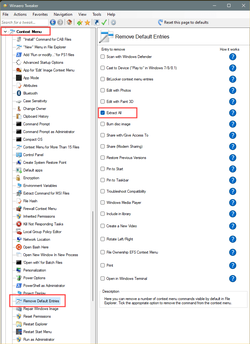
Winaero Tweaker > Context Menu > Remove Default Entries (list)

Put a checkmark in Extract All, and sign out and back in... and it's... gone!

Image1.png


"How it works" is the same instructions.

Lemme check what it actually did in the registry.
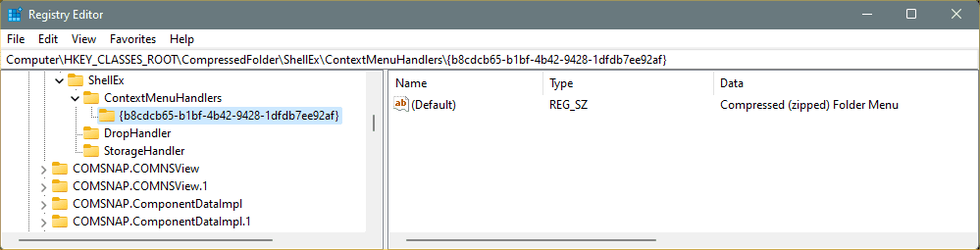
Well...whatever it did, in the registry, isn't what it says in "How it works".
This is my registry entry AFTER the Winaero tweak...

Image1.png


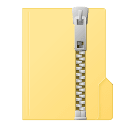
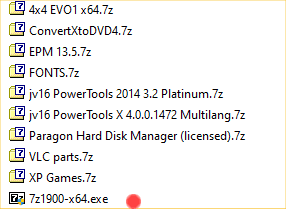
Besides no more Extract All... on .zip file right click menu... the only other change I see is that the icon for 7zip files has changed from the black and white icon to a yellow folder with a "7" on it.
The red dot shows what the 7zip icons used to look like., before this Winaero tweak.


Image1.png


I definitely used to have the "Extract All..." on the .zip file right click menu.
Now....

Image1.png
 
Last edited:

My Computers

System One System Two

  • OS
    Win 11 Home ♦♦♦26200.8457 ♦♦♦♦♦♦♦25H2
    Computer type
    PC/Desktop
    Manufacturer/Model
    Built by Ghot® [May 2020]
    CPU
    AMD Ryzen 7 3700X
    Motherboard
    Asus Pro WS X570-ACE (BIOS 5302)
    Memory
    G.Skill (F4-3200C14D-16GTZKW)
    Graphics Card(s)
    EVGA RTX 2070 (08G-P4-2171-KR)
    Sound Card
    Realtek ALC1220P / ALC S1220A
    Monitor(s) Displays
    Dell U3011 30"
    Screen Resolution
    2560 x 1600
    Hard Drives
    2x Samsung 860 EVO 500GB,
    WD 4TB Black FZBX - SATA III,
    WD 8TB Black FZBX - SATA III,
    DRW-24B1ST CD/DVD Burner
    PSU
    PC Power & Cooling 750W Quad EPS12V
    Case
    Cooler Master ATCS 840 Tower
    Cooling
    CM Hyper 212 EVO (push/pull)
    Keyboard
    Ducky DK9008 Shine II Blue LED
    Mouse
    Logitech Optical M-100
    Internet Speed
    300/300
    Browser
    Firefox (latest)
    Antivirus
    Bitdefender Total Security
    Other Info
    Speakers: Klipsch Pro Media 2.1
  • Operating System
    Windows XP Pro 32bit w/SP3
    Computer type
    PC/Desktop
    Manufacturer/Model
    Built by Ghot® (not in use)
    CPU
    AMD Athlon 64 X2 5000+ (OC'd @ 3.2Ghz)
    Motherboard
    ASUS M2N32-SLI Deluxe Wireless Edition
    Memory
    TWIN2X2048-6400C4DHX (2 x 1GB, DDR2 800)
    Graphics card(s)
    EVGA 256-P2-N758-TR GeForce 8600GT SSC
    Sound Card
    Onboard
    Monitor(s) Displays
    ViewSonic G90FB Black 19" Professional (CRT)
    Screen Resolution
    up to 2048 x 1536
    Hard Drives
    WD 36GB 10,000rpm Raptor SATA
    Seagate 80GB 7200rpm SATA
    Lite-On LTR-52246S CD/RW
    Lite-On LH-18A1P CD/DVD Burner
    PSU
    PC Power & Cooling Silencer 750 Quad EPS12V
    Case
    Generic Beige case, 80mm fans
    Cooling
    ZALMAN 9500A 92mm CPU Cooler
    Keyboard
    Logitech Classic Keybooard 200
    Mouse
    Logitech Optical M-BT96a
    Internet Speed
    300/300
    Browser
    Firefox 3.x ??
    Antivirus
    Symantec (Norton)
    Other Info
    Still assembled, still runs. Haven't turned it on for 15 years?
Got it. :D

Winaero Tweaker > Context Menu > Remove Default Entries (list)

Put a checkmark in Extract All, and sign out and back in... and it's... gone!
Well done.

Score : Microsoft 7,347,987,741 settings blocked -vs- User 1 setting unblocked
 

My Computers

System One System Two

  • OS
    Windows 11 2xH2 (latest update ... forever anal)
    Computer type
    PC/Desktop
    Manufacturer/Model
    HP Slim S01
    CPU
    Intel i5-12400
    Memory
    8GB
    Graphics Card(s)
    NVIDIA GeForce GT730
    Sound Card
    OOBE
    Monitor(s) Displays
    Acer 32"
    Screen Resolution
    1920x1080
    Hard Drives
    512GB KIOXIA NVMe
    1TB SATA SSD
    PSU
    OOBE
    Case
    OOBE
    Cooling
    OOBE
    Keyboard
    BT
    Mouse
    BT
    Browser
    Brave FFox Chrome Opera
    Antivirus
    KIS
  • Operating System
    Windows 11 Pro 2xH2 (latest update ... 4ever anal)
    Computer type
    Laptop
    Manufacturer/Model
    HP Pavillion 15
    CPU
    i7-1165G7 @ 2.80GHz
    Graphics card(s)
    Intel Iris Xe Graphics
    Hard Drives
    Samsung NVMe 512GB
    + numerous/multiple SSD Type C USB enclosures
    Internet Speed
    NBN FTTN 50
    Browser
    Brave
    Antivirus
    KIS
Try one of the Nirsoft context menu editing programs?

Also, when you associated the extensions, did you just use 7Zip's association function, or did you go into Windows 11 Apps settings and manually associate the .zip extension? Windows 11 has become a little less friendly in allowing other programs to set/change the default extension association ....
In the app settings, 7Zip isn't even listed but when I went to the associate by file type, it is handling all compressed files but the Extract All still shows
 

My Computers

System One System Two

  • OS
    Windows 11 Pro
    Computer type
    Laptop
    Manufacturer/Model
    ASUS ROG Strix SCAR 16 G635LX
    CPU
    Intel Core Ultra 9 275HX
    Motherboard
    ASUS
    Memory
    SK Hynix 64GB DDR5-5600MHz RAM
    Graphics Card(s)
    GeForce RTX 5090 24 GB GDDR7 VRAM
    Sound Card
    Dolby Atmos-powered speakers - 2 tweeters and 3 downward firing woofers
    Monitor(s) Displays
    ASUS ROG Strix OLED XG27AQWMG QHD 280 Hz 27" Monitor
    Screen Resolution
    QHD (2560x1440)
    Hard Drives
    2x WD_BLACK SN850X 8TB SSDs (RAID 0)
    PSU
    380W AC Power Adapter
    Cooling
    Thermal Grizzly Conductonaut + IETS GT600 Cooling Pad
    Keyboard
    ROG Strix Scope II 96 RX Wireless
    Mouse
    ROG Chakram X Origin
    Internet Speed
    1 GBPS Down / 882 MBPS Up
    Browser
    Google Chrome
    Antivirus
    Microsoft Defender
  • Operating System
    Windows 11 Pro
    Computer type
    Laptop
    Manufacturer/Model
    Dell XPS 15 9500
    CPU
    Intel i7-10875H
    Memory
    Kingston FURY Impact 64 GB 3200 MHz DDR4 RAM
    Graphics card(s)
    nVIDIA GeForce GTX 1650 Ti Max-Q w/ 4 GB GDDR6
    Sound Card
    Realtek
    Monitor(s) Displays
    15.6 UHD+ Touch, InfinityEdge, 500-nits, Anti-Reflecitve
    Screen Resolution
    3840 x 2400
    Hard Drives
    Samsung 990 PRO 2TB + 4TB SSDs
    PSU
    Dell 130W Laptop Charger USB C Type C AC Adapter
    Cooling
    Noctua NT-H2 Thermal Paste on CPU + GPU
    Mouse
    Logitech MX Anywhere 3
    Internet Speed
    1 GBPS Down / 875 MBPS Up
    Browser
    Google Chrome
    Antivirus
    AVG Free Antivirus
@Brink
@Spartan

Got it. :D

Winaero Tweaker > Context Menu > Remove Default Entries (list)

Put a checkmark in Extract All, and sign out and back in... and it's... gone!

View attachment 17355


"How it works" is the same instructions.

Lemme check what it actually did in the registry.
Well...whatever it did, in the registry, isn't what it says in "How it works".
This is my registry entry AFTER the Winaero tweak...

View attachment 17360


Besides no more Extract All... on .zip file right click menu... the only other change I see is that the icon for 7zip files has changed from the black and white icon to a yellow folder with a "7" on it.
The red dot shows what the 7zip icons used to look like., before this Winaero tweak.


View attachment 17354


I definitely used to have the "Extract All..." on the .zip file right click menu.
Now....

View attachment 17358
Right, that worked, I wonder what it did differently than the reg tweak I posted above.
 

My Computers

System One System Two

  • OS
    Windows 11 Pro
    Computer type
    Laptop
    Manufacturer/Model
    ASUS ROG Strix SCAR 16 G635LX
    CPU
    Intel Core Ultra 9 275HX
    Motherboard
    ASUS
    Memory
    SK Hynix 64GB DDR5-5600MHz RAM
    Graphics Card(s)
    GeForce RTX 5090 24 GB GDDR7 VRAM
    Sound Card
    Dolby Atmos-powered speakers - 2 tweeters and 3 downward firing woofers
    Monitor(s) Displays
    ASUS ROG Strix OLED XG27AQWMG QHD 280 Hz 27" Monitor
    Screen Resolution
    QHD (2560x1440)
    Hard Drives
    2x WD_BLACK SN850X 8TB SSDs (RAID 0)
    PSU
    380W AC Power Adapter
    Cooling
    Thermal Grizzly Conductonaut + IETS GT600 Cooling Pad
    Keyboard
    ROG Strix Scope II 96 RX Wireless
    Mouse
    ROG Chakram X Origin
    Internet Speed
    1 GBPS Down / 882 MBPS Up
    Browser
    Google Chrome
    Antivirus
    Microsoft Defender
  • Operating System
    Windows 11 Pro
    Computer type
    Laptop
    Manufacturer/Model
    Dell XPS 15 9500
    CPU
    Intel i7-10875H
    Memory
    Kingston FURY Impact 64 GB 3200 MHz DDR4 RAM
    Graphics card(s)
    nVIDIA GeForce GTX 1650 Ti Max-Q w/ 4 GB GDDR6
    Sound Card
    Realtek
    Monitor(s) Displays
    15.6 UHD+ Touch, InfinityEdge, 500-nits, Anti-Reflecitve
    Screen Resolution
    3840 x 2400
    Hard Drives
    Samsung 990 PRO 2TB + 4TB SSDs
    PSU
    Dell 130W Laptop Charger USB C Type C AC Adapter
    Cooling
    Noctua NT-H2 Thermal Paste on CPU + GPU
    Mouse
    Logitech MX Anywhere 3
    Internet Speed
    1 GBPS Down / 875 MBPS Up
    Browser
    Google Chrome
    Antivirus
    AVG Free Antivirus
Right, that worked, I wonder what it did differently than the reg tweak I posted above.


I had that thought also, then I just decided... it doesn't matter... it worked. :D
 

My Computers

System One System Two

  • OS
    Win 11 Home ♦♦♦26200.8457 ♦♦♦♦♦♦♦25H2
    Computer type
    PC/Desktop
    Manufacturer/Model
    Built by Ghot® [May 2020]
    CPU
    AMD Ryzen 7 3700X
    Motherboard
    Asus Pro WS X570-ACE (BIOS 5302)
    Memory
    G.Skill (F4-3200C14D-16GTZKW)
    Graphics Card(s)
    EVGA RTX 2070 (08G-P4-2171-KR)
    Sound Card
    Realtek ALC1220P / ALC S1220A
    Monitor(s) Displays
    Dell U3011 30"
    Screen Resolution
    2560 x 1600
    Hard Drives
    2x Samsung 860 EVO 500GB,
    WD 4TB Black FZBX - SATA III,
    WD 8TB Black FZBX - SATA III,
    DRW-24B1ST CD/DVD Burner
    PSU
    PC Power & Cooling 750W Quad EPS12V
    Case
    Cooler Master ATCS 840 Tower
    Cooling
    CM Hyper 212 EVO (push/pull)
    Keyboard
    Ducky DK9008 Shine II Blue LED
    Mouse
    Logitech Optical M-100
    Internet Speed
    300/300
    Browser
    Firefox (latest)
    Antivirus
    Bitdefender Total Security
    Other Info
    Speakers: Klipsch Pro Media 2.1
  • Operating System
    Windows XP Pro 32bit w/SP3
    Computer type
    PC/Desktop
    Manufacturer/Model
    Built by Ghot® (not in use)
    CPU
    AMD Athlon 64 X2 5000+ (OC'd @ 3.2Ghz)
    Motherboard
    ASUS M2N32-SLI Deluxe Wireless Edition
    Memory
    TWIN2X2048-6400C4DHX (2 x 1GB, DDR2 800)
    Graphics card(s)
    EVGA 256-P2-N758-TR GeForce 8600GT SSC
    Sound Card
    Onboard
    Monitor(s) Displays
    ViewSonic G90FB Black 19" Professional (CRT)
    Screen Resolution
    up to 2048 x 1536
    Hard Drives
    WD 36GB 10,000rpm Raptor SATA
    Seagate 80GB 7200rpm SATA
    Lite-On LTR-52246S CD/RW
    Lite-On LH-18A1P CD/DVD Burner
    PSU
    PC Power & Cooling Silencer 750 Quad EPS12V
    Case
    Generic Beige case, 80mm fans
    Cooling
    ZALMAN 9500A 92mm CPU Cooler
    Keyboard
    Logitech Classic Keybooard 200
    Mouse
    Logitech Optical M-BT96a
    Internet Speed
    300/300
    Browser
    Firefox 3.x ??
    Antivirus
    Symantec (Norton)
    Other Info
    Still assembled, still runs. Haven't turned it on for 15 years?
LOL Anyone catch the irony there .... Winaero Tweaker is downloaded as a zip file :zany:
 

My Computers

System One System Two

  • OS
    Windows 11 2xH2 (latest update ... forever anal)
    Computer type
    PC/Desktop
    Manufacturer/Model
    HP Slim S01
    CPU
    Intel i5-12400
    Memory
    8GB
    Graphics Card(s)
    NVIDIA GeForce GT730
    Sound Card
    OOBE
    Monitor(s) Displays
    Acer 32"
    Screen Resolution
    1920x1080
    Hard Drives
    512GB KIOXIA NVMe
    1TB SATA SSD
    PSU
    OOBE
    Case
    OOBE
    Cooling
    OOBE
    Keyboard
    BT
    Mouse
    BT
    Browser
    Brave FFox Chrome Opera
    Antivirus
    KIS
  • Operating System
    Windows 11 Pro 2xH2 (latest update ... 4ever anal)
    Computer type
    Laptop
    Manufacturer/Model
    HP Pavillion 15
    CPU
    i7-1165G7 @ 2.80GHz
    Graphics card(s)
    Intel Iris Xe Graphics
    Hard Drives
    Samsung NVMe 512GB
    + numerous/multiple SSD Type C USB enclosures
    Internet Speed
    NBN FTTN 50
    Browser
    Brave
    Antivirus
    KIS
LOL Anyone catch the irony there .... Winaero Tweaker is downloaded as a zip file :zany:
but then you have to extract it, run the EXE then choose portable if you don't want to install it! so why the freakin ZIP file if itS not portable to start off with! Weird guy that developer is. :cautious::cautious::cautious:
 

My Computers

System One System Two

  • OS
    Windows 11 Pro
    Computer type
    Laptop
    Manufacturer/Model
    ASUS ROG Strix SCAR 16 G635LX
    CPU
    Intel Core Ultra 9 275HX
    Motherboard
    ASUS
    Memory
    SK Hynix 64GB DDR5-5600MHz RAM
    Graphics Card(s)
    GeForce RTX 5090 24 GB GDDR7 VRAM
    Sound Card
    Dolby Atmos-powered speakers - 2 tweeters and 3 downward firing woofers
    Monitor(s) Displays
    ASUS ROG Strix OLED XG27AQWMG QHD 280 Hz 27" Monitor
    Screen Resolution
    QHD (2560x1440)
    Hard Drives
    2x WD_BLACK SN850X 8TB SSDs (RAID 0)
    PSU
    380W AC Power Adapter
    Cooling
    Thermal Grizzly Conductonaut + IETS GT600 Cooling Pad
    Keyboard
    ROG Strix Scope II 96 RX Wireless
    Mouse
    ROG Chakram X Origin
    Internet Speed
    1 GBPS Down / 882 MBPS Up
    Browser
    Google Chrome
    Antivirus
    Microsoft Defender
  • Operating System
    Windows 11 Pro
    Computer type
    Laptop
    Manufacturer/Model
    Dell XPS 15 9500
    CPU
    Intel i7-10875H
    Memory
    Kingston FURY Impact 64 GB 3200 MHz DDR4 RAM
    Graphics card(s)
    nVIDIA GeForce GTX 1650 Ti Max-Q w/ 4 GB GDDR6
    Sound Card
    Realtek
    Monitor(s) Displays
    15.6 UHD+ Touch, InfinityEdge, 500-nits, Anti-Reflecitve
    Screen Resolution
    3840 x 2400
    Hard Drives
    Samsung 990 PRO 2TB + 4TB SSDs
    PSU
    Dell 130W Laptop Charger USB C Type C AC Adapter
    Cooling
    Noctua NT-H2 Thermal Paste on CPU + GPU
    Mouse
    Logitech MX Anywhere 3
    Internet Speed
    1 GBPS Down / 875 MBPS Up
    Browser
    Google Chrome
    Antivirus
    AVG Free Antivirus
but then you have to extract it, run the EXE then choose portable if you don't want to install it! so why the freakin ZIP file if itS not portable to start off with! Weird guy that developer is. :cautious::cautious::cautious:

Yeh, but there's still a lot of "old school" out there that still believe bundling an executable file in a zip format offers some sort of protection and/or reduced size for downloading. Minimal/negligible size compression.

Similarly, zip format for multimedia files. With today's broadband speed, attempts to reduce file size for transmission speed, belongs in the days of 14.4Kbps modems.
 

My Computers

System One System Two

  • OS
    Windows 11 2xH2 (latest update ... forever anal)
    Computer type
    PC/Desktop
    Manufacturer/Model
    HP Slim S01
    CPU
    Intel i5-12400
    Memory
    8GB
    Graphics Card(s)
    NVIDIA GeForce GT730
    Sound Card
    OOBE
    Monitor(s) Displays
    Acer 32"
    Screen Resolution
    1920x1080
    Hard Drives
    512GB KIOXIA NVMe
    1TB SATA SSD
    PSU
    OOBE
    Case
    OOBE
    Cooling
    OOBE
    Keyboard
    BT
    Mouse
    BT
    Browser
    Brave FFox Chrome Opera
    Antivirus
    KIS
  • Operating System
    Windows 11 Pro 2xH2 (latest update ... 4ever anal)
    Computer type
    Laptop
    Manufacturer/Model
    HP Pavillion 15
    CPU
    i7-1165G7 @ 2.80GHz
    Graphics card(s)
    Intel Iris Xe Graphics
    Hard Drives
    Samsung NVMe 512GB
    + numerous/multiple SSD Type C USB enclosures
    Internet Speed
    NBN FTTN 50
    Browser
    Brave
    Antivirus
    KIS
Now there is another one I can't figure out, when you right click on a file or folder, how to get rid of the Compress To Zip file context menu entry?
 

My Computers

System One System Two

  • OS
    Windows 11 Pro
    Computer type
    Laptop
    Manufacturer/Model
    ASUS ROG Strix SCAR 16 G635LX
    CPU
    Intel Core Ultra 9 275HX
    Motherboard
    ASUS
    Memory
    SK Hynix 64GB DDR5-5600MHz RAM
    Graphics Card(s)
    GeForce RTX 5090 24 GB GDDR7 VRAM
    Sound Card
    Dolby Atmos-powered speakers - 2 tweeters and 3 downward firing woofers
    Monitor(s) Displays
    ASUS ROG Strix OLED XG27AQWMG QHD 280 Hz 27" Monitor
    Screen Resolution
    QHD (2560x1440)
    Hard Drives
    2x WD_BLACK SN850X 8TB SSDs (RAID 0)
    PSU
    380W AC Power Adapter
    Cooling
    Thermal Grizzly Conductonaut + IETS GT600 Cooling Pad
    Keyboard
    ROG Strix Scope II 96 RX Wireless
    Mouse
    ROG Chakram X Origin
    Internet Speed
    1 GBPS Down / 882 MBPS Up
    Browser
    Google Chrome
    Antivirus
    Microsoft Defender
  • Operating System
    Windows 11 Pro
    Computer type
    Laptop
    Manufacturer/Model
    Dell XPS 15 9500
    CPU
    Intel i7-10875H
    Memory
    Kingston FURY Impact 64 GB 3200 MHz DDR4 RAM
    Graphics card(s)
    nVIDIA GeForce GTX 1650 Ti Max-Q w/ 4 GB GDDR6
    Sound Card
    Realtek
    Monitor(s) Displays
    15.6 UHD+ Touch, InfinityEdge, 500-nits, Anti-Reflecitve
    Screen Resolution
    3840 x 2400
    Hard Drives
    Samsung 990 PRO 2TB + 4TB SSDs
    PSU
    Dell 130W Laptop Charger USB C Type C AC Adapter
    Cooling
    Noctua NT-H2 Thermal Paste on CPU + GPU
    Mouse
    Logitech MX Anywhere 3
    Internet Speed
    1 GBPS Down / 875 MBPS Up
    Browser
    Google Chrome
    Antivirus
    AVG Free Antivirus
;)


My Computers

System One System Two

  • OS
    Windows 11 Pro for Workstations
    Computer type
    PC/Desktop
    Manufacturer/Model
    Custom self build
    CPU
    Intel i7-8700K 5 GHz
    Motherboard
    ASUS ROG Maximus XI Formula Z390
    Memory
    64 GB (4x16GB) G.SKILL TridentZ RGB DDR4 3600 MHz (F4-3600C18D-32GTZR)
    Graphics Card(s)
    ASUS ROG-STRIX-GTX1080TI-O11G-GAMING (11GB GDDR5X)
    Sound Card
    Integrated Digital Audio (S/PDIF)
    Monitor(s) Displays
    2 x Samsung Odyssey G75 27"
    Screen Resolution
    2560x1440
    Hard Drives
    1TB Samsung 990 PRO M.2,
    4TB Samsung 990 PRO M.2,
    TerraMaster F8 SSD Plus NAS
    PSU
    Seasonic Prime Titanium 850W
    Case
    Thermaltake Core P3 wall mounted
    Cooling
    Corsair Hydro H115i
    Keyboard
    Amazon Basics Wired Full Keyboard MD005
    Mouse
    Logitech MX Master 4
    Internet Speed
    2 Gbps Download and 100 Mbps Upload
    Browser
    Chrome and Edge
    Antivirus
    Microsoft Defender
    Other Info
    Logitech Z625 speaker system,
    Logitech BRIO 4K Pro webcam,
    HP Color LaserJet Pro MFP M477fdn,
    CyberPower CP1500PFCLCD
    Galaxy S23 Plus phone
  • Operating System
    Windows 11 Pro
    Computer type
    Laptop
    Manufacturer/Model
    Surface Laptop 7 Copilot+ PC
    CPU
    Snapdragon X Elite (12 core) 3.42 GHz
    Memory
    16 GB LPDDR5x-7467 MHz
    Monitor(s) Displays
    15" HDR
    Screen Resolution
    2496 x 1664
    Hard Drives
    1 TB SSD
    Internet Speed
    Wi-Fi 7 and Bluetooth 5.4
    Browser
    Chrome and Edge
    Antivirus
    Microsoft Defender
The old registry key that winaero and that tenforums post use to remove "extract all" no longer works, at least not for me on Windows 11 25H2. Tested both the latest version of Winaero Tweaker as of writing and the reg value in the tenforums post.
 

My Computer

System One

  • OS
    Windows 10
The old registry key that winaero and that tenforums post use to remove "extract all" no longer works, at least not for me on Windows 11 25H2. Tested both the latest version of Winaero Tweaker as of writing and the reg value in the tenforums post.
this doesn't work on its own. You also need to block or rename or delete this key:
HKEY_CLASSES_ROOT\SystemFileAssociations\.zip\shellex\ContextMenuHandlers\{b8cdcb65-b1bf-4b42-9428-1dfdb7ee92af}

There's a problem with doing that. It's owned by TrustedInstaller. So, you won't be able to delete it using regedit without changing the permissions or using a utility that enables you to run as TrustedInstaller. I wouldn't recommend either of these. The alternative method for dealing with Shell extensions (such as this) is to block the extension.

Add a string value to HKEY_CURRENT_USER\Software\Microsoft\Windows\CurrentVersion\Shell Extensions\Blocked named as the CLSID i.e. {b8cdcb65-b1bf-4b42-9428-1dfdb7ee92af} for .zip files. Set the data to anything you like. In this case "Extract All (zip files)" might be a helpful reminder.

This setting won't take effect until you have logged off and back on again - the simple and straightforward option. Restarting Explorer, or using the sysrefresh option with NirCmd - Windows command line tool should also work.

(the Blocked key may not exist, so you might need to add it.)

This won't remove "Extract All" option for other types of compressed files. For those you'd need to add:

{EE07CEF5-3441-4CFB-870A-4002C724783A} for "Archive Files" (.7z .rar .zst .xz etc)
{0CD7A5C0-9F37-11CE-AE65-08002B2E1262} for MS cabinet files (.cab)
 

My Computers

System One System Two

  • OS
    Windows 11 25H2 Pro Build 26200
    Computer type
    PC/Desktop
    Manufacturer/Model
    MSI PRO ADL-U Cubi 5 (MS-B0A8)
    CPU
    i3-1215U
    Memory
    8GB
    Monitor(s) Displays
    Sony 43" 4k TV
    Screen Resolution
    3840x2160
    Hard Drives
    250GB NVMe M.2 PCIe Gen 3 SSD
    PSU
    External 65W
    Case
    Mini PC
    Browser
    FireFox
    Antivirus
    MS
  • Operating System
    Windows 11 Pro 25H2
    Computer type
    PC/Desktop
    Manufacturer/Model
    Dell Optiplex 3070 SFF
    CPU
    Intel i3-9100
    Memory
    16GB DDR4
    Monitor(s) Displays
    Dell S2721
    Screen Resolution
    3840 x 2160
    Hard Drives
    Samsung 500GB nvMe
    Case
    Dell small form factor
    Keyboard
    Cherry mechanical (Blue)
    Mouse
    Microsoft
    Antivirus
    MS Defender
this doesn't work on its own. You also need to block or rename or delete this key:
HKEY_CLASSES_ROOT\SystemFileAssociations\.zip\shellex\ContextMenuHandlers\{b8cdcb65-b1bf-4b42-9428-1dfdb7ee92af}

There's a problem with doing that. It's owned by TrustedInstaller. So, you won't be able to delete it using regedit without changing the permissions or using a utility that enables you to run as TrustedInstaller. I wouldn't recommend either of these. The alternative method for dealing with Shell extensions (such as this) is to block the extension.

Add a string value to HKEY_CURRENT_USER\Software\Microsoft\Windows\CurrentVersion\Shell Extensions\Blocked named as the CLSID i.e. {b8cdcb65-b1bf-4b42-9428-1dfdb7ee92af} for .zip files. Set the data to anything you like. In this case "Extract All (zip files)" might be a helpful reminder.

This setting won't take effect until you have logged off and back on again - the simple and straightforward option. Restarting Explorer, or using the sysrefresh option with NirCmd - Windows command line tool should also work.

(the Blocked key may not exist, so you might need to add it.)

This won't remove "Extract All" option for other types of compressed files. For those you'd need to add:

{EE07CEF5-3441-4CFB-870A-4002C724783A} for "Archive Files" (.7z .rar .zst .xz etc)
{0CD7A5C0-9F37-11CE-AE65-08002B2E1262} for MS cabinet files (.cab)
That did seem to work. Thank you very much!
 

My Computer

System One

  • OS
    Windows 10

Latest Support Threads

Back
Top Bottom